Spring Security是针对Spring项目的安全框架,也是Spring Boot底层安全模块默认的技术选型,他可以实现强大的Web安全控制,对于安全控制,我们仅需要引入spring-boot-starter-security模块,进行少量的配置,即可实现强大的安全管理!
记住几个类:
Spring Security的两个主要目标是 “认证” 和 “授权”(访问控制)。
“认证”(Authentication)
身份验证是关于验证您的凭据,如用户名/用户ID和密码,以验证您的身份。
身份验证通常通过用户名和密码完成,有时与身份验证因素结合使用。
“授权” (Authorization)
授权发生在系统成功验证您的身份后,最终会授予您访问资源(如信息,文件,数据库,资金,位置,几乎任何内容)的完全权限。
这个概念是通用的,而不是只在Spring Security 中存在。
新建一个项目
这里记得要选择thymeleaf
导入静态资源
静态资源获取:https://gitee.com/ENNRIAAA/spring-security-material
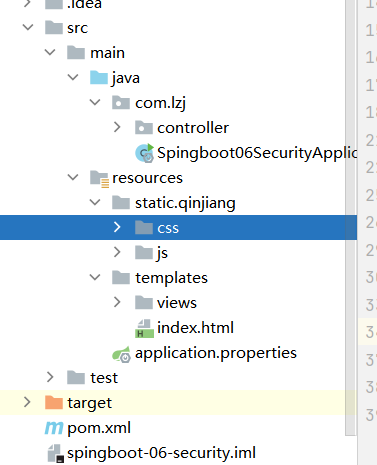
创建路由RouterController跳转测试静态资源是否能够访问
@Controller
public class RouterController {
    @RequestMapping({"/","/index"})
    public String index(){
        return "index";
    }
    @RequestMapping("/toLogin")
    public String toLogin(){
        return "views/login";
    }
    @RequestMapping("/level1/{id}")
    public String level1(@PathVariable("id") int id){
        return "views/level1/"+id;
    }
    @RequestMapping("/level2/{id}")
    public String level2(@PathVariable("id") int id){
        return "views/level2/"+id;
    }
    @RequestMapping("/level3/{id}")
    public String level3(@PathVariable("id") int id){
        return "views/level3/"+id;
    }

}
运行项目进行测试
导入依赖
<!--        security-->
<dependency>
    <groupId>org.springframework.boot</groupId>
    <artifactId>spring-boot-starter-security</artifactId>
</dependency>
编写SecurityConfig
@EnableWebSecurity
public class SecurityConfig extends WebSecurityConfigurerAdapter {
    //授权
    @Override
    protected void configure(HttpSecurity http) throws Exception {
        //首页所有人可以访问,功能页只有对应有权限的人才能访问
        http.authorizeHttpRequests()
                .antMatchers("/").permitAll()
                .antMatchers("/level1/**").hasRole("vip1")
                .antMatchers("/level2/**").hasRole("vip2")
                .antMatchers("/level3/**").hasRole("vip3");
        //没有权限会默认到登录页,需要开启登录的页面
        // /login
        http.formLogin();

        //防止网站攻击: get,post
        http.csrf().disable();//关闭csrf功能,登出失败可能存在的原因


        //注销,开启了注销功能,跳到首页
        http.logout().logoutSuccessUrl("/");
    }

    //认证
    //密码编码:PasswordEncoder
    @Override
    protected void configure(AuthenticationManagerBuilder auth) throws Exception {
        //这些数据正常应该从数据库中读
        auth.inMemoryAuthentication().passwordEncoder(new BCryptPasswordEncoder())
                .withUser("lzj").password(new BCryptPasswordEncoder().encode("123456")).roles("vip2","vip3")
                .and()
                .withUser("root").password(new BCryptPasswordEncoder().encode("123456")).roles("vip1","vip2","vip3")
                .and()
                .withUser("guest").password(new BCryptPasswordEncoder().encode("123456")).roles("vip1");

    }
}
测试
导入依赖
<!--        security-thymeleaf整合包-->
        <dependency>
            <groupId>org.thymeleaf.extras</groupId>
            <artifactId>thymeleaf-extras-springsecurity5</artifactId>
            <version>3.0.4.RELEASE</version>
        </dependency>
注入命名空间
xmlns:sec="http://www.thymeleaf.org/extras/spring-security"
修改登录和注销按钮
实现用户未登录时只显示登录,用户登录后显示用户名、角色和注销
<!--登录注销-->
            <div class="right menu">
                <!--如果未登录-->
                <div sec:authorize="!isAuthenticated()">
                    <a class="item" th:href="@{/toLogin}">
                        <i class="address card icon"></i> 登录
                    </a>
                </div>
<!--                如果登录:用户名,注销-->
                <div sec:authorize="isAuthenticated()">
                    <a class="item">
                        用户名:<span sec:authentication="name"></span>
                        角色:<span sec:authentication="authorities"></span>
                    </a>
                </div>
                <div sec:authorize="isAuthenticated()">
                    <a class="item" th:href="@{/logout}">
                        <i class="sign-out icon"></i> 注销
                    </a>
                </div>

                <!--已登录
                <a th:href="@{/usr/toUserCenter}">
                    <i class="address card icon"></i> admin
                </a>
                -->
            </div>
修改用户的权限显示
<!--            菜单根据用户的角色动态实现-->
            <div class="column" sec:authorize="hasRole('vip1')">
                <div class="ui raised segment">
                    <div class="ui">
                        <div class="content">
                            <h5 class="content">Level 1</h5>
                            <hr>
                            <div><a th:href="@{/level1/1}"><i class="bullhorn icon"></i> Level-1-1</a></div>
                            <div><a th:href="@{/level1/2}"><i class="bullhorn icon"></i> Level-1-2</a></div>
                            <div><a th:href="@{/level1/3}"><i class="bullhorn icon"></i> Level-1-3</a></div>
                        </div>
                    </div>
                </div>
            </div>

            <div class="column" sec:authorize="hasRole('vip2')">
                <div class="ui raised segment">
                    <div class="ui">
                        <div class="content">
                            <h5 class="content">Level 2</h5>
                            <hr>
                            <div><a th:href="@{/level2/1}"><i class="bullhorn icon"></i> Level-2-1</a></div>
                            <div><a th:href="@{/level2/2}"><i class="bullhorn icon"></i> Level-2-2</a></div>
                            <div><a th:href="@{/level2/3}"><i class="bullhorn icon"></i> Level-2-3</a></div>
                        </div>
                    </div>
                </div>
            </div>

            <div class="column" sec:authorize="hasRole('vip3')">
                <div class="ui raised segment">
                    <div class="ui">
                        <div class="content">
                            <h5 class="content">Level 3</h5>
                            <hr>
                            <div><a th:href="@{/level3/1}"><i class="bullhorn icon"></i> Level-3-1</a></div>
                            <div><a th:href="@{/level3/2}"><i class="bullhorn icon"></i> Level-3-2</a></div>
                            <div><a th:href="@{/level3/3}"><i class="bullhorn icon"></i> Level-3-3</a></div>
                        </div>
                    </div>
                </div>
            </div>
测试
可以使用我们自己的登录页登录
编写SecurityConfig
@EnableWebSecurity
public class SecurityConfig extends WebSecurityConfigurerAdapter {
    //授权
    @Override
    protected void configure(HttpSecurity http) throws Exception {
        //首页所有人可以访问,功能页只有对应有权限的人才能访问
        http.authorizeHttpRequests()
                .antMatchers("/").permitAll()
                .antMatchers("/level1/**").hasRole("vip1")
                .antMatchers("/level2/**").hasRole("vip2")
                .antMatchers("/level3/**").hasRole("vip3");
        //没有权限会默认到登录页,需要开启登录的页面
        // /login
        //定制根页面,user为表单中username的name,pwd为表单中password的name
        //loginProcessingUrl为表单跳转路径,若无这个,则跳转路径为toLogin
        http.formLogin().loginPage("/toLogin").usernameParameter("user").passwordParameter("pwd").loginProcessingUrl("/login");

        //防止网站攻击: get,post
        http.csrf().disable();//关闭csrf功能,登出失败可能存在的原因

        //注销,开启了注销功能,跳到首页
        http.logout().logoutSuccessUrl("/");

        //开启记住我功能   cookie  默认保存时间14天
        //自定义接收前端参数,remember为表单中的名字
        http.rememberMe().rememberMeParameter("remember");
    }

    //认证
    //密码编码:PasswordEncoder
    @Override
    protected void configure(AuthenticationManagerBuilder auth) throws Exception {
        //这些数据正常应该从数据库中读
        auth.inMemoryAuthentication().passwordEncoder(new BCryptPasswordEncoder())
                .withUser("lzj").password(new BCryptPasswordEncoder().encode("123456")).roles("vip2","vip3")
                .and()
                .withUser("root").password(new BCryptPasswordEncoder().encode("123456")).roles("vip1","vip2","vip3")
                .and()
                .withUser("guest").password(new BCryptPasswordEncoder().encode("123456")).roles("vip1");

    }
}
修改登录页面表单
<form th:action="@{/login}" method="post">
    <div class="field">
        <label>Username</label>
        <div class="ui left icon input">
            <input type="text" placeholder="Username" name="user">
            <i class="user icon"></i>
        </div>
    </div>
    <div class="field">
        <label>Password</label>
        <div class="ui left icon input">
            <input type="password" name="pwd">
            <i class="lock icon"></i>
        </div>
    </div>
    <div class="field">
        <input type="checkbox" name="remember">记住我
    </div>

    <input type="submit" class="ui blue submit button"/>
</form>
测试
input type=“password” name=“pwd”>
<input type="submit" class="ui blue submit button"/>
测试
我正在编写一个小脚本来定位aws存储桶中的特定文件,并创建一个临时验证的url以发送给同事。(理想情况下,这将创建类似于在控制台上右键单击存储桶中的文件并复制链接地址的结果)。我研究过回形针,它似乎不符合这个标准,但我可能只是不知道它的全部功能。我尝试了以下方法:defauthenticated_url(file_name,bucket)AWS::S3::S3Object.url_for(file_name,bucket,:secure=>true,:expires=>20*60)end产生这种类型的结果:...-1.amazonaws.com/file_path/file.zip.A
在Ruby中是否有Gem或安全删除文件的方法?我想避免系统上可能不存在的外部程序。“安全删除”指的是覆盖文件内容。 最佳答案 如果您使用的是*nix,一个很好的方法是使用exec/open3/open4调用shred:`shred-fxuz#{filename}`http://www.gnu.org/s/coreutils/manual/html_node/shred-invocation.html检查这个类似的帖子:Writingafileshredderinpythonorruby?
我正在使用ruby2.1.0我有一个json文件。例如:test.json{"item":[{"apple":1},{"banana":2}]}用YAML.load加载这个文件安全吗?YAML.load(File.read('test.json'))我正在尝试加载一个json或yaml格式的文件。 最佳答案 YAML可以加载JSONYAML.load('{"something":"test","other":4}')=>{"something"=>"test","other"=>4}JSON将无法加载YAML。JSON.load("
默认情况下:回形针gem将所有附件存储在公共(public)目录中。出于安全原因,我不想将附件存储在公共(public)目录中,所以我将它们保存在应用程序根目录的uploads目录中:classPost我没有指定url选项,因为我不希望每个图像附件都有一个url。如果指定了url:那么拥有该url的任何人都可以访问该图像。这是不安全的。在user#show页面中:我想实际显示图像。如果我使用所有回形针默认设置,那么我可以这样做,因为图像将在公共(public)目录中并且图像将具有一个url:Someimage:看来,如果我将图像附件保存在公共(public)目录之外并且不指定url(同
我在一个ruby文件中有一个函数可以像这样写入一个文件File.open("myfile",'a'){|f|f.puts("#{sometext}")}这个函数在不同的线程中被调用,使得像上面这样的文件写入不是线程安全的。有谁知道如何以最简单的方式使这个文件写入线程安全?更多信息:如果重要的话,我正在使用rspec框架。 最佳答案 您可以通过File#flock给锁File.open("myfile",'a'){|f|f.flock(File::LOCK_EX)f.puts("#{sometext}")}
关闭。这个问题不符合StackOverflowguidelines.它目前不接受答案。要求我们推荐或查找工具、库或最喜欢的场外资源的问题对于StackOverflow来说是偏离主题的,因为它们往往会吸引自以为是的答案和垃圾邮件。相反,describetheproblem以及迄今为止为解决该问题所做的工作。关闭8年前。Improvethisquestion我需要实现具有各种灵活需求的密码安全。这些要求基本上取自Sanspasswordpolicy:Strongpasswordshavethefollowingcharacteristics:Containatleastthreeofthe
安全产品安全网关类防火墙Firewall防火墙防火墙主要用于边界安全防护的权限控制和安全域的划分。防火墙•信息安全的防护系统,依照特定的规则,允许或是限制传输的数据通过。防火墙是一个由软件和硬件设备组合而成,在内外网之间、专网与公网之间的界面上构成的保护屏障。下一代防火墙•下一代防火墙,NextGenerationFirewall,简称NGFirewall,是一款可以全面应对应用层威胁的高性能防火墙,提供网络层应用层一体化安全防护。生产厂家•联想网御、CheckPoint、深信服、网康、天融信、华为、H3C等防火墙部署部署于内、外网编辑额,用于权限访问控制和安全域划分。UTM统一威胁管理(Un
我尝试使用Net::HTTP向Twitter发送GET请求(出于隐私原因替换了用户ID):url=URI.parse("http://api.twitter.com/1/friends/ids.json?user_id=12345")resp=Net::HTTP.get_response(url)这会在Net::HTTP中引发异常:NoMethodError:undefinedmethodempty?'for#from/System/Library/Frameworks/Ruby.framework/Versions/1.8/usr/lib/ruby/1.8/net/http.rb:1
运行bundle安装时,我收到以下消息:Rubygems2.0.14isnotthreadsafe,soyourgemswillbeinstalledoneatatime.UpgradetoRubygems2.1.0orhighertoenableparallelgeminstallation.这很奇怪,因为在我的RubyGems环境中它说我的RubyGems版本是:2.4.5.1(见下文)~/w/Rafftopia❯❯❯gemenvRubyGemsEnvironment:-RUBYGEMSVERSION:2.4.5.1-RUBYVERSION:2.2.5(2016-04-26patc
我一直在使用zeroMQ,我希望能够通过Internet安全连接。我在ruby中,可以使用SSL和/或某种shh连接,但找不到有关如何执行此操作的任何示例。我找到了这个旧的stackoverflow链接,HowdoeszeromqworktogetherwithSSL?说他们正在研究某种安全性,但那是一年前的事了,我找不到任何新的引用资料。即使这不是内置在zeroMQ中,我也假设会有一些方法可以使用OpenSSL或类似的东西来设置它。注意:如果您想要安全传输,zeroMQ网站提到使用VPN或其他东西。我不想使用VPN。一定有更好的方法。 最佳答案
