实现搜索音乐,同步歌词,控制播放等功能
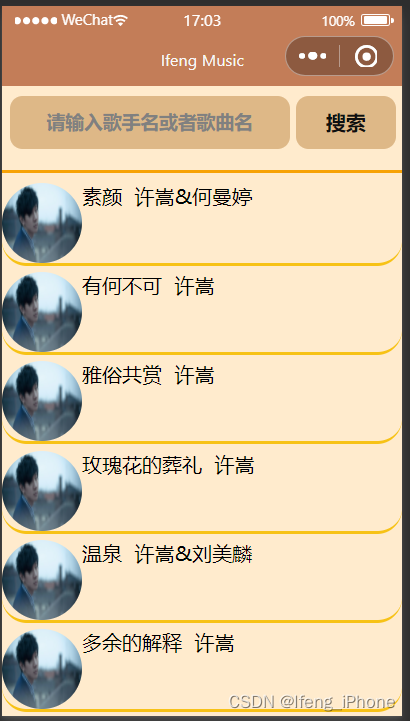
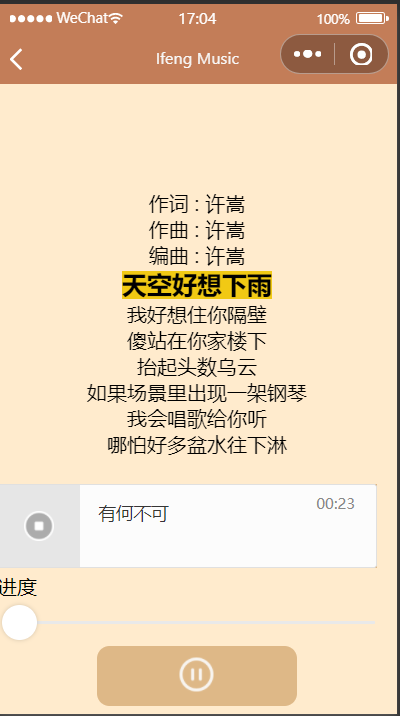
采用微信开发文档中的audio组件的作为代码原型,进行扩展,链接audio | 微信开放文档 (qq.com)

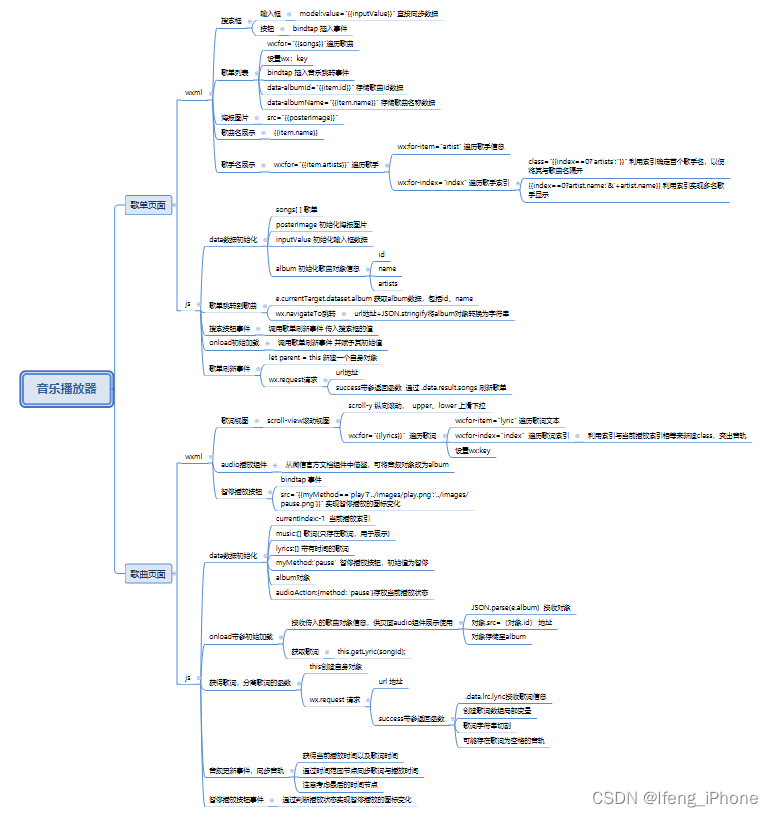
思维导图 链接:https://pan.baidu.com/s/1whZC2xOP4HvbDMjMPA7pRQ
提取码:ljsb
3.1 播放界面index
<view class="page" >
<view class="lyrics_view" class="container" style="margin-top: 0;">
<scroll-view scroll-y="true" style="height:500rpx;" bindscrolltoupper="upper"
bindscrolltolower="lower" scroll-top="{{scrollTop}}">
<view class="lyric" wx:for="{{lyrics}}" wx:for-item="lyric" wx:for-index="index" wx:key="lyric">
<text class="{{currentIndex==index?'focus_view':''}}">{{lyric}}</text>
</view>
</scroll-view>
</view>
<view class="page__bd">
<audio class="section_gap" src="{{album.src}}" poster="{{album.poster}}" name="{{album.name}}" author="{{album.author}}" action="{{audioAction}}"
bindplay="audioPlayed" bindtimeupdate="audioTimeUpdated" controls></audio>
</view>
<view class="section__tit">
<text class="section__title">进度</text>
<view class="body-view">
<slider bindchange="timeSliderChanged" left-icon="cancel" right-icon="success_no_circle"/>
</view>
<!-- <text class="section__title">暂停</text> -->
<button class="section_gap" bindtap="pauseAudio" style="width:50vw;height: 15vw;border-radius: 25rpx;">
<image class="tapimg1" style="width: 30px;height: 30px;"
src="{{myMethod=='play'?'../images/play.png':'../images/pause.png'}}"></image>
</button>
</view>
</view>
Page({
// overflow: hidden,
data: {
currentIndex:-1,
music:[],
lyrics:[],
myMethod:'pause',
album: {
poster: '',
name: '',
author: '',
src: '',
},
audioAction: {
method: 'pause'
}
},
onLoad:function(param){
//接收传入的歌曲对象信息,供页面audio组件展示使用
var alb=JSON.parse(param.album);
let songId = alb.id
alb.src=`http://music.163.com/song/media/outer/url?id=${songId}.mp3`;
console.log(alb);
this.setData(
{album:alb}
);
//获取歌词
this.getLyric(songId);
console.log(this.data.album);
},
getLyric:function(songId){
let parent = this
wx.request({
url: `https://music.163.com/api/song/lyric?os=pc&id=${songId}&lv=-1&kv=-1&tv=-1`,
success:function(response){
let result =response.data.lrc.lyric;
//歌词数组局部变量
let localLyrics =[]
//歌词字符串按\n进行切割
let la = result.split("\n");
//可能存在歌词为空格的音轨
for(let i=0;i<la.length;i++){
let temp = la[i].split("]");
if(temp.length == 2 && temp[1] != ""){
let time =temp[0].slice(1).split(":");
let minute =parseFloat(time[0]);
let second =parseFloat(time[1]);
localLyrics.push([(minute*60+second).toFixed(3),temp[1]]);
}
}
let temp=[];
for(let i =0;i<localLyrics.length;i++)
{
temp[i]=localLyrics[i][1]
}
parent.setData({
lyrics:temp,
music:localLyrics
});
}
})
},
//音频更新事件
audioTimeUpdated: function (e) {
this.duration = e.detail.duration;
let curTime = e.detail.currentTime;
let localLy = this.data.music;
for(let i=0;i<localLy.length;i++){
if(i==localLy.length-1&&curTime>=localLy[i][0]){
this.setData({currentIndex:i})
}
if(curTime>localLy[i][0]&&curTime<localLy[i+1][0]){
this.setData({currentIndex:i});
}
}
},
audioPlayed: function (e) {
console.log('audio is played')
},
timeSliderChanged: function (e) {
if (!this.duration)
return;
var time = this.duration * e.detail.value / 100;
this.setData({
audioAction: {
method: 'setCurrentTime',
data: time
}
});
},
playbackRateSliderChanged: function (e) {
this.setData({
audioAction: {
method: 'setPlaybackRate',
data: e.detail.value
}
})
},
pauseAudio: function () {
if(this.data.audioAction.method=="pause"){
this.setData({
audioAction: {
method: 'play'
},
myMethod:'play'
});
}else{
this.setData({
audioAction: {
method: 'pause'
}
,myMethod:'pause'
});
}
}
})
/* songs/songs.wxss */
page{
  height:100%;
  background-color: #ffebcd;
}
.focus_view{
  background-color: rgb(241, 201, 20);
  font:bold 20px Arial
}
.music{
  display: flex;
}
.lyric{
  text-align: center;
}
.page{
  background-color: blanchedalmond;
  height: 320px;
}
.section_gap{
  background: #deb887;
}
3.2 索引界面list
<view class="all">
<!-- 搜索框 -->
<view class="mySearch">
<input type="text" model:value="{{inputValue}}" placeholder="请输入歌手名或者歌曲名"/>
<button style="width:25vw;" size="mini" bindtap="myButton">搜索</button>
</view>
<!--id ,name,poster,artists(可能会存在多个歌手) -->
<view  class="listview" wx:for="{{songs}}" wx:key="song" bindtap="navigateToMusic" data-albumId="{{item.id}}" data-albumName="{{item.name}}">
<!--海报图片-->
<image src="{{posterImage}}"></image>
<!-- 歌曲的名称-->
<view>{{item.name}}</view>
<!--歌唱家(可能多个)-->
<view  wx:for="{{item.artists}}" wx:key="artist" wx:for-item="artist" wx:for-index="index">
<view class="{{index==0?'artists':''}}" >
<text>{{index==0?artist.name:'&'+artist.name}}</text>
</view>
</view>
</view>
</view>
Page({
data:{
songs:[],
inputValue:'',
posterImage:'https://gimg2.baidu.com/image_search/src=http%3A%2F%2Fgss0.baidu.com%2F-fo3dSag_xI4khGko9WTAnF6hhy%2Fzhidao%2Fpic%2Fitem%2Fb21c8701a18b87d6416a3095060828381f30fd14.jpg&refer=http%3A%2F%2Fgss0.baidu.com&app=2002&size=f9999,10000&q=a80&n=0&g=0n&fmt=auto?sec=1661942984&t=4e2d5aa85e2d7f6c22c22ffa15093bde',
album:{
id:'',
name:'',
artists:''
}
},
// navigateToMusic:function(e){
// this.setData({
// id:e.currenTarget.dataset.albumid,
// src:`http://music.163.com/song/media/outer/url?id${e.currenTarget.dataset.albumid}.mp3`,
// name:currenTarget.dataset.albumname,
// srtist: ''
// });
navigateToMusic:function(e){
this.setData({
album:{
id:e.currentTarget.dataset.albumid,
name:e.currentTarget.dataset.albumname,
artist: ''
}
})
console.log(this.data.album);
wx.navigateTo({
//url:' /index/index?album='+this.data.album,
url:'/songs/songs?album='+JSON.stringify(this.data.album),
})
},
// mySearch:function(e){
// this.setData({inputValue:e.detail.value})
// },
myButton:function(){
this.searchMusic(this.data.inputValue)
},
onLoad:function(){
this.searchMusic('许嵩')
},
searchMusic:function(searchName){
let parent = this;
wx.request({
url: `https://music.163.com/api/search/get?s=${searchName}&type=1&limit=10`,
success:function(response){
console.log(response.data.result.songs);
parent.setData({
songs:response.data.result.songs
});
}
})
}
})
.all{
  background-color: blanchedalmond;
}
.listview{
  display: flex;
  margin-bottom: 5px;
  border-bottom: solid rgb(247, 194, 22);
  border-radius: 20px;
}
.listview image{
  width: 150rpx;
  height: 150rpx;
  border-radius: 50%;
}
.mySearch{
  display: flex;
  margin-bottom: 20rpx;
  border-bottom: solid rgb(247, 162, 5);
}
.mySearch input{
  /* display: flex; */
  margin-top: 20rpx;
  background: #deb887;
  width: 70%;
  height: 100rpx;
  font:bold 15px Arial;
  margin-left: 15rpx;
  margin-bottom: 40rpx;
  /* 文字居中 */
  text-align: center;
  border-radius: 25rpx;
}
.mySearch button{
  margin-top: 20rpx;
  height: 100rpx;
  /* 行内高,可将按钮文字居中 */
  line-height: 100rpx;
  border-radius: 25rpx;
  background-color: #deb887;
  color: rgb(15, 15, 15);
  width: 300rpx;
}
.artists{
  margin-left: 10px;
}
很好奇,就使用rubyonrails自动化单元测试而言,你们正在做什么?您是否创建了一个脚本来在cron中运行rake作业并将结果邮寄给您?git中的预提交Hook?只是手动调用?我完全理解测试,但想知道在错误发生之前捕获错误的最佳实践是什么。让我们理所当然地认为测试本身是完美无缺的,并且可以正常工作。下一步是什么以确保他们在正确的时间将可能有害的结果传达给您? 最佳答案 不确定您到底想听什么,但是有几个级别的自动代码库控制:在处理某项功能时,您可以使用类似autotest的内容获得关于哪些有效,哪些无效的即时反馈。要确保您的提
导读:随着叮咚买菜业务的发展,不同的业务场景对数据分析提出了不同的需求,他们希望引入一款实时OLAP数据库,构建一个灵活的多维实时查询和分析的平台,统一数据的接入和查询方案,解决各业务线对数据高效实时查询和精细化运营的需求。经过调研选型,最终引入ApacheDoris作为最终的OLAP分析引擎,Doris作为核心的OLAP引擎支持复杂地分析操作、提供多维的数据视图,在叮咚买菜数十个业务场景中广泛应用。作者|叮咚买菜资深数据工程师韩青叮咚买菜创立于2017年5月,是一家专注美好食物的创业公司。叮咚买菜专注吃的事业,为满足更多人“想吃什么”而努力,通过美好食材的供应、美好滋味的开发以及美食品牌的孵
前言一般来说,前端根据后台返回code码展示对应内容只需要在前台判断code值展示对应的内容即可,但要是匹配的code码比较多或者多个页面用到时,为了便于后期维护,后台就会使用字典表让前端匹配,下面我将在微信小程序中通过wxs的方法实现这个操作。为什么要使用wxs?{{method(a,b)}}可以看到,上述代码是一个调用方法传值的操作,在vue中很常见,多用于数据之间的转换,但由于微信小程序诸多限制的原因,你并不能优雅的这样操作,可能有人会说,为什么不用if判断实现呢?但是if判断的局限性在于如果存在数据量过大时,大量重复性操作和if判断会让你的代码显得异常冗余。wxswxs相当于是一个独立
项目介绍随着我国经济迅速发展,人们对手机的需求越来越大,各种手机软件也都在被广泛应用,但是对于手机进行数据信息管理,对于手机的各种软件也是备受用户的喜爱小学生兴趣延时班预约小程序的设计与开发被用户普遍使用,为方便用户能够可以随时进行小学生兴趣延时班预约小程序的设计与开发的数据信息管理,特开发了小程序的设计与开发的管理系统。小学生兴趣延时班预约小程序的设计与开发的开发利用现有的成熟技术参考,以源代码为模板,分析功能调整与小学生兴趣延时班预约小程序的设计与开发的实际需求相结合,讨论了小学生兴趣延时班预约小程序的设计与开发的使用。开发环境开发说明:前端使用微信微信小程序开发工具:后端使用ssm:VU
@作者:SYFStrive @博客首页:HomePage📜:微信小程序📌:个人社区(欢迎大佬们加入)👉:社区链接🔗📌:觉得文章不错可以点点关注👉:专栏连接🔗💃:感谢支持,学累了可以先看小段由小胖给大家带来的街舞👉微信小程序(🔥)目录自定义组件-behaviors 1、什么是behaviors 2、behaviors的工作方式 3、创建behavior 4、导入并使用behavior 5、behavior中所有可用的节点 6、同名字段的覆盖和组合规则总结最后自定义组件-behaviors 1、什么是behaviorsbehaviors是小程序中,用于实现
我认为我的问题最好用一个例子来描述。假设我有一个名为“Thing”的简单模型,它有一些简单数据类型的属性。像...Thing-foo:string-goo:string-bar:int这并不难。数据库表将包含具有这三个属性的三列,我可以使用@thing.foo或@thing.bar之类的东西访问它们。但我要解决的问题是当“foo”或“goo”不再包含在简单数据类型中时会发生什么?假设foo和goo代表相同类型的对象。也就是说,它们都是“Whazit”的实例,只是数据不同。所以现在事情可能看起来像这样......Thing-bar:int但是现在有一个新的模型叫做“Whazit”,看起来
我有一个要在我的Rails3项目中使用的数组扩展方法。它应该住在哪里?我有一个应用程序/类,我最初把它放在(array_extensions.rb)中,在我的config/application.rb中我加载路径:config.autoload_paths+=%W(#{Rails.root}/应用程序/类)。但是,当我转到railsconsole时,未加载扩展。是否有一个预定义的位置可以放置我的Rails3扩展方法?或者,一种预先定义的方式来添加它们?我知道Rails有自己的数组扩展方法。我应该将我的添加到active_support/core_ext/array/conversion
参见下面的示例,我想最好使用第二种方法,但第一种也可以。哪种方法最好,使用另一种的后果是什么?classTestdefstartp"started"endtest=Test.newtest.startendclassTest2defstartp"started"endendtest2=Test2.newtest2.start 最佳答案 我肯定会说第二种变体更有意义。第一个不会导致错误,但对象实例化完全过时且毫无意义。外部变量在类的范围内不可见:var="string"classAvar=A.newendputsvar#=>strin
如果我构建了一个应用程序来访问来自Gmail、Twitter和Facebook的一些数据,并且我希望用户只需输入一次他们的身份验证信息,并且在几天或几周后重置,那会怎样是在Ruby中动态执行此操作的最佳方法吗?我看到很多人只是拥有他们客户/用户凭证的配置文件,如下所示:gmail_account:username:myClientpassword:myClientsPassword这看起来a)非常不安全,b)如果我想为成千上万的用户存储此类信息,它就无法工作。推荐的方法是什么?我希望能够在这些服务之上构建一个界面,因此每次用户进行交易时都必须输入凭据是不可行的。
提供3种Ubuntu系统安装微信的方法,在Ubuntu20.04上验证都ok。1.WineHQ7.0安装微信:ubuntu20.04安装最新版微信--可以支持微信最新版,但是适配的不是特别好;比如WeChartOCR.exe报错。2.原生微信安装:linux系统下的微信安装(ubuntu20.04)--微信适配的最好,反应最快,但是微信版本只到2.1.1,版本太老,很多功能都没有。3.深度deepin-wine6安装微信:ubuntu20.04+系统deepin-wine6安装新版微信--综合比较好,当前个人使用此种方法1个月,微信版本3.4;没什么大问题,尚可。一、WineHQ7.0安装微信
