最近给一个租户做minio的独立存储部署,使用过程中,有了一点使用心得,做一个记录分享,希望可以帮到有需要的朋友~~~
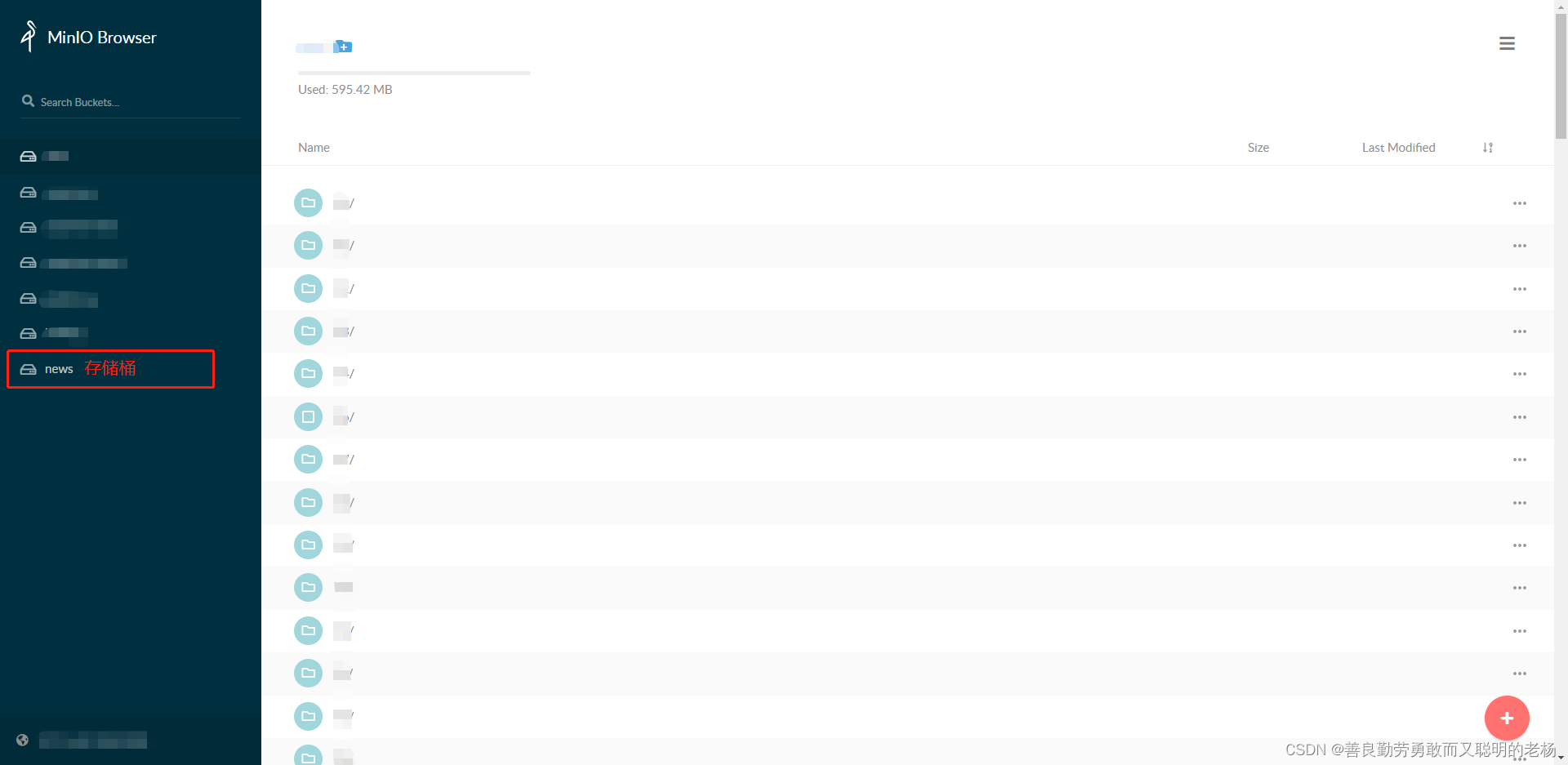
进入下载链接:https://dl.min.io/server/minio/release/ ,按需下载对应版本后,安装完毕即可。装载完成,启动minio后,可以直接打开对应的可视化界面,输入http://ip:9000/,如下图,表示部署安装成功啦(安装细节在本文展开,不清楚的童靴请搜索一下):
引入相关java sdk所需依赖:
<dependency>
    <groupId>io.minio</groupId>
    <artifactId>minio</artifactId>
    <version>8.2.2</version>
</dependency>先设置minio的一些配置信息:
minio:
  url: http://127.0.0.1:9000    #安装minio的服务器ip
  bucket: news                  #创建的存储桶名称(可界面创建,亦可sdk代码创建)
  accessKey: testkey            #minio登录账号
  secretKey: testpassword       #minio登录密码
通过配置类读取配置信息,为后续使用做准备:
package ***.***.***.***.configure;

import lombok.Data;
import org.springframework.boot.autoconfigure.condition.ConditionalOnProperty;
import org.springframework.boot.context.properties.ConfigurationProperties;
import org.springframework.context.annotation.Configuration;

@Data
@Configuration
@ConfigurationProperties(prefix = "minio")
public class MinioProperties {
	private String accessKey;
	private String secretKey;
	private String url;
	private String bucket;
}
初始化minio客户端:
package ***.***.***.utils;

import ***.***.***.MinioProperties;
import io.minio.BucketExistsArgs;
import io.minio.GetObjectArgs;
import io.minio.MakeBucketArgs;
import io.minio.MinioClient;
import io.minio.PutObjectArgs;
import io.minio.RemoveObjectArgs;
import io.minio.errors.ErrorResponseException;
import io.minio.errors.InsufficientDataException;
import io.minio.errors.InternalException;
import io.minio.errors.InvalidResponseException;
import io.minio.errors.ServerException;
import io.minio.errors.XmlParserException;
import org.springframework.beans.factory.annotation.Autowired;

import java.io.IOException;
import java.io.InputStream;
import java.security.InvalidKeyException;
import java.security.NoSuchAlgorithmException;


public class MinioClientUtil {

	@Autowired
	private MinioProperties properties;

	private MinioClient client;

    //初始化minio client
	private void init() throws NoSuchAlgorithmException, InvalidKeyException, IOException,
			InvalidResponseException, InsufficientDataException, ServerException, ErrorResponseException,
			XmlParserException, InternalException {
		if (null != client) {
			return;
		}

		client = MinioClient.builder()
				.endpoint(properties.getUrl())
				.credentials(properties.getAccessKey(), properties.getSecretKey())
				.build();

		makeBucket(properties.getBucket());
	}

    //创建自定义的存储桶
    //这里只做了简单的桶存在判断,这里还可以添加设置桶的策略等
	public void makeBucket(String bucket) throws IOException, InvalidKeyException, InvalidResponseException,
			InsufficientDataException, NoSuchAlgorithmException, ServerException, InternalException, XmlParserException,
			ErrorResponseException {
		boolean bucketExist = client.bucketExists(BucketExistsArgs.builder().bucket(bucket).build());
		if (!bucketExist) {
			client.makeBucket(MakeBucketArgs.builder().bucket(bucket).build());
		}
	}

}
import io.minio.BucketExistsArgs;
import io.minio.GetObjectArgs;
import io.minio.MakeBucketArgs;
import io.minio.MinioClient;
import io.minio.PutObjectArgs;
import io.minio.RemoveObjectArgs;
import io.minio.errors.ErrorResponseException;
import io.minio.errors.InsufficientDataException;
import io.minio.errors.InternalException;
import io.minio.errors.InvalidResponseException;
import io.minio.errors.ServerException;
import io.minio.errors.XmlParserException;
import org.springframework.beans.factory.annotation.Autowired;

import java.io.IOException;
import java.io.InputStream;
import java.security.InvalidKeyException;
import java.security.NoSuchAlgorithmException;


public class MinioClientUtil {


	/**
	 * @return void
	 * @Description
	 * @Date 11:58 2022/8/19
	 * @Param [bucket=同名称, fileName=文件路径即名称, ins=上传的输入流, fileSize=上传的文件大小]
	 **/
	public void uploadFile(String bucket, String fileName, InputStream ins, long fileSize)
			throws IOException, InvalidKeyException, InvalidResponseException, InsufficientDataException,
			NoSuchAlgorithmException, ServerException, InternalException, XmlParserException,
			ErrorResponseException {

		init();
		makeBucket(bucket);

		PutObjectArgs.Builder putObjectArgsBuilder = PutObjectArgs.builder()
				.bucket(bucket)
				.object(fileName)
				.stream(ins, fileSize, 5 * 1024 * 1024);

		client.putObject(putObjectArgsBuilder.build());
	}

}import io.minio.BucketExistsArgs;
import io.minio.GetObjectArgs;
import io.minio.MakeBucketArgs;
import io.minio.MinioClient;
import io.minio.RemoveObjectArgs;
import io.minio.errors.ErrorResponseException;
import io.minio.errors.InsufficientDataException;
import io.minio.errors.InternalException;
import io.minio.errors.InvalidResponseException;
import io.minio.errors.ServerException;
import io.minio.errors.XmlParserException;
import org.springframework.beans.factory.annotation.Autowired;
import java.io.IOException;
import java.io.InputStream;
import java.security.InvalidKeyException;
import java.security.NoSuchAlgorithmException;
public class MinioClientUtil {
/**
* @return java.io.InputStream
* @Description
* @Date 12:09 2022/8/19
* @Param [bucket=存储桶名称, fileName=文件路径即名称]
**/
public InputStream download(String bucket, String fileName)
throws IOException, InvalidKeyException, InvalidResponseException, InsufficientDataException,
NoSuchAlgorithmException, ServerException, InternalException, XmlParserException,
ErrorResponseException {
init();
GetObjectArgs.Builder getObjectArgsBuilder = GetObjectArgs.builder()
.bucket(bucket)
.object(fileName);
return client.getObject(getObjectArgsBuilder.build());
}
}import io.minio.BucketExistsArgs;
import io.minio.GetObjectArgs;
import io.minio.GetPresignedObjectUrlArgs;
import io.minio.MakeBucketArgs;
import io.minio.MinioClient;
import io.minio.PutObjectArgs;
import io.minio.RemoveObjectArgs;
import io.minio.errors.ErrorResponseException;
import io.minio.errors.InsufficientDataException;
import io.minio.errors.InternalException;
import io.minio.errors.InvalidResponseException;
import io.minio.errors.ServerException;
import io.minio.errors.XmlParserException;
import io.minio.http.Method;
import org.springframework.beans.factory.annotation.Autowired;
import java.io.IOException;
import java.io.InputStream;
import java.security.InvalidKeyException;
import java.security.NoSuchAlgorithmException;
public class MinioClientUtil {
/**
* @return java.lang.String
* @Description
* @Date 12:14 2022/8/19
* @Param [bucket=存储桶名称, fileName=文件路径即名称]
**/
private String getMinioURL(String bucket, String fileName) throws IOException, NoSuchAlgorithmException, InvalidKeyException, InvalidResponseException, ServerException, XmlParserException, InternalException, InsufficientDataException, ErrorResponseException {
if (null == client) {
init();
}
GetPresignedObjectUrlArgs build = GetPresignedObjectUrlArgs.builder()
.method(Method.GET)
.bucket(bucket)
.object(fileName)
.expiry(60 * 60 * 24) //生成的预签名url可访问的有效时间,最大期限7天
.build();
return client.getPresignedObjectUrl(build);
}
}这里做永久访问有效实现,是为了应对一种场景。例如,我们的图片文件,需要直接通过url(非下载后)可显示或打开,在系统用户头像这里,就可能会要求如此实现。因此,我们需要保证我们生成的图片url只可以直接访问的。
但是,通过上述预签名url的生成方式,有一个最大时效7天的限制,所以此方式暂不考虑。
minio其实也提供了,文件直接通过ip端口或域名的方式访问的,即用url访问minio存储桶中的文件。要想能直接通过自己定义的 ip+端口+图片路径 来访问的话,需要将minio指定存储桶的访问策略调整一下,如下图所示:
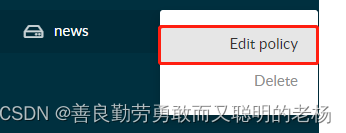

点击add,策略选Read Only就行了,就可以访问了。

然后,通过 http://ip:9000/同名/文件路径及名称 的URL形式,就可以永久访问到这个图片文件啦~~
这里有一个访问形式上的微调,可能有的系统,是使用域名访问的,这个时候域名的一些端口都是通过nginx指定统一了,那这个时候,对于minio如果需要使用域名访问,则需要把nginx再指定配置一下,就可以啦!
import io.minio.BucketExistsArgs;
import io.minio.GetObjectArgs;
import io.minio.GetPresignedObjectUrlArgs;
import io.minio.MakeBucketArgs;
import io.minio.MinioClient;
import io.minio.PutObjectArgs;
import io.minio.RemoveObjectArgs;
import io.minio.errors.ErrorResponseException;
import io.minio.errors.InsufficientDataException;
import io.minio.errors.InternalException;
import io.minio.errors.InvalidResponseException;
import io.minio.errors.ServerException;
import io.minio.errors.XmlParserException;
import io.minio.http.Method;
import org.springframework.beans.factory.annotation.Autowired;

import java.io.IOException;
import java.io.InputStream;
import java.security.InvalidKeyException;
import java.security.NoSuchAlgorithmException;


public class MinioClientUtil {

	/**
	 * @return void
	 * @Description
	 * @Date 14:19 2022/8/19
	 * @Param [bucket=存储桶名称, fileName=文件路径即名称]
	 **/
	public void delete(String bucket, String fileName) throws IOException, InvalidKeyException, InvalidResponseException,
			InsufficientDataException, NoSuchAlgorithmException, ServerException, InternalException, XmlParserException,
			ErrorResponseException {
		init();
		client.removeObject(RemoveObjectArgs.builder().bucket(bucket).object(fileName).build());
	}

}
以上就为minio的主要操作sdk的实现了。另外有一个操作,这边就不一 一列举了。例如
获取桶对象、桶列表、存储文件列表等等,可以自行按需实践一番~~~
在使用minio的过程中,发现了几处需要注意的点:
1、minio在同一路径下的文件,如果名称相同,则会被覆盖掉。所以,建议可以考虑加文件前加:yyyy-MM-dd/时间戳-文件名 的方式来实现区分存储
2、minio对于存储文件的单个文件的大小,暂无明确大小上限,一个对象文件可以是任意大小,从几 kb 到最大 5T 不等
最后,对于minio的加密处理方式,暂时还没有研究完,可能后续补充完善。
对博文内容有疑问的地方,欢迎下方留言讨论,看到必回复大家~~~~
我有一个Ruby程序,它使用rubyzip压缩XML文件的目录树。gem。我的问题是文件开始变得很重,我想提高压缩级别,因为压缩时间不是问题。我在rubyzipdocumentation中找不到一种为创建的ZIP文件指定压缩级别的方法。有人知道如何更改此设置吗?是否有另一个允许指定压缩级别的Ruby库? 最佳答案 这是我通过查看rubyzip内部创建的代码。level=Zlib::BEST_COMPRESSIONZip::ZipOutputStream.open(zip_file)do|zip|Dir.glob("**/*")d
我试图在一个项目中使用rake,如果我把所有东西都放到Rakefile中,它会很大并且很难读取/找到东西,所以我试着将每个命名空间放在lib/rake中它自己的文件中,我添加了这个到我的rake文件的顶部:Dir['#{File.dirname(__FILE__)}/lib/rake/*.rake'].map{|f|requiref}它加载文件没问题,但没有任务。我现在只有一个.rake文件作为测试,名为“servers.rake”,它看起来像这样:namespace:serverdotask:testdoputs"test"endend所以当我运行rakeserver:testid时
我的目标是转换表单输入,例如“100兆字节”或“1GB”,并将其转换为我可以存储在数据库中的文件大小(以千字节为单位)。目前,我有这个:defquota_convert@regex=/([0-9]+)(.*)s/@sizes=%w{kilobytemegabytegigabyte}m=self.quota.match(@regex)if@sizes.include?m[2]eval("self.quota=#{m[1]}.#{m[2]}")endend这有效,但前提是输入是倍数(“gigabytes”,而不是“gigabyte”)并且由于使用了eval看起来疯狂不安全。所以,功能正常,
关闭。这个问题是opinion-based.它目前不接受答案。想要改进这个问题?更新问题,以便editingthispost可以用事实和引用来回答它.关闭4年前。Improvethisquestion我想在固定时间创建一系列低音和高音调的哔哔声。例如:在150毫秒时发出高音调的蜂鸣声在151毫秒时发出低音调的蜂鸣声200毫秒时发出低音调的蜂鸣声250毫秒的高音调蜂鸣声有没有办法在Ruby或Python中做到这一点?我真的不在乎输出编码是什么(.wav、.mp3、.ogg等等),但我确实想创建一个输出文件。
Rails2.3可以选择随时使用RouteSet#add_configuration_file添加更多路由。是否可以在Rails3项目中做同样的事情? 最佳答案 在config/application.rb中:config.paths.config.routes在Rails3.2(也可能是Rails3.1)中,使用:config.paths["config/routes"] 关于ruby-on-rails-Rails3中的多个路由文件,我们在StackOverflow上找到一个类似的问题
对于具有离线功能的智能手机应用程序,我正在为Xml文件创建单向文本同步。我希望我的服务器将增量/差异(例如GNU差异补丁)发送到目标设备。这是计划:Time=0Server:hasversion_1ofXmlfile(~800kiB)Client:hasversion_1ofXmlfile(~800kiB)Time=1Server:hasversion_1andversion_2ofXmlfile(each~800kiB)computesdeltaoftheseversions(=patch)(~10kiB)sendspatchtoClient(~10kiBtransferred)Cl
我正在寻找执行以下操作的正确语法(在Perl、Shell或Ruby中):#variabletoaccessthedatalinesappendedasafileEND_OF_SCRIPT_MARKERrawdatastartshereanditcontinues. 最佳答案 Perl用__DATA__做这个:#!/usr/bin/perlusestrict;usewarnings;while(){print;}__DATA__Texttoprintgoeshere 关于ruby-如何将脚
使用带有Rails插件的vim,您可以创建一个迁移文件,然后一次性打开该文件吗?textmate也可以这样吗? 最佳答案 你可以使用rails.vim然后做类似的事情::Rgeneratemigratonadd_foo_to_bar插件将打开迁移生成的文件,这正是您想要的。我不能代表textmate。 关于ruby-使用VimRails,您可以创建一个新的迁移文件并一次性打开它吗?,我们在StackOverflow上找到一个类似的问题: https://sta
好的,所以我的目标是轻松地将一些数据保存到磁盘以备后用。您如何简单地写入然后读取一个对象?所以如果我有一个简单的类classCattr_accessor:a,:bdefinitialize(a,b)@a,@b=a,bendend所以如果我从中非常快地制作一个objobj=C.new("foo","bar")#justgaveitsomerandomvalues然后我可以把它变成一个kindaidstring=obj.to_s#whichreturns""我终于可以将此字符串打印到文件或其他内容中。我的问题是,我该如何再次将这个id变回一个对象?我知道我可以自己挑选信息并制作一个接受该信
我正在编写一个小脚本来定位aws存储桶中的特定文件,并创建一个临时验证的url以发送给同事。(理想情况下,这将创建类似于在控制台上右键单击存储桶中的文件并复制链接地址的结果)。我研究过回形针,它似乎不符合这个标准,但我可能只是不知道它的全部功能。我尝试了以下方法:defauthenticated_url(file_name,bucket)AWS::S3::S3Object.url_for(file_name,bucket,:secure=>true,:expires=>20*60)end产生这种类型的结果:...-1.amazonaws.com/file_path/file.zip.A
