下载地址:https://www.elastic.co/cn/downloads/elasticsearch
当前版本:8.3.3
创建一个文件夹mkdir /elk,用于作为安装目录,当然实际可能不是这样的文件结构,仅用于测试情况。
Elasticsearch不允许用root启动,创建一个新用户elkuser,并将elk文件夹的权限给他。
创建用户:adduser elkuser
创建密码: passwd elkuser             例如:   123456
修改文件全限: chown -R elkuser /elk
切换用户: su elkuser
下载elasticsearch
wget https://artifacts.elastic.co/downloads/elasticsearch/elasticsearch-8.3.3-linux-x86_64.tar.gz
tar -xzf elasticsearch-8.3.3-linux-x86_64.tar.gz
cd elasticsearch-8.3.3/
bin/elasticsearch
若想要后台方式启动,使用-d参数 ,首次启动建议不用:
bin/elasticsearch -d
会出现如下提示,默认启动了安全认证,包括elastic的用户名密码及相关token,将内容记录下来(忘记了后期也可以重置):
━
✅ Elasticsearch security features have been automatically configured!
✅ Authentication is enabled and cluster connections are encrypted.

ℹ️  Password for the elastic user (reset with `bin/elasticsearch-reset-password -u elastic`):
  EIMr234wer234zQS2B

ℹ️  HTTP CA certificate SHA-256 fingerprint:
  3a76d5d4e9ec3e.........337c4ec0b366c81ef3a53d

ℹ️  Configure Kibana to use this cluster:
• Run Kibana and click the configuration link in the terminal when Kibana starts.
• Copy the following enrollment token and paste it into Kibana in your browser (valid for the next 30 minutes):
  eyJ2ZXIiOiI4LjMuMyYjU1MjgzNmZjODE4NzAyYW1M2QiLCJrZXkiOiI4WGxEU1lJQmRVQnhHdmJEUmlsejpsTjB0STBfTVFJYUNEQXhTbFZZajd3In0=

ℹ️  Configure other nodes to join this cluster:
• On this node:
  ⁃ Create an enrollment token with `bin/elasticsearch-create-enrollment-token -s node`.
  ⁃ Uncomment the transport.host setting at the end of config/elasticsearch.yml.
  ⁃ Restart Elasticsearch.
• On other nodes:
  ⁃ Start Elasticsearch with `bin/elasticsearch --enrollment-token <token>`, using the enrollment token that you generated.
重置密码:
bin/elasticsearch-reset-password -u elastic

elasticsearch 不允许用root方式启动,见环境准备部分
此版本将GeoIp功能默认开启了采集。在默认的启动下是会去官网的默认地址下获取最新的Ip的GEO信息
在elasticsearch.yml中添加配置
ingest.geoip.downloader.enabled: false
确认日志文件夹的权限,可以再次执行一下 1.1中设置权限的命令。
默认开启了ssl认证,可以考虑是否需要访问9200,仅用kibana即可。若需访问,则需要修改config/目录下面的elasticsearch.yml配置文件:
# Enable encryption for HTTP API client connections, such as Kibana, Logstash, and Agents
xpack.security.http.ssl:
  enabled: true
  keystore.path: certs/http.p12
将此处的【true】改为false
下载Kibana , 解压
wget https://artifacts.elastic.co/downloads/kibana/kibana-8.3.3-linux-x86_64.tar.gz
tar -xzf kibana-8.3.3-linux-x86_64.tar.gz
./bin/kibana
会看到如下图样式提示
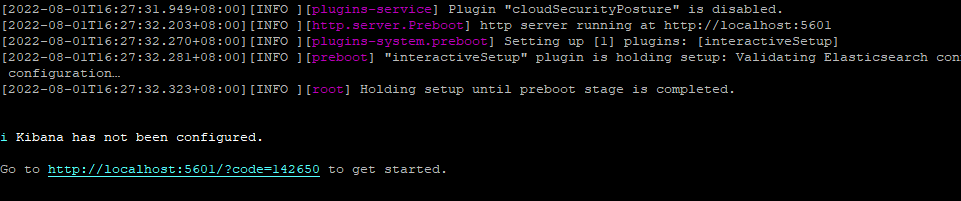
访问图中的地址进行配置,注意如果不是在当前主机上访问,localhost改为相应的IP。
默认不允许当前主机外访问,需修改kibana.yml 文件 如下:
server.host: "0.0.0.0"
访问改地址进行配置,需要填写安装Elasticsearch时生产的token。
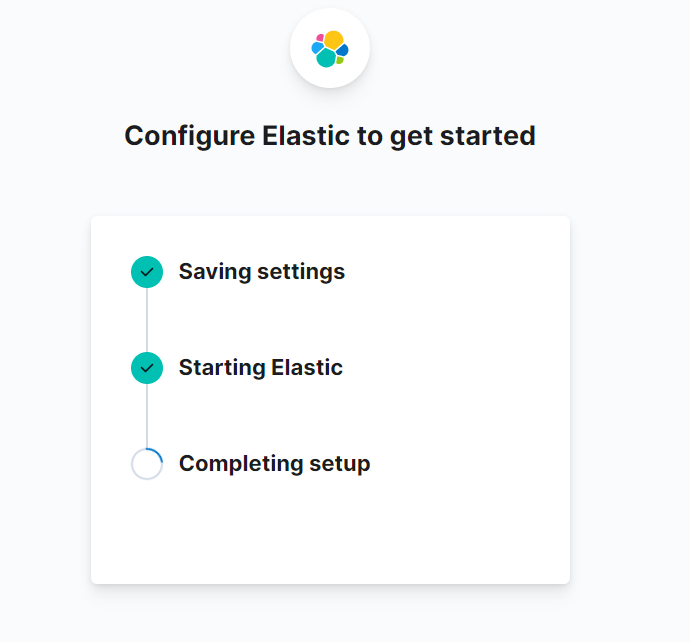
配置完可以用安装Elasticsearch时提示的用户进行登录了。
下载Filebeat , 解压
wget https://artifacts.elastic.co/downloads/beats/filebeat/filebeat-8.3.3-linux-x86_64.tar.gz
tar -xzf filebeat-8.3.3-linux-x86_64.tar.gz
filebeat.inputs是一个集合,可以配置多个文件的监控,如下面配置
filebeat.inputs:

# 第一个监控
- type: filestream

  id: 自己定义个id
  enabled: true
  paths:
    - /opt/1.log

  # 可选,比如添加一个字段用于标识来源于不同文件
  fields:
    file_name: XXX
  fields_under_root: true

# 第二个监控
- type: filestream
  id: 自己定义个id2
  enabled: true
  paths:
    - /opt/2.log
  fields:
    file_name: YYY
  fields_under_root: true
这里需要配置Elasticsearch 的IP、用户名密码及crt证书文件,这些都可以在安装Elasticsearch 的时候得到
# ---------------------------- Elasticsearch Output ----------------------------
output.elasticsearch:
  # Array of hosts to connect to.
  hosts: ["192.168.1.2:9200"]

  # Protocol - either `http` (default) or `https`.
  protocol: "https"

  # Authentication credentials - either API key or username/password.
  #api_key: "id:api_key"
  username: "elastic"
  password: "OqdCD234234dfsdf-2"
  ssl:
     certificate_authorities: "/elk/http_ca.crt"
执行如下命令启用相关的索引
./filebeat setup -e
./filebeat -e
配置都比较类似,例如metricbeat的配置文件主要也是链接到elasticsearch部分,这里不再列举。
elasticsearch提供了-d的参数支持后台启动,其他的kibana 、filebeat貌似都没有,可以通过如下方式实现:
nohup ./filebeat -e &
nohup ./metricbeat -e &
nohup ./bin/kibana &
尝试通过RVM将RubyGems升级到版本1.8.10并出现此错误:$rvmrubygemslatestRemovingoldRubygemsfiles...Installingrubygems-1.8.10forruby-1.9.2-p180...ERROR:Errorrunning'GEM_PATH="/Users/foo/.rvm/gems/ruby-1.9.2-p180:/Users/foo/.rvm/gems/ruby-1.9.2-p180@global:/Users/foo/.rvm/gems/ruby-1.9.2-p180:/Users/foo/.rvm/gems/rub
我正在使用puppet为ruby程序提供一组常量。我需要提供一组主机名,我的程序将对其进行迭代。在我之前使用的bash脚本中,我只是将它作为一个puppet变量hosts=>"host1,host2"我将其提供给bash脚本作为HOSTS=显然这对ruby不太适用——我需要它的格式hosts=["host1","host2"]自从phosts和putsmy_array.inspect提供输出["host1","host2"]我希望使用其中之一。不幸的是,我终其一生都无法弄清楚如何让它发挥作用。我尝试了以下各项:我发现某处他们指出我需要在函数调用前放置“function_”……这
我正在编写一个gem,我必须在其中fork两个启动两个webrick服务器的进程。我想通过基类的类方法启动这个服务器,因为应该只有这两个服务器在运行,而不是多个。在运行时,我想调用这两个服务器上的一些方法来更改变量。我的问题是,我无法通过基类的类方法访问fork的实例变量。此外,我不能在我的基类中使用线程,因为在幕后我正在使用另一个不是线程安全的库。所以我必须将每个服务器派生到它自己的进程。我用类变量试过了,比如@@server。但是当我试图通过基类访问这个变量时,它是nil。我读到在Ruby中不可能在分支之间共享类变量,对吗?那么,还有其他解决办法吗?我考虑过使用单例,但我不确定这是
我的最终目标是安装当前版本的RubyonRails。我在OSXMountainLion上运行。到目前为止,这是我的过程:已安装的RVM$\curl-Lhttps://get.rvm.io|bash-sstable检查已知(我假设已批准)安装$rvmlistknown我看到当前的稳定版本可用[ruby-]2.0.0[-p247]输入命令安装$rvminstall2.0.0-p247注意:我也试过这些安装命令$rvminstallruby-2.0.0-p247$rvminstallruby=2.0.0-p247我很快就无处可去了。结果:$rvminstall2.0.0-p247Search
我在理解Enumerator.new方法的工作原理时遇到了一些困难。假设文档中的示例:fib=Enumerator.newdo|y|a=b=1loopdoy[1,1,2,3,5,8,13,21,34,55]循环中断条件在哪里,它如何知道循环应该迭代多少次(因为它没有任何明确的中断条件并且看起来像无限循环)? 最佳答案 Enumerator使用Fibers在内部。您的示例等效于:require'fiber'fiber=Fiber.newdoa=b=1loopdoFiber.yieldaa,b=b,a+bendend10.times.m
我有一个用户工厂。我希望默认情况下确认用户。但是鉴于unconfirmed特征,我不希望它们被确认。虽然我有一个基于实现细节而不是抽象的工作实现,但我想知道如何正确地做到这一点。factory:userdoafter(:create)do|user,evaluator|#unwantedimplementationdetailshereunlessFactoryGirl.factories[:user].defined_traits.map(&:name).include?(:unconfirmed)user.confirm!endendtrait:unconfirmeddoenden
几个月前,我读了一篇关于rubygem的博客文章,它可以通过阅读代码本身来确定编程语言。对于我的生活,我不记得博客或gem的名称。谷歌搜索“ruby编程语言猜测”及其变体也无济于事。有人碰巧知道相关gem的名称吗? 最佳答案 是这个吗:http://github.com/chrislo/sourceclassifier/tree/master 关于ruby-寻找通过阅读代码确定编程语言的rubygem?,我们在StackOverflow上找到一个类似的问题:
从MB升级到新的MBP后,Apple的迁移助手没有移动我的gem。我这次是通过macports安装rubygems,希望在下次升级时避免这种情况。有什么我应该注意的陷阱吗? 最佳答案 如果你想把你的gems安装在你的主目录中(在传输过程中应该复制过来,作为一个附带的好处,会让你以你自己的身份运行geminstall,而不是root),将gemhome:键设置为您在~/.gemrc中的主目录中的路径. 关于通过MacPorts的RubyGems是个好主意吗?,我们在StackOverf
当我执行>rvminstall1.9.2时一切顺利。然后我做>rvmuse1.9.2也很顺利。但是当涉及到ruby-v时..sam@sjones:~$rvminstall1.9.2/home/sam/.rvm/rubies/ruby-1.9.2-p136,thismaytakeawhiledependingonyourcpu(s)...ruby-1.9.2-p136-#fetchingruby-1.9.2-p136-#downloadingruby-1.9.2-p136,thismaytakeawhiledependingonyourconnection...%Total%Rece
当谈到运行时自省(introspection)和动态代码生成时,我认为ruby没有任何竞争对手,可能除了一些lisp方言。前几天,我正在做一些代码练习来探索ruby的动态功能,我开始想知道如何向现有对象添加方法。以下是我能想到的3种方法:obj=Object.new#addamethoddirectlydefobj.new_method...end#addamethodindirectlywiththesingletonclassclass这只是冰山一角,因为我还没有探索instance_eval、module_eval和define_method的各种组合。是否有在线/离线资
