查找 Docker Hub 上的 Python 镜像:
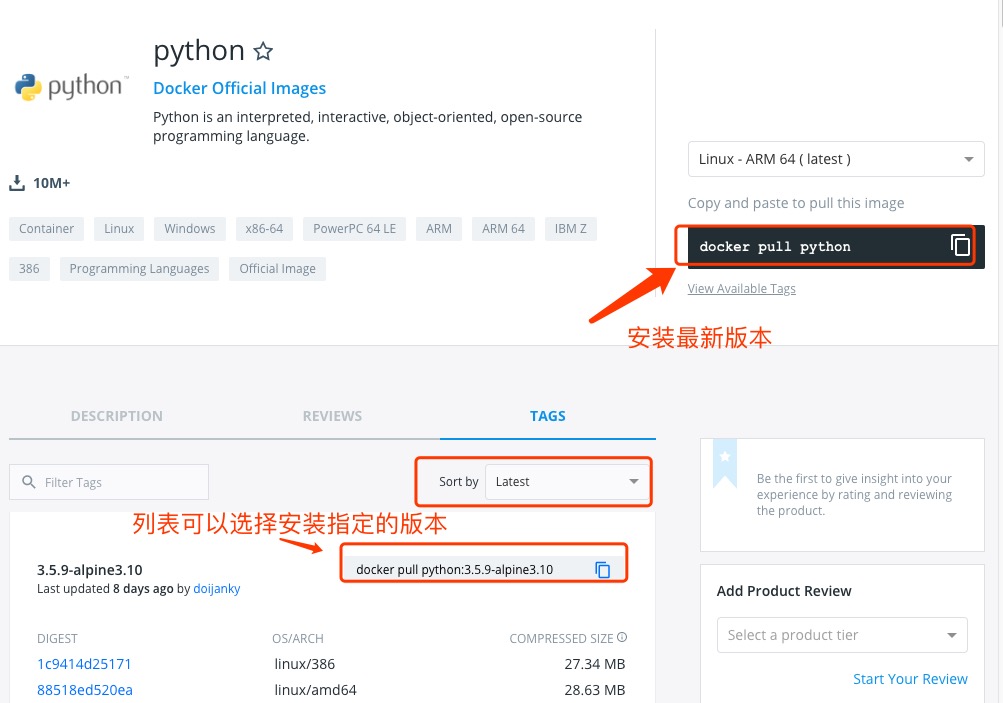
可以通过 Sort by 查看其他版本的 python,默认是最新版本 python:latest。
此外,我们还可以用 docker search python 命令来查看可用版本:
runoob@runoob:~/python$ docker search python
NAME                           DESCRIPTION                        STARS     OFFICIAL   AUTOMATED
python                         Python is an interpreted,...       982       [OK]
kaggle/python                  Docker image for Python...         33                   [OK]
azukiapp/python                Docker image to run Python ...     3                    [OK]
vimagick/python                mini python                                  2          [OK]
tsuru/python                   Image for the Python ...           2                    [OK]
pandada8/alpine-python         An alpine based python image                 1          [OK]
1science/python                Python Docker images based on ...  1                    [OK]
lucidfrontier45/python-uwsgi   Python with uWSGI                  1                    [OK]
orbweb/python                  Python image                       1                    [OK]
pathwar/python                 Python template for Pathwar levels 1                    [OK]
rounds/10m-python              Python, setuptools and pip.        0                    [OK]
ruimashita/python              ubuntu 14.04 python                0                    [OK]
tnanba/python                  Python on CentOS-7 image.          0                    [OK]
这里我们拉取官方的镜像,标签为3.5
runoob@runoob:~/python$ docker pull python:3.5
等待下载完成后,我们就可以在本地镜像列表里查到 REPOSITORY 为python, 标签为 3.5 的镜像。
runoob@runoob:~/python$ docker images python:3.5
REPOSITORY          TAG                 IMAGE ID            CREATED             SIZE
python              3.5              045767ddf24a        9 days ago          684.1 MB
创建 Dockerfile/p>
首先,创建目录 python,用于存放后面的相关东西。
runoob@runoob:~$ mkdir -p ~/python ~/python/myapp
myapp 目录将映射为 python 容器配置的应用目录。
进入创建的 python 目录,创建 Dockerfile。
FROM buildpack-deps:jessie

# remove several traces of debian python
RUN apt-get purge -y python.*

# http://bugs.python.org/issue19846
# > At the moment, setting "LANG=C" on a Linux system *fundamentally breaks Python 3*, and that's not OK.
ENV LANG C.UTF-8

# gpg: key F73C700D: public key "Larry Hastings <larry@hastings.org>" imported
ENV GPG_KEY 97FC712E4C024BBEA48A61ED3A5CA953F73C700D

ENV PYTHON_VERSION 3.5.1

# if this is called "PIP_VERSION", pip explodes with "ValueError: invalid truth value '<VERSION>'"
ENV PYTHON_PIP_VERSION 8.1.2

RUN set -ex \
        && curl -fSL "https://www.python.org/ftp/python/${PYTHON_VERSION%%[a-z]*}/Python-$PYTHON_VERSION.tar.xz" -o python.tar.xz \
        && curl -fSL "https://www.python.org/ftp/python/${PYTHON_VERSION%%[a-z]*}/Python-$PYTHON_VERSION.tar.xz.asc" -o python.tar.xz.asc \
        && export GNUPGHOME="$(mktemp -d)" \
        && gpg --keyserver ha.pool.sks-keyservers.net --recv-keys "$GPG_KEY" \
        && gpg --batch --verify python.tar.xz.asc python.tar.xz \
        && rm -r "$GNUPGHOME" python.tar.xz.asc \
        && mkdir -p /usr/src/python \
        && tar -xJC /usr/src/python --strip-components=1 -f python.tar.xz \
        && rm python.tar.xz \
        \
        && cd /usr/src/python \
        && ./configure --enable-shared --enable-unicode=ucs4 \
        && make -j$(nproc) \
        && make install \
        && ldconfig \
        && pip3 install --no-cache-dir --upgrade --ignore-installed pip==$PYTHON_PIP_VERSION \
        && find /usr/local -depth \
                \( \
                    \( -type d -a -name test -o -name tests \) \
                    -o \
                    \( -type f -a -name '*.pyc' -o -name '*.pyo' \) \
                \) -exec rm -rf '{}' + \
        && rm -rf /usr/src/python ~/.cache

# make some useful symlinks that are expected to exist
RUN cd /usr/local/bin \
        && ln -s easy_install-3.5 easy_install \
        && ln -s idle3 idle \
        && ln -s pydoc3 pydoc \
        && ln -s python3 python \
        && ln -s python3-config python-config

CMD ["python3"]
通过 Dockerfile 创建一个镜像,替换成你自己的名字:
runoob@runoob:~/python$ docker build -t python:3.5 .
创建完成后,我们可以在本地的镜像列表里查找到刚刚创建的镜像:
runoob@runoob:~/python$ docker images python:3.5
REPOSITORY          TAG                 IMAGE ID            CREATED             SIZE
python              3.5              045767ddf24a        9 days ago          684.1 MB
在 ~/python/myapp 目录下创建一个 helloworld.py 文件,代码如下:
#!/usr/bin/python

print("Hello, World!");
runoob@runoob:~/python$ docker run -v $PWD/myapp:/usr/src/myapp -w /usr/src/myapp python:3.5 python helloworld.py
命令说明:
-v $PWD/myapp:/usr/src/myapp: 将主机中当前目录下的 myapp 挂载到容器的 /usr/src/myapp。
-w /usr/src/myapp: 指定容器的 /usr/src/myapp 目录为工作目录。
python helloworld.py: 使用容器的 python 命令来执行工作目录中的 helloworld.py 文件。
输出结果:
Hello, World!
关闭。这个问题是opinion-based.它目前不接受答案。想要改进这个问题?更新问题,以便editingthispost可以用事实和引用来回答它.关闭4年前。Improvethisquestion我想在固定时间创建一系列低音和高音调的哔哔声。例如:在150毫秒时发出高音调的蜂鸣声在151毫秒时发出低音调的蜂鸣声200毫秒时发出低音调的蜂鸣声250毫秒的高音调蜂鸣声有没有办法在Ruby或Python中做到这一点?我真的不在乎输出编码是什么(.wav、.mp3、.ogg等等),但我确实想创建一个输出文件。
我想为Heroku构建一个Rails3应用程序。他们使用Postgres作为他们的数据库,所以我通过MacPorts安装了postgres9.0。现在我需要一个postgresgem并且共识是出于性能原因你想要pggem。但是我对我得到的错误感到非常困惑当我尝试在rvm下通过geminstall安装pg时。我已经非常明确地指定了所有postgres目录的位置可以找到但仍然无法完成安装:$envARCHFLAGS='-archx86_64'geminstallpg--\--with-pg-config=/opt/local/var/db/postgresql90/defaultdb/po
我打算为ruby脚本创建一个安装程序,但我希望能够确保机器安装了RVM。有没有一种方法可以完全离线安装RVM并且不引人注目(通过不引人注目,就像创建一个可以做所有事情的脚本而不是要求用户向他们的bash_profile或bashrc添加一些东西)我不是要脚本本身,只是一个关于如何走这条路的快速指针(如果可能的话)。我们还研究了这个很有帮助的问题:RVM-isthereawayforsimpleofflineinstall?但有点误导,因为答案只向我们展示了如何离线在RVM中安装ruby。我们需要能够离线安装RVM本身,并查看脚本https://raw.github.com/wayn
我有一个奇怪的问题:我在rvm上安装了rubyonrails。一切正常,我可以创建项目。但是在我输入“railsnew”时重新启动后,我有“程序'rails'当前未安装。”。SystemUbuntu12.04ruby-v"1.9.3p194"gemlistactionmailer(3.2.5)actionpack(3.2.5)activemodel(3.2.5)activerecord(3.2.5)activeresource(3.2.5)activesupport(3.2.5)arel(3.0.2)builder(3.0.0)bundler(1.1.4)coffee-rails(
我刚刚为fedora安装了emacs。我想用emacs编写ruby。为ruby提供代码提示、代码完成类型功能所需的工具、扩展是什么? 最佳答案 ruby-mode已经包含在Emacs23之后的版本中。不过,它也可以通过ELPA获得。您可能感兴趣的其他一些事情是集成RVM、feature-mode(Cucumber)、rspec-mode、ruby-electric、inf-ruby、rinari(用于Rails)等。这是我当前用于Ruby开发的Emacs配置:https://github.com/citizen428/emacs
我正在尝试在我的centos服务器上安装therubyracer,但遇到了麻烦。$geminstalltherubyracerBuildingnativeextensions.Thiscouldtakeawhile...ERROR:Errorinstallingtherubyracer:ERROR:Failedtobuildgemnativeextension./usr/local/rvm/rubies/ruby-1.9.3-p125/bin/rubyextconf.rbcheckingformain()in-lpthread...yescheckingforv8.h...no***e
我的最终目标是安装当前版本的RubyonRails。我在OSXMountainLion上运行。到目前为止,这是我的过程:已安装的RVM$\curl-Lhttps://get.rvm.io|bash-sstable检查已知(我假设已批准)安装$rvmlistknown我看到当前的稳定版本可用[ruby-]2.0.0[-p247]输入命令安装$rvminstall2.0.0-p247注意:我也试过这些安装命令$rvminstallruby-2.0.0-p247$rvminstallruby=2.0.0-p247我很快就无处可去了。结果:$rvminstall2.0.0-p247Search
我实际上是在尝试使用RVM在我的OSX10.7.5上更新ruby,并在输入以下命令后:rvminstallruby我得到了以下回复:Searchingforbinaryrubies,thismighttakesometime.Checkingrequirementsforosx.Installingrequirementsforosx.Updatingsystem.......Errorrunning'requirements_osx_brew_update_systemruby-2.0.0-p247',pleaseread/Users/username/.rvm/log/138121
由于fast-stemmer的问题,我很难安装我想要的任何rubygem。我把我得到的错误放在下面。Buildingnativeextensions.Thiscouldtakeawhile...ERROR:Errorinstallingfast-stemmer:ERROR:Failedtobuildgemnativeextension./System/Library/Frameworks/Ruby.framework/Versions/2.0/usr/bin/rubyextconf.rbcreatingMakefilemake"DESTDIR="cleanmake"DESTDIR=
当我尝试安装Ruby时遇到此错误。我试过查看this和this但无济于事➜~brewinstallrubyWarning:YouareusingOSX10.12.Wedonotprovidesupportforthispre-releaseversion.Youmayencounterbuildfailuresorotherbreakages.Pleasecreatepull-requestsinsteadoffilingissues.==>Installingdependenciesforruby:readline,libyaml,makedepend==>Installingrub
