转载自我的个人网站 https://wzw21.cn/2022/02/04/tempo-baseline/
目录
参考:https://tempobeatdownbeat.github.io/tutorial/ch2_basics/baseline.html
import librosa
import matplotlib.pyplot as plt
import librosa.display
import numpy as np
mount = False
from google.colab import drive
drive.mount('/content/drive')
# drive._mount('/content/drive') # failed on Jan 21st, 2022
mount = True
if mount == True:
  filename = "drive/MyDrive/data/tempo_tutorial/audio/book_assets_ch2_basics_audio_easy_example"
else:
  filename = "book_assets_ch2_basics_audio_easy_example"
sr = 44100
fps = 100
hop_length = int(librosa.time_to_samples(1./fps,sr=sr)) # 441
# this Calculation is new to me
n_fft = 2048
# length of fft window
fmin = 27.5
fmax = 17000.
n_mels = 80
# number of Mel bands to generate
y, sr = librosa.load(filename+".flac", sr=sr)
# Mel-spectrogram
mel_spec = librosa.feature.melspectrogram(y, sr=sr, n_fft=n_fft,
                      hop_length=hop_length,
                      fmin=fmin, fmax=fmax,
                      n_mels=n_mels)
# melspectrogram's defult parameters
# fmax = sr / 2
# win_length = n_fft
# power = 2 # exponent for the magnitude melspectrogram. e.g., 1 for energy, 2 for power, etc.

# If a time-series input y, sr is provided, then its magnitude spectrogram S is first computed, and then mapped onto the mel scale by mel_f.dot(S**power).
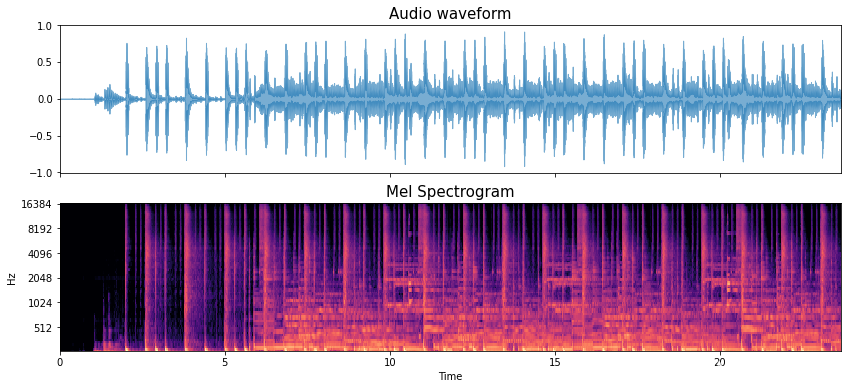
fig, ax = plt.subplots(nrows=2, sharex=True, figsize=(14,6))
librosa.display.waveplot(y, sr=sr, alpha=0.6, ax=ax[0])
# alpha controls the color transparency
ax[0].set_title('Audio waveform', fontsize=15)
ax[0].label_outer()
# only show "outer" labels and tick labels

librosa.display.specshow(librosa.power_to_db(mel_spec, ref=np.max), # convert a power spectrogram (amplitude(?) squared) to decibel (dB) units
            y_axis='mel', x_axis='time', sr=sr,
            hop_length=hop_length, fmin=fmin, fmax=fmax,
            ax=ax[1])
ax[1].set_title('Mel Spectrogram', fontsize=15)
ax[1].label_outer()
# Mid-level Representation (Spectral Flux)

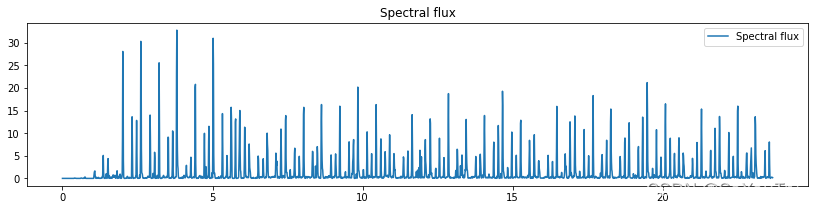
# Onset strength at time t is determined by:
# mean_f max(0, S[f, t] - ref[f, t - lag])
# where ref is S after local max filtering along the frequency axis.

S = mel_spec # pre-computed (log-power) spectrogram
lag = 2 # time lag for computing differences
max_size = 3 # size (in frequency bins) of the local max filter, set to 1 to disable filtering
spectral_flux = librosa.onset.onset_strength(S=librosa.power_to_db(S, ref=np.max),
                        sr=sr, hop_length=hop_length,
                        lag=lag, max_size=max_size)
# Compute a spectral flux onset strength envelope

times = librosa.frames_to_time(np.arange(len(spectral_flux)),
                 sr=sr, hop_length=hop_length)
# or librosa.times_like(spectral_flux, sr=sr, hop_length=hop_length)

plt.figure(figsize=(14, 3))
plt.plot(times, spectral_flux, label="Spectral flux")
plt.title("Spectral flux")
plt.legend() # show legend
plt.show()
# Periodicity Detection and Tempogram

fig, ax = plt.subplots(nrows=3, figsize=(14, 12))

tempogram = librosa.feature.tempogram(onset_envelope=spectral_flux,
                    sr=sr, hop_length=hop_length)
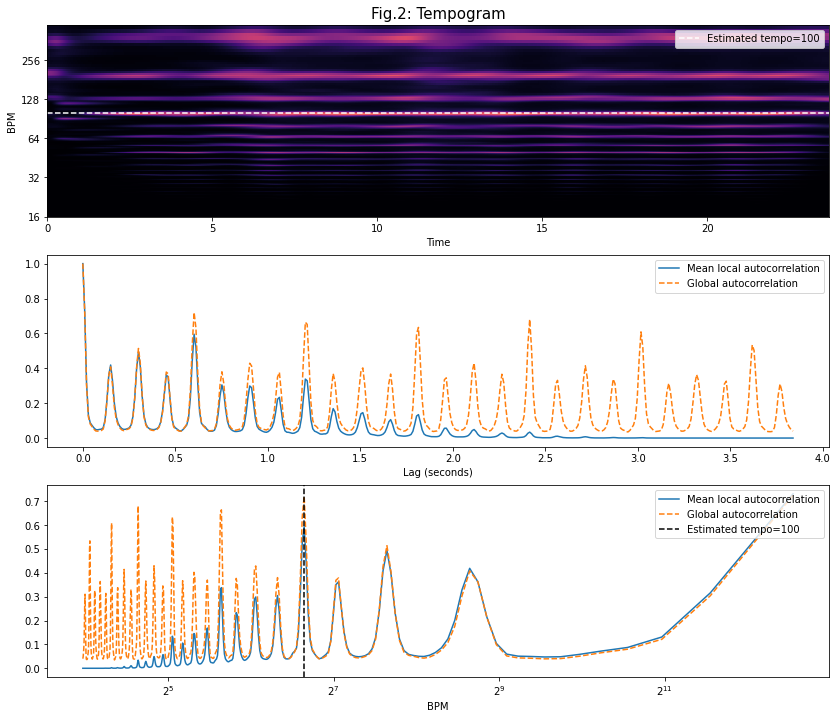
# Compute the tempogram: local autocorrelation of the onset strength envelope
# default win_length = 384: length of the onset autocorrelation window
# return_shape = (win_length, n)
# time lag changes from 0 to win_length (?) \
# when time_lag == win_length \
# there is no overlap between origin window and shifted window, thus autocorrelation should be 0 \
# but for global_ac (window is much larger) there are still a lot of overlops

librosa.display.specshow(tempogram, sr=sr, hop_length=hop_length,
             x_axis='time', y_axis='tempo', cmap='magma',
             ax=ax[0])
# y_axis='tempo' visualizes the outputs of feature.tempogram
# cmap: color map
# win_length => BPM (?)

tempo = librosa.beat.tempo(onset_envelope=spectral_flux, sr=sr,
               hop_length=hop_length)[0]
# default aggregation function: mean
# shape = (1,) or (n,) if no aggregate
ax[0].axhline(tempo, color='w', linestyle='--', alpha=1,
       label='Estimated tempo={:g}'.format(tempo))
# this line shows the estimated global tempo
ax[0].legend(loc='upper right')
ax[0].set_title('Fig.2: Tempogram',fontsize=15)

ac_global = librosa.autocorrelate(spectral_flux, max_size=tempogram.shape[0])
# Compute global onset autocorrelation
# max_size: maximum correlation lag
ac_global = librosa.util.normalize(ac_global)

x_scale = np.linspace(start=0, stop=tempogram.shape[0] * float(hop_length) / sr,
            num=tempogram.shape[0])
# return evenly spaced numbers over a specified interval
ax[1].plot(x_scale, np.mean(tempogram, axis=1), label='Mean local autocorrelation')
ax[1].plot(x_scale, ac_global, '--', label='Global autocorrelation')
ax[1].legend(loc='upper right')
ax[1].set(xlabel='Lag (seconds)')

# ax[2]: map the lag scale into tempo, which is a prior distribution
freqs = librosa.tempo_frequencies(n_bins = tempogram.shape[0],
                  hop_length=hop_length, sr=sr)
# Compute the frequencies (in beats per minute) corresponding to an onset auto-correlation or tempogram matrix
# n_bins: the number of lag bins
# freqs[0] = +np.inf corresponds to 0-lag
# freqs[1] = 6000, [2] = 3000, [3] = 1500 ...
# freqs here means x_scale

ax[2].semilogx(freqs[1:], np.mean(tempogram[1:], axis=1),
        label='Mean local autocorrelation', basex=2)
ax[2].semilogx(freqs[1:], ac_global[1:], linestyle='--',
        label='Global autocorrelation', basex=2)
ax[2].axvline(tempo, color='black', linestyle='--',
       label='Estimated tempo={:g}'.format(tempo))

ax[2].legend(loc='upper right')
ax[2].set(xlabel='BPM')
# blue line taper off at higher periodicity (lower tempi) \
# due to the lack of overlap between the shifted versions of the windowed spectral flux

plt.show()

# Notice that in a variable tempo context, \
# it’s not super meaningful to reduce the tempo information down to a single value.
# Use DP to recover beats sequence (i.e., temporal locations)
# Ref: https://www.audiolabs-erlangen.de/resources/MIR/FMP/C6/C6S3_BeatTracking.html
'''
Pseudocode:
for i = 1 to N
  int tmp = 0;
  for j = 1 to i-1
    tmp = max(tmp, dp[j] + lamda * penalty(i-j));
  dp[i] = delta[i] + tmp

'''
def beat_track_dp(oenv, tempo, fps, sr, hop_length, tightness=100, alpha=0.5, ref_beats=None):

	period = (fps * 60./tempo) # beat period (given in samples)
	localscore = librosa.beat.__beat_local_score(oenv, period)
	"""Construct the local score for an onset envlope and given period"""
	# localscore is a smoothed version of AGC'd(?) onset envelope

	backlink = np.zeros_like(localscore, dtype=int) # save answers in DP process
	cumulative_score = np.zeros_like(localscore)

	# Search range for previous beat
	window = np.arange(-2 * period, -np.round(period / 2) + 1, dtype=int)

	txwt = -tightness * (np.log(-window / period) ** 2)
	# penalty function
	# notice window is an array, so txwt saves not only one penalty value
	# tightness means tightness of beat distribution around tempo
	# higher tightness value favours constant tempi

	# Are we on the first beat?
	first_beat = True
	for i, score_i in enumerate(localscore):

	    # Are we reaching back before time 0?
	    z_pad = np.maximum(0, min(-window[0], len(window)))

	    # Search over all possible predecessors
	    candidates = txwt.copy()
	    candidates[z_pad:] = candidates[z_pad:] + cumulative_score[window[z_pad:]]

	    # Find the best preceding beat
	    beat_location = np.argmax(candidates)

	    # Add the local score
	    cumulative_score[i] = (1-alpha)*score_i + alpha*candidates[beat_location]

	    # Special case the first onset.  Stop if the localscore is small
	    if first_beat and score_i < 0.01 * localscore.max():
	        backlink[i] = -1
	    else:
	        backlink[i] = window[beat_location]
	        first_beat = False

	    # Update the time range
	    window = window + 1

	beats = [librosa.beat.__last_beat(cumulative_score)]
	"""Get the last beat from the cumulative score array"""
	# get the last (final) beat

	# Reconstruct the beat path from backlinks
	while backlink[beats[-1]] >= 0:
	    beats.append(backlink[beats[-1]])

	# Put the beats in ascending order
	# Convert into an array of frame numbers
	beats = np.array(beats[::-1], dtype=int)

	# Discard spurious trailing beats
	beats = librosa.beat.__trim_beats(oenv, beats, trim=True)
	"""Final post-processing: throw out spurious leading/trailing beats"""

	# Convert beat times seconds
	beats = librosa.frames_to_time(beats, hop_length=hop_length, sr=sr)

	return beats, cumulative_score
alpha = 0.5
tightness=100

est_beats, cumulative_score = beat_track_dp(oenv=spectral_flux, tempo=tempo, fps=fps, sr=sr, hop_length=hop_length, tightness=tightness, alpha=alpha)
fig, ax = plt.subplots(nrows=2, figsize=(14, 6))
times = librosa.times_like(spectral_flux, sr=sr, hop_length=hop_length)
ax[0].plot(times, spectral_flux, label='Spectral flux')
ax[0].set_title('Spectral flux',fontsize=15)
ax[0].label_outer()

ax[0].set(xlim=[0, len(spectral_flux)/fps])
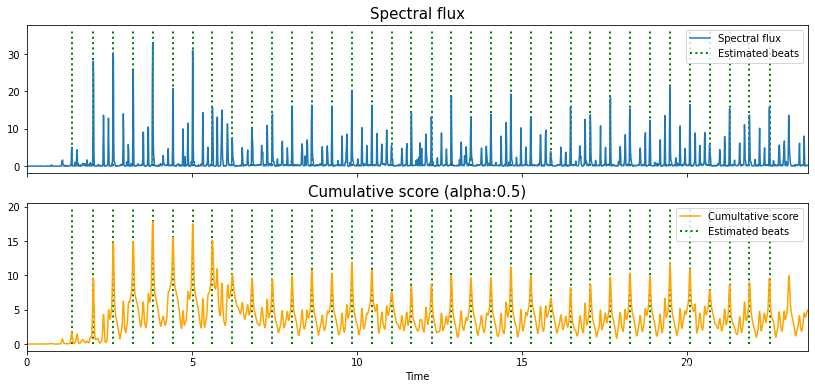
ax[0].vlines(est_beats, 0, 1.1*spectral_flux.max(), label='Estimated beats',
       color='green', linestyle=':', linewidth=2)
ax[0].legend(loc='upper right')

ax[1].plot(times, cumulative_score, color='orange', label='Cumultative score')
ax[1].set_title('Cumulative score (alpha:'+str(alpha)+')',fontsize=15)
ax[1].label_outer()
ax[1].set(xlim=[0, len(spectral_flux)/fps])
ax[1].vlines(est_beats, 0, 1.1*cumulative_score.max(), label='Estimated beats',
       color='green', linestyle=':', linewidth=2)
ax[1].legend(loc='upper right')
ax[1].set(xlabel = 'Time')
plt.show()
按照目前的情况,这个问题不适合我们的问答形式。我们希望答案得到事实、引用或专业知识的支持,但这个问题可能会引发辩论、争论、投票或扩展讨论。如果您觉得这个问题可以改进并可能重新打开,visitthehelpcenter指导。关闭10年前。在我在网上找到的每个基准测试中,Ruby似乎都很慢,比Java慢得多。Ruby的人只是说这无关紧要。您能举个例子说明RubyonRails(以及Ruby本身)的速度真的无关紧要吗?
我有这段代码:date_counter=Time.mktime(2011,01,01,00,00,00,"+05:00")@weeks=Array.new(date_counter..Time.now).step(1.week)do|week|logger.debug"WEEK:"+week.inspect@weeks从技术上讲,代码有效,输出:SatJan0100:00:00-05002011SatJan0800:00:00-05002011SatJan1500:00:00-05002011etc.但是执行时间完全是垃圾!每周计算大约需要四秒钟。我在这段代码中是否遗漏了一些奇怪的低效
我想知道NokogiriXPath或CSS解析是否可以更快地处理HTML文件。速度有何不同? 最佳答案 Nokogiri没有XPath或CSS解析。它将XML/HTML解析为单个DOM,然后您可以使用CSS或XPath语法进行查询。CSS选择器在要求libxml2执行查询之前在内部转换为XPath。因此(对于完全相同的选择器)XPath版本会快一点点,因为CSS不需要先转换成XPath。但是,您的问题没有通用答案;这取决于您选择的是什么,以及您的XPath是什么样的。很有可能,您不会编写与Nokogiri创建的相同的XPath。例如
过程和lambdadiffer关于方法范围和return关键字的效果。我对它们之间的性能差异很感兴趣。我写了一个测试,如下所示:deftime(&block)start=Time.nowblock.callp"thattook#{Time.now-start}"enddeftest(proc)time{(0..10000000).each{|n|proc.call(n)}}enddeftest_block(&block)time{(0..10000000).each{|n|block.call(n)}}enddefmethod_testtime{(1..10000000).each{|
我正在使用RubyonRails3.2.2、FactoryGirl3.1.0、FactoryGirlRails3.1.0、Rspec2.9.0和RspecRails2.9.0。为了测试我的应用程序,我必须在数据库中创建大量记录(大约5000条),但是该操作非常慢(创建记录需要10多分钟)。我这样进行:before(:each)do5000.timesdoFactoryGirl.create(:article,)endend如何改进我的规范代码以加快速度?注意:可能速度较慢是由在每个文章创建过程前后运行的(5)个文章回调引起的,但我可以跳过这些(因为我唯一需要测试的是文章和不是关联的模型
从来源(database_cleaner,active_record)来看,它们应该同样快。但是有人声称使用database_cleaner的事务策略会降低Controller和模型规范的速度(forexample)。我手头没有用于基准测试的大型测试套件。任何人有任何见解或比较两者? 最佳答案 我花了一点时间在广泛使用ActiveRecord固定装置的中型代码库上比较两者。当我将其切换为使用DatabaseCleaner而不是use_transactional_fixtures时,模型规范开始花费大约两倍的时间。在进行了与您相同的比
Ai-Bot基于流行的Node.js和JavaScript语言的一款新自动化框架,支持Windows和Android自动化。1、Windowsxpath元素定位算法支持支持Windows应用、.NET、WPF、Qt、Java和Electron客户端程序和ie、edgechrome浏览器2、Android支持原生APP和H5界面,元素定位速度是appium十倍,无线远程自动化操作多台安卓设备3、基于opencv图色算法,支持找图和多点找色,1080*2340全分辨率找图50MS以内4、内置免费OCR人工智能技术,无限制获取图片文字和找字功能。5、框架协议开源,除官方node.jsSDK外,用户可
(本题试图找出为什么一个程序在不同的处理器上运行会有所不同,所以它与编程的性能方面有关。)以下程序在配备2.2GHzCore2Duo的Macbook上运行需要3.6秒,在配备2.53GHzCore2Duo的MacbookPro上运行需要1.8秒。这是为什么?这有点奇怪……当CPU的时钟速度仅快15%时,为什么要加倍速度?我仔细检查了CPU仪表,以确保2个内核中没有一个处于100%使用率(以便查看CPU是否忙于运行其他东西)。难道是因为一个是MacOSXLeopard,一个是MacOSXSnowLeopard(64位)?两者都运行Ruby1.9.2。pRUBY_VERSIONpRUBY_
1.升级背景因项目需要使用数据质量模块功能,可以为数仓提供良好的数据质量监控功能。故要对已有2.0版本升级到3.0版本以上,此次选择测试了3.0.1和3.1.1两个版本,对进行同数据等任务调度暂停等操作测试,最后选择3.0.1版本原因:1.3.1.1在测试sql任务时,同时启动上百sql任务时,会出现sql任务报错,导致大量任务无法正常运行,询问社区大佬,这是DS本身bug导致,虽然此现象在3.0.1也有出现,不过出现几率较小。2.DS3.0.1以上版本zookeeper的依赖版本进行了更新,查看驱动版本是3.8版本。我们生产不打算升级zk,故选择使用3.0.1版本。此版本测试还是比较稳定的,
在我的一个Rails应用程序中,当我粘贴文本、键入和(尤其是)删除文本时,控制台开始运行得非常慢。我可以在顶部看到irb正在使用大量cpu。但我不知道如何进一步诊断这个问题。它是几周前才开始发生的。我想知道它是否可能与readline/wirble相关?这两个我都用。我刚刚在另一个应用程序中尝试了它,粘贴了一段文本,它看起来同样糟糕-文本以每秒一个字符的速度出现!也许我的命令行历史已经填满了?我怎样才能删除它?(对于Rails控制台,不是我的bash命令行历史记录)感谢任何建议-max编辑-抱歉,应该提供一些系统详细信息。给你:System-Ubuntu10.04Rubyversion
