| 内容 | 参考链接 |
|---|---|
| Vue2.x全家桶 | Vue2.x 全家桶参考链接 |
| Vue2.x项目(一) | Vue2.x 实现一个任务清单 |
| Vue2.x项目(二) | Vue2.x 实现GitHub搜索案例 |
| Vue3.x项目(三) | Vue3.x 实现一个任务清单 |
文章目录
如果你对 vue 的基础知识还很陌生,推荐先去学习一下 vue 基础
todoList 项目演示
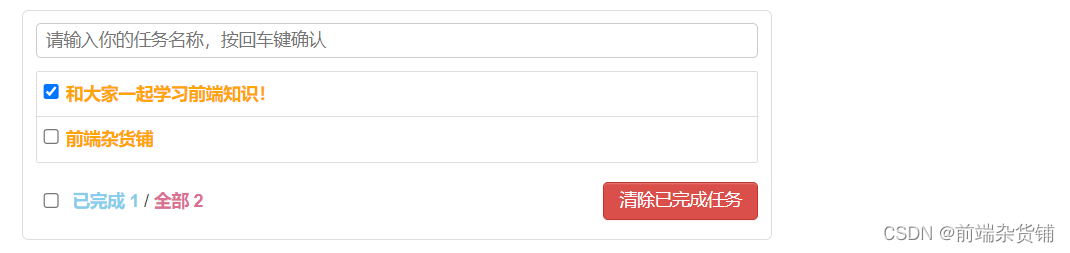
备注:
该项目有 五个组件 构成:
(1)App.vue 父组件,以上四个子组件 最终归并的地方,并实现很多功能相关方法
(2)MyHeader.vue 子组件:头部,用于用户文本框 输入添加任务事项
(3)MyList.vue 子组件:躯干,用于 呈现任务的列表
(4)MyItem.vue 子中子组件,Mylist.vue 的子组件,用于 呈现每个任务及编辑删除
(5)MyFooter 子组件,用于 显示所选个数和总个数及删除已完成任务
App.vue 父组件
<template>
  <!-- 最外层容器 -->
  <div class="todo-container">
    <div class="todo-wrap">
      <!-- 头部子组件,子传父,自定义 addTodo事件,添加一个 todo对象 -->
      <MyHeader @addTodo="addTodo" />
      <!-- 任务列表子组件,父传子,动态绑定对应事件 -->
      <MyList :updateTodo="updateTodo" :todos="todos" :checkTodo="checkTodo" :deleteTodo="deleteTodo" />
      <!-- 底部子组件,子传父,全选和全清除 -->
      <MyFooter
        :todos="todos"
        @checkAllTodo="checkAllTodo"
        @clearAllTodo="clearAllTodo"
      />
    </div>
  </div>
</template>

<script>
// 引入所需组件
import MyHeader from "./components/MyHeader.vue";
import MyList from "./components/MyList.vue";
import MyFooter from "./components/MyFooter.vue";

export default {
  name: "App",
  components: { MyHeader, MyList, MyFooter },
  data() {
    return {
      // 由于 todos 是 MyHeader 组件 和 MyFooter 组件都在用,所以放在APP中(状态提升)
      // 解析 JSON字符串 第一次使用时 null 身上没有 length 属性会报错,所以添加||,前面不能用时,置为空数组
      // localStorage.getItem("xxx") 用于从本地存储中读取 todos
      todos: JSON.parse(localStorage.getItem("todos")) || [],
    };
  },
  methods: {
    // 添加一个 todo
    addTodo(todoObj) {
      this.todos.unshift(todoObj);
    },
    // 勾选 or 取消勾选一个todo
    checkTodo(id) {
      this.todos.forEach((todo) => {
        if (todo.id === id) todo.done = !todo.done;
      });
    },
    // 更新一个 todo
    updateTodo(id, title) {
      this.todos.forEach((todo) => {
        if (todo.id === id) todo.title = title;
      });

    },
    // 删除,todo.id !== id 就不会 push 该 todo,即删除
    deleteTodo(id) {
      this.todos = this.todos.filter((todo) => todo.id !== id);
    },
    // 全选 or 取消全选
    checkAllTodo(done) {
      this.todos.forEach((todo) => {
        todo.done = done;
      });
    },
    // 清除所有已经完成的todo
    clearAllTodo() {
      this.todos = this.todos.filter((todo) => {
        return !todo.done;
      });
    },
  },
  watch: {
    todos: {
      // 深度监视 检测到是否被勾选
      deep: true,
      handler(value) {
        // localStorage.setItem("xxx") 用来添加 todo
        // 格式化为 JSON 字符串
        localStorage.setItem("todos", JSON.stringify(value));
      },
    },
  },
  // 销毁前进行自定义事件的解绑
  beforeDestroy() {
    this.$off(['addTodo', 'checkAllTodo', 'clearAllTodo'])
  }
};
</script>

<style>
body {
  background: #fff;
}

.btn {
  display: inline-block;
  padding: 4px 12px;
  margin-bottom: 0;
  font-size: 14px;
  line-height: 20px;
  text-align: center;
  vertical-align: middle;
  cursor: pointer;
  box-shadow: inset 0 1px 0 rgba(255, 255, 255, 0.2),
    0 1px 2px rgba(0, 0, 0, 0.05);
  border-radius: 4px;
}

.btn-danger {
  color: #fff;
  background-color: #da4f49;
  border: 1px solid #bd362f;
}

.btn-edit {
  margin-right: 5px;
  background-color: skyblue;
  border: 1px solid rgb(102, 158, 180);
}

.btn-danger:hover {
  color: #fff;
  background-color: #bd362f;
}

.btn:focus {
  outline: none;
}

.todo-container {
  width: 600px;
  margin: 10px auto;
}

.todo-container .todo-wrap {
  padding: 10px;
  border: 1px solid #ddd;
  border-radius: 5px;
}
</style>
MyHeader.vue 组件
npm i nanoid,安装 nanoid<style> 标签里的 scoped,表示里面定义的样式 仅在当前组件中生效<template>
<div class="todo-header">
<!-- 双向数据绑定 title,绑定键盘 enter 键,点击触发 add 事件,添加 title -->
<input
type="text"
placeholder="请输入你的任务名称,按回车键确认"
v-model="title"
@keyup.enter="add"
/>
</div>
</template>
<script>
import { nanoid } from "nanoid";
export default {
name: "MyHeader",
data() {
return {
// 要输入的任务事项
title: "",
};
},
methods: {
add() {
// 校验数据
if (!this.title.trim()) return alert("输入不能为空");
// 将用户的输入包装成为一个 todo 对象,nanoid() 是随机生成的唯一值,默认为未完成事件
const todoObj = { id: nanoid(), title: this.title, done: false };
// 通知 App 组件去添加一个 todo 对象
this.$emit("addTodo", todoObj);
// 清空输入
this.title = "";
},
},
};
</script>
<style scoped>
.todo-header input {
width: 578px;
height: 28px;
font-size: 14px;
border: 1px solid #ccc;
border-radius: 4px;
padding: 4px 7px;
margin-bottom: 10px;
}
.todo-header input:focus {
outline: none;
border-color: rgba(82, 168, 236, 0.8);
box-shadow: inset 0 1px 1px rgba(0, 0, 0, 0.075),
0 0 8px rgba(82, 168, 236, 0.6);
}
</style>
MyList.vue 组件
<template>
  <ul class="todo-main">
    <!-- :todo,动态绑定,供 MyItem.vue 使用 -->
    <!-- 自定义 updateTodo 事件,子传父,供子组件编辑更新数据 -->
    <MyItem
      v-for="todoObj in todos"
      :key="todoObj.id"
      :todo="todoObj"
      :checkTodo="checkTodo"
      :deleteTodo="deleteTodo"
      @updateTodo="updateTodo"
    />
  </ul>
</template>

<script>
import MyItem from "./MyItem.vue";
export default {
  name: "MyList",
  components: { MyItem },
  props: ["todos", "checkTodo", "deleteTodo", "updateTodo"],
};
</script>

<style scoped>
.todo-main {
  margin-left: 0px;
  border: 1px solid #ddd;
  border-radius: 2px;
  padding: 0px;
}

.todo-empty {
  height: 40px;
  line-height: 40px;
  border: 1px solid #ddd;
  border-radius: 2px;
  padding-left: 5px;
  margin-top: 10px;
}
</style>
MyItem.vue 组件
$nextTick (等 DOM 节点更新后执行),或者用 setTimeout 异步包裹也能达到同样的效果Vue.set() 和 vm.$set(),否则是无法触发视图更新的。<template>
<li>
<label>
<!-- 复选框,:checked 单向绑定 todo 是否已完成,@change 检测复选框的变化 -->
<input
type="checkbox"
:checked="todo.done"
@change="handleCheck(todo.id)"
/>
<!-- 非编辑状态下,在 sapn 标签中展示 todo -->
<span v-show="!todo.isEdit">{{ todo.title }}</span>
<!-- 绑定失去焦点事件,更新内容。ref 打标识,用于自动获取焦点 -->
<input
type="text"
style="height: 22px"
v-show="todo.isEdit"
:value="todo.title"
@blur="handleBlur(todo, $event)"
ref="inputTitle"
/>
</label>
<!-- 删除 todo -->
<button class="btn btn-danger" @click="handleDelete(todo.id)">删除</button>
<!-- 编辑状态下,展示输入框,隐藏编辑按钮。 -->
<button v-show="!todo.isEdit" class="btn btn-edit" @click="handleEdit(todo)">编辑</button>
</li>
</template>
<script>
export default {
name: "MyItem",
// 声明接收 todo 对象,checkTodo 是否勾选,deleteTodo 删除该 todo
props: ["todo", "checkTodo", "deleteTodo"],
methods: {
// 勾选 or 取消勾选
handleCheck(id) {
// 通知 APP 组件 将对应的 todo 对象的 done 值取反
this.checkTodo(id);
},
// 删除 todo
handleDelete(id) {
if (confirm("确定删除当前任务吗?")) {
this.deleteTodo(id);
}
},
// 编辑
handleEdit(todo) {
// 如果 todo 身上有 isEdit,则直接修改 isEdit,否则再给 todo 添加新的 isEdit
// Reflect.has(todo, 'isEdit') 或 todo.hasOwnProperty.call(todo, "isEdit")
if (Reflect.has(todo, 'isEdit')) {
todo.isEdit = true;
} else {
this.$set(todo, "isEdit", true);
}
// DOM 节点更新后执行
this.$nextTick(() => {
this.$refs.inputTitle.focus()
})
},
// 失去焦点,编辑框隐藏,并判断编辑后的内容是否为空,再呈现编辑后的内容
handleBlur(todo, e) {
todo.isEdit = false;
if(!e.target.value.trim()) return alert('输入内容不能为空!')
this.$emit('updateTodo', todo.id, e.target.value)
},
},
};
</script>
<style scoped>
span {
color: orange;
}
li {
list-style: none;
height: 36px;
line-height: 36px;
padding: 0 5px;
border-bottom: 1px solid #ddd;
}
li label {
cursor: pointer;
}
input {
margin-right: 5px;
}
li label li input {
vertical-align: middle;
margin-right: 6px;
position: relative;
top: -1px;
}
li button {
float: right;
display: none;
margin-top: 3px;
}
li:before {
content: initial;
}
li:last-child {
border-bottom: none;
}
li:hover {
background-color: #ddd;
}
li:hover button {
display: block;
}
</style>
MyFooter.vue 组件
<template>
  <!-- total 不为 0 则显示底部,否则隐藏 -->
  <div class="todo-footer" v-show="total">
    <label>
      <!-- 是否全选,双向绑定 isAll -->
      <input type="checkbox" v-model="isAll" />
    </label>
    <!-- 插值语法呈现数值 -->
    <span class="done">已完成 {{ doneTotal }}</span> /
    <span class="total">全部 {{ total }}</span>
    <button class="btn btn-danger" @click="clearAll()">清除已完成任务</button>
  </div>
</template>

<script>
export default {
  name: "MyFooter",
  props: ["todos"],
  computed: {
    // 返回 todos 的总长度
    total() {
      return this.todos.length;
    },
    // 统计任务已经完成的个数
    doneTotal() {
      // reduce() 方法接收一个函数作为累加器,数组中的每个值(从左到右)开始缩减,最终计算为一个值
      // pre 必需:初始值;todo 必需:当前元素;0 可选:传递给函数的初始值
      return this.todos.reduce((pre, todo) => pre + (todo.done ? 1 : 0), 0);
    },
    // 是否全选,当被选个数和总个数相同,且总个数大于 0 时,checked 选中
    isAll: {
      get() {
        return this.doneTotal === this.total && this.total > 0;
      },
      set(value) {
        this.$emit("checkAllTodo", value);
      },
    },
  },
  methods: {
    // 清除所有已完成任务
    clearAll() {
      this.$emit("clearAllTodo");
    },
  },
};
</script>

<style scoped>
.done {
  font-weight: bold;
  color: skyblue;
}

.total {
  font-weight: bold;
  color: palevioletred;
}

.todo-footer {
  height: 40px;
  line-height: 40px;
  padding-left: 6px;
  margin-top: 5px;
}

.todo-footer label {
  display: inline-block;
  margin-right: 20px;
  cursor: pointer;
}

.todo-footer label input {
  position: relative;
  top: -3px;
  vertical-align: middle;
  margin-right: -10px;
}

.todo-footer button {
  float: right;
  margin-top: 5px;
}
</style>
如果你是 看完全篇 阅读到了这里,我相信你一定是有收获的!
那么下面不妨打开自己的电脑,启动自己的编译器,来跟着做 / 自己做一遍吧!
好吧,我骗了你,真正学会它可能不止两个小时,但再多花点时间,你对 vue 的理解可能会有质的提升,加油~
如果这篇文章对你有些许帮助的话,不妨 三连 + 关注 支持一下~~
下一篇是 github 的搜索 demo,也是使用的 vue2.x 实现的,一起期待一下吧~
如何在buildr项目中使用Ruby?我在很多不同的项目中使用过Ruby、JRuby、Java和Clojure。我目前正在使用我的标准Ruby开发一个模拟应用程序,我想尝试使用Clojure后端(我确实喜欢功能代码)以及JRubygui和测试套件。我还可以看到在未来的不同项目中使用Scala作为后端。我想我要为我的项目尝试一下buildr(http://buildr.apache.org/),但我注意到buildr似乎没有设置为在项目中使用JRuby代码本身!这看起来有点傻,因为该工具旨在统一通用的JVM语言并且是在ruby中构建的。除了将输出的jar包含在一个独特的、仅限ruby
使用带有Rails插件的vim,您可以创建一个迁移文件,然后一次性打开该文件吗?textmate也可以这样吗? 最佳答案 你可以使用rails.vim然后做类似的事情::Rgeneratemigratonadd_foo_to_bar插件将打开迁移生成的文件,这正是您想要的。我不能代表textmate。 关于ruby-使用VimRails,您可以创建一个新的迁移文件并一次性打开它吗?,我们在StackOverflow上找到一个类似的问题: https://sta
我需要从一个View访问多个模型。以前,我的links_controller仅用于提供以不同方式排序的链接资源。现在我想包括一个部分(我假设)显示按分数排序的顶级用户(@users=User.all.sort_by(&:score))我知道我可以将此代码插入每个链接操作并从View访问它,但这似乎不是“ruby方式”,我将需要在不久的将来访问更多模型。这可能会变得很脏,是否有针对这种情况的任何技术?注意事项:我认为我的应用程序正朝着单一格式和动态页面内容的方向发展,本质上是一个典型的网络应用程序。我知道before_filter但考虑到我希望应用程序进入的方向,这似乎很麻烦。最终从任何
我想要做的是有2个不同的Controller,client和test_client。客户端Controller已经构建,我想创建一个test_clientController,我可以使用它来玩弄客户端的UI并根据需要进行调整。我主要是想绕过我在客户端中内置的验证及其对加载数据的管理Controller的依赖。所以我希望test_clientController加载示例数据集,然后呈现客户端Controller的索引View,以便我可以调整客户端UI。就是这样。我在test_clients索引方法中试过这个:classTestClientdefindexrender:template=>
我在我的Rails项目中使用Pow和powifygem。现在我尝试升级我的ruby版本(从1.9.3到2.0.0,我使用RVM)当我切换ruby版本、安装所有gem依赖项时,我通过运行railss并访问localhost:3000确保该应用程序正常运行以前,我通过使用pow访问http://my_app.dev来浏览我的应用程序。升级后,由于错误Bundler::RubyVersionMismatch:YourRubyversionis1.9.3,butyourGemfilespecified2.0.0,此url不起作用我尝试过的:重新创建pow应用程序重启pow服务器更新战俘
如果您尝试在Ruby中的nil对象上调用方法,则会出现NoMethodError异常并显示消息:"undefinedmethod‘...’fornil:NilClass"然而,有一个tryRails中的方法,如果它被发送到一个nil对象,它只返回nil:require'rubygems'require'active_support/all'nil.try(:nonexisting_method)#noNoMethodErrorexceptionanymore那么try如何在内部工作以防止该异常? 最佳答案 像Ruby中的所有其他对象
关闭。这个问题需要detailsorclarity.它目前不接受答案。想改进这个问题吗?通过editingthispost添加细节并澄清问题.关闭8年前。Improvethisquestion为什么SecureRandom.uuid创建一个唯一的字符串?SecureRandom.uuid#=>"35cb4e30-54e1-49f9-b5ce-4134799eb2c0"SecureRandom.uuid方法创建的字符串从不重复?
我已经像这样安装了一个新的Rails项目:$railsnewsite它执行并到达:bundleinstall但是当它似乎尝试安装依赖项时我得到了这个错误Gem::Ext::BuildError:ERROR:Failedtobuildgemnativeextension./System/Library/Frameworks/Ruby.framework/Versions/2.0/usr/bin/rubyextconf.rbcheckingforlibkern/OSAtomic.h...yescreatingMakefilemake"DESTDIR="cleanmake"DESTDIR="
我有一个正在构建的应用程序,我需要一个模型来创建另一个模型的实例。我希望每辆车都有4个轮胎。汽车模型classCar轮胎模型classTire但是,在make_tires内部有一个错误,如果我为Tire尝试它,则没有用于创建或新建的activerecord方法。当我检查轮胎时,它没有这些方法。我该如何补救?错误是这样的:未定义的方法'create'forActiveRecord::AttributeMethods::Serialization::Tire::Module我测试了两个环境:测试和开发,它们都因相同的错误而失败。 最佳答案
我想在Ruby中创建一个用于开发目的的极其简单的Web服务器(不,不想使用现成的解决方案)。代码如下:#!/usr/bin/rubyrequire'socket'server=TCPServer.new('127.0.0.1',8080)whileconnection=server.acceptheaders=[]length=0whileline=connection.getsheaders想法是从命令行运行这个脚本,提供另一个脚本,它将在其标准输入上获取请求,并在其标准输出上返回完整的响应。到目前为止一切顺利,但事实证明这真的很脆弱,因为它在第二个请求上中断并出现错误:/usr/b
