Store用来写业务逻辑。
在MVIKotlin中用Store接口表示。
Intent、输出State、Label。state返回当前Store的State。states(Observer<State>)用于订阅State的更新。订阅时他会发出Store的State。可以在任何线程调用。States总是在主线程上发出。labels(Observer<Label>)用于订阅Labels。可以在任何线程调用。Labels总是在主线程上发出。accept(Intent)用于给Store补给Intents。只能在主线程调用。init()用于初始化Store。如果可以的话会触发Bootstrapper。只能在主线程调用。dispose()用于释放Store并取消它的所有异步操作。只能在主线程调用。
states(Observer<State>)与labels(Observer<Label>)通常不直接使用。可以使用扩展Reaktive与kotlinx.coroutines类库(详见生命周期)。只有在自定义扩展时会用到这些函数。
任何Store最多只有三个组件:引导程序(Bootstrapper)、执行者(Executor)与缩减器(Reducer)。
Reducer为什么叫缩减器:https://blog.csdn.net/uwenhao2008/article/details/79613717
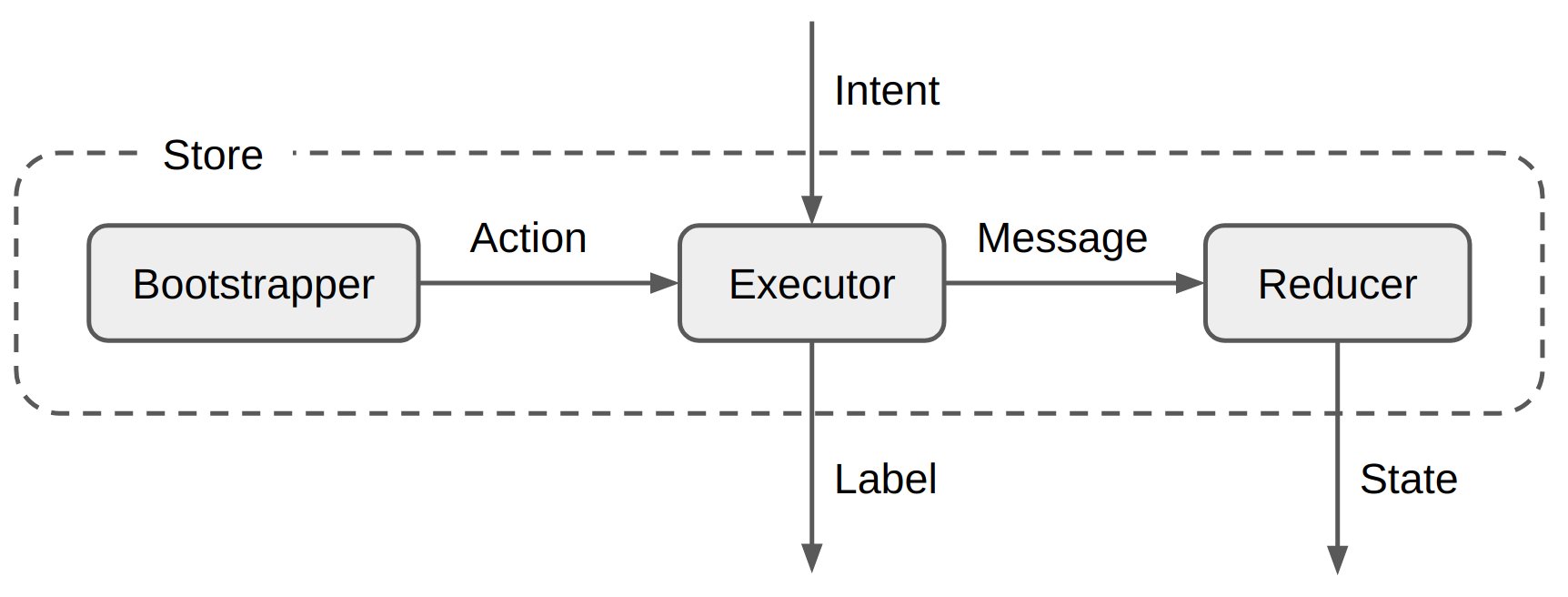
用于快速启动Store。
如果Bootstrapper被传递给StoreFactory,它会在Store的初始化期间被执行。
Bootstrapper生产Actions给Executor处理。
Bootstrapper总是在主线程执行,Actions也只能在主线程调度。在Bootstrapper执行时可以自由切换线程。
Bootstrapper是有状态的,不能作为单例使用。
Executor用来写业务逻辑,所有的异步操作都发生在这里。
Executor接收并处理来自外部的Intents与来自内部的Actions。
Executor有两种输出:Messages与Labels。
Messages被传递给Reducer。
Labels被直接发送到外部。
Executor持续访问Store的State。在Message被调度后,新的State对Executor来说是可见的。
Executor总是在主线程执行,Messages与Labels也只能在主线程调度。在Action与Intents处理时可以自由切换线程。
Executor是有状态的,不能作为单例使用。
Reducer是一个函数。它接收来自Executor的Message与Store的State作为参数,返回一个新的State。
Reducer在任何Message被生产后调用,调用返回后应用并发送新的State。
Reducer总是在主线程调用。
通常不需要直接实现Store接口,应该使用StoreFactory来创建,只需要将Bootstrapper、Executor和Reducer传入并初始化State即可。可以在不同的情况下使用不同的StoreFactory并在需要的时候组合他们。
一些由MVIKotlin提供的Factory:
DefaultStoreFactory 创建默认的Store实例。由mvikotlin-main模块提供。LoggingStoreFactory 包装另一个StoreFactory并添加日志记录。由mvikotlin-logging模块提供。Store。由mvikotlin-timetravel模块提供。默认情况下,Stores由StoreFactory自动初始化。可以通过设置StoreFactory.create(...)函数的autoInit参数为false来禁用自动初始化。
如果自动初始化被禁用,你应该使用
Store.init()函数进行手动初始化。
用于快速创建新的Store:https://gist.github.com/arkivanov/34bb84e73e56c22a4e7c752421d5f02c
这个例子会创建一个简单的计数器Store,它可以实现增加或减少它的值。
首先,定义一个接口,它看起来像这样:
internal interface CalculatorStore : Store<Intent, State, Nothing> {

    sealed class Intent {
        object Increment : Intent()
        object Decrement : Intent()
    }

    data class State(
        val value: Long = 0L
    )
}
CalculatorStore接口本身可以标记为internal,因此这是一个模块的具体实现。
同时,CalculatorStore有两个Intents(Increment和Decrement)并且State有一个Long类型的属性value。这是这个Store的公开API部分。
接下来是Store的实例化工厂:
internal class CalculatorStoreFactory(private val storeFactory: StoreFactory) {

    fun create(): CalculatorStore =
        object : CalculatorStore, Store<Intent, State, Nothing> by storeFactory.create(
            name = "CounterStore",
            initialState = State(),
            reducer = ReducerImpl
        ) {
        }

    private object ReducerImpl : Reducer<State, Intent> {
        override fun State.reduce(msg: Intent): State =
            when (msg) {
                is Intent.Increment -> copy(value = value + 1L)
                is Intent.Decrement -> copy(value = value - 1L)
            }
    }
}
我们只需要Reducer组件。它接受Intents并且通过递增或递减value的值来修改State。
工厂的create()函数使用作为依赖项传递的StoreFactory。
目前CalculatorStore只能递增或递减它的值。接下来我们需要实现计算从1加到value的总和。我们需要一个新的Intent:
internal interface CalculatorStore : Store<Intent, State, Nothing> {

    sealed class Intent {
        object Increment : Intent()
        object Decrement : Intent()
        data class Sum(val n: Int): Intent() // <-- 增加了这行
    }

    data class State(
        val value: Long = 0L
    )
}
目前的想法是CalculatorStore会接收Intent.Sum(N),计算从1加到value的总和并使用计算得到的值更新State。但是这个计算是很耗时的,所以我们应该让它在后台线程中执行。因此我们需要Executor。
为了让Executor可以和Reducer进行通信,我们需要Messages:
internal class CalculatorStoreFactory(private val storeFactory: StoreFactory) {

    private sealed class Msg {
        class Value(val value: Long) : Msg()
    }
}
我们需要一个新的Reducer,现在它可以通过接收Messages来代替Intents了:
internal class CalculatorStoreFactory(private val storeFactory: StoreFactory) {

    private sealed class Msg {
        class Value(val value: Long) : Msg()
    }

    private object ReducerImpl : Reducer<State, Msg> {
        override fun State.reduce(msg: Msg): State =
            when (msg) {
                is Msg.Value -> copy(value = msg.value)
            }
    }
}
Msg.Value(Long)用来替换State中value的值。
接下来是Executor。我们不需要实现整个接口,只需要扩展基本实现即可。
两个由MVIKotlin提供的Executors基本实现:
mvikotlin-extensions-reaktive模块提供。mvikotlin-extensions-coroutines模块提供。两个都来尝试一下:
internal class CalculatorStoreFactory(private val storeFactory: StoreFactory) {

    // ...

    private class ExecutorImpl : ReaktiveExecutor<Intent, Nothing, State, Msg, Nothing>() {
        override fun executeIntent(intent: Intent, getState: () -> State) =
            when (intent) {
                is Intent.Increment -> dispatch(Msg.Value(getState().value + 1))
                is Intent.Decrement -> dispatch(Msg.Value(getState().value - 1))
                is Intent.Sum -> sum(intent.n)
            }

        private fun sum(n: Int) {
            singleFromFunction { (1L..n.toLong()).sum() }
                .subscribeOn(computationScheduler)
                .map(Msg::Value)
                .observeOn(mainScheduler)
                .subscribeScoped(onSuccess = ::dispatch)
        }
    }

    // ...
}
ExecutorImpl继承自ReaktiveExecutor并实现了executeIntent方法。executeIntent提供了一个Intent和一个当前State的提供者。对于Intent.Increment和Intent.Decrement只需要简单地发送一个带有由dispatch函数包装的新的值的Message。但对于Intent.Sum需要用到Reaktive来进行多线程处理:在computationScheduler中求和,然后转换到mainScheduler并使用dispatch来发送Message。
ReaktiveExecutor实现了Reaktive的 DisposableScope,它提供了许多扩展函数。我们使用了其中之一:subscribeScoped,这样可以确保在Store被释放时订阅也可以被释放。
internal class CalculatorStoreFactory(private val storeFactory: StoreFactory) {

    // ...

    private class ExecutorImpl : CoroutineExecutor<Intent, Nothing, State, Msg, Nothing>() {
        override fun executeIntent(intent: Intent, getState: () -> State) =
            when (intent) {
                is Intent.Increment -> dispatch(Msg.Value(getState().value + 1))
                is Intent.Decrement -> dispatch(Msg.Value(getState().value - 1))
                is Intent.Sum -> sum(intent.n)
            }

        private fun sum(n: Int) {
            scope.launch {
                val sum = withContext(Dispatchers.Default) { (1L..n.toLong()).sum() }
                dispatch(Msg.Value(sum))
            }
        }
    }

    // ...
}
ExecutorImpl继承自CoroutineExecutor。求和过程在Default调度器中被执行,Message在Main线程中被调度。
CoroutineExecutor提供了名为scope的CoroutineScope属性,我们可以用它来执行异步任务。scope的默认调度器是Dispatchers.Main,可以通过传给CoroutineExecutor的构造函数不同的CoroutineContext来重写默认调度器。在Store被释放时scope会自动取消。
Labels是由Store(或Executor)生产的一次性事件。一旦Labels被发布,它们会被当前所有的订阅者接收并且不会缓存。Executor有一个专门用来发布Label的函数:publish(Label)。
我们需要将Executor的构建工厂交给StoreFactory:
internal class CalculatorStoreFactory(private val storeFactory: StoreFactory) {

    fun create(): CalculatorStore =
        object : CalculatorStore, Store<Intent, State, Nothing> by storeFactory.create(
            name = "CounterStore",
            initialState = State(),
            executorFactory = ::ExecutorImpl, // <-- 交付Executor的工厂
            reducer = ReducerImpl
        ) {
        }

    // ...
}
为什么要使用构建工厂而不是直接使用一个Executor的实例呢?因为前者可以实现时间旅行功能。在调试时间旅行事件时,它会在必要时创建单独的执行器实例,并伪造它们的States。
当我们需要创建Store的一个新的实例时,它会保持一个初始化State并什么都不做,直到你提供了一个Intent。但有时需要引导启动一个Store,在它被创建时做一些额外的事情。例如,它可以开始从服务端接收事件,或从数据库中读取一些数据。这就是Bootstrapper要做的事:生产Actions并交给Executor运行,就像Intents一样。
CalculatorStore能够计算从1到N的和,目前它会在接收到Intent.Sum(N)时执行这一步骤。让我们使用Bootstrapper来让CalculatorStore被创建时计算sum(100)。Executor已经实现了计算的具体过程,所以我们只要发送一个触发Action给Executor,就像Intent.Sum(N)。
首先,添加一个Action:
internal class CalculatorStoreFactory(private val storeFactory: StoreFactory) {

    // ...

    private sealed class Action {
        class Sum(val n: Int): Action()
    }

    // ...
}
然后,在ReaktiveExecutor中处理这个Action:
internal class CalculatorStoreFactory(private val storeFactory: StoreFactory) {

    // ...

    private class ExecutorImpl : ReaktiveExecutor<Intent, Action, State, Msg, Nothing>() {
        override fun executeAction(action: Action, getState: () -> State) =
            when (action) {
                is Action.Sum -> sum(action.n)
            }

        // ...
    }

    // ...
}
或者在CoroutineExecutor中来处理,是一样的:
internal class CalculatorStoreFactory(private val storeFactory: StoreFactory) {

    // ...

    private class ExecutorImpl : CoroutineExecutor<Intent, Action, State, Msg, Nothing>() {
        override fun executeAction(action: Action, getState: () -> State) =
            when (action) {
                is Action.Sum -> sum(action.n)
            }

        // ...
    }

    // ...
}
最后,我们需要触发这个Action。我们需要将一个Bootstrapper传给StoreFactory。对于这种简单的情况,我们只需要使用SimpleBootstrapper:
internal class CalculatorStoreFactory(private val storeFactory: StoreFactory) {

    fun create(): CalculatorStore =
        object : CalculatorStore, Store<Intent, State, Nothing> by storeFactory.create(
            name = "CounterStore",
            initialState = State(),
            bootstrapper = SimpleBootstrapper(Action.Sum(100)), // <-- 增加了这行
            executorFactory = ::ExecutorImpl,
            reducer = ReducerImpl
        ) {
        }

    // ...
}
SimpleBootstrapper只调度了提供的Actions,但有时我们可能需要其他的引导程序,例如后台工作:
使用来自mvikotlin-extensions-reaktive模块的ReaktiveBootstrapper:
internal class CalculatorStoreFactory(private val storeFactory: StoreFactory) {

    fun create(): CalculatorStore =
        object : CalculatorStore, Store<Intent, State, Nothing> by storeFactory.create(
            name = "CounterStore",
            initialState = State(),
            bootstrapper = BootstrapperImpl, // <-- 传BootstrapperImp给 StoreFactory
            executorFactory = ::ExecutorImpl,
            reducer = ReducerImpl
        ) {
        }

    private sealed class Action {
        class SetValue(val value: Long): Action() // <-- 使用另一个Action
    }

    // ...

    private class BootstrapperImpl : ReaktiveBootstrapper<Action>() {
        override fun invoke() {
            singleFromFunction { (1L..1000000.toLong()).sum() }
                .subscribeOn(computationScheduler)
                .map(Action::SetValue)
                .observeOn(mainScheduler)
                .subscribeScoped(onSuccess = ::dispatch)
        }
    }

    private class ExecutorImpl : ReaktiveExecutor<Intent, Action, State, Msg, Nothing>() {
        override fun executeAction(action: Action, getState: () -> State) =
            when (action) {
                is Action.SetValue -> dispatch(Msg.Value(action.value)) // <-- 处理Action
            }

        // ...
    }

    // ...
}
ReaktiveBootstrapper也实现了DisposableScope,就像ReaktiveExecutor一样。所以我们也可以在这里使用subscribeScoped函数。
使用来自mvikotlin-extensions-coroutines模块的CoroutineBootstrapper:
internal class CalculatorStoreFactory(private val storeFactory: StoreFactory) {

    fun create(): CalculatorStore =
        object : CalculatorStore, Store<Intent, State, Nothing> by storeFactory.create(
            name = "CounterStore",
            initialState = State(),
            bootstrapper = BootstrapperImpl,
            executorFactory = ::ExecutorImpl,
            reducer = ReducerImpl
        ) {
        }

    private sealed class Action {
        class SetValue(val value: Long): Action()
    }

    // ...

    private class BootstrapperImpl : CoroutineBootstrapper<Action>() {
        override fun invoke() {
            scope.launch {
                val sum = withContext(Dispatchers.Default) { (1L..1000000.toLong()).sum() }
                dispatch(Action.SetValue(sum))
            }
        }
    }

    private class ExecutorImpl : CoroutineExecutor<Intent, Action, State, Msg, Nothing>() {
        override fun executeAction(action: Action, getState: () -> State) =
            when (action) {
                is Action.SetValue -> dispatch(Msg.Value(action.value))
            }

        // ...
    }

    // ...
}
CoroutineBootstrapper也提供了名为scope的CoroutineScope属性,就和CoroutineExecutor一样,所以我们可以用它来执行异步任务。
目录前言滤波电路科普主要分类实际情况单位的概念常用评价参数函数型滤波器简单分析滤波电路构成低通滤波器RC低通滤波器RL低通滤波器高通滤波器RC高通滤波器RL高通滤波器部分摘自《LC滤波器设计与制作》,侵权删。前言最近需要学习放大电路和滤波电路,但是由于只在之前做音乐频谱分析仪的时候简单了解过一点点运放,所以也是相当从零开始学习了。滤波电路科普主要分类滤波器:主要是从不同频率的成分中提取出特定频率的信号。有源滤波器:由RC元件与运算放大器组成的滤波器。可滤除某一次或多次谐波,最普通易于采用的无源滤波器结构是将电感与电容串联,可对主要次谐波(3、5、7)构成低阻抗旁路。无源滤波器:无源滤波器,又称
最近在学习CAN,记录一下,也供大家参考交流。推荐几个我觉得很好的CAN学习,本文也是在看了他们的好文之后做的笔记首先是瑞萨的CAN入门,真的通透;秀!靠这篇我竟然2天理解了CAN协议!实战STM32F4CAN!原文链接:https://blog.csdn.net/XiaoXiaoPengBo/article/details/116206252CAN详解(小白教程)原文链接:https://blog.csdn.net/xwwwj/article/details/105372234一篇易懂的CAN通讯协议指南1一篇易懂的CAN通讯协议指南1-知乎(zhihu.com)视频推荐CAN总线个人知识总
深度学习部署:Windows安装pycocotools报错解决方法1.pycocotools库的简介2.pycocotools安装的坑3.解决办法更多Ai资讯:公主号AiCharm本系列是作者在跑一些深度学习实例时,遇到的各种各样的问题及解决办法,希望能够帮助到大家。ERROR:Commanderroredoutwithexitstatus1:'D:\Anaconda3\python.exe'-u-c'importsys,setuptools,tokenize;sys.argv[0]='"'"'C:\\Users\\46653\\AppData\\Local\\Temp\\pip-instal
我完全不是程序员,正在学习使用Ruby和Rails框架进行编程。我目前正在使用Ruby1.8.7和Rails3.0.3,但我想知道我是否应该升级到Ruby1.9,因为我真的没有任何升级的“遗留”成本。缺点是什么?我是否会遇到与普通gem的兼容性问题,或者甚至其他我不太了解甚至无法预料的问题? 最佳答案 你应该升级。不要坚持从1.8.7开始。如果您发现不支持1.9.2的gem,请避免使用它们(因为它们很可能不被维护)。如果您对gem是否兼容1.9.2有任何疑问,您可以在以下位置查看:http://www.railsplugins.or
如何学习ruby的正则表达式?(对于假人) 最佳答案 http://www.rubular.com/在Ruby中使用正则表达式时是一个很棒的工具,因为它可以立即将结果可视化。 关于ruby-我如何学习ruby的正则表达式?,我们在StackOverflow上找到一个类似的问题: https://stackoverflow.com/questions/1881231/
深度学习12.CNN经典网络VGG16一、简介1.VGG来源2.VGG分类3.不同模型的参数数量4.3x3卷积核的好处5.关于学习率调度6.批归一化二、VGG16层分析1.层划分2.参数展开过程图解3.参数传递示例4.VGG16各层参数数量三、代码分析1.VGG16模型定义2.训练3.测试一、简介1.VGG来源VGG(VisualGeometryGroup)是一个视觉几何组在2014年提出的深度卷积神经网络架构。VGG在2014年ImageNet图像分类竞赛亚军,定位竞赛冠军;VGG网络采用连续的小卷积核(3x3)和池化层构建深度神经网络,网络深度可以达到16层或19层,其中VGG16和VGG
文章目录1、自相关函数ACF2、偏自相关函数PACF3、ARIMA(p,d,q)的阶数判断4、代码实现1、引入所需依赖2、数据读取与处理3、一阶差分与绘图4、ACF5、PACF1、自相关函数ACF自相关函数反映了同一序列在不同时序的取值之间的相关性。公式:ACF(k)=ρk=Cov(yt,yt−k)Var(yt)ACF(k)=\rho_{k}=\frac{Cov(y_{t},y_{t-k})}{Var(y_{t})}ACF(k)=ρk=Var(yt)Cov(yt,yt−k)其中分子用于求协方差矩阵,分母用于计算样本方差。求出的ACF值为[-1,1]。但对于一个平稳的AR模型,求出其滞
写在之前Shader变体、Shader属性定义技巧、自定义材质面板,这三个知识点任何一个单拿出来都是一套知识体系,不能一概而论,本文章目的在于将学习和实际工作中遇见的问题进行总结,类似于网络笔记之用,方便后续回顾查看,如有以偏概全、不祥不尽之处,还望海涵。1、Shader变体先看一段代码......Properties{ [KeywordEnum(on,off)]USL_USE_COL("IsUseColorMixTex?",int)=0 [Toggle(IS_RED_ON)]_IsRed("IsRed?",int)=0}......//中间省略,后续会有完整代码 #pragmamulti_c
TCL脚本语言简介•TCL(ToolCommandLanguage)是一种解释执行的脚本语言(ScriptingLanguage),它提供了通用的编程能力:支持变量、过程和控制结构;同时TCL还拥有一个功能强大的固有的核心命令集。TCL经常被用于快速原型开发,脚本编程,GUI和测试等方面。•实际上包含了两个部分:一个语言和一个库。首先,Tcl是一种简单的脚本语言,主要使用于发布命令给一些互交程序如文本编辑器、调试器和shell。由于TCL的解释器是用C\C++语言的过程库实现的,因此在某种意义上我们又可以把TCL看作C库,这个库中有丰富的用于扩展TCL命令的C\C++过程和函数,所以,Tcl是
按照目前的情况,这个问题不适合我们的问答形式。我们希望答案得到事实、引用或专业知识的支持,但这个问题可能会引发辩论、争论、投票或扩展讨论。如果您觉得这个问题可以改进并可能重新打开,visitthehelpcenter指导。关闭9年前。我来自C、php和bash背景,很容易学习,因为它们都有相同的C结构,我可以将其与我已经知道的联系起来。然后2年前我学了Python并且学得很好,Python对我来说比Ruby更容易学。然后从去年开始,我一直在尝试学习Ruby,然后是Rails,我承认,直到现在我还是学不会,讽刺的是那些打着简单易学的烙印,但是对于我这样一个老练的程序员来说,我只是无法将它
