iOS16.1 实时活动 (Live Activity)&灵动岛适配
苹果在 WWDC22 中,提出了实时活动(Live Activity)的概念,以便于用户在锁屏查看一些应用实时活动的更新。并且ActivityKit实现了灵动岛视图的自定义。经过我近两个月的学习,总结出了一些经验分享出来供大家批评和指正。
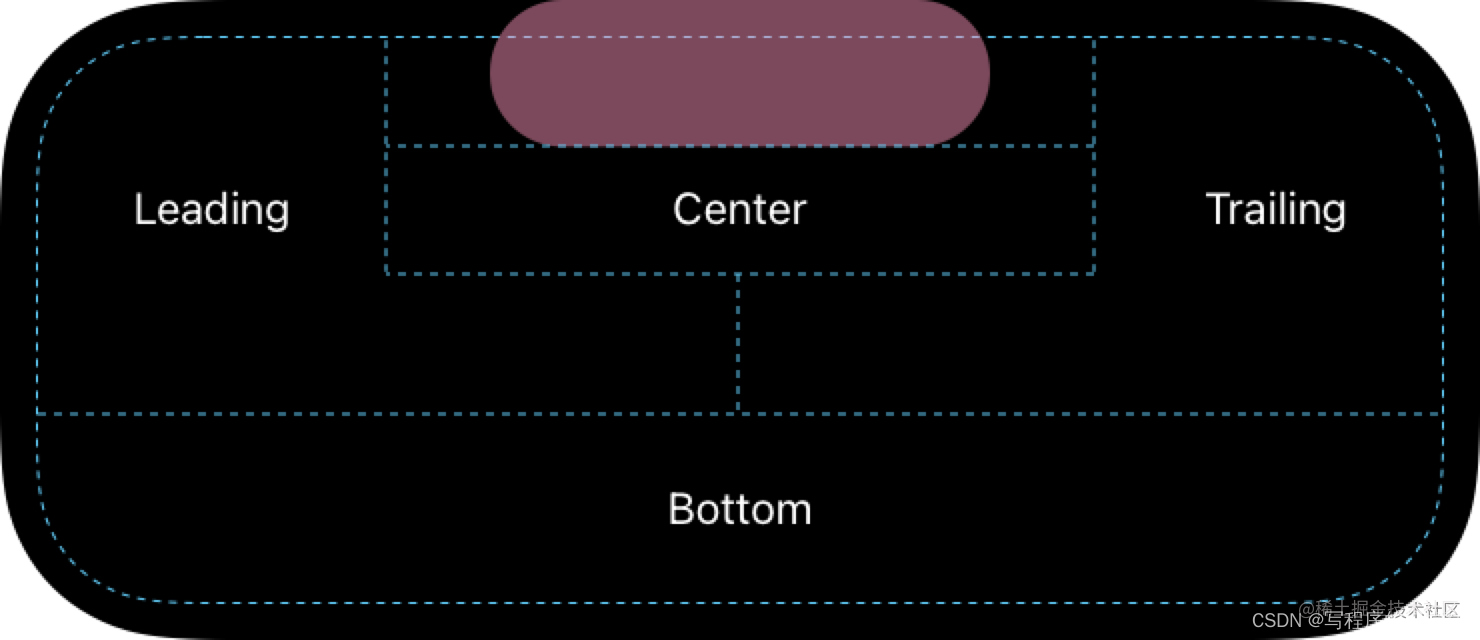
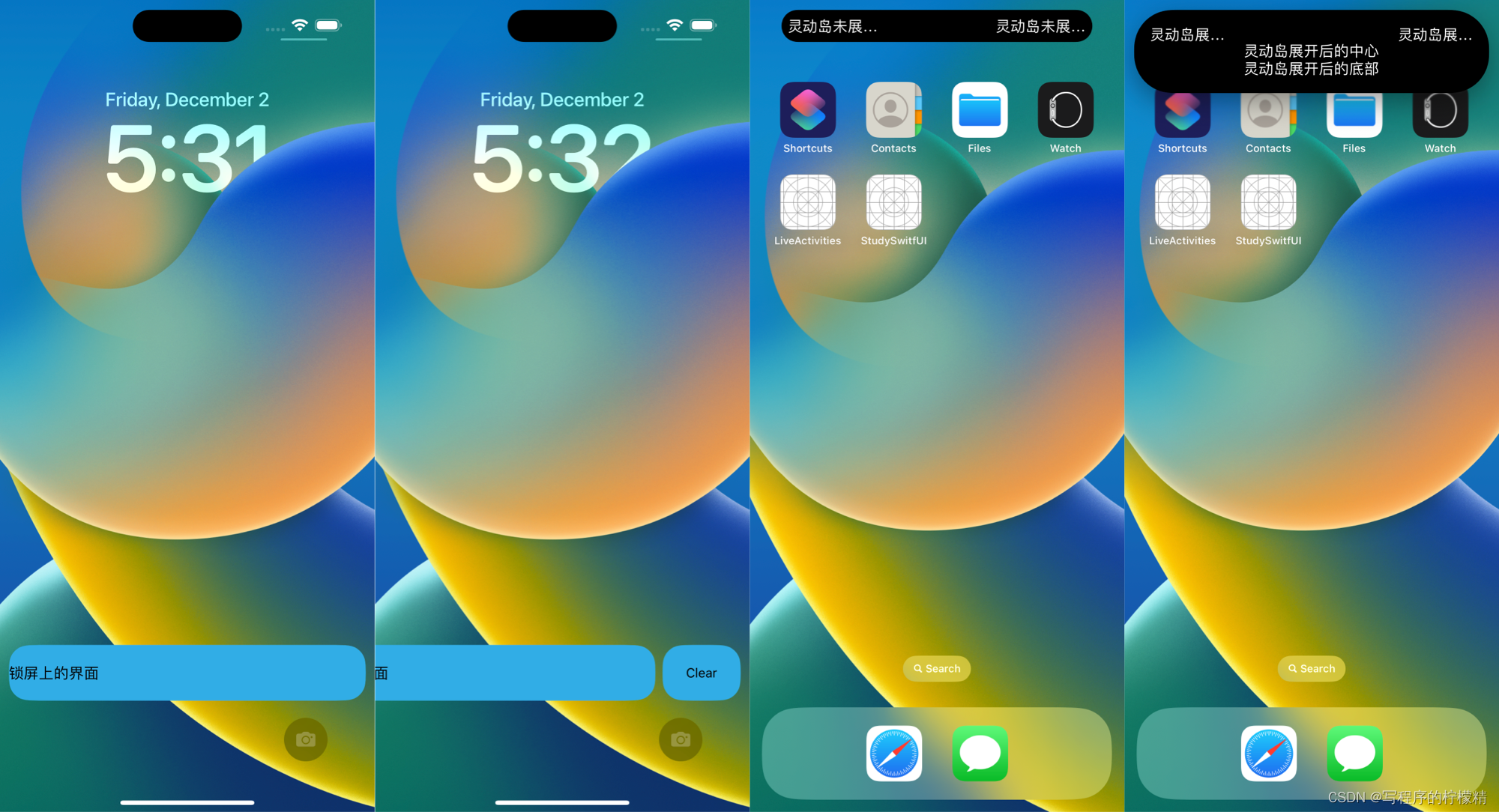
iOS16.1 锁屏界面上新增了实时活动界面,目前仅有iPhone 14 Pro和iPhone 14 Pro Max 两款机型上拥有灵动岛。实时活动包括了锁屏界面和灵动岛界面两个部分的内容,示例如下图所示:
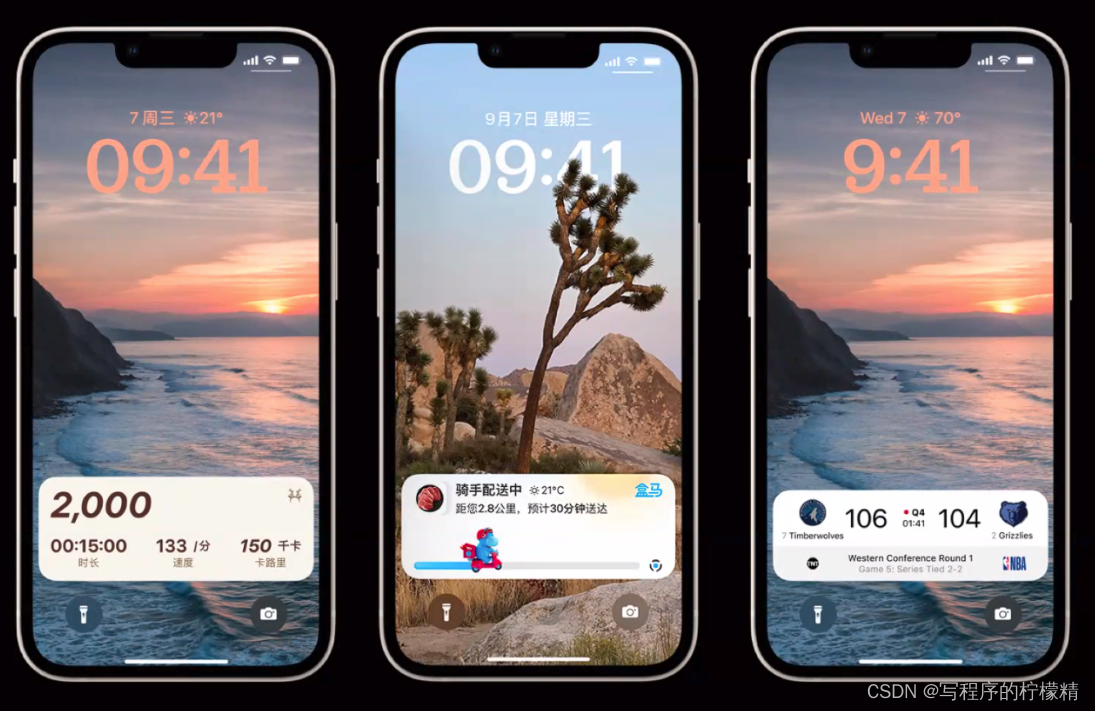
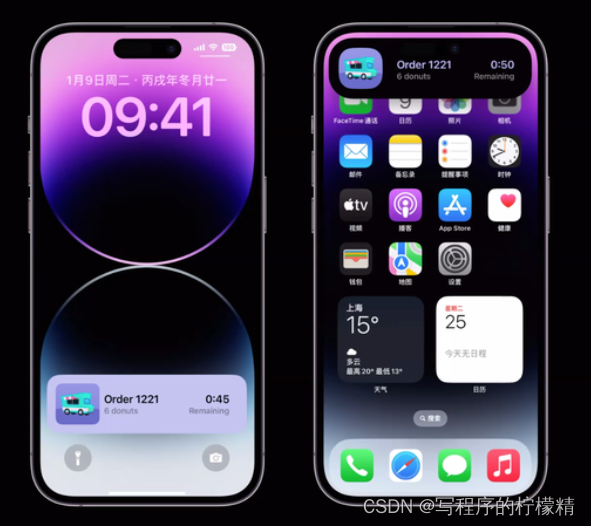
相较于iOS16.0的锁屏小组件,实时活动是显示在通知区域,且拥有更自由的视图定制和刷新方式。和小组件一样,它也限制了视图上的动画效果显示。我们可以使用实时更新来做一些有意思的设计和功能。例如上面演示的 运动监测、订单进度、赛事成绩等。
需要在主程序的Info.plist中添加键值:Supports Live Activities为YES
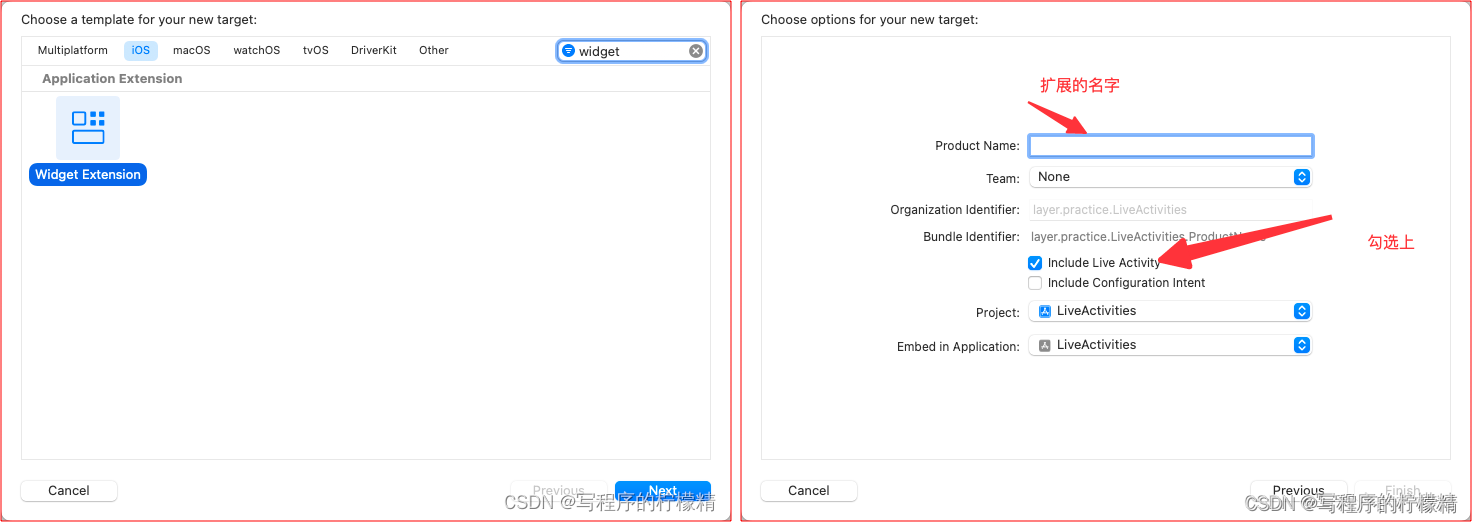
如果项目中已经有WidgetExtension,可以直接快进到第二步。
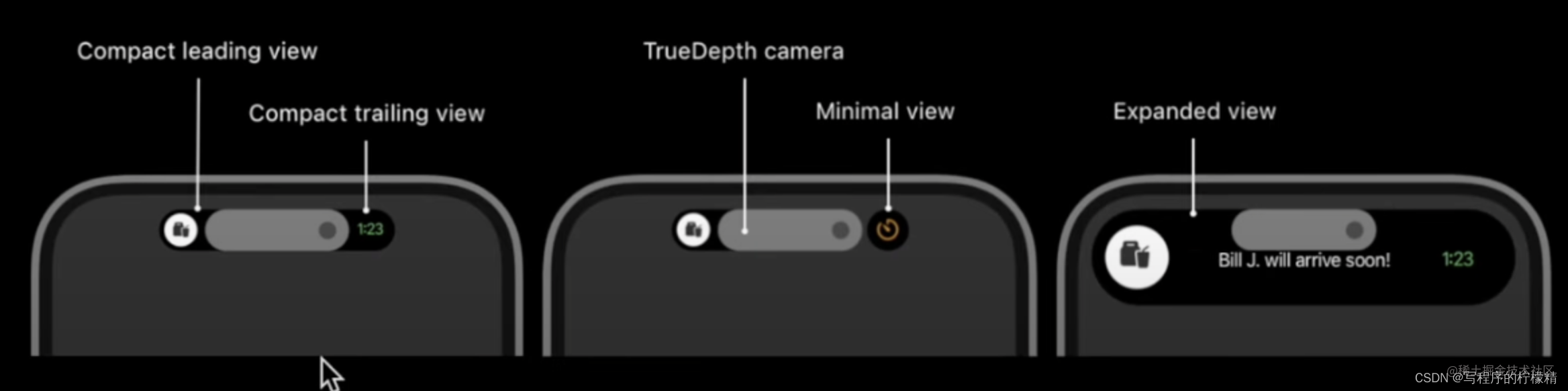
struct LiveActivitiesWidget: Widget {
    var body: some WidgetConfiguration {
        ActivityConfiguration(for: LiveActivitiesAttributes.self) { context in
            Text("锁屏上的界面")
                .activityBackgroundTint(Color.cyan) // 背景色
                .activitySystemActionForegroundColor(Color.black) // 系统操作的按钮字体色
        } dynamicIsland: { context in
            DynamicIsland {
                DynamicIslandExpandedRegion(.leading) {
                    Text("灵动岛展开后的左边")
                }
                DynamicIslandExpandedRegion(.trailing) {
                    Text("灵动岛展开后的右边")
                }
                DynamicIslandExpandedRegion(.center) {
                    Text("灵动岛展开后的中心")
                }
                DynamicIslandExpandedRegion(.bottom) {
                    Text("灵动岛展开后的底部")
                }
            } compactLeading: {
                Text("灵动岛未展开的左边")
            } compactTrailing: {
                Text("灵动岛未展开的右边")
            } minimal: {
                // 这里是灵动岛有多个任务的情况下,展示优先级高的任务,位置在右边的一个圆圈区域
                Text("灵动岛Mini")
            }
            .widgetURL(URL(string: "http://www.apple.com")) // 点击整个区域,通过deeplink将数据传递给主工程,做相应的业务
            .keylineTint(Color.red) // ///设置“动态岛”中显示的“活动”的关键帧线色调。
        }
    }
}
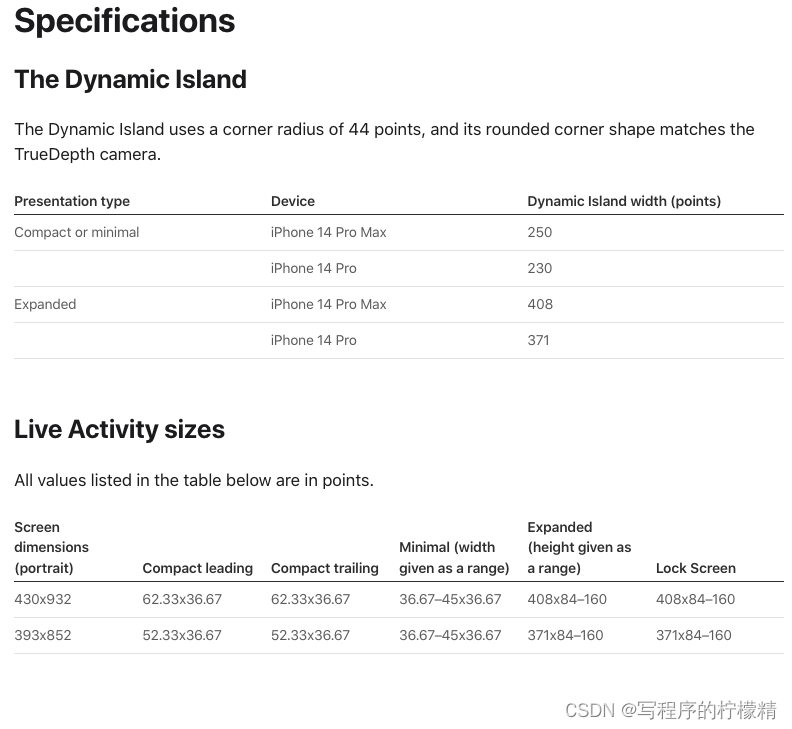
界面的相关设计规范请参考人机交互官方文档,参考文献3
struct ActivityWidgetAttributes: ActivityAttributes {
    public struct ContentState: Codable, Hashable {
        var nickname: String // 用户对象的昵称
        ......
    }
    // Fixed non-changing properties about your activity go here!
    var name: String
}
数据由ContentState(可变部分) 和 不可变部分组成。更新所需要传递的就是可变部分的内容。
实时活动的开启、更新和结束都需要在主程序进行管理。
// 使用方法
public static func request(attributes: Attributes, contentState: Activity<Attributes>.ContentState, pushType: PushType? = nil) throws -> Activity<Attributes>
--------------------------
private var myActivity: Activity<ActivityWidgetAttributes>? = nil

let initialContentState = ActivityWidgetAttributes.ContentState(nickName: "哈哈哈")
let activityAttributes = ActivityWidgetAttributes(name: "嘻嘻嘻")
do {
	// 本地更新的创建方式
	myActivity = try Activity.request(attributes: activityAttributes, contentState: initialContentState)
	// 通知更新的创建方式,需要传递pushType: .token
	myActivity = try Activity.request(attributes: activityAttributes, contentState: initialContentState, pushType: .token)
	print("Activity id : \(String(describing: cymActivity?.id ?? "nil")).")
} catch (let error) {
	print("ActivityError: \(error.localizedDescription)" )
}
// 使用方法
public func update(using contentState: Activity<Attributes>.ContentState, alertConfiguration: AlertConfiguration? = nil) async
------------------------------------------------------------
// 更新内容
let updateStatus = ActivityWidgetAttributes.ContentState(nickName: "啊啊啊")
// 关于通知的配置
let alertConfiguration = AlertConfiguration(title: "111", body: "2222", sound: .default)
Task {
	await myActivity?.update(using: updateStatus, alertConfiguration: alertConfiguration)
}
// 使用方法
public func end(using contentState: Activity<Attributes>.ContentState? = nil, dismissalPolicy: ActivityUIDismissalPolicy = .default) async
// 结束策略有3种
 	/// The system's default dismissal policy for the Live Activity.
    ///
    /// With the default dismissal policy, the system keeps a Live Activity that ended on the Lock Screen for
    /// up to four hours after it ends or the user removes it. The ``ActivityKit/ActivityState``
    /// doesn't change to ``ActivityKit/ActivityState/dismissed`` until the user or the system
    /// removes the Live Activity user interface.
    public static let `default`: ActivityUIDismissalPolicy

    /// The system immediately removes the Live Activity that ended.
    ///
    /// With the `immediate` dismissal policy, the system immediately removes the ended Live Activity
    /// and the ``ActivityKit/ActivityState`` changes to
    /// ``ActivityKit/ActivityState/dismissed``.
    public static let immediate: ActivityUIDismissalPolicy

    /// The system removes the Live Activity that ended at the specified time within a four-hour window.
    ///
    /// Provide a date to tell the system when it should remove a Live Activity that ended. While you can
    /// provide any date, the system removes a Live Activity that ended after the specified date or after four
    /// hours from the moment the Live Activity ended — whichever comes first. When the system
    /// removes the Live Activity,  the ``ActivityKit/ActivityState`` changes to ``ActivityKit/ActivityState/dismissed``.
    ///
    /// - Parameters:
    ///     - date: A date within a four-hour window from the moment the Live Activity ends.
    public static func after(_ date: Date) -> ActivityUIDismissalPolicy

--------------------------------------------------------------
Task {
    await myActivity?.end(using:nil, dismissalPolicy: .immediate)
}
创建成功后可以使用activityStateUpdates监听到实时活动的状态
Task.detached {
	for awaitactivity in Activity<ActivityWidgetAttributes>.activities {
    	for await state in activity.activityStateUpdates {
        	if (state == .active) {
            /// The Live Activity is active, visible to the user, and can receive content updates.
            } else if (state == .ended) {
            /// The Live Activity is visible, but the user, app, or system ended it, and it won't update its content anymore.
            } else { // .dismissed
            /// The Live Activity ended and is no longer visible because the user or the system removed it.
            }
        }
    }
}
如果需要使用通知进行更新,需要将PushToken发送给服务端。
// 创建时需要 pushType: .token
Activity.request(attributes: activityAttributes, contentState: initialContentState, pushType: .token)
// 创建成功后
Task.detached {
	for await activity in Activity<ActivityWidgetAttributes>.activities {
    	for await pushToken in activitie.pushTokenUpdates {
            	let mytoken = pushToken.map {String(format: "%02x", $0)}.joined().uppercased()
            	// pushToken 是Data 需要经过上面的方法 转换成String传递给服务端使用
            	print("push token", mytoken)
            }
        }
    }
}

实时活动的权限无法监听获得,只能主动进行判断,需要在进行创建前进行判断来提示用户
// 实时活动是否可用,包括权限是否开启和手机是否支持实时活动
ActivityAuthorizationInfo().areActivitiesEnabled
// 获取已有的实时活动个数
Activity<ActivityWidgetAttributes>.activities.count
服务端需要使用p8 + jwt实现liveActivity的推送
// 推送配置
TEAM_ID=开发者账号里的TEAM_ID
AUTH_KEY_ID=p8推送需要的验证秘钥ID
TOPIC=主程序的Bundle Identifier.push-type.liveactivity
DEVICE_TOKEN=PushToken
APNS_HOST_NAME=api.sandbox.push.apple.com
// APS结构
{"aps": {
   "timestamp":1666667682, // 更新的时间
   "event": "update", // 事件选择更新,也可以进行结束操作
   "content-state": { // 需要与程序中的数据结构保持一致
      "nickname": "我来更新"
   },
   "alert": { // 通知配置
      "title": "Track Update",
      "body": "Tony Stark is now handling the delivery!"
   }
}}
实时活动的网络研讨会上自由提问时间里一些开发者的问题和回答
Q:可以在didBecomeBackground的时刻启动LiveActivity吗?
A:有可能不成功,因为进入后台可能会导致无法取到PushToken
Q:灵动岛是否支持lottie svgs gif等动画吗
A:不行,自定义动画都不支持,系统会处理动画
Q:灵动岛如何进行调试,打断点调试无效
A:暂时无法回答
Q:可以使用ObjC实现实时活动吗
A:不行!ActivityKit Only Swift,需要进行桥接
Q:如何在Live Activity中获取WebImage
A:一次更新不能超过4KB,webimage最好下载好放在本地的
Q:是否可以创建一个Button处理点击事件,而不是打开App
A:不行,通过Link和widgetURL,点击就会自动打开你的App
Q:如果用户没有开启APP的推送权限,会导致无法实施实时活动吗
A:不会,通知推送和实时活动的推送是两套不同的系统,只要实时活动权限开启即可
Q:灵动岛和实时活动一样最多显示8小时吗
A:是的
本人新手,如果有写错的地方欢迎指正,期待和大家一起交流开发。
1.《盒马 iOS Live Activity &“灵动岛”配送场景实践》
2.《iOS灵动岛开发实践》
3.《Apple Developer-Design-Live Activities》
4.《iOS 使用推送通知更新 Dynamic Island 和 Live Activity》
5.《Mastering Dynamic Island in SwiftUI》
产品要求:将用户头像和一些数据显示在实时活动和灵动岛上,随即使用AppGroup保存头像,在创建实时活动时取出头像使用,但是发生了一个很严重的问题。
测试员使用四台手机 iPhone 12、iPhone X、iPhone XR、iPhone 11(iOS版本全部为 16.1.1)进行了测试,iPhone 12、iPhone X成功的显示了实时活动,但是iPhone XR、iPhone 11却没有显示,在Log中发现实时活动虽然被创建了,但是立马被系统删除了。
经过一下午的实验,终于发现
// 主程序保存头像
NSURL *imageURL = [NSURL URLWithString:@"https://xxxxxxxxxxxx.png"];
[[SDWebImageDownloader sharedDownloader] downloadImageWithURL:imageURL completed:^(UIImage * _Nullable image, NSData * _Nullable data, NSError * _Nullable error, BOOL finished) {
    if (finished && image) {
        NSFileManager *fileManager = [NSFileManager defaultManager];
        NSURL *pathURL = [fileManager containerURLForSecurityApplicationGroupIdentifier:@"group.app.???.???"];
        pathURL = [pathURL URLByAppendingPathComponent:@"ActivityLoverAvatar.png"];
        NSData *imageData = UIImagePNGRepresentation(image);
        BOOL success = [imageData writeToURL:pathURL atomically:YES];
        ...
        // 创建实时活动
    } else {
        ...
        // 处理错误
    }
}];

// 实时活动获取对象头像
func getLoveryAvatatImage()->Image {
    let manager = FileManager.default
    let floderURL:URL = manager.containerURL(forSecurityApplicationGroupIdentifier: "group.app.???.???")!
    let fileURL:URL = floderURL.appendingPathComponent("ActivityLoverAvatar.png")
    do {
        let data: Data = try Data.init(contentsOf: fileURL)
        let image = UIImage.init(data: data)
        return Image(uiImage: image!)
    } catch let error{
        print(error.localizedDescription)
        return Image("placeholderImage")
    }
}

// 实时活动Widget配置
struct ActivityWidget: Widget {
    var body: some WidgetConfiguration {
        ActivityConfiguration(for: ActivityWidgetAttributes.self) { context in
            ActivityWidgetMainView(context: context) // 内部使用了 getLoveryAvatatImage()
        } dynamicIsland: { context in
            DynamicIsland {
                // Expanded UI goes here.  Compose the expanded UI through
                // various regions, like leading/trailing/center/bottom
                DynamicIslandExpandedRegion(.leading, priority: 1) {
                    ActivityWidgetMainDynamicIslandView(context: context) //内部使用了 getLoveryAvatatImage()
                        .dynamicIsland(verticalPlacement: .belowIfTooWide)
                        .padding(0)
                }

            } compactLeading: {
               getLoveryAvatatImage()
                    .resizable()
                    .frame(width: 22, height: 22)
                    .clipShape(Circle())
            } compactTrailing: {
                Image(getIconImageName(context.state.iconName))
                    .resizable()
                    .frame(width: 17, height: 17)
            } minimal: {
                getLoveryAvatatImage()
                    .resizable()
                    .frame(width: 22, height: 22)
                    .clipShape(Circle())
            }
        }
    }
}
代码中一共有4处使用了 getLoveryAvatatImage() 方法,如果删除minimal和compactLeading中的getLoveryAvatatImage(),不能正常显示的两个手机就可以正常显示了。所以,建议设计师将这两处换成了显示App的Logo图片了。
// 实时活动Widget配置
struct ActivityWidget: Widget {
    var body: some WidgetConfiguration {
        ActivityConfiguration(for: ActivityWidgetAttributes.self) { context in
            ActivityWidgetMainView(context: context) // 内部使用了 getLoveryAvatatImage()
        } dynamicIsland: { context in
            DynamicIsland {
                // Expanded UI goes here.  Compose the expanded UI through
                // various regions, like leading/trailing/center/bottom
                DynamicIslandExpandedRegion(.leading, priority: 1) {
                    ActivityWidgetMainDynamicIslandView(context: context) //内部使用了 getLoveryAvatatImage()
                        .dynamicIsland(verticalPlacement: .belowIfTooWide)
                        .padding(0)
                }

            } compactLeading: {
               Image("AppLogo")
                    .resizable()
                    .frame(width: 22, height: 22)
                    .clipShape(Circle())
            } compactTrailing: {
                Image(getIconImageName(context.state.iconName))
                    .resizable()
                    .frame(width: 17, height: 17)
            } minimal: {
                Image("AppLogo")
                    .resizable()
                    .frame(width: 22, height: 22)
                    .clipShape(Circle())
            }
        }
    }
}
但是这个问题的根本原因却不知道,因为有的手机是可以正常使用的,只有那两台测试机无法正常使用。如果有人知道为什么请私信我,大家一起讨论,谢谢!!!
我正在尝试测试是否存在表单。我是Rails新手。我的new.html.erb_spec.rb文件的内容是:require'spec_helper'describe"messages/new.html.erb"doit"shouldrendertheform"dorender'/messages/new.html.erb'reponse.shouldhave_form_putting_to(@message)with_submit_buttonendendView本身,new.html.erb,有代码:当我运行rspec时,它失败了:1)messages/new.html.erbshou
我在从html页面生成PDF时遇到问题。我正在使用PDFkit。在安装它的过程中,我注意到我需要wkhtmltopdf。所以我也安装了它。我做了PDFkit的文档所说的一切......现在我在尝试加载PDF时遇到了这个错误。这里是错误:commandfailed:"/usr/local/bin/wkhtmltopdf""--margin-right""0.75in""--page-size""Letter""--margin-top""0.75in""--margin-bottom""0.75in""--encoding""UTF-8""--margin-left""0.75in""-
我在我的项目目录中完成了compasscreate.和compassinitrails。几个问题:我已将我的.sass文件放在public/stylesheets中。这是放置它们的正确位置吗?当我运行compasswatch时,它不会自动编译这些.sass文件。我必须手动指定文件:compasswatchpublic/stylesheets/myfile.sass等。如何让它自动运行?文件ie.css、print.css和screen.css已放在stylesheets/compiled。如何在编译后不让它们重新出现的情况下删除它们?我自己编译的.sass文件编译成compiled/t
我有一个对象has_many应呈现为xml的子对象。这不是问题。我的问题是我创建了一个Hash包含此数据,就像解析器需要它一样。但是rails自动将整个文件包含在.........我需要摆脱type="array"和我该如何处理?我没有在文档中找到任何内容。 最佳答案 我遇到了同样的问题;这是我的XML:我在用这个:entries.to_xml将散列数据转换为XML,但这会将条目的数据包装到中所以我修改了:entries.to_xml(root:"Contacts")但这仍然将转换后的XML包装在“联系人”中,将我的XML代码修改为
为了将Cucumber用于命令行脚本,我按照提供的说明安装了arubagem。它在我的Gemfile中,我可以验证是否安装了正确的版本并且我已经包含了require'aruba/cucumber'在'features/env.rb'中为了确保它能正常工作,我写了以下场景:@announceScenario:Testingcucumber/arubaGivenablankslateThentheoutputfrom"ls-la"shouldcontain"drw"假设事情应该失败。它确实失败了,但失败的原因是错误的:@announceScenario:Testingcucumber/ar
我在我的项目中添加了一个系统来重置用户密码并通过电子邮件将密码发送给他,以防他忘记密码。昨天它运行良好(当我实现它时)。当我今天尝试启动服务器时,出现以下错误。=>BootingWEBrick=>Rails3.2.1applicationstartingindevelopmentonhttp://0.0.0.0:3000=>Callwith-dtodetach=>Ctrl-CtoshutdownserverExiting/Users/vinayshenoy/.rvm/gems/ruby-1.9.3-p0/gems/actionmailer-3.2.1/lib/action_mailer
我的瘦服务器配置了nginx,我的ROR应用程序正在它们上运行。在我发布代码更新时运行thinrestart会给我的应用程序带来一些停机时间。我试图弄清楚如何优雅地重启正在运行的Thin实例,但找不到好的解决方案。有没有人能做到这一点? 最佳答案 #Restartjustthethinserverdescribedbythatconfigsudothin-C/etc/thin/mysite.ymlrestartNginx将继续运行并代理请求。如果您将Nginx设置为使用多个上游服务器,例如server{listen80;server
在MRIRuby中我可以这样做:deftransferinternal_server=self.init_serverpid=forkdointernal_server.runend#Maketheserverprocessrunindependently.Process.detach(pid)internal_client=self.init_client#Dootherstuffwithconnectingtointernal_server...internal_client.post('somedata')ensure#KillserverProcess.kill('KILL',
我已经从我的命令行中获得了一切,所以我可以运行rubymyfile并且它可以正常工作。但是当我尝试从sublime中运行它时,我得到了undefinedmethod`require_relative'formain:Object有人知道我的sublime设置中缺少什么吗?我正在使用OSX并安装了rvm。 最佳答案 或者,您可以只使用“require”,它应该可以正常工作。我认为“require_relative”仅适用于ruby1.9+ 关于ruby-主要:Objectwhenrun
我花了三天的时间用头撞墙,试图弄清楚为什么简单的“rake”不能通过我的规范文件。如果您遇到这种情况:任何文件夹路径中都不要有空格!。严重地。事实上,从现在开始,您命名的任何内容都没有空格。这是我的控制台输出:(在/Users/*****/Desktop/LearningRuby/learn_ruby)$rake/Users/*******/Desktop/LearningRuby/learn_ruby/00_hello/hello_spec.rb:116:in`require':cannotloadsuchfile--hello(LoadError) 最佳
