os.system:获取程序执行命令的返回值。
os.popen: 获取程序执行命令的输出结果。
commands:获取返回值和命令的输出结果。
这个方法是直接调用标准C的system() 函数,仅仅在一个子终端运行系统命令,而不能获取命令执行后的返回信息,但是会在python终端中打印输出。
os.system(cmd)的返回值。os.system(cmd)的返回值只会有0(成功),1,2。
如果执行成功,那么会返回0,表示命令执行成功。否则,则是执行错误。
参考:https://blog.csdn.net/qq_36380748/article/details/106787911
可以自己设定 sh 脚本,在脚本中插入返回码,这样就不会返回 0 了,而是返回码。
#!/bin/bash

echo "hello world!"

exit 1
我们使用os.system()执行脚本:
>>> import os
>>> cmd='./test.sh'
>>> mm=os.system(cmd)
hello world!
>>> print (mm)
256
可以看到shell脚本执行完成后,返回的值是256,但是跟我们实际想要的值不一样:
os.system的返回值并不是执行程序的返回结果。而是一个16位的数,它的高位才是返回码。也就是说os.system()返回256即 0×0100,返回码应该是其高位0×01即1。
使用os.system返回值是脚本的退出状态码,该方法在调用完shell脚本后,返回一个16位的二进制数,低位为杀死所调用脚本的信号号码,高位为脚本的退出状态码。
os.system()返回值为0 linux命令返回值也为0。一般来说,返回 0 表示运行成功。
os.system()返回值为256,十六位二进制数示为:00000001,00000000,高八位转成十进制为 1 对应 linux命令返回值 1。
os.system()返回值为512,十六位二进制数示为:00000010,00000000,高八位转成十进制为 2 对应 linux命令返回值 2。
os.popen()方法不仅执行命令而且返回执行后的信息对象(常用于需要获取执行命令后的返回信息),是通过一个管道文件将结果返回。通过 os.popen() 返回的是 file read 的对象,对其进行读取 read() 的操作可以看到执行的输出。
os.popen(cmd)会把执行的cmd的输出作为值返回。
import os
result = os.popen('cat /etc/passwd')
print(result.read())
def ping2(host, n):
    cmd = "ping {} {} {}".format(
        "-n" if sys.platform.lower() == "win32" else "-c",
        n,
        host,
    )
    return cmd, os.system(cmd)

def ping3(host, n):
    cmd = "ping {} {} {}".format(
        "-n" if sys.platform.lower() == "win32" else "-c",
        n,
        host,
    )
    return cmd, os.popen(cmd)
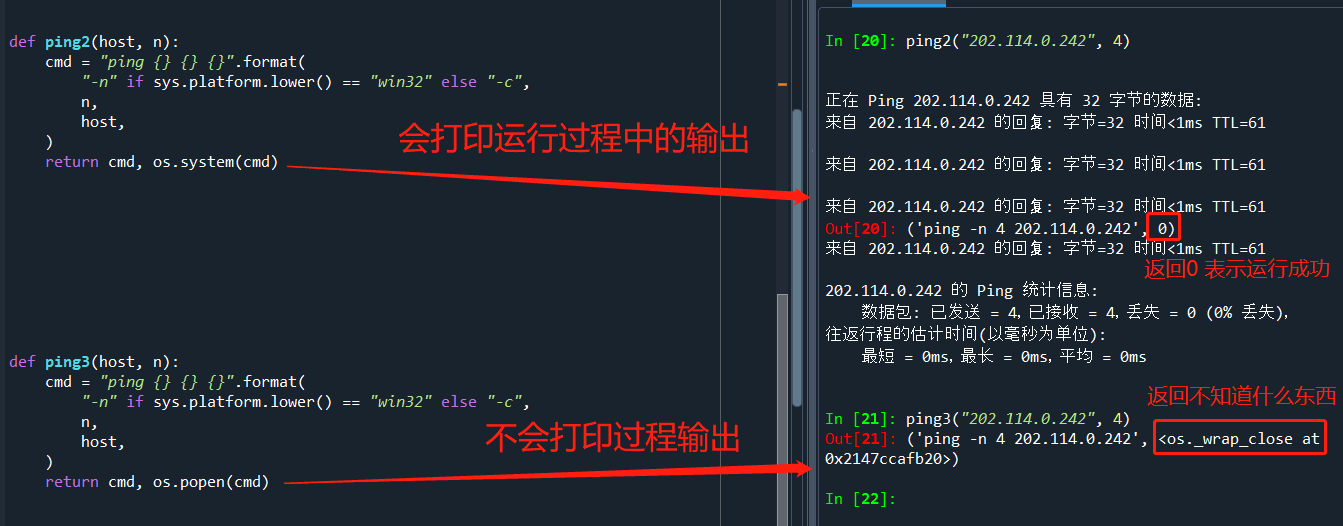
探究 ping3 输出的那个到底是啥:

import commands
status = commands.getstatus('cat /etc/passwd')
print(status)
output = commands.getoutput('cat /etc/passwd')
print(output)
(status, output) = commands.getstatusoutput('cat /etc/passwd')
print(status, output)
code 0 : succcessful
"OS error code   1:  Operation not permitted"
 "OS error code   2:  No such file or directory"
 "OS error code   3:  No such process"
 "OS error code   4:  Interrupted system call"
 "OS error code   5:  Input/output error"
 "OS error code   6:  No such device or address"
 "OS error code   7:  Argument list too long"
 "OS error code   8:  Exec format error"
 "OS error code   9:  Bad file descriptor"
 "OS error code  10:  No child processes"
 "OS error code  11:  Resource temporarily unavailable"
 "OS error code  12:  Cannot allocate memory"
 "OS error code  13:  Permission denied"
 "OS error code  14:  Bad address"
 "OS error code  15:  Block device required"
 "OS error code  16:  Device or resource busy"
 "OS error code  17:  File exists"
 "OS error code  18:  Invalid cross-device link"
 "OS error code  19:  No such device"
 "OS error code  20:  Not a directory"
 "OS error code  21:  Is a directory"
 "OS error code  22:  Invalid argument"
 "OS error code  23:  Too many open files in system"
 "OS error code  24:  Too many open files"
 "OS error code  25:  Inappropriate ioctl for device"
 "OS error code  26:  Text file busy"
 "OS error code  27:  File too large"
 "OS error code  28:  No space left on device"
 "OS error code  29:  Illegal seek"
 "OS error code  30:  Read-only file system"
 "OS error code  31:  Too many links"
 "OS error code  32:  Broken pipe"
 "OS error code  33:  Numerical argument out of domain"
 "OS error code  34:  Numerical result out of range"
 "OS error code  35:  Resource deadlock avoided"
 "OS error code  36:  File name too long"
 "OS error code  37:  No locks available"
 "OS error code  38:  Function not implemented"
 "OS error code  39:  Directory not empty"
 "OS error code  40:  Too many levels of symbolic links"
 "OS error code  42:  No message of desired type"
 "OS error code  43:  Identifier removed"
 "OS error code  44:  Channel number out of range"
 "OS error code  45:  Level 2 not synchronized"
 "OS error code  46:  Level 3 halted"
 "OS error code  47:  Level 3 reset"
 "OS error code  48:  Link number out of range"
 "OS error code  49:  Protocol driver not attached"
 "OS error code  50:  No CSI structure available"
 "OS error code  51:  Level 2 halted"
 "OS error code  52:  Invalid exchange"
 "OS error code  53:  Invalid request descriptor"
 "OS error code  54:  Exchange full"
 "OS error code  55:  No anode"
 "OS error code  56:  Invalid request code"
 "OS error code  57:  Invalid slot"
 "OS error code  59:  Bad font file format"
 "OS error code  60:  Device not a stream"
 "OS error code  61:  No data available"
 "OS error code  62:  Timer expired"
 "OS error code  63:  Out of streams resources"
 "OS error code  64:  Machine is not on the network"
 "OS error code  65:  Package not installed"
 "OS error code  66:  Object is remote"
 "OS error code  67:  Link has been severed"
 "OS error code  68:  Advertise error"
 "OS error code  69:  Srmount error"
 "OS error code  70:  Communication error on send"
 "OS error code  71:  Protocol error"
 "OS error code  72:  Multihop attempted"
 "OS error code  73:  RFS specific error"
 "OS error code  74:  Bad message"
 "OS error code  75:  Value too large for defined data type"
 "OS error code  76:  Name not unique on network"
 "OS error code  77:  File descriptor in bad state"
 "OS error code  78:  Remote address changed"
 "OS error code  79:  Can not access a needed shared library"
 "OS error code  80:  Accessing a corrupted shared library"
 "OS error code  81:  .lib section in a.out corrupted"
 "OS error code  82:  Attempting to link in too many shared libraries"
 "OS error code  83:  Cannot exec a shared library directly"
 "OS error code  84:  Invalid or incomplete multibyte or wide character"
 "OS error code  85:  Interrupted system call should be restarted"
 "OS error code  86:  Streams pipe error"
 "OS error code  87:  Too many users"
 "OS error code  88:  Socket operation on non-socket"
 "OS error code  89:  Destination address required"
 "OS error code  90:  Message too long"
 "OS error code  91:  Protocol wrong type for socket"
 "OS error code  92:  Protocol not available"
 "OS error code  93:  Protocol not supported"
 "OS error code  94:  Socket type not supported"
 "OS error code  95:  Operation not supported"
 "OS error code  96:  Protocol family not supported"
 "OS error code  97:  Address family not supported by protocol"
 "OS error code  98:  Address already in use"
 "OS error code  99:  Cannot assign requested address"
 "OS error code 100:  Network is down"
 "OS error code 101:  Network is unreachable"
 "OS error code 102:  Network dropped connection on reset"
 "OS error code 103:  Software caused connection abort"
 "OS error code 104:  Connection reset by peer"
 "OS error code 105:  No buffer space available"
 "OS error code 106:  Transport endpoint is already connected"
 "OS error code 107:  Transport endpoint is not connected"
 "OS error code 108:  Cannot send after transport endpoint shutdown"
 "OS error code 109:  Too many references: cannot splice"
 "OS error code 110:  Connection timed out"
 "OS error code 111:  Connection refused"
 "OS error code 112:  Host is down"
 "OS error code 113:  No route to host"
 "OS error code 114:  Operation already in progress"
 "OS error code 115:  Operation now in progress"
 "OS error code 116:  Stale NFS file handle"
 "OS error code 117:  Structure needs cleaning"
 "OS error code 118:  Not a XENIX named type file"
 "OS error code 119:  No XENIX semaphores available"
 "OS error code 120:  Is a named type file"
 "OS error code 121:  Remote I/O error"
 "OS error code 122:  Disk quota exceeded"
 "OS error code 123:  No medium found"
 "OS error code 124:  Wrong medium type"
 "OS error code 125:  Operation canceled"
 "OS error code 126:  Required key not available"
 "OS error code 127:  Key has expired"
 "OS error code 128:  Key has been revoked"
 "OS error code 129:  Key was rejected by service"
 "OS error code 130:  Owner died"
 "OS error code 131:  State not recoverable"
关闭。这个问题是opinion-based.它目前不接受答案。想要改进这个问题?更新问题,以便editingthispost可以用事实和引用来回答它.关闭4年前。Improvethisquestion我想在固定时间创建一系列低音和高音调的哔哔声。例如:在150毫秒时发出高音调的蜂鸣声在151毫秒时发出低音调的蜂鸣声200毫秒时发出低音调的蜂鸣声250毫秒的高音调蜂鸣声有没有办法在Ruby或Python中做到这一点?我真的不在乎输出编码是什么(.wav、.mp3、.ogg等等),但我确实想创建一个输出文件。
我正在尝试测试是否存在表单。我是Rails新手。我的new.html.erb_spec.rb文件的内容是:require'spec_helper'describe"messages/new.html.erb"doit"shouldrendertheform"dorender'/messages/new.html.erb'reponse.shouldhave_form_putting_to(@message)with_submit_buttonendendView本身,new.html.erb,有代码:当我运行rspec时,它失败了:1)messages/new.html.erbshou
我在从html页面生成PDF时遇到问题。我正在使用PDFkit。在安装它的过程中,我注意到我需要wkhtmltopdf。所以我也安装了它。我做了PDFkit的文档所说的一切......现在我在尝试加载PDF时遇到了这个错误。这里是错误:commandfailed:"/usr/local/bin/wkhtmltopdf""--margin-right""0.75in""--page-size""Letter""--margin-top""0.75in""--margin-bottom""0.75in""--encoding""UTF-8""--margin-left""0.75in""-
我在使用omniauth/openid时遇到了一些麻烦。在尝试进行身份验证时,我在日志中发现了这一点:OpenID::FetchingError:Errorfetchinghttps://www.google.com/accounts/o8/.well-known/host-meta?hd=profiles.google.com%2Fmy_username:undefinedmethod`io'fornil:NilClass重要的是undefinedmethodio'fornil:NilClass来自openid/fetchers.rb,在下面的代码片段中:moduleNetclass
我在我的项目目录中完成了compasscreate.和compassinitrails。几个问题:我已将我的.sass文件放在public/stylesheets中。这是放置它们的正确位置吗?当我运行compasswatch时,它不会自动编译这些.sass文件。我必须手动指定文件:compasswatchpublic/stylesheets/myfile.sass等。如何让它自动运行?文件ie.css、print.css和screen.css已放在stylesheets/compiled。如何在编译后不让它们重新出现的情况下删除它们?我自己编译的.sass文件编译成compiled/t
我有一个对象has_many应呈现为xml的子对象。这不是问题。我的问题是我创建了一个Hash包含此数据,就像解析器需要它一样。但是rails自动将整个文件包含在.........我需要摆脱type="array"和我该如何处理?我没有在文档中找到任何内容。 最佳答案 我遇到了同样的问题;这是我的XML:我在用这个:entries.to_xml将散列数据转换为XML,但这会将条目的数据包装到中所以我修改了:entries.to_xml(root:"Contacts")但这仍然将转换后的XML包装在“联系人”中,将我的XML代码修改为
为了将Cucumber用于命令行脚本,我按照提供的说明安装了arubagem。它在我的Gemfile中,我可以验证是否安装了正确的版本并且我已经包含了require'aruba/cucumber'在'features/env.rb'中为了确保它能正常工作,我写了以下场景:@announceScenario:Testingcucumber/arubaGivenablankslateThentheoutputfrom"ls-la"shouldcontain"drw"假设事情应该失败。它确实失败了,但失败的原因是错误的:@announceScenario:Testingcucumber/ar
我在我的项目中添加了一个系统来重置用户密码并通过电子邮件将密码发送给他,以防他忘记密码。昨天它运行良好(当我实现它时)。当我今天尝试启动服务器时,出现以下错误。=>BootingWEBrick=>Rails3.2.1applicationstartingindevelopmentonhttp://0.0.0.0:3000=>Callwith-dtodetach=>Ctrl-CtoshutdownserverExiting/Users/vinayshenoy/.rvm/gems/ruby-1.9.3-p0/gems/actionmailer-3.2.1/lib/action_mailer
我的瘦服务器配置了nginx,我的ROR应用程序正在它们上运行。在我发布代码更新时运行thinrestart会给我的应用程序带来一些停机时间。我试图弄清楚如何优雅地重启正在运行的Thin实例,但找不到好的解决方案。有没有人能做到这一点? 最佳答案 #Restartjustthethinserverdescribedbythatconfigsudothin-C/etc/thin/mysite.ymlrestartNginx将继续运行并代理请求。如果您将Nginx设置为使用多个上游服务器,例如server{listen80;server
在MRIRuby中我可以这样做:deftransferinternal_server=self.init_serverpid=forkdointernal_server.runend#Maketheserverprocessrunindependently.Process.detach(pid)internal_client=self.init_client#Dootherstuffwithconnectingtointernal_server...internal_client.post('somedata')ensure#KillserverProcess.kill('KILL',
