Vue基础篇一:编写第一个Vue程序
Vue基础篇二:Vue组件的核心概念
Vue基础篇三:Vue的计算属性与侦听器
Vue基础篇四:Vue的生命周期(秒杀案例实战)
Vue基础篇五:Vue的指令
Vue基础篇六:Vue使用JSX进行动态渲染
Vue提高篇一:使用Vuex进行状态管理
Vue提高篇二:使用vue-router实现静态路由
Vue提高篇三:使用vue-router实现动态路由
Vue提高篇四:使用Element UI组件库
Vue提高篇五:使用Jest进行单元测试
Vue提高篇六: 使用Vetur+ESLint+Prettier插件提升开发效率
Vue实战篇一: 使用Vue搭建注册登录界面
Vue实战篇二: 实现邮件验证码发送
Vue实战篇三:实现用户注册
Vue实战篇四:创建多步骤表单
Vue实战篇五:实现文件上传
Vue实战篇六:表格渲染动态数据
Vue实战篇七:表单校验
Vue实战篇八:实现弹出对话框进行交互
Vue实战篇九:使用省市区级联选择插件
Vue实战篇十:响应式布局
Vue实战篇十一:父组件获取子组件数据的常规方法
Vue实战篇十二:多项选择器的实际运用
Vue实战篇十三:实战分页组件
Vue实战篇十四:前端excel组件实现数据导入
Vue实战篇十五:表格数据多选在实际项目中的技巧
Vue实战篇十六:导航菜单
Vue实战篇十七:用树型组件实现一个知识目录
Vue实战篇十八:搭建一个知识库框架
Vue实战篇十九:使用printjs打印表单
Vue实战篇二十:自定义表格合计
Vue实战篇二十一:实战Prop的双向绑定
Vue实战篇二十二:生成二维码
Vue实战篇二十三:卡片风格与列表风格的切换
Vue实战篇二十四:分页显示
Vue实战篇二十五:使用ECharts绘制疫情折线图
Vue实战篇二十六:创建动态仪表盘
Vue实战篇二十七:实现走马灯效果的商品轮播图
Vue实战篇二十八:实现一个手机版的购物车
Vue实战篇二十九:模拟一个简易留言板
Vue项目实战篇一:实现一个完整的留言板(带前后端源码下载)
Vue实战篇三十:实现一个简易版的头条新闻
Vue实战篇三十一:实现一个改进版的头条新闻
Vue实战篇三十二:实现新闻的无限加载
Vue实战篇三十三:实现新闻的浏览历史
Vue实战篇三十四:给新闻WebApp加入模拟注册登录功能
Vue项目实战篇二:实现一个完整的新闻WebApp客户端(带前端源码下载)
文章目录

npm install --save vue-monoplasty-slide-verify
import Vue from 'vue'
...
import SlideVerify from 'vue-monoplasty-slide-verify'

Vue.use(SlideVerify)
...
new Vue({
  el: '#app',
  router,
  store,
  render: h => h(App)
})
<template>
  <div v-if="logined == true" class="content">
    <div class="header">
      <div class="user">
        <img class="avatar" src="@/assets/images/avatar.png">
        <p class="user-name">{{ loginForm.username }}</p>
        <img class="right" src="@/assets/images/right.png">
      </div>
      <div class="info">
        <div class="histroy" @click="toHistroy()">
          <span class="histroy-count">{{ histroryCount }}</span>
          <span class="histroy-text">{{ '浏览历史' }}</span>
        </div>
        <div class="fav">
          <span class="fav-count">{{ favCount }}</span>
          <span class="fav-text">{{ '我的收藏' }}</span>
        </div>
      </div>
    </div>
    <div class="logout">
      <el-button
        size="medium"
        type="danger"
        style="width: 90%"
        @click.native.prevent="logout"
      >
        <span>退 出 登 录</span>
      </el-button>
    </div>
  </div>
  <div v-else>
    <el-form
      ref="loginForm"
      :model="loginForm"
      :rules="loginRules"
      label-position="left"
      label-width="0px"
      class="login-form"
    >
      <h2 class="title">欢迎使用</h2>
      <el-form-item prop="username">
        <el-input
          v-model="loginForm.username"
          type="text"
          auto-complete="off"
          placeholder="账号"
        >
          <svg-icon
            slot="prefix"
            icon-class="user"
            class="el-input__icon input-icon"
          />
        </el-input>
      </el-form-item>
      <el-form-item prop="password">
        <el-input
          v-model="loginForm.password"
          type="password"
          auto-complete="off"
          placeholder="密码"
          @keyup.enter.native="handleLogin"
        >
          <svg-icon
            slot="prefix"
            icon-class="password"
            class="el-input__icon input-icon"
          />
        </el-input>
      </el-form-item>
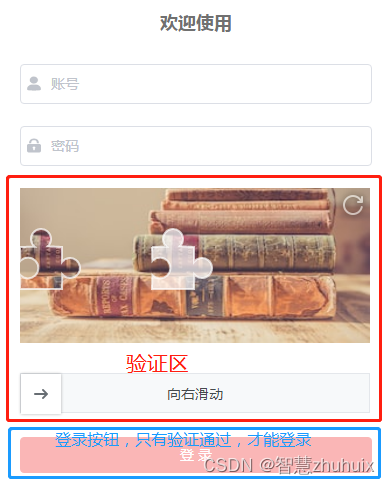
      <!-- 滑动拼图验证区 -->
      <el-form-item style="">
        <slide-verify
          :l="42"
          :r="10"
          :w="350"
          :h="155"
          slider-text="向右滑动"
          @success="onSuccess"
          @fail="onFail"
        />
      </el-form-item>
       <!-- ---- -->
      <el-form-item style="width: 100%">
        <el-button
          :disabled="!verified"
          :loading="loading"
          size="medium"
          type="danger"
          style="width: 100%"
          @click.native.prevent="handleLogin"
        >
          <span v-if="!loading">登 录</span>
          <span v-else>登 录 中...</span>
        </el-button>
      </el-form-item>

      <p class="register">
        <!-- <span class="memo">请使用Chrome,Firefox,IE 10+  </span> -->
        还没有帐号?
        <a href="/register" type="primary">立即注册</a>
      </p>
    </el-form>
  </div>
</template>

<script>

export default {
  data() {
    return {
      loginForm: {
        username: '',
        password: ''
      },
      loginRules: {
        username: [
          { required: true, trigger: 'blur', message: '用户名不能为空' }
        ],
        password: [
          { required: true, trigger: 'blur', message: '密码不能为空' }
        ]
      },
      loading: false,
      // 图形验证是否通过
      verified: false
    }
  },
  computed: {
    histroryCount() {
      return this.$store.state.my.histroy.length
    },
    favCount() {
      return this.$store.state.my.favourite.length
    },
    logined() {
      return this.$store.state.my.logined
    }
  },
  methods: {
    // 模拟登录成功
    handleLogin() {
      this.$refs.loginForm.validate((valid) => {
        if (valid) {
          this.loading = true
          this.$store.commit('SET_LOGIN', true)
          this.loading = false
        } else {
          console.log('error submit!!')
          return false
        }
      })
    },
    // 模拟注销登录
    logout() {
      this.$store.commit('SET_LOGIN', false)
      this.loginForm.username = ''
      this.loginForm.password = ''
      this.verified = false
    },
    toHistroy() {
      if (this.histroryCount > 0) {
        this.$router.push('/list')
      }
    },
    // 图形验证通过后,将登录按钮置为可用
    onSuccess() {
      this.verified = true
    }
  }
}

</script>

<style lang="scss"  scoped>
.login-form {
  border-radius: 6px;
  background: #ffffff;
  width: 100%;
  padding: 25px 25px 5px 25px;
  margin-top: 25px;
  .el-input {
    height: 38px;
    input {
      height: 38px;
    }
  }
  .input-icon {
    height: 39px;
    width: 14px;
    margin-left: 2px;
  }
}

.title {
  margin: 0 auto 30px auto;
  text-align: center;
  color: #707070;
}

.register {
  float: right;
  font-size: 13px;
  // color: rgb(24, 144, 255);
}
a {
  color: #e72521;
  text-decoration: none;
  background-color: transparent;
  outline: none;
  cursor: pointer;
  transition: color 0.3s;
}
a:hover {
  color: #e72521;
}

.content {
  width: 100%;
  height: 100%;
  background-color: rgb(252, 248, 248);
}
.header {
  width: 100%;
  height: 5.33rem;
  background-color: #fff;
}

.user {
  margin-top: 0.5rem;
  overflow: hidden;
  padding: 0.5rem;
  height: 2.5rem;
  width: 100%;
}

.avatar {
  float: left;
  width: 1.8rem;
  height: 1.8rem;
  border-radius: 50%;
}

.user-name {
  float: left;
  margin-top: 0.6rem;
  margin-left: 0.5rem;
  color: #404040;
  font-size: 18px;
}

.right {
  float: right;
  width: 0.8rem;
  height: 0.8rem;
  margin-top: 0.6rem;
}

.info {
  float: left;
  padding: 1rem;
  height: 2.5rem;
  width: 100%;
}
.histroy {
  display: flex;
  float: left;
  flex-direction: column;
  align-items: center;
  justify-content: center;
  cursor: pointer;
}

.histroy-count {
  color: #404040;
  font-size: 18px;
}

.histroy-text {
  margin-top: 0.1rem;
  color: #9b9191;
  font-size: 14px;
}

.fav {
  display: flex;
  float: right;
  flex-direction: column;
  align-items: center;
  justify-content: center;
  cursor: pointer;
}

.fav-count {
  color: #404040;
  font-size: 18px;
}

.fav-text {
  margin-top: 0.1rem;
  color: #9b9191;
  font-size: 14px;
}

.logout {
  display: flex;
  align-items: center;
  justify-content: center;
  margin-top: 2rem;

}
</style>

给定这段代码defcreate@upgrades=User.update_all(["role=?","upgraded"],:id=>params[:upgrade])redirect_toadmin_upgrades_path,:notice=>"Successfullyupgradeduser."end我如何在该操作中实际验证它们是否已保存或未重定向到适当的页面和消息? 最佳答案 在Rails3中,update_all不返回任何有意义的信息,除了已更新的记录数(这可能取决于您的DBMS是否返回该信息)。http://ar.ru
我想安装一个带有一些身份验证的私有(private)Rubygem服务器。我希望能够使用公共(public)Ubuntu服务器托管内部gem。我读到了http://docs.rubygems.org/read/chapter/18.但是那个没有身份验证-如我所见。然后我读到了https://github.com/cwninja/geminabox.但是当我使用基本身份验证(他们在他们的Wiki中有)时,它会提示从我的服务器获取源。所以。如何制作带有身份验证的私有(private)Rubygem服务器?这是不可能的吗?谢谢。编辑:Geminabox问题。我尝试“捆绑”以安装新的gem..
我希望我的UserPrice模型的属性在它们为空或不验证数值时默认为0。这些属性是tax_rate、shipping_cost和price。classCreateUserPrices8,:scale=>2t.decimal:tax_rate,:precision=>8,:scale=>2t.decimal:shipping_cost,:precision=>8,:scale=>2endendend起初,我将所有3列的:default=>0放在表格中,但我不想要这样,因为它已经填充了字段,我想使用占位符。这是我的UserPrice模型:classUserPrice回答before_val
我有一个表单,其中有很多字段取自数组(而不是模型或对象)。我如何验证这些字段的存在?solve_problem_pathdo|f|%>... 最佳答案 创建一个简单的类来包装请求参数并使用ActiveModel::Validations。#definedsomewhere,atthesimplest:require'ostruct'classSolvetrue#youcouldevencheckthesolutionwithavalidatorvalidatedoerrors.add(:base,"WRONG!!!")unlesss
我有一些非常大的模型,我必须将它们迁移到最新版本的Rails。这些模型有相当多的验证(User有大约50个验证)。是否可以将所有这些验证移动到另一个文件中?说app/models/validations/user_validations.rb。如果可以,有人可以提供示例吗? 最佳答案 您可以为此使用关注点:#app/models/validations/user_validations.rbrequire'active_support/concern'moduleUserValidationsextendActiveSupport:
当我的预订模型通过rake任务在状态机上转换时,我试图找出如何跳过对ActiveRecord对象的特定实例的验证。我想在reservation.close时跳过所有验证!叫做。希望调用reservation.close!(:validate=>false)之类的东西。仅供引用,我们正在使用https://github.com/pluginaweek/state_machine用于状态机。这是我的预订模型的示例。classReservation["requested","negotiating","approved"])}state_machine:initial=>'requested
我有一个服务模型/表及其注册表。在表单中,我几乎拥有服务的所有字段,但我想在验证服务对象之前自动设置其中一些值。示例:--服务Controller#创建Action:defcreate@service=Service.new@service_form=ServiceFormObject.new(@service)@service_form.validate(params[:service_form_object])and@service_form.saverespond_with(@service_form,location:admin_services_path)end在验证@ser
我有一个用户工厂。我希望默认情况下确认用户。但是鉴于unconfirmed特征,我不希望它们被确认。虽然我有一个基于实现细节而不是抽象的工作实现,但我想知道如何正确地做到这一点。factory:userdoafter(:create)do|user,evaluator|#unwantedimplementationdetailshereunlessFactoryGirl.factories[:user].defined_traits.map(&:name).include?(:unconfirmed)user.confirm!endendtrait:unconfirmeddoenden
这里有一个很好的答案解释了如何在Ruby中下载文件而不将其加载到内存中:https://stackoverflow.com/a/29743394/4852737require'open-uri'download=open('http://example.com/image.png')IO.copy_stream(download,'~/image.png')我如何验证下载文件的IO.copy_stream调用是否真的成功——这意味着下载的文件与我打算下载的文件完全相同,而不是下载一半的损坏文件?documentation说IO.copy_stream返回它复制的字节数,但是当我还没有下
华为OD机试题本篇题目:明明的随机数题目输入描述输出描述:示例1输入输出说明代码编写思路最近更新的博客华为od2023|什么是华为od,od薪资待遇,od机试题清单华为OD机试真题大全,用Python解华为机试题|机试宝典【华为OD机试】全流程解析+经验分享,题型分享,防作弊指南华为o