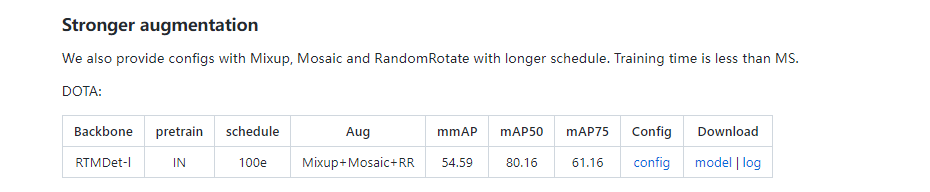
注意:
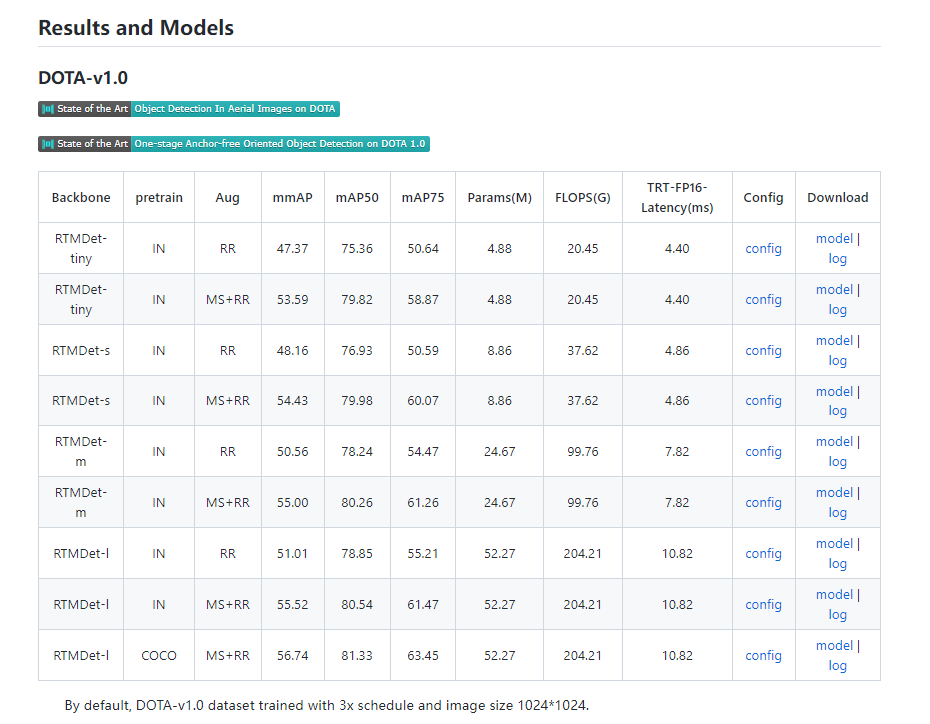
我们按照 DOTA 评测服务器的最新指标,原来的 voc 格式 mAP 现在是 mAP50。
IN表示ImageNet预训练,COCO表示COCO预训练。
与报告不同的是,这里的推理速度是在 NVIDIA 2080Ti GPU 上测量的,配备 TensorRT 8.4.3、cuDNN 8.2.0、FP16、batch size=1 和 NMS。
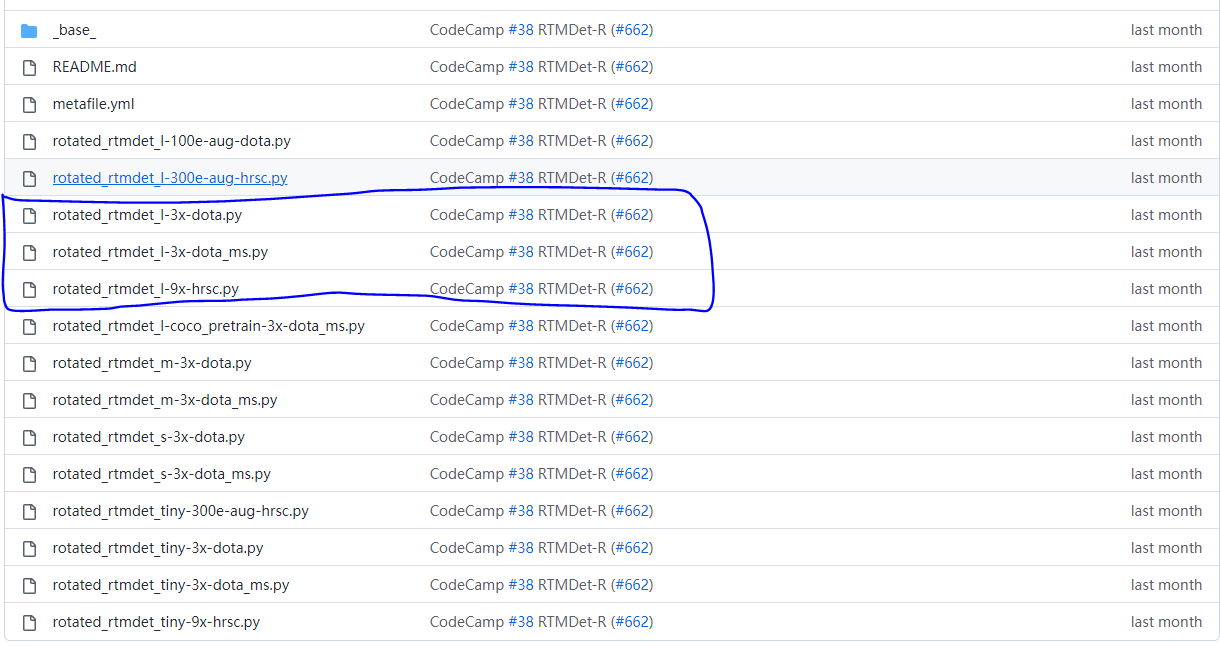
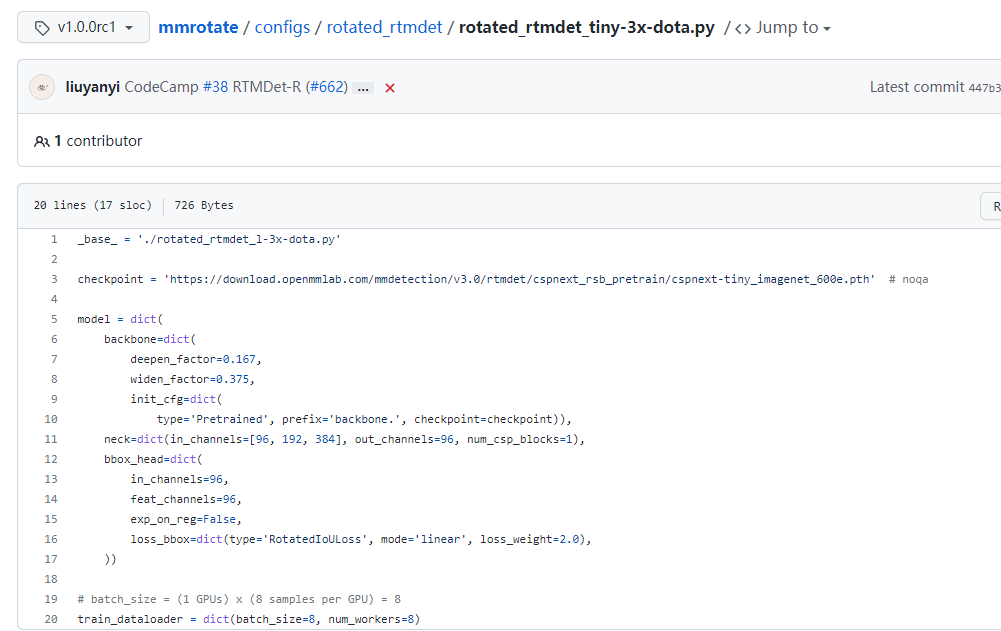
_base_ = [
    './_base_/default_runtime.py', './_base_/schedule_3x.py',
    './_base_/dota_rr.py'
]
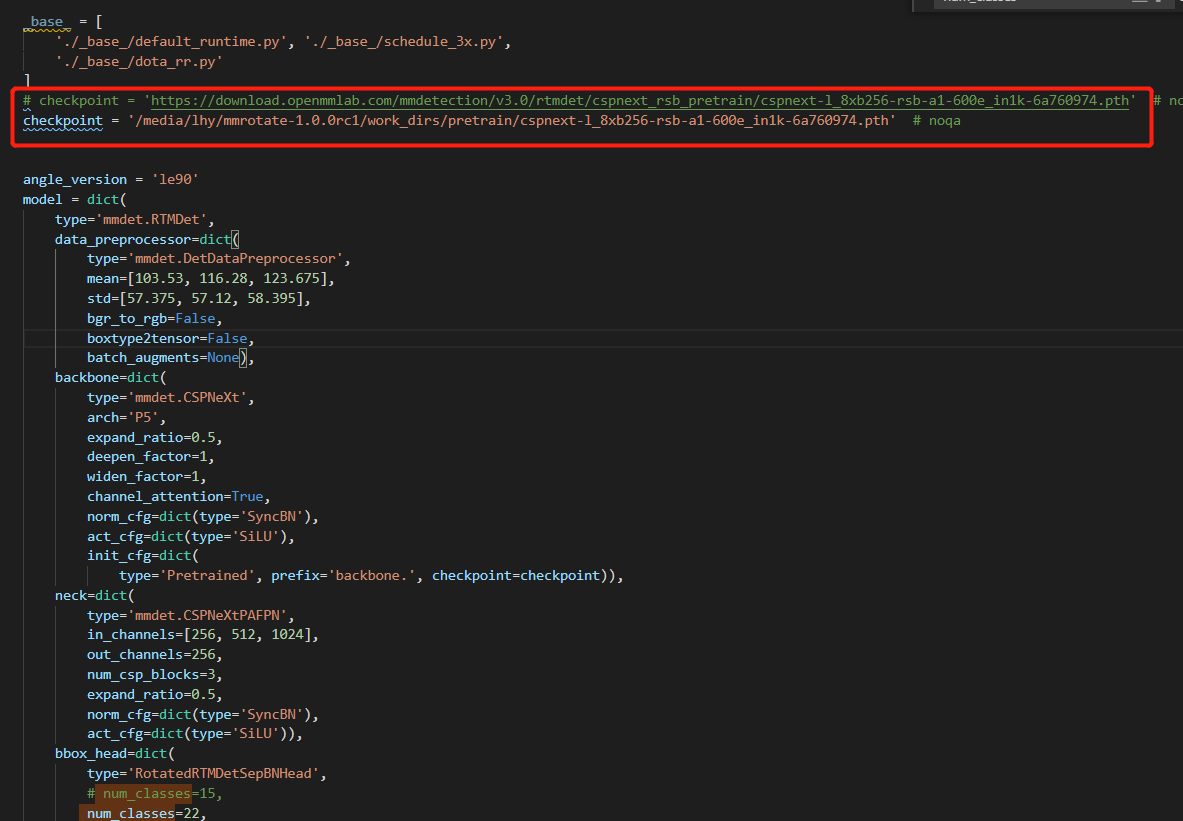
checkpoint = 'https://download.openmmlab.com/mmdetection/v3.0/rtmdet/cspnext_rsb_pretrain/cspnext-l_8xb256-rsb-a1-600e_in1k-6a760974.pth'  # noqa

angle_version = 'le90'
model = dict(
    type='mmdet.RTMDet',
    data_preprocessor=dict(
        type='mmdet.DetDataPreprocessor',
        mean=[103.53, 116.28, 123.675],
        std=[57.375, 57.12, 58.395],
        bgr_to_rgb=False,
        boxtype2tensor=False,
        batch_augments=None),
    backbone=dict(
        type='mmdet.CSPNeXt',
        arch='P5',
        expand_ratio=0.5,
        deepen_factor=1,
        widen_factor=1,
        channel_attention=True,
        norm_cfg=dict(type='SyncBN'),
        act_cfg=dict(type='SiLU'),
        init_cfg=dict(
            type='Pretrained', prefix='backbone.', checkpoint=checkpoint)),
    neck=dict(
        type='mmdet.CSPNeXtPAFPN',
        in_channels=[256, 512, 1024],
        out_channels=256,
        num_csp_blocks=3,
        expand_ratio=0.5,
        norm_cfg=dict(type='SyncBN'),
        act_cfg=dict(type='SiLU')),
    bbox_head=dict(
        type='RotatedRTMDetSepBNHead',
        num_classes=15,
        in_channels=256,
        stacked_convs=2,
        feat_channels=256,
        angle_version=angle_version,
        anchor_generator=dict(
            type='mmdet.MlvlPointGenerator', offset=0, strides=[8, 16, 32]),
        bbox_coder=dict(
            type='DistanceAnglePointCoder', angle_version=angle_version),
        loss_cls=dict(
            type='mmdet.QualityFocalLoss',
            use_sigmoid=True,
            beta=2.0,
            loss_weight=1.0),
        loss_bbox=dict(type='RotatedIoULoss', mode='linear', loss_weight=2.0),
        with_objectness=False,
        exp_on_reg=True,
        share_conv=True,
        pred_kernel_size=1,
        use_hbbox_loss=False,
        scale_angle=False,
        loss_angle=None,
        norm_cfg=dict(type='SyncBN'),
        act_cfg=dict(type='SiLU')),
    train_cfg=dict(
        assigner=dict(
            type='mmdet.DynamicSoftLabelAssigner',
            iou_calculator=dict(type='RBboxOverlaps2D'),
            topk=13),
        allowed_border=-1,
        pos_weight=-1,
        debug=False),
    test_cfg=dict(
        nms_pre=2000,
        min_bbox_size=0,
        score_thr=0.05,
        nms=dict(type='nms_rotated', iou_threshold=0.1),
        max_per_img=2000),
)

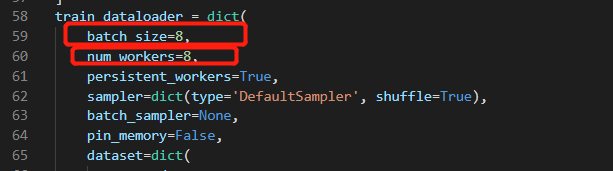
# batch_size = (2 GPUs) x (4 samples per GPU) = 8
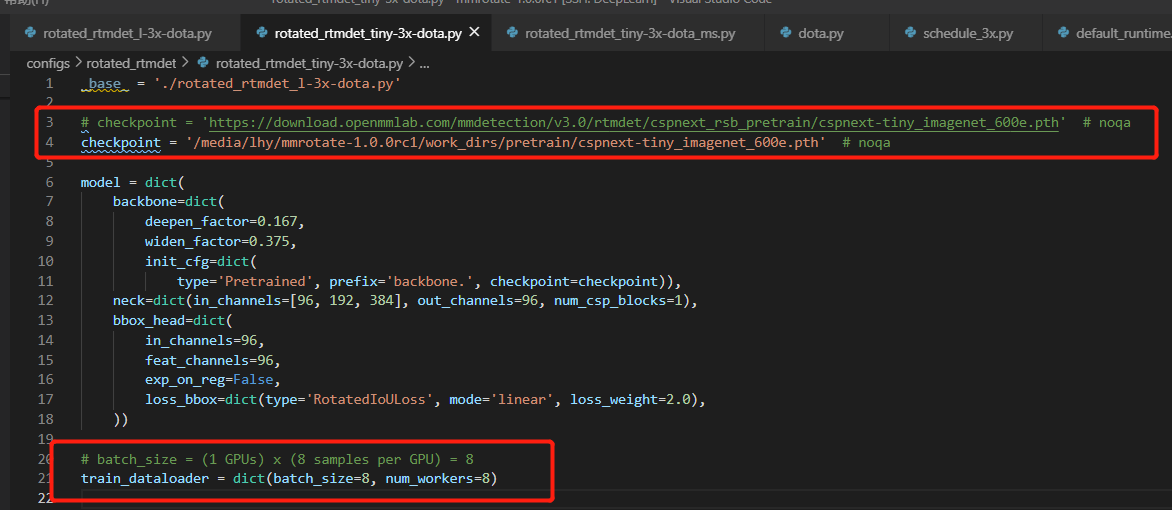
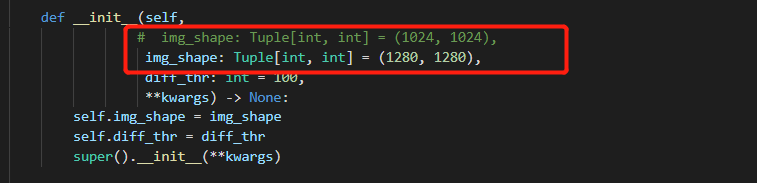
train_dataloader = dict(batch_size=4, num_workers=4)更改数据集基础路径及训练、验证和测试路径、以及影像切片的大小
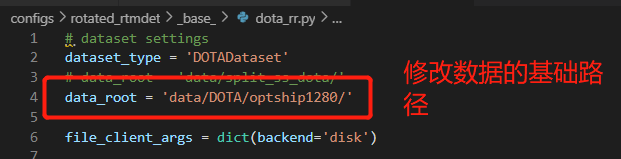
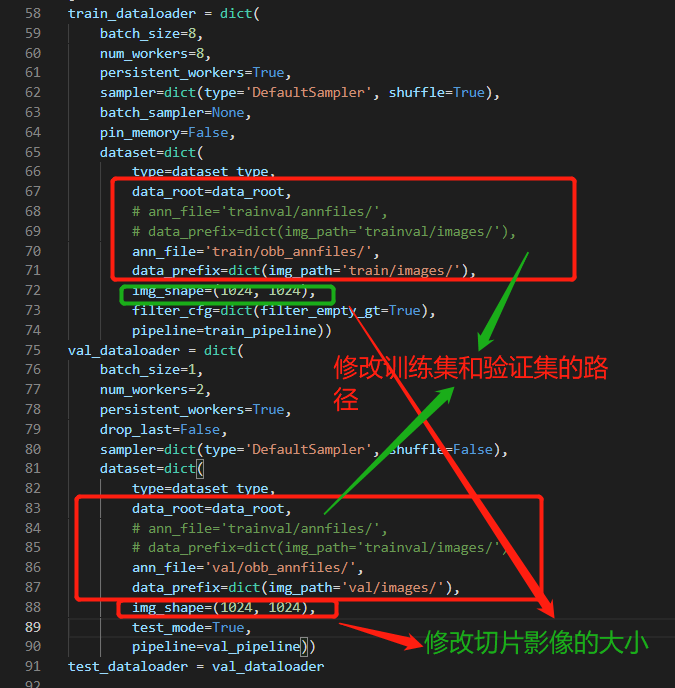
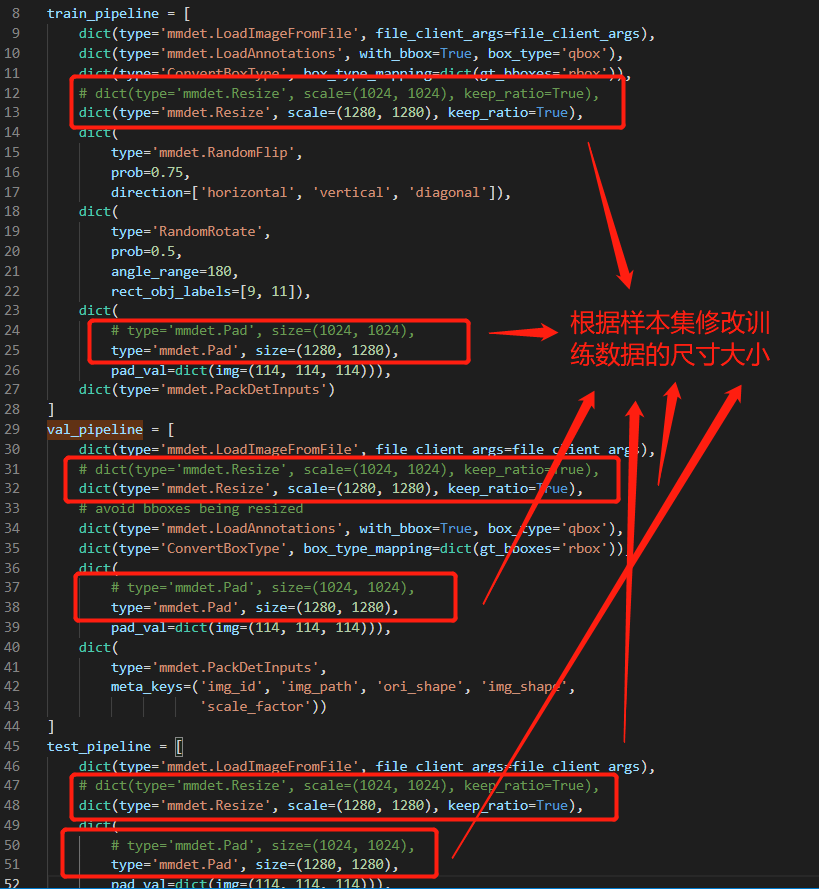
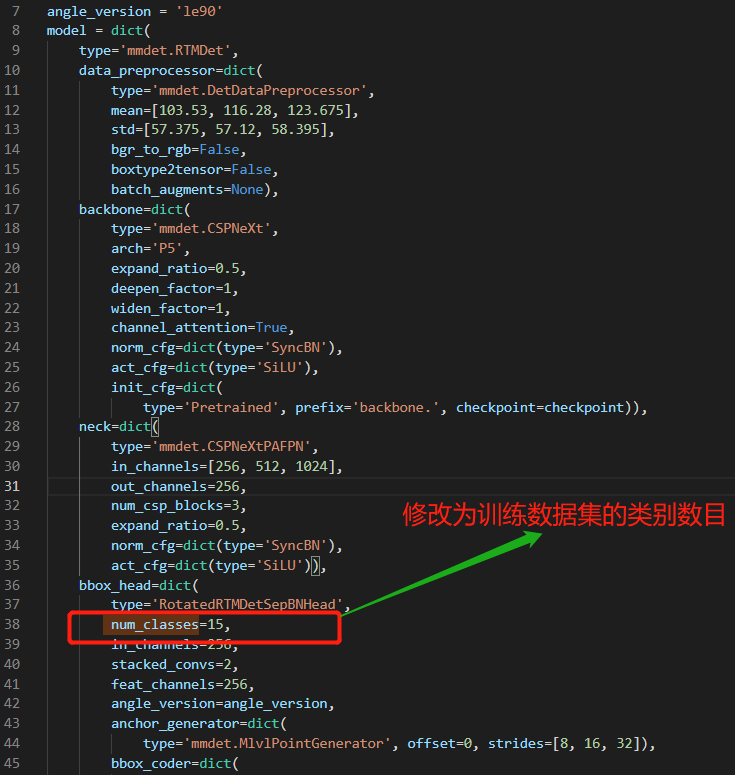
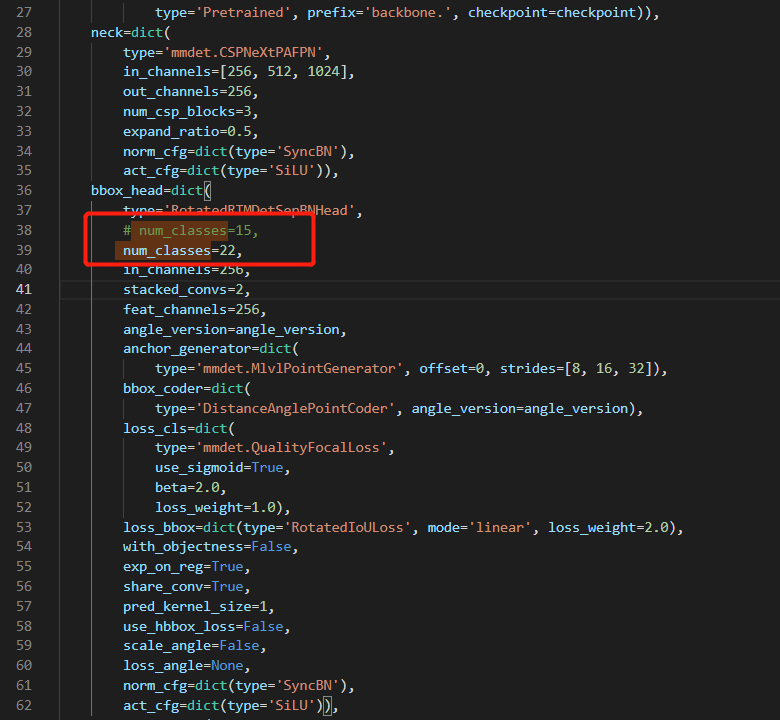
'./_base_/dota_rr.py'
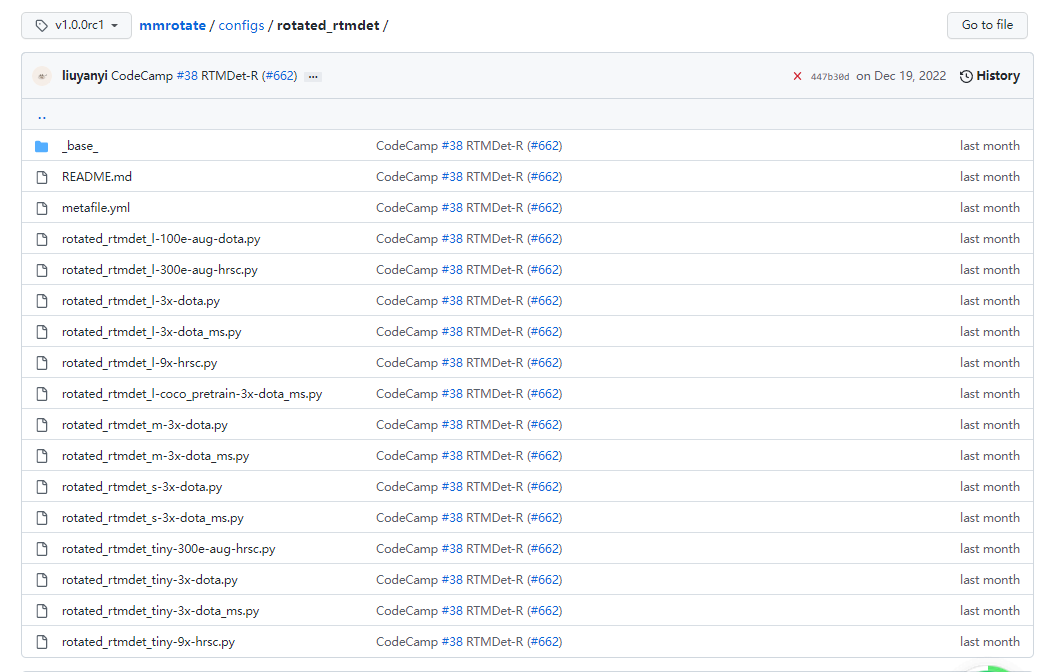
rotated_rtmdet_l-3x-dota.py



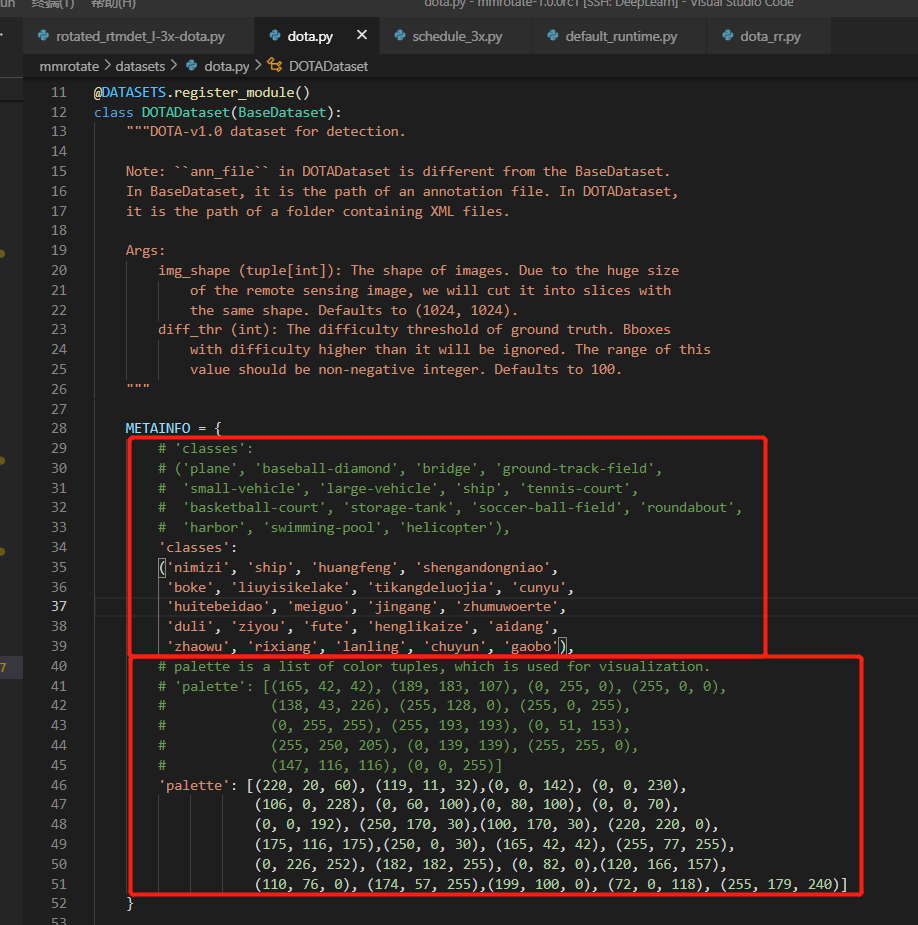
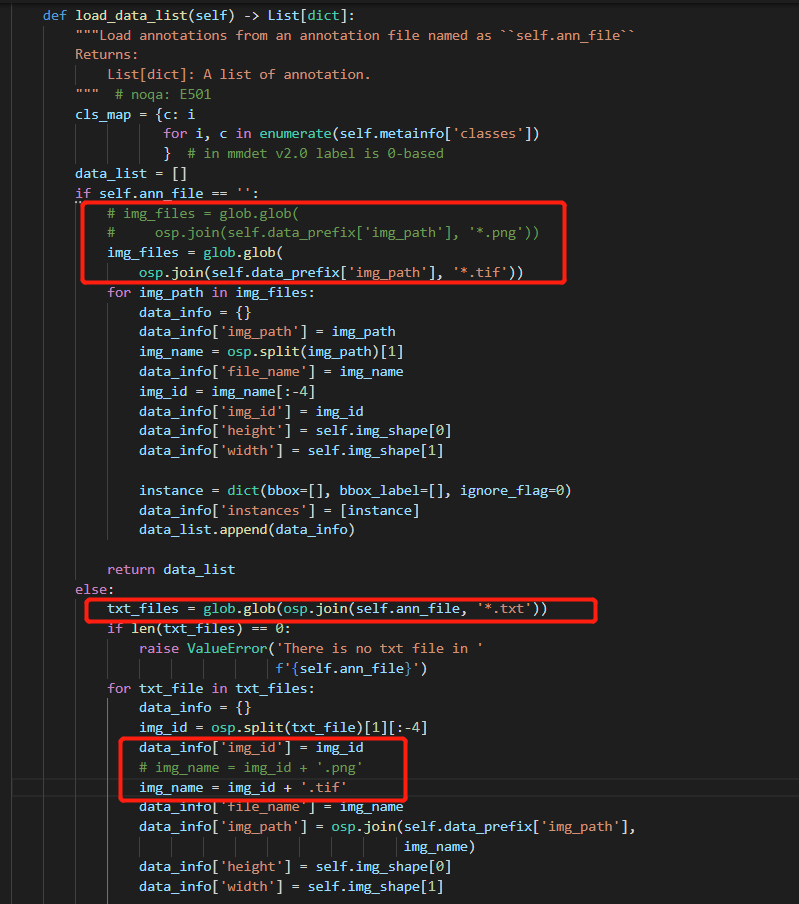
default_scope = 'mmrotate'
default_hooks = dict(
    timer=dict(type='IterTimerHook'),
    logger=dict(type='LoggerHook', interval=50),
    param_scheduler=dict(type='ParamSchedulerHook'),
    checkpoint=dict(type='CheckpointHook', interval=12, max_keep_ckpts=3),
    sampler_seed=dict(type='DistSamplerSeedHook'),
    visualization=dict(type='mmdet.DetVisualizationHook'))
env_cfg = dict(
    cudnn_benchmark=False,
    mp_cfg=dict(mp_start_method='fork', opencv_num_threads=0),
    dist_cfg=dict(backend='nccl'))
vis_backends = [dict(type='LocalVisBackend')]
visualizer = dict(
    type='RotLocalVisualizer',
    vis_backends=[dict(type='LocalVisBackend')],
    name='visualizer')
log_processor = dict(type='LogProcessor', window_size=50, by_epoch=True)
log_level = 'INFO'
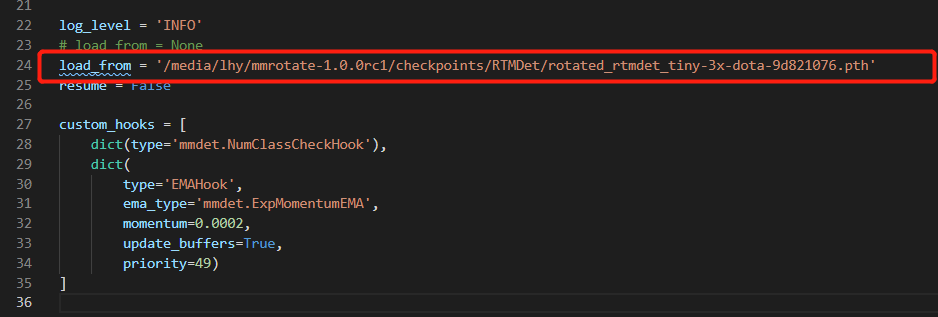
load_from = '/media/lhy/mmrotate-1.0.0rc1/checkpoints/RTMDet/rotated_rtmdet_tiny-3x-dota-9d821076.pth'
resume = False
custom_hooks = [
    dict(type='mmdet.NumClassCheckHook'),
    dict(
        type='EMAHook',
        ema_type='mmdet.ExpMomentumEMA',
        momentum=0.0002,
        update_buffers=True,
        priority=49)#在训练时对模型进行指数移动平均运算,目的是提高模型的鲁棒性
]
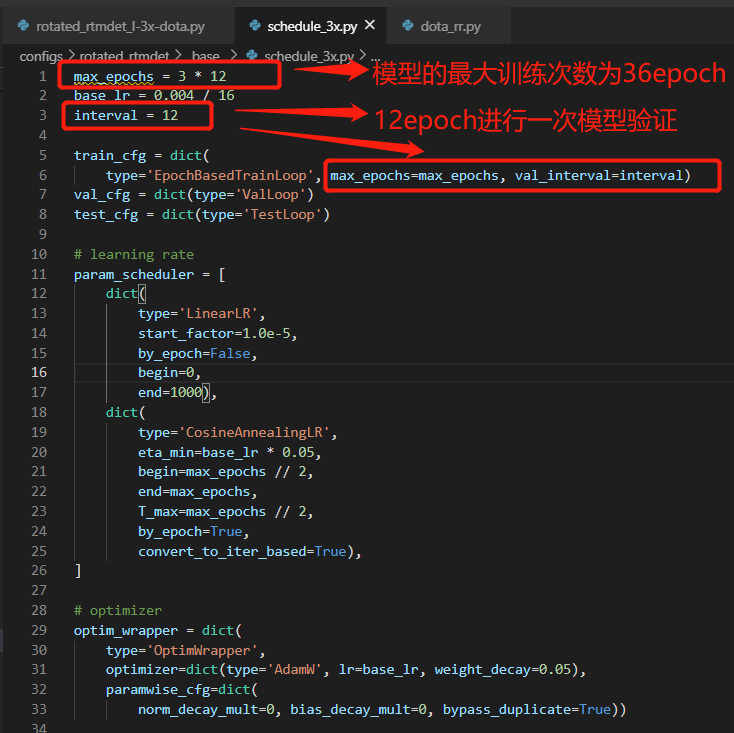
max_epochs = 36
base_lr = 0.00025
interval = 12
train_cfg = dict(type='EpochBasedTrainLoop', max_epochs=36, val_interval=12)
val_cfg = dict(type='ValLoop')
test_cfg = dict(type='TestLoop')
param_scheduler = [
    dict(
        type='LinearLR', start_factor=1e-05, by_epoch=False, begin=0,
        end=1000),
    dict(
        type='CosineAnnealingLR',
        eta_min=1.25e-05,
        begin=18,
        end=36,
        T_max=18,
        by_epoch=True,
        convert_to_iter_based=True)
]
optim_wrapper = dict(
    type='OptimWrapper',#标准的单精度训练
    optimizer=dict(type='AdamW', lr=0.00025, weight_decay=0.05),
    paramwise_cfg=dict(
        norm_decay_mult=0, bias_decay_mult=0, bypass_duplicate=True))
#paramwise_cfg可以设置参数
#lr_mult:所有参数的学习率。
#decay_mult:所有参数的衰减系数。
#bias_lr_mult:偏置的学习率系数(不包括归一化层的偏置和可变形卷积的偏置)。
#bias_decay_mult:偏差的权重衰减系数(不包括归一化层的偏差和可变形卷积的偏移量)。
#norm_decay_mult:归一化层的权重和偏差的权重衰减系数。
#flat_decay_mult:一维参数的权重衰减系数。
#dwconv_decay_mult:深度卷积的衰减系数。
#bypass_duplicate: 是否跳过重复参数,默认为False.
#dcn_offset_lr_mult:可变形卷积的学习率。
dataset_type = 'DOTADataset'
data_root = 'data/DOTA/optship1280/'
file_client_args = dict(backend='disk')
train_pipeline = [
    dict(
        type='mmdet.LoadImageFromFile', file_client_args=dict(backend='disk')),
    dict(type='mmdet.LoadAnnotations', with_bbox=True, box_type='qbox'),
    dict(type='ConvertBoxType', box_type_mapping=dict(gt_bboxes='rbox')),
    dict(type='mmdet.Resize', scale=(1280, 1280), keep_ratio=True),
    dict(
        type='mmdet.RandomFlip',
        prob=0.75,
        direction=['horizontal', 'vertical', 'diagonal']),
    dict(
        type='RandomRotate',
        prob=0.5,
        angle_range=180,
        rect_obj_labels=[9, 11]),
    dict(
        type='mmdet.Pad', size=(1280, 1280),
        pad_val=dict(img=(114, 114, 114))),
    dict(type='mmdet.PackDetInputs')
]
val_pipeline = [
    dict(
        type='mmdet.LoadImageFromFile', file_client_args=dict(backend='disk')),
    dict(type='mmdet.Resize', scale=(1280, 1280), keep_ratio=True),
    dict(type='mmdet.LoadAnnotations', with_bbox=True, box_type='qbox'),
    dict(type='ConvertBoxType', box_type_mapping=dict(gt_bboxes='rbox')),
    dict(
        type='mmdet.Pad', size=(1280, 1280),
        pad_val=dict(img=(114, 114, 114))),
    dict(
        type='mmdet.PackDetInputs',
        meta_keys=('img_id', 'img_path', 'ori_shape', 'img_shape',
                   'scale_factor'))
]
test_pipeline = [
    dict(
        type='mmdet.LoadImageFromFile', file_client_args=dict(backend='disk')),
    dict(type='mmdet.Resize', scale=(1280, 1280), keep_ratio=True),
    dict(
        type='mmdet.Pad', size=(1280, 1280),
        pad_val=dict(img=(114, 114, 114))),
    dict(
        type='mmdet.PackDetInputs',
        meta_keys=('img_id', 'img_path', 'ori_shape', 'img_shape',
                   'scale_factor'))
]
train_dataloader = dict(
    batch_size=8,
    num_workers=8,
    persistent_workers=True,
    sampler=dict(type='DefaultSampler', shuffle=True),
    batch_sampler=None,
    pin_memory=False,
    dataset=dict(
        type='DOTADataset',
        data_root='data/DOTA/optship1280/',
        ann_file='trainval/obb_annfiles/',
        data_prefix=dict(img_path='trainval/images/'),
        img_shape=(1280, 1280),
        filter_cfg=dict(filter_empty_gt=True),
        pipeline=[
            dict(
                type='mmdet.LoadImageFromFile',
                file_client_args=dict(backend='disk')),
            dict(
                type='mmdet.LoadAnnotations', with_bbox=True, box_type='qbox'),
            dict(
                type='ConvertBoxType',
                box_type_mapping=dict(gt_bboxes='rbox')),
            dict(type='mmdet.Resize', scale=(1280, 1280), keep_ratio=True),
            dict(
                type='mmdet.RandomFlip',
                prob=0.75,
                direction=['horizontal', 'vertical', 'diagonal']),
            dict(
                type='RandomRotate',
                prob=0.5,
                angle_range=180,
                rect_obj_labels=[9, 11]),
            dict(
                type='mmdet.Pad',
                size=(1280, 1280),
                pad_val=dict(img=(114, 114, 114))),
            dict(type='mmdet.PackDetInputs')
        ]))
val_dataloader = dict(
    batch_size=1,
    num_workers=2,
    persistent_workers=True,
    drop_last=False,
    sampler=dict(type='DefaultSampler', shuffle=False),
    dataset=dict(
        type='DOTADataset',
        data_root='data/DOTA/optship1280/',
        ann_file='trainval/obb_annfiles/',
        data_prefix=dict(img_path='trainval/images/'),
        img_shape=(1280, 1280),
        test_mode=True,
        pipeline=[
            dict(
                type='mmdet.LoadImageFromFile',
                file_client_args=dict(backend='disk')),
            dict(type='mmdet.Resize', scale=(1280, 1280), keep_ratio=True),
            dict(
                type='mmdet.LoadAnnotations', with_bbox=True, box_type='qbox'),
            dict(
                type='ConvertBoxType',
                box_type_mapping=dict(gt_bboxes='rbox')),
            dict(
                type='mmdet.Pad',
                size=(1280, 1280),
                pad_val=dict(img=(114, 114, 114))),
            dict(
                type='mmdet.PackDetInputs',
                meta_keys=('img_id', 'img_path', 'ori_shape', 'img_shape',
                           'scale_factor'))
        ]))
test_dataloader = dict(
    batch_size=1,
    num_workers=2,
    persistent_workers=True,
    drop_last=False,
    sampler=dict(type='DefaultSampler', shuffle=False),
    dataset=dict(
        type='DOTADataset',
        data_root='data/DOTA/optship1280/',
        ann_file='val/obb_annfiles/',
        data_prefix=dict(img_path='val/images/'),
        img_shape=(1280, 1280),
        test_mode=True,
        pipeline=[
            dict(
                type='mmdet.LoadImageFromFile',
                file_client_args=dict(backend='disk')),
            dict(type='mmdet.Resize', scale=(1280, 1280), keep_ratio=True),
            dict(
                type='mmdet.LoadAnnotations', with_bbox=True, box_type='qbox'),
            dict(
                type='ConvertBoxType',
                box_type_mapping=dict(gt_bboxes='rbox')),
            dict(
                type='mmdet.Pad',
                size=(1280, 1280),
                pad_val=dict(img=(114, 114, 114))),
            dict(
                type='mmdet.PackDetInputs',
                meta_keys=('img_id', 'img_path', 'ori_shape', 'img_shape',
                           'scale_factor'))
        ]))
val_evaluator = dict(type='DOTAMetric', metric='mAP')#评估数据类型与指标
test_evaluator = dict(type='DOTAMetric', metric='mAP')
checkpoint = '/media/lhy/mmrotate-1.0.0rc1/work_dirs/pretrain/cspnext-tiny_imagenet_600e.pth'
angle_version = 'le90'
model = dict(
    type='mmdet.RTMDet',
    data_preprocessor=dict(
        type='mmdet.DetDataPreprocessor',
        mean=[103.53, 116.28, 123.675],
        std=[57.375, 57.12, 58.395],
        bgr_to_rgb=False,
        boxtype2tensor=False,
        batch_augments=None),
    backbone=dict(
        type='mmdet.CSPNeXt',
        arch='P5',
        expand_ratio=0.5,
        deepen_factor=0.167,
        widen_factor=0.375,
        channel_attention=True,
        norm_cfg=dict(type='SyncBN'),
        act_cfg=dict(type='SiLU'),
        init_cfg=dict(
            type='Pretrained',
            prefix='backbone.',
            checkpoint=
            '/media/lhy/mmrotate-1.0.0rc1/work_dirs/pretrain/cspnext-tiny_imagenet_600e.pth'
        )),
    neck=dict(
        type='mmdet.CSPNeXtPAFPN',
        in_channels=[96, 192, 384],
        out_channels=96,
        num_csp_blocks=1,
        expand_ratio=0.5,
        norm_cfg=dict(type='SyncBN'),
        act_cfg=dict(type='SiLU')),
    bbox_head=dict(
        type='RotatedRTMDetSepBNHead',
        num_classes=22,
        in_channels=96,
        stacked_convs=2,
        feat_channels=96,
        angle_version='le90',
        anchor_generator=dict(
            type='mmdet.MlvlPointGenerator', offset=0, strides=[8, 16, 32]),
        bbox_coder=dict(type='DistanceAnglePointCoder', angle_version='le90'),
        loss_cls=dict(
            type='mmdet.QualityFocalLoss',
            use_sigmoid=True,
            beta=2.0,
            loss_weight=1.0),
        loss_bbox=dict(type='RotatedIoULoss', mode='linear', loss_weight=2.0),
        with_objectness=False,
        exp_on_reg=False,
        share_conv=True,
        pred_kernel_size=1,
        use_hbbox_loss=False,
        scale_angle=False,
        loss_angle=None,
        norm_cfg=dict(type='SyncBN'),
        act_cfg=dict(type='SiLU')),
    train_cfg=dict(
        assigner=dict(
            type='mmdet.DynamicSoftLabelAssigner',
            iou_calculator=dict(type='RBboxOverlaps2D'),
            topk=13),
        allowed_border=-1,
        pos_weight=-1,
        debug=False),
    test_cfg=dict(
        nms_pre=2000,
        min_bbox_size=0,
        score_thr=0.05,
        nms=dict(type='nms_rotated', iou_threshold=0.1),
        max_per_img=2000))
launcher = 'none'
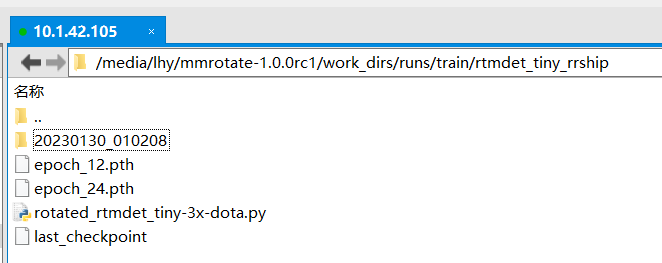
work_dir = 'work_dirs/runs/train/rtmdet_tiny_rrship/'
python tools/train.py ${CONFIG_FILE} [optional arguments]如果你想在命令中指定工作目录,你可以添加一个参数–work_dir $[YOUR_WORK_DIR]。
./tools/dist_train.sh ${CONFIG_FILE} ${GPU_NUM} [optional arguments]Optional arguments are:
–no-validate (not suggested): By default, the codebase will perform evaluation during the training. To disable this behavior, use --no-validate.
–work-dir ${WORK_DIR}: Override the working directory specified in the config file.
–resume-from ${CHECKPOINT_FILE}: Resume from a previous checkpoint file.
Difference between resume-from and load-from: resume-from loads both the model weights and optimizer status, and the epoch is also inherited from the specified checkpoint. It is usually used for resuming the training process that is interrupted accidentally. load-from only loads the model weights and the training epoch starts from 0. It is usually used for finetuning.
•如果你启动了多台连接以太网的机器,你可以简单地运行以下命令:
On the first machine:
NNODES=2 NODE_RANK=0 PORT=$MASTER_PORT MASTER_ADDR=$MASTER_ADDR sh tools/dist_train.sh $CONFIG $GPUSOn the second machine:
NNODES=2 NODE_RANK=1 PORT=$MASTER_PORT MASTER_ADDR=$MASTER_ADDR sh tools/dist_train.sh $CONFIG $GPUS如果你没有像InfiniBand这样的高速网络,通常会很慢。
如果在由slurm管理的集群上运行MMRotate,可以使用脚本slurm_train.sh。(此脚本也支持单机训练。)
[GPUS=${GPUS}] ./tools/slurm_train.sh ${PARTITION} ${JOB_NAME} ${CONFIG_FILE} ${WORK_DIR}如果您有多台机器与以太网连接,您可以参考PyTorch启动实用程序添加链接描述。如果你没有像InfiniBand这样的高速网络,通常会很慢
如果您在一台机器上启动多个作业,例如,在一台有8个gpu的机器上启动2个4-GPU训练的作业,您需要为每个作业指定不同的端口(默认为29500),以避免通信冲突。
If you use dist_train.sh to launch training jobs, you can set the port in commands.
CUDA_VISIBLE_DEVICES=0,1,2,3 PORT=29500 ./tools/dist_train.sh ${CONFIG_FILE} 4
CUDA_VISIBLE_DEVICES=4,5,6,7 PORT=29501 ./tools/dist_train.sh ${CONFIG_FILE} 4
如果使用Slurm启动培训作业,则需要修改配置文件(通常是配置文件中倒数第6行)以设置不同的通信端口。
In config1.py,
dist_params = dict(backend=‘nccl’, port=29500)
In config2.py,
dist_params = dict(backend=‘nccl’, port=29501)
Then you can launch two jobs with config1.py and config2.py.
CUDA_VISIBLE_DEVICES=0,1,2,3 GPUS=4 ./tools/slurm_train.sh ${PARTITION} ${JOB_NAME} config1.py ${WORK_DIR}
CUDA_VISIBLE_DEVICES=4,5,6,7 GPUS=4 ./tools/slurm_train.sh ${PARTITION} ${JOB_NAME} config2.py ${WORK_DIR}
python tools/train.py configs/rotated_rtmdet/rotated_rtmdet_tiny-3x-dota.py --work-dir work_dirs/runs/train/rtmdet_tiny_rrship/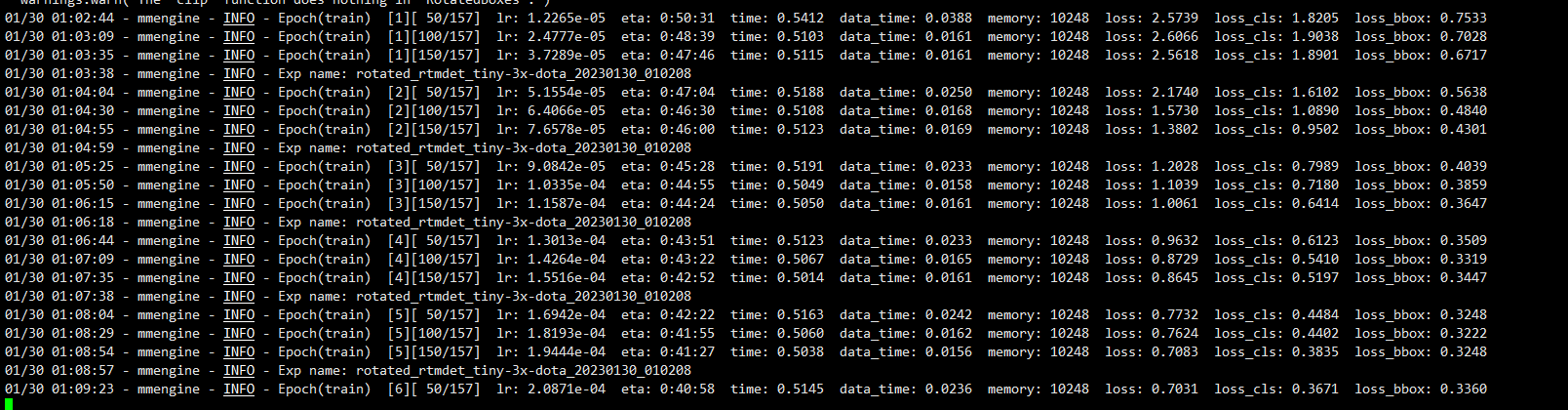

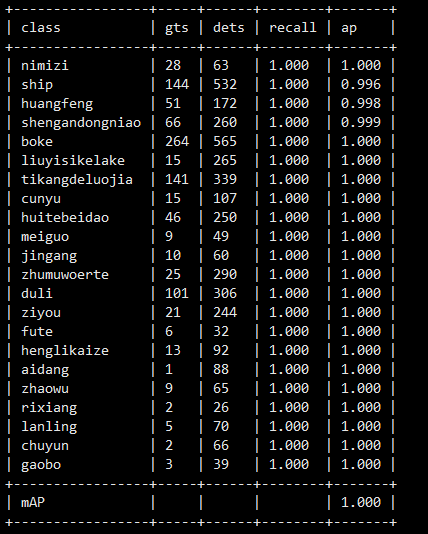
模型验证发现模型检测的目标远远多于真实的目标,我们修改配置文件的训练数据集路径为trainval,扩大训练样本。
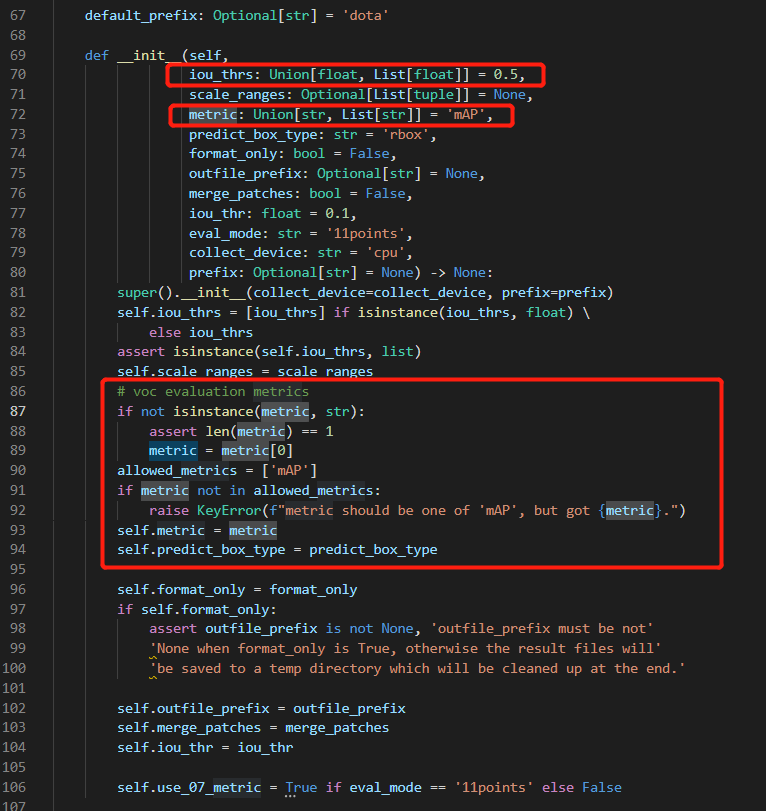
模型默认的iou阈值为0.5,可以修改为0.75等。
single GPU
single node multiple GPU
multiple node
可以使用以下命令推断数据集。
# single-gpu
python tools/test.py ${CONFIG_FILE} ${CHECKPOINT_FILE} [optional arguments]

# multi-gpu
./tools/dist_test.sh ${CONFIG_FILE} ${CHECKPOINT_FILE} ${GPU_NUM} [optional arguments]

# multi-node in slurm environment
python tools/test.py ${CONFIG_FILE} ${CHECKPOINT_FILE} [optional arguments] --launcher slurm
例子:
在DOTA-1.0数据集上推理RotatedRetinaNet,可以生成压缩文件在线提交。(请先更改data_root。)
python ./tools/test.py  \
  configs/rotated_retinanet/rotated-retinanet-rbox-le90_r50_fpn_1x_dota.py \
  checkpoints/SOME_CHECKPOINT.pth --format-only \
  --eval-options submission_dir=work_dirs/Task1_results
或者
./tools/dist_test.sh  \
  configs/rotated_retinanet/rotated-retinanet-rbox-le90_r50_fpn_1x_dota.py \
  checkpoints/SOME_CHECKPOINT.pth 1 --format-only \
--eval-options submission_dir=work_dirs/Task1_results您可以将data_root中的test set路径改为val set或trainval set进行离线评估。
python ./tools/test.py \
  configs/rotated_retinanet/rotated-retinanet-rbox-le90_r50_fpn_1x_dota.py \
  checkpoints/SOME_CHECKPOINT.pth --eval mAP
或者
./tools/dist_test.sh  \
  configs/rotated_retinanet/rotated-retinanet-rbox-le90_r50_fpn_1x_dota.py \
  checkpoints/SOME_CHECKPOINT.pth 1 --eval mAP
您还可以可视化结果。
python ./tools/test.py \
  configs/rotated_retinanet/rotated-retinanet-rbox-le90_r50_fpn_1x_dota.py \
  checkpoints/SOME_CHECKPOINT.pth \
  --show-dir work_dirs/vis
点向量坐标矩阵的几何意义介绍旋转矩阵的几何含义之前,先介绍一下点向量坐标矩阵的几何含义点:在一维空间下就是一个标量,如同一条直线上,以任意某一个位置为0点,以一定的尺度间隔为1,2,3...,相反方向为-1,-2,-3...;如此就形成了一维坐标系,这时候任何一个点都可以用一个数值表示,如点p1=5,即即从原点出发沿着x轴正方向移动5个尺度;点p2=-3,负方向移动3个尺度; 在一维坐标系上过原点做垂直于一维坐标系的直线,则形成了二维坐标系,此时描述一个点需要两个数值来表示点p3=(3,2),即从原点出发沿着x轴正方向移动3个尺度,在此基础上沿着y轴正方向移动两个尺度的位置就是点p3。
Unity自动旋转动画1.开门需要门把手先动,门再动2.关门需要门先动,门把手再动3.中途播放过程中不可以再次进行操作觉得太复杂?查看我的文章开关门简易进阶版效果:如果这个门可以直接打开的话,就不需要放置"门把手"如果门把手还有钥匙需要旋转,那就可以把钥匙放在门把手的"门把手",理论上是可以无限套娃的可调整参数有:角度,反向,轴向,速度运行时点击Test进行测试自己写的代码比较垃圾,命名与结构比较拉,高手轻点喷,新手有类似的需求可以拿去做参考上代码usingSystem.Collections;usingSystem.Collections.Generic;usingUnityEngine;u
我正在使用最新版本的Rails,启动一个我将在3.1发布后部署的新应用程序,但我无法让omniauth工作。如果我只是将omniauth添加到我的Gemfile,它会bundle起来,但是当我运行rake、railss或几乎所有命令时,它会出错:nosuchfiletoload--omniauth/password有什么想法吗?是否有适用于Rails3.1的分支或分支?还是只有我遇到这个问题? 最佳答案 实际问题是bundler选择了旧版本的omniauth。为了帮助bundler选择正确的版本,请使用:gem'omniauth',
在神经网络方面,我完全是个初学者。我整天都在与ruby-fann和ai4r搏斗,不幸的是我没有任何东西可以展示,所以我想我会来到StackOverflow并询问这里的知识渊博的人。我有一组样本——每天都有一个数据点,但它们不符合我能够找出的任何明确模式(我尝试了几次回归)。不过,我认为看看是否有任何方法可以仅从日期预测future的数据会很好,而且我认为神经网络将是生成希望表达这种关系的函数的好方法.日期是DateTime对象,数据点是十进制数,例如7.68。我一直在将DateTime对象转换为float,然后除以10,000,000,000得到一个介于0和1之间的数字,我一直在将
我最近正在进行Rails5升级,当我尝试启动Rails控制台时遇到了这个错误:/actionpack-5.0.0/lib/action_controller/test_case.rb:49:ininitialize':wrongnumberofarguments(0for2)(ArgumentError)当前bundleupdaterails已经完成了gem依赖项的解决,足以更新到5.0.0,rspec正在运行(尽管我正在修复很多中断)。我也可以运行railss没有错误。这里是代码中断行:https://github.com/rails/rails/blob/master/action
我是Ruby和Watir-Webdriver的新手。我有一套用VBScript编写的站点自动化程序,我想将其转换为Ruby/Watir,因为我现在必须支持Firefox。我发现我真的很喜欢Ruby,而且我正在研究Watir,但我已经花了一周时间试图让Webdriver显示我的登录屏幕。该站点以带有“我同意”区域的“警告屏幕”开头。用户点击我同意并显示登录屏幕。我需要单击该区域以显示登录屏幕(这是同一页面,实际上是一个表单,只是隐藏了)。我整天都在用VBScript这样做:objExplorer.Document.GetElementsByTagName("area")(0).click
我正在尝试训练一个前馈网络来使用Ruby库AI4R执行异或运算。然而,当我在训练后评估XOR时。我没有得到正确的输出。有没有人以前使用过这个库并得到它来学习异或运算。我使用了两个输入神经元,一个隐藏层中的三个神经元,一个输出层,正如我看到的预计算XOR前馈神经网络就像这样。require"rubygems"require"ai4r"#Createthenetworkwith:#2inputs#1hiddenlayerwith3neurons#1outputsnet=Ai4r::NeuralNetwork::Backpropagation.new([2,3,1])example=[[0,
欧拉角、旋转矩阵及四元数1.简介2.欧拉角2.1欧拉角定义2.2右手系和左手系2.3转换流程3.旋转矩阵4.四元数4.1四元数与欧拉角和旋转矩阵之间等效变换4.2测试Matlab代码5.总结1.简介常用姿态参数表达方式包括方向余弦矩阵、欧拉轴/角参数、欧拉角、四元数以及罗德里格参数等。高分辨率光学遥感卫星主要采用欧拉角与四元数对姿态参数进行描述。这里着重讲解欧拉角、旋转矩阵和四元数。2.欧拉角2.1欧拉角定义欧拉角是表征刚体旋转的一种方法之一,由莱昂哈德·欧拉引入的三个角度,用于描述刚体相对于固定坐标系的方向。在摄影测量、空间科学或其它技术领域,一般用一组(三个)欧拉角描述两个空间坐标之间的旋
关于yolov5训练时参数workers和batch-size的理解yolov5训练命令workers和batch-size参数的理解两个参数的调优总结yolov5训练命令python.\train.py--datamy.yaml--workers8--batch-size32--epochs100yolov5的训练很简单,下载好仓库,装好依赖后,只需自定义一下data目录中的yaml文件就可以了。这里我使用自定义的my.yaml文件,里面就是定义数据集位置和训练种类数和名字。workers和batch-size参数的理解一般训练主要需要调整的参数是这两个:workers指数据装载时cpu所使
我收到以下错误:incompatiblemarshalfileformat(can'tberead)formatversion4.8required;0.0given在这一行:从我的布局文件的这一部分:true%>true%>我以前从来没有遇到过这个问题,网上的解释对我来说太高级了,或者与制作游戏的人有关,我的项目是一个简单的rails应用程序,我昨天才开始。 最佳答案 您尝试过清算Assets吗?bundleexecrakeassets:clean然后重新编译:bundleexecrakeassets:precompile您是否以
