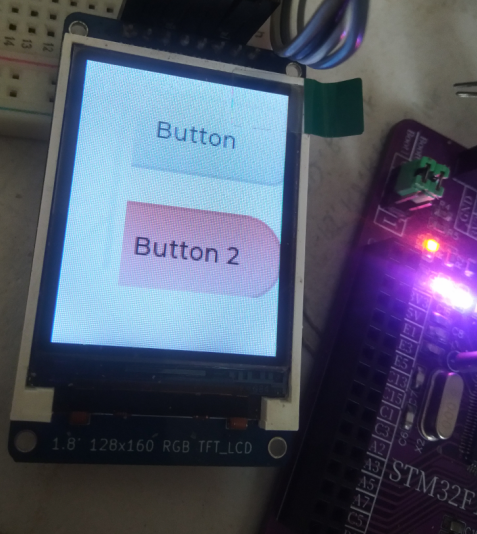
✨基于STM32CubeMX配置工程是因为方便移植,只要是STM32芯片,拿到我的这个工程源码就可以根据自己的stm32芯片,自行通过STM32CubeMX工具软件进行工程配置,并将我的工程中的屏幕驱动文件拷贝到自己的工程目录下,修改2个驱动函数代码就可以轻松点亮。
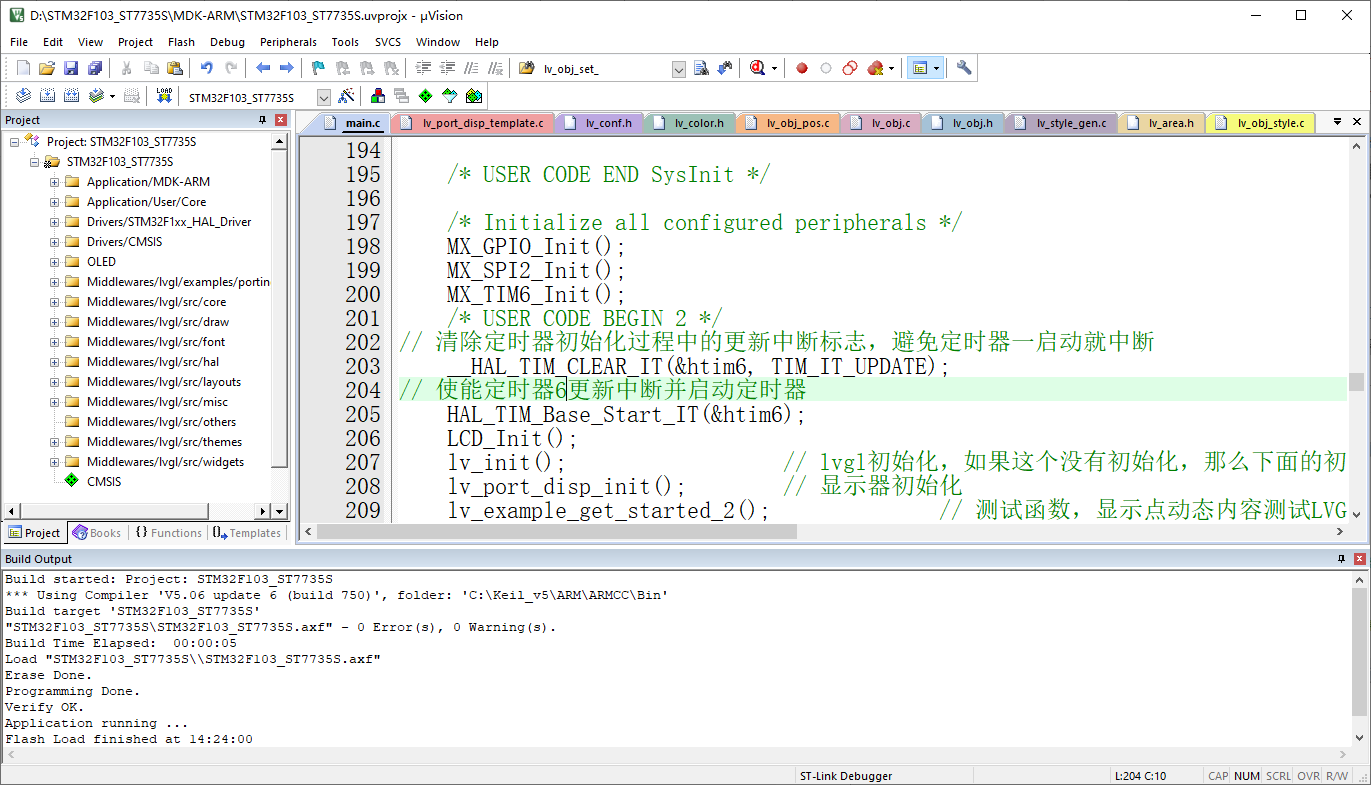
STM32F103VET6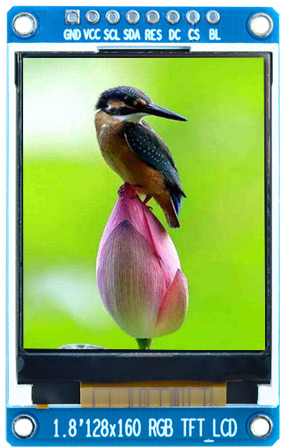
🎉折腾了我一天半,大部分时间在找不显示的问题。首先是没有处理好刷屏显示函数(
disp_flush),处理好了,就缺一个可运行的demo.以为LVGL难度不大,只要按照步骤和工程项目结构布局,没有什么难度。
第4讲 基础篇-LVGL移植(无操作系统1)
https://docs.lvgl.io/8.3/📋在线文档可以帮助我们快速查阅LVGL的API的使用和参数以及提供了相关的demo案例。直接拷贝到项目中就可以运行验证,根据个人需求可以自定义设计。
🍁工程文件架构
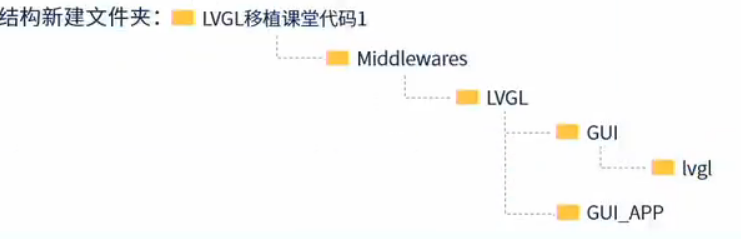
🌴项目树结构:
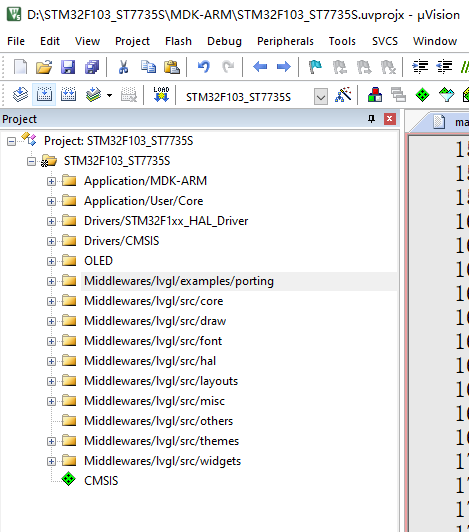
🔰其他屏幕接口移植,只要能点亮的,目标芯片满足LVGL要求的基本都可以移植,重点和难点就是要对接换LVGL刷屏显示函数(disp_flush):
static void disp_flush(lv_disp_drv_t * disp_drv, const lv_area_t * area, lv_color_t * color_p)
{
    if(disp_flush_enabled) {
        /*The most simple case (but also the slowest) to put all pixels to the screen one-by-one*/

        int32_t x;
        int32_t y;
        for(y = area->y1; y <= area->y2; y++) {
            for(x = area->x1; x <= area->x2; x++) {
                /*Put a pixel to the display. For example:*/
                /*put_px(x, y, *color_p)*/
				LCD_Fast_DrawPoint(x, y, color_p->full);
                color_p++;
            }
        }
    }
--diag_suppress=188,546,68,111,1215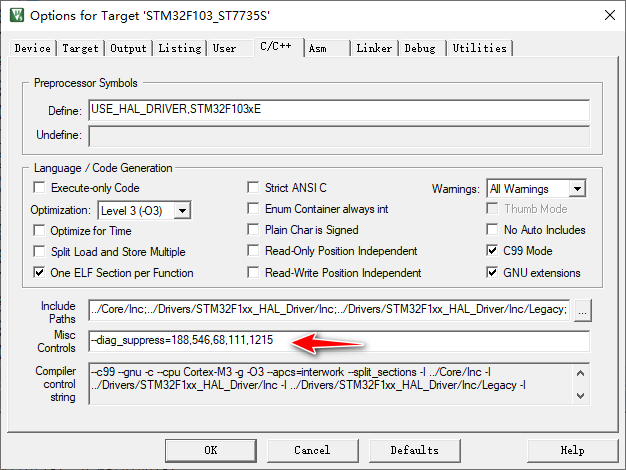
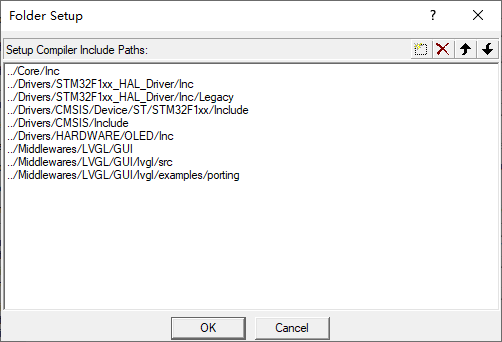
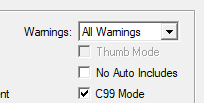
LV_CONF_h文件中启用相关宏和配置缓冲区大小。(直接关系到编译是否成功,默认LVGL配置的是128U)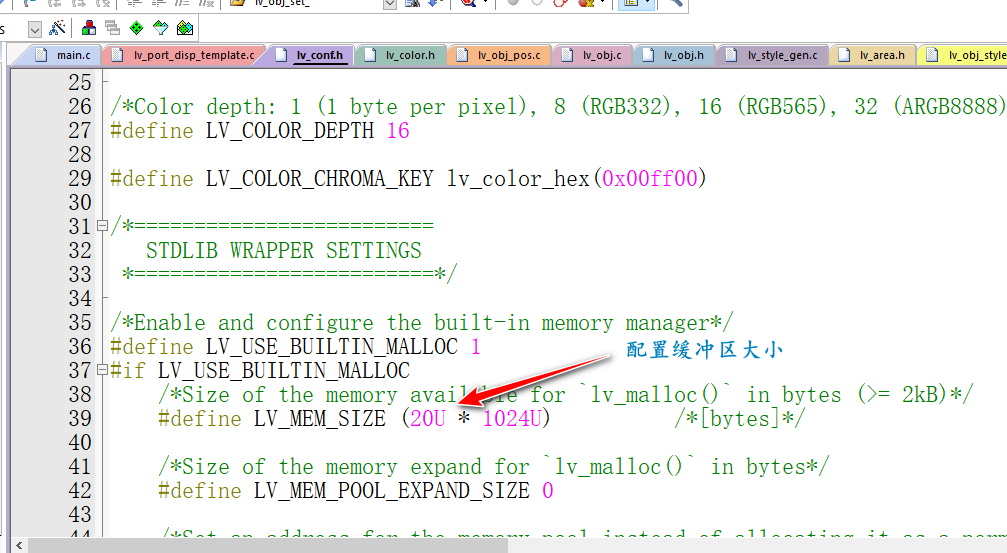
lv_port_disp_template.c中设置屏幕像素和刷屏显示函数#ifndef MY_DISP_HOR_RES
#warning Please define or replace the macro MY_DISP_HOR_RES with the actual screen width, default value 320 is used for now.
#define MY_DISP_HOR_RES 160
#endif
#ifndef MY_DISP_VER_RES
#warning Please define or replace the macro MY_DISP_HOR_RES with the actual screen height, default value 240 is used for now.
#define MY_DISP_VER_RES 128
#endif
/*Flush the content of the internal buffer the specific area on the display
 *You can use DMA or any hardware acceleration to do this operation in the background but
 *'lv_disp_flush_ready()' has to be called when finished.*/
static void disp_flush(lv_disp_drv_t * disp_drv, const lv_area_t * area, lv_color_t * color_p)
{
    if(disp_flush_enabled) {
        /*The most simple case (but also the slowest) to put all pixels to the screen one-by-one*/

        int32_t x;
        int32_t y;
        for(y = area->y1; y <= area->y2; y++) {
            for(x = area->x1; x <= area->x2; x++) {
                /*Put a pixel to the display. For example:*/
                /*put_px(x, y, *color_p)*/
							LCD_Fast_DrawPoint(x, y, color_p->full);
                color_p++;
            }
        }
    }

//	LCD_Color_Fill(area->x1, area->y1, area->x2, area->y2,color_p);
    /*IMPORTANT!!!
     *Inform the graphics library that you are ready with the flushing*/
    lv_disp_flush_ready(disp_drv);
}
/* USER CODE BEGIN Header */
/**
  ******************************************************************************
  * @file           : main.c
  * @brief          : Main program body
  ******************************************************************************
  * @attention
  *
  * Copyright (c) 2023 STMicroelectronics.
  * All rights reserved.
  *
  * This software is licensed under terms that can be found in the LICENSE file
  * in the root directory of this software component.
  * If no LICENSE file comes with this software, it is provided AS-IS.
  *
  ******************************************************************************
  */
/* USER CODE END Header */
/* Includes ------------------------------------------------------------------*/
#include "main.h"
#include "spi.h"
#include "tim.h"
#include "gpio.h"

/* Private includes ----------------------------------------------------------*/
/* USER CODE BEGIN Includes */
#include "lcd.h"
/* USER CODE END Includes */

/* Private typedef -----------------------------------------------------------*/
/* USER CODE BEGIN PTD */
#include "lcd.h"
#include "lv_port_disp_template.h"
//#include "lv_port_indev.h"// 输入设备初始化(如果没有实现就注释掉)
#include "lvgl.h"
/* USER CODE END PTD */

/* Private define ------------------------------------------------------------*/
/* USER CODE BEGIN PD */
/* USER CODE END PD */

/* Private macro -------------------------------------------------------------*/
/* USER CODE BEGIN PM */
uint16_t cnt = 0;
/* USER CODE END PM */

/* Private variables ---------------------------------------------------------*/

/* USER CODE BEGIN PV */

/* USER CODE END PV */

/* Private function prototypes -----------------------------------------------*/
void SystemClock_Config(void);
/* USER CODE BEGIN PFP */

/* USER CODE END PFP */

/* Private user code ---------------------------------------------------------*/
/* USER CODE BEGIN 0 */
void HAL_TIM_PeriodElapsedCallback(TIM_HandleTypeDef *htim)
{
//    static uint32_t time = 0;
    if (htim->Instance == TIM6) // 定时器6基地址
    {
        lv_tick_inc(1);//lvgl 的 1ms 心跳
        cnt++;
    }
    __HAL_TIM_CLEAR_IT(&htim6, TIM_IT_UPDATE);
}

/*
static void lv_ex_label(void)
{
    static char *STR = "Perseverance51";
    lv_obj_t *label = lv_label_create(lv_scr_act());
    lv_label_set_recolor(label, true);
    lv_label_set_long_mode(label, LV_LABEL_LONG_SCROLL_CIRCULAR); //Circular scroll
    lv_obj_set_width(label, 160);
    lv_label_set_text_fmt(label, "Gitee: %s",STR);
    lv_obj_align(label, LV_ALIGN_CENTER, 0, 10);

    lv_obj_t *label2 = lv_label_create(lv_scr_act());
    lv_label_set_recolor(label2, true);
    lv_label_set_long_mode(label2, LV_LABEL_LONG_SCROLL_CIRCULAR); //Circular scroll
    lv_obj_set_width(label2, 160);
    lv_label_set_text_fmt(label2, "Hello world!");
    lv_obj_align(label2, LV_ALIGN_CENTER, 0, -10);
}
*/
static lv_style_t style_btn;
static lv_style_t style_btn_pressed;
static lv_style_t style_btn_red;

static lv_color_t darken(const lv_color_filter_dsc_t * dsc, lv_color_t color, lv_opa_t opa)
{
    LV_UNUSED(dsc);
    return lv_color_darken(color, opa);
}

static void style_init(void)
{
    /*Create a simple button style*/
    lv_style_init(&style_btn);
    lv_style_set_radius(&style_btn, 10);
    lv_style_set_bg_opa(&style_btn, LV_OPA_COVER);
    lv_style_set_bg_color(&style_btn, lv_palette_lighten(LV_PALETTE_GREY, 3));
    lv_style_set_bg_grad_color(&style_btn, lv_palette_main(LV_PALETTE_GREY));
    lv_style_set_bg_grad_dir(&style_btn, LV_GRAD_DIR_VER);

    lv_style_set_border_color(&style_btn, lv_color_black());
    lv_style_set_border_opa(&style_btn, LV_OPA_20);
    lv_style_set_border_width(&style_btn, 2);

    lv_style_set_text_color(&style_btn, lv_color_black());

    /*Create a style for the pressed state.
     *Use a color filter to simply modify all colors in this state*/
    static lv_color_filter_dsc_t color_filter;
    lv_color_filter_dsc_init(&color_filter, darken);
    lv_style_init(&style_btn_pressed);
    lv_style_set_color_filter_dsc(&style_btn_pressed, &color_filter);
    lv_style_set_color_filter_opa(&style_btn_pressed, LV_OPA_20);

    /*Create a red style. Change only some colors.*/
    lv_style_init(&style_btn_red);
    lv_style_set_bg_color(&style_btn_red, lv_palette_main(LV_PALETTE_RED));
    lv_style_set_bg_grad_color(&style_btn_red, lv_palette_lighten(LV_PALETTE_RED, 3));
}

/**
 * Create styles from scratch for buttons.
 */
void lv_example_get_started_2(void)
{
    /*Initialize the style*/
    style_init();

    /*Create a button and use the new styles*/
    lv_obj_t * btn = lv_btn_create(lv_scr_act());
    /* Remove the styles coming from the theme
     * Note that size and position are also stored as style properties
     * so lv_obj_remove_style_all will remove the set size and position too */
    lv_obj_remove_style_all(btn);
    lv_obj_set_pos(btn, 10, 10);
    lv_obj_set_size(btn, 120, 50);
    lv_obj_add_style(btn, &style_btn, 0);
    lv_obj_add_style(btn, &style_btn_pressed, LV_STATE_PRESSED);

    /*Add a label to the button*/
    lv_obj_t * label = lv_label_create(btn);
    lv_label_set_text(label, "Button");
    lv_obj_center(label);

    /*Create another button and use the red style too*/
    lv_obj_t * btn2 = lv_btn_create(lv_scr_act());
    lv_obj_remove_style_all(btn2);                      /*Remove the styles coming from the theme*/
    lv_obj_set_pos(btn2, 10, 80);
    lv_obj_set_size(btn2, 120, 50);
    lv_obj_add_style(btn2, &style_btn, 0);
    lv_obj_add_style(btn2, &style_btn_red, 0);
    lv_obj_add_style(btn2, &style_btn_pressed, LV_STATE_PRESSED);
    lv_obj_set_style_radius(btn2, LV_RADIUS_CIRCLE, 0); /*Add a local style too*/

    label = lv_label_create(btn2);
    lv_label_set_text(label, "Button 2");
    lv_obj_center(label);
}
/* USER CODE END 0 */

/**
  * @brief  The application entry point.
  * @retval int
  */
int main(void)
{
    /* USER CODE BEGIN 1 */

    /* USER CODE END 1 */

    /* MCU Configuration--------------------------------------------------------*/

    /* Reset of all peripherals, Initializes the Flash interface and the Systick. */
    HAL_Init();

    /* USER CODE BEGIN Init */

    /* USER CODE END Init */

    /* Configure the system clock */
    SystemClock_Config();

    /* USER CODE BEGIN SysInit */

    /* USER CODE END SysInit */

    /* Initialize all configured peripherals */
    MX_GPIO_Init();
    MX_SPI2_Init();
    MX_TIM6_Init();
    /* USER CODE BEGIN 2 */
// 清除定时器初始化过程中的更新中断标志,避免定时器一启动就中断
    __HAL_TIM_CLEAR_IT(&htim6, TIM_IT_UPDATE);
// 使能定时器6更新中断并启动定时器
    HAL_TIM_Base_Start_IT(&htim6);
    LCD_Init();
    lv_init();                  // lvgl初始化,如果这个没有初始化,那么下面的初始化会崩溃
    lv_port_disp_init();        // 显示器初始化
    lv_example_get_started_2(); // demo函数,显示2个按键,测试LVGL是否成功
    /* USER CODE END 2 */

    /* Infinite loop */
    /* USER CODE BEGIN WHILE */
    while (1)
    {
        /* USER CODE END WHILE */

        /* USER CODE BEGIN 3 */
//        LCD_Clear(WHITE);
//      HAL_Delay(1000);
//      LCD_Draw_Circle(50,50,45,RED);
//      HAL_Delay(1000);
//      LCD_Clear(RED);
//      HAL_Delay(1000);
//      Demo_Menu();
        lv_task_handler();    // 运行所有lvgl的timer
        if (cnt > 1000)
        {
            cnt = 0;
            HAL_GPIO_TogglePin(GPIOE, GPIO_PIN_5);
        }
    }
    /* USER CODE END 3 */
}

/**
  * @brief System Clock Configuration
  * @retval None
  */
void SystemClock_Config(void)
{
    RCC_OscInitTypeDef RCC_OscInitStruct = {0};
    RCC_ClkInitTypeDef RCC_ClkInitStruct = {0};

    /** Initializes the RCC Oscillators according to the specified parameters
    * in the RCC_OscInitTypeDef structure.
    */
    RCC_OscInitStruct.OscillatorType = RCC_OSCILLATORTYPE_HSE;
    RCC_OscInitStruct.HSEState = RCC_HSE_ON;
    RCC_OscInitStruct.HSEPredivValue = RCC_HSE_PREDIV_DIV1;
    RCC_OscInitStruct.HSIState = RCC_HSI_ON;
    RCC_OscInitStruct.PLL.PLLState = RCC_PLL_ON;
    RCC_OscInitStruct.PLL.PLLSource = RCC_PLLSOURCE_HSE;
    RCC_OscInitStruct.PLL.PLLMUL = RCC_PLL_MUL9;
    if (HAL_RCC_OscConfig(&RCC_OscInitStruct) != HAL_OK)
    {
        Error_Handler();
    }

    /** Initializes the CPU, AHB and APB buses clocks
    */
    RCC_ClkInitStruct.ClockType = RCC_CLOCKTYPE_HCLK | RCC_CLOCKTYPE_SYSCLK
                                  | RCC_CLOCKTYPE_PCLK1 | RCC_CLOCKTYPE_PCLK2;
    RCC_ClkInitStruct.SYSCLKSource = RCC_SYSCLKSOURCE_PLLCLK;
    RCC_ClkInitStruct.AHBCLKDivider = RCC_SYSCLK_DIV1;
    RCC_ClkInitStruct.APB1CLKDivider = RCC_HCLK_DIV2;
    RCC_ClkInitStruct.APB2CLKDivider = RCC_HCLK_DIV1;

    if (HAL_RCC_ClockConfig(&RCC_ClkInitStruct, FLASH_LATENCY_2) != HAL_OK)
    {
        Error_Handler();
    }
}

/* USER CODE BEGIN 4 */

/* USER CODE END 4 */

/**
  * @brief  This function is executed in case of error occurrence.
  * @retval None
  */
void Error_Handler(void)
{
    /* USER CODE BEGIN Error_Handler_Debug */
    /* User can add his own implementation to report the HAL error return state */
    __disable_irq();
    while (1)
    {
    }
    /* USER CODE END Error_Handler_Debug */
}

#ifdef  USE_FULL_ASSERT
/**
  * @brief  Reports the name of the source file and the source line number
  *         where the assert_param error has occurred.
  * @param  file: pointer to the source file name
  * @param  line: assert_param error line source number
  * @retval None
  */
void assert_failed(uint8_t *file, uint32_t line)
{
    /* USER CODE BEGIN 6 */
    /* User can add his own implementation to report the file name and line number,
       ex: printf("Wrong parameters value: file %s on line %d\r\n", file, line) */
    /* USER CODE END 6 */
}
#endif /* USE_FULL_ASSERT */
复制这段内容后打开百度网盘手机App,操作更方便哦
链接: https://pan.baidu.com/s/1f_P8bEqrT7-AN2L9NVMynA
提取码: w7ck
我有一个在Linux服务器上运行的ruby脚本。它不使用rails或任何东西。它基本上是一个命令行ruby脚本,可以像这样传递参数:./ruby_script.rbarg1arg2如何将参数抽象到配置文件(例如yaml文件或其他文件)中?您能否举例说明如何做到这一点?提前谢谢你。 最佳答案 首先,您可以运行一个写入YAML配置文件的独立脚本:require"yaml"File.write("path_to_yaml_file",[arg1,arg2].to_yaml)然后,在您的应用中阅读它:require"yaml"arg
我已经在Sinatra上创建了应用程序,它代表了一个简单的API。我想在生产和开发上进行部署。我想在部署时选择,是开发还是生产,一些方法的逻辑应该改变,这取决于部署类型。是否有任何想法,如何完成以及解决此问题的一些示例。例子:我有代码get'/api/test'doreturn"Itisdev"end但是在部署到生产环境之后我想在运行/api/test之后看到ItisPROD如何实现? 最佳答案 根据SinatraDocumentation:EnvironmentscanbesetthroughtheRACK_ENVenvironm
按照目前的情况,这个问题不适合我们的问答形式。我们希望答案得到事实、引用或专业知识的支持,但这个问题可能会引发辩论、争论、投票或扩展讨论。如果您觉得这个问题可以改进并可能重新打开,visitthehelpcenter指导。关闭10年前。问题1)我想知道rubyonrails是否有功能类似于primefaces的gem。我问的原因是如果您使用primefaces(http://www.primefaces.org/showcase-labs/ui/home.jsf),开发人员无需担心javascript或jquery的东西。据我所知,JSF是一个规范,基于规范的各种可用实现,prim
无论您是想搭建桌面端、WEB端或者移动端APP应用,HOOPSPlatform组件都可以为您提供弹性的3D集成架构,同时,由工业领域3D技术专家组成的HOOPS技术团队也能为您提供技术支持服务。如果您的客户期望有一种在多个平台(桌面/WEB/APP,而且某些客户端是“瘦”客户端)快速、方便地将数据接入到3D应用系统的解决方案,并且当访问数据时,在各个平台上的性能和用户体验保持一致,HOOPSPlatform将帮助您完成。利用HOOPSPlatform,您可以开发在任何环境下的3D基础应用架构。HOOPSPlatform可以帮您打造3D创新型产品,HOOPSSDK包含的技术有:快速且准确的CAD
本教程将在Unity3D中混合Optitrack与数据手套的数据流,在人体运动的基础上,添加双手手指部分的运动。双手手背的角度仍由Optitrack提供,数据手套提供双手手指的角度。 01 客户端软件分别安装MotiveBody与MotionVenus并校准人体与数据手套。MotiveBodyMotionVenus数据手套使用、校准流程参照:https://gitee.com/foheart_1/foheart-h1-data-summary.git02 数据转发打开MotiveBody软件的Streaming,开始向Unity3D广播数据;MotionVenus中设置->选项选择Unit
之前在培训新生的时候,windows环境下配置opencv环境一直教的都是网上主流的vsstudio配置属性表,但是这个似乎对新生来说难度略高(虽然个人觉得完全是他们自己的问题),加之暑假之后对cmake实在是爱不释手,且这样配置确实十分简单(其实都不需要配置),故斗胆妄言vscode下配置CV之法。其实极为简单,图比较多所以很长。如果你看此文还配不好,你应该思考一下是不是自己的问题。闲话少说,直接开始。0.CMkae简介有的人到大二了都不知道cmake是什么,我不说是谁。CMake是一个开源免费并且跨平台的构建工具,可以用简单的语句来描述所有平台的编译过程。它能够根据当前所在平台输出对应的m
文章目录1.开发板选择*用到的资源2.串口通信(个人理解)3.代码分析(注释比较详细)1.主函数2.串口1配置3.串口2配置以及中断函数4.注意问题5.源码链接1.开发板选择我用的是STM32F103RCT6的板子,不过代码大概在F103系列的板子上都可以运行,我试过在野火103的霸道板上也可以,主要看一下串口对应的引脚一不一样就行了,不一样的就更改一下。*用到的资源keil5软件这里用到了两个串口资源,采集数据一个,串口通信一个,板子对应引脚如下:串口1,TX:PA9,RX:PA10串口2,TX:PA2,RX:PA32.串口通信(个人理解)我就从串口采集传感器数据这个过程说一下我自己的理解,
注意:本文主要掌握DCN自研无线产品的基本配置方法和注意事项,能够进行一般的项目实施、调试与运维AP基本配置命令AP登录用户名和密码均为:adminAP默认IP地址为:192.168.1.10AP默认情况下DHCP开启AP静态地址配置:setmanagementstatic-ip192.168.10.1AP开启/关闭DHCP功能:setmanagementdhcp-statusup/downAP设置默认网关:setstatic-ip-routegeteway192.168.10.254查看AP基本信息:getsystemgetmanagementgetmanaged-apgetrouteAP配
1.1.1 YARN的介绍 为克服Hadoop1.0中HDFS和MapReduce存在的各种问题⽽提出的,针对Hadoop1.0中的MapReduce在扩展性和多框架⽀持⽅⾯的不⾜,提出了全新的资源管理框架YARN. ApacheYARN(YetanotherResourceNegotiator的缩写)是Hadoop集群的资源管理系统,负责为计算程序提供服务器计算资源,相当于⼀个分布式的操作系统平台,⽽MapReduce等计算程序则相当于运⾏于操作系统之上的应⽤程序。 YARN被引⼊Hadoop2,最初是为了改善MapReduce的实现,但是因为具有⾜够的通⽤性,同样可以⽀持其他的分布式计算模
我是ruby的新手,正在配置IRB。我喜欢pretty-print(需要'pp'),但总是输入pp来漂亮地打印它似乎很麻烦。我想做的是默认情况下让它漂亮地打印出来,所以如果我有一个var,比如说,'myvar',然后键入myvar,它会自动调用pretty_inspect而不是常规检查。我从哪里开始?理想情况下,我将能够向我的.irbrc文件添加一个自动调用的方法。有什么想法吗?谢谢! 最佳答案 irb中默认pretty-print对象正是hirb被迫去做。Theseposts解释hirb如何将几乎所有内容转换为ascii表。虽
