 大家好,我是 华仔, 又跟大家见面了。上篇主要带大家深度剖析了「发送网络 I/O 的 Sender 线程的架构设计」,消息先被暂存然后调用网络I/O组件进行发送,今天主要聊聊「真正进行网络 I/O 的 NetworkClient 的架构设计」深度剖析下消息是如何被发送出去的。
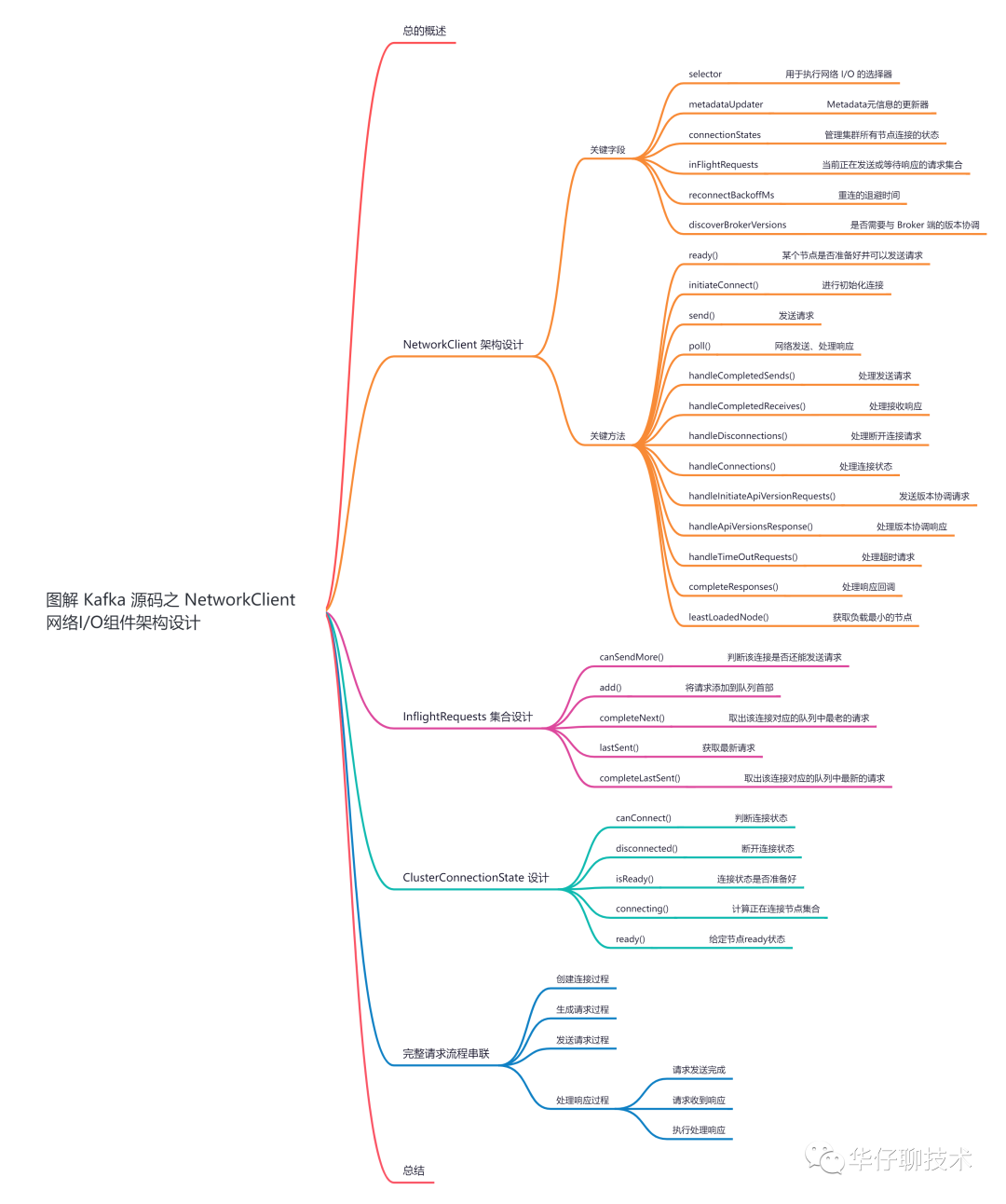 认真读完这篇文章,我相信你会对 Kafka NetworkClient 的源码有更加深刻的理解。
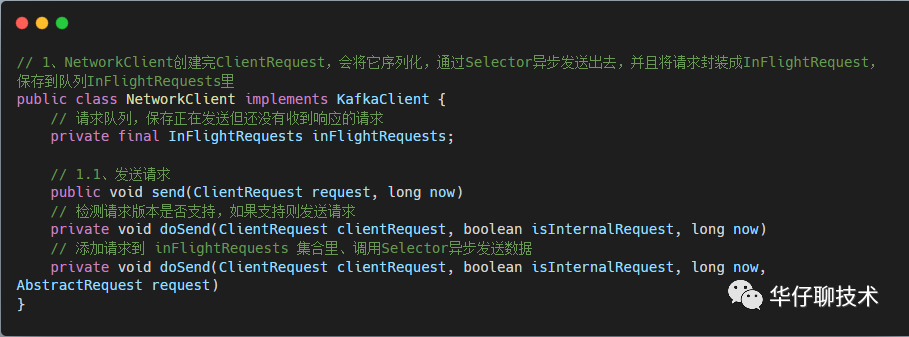
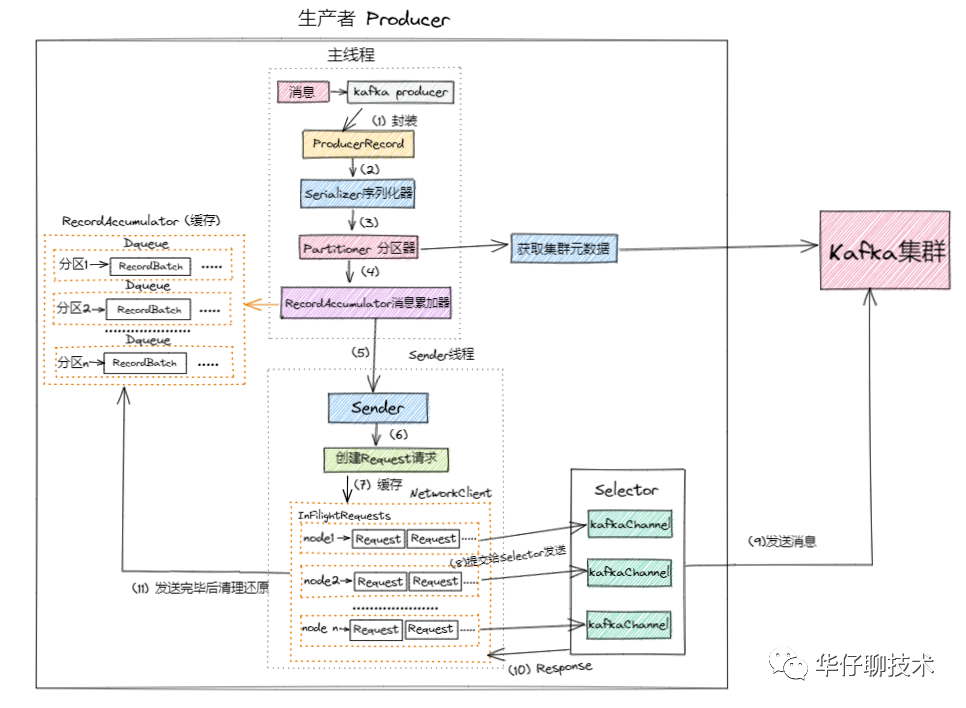 NetworkClient 为「生产者」、「消费者」、「服务端」等上层业务提供了网络I/O的能力。在 NetworkClient 内部使用了前面介绍的 Kafka 对 NIO 的封装组件,同时做了一定的封装,最终实现了网络I/O能力。NetworkClient 不仅仅用于客户端与服务端的通信,也用于服务端之间的通信。接下来我们就来看看,「NetworkClient 网络I/O组件的架构实现以及发送处理流程」,为了方便大家理解,所有的源码只保留骨干。
https://github.com/apache/kafka/blob/2.7.0/clients/src/main/java/org/apache/kafka/clients/NetworkClient.javahttps://github.com/apache/kafka/blob/2.7.0/clients/src/main/java/org/apache/kafka/clients/InFlightRequests.javahttps://github.com/apache/kafka/blob/2.7.0/clients/src/main/java/org/apache/kafka/clients/ClusterConnectionStates.javahttps://github.com/apache/kafka/blob/2.7.0/clients/src/main/java/org/apache/kafka/clients/ClientRequest.javahttps://github.com/apache/kafka/blob/2.7.0/clients/src/main/java/org/apache/kafka/clients/ClientResponse.java
public class NetworkClient implements KafkaClient {
    // 状态枚举值
    private enum State {
        ACTIVE,
        CLOSING,
        CLOSED
    }
    /* the selector used to perform network i/o */
    // 用于执行网络 I/O 的选择器
    private final Selectable selector;
    // Metadata元信息的更新器, 它可以尝试更新元信息
    private final MetadataUpdater metadataUpdater;
    /* the state of each node's connection */
    // 管理集群所有节点连接的状态
    private final ClusterConnectionStates connectionStates;
    /* the set of requests currently being sent or awaiting a response */
    // 当前正在发送或等待响应的请求集合
    private final InFlightRequests inFlightRequests;
    /* the socket send buffer size in bytes */
    // 套接字发送数据的缓冲区的大小(以字节为单位)
    private final int socketSendBuffer;
    /* the socket receive size buffer in bytes */
    // 套接字接收数据的缓冲区的大小(以字节为单位)
    private final int socketReceiveBuffer;
    /* the client id used to identify this client in requests to the server */
    // 表示客户端id,标识客户端身份
    private final String clientId;
    /* the current correlation id to use when sending requests to servers */
    // 向服务器发送请求时使用的当前关联 ID
    private int correlation;
    /* default timeout for individual requests to await acknowledgement from servers */
    // 单个请求等待服务器确认的默认超时
    private final int defaultRequestTimeoutMs;
    /* time in ms to wait before retrying to create connection to a server */
    // 重连的退避时间
    private final long reconnectBackoffMs;
    /**
     * True if we should send an ApiVersionRequest when first connecting to a broker.
     * 是否需要与 Broker 端的版本协调,默认为 true
     * 如果为 true 当第一次连接到一个 broker 时,应当发送一个 version 的请求,用来得知 broker 的版本, 如果为 false 则不需要发送 version 的请求。
     */
    private final boolean discoverBrokerVersions;
    // broker 端版本
    private final ApiVersions apiVersions;
    // 存储着要发送的版本请求,key 为 nodeId,value 为构建请求的 Builder
    private final Map<String, ApiVersionsRequest.Builder> nodesNeedingApiVersionsFetch = new HashMap<>();
    // 取消的请求集合
    private final List<ClientResponse> abortedSends = new LinkedList<>();
- selector:Kafka 自己封装的 Selector,该选择器负责监听「网络I/O事件」、「网络连接」、「读写操作」。
- metadataUpdater:NetworkClient 的内部类,主要用来实现Metadata元信息的更新器, 它可以尝试更新元信息。
- connectionStates:管理集群所有节点连接的状态,底层使用 Map<nodeid, NodeConnectionState>实现,NodeConnectionState 枚举值表示连接状态,并且记录了最后一次连接的时间戳。
- inFlightRequests:用来保存当前正在发送或等待响应的请求集合。
- socketSenderBuffer:表示套接字发送数据的缓冲区的大小。
- socketReceiveBuffer:表示套接字接收数据的缓冲区的大小。
- clientId:表示客户端id,标识客户端身份。
- reconnectBackoffMs:表示重连的退避事件,为了防止短时间内大量重连造成的网络压力,设计了这么一个时间段,在此时间段内不得重连。
/**
 * Begin connecting to the given node, return true if we are already connected and ready to send to that node.
 *
 * @param node The node to check
 * @param now The current timestamp
 * @return True if we are ready to send to the given node
 */
 @Override
 public boolean ready(Node node, long now) {
     // 空节点
     if (node.isEmpty())
        throw new IllegalArgumentException("Cannot connect to empty node " + node);
     // 1、判断节点是否准备好发送请求
     if (isReady(node, now))
        return true;
     // 2、判断节点连接状态
     if (connectionStates.canConnect(node.idString(), now))
        // if we are interested in sending to a node and we don't have a connection to it, initiate one
        // 3、初始化连接,但此时不一定连接成功了
        initiateConnect(node, now);

     return false;
}

/**
 * Check if the node with the given id is ready to send more requests.
 * @param node The node
 * @param now The current time in ms
 * @return true if the node is ready
*/
@Override
public boolean isReady(Node node, long now) {
    // if we need to update our metadata now declare all requests unready to make metadata requests first priority
    // 当发现正在更新元数据时,会禁止发送请求 && 当连接没有创建完毕或者当前发送的请求过多时,也会禁止发送请求
    return !metadataUpdater.isUpdateDue(now) && canSendRequest(node.idString(), now);
}

/**
 * Are we connected and ready and able to send more requests to the given connection?
 * 检测连接状态、发送请求是否过多
 * @param node The node
 * @param now the current timestamp
 */
 private boolean canSendRequest(String node, long now) {
    // 三个条件必须都满足
    return connectionStates.isReady(node, now) && selector.isChannelReady(node) &&
            inFlightRequests.canSendMore(node);
}
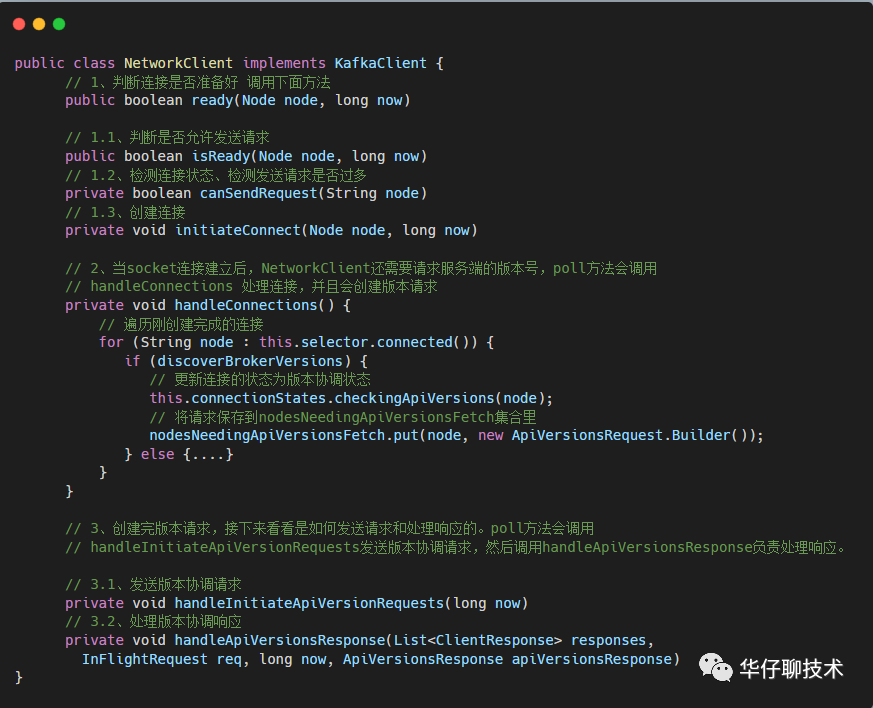
- 先判断节点是否已经准备好连接并接收请求了,需要满足以下四个条件:
- !metadataUpdater.isUpdateDue(now):不能是正在更新元数据的状态,且元数据不能过期。
- canSendRequest(node.idString(), now):此处有3个条件。(1)、客户端和 node 连接是否处于 ready 状态;(2)、客户端和 node 的 channel 是否建立好;(3)、inFlightRequests 中对应的节点是否可以接收更多的请求。
- 如果连接好返回 true 表示准备好,如果没有准备好接收请求,则会尝试与对应的 Node 连接,此处也需要满足两个条件:
- 首先连接必须是 isDisconnected,不能是 connecteding 状态,即客户端与服务端的连接状态是没有连接上。
- 两次重试之间时间差要大于重试退避时间,目的就是为了避免网络拥塞,防止重连过于频繁造成网络压力过大。
- 最后初始化连接。
/**
  * 创建连接
  * Initiate a connection to the given node
  * @param node the node to connect to
  * @param now current time in epoch milliseconds
  */
 private void initiateConnect(Node node, long now) {
    String nodeConnectionId = node.idString();
    try {
        // 1、更新连接状态为正在连接
        connectionStates.connecting(nodeConnectionId, now, node.host(), clientDnsLookup);
        // 获取连接地址
        InetAddress address = connectionStates.currentAddress(nodeConnectionId);
        log.debug("Initiating connection to node {} using address {}", node, address);
        // 2、调用 selector 尝试异步进行连接,后续通过selector.poll进行监听事件就绪
        selector.connect(nodeConnectionId,
                    new InetSocketAddress(address, node.port()),
                    this.socketSendBuffer,
                    this.socketReceiveBuffer);
    } catch (IOException e) {
        log.warn("Error connecting to node {}", node, e);
        // Attempt failed, we'll try again after the backoff
        connectionStates.disconnected(nodeConnectionId, now);
        // Notify metadata updater of the connection failure
        metadataUpdater.handleServerDisconnect(now, nodeConnectionId, Optional.empty());
    }
}当连接准备好后,接下来我们来看下发送相关的方法。
- 调用 connectionStates.connecting() 更新连接状态为正在连接。
- 调用 selector.connect() 异步发起连接,此时不一定连接上了,后续 Selector.poll() 会监听连接是否准备好并完成连接,如果连接成功,则会将 ConnectionState 设置为 CONNECTED。
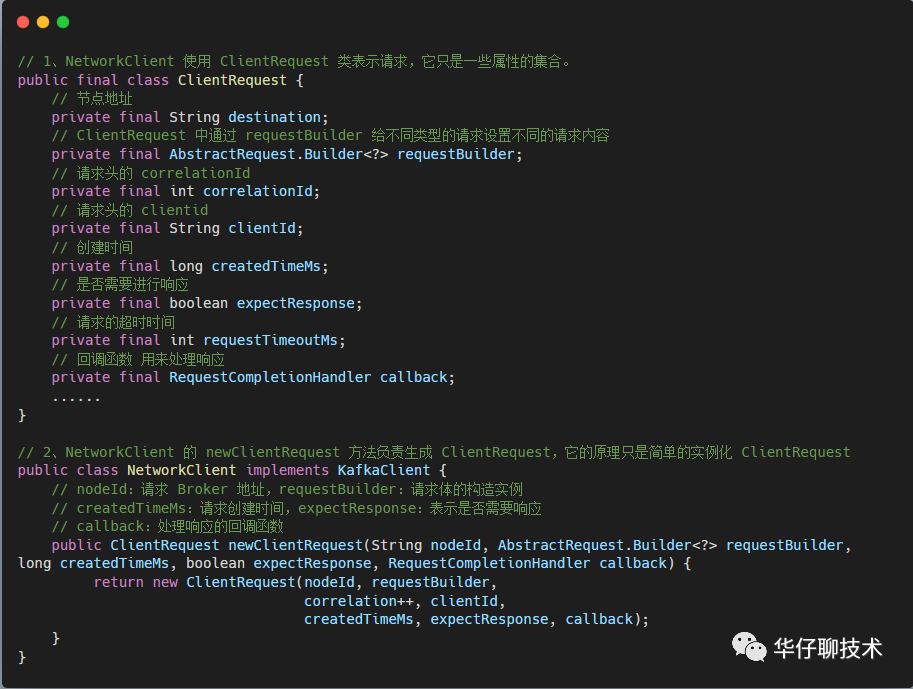
/**
 * ClientRequest 是客户端的请求,封装了 requestBuilder
 */
public final class ClientRequest {
    // 节点地址
    private final String destination;
    // ClientRequest 中通过 requestBuilder 给不同类型的请求设置不同的请求内容
    private final AbstractRequest.Builder<?> requestBuilder;
    // 请求头的 correlationId
    private final int correlationId;
    // 请求头的 clientid
    private final String clientId;
    // 创建时间
    private final long createdTimeMs;
    // 是否需要进行响应
    private final boolean expectResponse;
    // 请求的超时时间
    private final int requestTimeoutMs;
    // 回调函数 用来处理响应
    private final RequestCompletionHandler callback;
    ......
}

/**
 * Queue up the given request for sending. Requests can only be sent out to ready nodes.
 * @param request The request
 * @param now The current timestamp
 * 发送请求,这个方法 生产者和消费者都会调用,其中 ClientRequest 表示客户端的请求。
 */
 @Override
 public void send(ClientRequest request, long now) {
     doSend(request, false, now);
 }

 // 检测请求版本是否支持,如果支持则发送请求
 private void doSend(ClientRequest clientRequest, boolean isInternalRequest, long now) {
        // 确认是否活跃
        ensureActive();
        // 目标节点id
        String nodeId = clientRequest.destination();
        // 是否是 NetworkClient 内部请求 这里为 false
        if (!isInternalRequest) {
             // 检测是否可以向指定 Node 发送请求,如果还不能发送请求则抛异常
             if (!canSendRequest(nodeId, now))
                throw new IllegalStateException("Attempt to send a request to node " + nodeId + " which is not ready.");
        }
        AbstractRequest.Builder<?> builder = clientRequest.requestBuilder();
        try {
            // 检测版本
            NodeApiVersions versionInfo = apiVersions.get(nodeId);
            // ... 忽略
            // builder.build()是 ProduceRequest.Builder,结果是ProduceRequest
            // 调用 doSend 方法
            doSend(clientRequest, isInternalRequest, now, builder.build(version));
        } catch (UnsupportedVersionException unsupportedVersionException) {            log.debug("Version mismatch when attempting to send {} with correlation id {} to {}", builder, clientRequest.correlationId(), clientRequest.destination(), unsupportedVersionException);
           // 请求的版本不协调,那么生成 clientResponse
           ClientResponse clientResponse = new ClientResponse(clientRequest.makeHeader(builder.latestAllowedVersion()),
                    clientRequest.callback(), clientRequest.destination(), now, now,
                    false, unsupportedVersionException, null, null);
            // 添加到 abortedSends 集合里
            abortedSends.add(clientResponse);
        }
  }

  /**
   * isInternalRequest 表示发送前是否需要验证连接状态,如果为 true 则表示客户端已经确定连接是好的
   * request表示请求体
   */
  private void doSend(ClientRequest clientRequest, boolean isInternalRequest, long now, AbstractRequest request) {
        // 目标节点地址
        String destination = clientRequest.destination();
        // 生成请求头
        RequestHeader header = clientRequest.makeHeader(request.version());
        if (log.isDebugEnabled()) {
            log.debug("Sending {} request with header {} and timeout {} to node {}: {}",
                clientRequest.apiKey(), header, clientRequest.requestTimeoutMs(), destination, request);
        }
        // 1、构建 NetworkSend 对象 结合请求头和请求体,序列化数据,保存到 NetworkSend
        Send send = request.toSend(destination, header);
        // 2、构建 inFlightRequest 对象 保存了发送前的所有信息
        InFlightRequest inFlightRequest = new InFlightRequest(
                clientRequest,
                header,
                isInternalRequest,
                request,
                send,
                now);
        // 3、把 inFlightRequest 加入 inFlightRequests 集合里
        this.inFlightRequests.add(inFlightRequest);
        // 4、调用 Selector 异步发送数据,并将 send 和对应 kafkaChannel 绑定起来,并开启该 kafkaChannel 底层 socket 的写事件,等待下一步真正的网络发送
        selector.send(send);
}

@Override
public boolean active() {
    // 判断状态是否是活跃的
    return state.get() == State.ACTIVE;
}

// 确认是否活跃
private void ensureActive() {
   if (!active())
      throw new DisconnectException("NetworkClient is no longer active, state is " + state);
}/**
* Do actual reads and writes to sockets.
* @param timeout The maximum amount of time to wait (in ms) for responses if there are none immediately,
* must be non-negative. The actual timeout will be the minimum of timeout, request timeout and
* metadata timeout
* @param now The current time in milliseconds
* @return The list of responses received
*/
@Override
public List<ClientResponse> poll(long timeout, long now) {
// 确认是否活跃
ensureActive();
// 取消发送是否为空
if (!abortedSends.isEmpty()) {
// If there are aborted sends because of unsupported version exceptions or disconnects,
// handle them immediately without waiting for Selector#poll.
List<ClientResponse> responses = new ArrayList<>();
handleAbortedSends(responses);
completeResponses(responses);
return responses;
}
// 1、尝试更新元数据
long metadataTimeout = metadataUpdater.maybeUpdate(now);
try {
// 2、执行网络 I/O 操作,真正读写发送的地方,如果客户端的请求被完整的处理过了,会加入到completeSends 或 complteReceives 集合中
this.selector.poll(Utils.min(timeout, metadataTimeout, defaultRequestTimeoutMs));
} catch (IOException e) {
log.error("Unexpected error during I/O", e);
}
// process completed actions
long updatedNow = this.time.milliseconds();
// 响应结果集合:真正的读写操作, 会生成responses
List<ClientResponse> responses = new ArrayList<>();
// 3、完成发送的handler,处理 completedSends 集合
handleCompletedSends(responses, updatedNow);
// 4、完成接收的handler,处理 completedReceives 队列
handleCompletedReceives(responses, updatedNow);
// 5、断开连接的handler,处理 disconnected 列表
handleDisconnections(responses, updatedNow);
// 6、处理连接的handler,处理 connected 列表
handleConnections();
// 7、处理版本协调请求(获取api版本号) handler
handleInitiateApiVersionRequests(updatedNow);
// 8、超时连接的handler,处理超时连接集合
handleTimedOutConnections(responses, updatedNow);
// 9、超时请求的handler,处理超时请求集合
handleTimedOutRequests(responses, updatedNow);
// 10、完成响应回调
completeResponses(responses);
return responses;
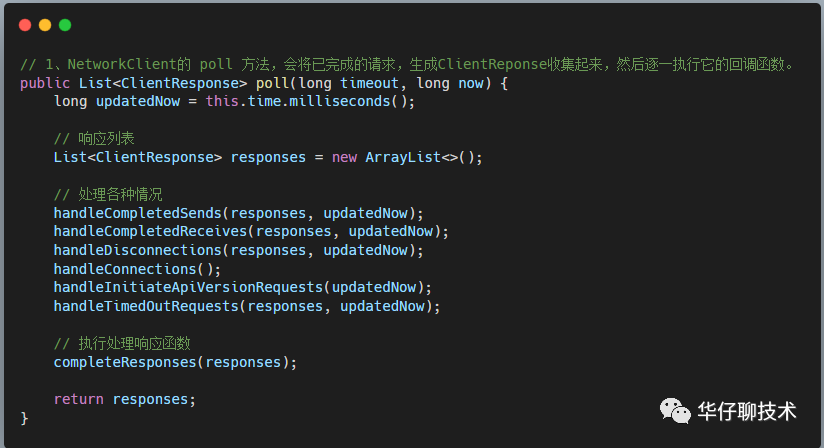
}接下来看下第 3~9 步骤的方法实现。
- 尝试更新元数据。
- 调用 Selector.poll() 执行真正网络 I/O 操作,可以点击查看 图解 Kafka 源码网络层实现机制之 Selector 多路复用器 主要操作以下3个集合。
- connected集合:已经完成连接的 Node 节点集合。
- completedReceives集合:接收完成的集合,即 KafkaChannel 上的 NetworkReceive 写满后会放入这个集合里。
- completedSends集合:发送完成的集合,即 channel 上的 NetworkSend 读完后会放入这个集合里。
- 调用 handleCompletedSends() 处理 completedSends 集合。
- 调用 handleCompletedReceives() 处理 completedReceives 队列。
- 调用 handleDisconnections() 处理与 Node 断开连接的请求。
- 调用 handleConnections() 处理 connected 列表。
- 调用 handleInitiateApiVersionRequests() 处理版本号请求。
- 调用 handleTimedOutConnections() 处理连接超时的 Node 集合。
- 调用 handleTimedOutRequests() 处理 inFlightRequests 集合中的超时请求,并修改其状态。
- 调用 completeResponses() 完成每个消息自定义的响应回调。
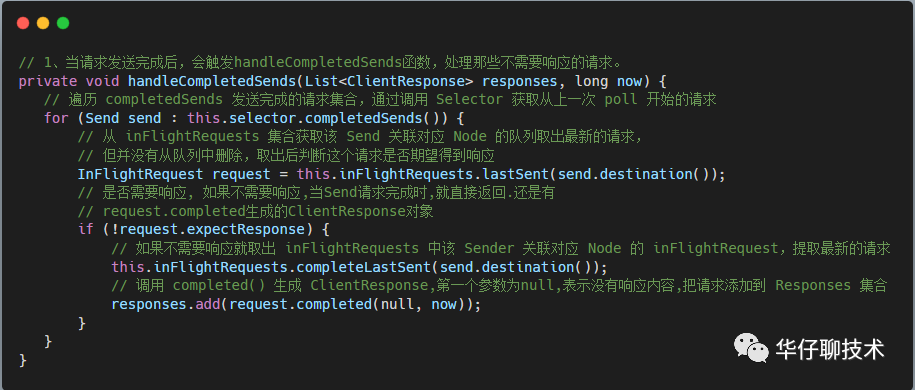
/**
 * Handle any completed request send. In particular if no response is expected consider the request complete.
 * @param responses The list of responses to update
 * @param now The current time
*/
private void handleCompletedSends(List<ClientResponse> responses, long now) {
   // if no response is expected then when the send is completed, return it
   // 1、遍历 completedSends 发送完成的请求集合,通过调用 Selector 获取从上一次 poll 开始的请求
   for (Send send : this.selector.completedSends()) {
       // 2、从 inFlightRequests 集合获取该 Send 关联对应 Node 的队列取出最新的请求,但并没有从队列中删除,取出后判断这个请求是否期望得到响应
       InFlightRequest request = this.inFlightRequests.lastSent(send.destination());
       // 3、是否需要响应, 如果不需要响应,当Send请求完成时,就直接返回.还是有request.completed生成的ClientResponse对象
       if (!request.expectResponse) {
           // 4、如果不需要响应就取出 inFlightRequests 中该 Sender 关联对应 Node 的 inFlightRequest,即提取最新的请求
           this.inFlightRequests.completeLastSent(send.destination());
           // 5、调用 completed() 生成 ClientResponse,第一个参数为null,表示没有响应内容,把请求添加到 Responses 集合
           responses.add(request.completed(null, now));
       }
   }
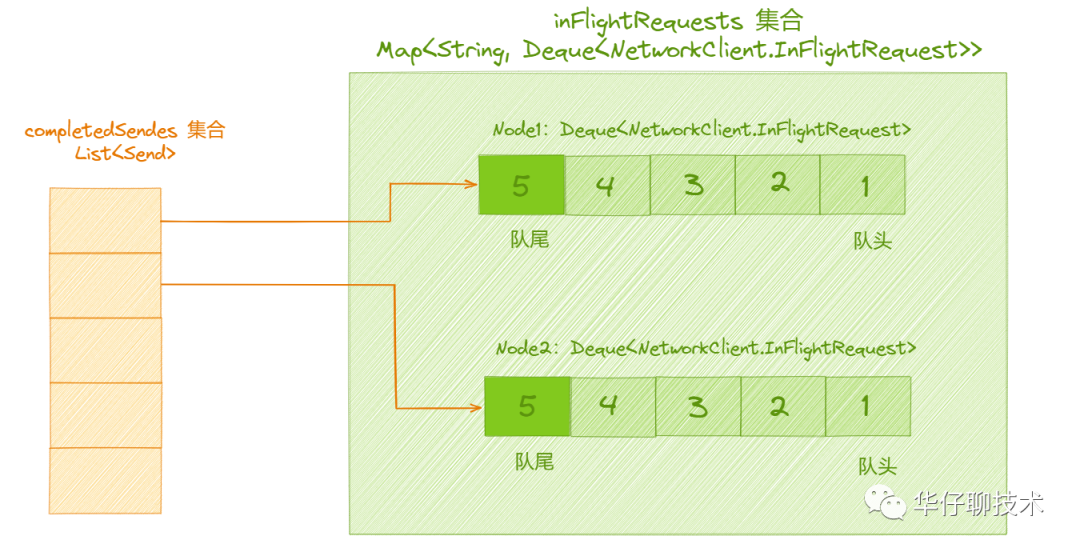
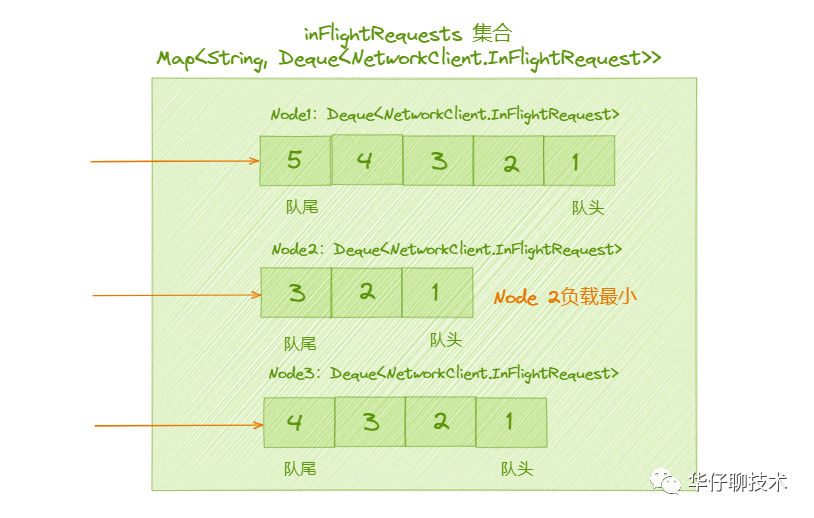
}从上面源码可以看出,「completedSends」集合与「InflightRequests」集合协作的关系。但是这里有个问题:如何保证从 Selector 返回的请求,就是对应到 InflightRequests 集合队列的最新的请求呢?completedSends 集合保存的是最近一次调用 poll() 方法中发送成功的请求「发送成功但还没有收到响应的请求集合」。而 InflightRequests 集合存储的是已经发送但还没收到响应的请求。每个请求发送都需要等待前面的请求发送完成,这样就能保证同一时间只有一个请求正在发送,因为 Selector 返回的请求是从上一次 poll 开始的,这样就对上了。「completedSends」的元素对应着「InflightRequests」集合里对应队列的最后一个元素, 如下图所示:
- 遍历 seletor 中的 completedSends 集合,逐个处理完成的 Send 对象。
- 从 inFlightRequests 集合获取该 Send 关联对应 Node 的队列中第一个元素,但并没有从队列中删除,取出后判断这个请求是否期望得到响应。
- 判断是否需要响应。
- 如果不需要响应就删除 inFlightRequests 中该 Sender 关联对应 Node 的 inFlightRequest,对于 Kafka 来说,有些请求是不需要响应的,对于发送完不用考虑是否发送成功的话,就构建 callback 为 null 的 Response 对象。
- 通过 InFlightRequest.completed(),生成 ClientResponse,第一个参数为 null 表示没有响应内容,最后把 ClientResponse 添加到 Responses 集合。
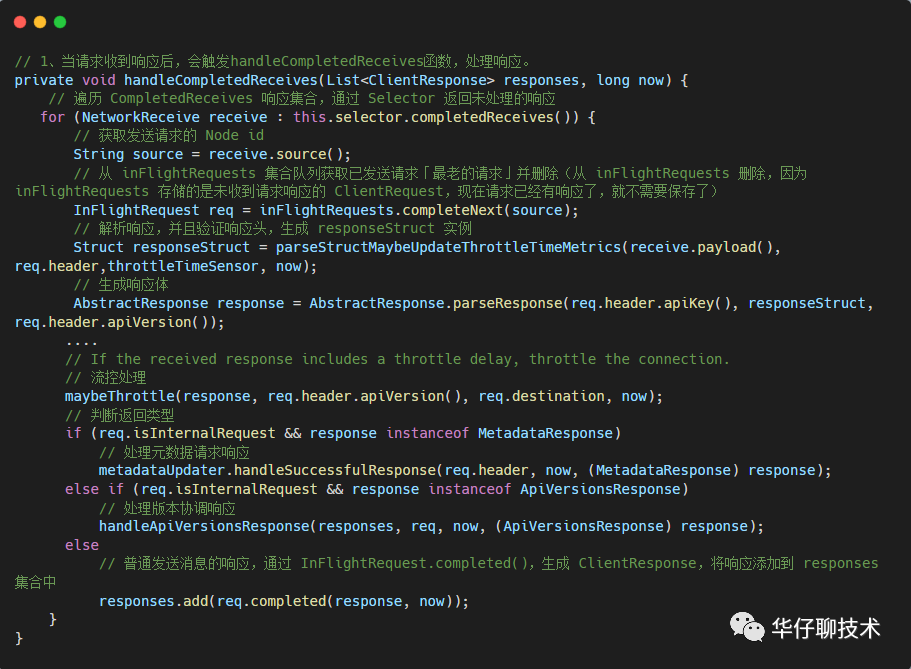
/**
 * Handle any completed receives and update the response list with the responses received.
 * @param responses The list of responses to update
 * @param now The current time
 * 处理 CompletedReceives 队列,根据返回的响应信息实例化 ClientResponse ,并加到响应集合里
*/
private void handleCompletedReceives(List<ClientResponse> responses, long now) {
   // 1、遍历 CompletedReceives 响应集合,通过 Selector 返回未处理的响应
   for (NetworkReceive receive : this.selector.completedReceives()) {
       // 2、获取发送请求的 Node id
       String source = receive.source();
       // 3、从 inFlightRequests 集合队列获取已发送请求「最老的请求」并删除(从 inFlightRequests 删除,因为inFlightRequests 存储的是未收到请求响应的 ClientRequest,现在请求已经有响应了,就不需要保存了)
       InFlightRequest req = inFlightRequests.completeNext(source);
       // 4、解析响应,并且验证响应头,生成 responseStruct 实例
       Struct responseStruct = parseStructMaybeUpdateThrottleTimeMetrics(receive.payload(), req.header,throttleTimeSensor, now);
       // 生成响应体
       AbstractResponse response = AbstractResponse.parseResponse(req.header.apiKey(), responseStruct, req.header.apiVersion());
      ....
      // If the received response includes a throttle delay, throttle the connection.
      // 流控处理
      maybeThrottle(response, req.header.apiVersion(), req.destination, now);
      // 5、判断返回类型
      if (req.isInternalRequest && response instanceof MetadataResponse)
          // 处理元数据请求响应
          metadataUpdater.handleSuccessfulResponse(req.header, now, (MetadataResponse) response);
      else if (req.isInternalRequest && response instanceof ApiVersionsResponse)
          // 处理版本协调响应
          handleApiVersionsResponse(responses, req, now, (ApiVersionsResponse) response);
      else
          // 普通发送消息的响应,通过 InFlightRequest.completed(),生成 ClientResponse,将响应添加到 responses 集合中
          responses.add(req.completed(response, now));
    }
}

// 解析响应,并且验证响应头,生成 responseStruct 实例
private static Struct parseStructMaybeUpdateThrottleTimeMetrics(ByteBuffer responseBuffer, RequestHeader requestHeader, Sensor throttleTimeSensor, long now) {
    // 解析响应头
    ResponseHeader responseHeader = ResponseHeader.parse(responseBuffer,
            requestHeader.apiKey().responseHeaderVersion(requestHeader.apiVersion()));
    // 解析响应体
    Struct responseBody = requestHeader.apiKey().parseResponse(requestHeader.apiVersion(), responseBuffer);
    // 验证请求头与响应头的 correlation id 必须相等
    correlate(requestHeader, responseHeader);
    if (throttleTimeSensor != null && responseBody.hasField(CommonFields.THROTTLE_TIME_MS))
            throttleTimeSensor.record(responseBody.get(CommonFields.THROTTLE_TIME_MS), now);
    return responseBody;
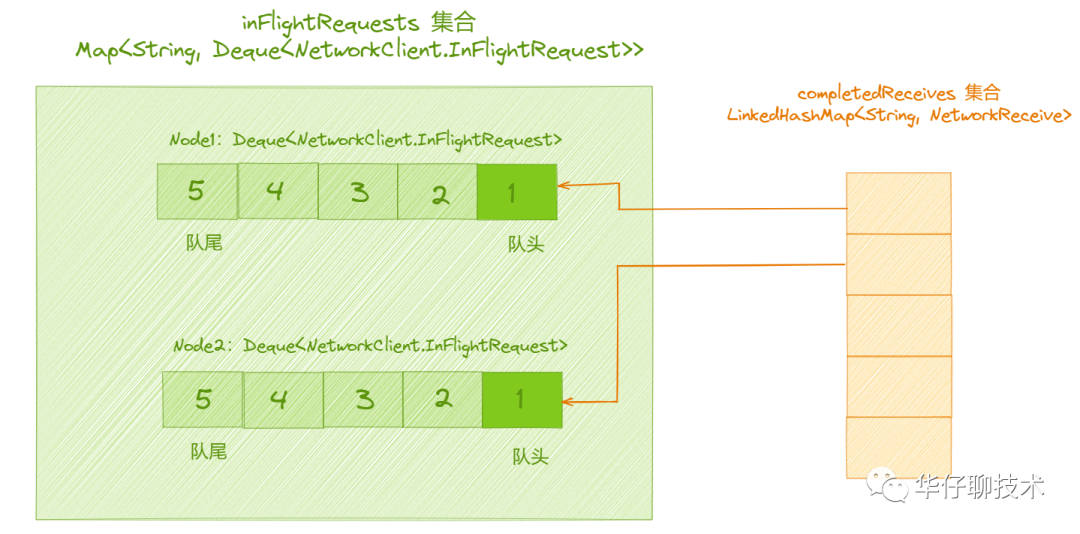
}从上面源码可以看出,「completedReceives」集合与「InflightRequests」集合也有协作的关系, completedReceives 集合指的是接收到的响应集合,如果请求已经收到响应了,就可以从 InflightRequests 删除了,这样 InflightRequests 就起到了可以防止请求堆积的作用。与 「completedSends」正好相反,「completedReceives」集合对应 「InflightRequests」集合里对应队列的第一个元素,如下图所示:
- 遍历 selector 中的 completedReceives 集合,逐个处理完成的 Receive 对象。
- 获取发送请求的 Node id。
- 从 inFlightRequests 集合队列获取已发送请求「最老的请求」并删除(从 inFlightRequests 删除,因为inFlightRequests 存储的是未收到请求响应的 ClientRequest,现在请求已经有响应了,就不需要保存了)。
- 解析响应,并且验证响应头,生成 responseStruct 实例,生成响应体。
- 处理响应结果,此处分为三种情况:
- 处理元数据请求响应,则调用 metadataUpdater.handleSuccessfulResponse()。
- 处理版本协调响应,则调用 handleApiVersionsResponse()。
- 普通发送消息的响应,通过 InFlightRequest.completed(),生成 ClientResponse,将响应添加到 responses 集合中。
/**
 * Choose the node with the fewest outstanding requests which is at least eligible for connection. This method will
 * prefer a node with an existing connection, but will potentially choose a node for which we don't yet have a
 * connection if all existing connections are in use. If no connection exists, this method will prefer a node
 * with least recent connection attempts. This method will never choose a node for which there is no
 * existing connection and from which we have disconnected within the reconnect backoff period, or an active
 * connection which is being throttled.
 *
 * @return The node with the fewest in-flight requests.
 */
 @Override
 public Node leastLoadedNode(long now) {
        // 从元数据中获取所有的节点
        List<Node> nodes = this.metadataUpdater.fetchNodes();
        if (nodes.isEmpty())
            throw new IllegalStateException("There are no nodes in the Kafka cluster");
        int inflight = Integer.MAX_VALUE;

        Node foundConnecting = null;
        Node foundCanConnect = null;
        Node foundReady = null;

        int offset = this.randOffset.nextInt(nodes.size());
        for (int i = 0; i < nodes.size(); i++) {
            int idx = (offset + i) % nodes.size();
            Node node = nodes.get(idx);
            // 节点是否可以发送请求
            if (canSendRequest(node.idString(), now)) {
                // 获取节点的队列大小
                int currInflight = this.inFlightRequests.count(node.idString());
                // 如果为 0 则返回该节点,负载最小
                if (currInflight == 0) {
                    // if we find an established connection with no in-flight requests we can stop right away
                    log.trace("Found least loaded node {} connected with no in-flight requests", node);
                    return node;
                } else if (currInflight < inflight) { // 如果队列大小小于最大值
                    // otherwise if this is the best we have found so far, record that
                    inflight = currInflight;
                    foundReady = node;
                }
            } else if (connectionStates.isPreparingConnection(node.idString())) {
                foundConnecting = node;
            } else if (canConnect(node, now)) {
                if (foundCanConnect == null ||
                        this.connectionStates.lastConnectAttemptMs(foundCanConnect.idString()) >
                                this.connectionStates.lastConnectAttemptMs(node.idString())) {
                    foundCanConnect = node;
                }
            } else {
                log.trace("Removing node {} from least loaded node selection since it is neither ready " +
                        "for sending or connecting", node);
            }
        }

        // We prefer established connections if possible. Otherwise, we will wait for connections
        // which are being established before connecting to new nodes.
        if (foundReady != null) {
            log.trace("Found least loaded node {} with {} inflight requests", foundReady, inflight);
            return foundReady;
        } else if (foundConnecting != null) {
            log.trace("Found least loaded connecting node {}", foundConnecting);
            return foundConnecting;
        } else if (foundCanConnect != null) {
            log.trace("Found least loaded node {} with no active connection", foundCanConnect);
            return foundCanConnect;
        } else {
            log.trace("Least loaded node selection failed to find an available node");
            return null;
        }
 }
- 节点是否正常:收集从「开始发送」到「接收响应」这段时间的请求,来判断要发送的 Broker 节点是否正常,请求和连接是否超时等等,也就是说用来监控发送到哥哥节点请求是否正常。
- 节点的负载情况:Deque 队列到一定长度后就认为某个 Broker 节点负载过高了。
/**
 * The set of requests which have been sent or are being sent but haven't yet received a response
 * 用来缓存已经发送出去或者正在发送但均还没有收到响应的  ClientRequest 请求集合
 */
final class InFlightRequests {
    // 每个连接最大执行中的请求数
    private final int maxInFlightRequestsPerConnection;
    // 节点 Node 至客户端请求双端队列 Deque<NetworkClient.InFlightRequest> 的映射集合,key为 NodeId, value 是请求队列
    private final Map<String, Deque<NetworkClient.InFlightRequest>> requests = new HashMap<>();
    /** Thread safe total number of in flight requests. */
    // 线程安全的 inFlightRequestCount
    private final AtomicInteger inFlightRequestCount = new AtomicInteger(0);
    // 设置每个连接最大执行中的请求数
    public InFlightRequests(int maxInFlightRequestsPerConnection) {
        this.maxInFlightRequestsPerConnection = maxInFlightRequestsPerConnection;
}/**
* Can we send more requests to this node?
* @param node Node in question
* @return true iff we have no requests still being sent to the given node
* 判断该连接是否还能发送请求
*/
public boolean canSendMore(String node) {
// 获取节点对应的双端队列
Deque<NetworkClient.InFlightRequest> queue = requests.get(node);
// 判断条件 队列为空 || (队首已经发送完成 && 队列中没有堆积更多的请求)
return queue == null || queue.isEmpty() ||
(queue.peekFirst().send.completed() && queue.size() < this.maxInFlightRequestsPerConnection);
}
- queue == null || queue.isEmpty(),队列为空就能发送。
- 判断 queue.peekFirst().send.completed() 队首是否发送完成。
- 如果队首的请求迟迟发送不出去,可能就是网络的原因,因此不能继续向此 Node 发送请求。
- 队首的请求与对应的 KafkaChannel.send 字段指向的是同一个请求,为了避免未发送的消息被覆盖掉,也不能让 KafkaChannel.send 字段指向新请求。
- queue.size() < this.maxInFlightRequestsPerConnection,该条件就是为了判断队列中是否堆积过多请求,如果 Node 已经堆积了很多未响应的请求,说明这个节点出现了网络拥塞,继续再发送请求,则可能会超时。
/**
 * Add the given request to the queue for the connection it was directed to
 * 将请求添加到队列首部
*/
public void add(NetworkClient.InFlightRequest request) {
        // 这个请求要发送到哪个 Broker 节点上
        String destination = request.destination;
        // 从 requests 集合中根据给定请求的目标 Node 节点获取对应 Deque<ClientRequest> 双端队列 reqs
        Deque<NetworkClient.InFlightRequest> reqs = this.requests.get(destination);
        // 如果双端队列reqs为null
        if (reqs == null) {
            // 构造一个双端队列 ArrayDeque 类型的 reqs
            reqs = new ArrayDeque<>();
            // 将请求目标 Node 节点至 reqs 的映射关系添加到 requests 集合
            this.requests.put(destination, reqs);
        }
        // 将请求 request 添加到 reqs 队首
        reqs.addFirst(request);
        // 增加计数
        inFlightRequestCount.incrementAndGet();
}/**
* Get the oldest request (the one that will be completed next) for the given node
* 取出该连接对应的队列中最老的请求
*/
public NetworkClient.InFlightRequest completeNext(String node) {
// 根据给定 Node 节点获取客户端请求双端队列 reqs,并从队尾出队
NetworkClient.InFlightRequest inFlightRequest = requestQueue(node).pollLast();
// 递减计数器
inFlightRequestCount.decrementAndGet();
return inFlightRequest;
}/**
* Get the last request we sent to the given node (but don't remove it from the queue)
* @param node The node id
*/
public NetworkClient.InFlightRequest lastSent(String node) {
return requestQueue(node).peekFirst();
}/**
* Complete the last request that was sent to a particular node.
* @param node The node the request was sent to
* @return The request
* 取出该连接对应的队列中最新的请求
*/
public NetworkClient.InFlightRequest completeLastSent(String node) {
// 根据给定 Node 节点获取客户端请求双端队列 reqs,并从队首出队
NetworkClient.InFlightRequest inFlightRequest = requestQueue(node).pollFirst();
// 递减计数器
inFlightRequestCount.decrementAndGet();
return inFlightRequest;
}static class InFlightRequest {
// 请求头
final RequestHeader header;
// 这个请求要发送到哪个 Broker 节点上
final String destination;
// 回调函数
final RequestCompletionHandler callback;
// 是否需要进行响应
final boolean expectResponse;
// 请求体
final AbstractRequest request;
// 发送前是否需要验证连接状态
final boolean isInternalRequest; // used to flag requests which are initiated internally by NetworkClient
// 请求的序列化数据
final Send send;
// 发送时间
final long sendTimeMs;
// 请求的创建时间,即 ClientRequest 的创建时间
final long createdTimeMs;
// 请求超时时间
final long requestTimeoutMs;
.....
/**
* 收到响应,回调的时候据响应内容生成 ClientResponse
*/
public ClientResponse completed(AbstractResponse response, long timeMs) {
return new ClientResponse(header, callback, destination, createdTimeMs, timeMs,
false, null, null, response);
}
/**
* 当连接突然断开,也会生成 ClientResponse。
*/
public ClientResponse disconnected(long timeMs, AuthenticationException authenticationException) {
return new ClientResponse(header, callback, destination, createdTimeMs, timeMs,
true, null, authenticationException, null);
}
}
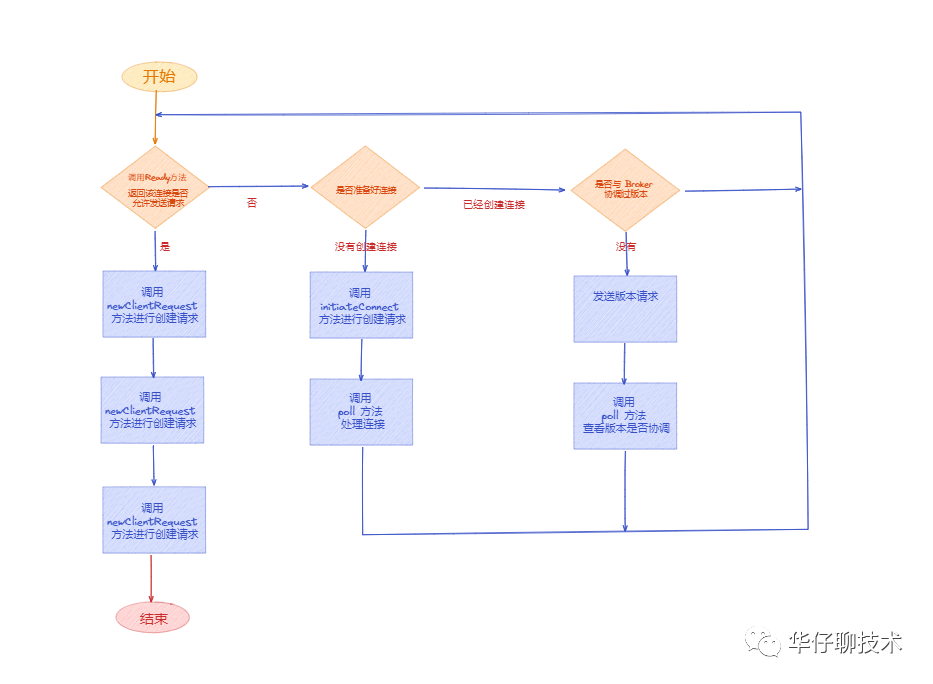
- 调用 NetworkClient 的 ready(),连接服务端。
- 调用 NetworkClient 的 poll(),处理连接。
- 调用 NetworkClient 的 newClientRequest(),创建请求 ClientRequest。
- 然后调用 NetworkClient 的 send(),发送请求。
- 最后调用 NetworkClient 的 poll(),处理响应。
我有一个模型:classItem项目有一个属性“商店”基于存储的值,我希望Item对象对特定方法具有不同的行为。Rails中是否有针对此的通用设计模式?如果方法中没有大的if-else语句,这是如何干净利落地完成的? 最佳答案 通常通过Single-TableInheritance. 关于ruby-on-rails-Rails-子类化模型的设计模式是什么?,我们在StackOverflow上找到一个类似的问题: https://stackoverflow.co
我构建了两个需要相互通信和发送文件的Rails应用程序。例如,一个Rails应用程序会发送请求以查看其他应用程序数据库中的表。然后另一个应用程序将呈现该表的json并将其发回。我还希望一个应用程序将存储在其公共(public)目录中的文本文件发送到另一个应用程序的公共(public)目录。我从来没有做过这样的事情,所以我什至不知道从哪里开始。任何帮助,将不胜感激。谢谢! 最佳答案 无论Rails是什么,几乎所有Web应用程序都有您的要求,大多数现代Web应用程序都需要相互通信。但是有一个小小的理解需要你坚持下去,网站不应直接访问彼此
我将应用程序升级到Rails4,一切正常。我可以登录并转到我的编辑页面。也更新了观点。使用标准View时,用户会更新。但是当我添加例如字段:name时,它不会在表单中更新。使用devise3.1.1和gem'protected_attributes'我需要在设备或数据库上运行某种更新命令吗?我也搜索过这个地方,找到了许多不同的解决方案,但没有一个会更新我的用户字段。我没有添加任何自定义字段。 最佳答案 如果您想允许额外的参数,您可以在ApplicationController中使用beforefilter,因为Rails4将参数
我想在Ruby中创建一个用于开发目的的极其简单的Web服务器(不,不想使用现成的解决方案)。代码如下:#!/usr/bin/rubyrequire'socket'server=TCPServer.new('127.0.0.1',8080)whileconnection=server.acceptheaders=[]length=0whileline=connection.getsheaders想法是从命令行运行这个脚本,提供另一个脚本,它将在其标准输入上获取请求,并在其标准输出上返回完整的响应。到目前为止一切顺利,但事实证明这真的很脆弱,因为它在第二个请求上中断并出现错误:/usr/b
一、引擎主循环UE版本:4.27一、引擎主循环的位置:Launch.cpp:GuardedMain函数二、、GuardedMain函数执行逻辑:1、EnginePreInit:加载大多数模块int32ErrorLevel=EnginePreInit(CmdLine);PreInit模块加载顺序:模块加载过程:(1)注册模块中定义的UObject,同时为每个类构造一个类默认对象(CDO,记录类的默认状态,作为模板用于子类实例创建)(2)调用模块的StartUpModule方法2、FEngineLoop::Init()1、检查Engine的配置文件找出使用了哪一个GameEngine类(UGame
网络编程套接字网络编程基础知识理解源`IP`地址和目的`IP`地址理解源MAC地址和目的MAC地址认识端口号理解端口号和进程ID理解源端口号和目的端口号认识`TCP`协议认识`UDP`协议网络字节序socket编程接口`sockaddr``UDP`网络程序服务器端代码逻辑:需要用到的接口服务器端代码`udp`客户端代码逻辑`udp`客户端代码`TCP`网络程序服务器代码逻辑多个版本服务器单进程版本多进程版本多线程版本线程池版本服务器端代码客户端代码逻辑客户端代码TCP协议通讯流程TCP协议的客户端/服务器程序流程三次握手(建立连接)数据传输四次挥手(断开连接)TCP和UDP对比网络编程基础知识
目录前言滤波电路科普主要分类实际情况单位的概念常用评价参数函数型滤波器简单分析滤波电路构成低通滤波器RC低通滤波器RL低通滤波器高通滤波器RC高通滤波器RL高通滤波器部分摘自《LC滤波器设计与制作》,侵权删。前言最近需要学习放大电路和滤波电路,但是由于只在之前做音乐频谱分析仪的时候简单了解过一点点运放,所以也是相当从零开始学习了。滤波电路科普主要分类滤波器:主要是从不同频率的成分中提取出特定频率的信号。有源滤波器:由RC元件与运算放大器组成的滤波器。可滤除某一次或多次谐波,最普通易于采用的无源滤波器结构是将电感与电容串联,可对主要次谐波(3、5、7)构成低阻抗旁路。无源滤波器:无源滤波器,又称
MIMO技术的优缺点优点通过下面三个增益来总体概括:阵列增益。阵列增益是指由于接收机通过对接收信号的相干合并而活得的平均SNR的提高。在发射机不知道信道信息的情况下,MIMO系统可以获得的阵列增益与接收天线数成正比复用增益。在采用空间复用方案的MIMO系统中,可以获得复用增益,即信道容量成倍增加。信道容量的增加与min(Nt,Nr)成正比分集增益。在采用空间分集方案的MIMO系统中,可以获得分集增益,即可靠性性能的改善。分集增益用独立衰落支路数来描述,即分集指数。在使用了空时编码的MIMO系统中,由于接收天线或发射天线之间的间距较远,可认为它们各自的大尺度衰落是相互独立的,因此分布式MIMO
项目介绍随着我国经济迅速发展,人们对手机的需求越来越大,各种手机软件也都在被广泛应用,但是对于手机进行数据信息管理,对于手机的各种软件也是备受用户的喜爱小学生兴趣延时班预约小程序的设计与开发被用户普遍使用,为方便用户能够可以随时进行小学生兴趣延时班预约小程序的设计与开发的数据信息管理,特开发了小程序的设计与开发的管理系统。小学生兴趣延时班预约小程序的设计与开发的开发利用现有的成熟技术参考,以源代码为模板,分析功能调整与小学生兴趣延时班预约小程序的设计与开发的实际需求相结合,讨论了小学生兴趣延时班预约小程序的设计与开发的使用。开发环境开发说明:前端使用微信微信小程序开发工具:后端使用ssm:VU
我在我的项目中有一个用户和一个管理员角色。我使用Devise创建了身份验证。在我的管理员角色中,我没有任何确认。在我的用户模型中,我有以下内容:devise:database_authenticatable,:confirmable,:recoverable,:rememberable,:trackable,:validatable,:timeoutable,:registerable#Setupaccessible(orprotected)attributesforyourmodelattr_accessible:email,:username,:prename,:surname,:
