1、天气预报项目的设计与实现;
个人手机、与因特网连接的计算机网络系统;主机操作系统为Windows或MAC;微信开发者工具、IE等软件。
数据支持:
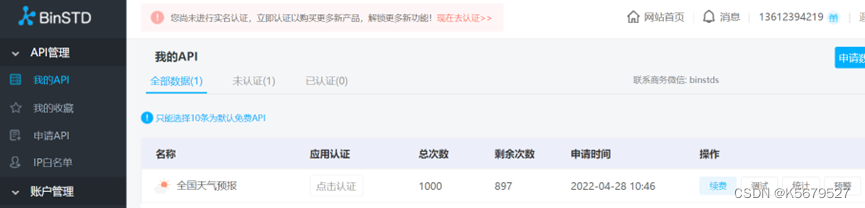
进制数据天气预报api
腾讯地图逆地址解析:

图示:
布局:
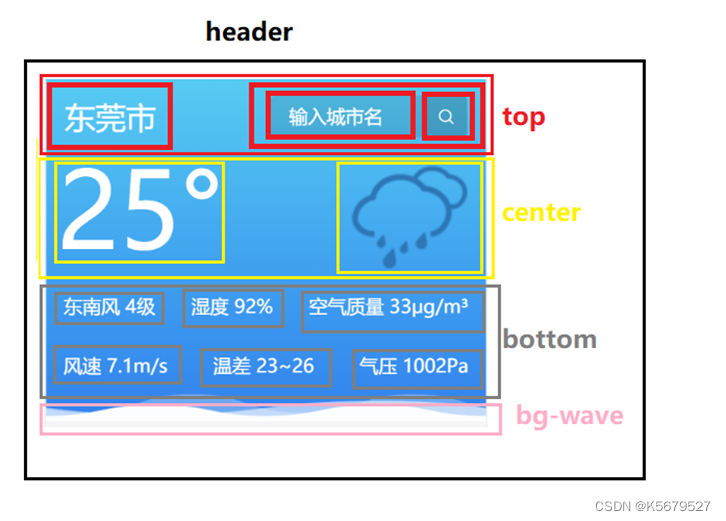
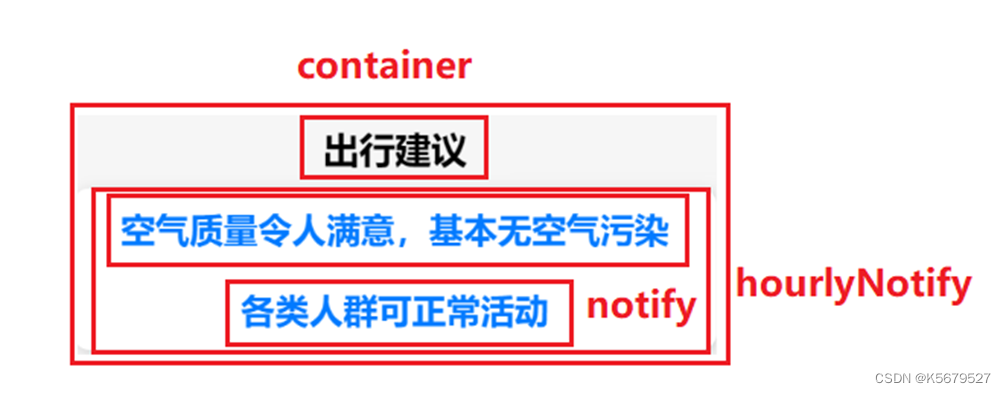
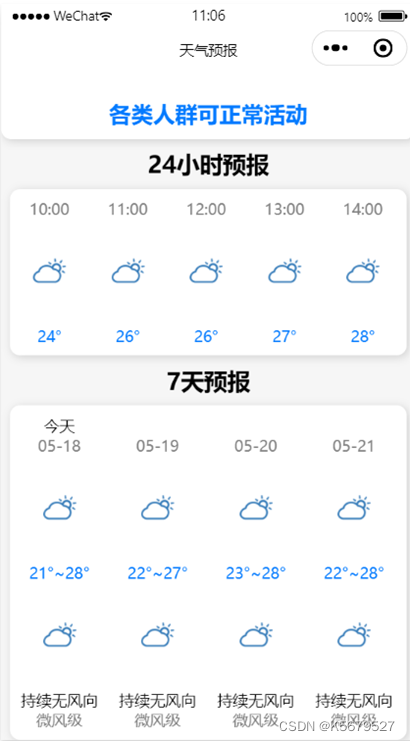
使用可滚动视图模块,方向为横向滚动,view组件视图内容用wx:for控制属性绑定data中的hourly数组的内容,重复渲染该组件,排列方式display:inline-block,不设置宽度时,内容撑开宽度;不会独占一行,支持宽高,代码换行,被解析成空格,文本居中排列
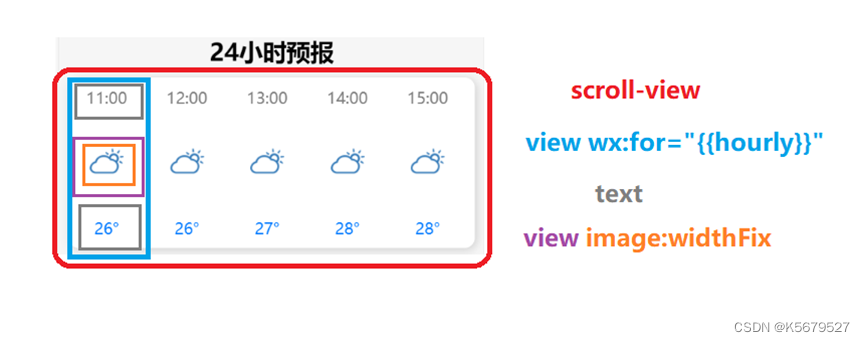
| <view class="hourly_title">24小时预报</view> <scroll-view scroll-x="true" class="hourly"> <view class="h_item" wx:for="{{hourly}}" wx:key="index"> <text class="h_time">{{item.time}}</text> <view class="h_img"> <image mode="widthFix" src="/icon/{{wid}}.png"></image> </view> <text class="h_tmp">{{item.tmp}}°</text> </view> </scroll-view> |
使用可滚动视图模块,方向为横向滚动,view组件视图内容用wx:for控制属性绑定data中的daily_forecast数组的内容,重复渲染该组件,排列方式display:inline-block,不设置宽度时,内容撑开宽度;不会独占一行,支持宽高,代码换行,被解析成空格,文本居中排列
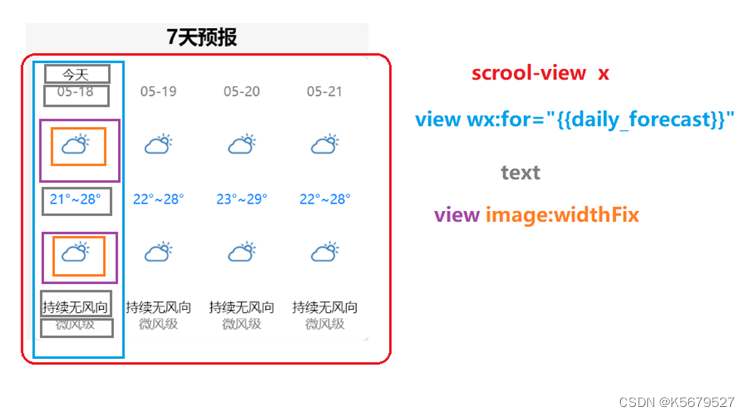
| <scroll-view scroll-x="true" class="daily"> <view class="d_item" wx:for="{{daily_forecast}}" wx:key="index"> <text class="d_txt">{{item.d_txt}}</text> <text class="d_date">{{item.d_date}}</text> <view class="h_img"> <image mode="widthFix" src="/icon/{{wid}}.png"></image> </view> <text class="h_tmp">{{item.tmp_min}}°~{{item.tmp_max}}°</text> <view class="h_img"> <image mode="widthFix" src="/icon/{{wid}}.png"></image> </view> <text class="d_wind_dir">{{item.wind_dir}}</text> <text class="d_wind_sc">{{item.wind_sc}}级</text> </view> </scroll-view> |
功能:
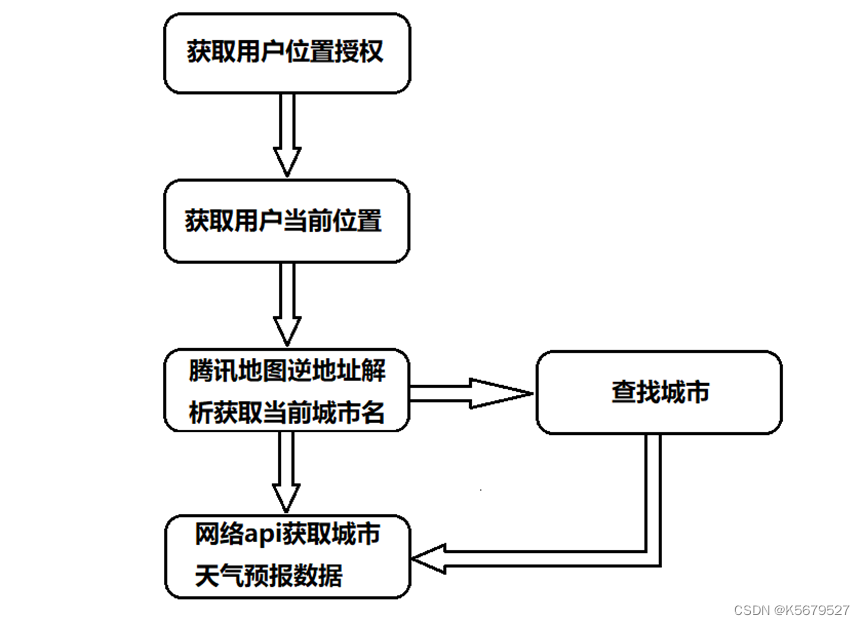
wx.getSetting获取用户的当前设置,if语句判断是否有位置权限,没有则用wx.authorize用于获取用户位置授权,成功获取权限则wx.showToast弹出“授权成功”窗口,若选择拒绝使用wx.showModal重新弹出“检测到您没打开此小程序的定位权限,是否去设置打开”窗口,引导用户在wx.openSetting设置中打开位置授权
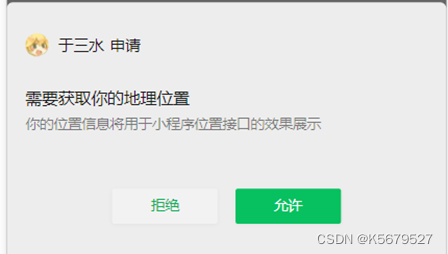
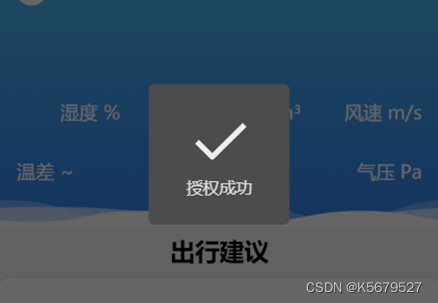
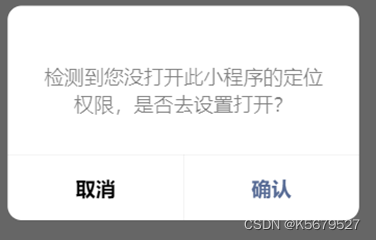
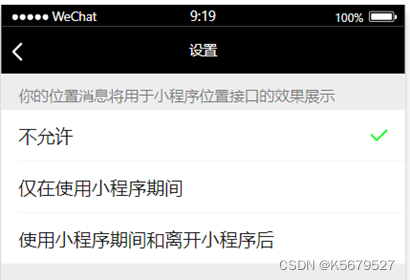
| wx.getSetting({ success(res) { if (!res.authSetting['scope.userLocation']) { wx.authorize({ scope: 'scope.userLocation', success(){ wx.showToast({ title: '授权成功', icon: 'success', duration: 1000 }) }, fail(){ wx.showModal({ content: '检测到您没打开此小程序的定位权限,是否去设置打开?', confirmText: "确认", cancelText: "取消", success: function (res) { console.log(res); //点击“确认”时打开设置页面 if (res.confirm) { console.log('用户点击确认') wx.openSetting({ success: (res) => { } }) } else { console.log('用户点击取消') } } }) } }) } } }) |
获取当前位置:
使用getlocation获取当前位置的经纬度,wgs84返回gps坐标,成功将result的latitude和longitude,与腾讯位置服务的逆地址解析url组合,使用wx.request网络api请求latitude和longtitude所对应的位置信息,使用setData将位置城市赋值到data中的city中
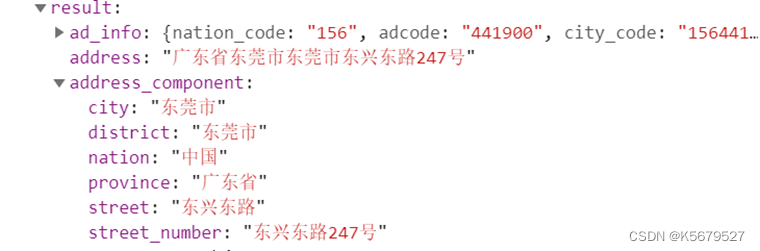
| wx.getLocation({ type: 'wgs84', success: (result) => { console.log(result); var url = 'https://apis.map.qq.com/ws/geocoder/v1/?location='+result.latitude+','+result.longitude+'&key=KKABZ-QQLEK-4KSJA-AJGTK-VTLGK-GLBMX&get_poi=1' wx.request({ url: url, data: {}, dataType: 'json', header: {'content-type':'application/json'}, method: 'GET', responseType: 'text', success: (res) => { console.log(res); this.setData({ city:res.data.result.address_component.city }) this.getWeather(this.data.city) }, fail: (res) => { console.log(res); }, complete: (res) => { console.log(res);}, }) }, fail: (res) => { console.log(res); }, complete: (res) => { console.log(res);}, }) }, |
文本框用于获取要搜索的城市名,使用bindtap绑定文本内容,使用setData获取文本框内容

bindKeyInput(e) {
this.setData({
search_city: e.detail.value
})
},
图标搜索调用获取天气getWeather
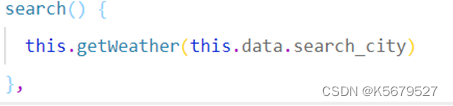
GetWeather(city)根据城市获取city的天气预报
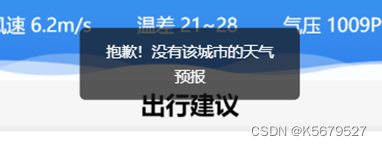
使用wx.request网络api获取city的天气预报数据,成功获取数据后使用if语句判断city是否正确,若不存在该城市,使用wx.showToast弹出“抱歉!没有该城市的天气预报”窗口,
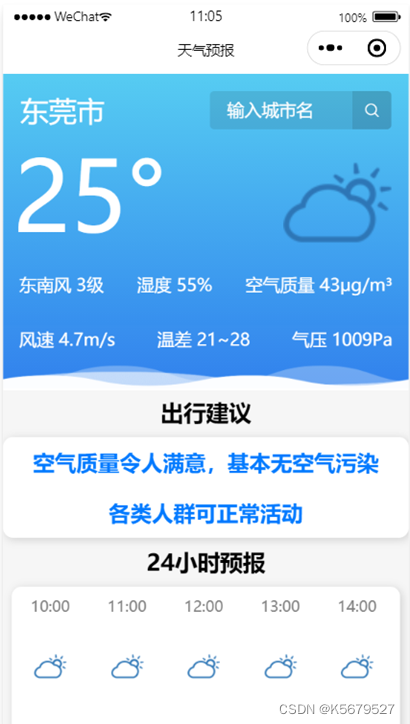
若该城市存在,使用setData将result中的城市名,城市的气温,最高气温与最低气温,气候图片数字,风向,风级,风速,空气湿度,aqi空气质量,气压,出行建议保存到data中,
将hourly中的数据使用for循环保存到data中的hourly数组中,将未来七天的数据使用for循环保存到daily_forecast中,再使用setData保存到data中
| getWeather(city) { var that = this //获取实况天气 wx.request({ url: 'https://api.binstd.com/weather/query?appkey=839c6cf080e63a65&city=' + city, success: (res) => { if (res.data.msg == '城市不存在') { wx.showToast({ title: '抱歉!没有该城市的天气预报', icon: 'none', duration: 2000 }) return; } console.log(res) that.setData({ city: city, temperature: res.data.result.temp, wid: res.data.result.img, direct: res.data.result.winddirect, power: res.data.result.windpower, humidity: res.data.result.humidity, aqi: res.data.result.aqi.aqi, windspeed:res.data.result.windspeed, temphigh:res.data.result.temphigh, templow:res.data.result.templow, pressure:res.data.result.pressure, affect:res.data.result.aqi.aqiinfo.affect, measure:res.data.result.aqi.aqiinfo.measure }) // console.log(that.data.affect); // console.log(that.data.measure); // 24小时天气预报 var arr = res.data.result.hourly var hourly = [] for (var i = 0; i < arr.length; i++) { hourly[i] = { "imgsrc": arr[i].img, "tmp": arr[i].temp, "time": arr[i].time, } } that.setData({ hourly: hourly })
// 未来七天的天气预报 var weekArray = new Array("周日", "周一", "周二", "周三", "周四", "周五", "周六"); var afterSeven = res.data.result.daily var daily_forecast = [] for (var i = 0; i < afterSeven.length; i++) { daily_forecast[i] = { d_txt: i == 0 ? "今天" : weekArray[new Date(arr[i].date).getDay()], d_date: afterSeven[i].date.substring(5), imgsrc_d: afterSeven[i].day.img, imgsrc_n: afterSeven[i].night.img, wind_dir: afterSeven[i].day.winddirect, wind_sc: afterSeven[i].day.windpower, tmp_max: afterSeven[i].day.temphigh, tmp_min: afterSeven[i].night.templow, } } that.setData({ daily_forecast: daily_forecast }) }, fail: (res) => { console.log(res); }, complete: (res) => { console.log(res);}, }) },
|
文件链接:
链接:https://pan.baidu.com/s/1WaXluHXxrRHrL1rEwGl0wA
提取码:asdf
我需要在客户计算机上运行Ruby应用程序。通常需要几天才能完成(复制大备份文件)。问题是如果启用sleep,它会中断应用程序。否则,计算机将持续运行数周,直到我下次访问为止。有什么方法可以防止执行期间休眠并让Windows在执行后休眠吗?欢迎任何疯狂的想法;-) 最佳答案 Here建议使用SetThreadExecutionStateWinAPI函数,使应用程序能够通知系统它正在使用中,从而防止系统在应用程序运行时进入休眠状态或关闭显示。像这样的东西:require'Win32API'ES_AWAYMODE_REQUIRED=0x0
我有一个模型:classItem项目有一个属性“商店”基于存储的值,我希望Item对象对特定方法具有不同的行为。Rails中是否有针对此的通用设计模式?如果方法中没有大的if-else语句,这是如何干净利落地完成的? 最佳答案 通常通过Single-TableInheritance. 关于ruby-on-rails-Rails-子类化模型的设计模式是什么?,我们在StackOverflow上找到一个类似的问题: https://stackoverflow.co
Rackup通过Rack的默认处理程序成功运行任何Rack应用程序。例如:classRackAppdefcall(environment)['200',{'Content-Type'=>'text/html'},["Helloworld"]]endendrunRackApp.new但是当最后一行更改为使用Rack的内置CGI处理程序时,rackup给出“NoMethodErrorat/undefinedmethod`call'fornil:NilClass”:Rack::Handler::CGI.runRackApp.newRack的其他内置处理程序也提出了同样的反对意见。例如Rack
我想用ruby编写一个小的命令行实用程序并将其作为gem分发。我知道安装后,Guard、Sass和Thor等某些gem可以从命令行自行运行。为了让gem像二进制文件一样可用,我需要在我的gemspec中指定什么。 最佳答案 Gem::Specification.newdo|s|...s.executable='name_of_executable'...endhttp://docs.rubygems.org/read/chapter/20 关于ruby-在Ruby中编写命令行实用程序
我构建了两个需要相互通信和发送文件的Rails应用程序。例如,一个Rails应用程序会发送请求以查看其他应用程序数据库中的表。然后另一个应用程序将呈现该表的json并将其发回。我还希望一个应用程序将存储在其公共(public)目录中的文本文件发送到另一个应用程序的公共(public)目录。我从来没有做过这样的事情,所以我什至不知道从哪里开始。任何帮助,将不胜感激。谢谢! 最佳答案 无论Rails是什么,几乎所有Web应用程序都有您的要求,大多数现代Web应用程序都需要相互通信。但是有一个小小的理解需要你坚持下去,网站不应直接访问彼此
我尝试运行2.x应用程序。我使用rvm并为此应用程序设置其他版本的ruby:$rvmuseree-1.8.7-head我尝试运行服务器,然后出现很多错误:$script/serverNOTE:Gem.source_indexisdeprecated,useSpecification.Itwillberemovedonorafter2011-11-01.Gem.source_indexcalledfrom/Users/serg/rails_projects_terminal/work_proj/spohelp/config/../vendor/rails/railties/lib/r
刚入门rails,开始慢慢理解。有人可以解释或给我一些关于在application_controller中编码的好处或时间和原因的想法吗?有哪些用例。您如何为Rails应用程序使用应用程序Controller?我不想在那里放太多代码,因为据我了解,每个请求都会调用此Controller。这是真的? 最佳答案 ApplicationController实际上是您应用程序中的每个其他Controller都将从中继承的类(尽管这不是强制性的)。我同意不要用太多代码弄乱它并保持干净整洁的态度,尽管在某些情况下ApplicationContr
我将应用程序升级到Rails4,一切正常。我可以登录并转到我的编辑页面。也更新了观点。使用标准View时,用户会更新。但是当我添加例如字段:name时,它不会在表单中更新。使用devise3.1.1和gem'protected_attributes'我需要在设备或数据库上运行某种更新命令吗?我也搜索过这个地方,找到了许多不同的解决方案,但没有一个会更新我的用户字段。我没有添加任何自定义字段。 最佳答案 如果您想允许额外的参数,您可以在ApplicationController中使用beforefilter,因为Rails4将参数
我是一个Rails初学者,但我想从我的RailsView(html.haml文件)中查看Ruby变量的内容。我试图在ruby中打印出变量(认为它会在终端中出现),但没有得到任何结果。有什么建议吗?我知道Rails调试器,但更喜欢使用inspect来打印我的变量。 最佳答案 您可以在View中使用puts方法将信息输出到服务器控制台。您应该能够在View中的任何位置使用Haml执行以下操作:-puts@my_variable.inspect 关于ruby-on-rails-如何在我的R
我有一个用户工厂。我希望默认情况下确认用户。但是鉴于unconfirmed特征,我不希望它们被确认。虽然我有一个基于实现细节而不是抽象的工作实现,但我想知道如何正确地做到这一点。factory:userdoafter(:create)do|user,evaluator|#unwantedimplementationdetailshereunlessFactoryGirl.factories[:user].defined_traits.map(&:name).include?(:unconfirmed)user.confirm!endendtrait:unconfirmeddoenden
