先说一下功能需求:
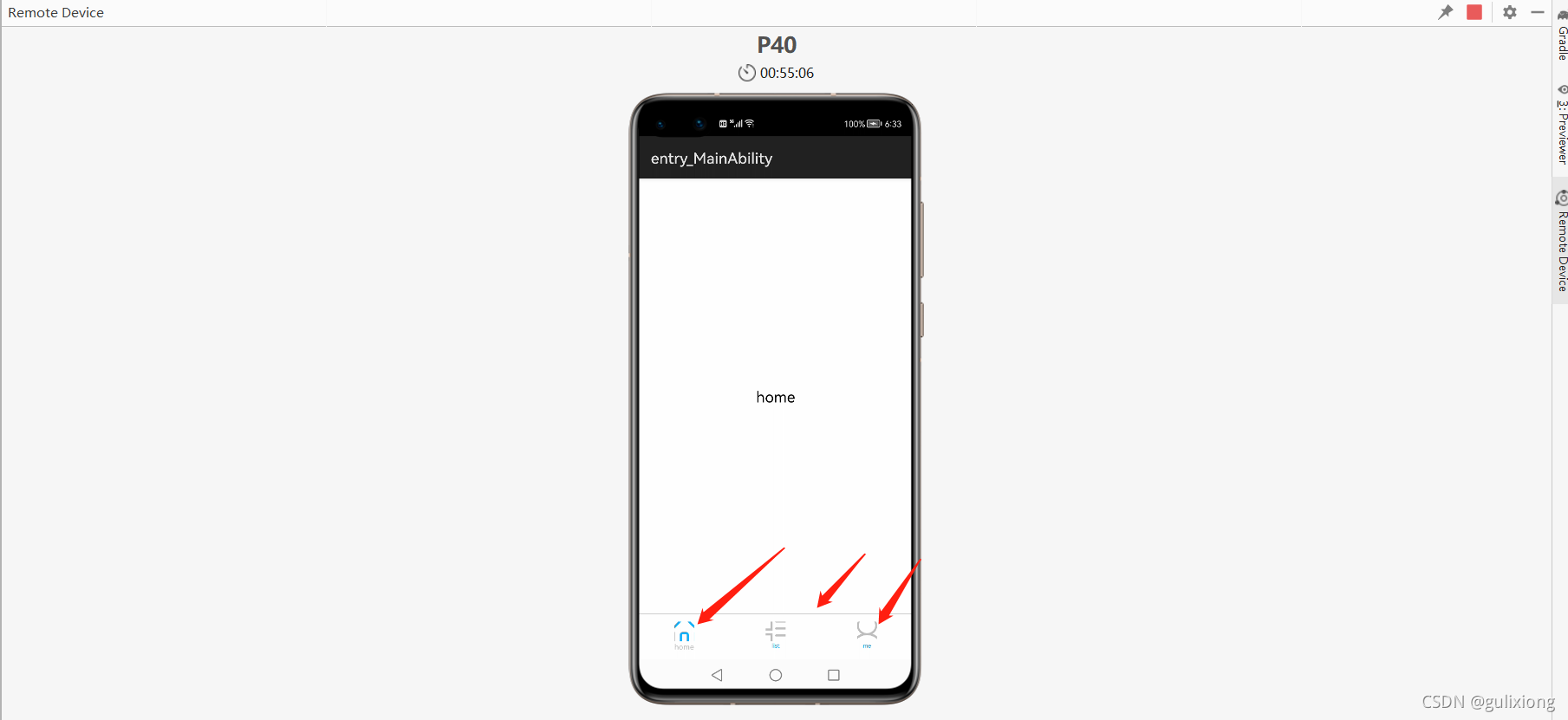
点击底部导航的图片所在的区域,上方显示不同的内容,例如:点击第一个图标,中间显示
文本内容“home”,点击第二个图标显示"list',点击第三个图标显示"me',
点击home的时候,home所在区域显示高亮,其他两个导航图标和文字显示灰色
1 布局如下:
ability_main.xml
<?xml version="1.0" encoding="utf-8"?>
<DirectionalLayout
    xmlns:ohos="http://schemas.huawei.com/res/ohos"
    ohos:height="match_parent"
    ohos:width="match_parent"
    ohos:alignment="center"
    ohos:orientation="vertical">

    <StackLayout
        ohos:id="$+id:main_content"
        ohos:height="0vp"
        ohos:width="match_parent"
        ohos:weight="1">
    </StackLayout>
    <Image
        ohos:height="1vp"
        ohos:width="match_parent"
        ohos:image_src="#cccccc"></Image>
    <DirectionalLayout
        ohos:top_margin="10vp"
        ohos:height="50vp"
        ohos:width="match_parent"
        ohos:orientation="horizontal">
        <!--home-->
        <DirectionalLayout
            ohos:id="$+id:icon_home"
            ohos:height="match_parent"
            ohos:width="match_content"
            ohos:orientation="vertical"
            ohos:weight="1"
            >
            <Image
                ohos:id="$+id:home_img"
                ohos:layout_alignment="center"
                ohos:height="26vp"
                ohos:width="26vp"
                ohos:image_src="$media:icon_home"></Image>
            <Text
                ohos:id="$+id:home_txt"
                ohos:layout_alignment="center"
                ohos:height="match_content"
                ohos:width="match_content"
                ohos:text_size="10fp"
                ohos:text="home"></Text>
        </DirectionalLayout>
        <DirectionalLayout
            ohos:id="$+id:icon_list"
            ohos:weight="1"
            ohos:height="match_parent"
            ohos:width="match_content"
            ohos:orientation="vertical">
            <Image
                ohos:id="$+id:list_img"
                ohos:layout_alignment="center"
                ohos:height="26vp"
                ohos:width="26vp"
                ohos:image_src="$media:icon_list"></Image>
            <Text
                ohos:id="$+id:list_txt"
                ohos:layout_alignment="center"
                ohos:height="match_content"
                ohos:width="match_content"
                ohos:text="list"></Text>
        </DirectionalLayout>
        <DirectionalLayout
            ohos:id="$+id:icon_me"
            ohos:weight="1"
            ohos:height="match_parent"
            ohos:width="match_content"
            ohos:orientation="vertical">
            <Image
                ohos:id="$+id:me_img"
                ohos:image_src="$media:icon_me"
                ohos:layout_alignment="center"
                ohos:height="26vp"
                ohos:width="26vp"></Image>
            <Text
                ohos:id="$+id:me_txt"
                ohos:layout_alignment="center"
                ohos:height="match_content"
                ohos:width="match_content"
                ohos:text="me"></Text>
        </DirectionalLayout>
    </DirectionalLayout>

</DirectionalLayout>
布局分析:中间的同一片区域,当点击下面的图标要显示不同的内容,所以这里用的是层叠布局
<StackLayout
    ohos:id="$+id:main_content"
    ohos:height="0vp"
    ohos:width="match_parent"
    ohos:weight="1">
</StackLayout>
中间这片大的区域和下面的底部导航之间分割线用的是图片,只不过图片的高度是1vp,宽度是和它的屏幕一样宽
ohos:id="$+id:icon_home"
ohos:height="match_parent"
ohos:width="match_content"
ohos:orientation="vertical"
ohos:weight="1"
中间这片区域内容的切换需要写java代码,写三个Fraction
package com.gulixiong.abilitycase.fraction;

import com.gulixiong.abilitycase.ResourceTable;
import ohos.aafwk.ability.fraction.Fraction;
import ohos.aafwk.content.Intent;
import ohos.agp.components.Component;
import ohos.agp.components.ComponentContainer;
import ohos.agp.components.LayoutScatter;

public class HomeFraction extends Fraction {
    @Override
    protected Component onComponentAttached(LayoutScatter scatter, ComponentContainer container, Intent intent) {
        //指定布局文件
        Component component = scatter.parse(ResourceTable.Layout_fraction_home, container, false);
        return component;
    }
}
package com.gulixiong.abilitycase.fraction;

import com.gulixiong.abilitycase.ResourceTable;
import ohos.aafwk.ability.fraction.Fraction;
import ohos.aafwk.content.Intent;
import ohos.agp.components.Component;
import ohos.agp.components.ComponentContainer;
import ohos.agp.components.LayoutScatter;

public class ListFraction extends Fraction {

    @Override
    protected Component onComponentAttached(LayoutScatter scatter, ComponentContainer container, Intent intent) {
        //指定布局文件
        Component component = scatter.parse(ResourceTable.Layout_fraction_list, container, false);
        return component;
    }
}
package com.gulixiong.abilitycase.fraction;

import com.gulixiong.abilitycase.ResourceTable;
import ohos.aafwk.ability.fraction.Fraction;
import ohos.aafwk.content.Intent;
import ohos.agp.components.Component;
import ohos.agp.components.ComponentContainer;
import ohos.agp.components.LayoutScatter;

public class MeFraction extends Fraction {

    @Override
    protected Component onComponentAttached(LayoutScatter scatter, ComponentContainer container, Intent intent) {
        //指定布局文件
        Component component = scatter.parse(ResourceTable.Layout_fraction_me, container, false);
        return component;
    }
}
我们看到每个Fraction类中指定了布局,以MeFraction 为例,Component component = scatter.parse(ResourceTable.Layout_fraction_me, container, false);这里指定了
Layout_fraction_me,所以三个Fration需要分别新建三个对应的布局文件
fraction_home.xml
<?xml version="1.0" encoding="utf-8"?>
<DirectionalLayout
    xmlns:ohos="http://schemas.huawei.com/res/ohos"
    ohos:height="match_parent"
    ohos:width="match_parent"
    ohos:alignment="center"
    ohos:orientation="vertical">

    <Text
        ohos:id="$+id:fraction_home"
        ohos:height="match_content"
        ohos:width="match_content"
        ohos:text_size="20fp"
        ohos:text="home">

    </Text>

</DirectionalLayout>
fraction_list.xml
<?xml version="1.0" encoding="utf-8"?>
<DirectionalLayout
    xmlns:ohos="http://schemas.huawei.com/res/ohos"
    ohos:height="match_parent"
    ohos:width="match_parent"
    ohos:alignment="center"
    ohos:orientation="vertical">

    <Text
        ohos:id="$+id:fraction_list"
        ohos:height="match_content"
        ohos:width="match_content"
        ohos:text_size="20fp"
        ohos:text="list">
    </Text>

</DirectionalLayout>
fraction_me.xml
<?xml version="1.0" encoding="utf-8"?>
<DirectionalLayout
    xmlns:ohos="http://schemas.huawei.com/res/ohos"
    ohos:height="match_parent"
    ohos:width="match_parent"
    ohos:alignment="center"
    ohos:orientation="vertical">

    <Text
        ohos:id="$+id:fraction_me"
        ohos:height="match_content"
        ohos:width="match_content"
        ohos:text_size="20fp"
        ohos:text="me">
    </Text>

</DirectionalLayout>
MainAbilitySlice.java代码如下:
package com.gulixiong.abilitycase.slice;

import com.gulixiong.abilitycase.MainAbility;
import com.gulixiong.abilitycase.ResourceTable;
import com.gulixiong.abilitycase.fraction.HomeFraction;
import com.gulixiong.abilitycase.fraction.ListFraction;
import com.gulixiong.abilitycase.fraction.MeFraction;
import ohos.aafwk.ability.AbilitySlice;
import ohos.aafwk.ability.fraction.FractionScheduler;
import ohos.aafwk.content.Intent;
import ohos.agp.components.Component;
import ohos.agp.components.DirectionalLayout;
import ohos.agp.components.Image;
import ohos.agp.components.Text;
import ohos.agp.utils.Color;
import ohos.hiviewdfx.HiLog;
import ohos.hiviewdfx.HiLogLabel;

public class MainAbilitySlice extends AbilitySlice {
    private static final HiLogLabel LABEL_LOG = new HiLogLabel(3, 0xD000F00, "fraction");
    //定义选中和没有选中时的颜色
    private int selectColor;
    private int unselectColor;
    DirectionalLayout icon_home;
    DirectionalLayout icon_list;
    DirectionalLayout icon_me;
    Text homeText;
    Text listText;
    Text meText;
    Image homeImg;
    Image listImg;
    Image meImg;

    @Override
    public void onStart(Intent intent) {
        super.onStart(intent);
        super.setUIContent(ResourceTable.Layout_ability_main);
        initColor();
        initUI();
        setListeners();
        loadFraction(0);
        setColor(0);
    }

    private void initColor(){
        selectColor = Color.getIntColor("#bfbfbf");
        unselectColor = Color.getIntColor("#0faeff");
        HiLog.info(LABEL_LOG,"initColor()----");
    }

    private void initUI(){
        icon_home= (DirectionalLayout) findComponentById(ResourceTable.Id_icon_home);
        icon_list= (DirectionalLayout) findComponentById(ResourceTable.Id_icon_list);
        icon_me= (DirectionalLayout) findComponentById(ResourceTable.Id_icon_me);

        homeText= (Text) findComponentById(ResourceTable.Id_home_txt);
        listText=(Text) findComponentById(ResourceTable.Id_list_txt);
        meText=(Text) findComponentById(ResourceTable.Id_me_txt);
        homeImg= (Image) findComponentById(ResourceTable.Id_home_img);
        listImg= (Image) findComponentById(ResourceTable.Id_list_img);
        meImg= (Image) findComponentById(ResourceTable.Id_me_img);
        HiLog.info(LABEL_LOG,"initUI()----");
    }

    private void setListeners(){
        icon_home.setClickedListener(new Component.ClickedListener() {
            @Override
            public void onClick(Component component) {
                loadFraction(0);
                setColor(0);
            }
        });
        icon_list.setClickedListener(new Component.ClickedListener() {
            @Override
            public void onClick(Component component) {
                loadFraction(1);
                setColor(1);
            }
        });
        icon_me.setClickedListener(new Component.ClickedListener() {
            @Override
            public void onClick(Component component) {
                loadFraction(2);
                setColor(2);
            }
        });
        HiLog.info(LABEL_LOG,"setListeners()----");
    }

    private void loadFraction(int type){
        //获取小部分的管理器
        MainAbility mainAbility = (MainAbility) getAbility();
        //获取FractionScheduler对象
        FractionScheduler scheduler=mainAbility.getFractionManager().startFractionScheduler();
        //建立FractionScheduler和Fraction之间的关系
        switch (type) {
            case 0 :{
                scheduler.replace(ResourceTable.Id_main_content,new HomeFraction());
                break;
            }
            case 1 :{
                scheduler.replace(ResourceTable.Id_main_content,new ListFraction());
                break;
            }
            case 2 :{
                scheduler.replace(ResourceTable.Id_main_content,new MeFraction());
                break;
            }
        }
        scheduler.submit();
        HiLog.info(LABEL_LOG,"loadFraction(int type)----");
    }


    private void setColor(int type){
          HiLog.info(LABEL_LOG,"setColor(int type)----开始");
          switch (type) {
              case 0: {
                  meImg.setImageAndDecodeBounds(ResourceTable.Media_icon_me);
                  listImg.setImageAndDecodeBounds(ResourceTable.Media_icon_list);
                  meText.setTextColor(new Color(unselectColor));
                  listText.setTextColor(new Color(unselectColor));

                  homeText.setTextColor(new Color(selectColor));
                  homeImg.setImageAndDecodeBounds(ResourceTable.Media_icon_home_xz);
                  break;
              }
              case 1: {
                  meImg.setImageAndDecodeBounds(ResourceTable.Media_icon_me);
                  homeImg.setImageAndDecodeBounds(ResourceTable.Media_icon_home);
                  meText.setTextColor(new Color(unselectColor));
                  homeText.setTextColor(new Color(unselectColor));

                  listText.setTextColor(new Color(selectColor));
                  listImg.setImageAndDecodeBounds(ResourceTable.Media_icon_list_xz);
                  break;
              }
              case 2: {
                  listImg.setImageAndDecodeBounds(ResourceTable.Media_icon_list);
                  homeImg.setImageAndDecodeBounds(ResourceTable.Media_icon_home);
                  listText.setTextColor(new Color(unselectColor));
                  homeText.setTextColor(new Color(unselectColor));

                  meText.setTextColor(new Color(selectColor));
                  meImg.setImageAndDecodeBounds(ResourceTable.Media_icon_me_xz);
                  break;
              }
          }
        HiLog.info(LABEL_LOG,"setColor(int type)----结束");
    }

    @Override
    public void onActive() {
        super.onActive();
    }

    @Override
    public void onForeground(Intent intent) {
        super.onForeground(intent);
    }
}
对于具有离线功能的智能手机应用程序,我正在为Xml文件创建单向文本同步。我希望我的服务器将增量/差异(例如GNU差异补丁)发送到目标设备。这是计划:Time=0Server:hasversion_1ofXmlfile(~800kiB)Client:hasversion_1ofXmlfile(~800kiB)Time=1Server:hasversion_1andversion_2ofXmlfile(each~800kiB)computesdeltaoftheseversions(=patch)(~10kiB)sendspatchtoClient(~10kiBtransferred)Cl
我正在编写一个包含C扩展的gem。通常当我写一个gem时,我会遵循TDD的过程,我会写一个失败的规范,然后处理代码直到它通过,等等......在“ext/mygem/mygem.c”中我的C扩展和在gemspec的“扩展”中配置的有效extconf.rb,如何运行我的规范并仍然加载我的C扩展?当我更改C代码时,我需要采取哪些步骤来重新编译代码?这可能是个愚蠢的问题,但是从我的gem的开发源代码树中输入“bundleinstall”不会构建任何native扩展。当我手动运行rubyext/mygem/extconf.rb时,我确实得到了一个Makefile(在整个项目的根目录中),然后当
我构建了两个需要相互通信和发送文件的Rails应用程序。例如,一个Rails应用程序会发送请求以查看其他应用程序数据库中的表。然后另一个应用程序将呈现该表的json并将其发回。我还希望一个应用程序将存储在其公共(public)目录中的文本文件发送到另一个应用程序的公共(public)目录。我从来没有做过这样的事情,所以我什至不知道从哪里开始。任何帮助,将不胜感激。谢谢! 最佳答案 无论Rails是什么,几乎所有Web应用程序都有您的要求,大多数现代Web应用程序都需要相互通信。但是有一个小小的理解需要你坚持下去,网站不应直接访问彼此
我尝试运行2.x应用程序。我使用rvm并为此应用程序设置其他版本的ruby:$rvmuseree-1.8.7-head我尝试运行服务器,然后出现很多错误:$script/serverNOTE:Gem.source_indexisdeprecated,useSpecification.Itwillberemovedonorafter2011-11-01.Gem.source_indexcalledfrom/Users/serg/rails_projects_terminal/work_proj/spohelp/config/../vendor/rails/railties/lib/r
刚入门rails,开始慢慢理解。有人可以解释或给我一些关于在application_controller中编码的好处或时间和原因的想法吗?有哪些用例。您如何为Rails应用程序使用应用程序Controller?我不想在那里放太多代码,因为据我了解,每个请求都会调用此Controller。这是真的? 最佳答案 ApplicationController实际上是您应用程序中的每个其他Controller都将从中继承的类(尽管这不是强制性的)。我同意不要用太多代码弄乱它并保持干净整洁的态度,尽管在某些情况下ApplicationContr
我是一个Rails初学者,但我想从我的RailsView(html.haml文件)中查看Ruby变量的内容。我试图在ruby中打印出变量(认为它会在终端中出现),但没有得到任何结果。有什么建议吗?我知道Rails调试器,但更喜欢使用inspect来打印我的变量。 最佳答案 您可以在View中使用puts方法将信息输出到服务器控制台。您应该能够在View中的任何位置使用Haml执行以下操作:-puts@my_variable.inspect 关于ruby-on-rails-如何在我的R
我已经在Sinatra上创建了应用程序,它代表了一个简单的API。我想在生产和开发上进行部署。我想在部署时选择,是开发还是生产,一些方法的逻辑应该改变,这取决于部署类型。是否有任何想法,如何完成以及解决此问题的一些示例。例子:我有代码get'/api/test'doreturn"Itisdev"end但是在部署到生产环境之后我想在运行/api/test之后看到ItisPROD如何实现? 最佳答案 根据SinatraDocumentation:EnvironmentscanbesetthroughtheRACK_ENVenvironm
我们的git存储库中目前有一个Gemfile。但是,有一个gem我只在我的环境中本地使用(我的团队不使用它)。为了使用它,我必须将它添加到我们的Gemfile中,但每次我checkout到我们的master/dev主分支时,由于与跟踪的gemfile冲突,我必须删除它。我想要的是类似Gemfile.local的东西,它将继承从Gemfile导入的gems,但也允许在那里导入新的gems以供使用只有我的机器。此文件将在.gitignore中被忽略。这可能吗? 最佳答案 设置BUNDLE_GEMFILE环境变量:BUNDLE_GEMFI
这似乎非常适得其反,因为太多的gem会在window上破裂。我一直在处理很多mysql和ruby-mysqlgem问题(gem本身发生段错误,一个名为UnixSocket的类显然在Windows机器上不能正常工作,等等)。我只是在浪费时间吗?我应该转向不同的脚本语言吗? 最佳答案 我在Windows上使用Ruby的经验很少,但是当我开始使用Ruby时,我是在Windows上,我的总体印象是它不是Windows原生系统。因此,在主要使用Windows多年之后,开始使用Ruby促使我切换回原来的系统Unix,这次是Linux。Rub
我正在玩HTML5视频并且在ERB中有以下片段:mp4视频从在我的开发环境中运行的服务器很好地流式传输到chrome。然而firefox显示带有海报图像的视频播放器,但带有一个大X。问题似乎是mongrel不确定ogv扩展的mime类型,并且只返回text/plain,如curl所示:$curl-Ihttp://0.0.0.0:3000/pr6.ogvHTTP/1.1200OKConnection:closeDate:Mon,19Apr201012:33:50GMTLast-Modified:Sun,18Apr201012:46:07GMTContent-Type:text/plain
