基于SuperPoint与SuperGlue实现图像配准,项目地址https://github.com/magicleap/SuperGluePretrainedNetwork,使用到了特殊算子grid_sample,在转onnx时要求opset_version为16及以上(即pytorch版本为1.9以上)。SuperPoint模型用于提取图像的特征点和特征点描述符(在进行图像配准时需要运行两个,实现对两个图片特征点的提取),SuperGlue模型用于对SuperPoint模型所提取的特征点和特征描述符进行匹配。
使用SuperPoint与SuperGlue训练自己的数据库,可以查看该文库资料https://download.csdn.net/download/a486259/87471980,该文档详细记录了使用pytorch-superpoint与pytorch-superglue项目实现训练自己的数据集的过程。
为实现模型可以onnx部署,对项目中部分代码进行修改。主要是删除代码中对dict对象的使用,因为onnx不支持。
代码在models/superpoint.py中,主要修改 SuperPoint模型的forward函数(代码在145行开始),不使用字典对象做参数(输入值和输出值),避免在onnx算子中不支持。同时对keypoints的实现函数进行多种尝试。其中,SuperPoint模型在训练时是只输出坐标点置信度(scores1)和坐标点的描述符(descriptors1),这里的坐标其实就是指特征点。但是,坐标信息仅体现在网格数据中且在进行点匹配时需要xy格式的坐标,为此将scores中置信度值大于阈值的点的坐标进行提取,故此得到了keypoints1(坐标点)。
    def forward(self, data):
        """ Compute keypoints, scores, descriptors for image """
        # Shared Encoder
        x = self.relu(self.conv1a(data))
        x = self.relu(self.conv1b(x))
        x = self.pool(x)
        x = self.relu(self.conv2a(x))
        x = self.relu(self.conv2b(x))
        x = self.pool(x)
        x = self.relu(self.conv3a(x))
        x = self.relu(self.conv3b(x))
        x = self.pool(x)
        x = self.relu(self.conv4a(x))
        x = self.relu(self.conv4b(x))

        # Compute the dense keypoint scores
        cPa = self.relu(self.convPa(x))
        scores = self.convPb(cPa)
        scores = torch.nn.functional.softmax(scores, 1)[:, :-1]
        b, _, h, w = scores.shape
        scores = scores.permute(0, 2, 3, 1).reshape(b, h, w, 8, 8)
        scores = scores.permute(0, 1, 3, 2, 4).reshape(b, h*8, w*8)
        scores = simple_nms(scores, self.config['nms_radius'])

        # Extract keypoints
        #keypoints = [ torch.nonzero(s > self.config['keypoint_threshold']) for s in scores]## nonzero->tensorRT not support
        #keypoints = [torch.vstack(torch.where(s > self.config['keypoint_threshold'])).T for s in scores]## vstack->onnx not support
        #keypoints = [torch.cat(torch.where(s > self.config['keypoint_threshold']),0).reshape(len(s.shape),-1).T for s in scores]# tensor.T->onnx not support
        #keypoints = [none_zero_index(s,self.config['keypoint_threshold']) for s in scores]# where->nonzero ->tensorRT not support
        keypoints = [torch.transpose(torch.cat(torch.where(s>self.config['keypoint_threshold']),0).reshape(len(s.shape),-1),1,0) for s in scores]# transpose->tensorRT not support
        scores = [s[tuple(k.t())] for s, k in zip(scores, keypoints)]

        # Discard keypoints near the image borders
        keypoints, scores = list(zip(*[
            remove_borders(k, s, self.config['remove_borders'], h*8, w*8)
            for k, s in zip(keypoints, scores)]))

        # Keep the k keypoints with highest score
        if self.config['max_keypoints'] >= 0:
            keypoints, scores = list(zip(*[
                top_k_keypoints(k, s, self.config['max_keypoints'])
                for k, s in zip(keypoints, scores)]))

        # Convert (h, w) to (x, y)
        keypoints = [torch.flip(k, [1]).float() for k in keypoints]

        # Compute the dense descriptors
        cDa = self.relu(self.convDa(x))
        descriptors = self.convDb(cDa)
        descriptors = torch.nn.functional.normalize(descriptors, p=2, dim=1)

        # Extract descriptors
        descriptors = [sample_descriptors(k[None], d[None], 8)[0]
                       for k, d in zip(keypoints, descriptors)]

        # return {
        #     'keypoints': keypoints,
        #     'scores': scores,
        #     'descriptors': descriptors,
        # }
        return  keypoints[0].unsqueeze(0),scores[0].unsqueeze(0),descriptors[0].unsqueeze(0)
代码中models/superglue.py中,主要修正由于字典对象在superpoint中被删除后的的影像。
将原函数的参数image_shape替换为height和width
def normalize_keypoints(kpts,  height, width):
    """ Normalize keypoints locations based on image image_shape"""
    one = kpts.new_tensor(1)
    size = torch.stack([one*width, one*height])[None]
    center = size / 2
    scaling = size.max(1, keepdim=True).values * 0.7
    return (kpts - center[:, None, :]) / scaling[:, None, :]
将代码中SuperGlue的forward函数使用以下代码替换。主要是修改了传入参数,将先前的字典进行了解包,让一个参数变成了6个;并对函数的返回值进行了修改,同时固定死了图像的size为640*640。
SuperGlue模型是根据输入的两组keypoints、scores、descriptors数据,输出两组match_indices, match_mscores信息。第一组用于描述A->B的对应关系,第二组用于描述B->A的对应关系。
    def forward(self, data_descriptors0, data_descriptors1, data_keypoints0, data_keypoints1, data_scores0, data_scores1):
        """Run SuperGlue on a pair of keypoints and descriptors"""
        #, height:int, width:int
        height, width=640,640
        desc0, desc1 = data_descriptors0, data_descriptors1
        kpts0, kpts1 = data_keypoints0, data_keypoints1

        if kpts0.shape[1] == 0 or kpts1.shape[1] == 0:  # no keypoints
            shape0, shape1 = kpts0.shape[:-1], kpts1.shape[:-1]
            return kpts0.new_full(shape0, -1, dtype=torch.int),kpts1.new_full(shape1, -1, dtype=torch.int),kpts0.new_zeros(shape0),kpts1.new_zeros(shape1)

        # Keypoint normalization.
        kpts0 = normalize_keypoints(kpts0, height, width)
        kpts1 = normalize_keypoints(kpts1, height, width)

        # Keypoint MLP encoder.
        desc0 = desc0 + self.kenc(kpts0, data_scores0)
        desc1 = desc1 + self.kenc(kpts1, data_scores1)

        # Multi-layer Transformer network.
        desc0, desc1 = self.gnn(desc0, desc1)

        # Final MLP projection.
        mdesc0, mdesc1 = self.final_proj(desc0), self.final_proj(desc1)

        # Compute matching descriptor distance.
        scores = torch.einsum('bdn,bdm->bnm', mdesc0, mdesc1)
        scores = scores / self.config['descriptor_dim']**.5

        # Run the optimal transport.
        scores = log_optimal_transport(
            scores, self.bin_score,
            iters=self.config['sinkhorn_iterations'])

        # Get the matches with score above "match_threshold".
        max0, max1 = scores[:, :-1, :-1].max(2), scores[:, :-1, :-1].max(1)
        indices0, indices1 = max0.indices, max1.indices
        mutual0 = arange_like(indices0, 1)[None] == indices1.gather(1, indices0)
        mutual1 = arange_like(indices1, 1)[None] == indices0.gather(1, indices1)
        zero = scores.new_tensor(0)
        mscores0 = torch.where(mutual0, max0.values.exp(), zero)
        mscores1 = torch.where(mutual1, mscores0.gather(1, indices1), zero)
        valid0 = mutual0 & (mscores0 > self.config['match_threshold'])
        valid1 = mutual1 & valid0.gather(1, indices1)
        indices0 = torch.where(valid0, indices0, indices0.new_tensor(-1))
        indices1 = torch.where(valid1, indices1, indices1.new_tensor(-1))
        # return {
        #     'matches0': indices0, # use -1 for invalid match
        #     'matches1': indices1, # use -1 for invalid match
        #     'matching_scores0': mscores0,
        #     'matching_scores1': mscores1,
        # }
        return indices0,  indices1,  mscores0,  mscores1
在进行图像配准时,使用superpoint模型和superglue模型的数据处理流程都是固定,为简化代码,故此将其封装为一个模型,代码保存为SPSP.py。
import torch
from superglue import SuperGlue
from superpoint import SuperPoint
import torch
import torch.nn as nn
import torch.nn.functional as F
class SPSG(nn.Module):#
    def __init__(self):
        super(SPSG, self).__init__()
        self.sp_model = SuperPoint({'max_keypoints':700})
        self.sg_model = SuperGlue({'weights': 'outdoor'})
    def forward(self,x1,x2):
        keypoints1,scores1,descriptors1=self.sp_model(x1)
        keypoints2,scores2,descriptors2=self.sp_model(x2)
        #print(scores1.shape,keypoints1.shape,descriptors1.shape)
        #example=(descriptors1.unsqueeze(0),descriptors2.unsqueeze(0),keypoints1.unsqueeze(0),keypoints2.unsqueeze(0),scores1.unsqueeze(0),scores2.unsqueeze(0))
        example=(descriptors1,descriptors2,keypoints1,keypoints2,scores1,scores2)
        indices0,  indices1,  mscores0,  mscores1=self.sg_model(*example)
        #return indices0,  indices1,  mscores0,  mscores1
        matches = indices0[0]

        valid = torch.nonzero(matches > -1).squeeze().detach()
        mkpts0 = keypoints1[0].index_select(0, valid);
        mkpts1 = keypoints2[0].index_select(0, matches.index_select(0, valid));
        confidence = mscores0[0].index_select(0, valid);
        return mkpts0, mkpts1, confidence
进行图像读取、图像显示操作的代码被封装为imgutils库,具体可以查阅https://hpg123.blog.csdn.net/article/details/124824892
通过以下步骤,即可获取两个图像的特征点,及特征点匹配度
from imgutils import *
import torch
from SPSG import SPSG
model=SPSG()#.to('cuda')
tensor2a,img2a=read_img_as_tensor("b1.jpg",(640,640),device='cpu')
tensor2b,img2b=read_img_as_tensor("b4.jpg",(640,640),device='cpu')
mkpts0, mkpts1, confidence=model(tensor2a,tensor2b)
myimshows( [img2a,img2b],size=12)
代码执行输出如下所示:

以下代码可以将两个图像中匹配度高于阈值的点进行绘制连接
import cv2 as cv
pt_num = mkpts0.shape[0]
im_dst,im_res=img2a,img2b
img = np.zeros((max(im_dst.shape[0], im_res.shape[0]), im_dst.shape[1]+im_res.shape[1]+10,3))
img[:,:im_res.shape[0],]=im_dst
img[:,-im_res.shape[0]:]=im_res
img=img.astype(np.uint8)
match_threshold=0.6
for i in range(0, pt_num):
    if (confidence[i] > match_threshold):
        pt0 = mkpts0[i].to('cpu').numpy().astype(np.int)
        pt1 = mkpts1[i].to('cpu').numpy().astype(np.int)
        #cv.circle(img, (pt0[0], pt0[1]), 1, (0, 0, 255), 2)
        #cv.circle(img, (pt1[0], pt1[1]+650), (0, 0, 255), 2)
        cv.line(img, pt0, (pt1[0]+im_res.shape[0], pt1[1]), (0, 255, 0), 1)
myimshow( img,size=12)
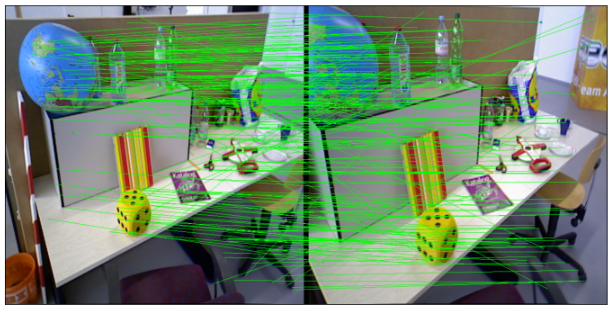
先调用getGoodMatchPoint函数根据阈值筛选匹配度高的特征点,然后计算和透视变化矩阵H,最后提取重叠区域
import cv2
def getGoodMatchPoint(mkpts0, mkpts1, confidence,  match_threshold:float=0.5):
    n = min(mkpts0.size(0), mkpts1.size(0))
    srcImage1_matchedKPs, srcImage2_matchedKPs=[],[]

    if (match_threshold > 1 or match_threshold < 0):
        print("match_threshold error!")

    for i in range(n):
        kp0 = mkpts0[i]
        kp1 = mkpts1[i]

        pt0=(kp0[0].item(),kp0[1].item());
        pt1=(kp1[0].item(),kp1[1].item());
        c = confidence[i].item();
        if (c > match_threshold):
            srcImage1_matchedKPs.append(pt0);
            srcImage2_matchedKPs.append(pt1);

    return np.array(srcImage1_matchedKPs),np.array(srcImage2_matchedKPs)
pts_src, pts_dst=getGoodMatchPoint(mkpts0, mkpts1, confidence)

h1, status = cv2.findHomography(pts_src, pts_dst, cv.RANSAC, 8)
im_out1 = cv2.warpPerspective(im_dst, h1, (im_dst.shape[1],im_dst.shape[0]))
im_out2 = cv2.warpPerspective(im_res, h1, (im_dst.shape[1],im_dst.shape[0]),16)
#这里 im_dst和im_out1是严格配准的状态
myimshowsCL([im_dst,im_out1,im_res,im_out2],rows=2,cols=2, size=6)

使用以下代码即可实现模型导出
input_names = ["input1","input2"]
output_names = ['mkpts0', 'mkpts1', 'confidence']
dummy_input=(tensor2a,tensor2b)
example_outputs=model(tensor2a,tensor2b)
ONNX_name="model.onnx"
torch.onnx.export(model.eval(), dummy_input, ONNX_name, verbose=True, input_names=input_names,opset_version=16,
                  dynamic_axes={
                        'confidence': {0: 'point_num',},
                        'mkpts0': {0: 'batch_size',},
                        'mkpts1': {0: 'batch_size',}
                       },
                   output_names=output_names)#,example_outputs=example_outputs
可以单独使用SuperPoint模型提取图像的特征点
from imgutils import *
import torch
from superpoint import SuperPoint
import cv2

config={'max_keypoints': 400,'keypoint_threshold':0.1}
sp_model=SuperPoint(config).to('cuda')
sp_model=sp_model.eval()

tensor2a,img2a=read_img_as_tensor(r"D:\SuperGluePretrainedNetwork-master\assets\freiburg_sequence\1341847986.762616.png",(640,640),device='cuda')
tensor2b,img2b=read_img_as_tensor(r"D:\SuperGluePretrainedNetwork-master\assets\freiburg_sequence\1341847987.758741.png",(640,640),device='cuda')

keypoints1,scores1,descriptors1=sp_model(tensor2a)
keypoints2,scores2,descriptors2=sp_model(tensor2b)

yanse=(0,0,255)
points=keypoints1[0].int().cpu().numpy()
for i in range(len(points)):
    X,Y=points[i]
    cv2.circle(img2a,(X,Y),3,yanse,2)

points=keypoints2[0].int().cpu().numpy()
for i in range(len(points)):
    X,Y=points[i]
    cv2.circle(img2b,(X,Y),3,yanse,2)
myimshows([img2a,img2b])

我有一个用户工厂。我希望默认情况下确认用户。但是鉴于unconfirmed特征,我不希望它们被确认。虽然我有一个基于实现细节而不是抽象的工作实现,但我想知道如何正确地做到这一点。factory:userdoafter(:create)do|user,evaluator|#unwantedimplementationdetailshereunlessFactoryGirl.factories[:user].defined_traits.map(&:name).include?(:unconfirmed)user.confirm!endendtrait:unconfirmeddoenden
我有带有Logo图像的公司模型has_attached_file:logo我用他们的Logo创建了许多公司。现在,我需要添加新样式has_attached_file:logo,:styles=>{:small=>"30x15>",:medium=>"155x85>"}我是否应该重新上传所有旧数据以重新生成新样式?我不这么认为……或者有什么rake任务可以重新生成样式吗? 最佳答案 参见Thumbnail-Generation.如果rake任务不适合你,你应该能够在控制台中使用一个片段来调用重新处理!关于相关公司
导读:随着叮咚买菜业务的发展,不同的业务场景对数据分析提出了不同的需求,他们希望引入一款实时OLAP数据库,构建一个灵活的多维实时查询和分析的平台,统一数据的接入和查询方案,解决各业务线对数据高效实时查询和精细化运营的需求。经过调研选型,最终引入ApacheDoris作为最终的OLAP分析引擎,Doris作为核心的OLAP引擎支持复杂地分析操作、提供多维的数据视图,在叮咚买菜数十个业务场景中广泛应用。作者|叮咚买菜资深数据工程师韩青叮咚买菜创立于2017年5月,是一家专注美好食物的创业公司。叮咚买菜专注吃的事业,为满足更多人“想吃什么”而努力,通过美好食材的供应、美好滋味的开发以及美食品牌的孵
华为OD机试题本篇题目:明明的随机数题目输入描述输出描述:示例1输入输出说明代码编写思路最近更新的博客华为od2023|什么是华为od,od薪资待遇,od机试题清单华为OD机试真题大全,用Python解华为机试题|机试宝典【华为OD机试】全流程解析+经验分享,题型分享,防作弊指南华为o
C#实现简易绘图工具一.引言实验目的:通过制作窗体应用程序(C#画图软件),熟悉基本的窗体设计过程以及控件设计,事件处理等,熟悉使用C#的winform窗体进行绘图的基本步骤,对于面向对象编程有更加深刻的体会.Tutorial任务设计一个具有基本功能的画图软件**·包括简单的新建文件,保存,重新绘图等功能**·实现一些基本图形的绘制,包括铅笔和基本形状等,学习橡皮工具的创建**·设计一个合理舒适的UI界面**注明:你可能需要先了解一些关于winform窗体应用程序绘图的基本知识,以及关于GDI+类和结构的知识二.实验环境Windows系统下的visualstudio2017C#窗体应用程序三.
MIMO技术的优缺点优点通过下面三个增益来总体概括:阵列增益。阵列增益是指由于接收机通过对接收信号的相干合并而活得的平均SNR的提高。在发射机不知道信道信息的情况下,MIMO系统可以获得的阵列增益与接收天线数成正比复用增益。在采用空间复用方案的MIMO系统中,可以获得复用增益,即信道容量成倍增加。信道容量的增加与min(Nt,Nr)成正比分集增益。在采用空间分集方案的MIMO系统中,可以获得分集增益,即可靠性性能的改善。分集增益用独立衰落支路数来描述,即分集指数。在使用了空时编码的MIMO系统中,由于接收天线或发射天线之间的间距较远,可认为它们各自的大尺度衰落是相互独立的,因此分布式MIMO
需求:要创建虚拟机,就需要给他提供一个虚拟的磁盘,我们就在/opt目录下创建一个10G大小的raw格式的虚拟磁盘CentOS-7-x86_64.raw命令格式:qemu-imgcreate-f磁盘格式磁盘名称磁盘大小qemu-imgcreate-f磁盘格式-o?1.创建磁盘qemu-imgcreate-fraw/opt/CentOS-7-x86_64.raw10G执行效果#ls/opt/CentOS-7-x86_64.raw2.安装虚拟机使用virt-install命令,基于我们提供的系统镜像和虚拟磁盘来创建一个虚拟机,另外在创建虚拟机之前,提前打开vnc客户端,在创建虚拟机的时候,通过vnc
我正在尝试使用Ruby2.0.0和Rails4.0.0提供的API从imgur中提取图像。我已尝试按照Ruby2.0.0文档中列出的各种方式构建http请求,但均无济于事。代码如下:require'net/http'require'net/https'defimgurheaders={"Authorization"=>"Client-ID"+my_client_id}path="/3/gallery/image/#{img_id}.json"uri=URI("https://api.imgur.com"+path)request,data=Net::HTTP::Get.new(path
2022/8/4更新支持加入水印水印必须包含透明图像,并且水印图像大小要等于原图像的大小pythonconvert_image_to_video.py-f30-mwatermark.pngim_dirout.mkv2022/6/21更新让命令行参数更加易用新的命令行使用方法pythonconvert_image_to_video.py-f30im_dirout.mkvFFMPEG命令行转换一组JPG图像到视频时,是将这组图像视为MJPG流。我需要转换一组PNG图像到视频,FFMPEG就不认了。pyav内置了ffmpeg库,不需要系统带有ffmpeg工具因此我使用ffmpeg的python包装p
遍历文件夹我们通常是使用递归进行操作,这种方式比较简单,也比较容易理解。本文为大家介绍另一种不使用递归的方式,由于没有使用递归,只用到了循环和集合,所以效率更高一些!一、使用递归遍历文件夹整体思路1、使用File封装初始目录,2、打印这个目录3、获取这个目录下所有的子文件和子目录的数组。4、遍历这个数组,取出每个File对象4-1、如果File是否是一个文件,打印4-2、否则就是一个目录,递归调用代码实现publicclassSearchFile{publicstaticvoidmain(String[]args){//初始目录Filedir=newFile("d:/Dev");Datebeg
