Jlinkcmd它可以方便用户在非仿真的情况下,hold内核、单步、全速、设置断点、查看内核和外设寄存器、读取flash代码等等,方便大家拥有最高的权限查看在运行中的MCU情况,查找非IDE仿真情况下,MCU运行异常的原因。
目录
Jlink相关文档及软件资料见如下官网网址:
SEGGER - The Embedded Experts - Downloads - J-Link / J-Trace
Jlink驱动下载可选如下官网网址:
SEGGER - The Embedded Experts - Downloads
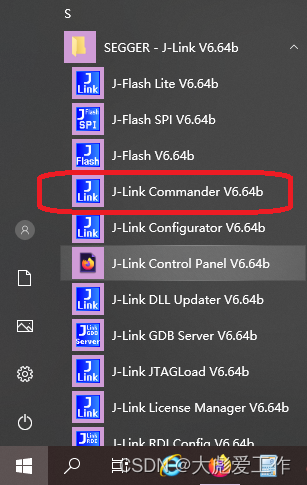
我们可以在开始菜单打开Jlinkcmd;
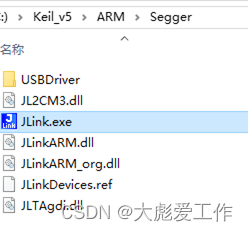
也可以在安装目录中打开Jlinkcmd;
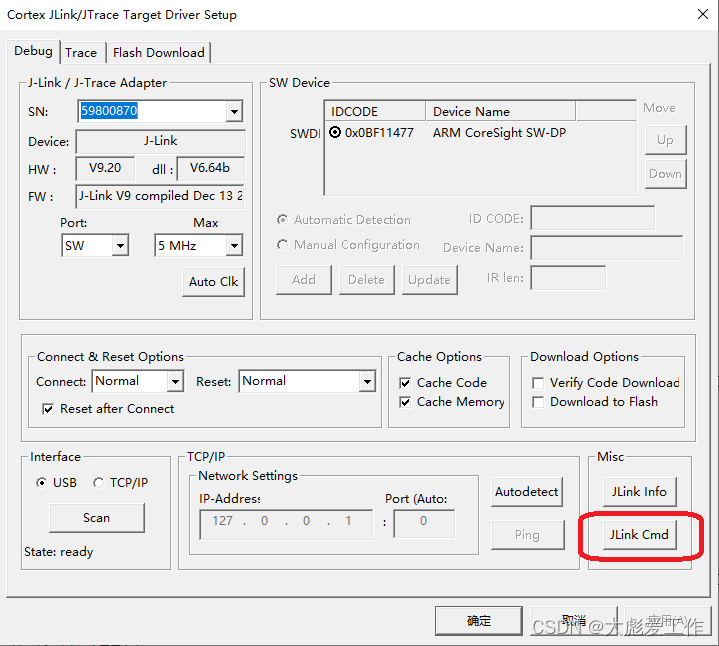
还可以在KEIL软件中debug窗口中打开;

1.输入connect建立连接;
2.输入芯片型号,直接回车可以选择默认选项;
3.根据实际情况选择JTAG或者SWD;
4.设置下载速度,直接回车可以选择默认选项;
正确的连接目标芯片后:
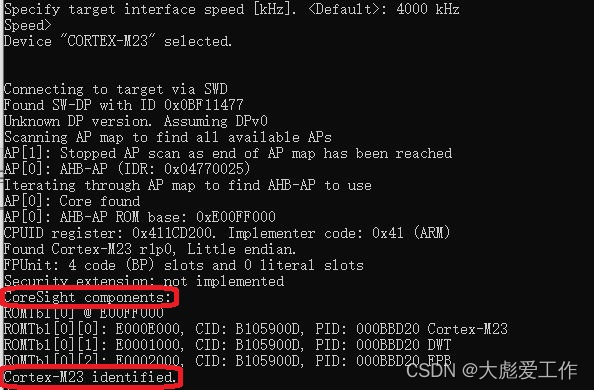
识别到内核,并通知“已识别”。
Mem 读内存
mem8 读8字节内存
mem16 读16字节内存
mem32 读32字节内存
w1 写8字节内存
w2 写16字节内存
w4 写32字节内存
h 停止cpu运行的程序
setbp 设置断点
g 跳到代码段地址执行
s 单步执行(调试用)
r 复位
q 退出
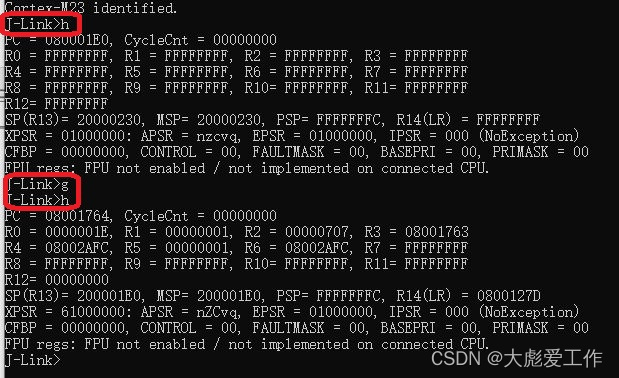
由以上指令运行结果可简单看出,PC初始值为0x080001E0,运行结束后指向0x08001764;
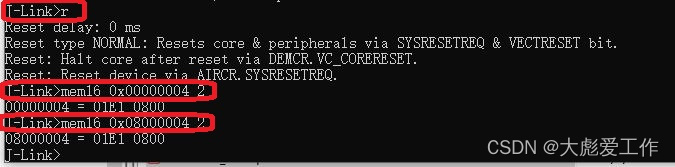
由以上指令运行结果可简单看出,地址0x00000004存储的值为:0x080001E1,地址0x08000004存储的值为:0x080001E1
| Command (long) | Command (short) | Explanation |
| Basic | ||
| ? | Show information about all or specific commands | |
| Exit | Close J-Link connection and quit | |
| EoE | Exit on error | |
| Sleep | Waits the given time (in milliseconds) | |
| Log | Enables log to file | |
| ExpDevList | Export device names from DLL internal device list to text file | |
| ExpDevListXML | Export device names from DLL internal device list to XML file | |
| Configuration - J-Link | ||
| USB | Connect to J-Link via USB | |
| IP | Connect to J-Link via TCP/IP or to Remote Server | |
| SelPrb | Show list of all connected probes via specified interface. The Probe to communicate with can then be selected | |
| ShowEmuList | Show list of all connected probes via specified interface | |
| Power | Switch power supply for target (5V-Supply pin) on or off | |
| VTREF | Set fixed value for VTref on J-Link | |
| VCOM | Enable/disable VCOM Takes effect after power cycle of the probe | |
| Reboot | Reboots the connected probe. | |
| F | Show firmware info | |
| St | Show hardware status | |
| License | Show list of all available license commands | |
| IPAddr | Show/Assign IP address and subnetmask of/to connected Probe | |
| GWAddr | Show/Assign network gateway address of/to connected Probe | |
| DNSAddr | Show/Assign network DNS server address of/to connected Probe | |
| Conf | Show configuration of the connected Probe | |
| Calib | Calibrate the target current measurement | |
| Configuration - Target (CPU) | ||
| Con | Connect to target device | |
| Device | Select specific device J-Link shall connect to | |
| SI | Select target interface | |
| Speed | Set target interface speed | |
| LE | Change mode to little endian | |
| BE | Change mode to big endian | |
| Debugging | ||
| H | Halt CPU | |
| IH | Return current CPU state | |
| WH | Wait until CPU is halted or timeout is reached | |
| G | Start CPU if halted | |
| R | Reset CPU | |
| RX | Reset CPU with delay after reset | |
| Rst | Set the current reset type | |
| S | Execute step(s) on the CPU | |
| IS | Identify length of scan chain select register | |
| MS | Measure length of scan chain | |
| Regs | Display CPU register contents | |
| RReg | Read register | |
| WReg | Write register | |
| MoE | Shows mode-of-entry (CPU halt reason) | |
| SetBP | Set breakpoint | |
| ClrBP | Clear breakpoint | |
| SetWP | Set watchpoint | |
| ClrWP | Clear watchpoint | |
| VC | Write vector catch | |
| SetPC | Set the PC to specified value | |
| ReadAP | Read CoreSight AP register | |
| WriteAP | Write CoreSight AP register | |
| ReadDP | Read CoreSight DP register | |
| WriteDP | Write CoreSight DP register | |
| RCE | Read CP15 register | |
| WCE | Write CP15 register | |
| Term | Visualize printf output using DCC (SEGGER DCC handler running on target) | |
| Debugging - Memory operation | ||
| Mem | Read memory and show corresponding ASCII values | |
| Mem8 | Read 8-bit items | |
| Mem16 | Read 16-bit items | |
| Mem32 | Read 32-bit items | |
| W1 | Write 8-bit items | |
| W2 | Write 16-bit items | |
| W4 | Write 32-bit items | |
| Debugging - JTAG related | ||
| JTAGConf | Set number of IR/DR bits before Target device | |
| I | Read JTAG Id | |
| WJIR | Write JTAG command (IR) | |
| WJDR | Write JTAG data (DR) | |
| WJR | Write Raw JTAG data | |
| RTAP | Reset TAP Controller using state machine (111110) | |
| RT | Reset TAP Controller using nTRST | |
| Debugging - ICE | ||
| ICE | Show state of the embedded ICE macrocell (ICE breaker) | |
| RI | Read Ice register | |
| WI | Write Ice register | |
| TRACE | ||
| TC | Clear TRACE buffer | |
| TSS | Set TRACE size of trace buffer | |
| TSF | Set TRACE Format | |
| TSR | Show TRACE Regions (and analyze trace buffer) | |
| TStart | Start TRACE | |
| TStop | Stop TRACE | |
| SWO | ||
| SWOSpeed | Show supported SWO speeds | |
| SWOStart | Start SWO | |
| SWOStop | Stop SWO | |
| SWOStat | Display SWO status | |
| SWORead | Read and display SWO data | |
| SWOShow | Read and analyze SWO data | |
| SWOFlush | Flush SWO data | |
| SWOView | View SWO terminal data | |
| Flash programming | ||
| Erase | Erase flash (range) of selected device | |
| LoadFile | Load data file into target memory | |
| SaveBin | Save target memory range into binary file | |
| VerifyBin | Verfy if specified bin file is at the specified target memory location | |
| Flasher File I/O Commands | ||
| FWr | (Flasher only) Write file to probe | |
| FRd | (Flasher only) Read file from probe | |
| FShow | (Flasher only) Read and display file from probe | |
| FDel | (Flasher only) Delete file on probe | |
| FSz | (Flasher only) Display size of file on probe | |
| FList | (Flasher only) List directory on probe | |
| SecureArea | (Flasher only) Creates/Removes secure area on probe | |
| Measurement and test commands | ||
| PowerTrace | Perform power trace (not supported by all models) | |
| TestW | Measure download speed into target memory | |
| TestR | Measure upload speed from target memory | |
| TestC | Measure CPU speed | |
| TestNW | Measure network download speed | |
| TestNR | Measure network upload speed | |
| MR | Measure RTCK react time | |
| J-Link Pin control | ||
| C | Output clock(s) on the TCK pin | |
| C00 | Output clock(s) on the TCK pin, with TDI == 0 and TMS == 0 | |
| TCK0 | Clear TCK pin | |
| TCK1 | Set TCK pin | |
| TDI0 | Clear TDI pin | |
| TDI1 | Set TDI pin | |
| TMS0 | Clear TMS pin | |
| TMS1 | Set TMS pin | |
| TRST0 | Clear TRST pin | |
| TRST1 | Set TRST pin | |
| R0 | Clear RESET pin | |
| R1 | Set RESET pin | |
我正在学习如何使用Nokogiri,根据这段代码我遇到了一些问题:require'rubygems'require'mechanize'post_agent=WWW::Mechanize.newpost_page=post_agent.get('http://www.vbulletin.org/forum/showthread.php?t=230708')puts"\nabsolutepathwithtbodygivesnil"putspost_page.parser.xpath('/html/body/div/div/div/div/div/table/tbody/tr/td/div
总的来说,我对ruby还比较陌生,我正在为我正在创建的对象编写一些rspec测试用例。许多测试用例都非常基础,我只是想确保正确填充和返回值。我想知道是否有办法使用循环结构来执行此操作。不必为我要测试的每个方法都设置一个assertEquals。例如:describeitem,"TestingtheItem"doit"willhaveanullvaluetostart"doitem=Item.new#HereIcoulddotheitem.name.shouldbe_nil#thenIcoulddoitem.category.shouldbe_nilendend但我想要一些方法来使用
我有一个Ruby程序,它使用rubyzip压缩XML文件的目录树。gem。我的问题是文件开始变得很重,我想提高压缩级别,因为压缩时间不是问题。我在rubyzipdocumentation中找不到一种为创建的ZIP文件指定压缩级别的方法。有人知道如何更改此设置吗?是否有另一个允许指定压缩级别的Ruby库? 最佳答案 这是我通过查看rubyzip内部创建的代码。level=Zlib::BEST_COMPRESSIONZip::ZipOutputStream.open(zip_file)do|zip|Dir.glob("**/*")d
类classAprivatedeffooputs:fooendpublicdefbarputs:barendprivatedefzimputs:zimendprotecteddefdibputs:dibendendA的实例a=A.new测试a.foorescueputs:faila.barrescueputs:faila.zimrescueputs:faila.dibrescueputs:faila.gazrescueputs:fail测试输出failbarfailfailfail.发送测试[:foo,:bar,:zim,:dib,:gaz].each{|m|a.send(m)resc
很好奇,就使用rubyonrails自动化单元测试而言,你们正在做什么?您是否创建了一个脚本来在cron中运行rake作业并将结果邮寄给您?git中的预提交Hook?只是手动调用?我完全理解测试,但想知道在错误发生之前捕获错误的最佳实践是什么。让我们理所当然地认为测试本身是完美无缺的,并且可以正常工作。下一步是什么以确保他们在正确的时间将可能有害的结果传达给您? 最佳答案 不确定您到底想听什么,但是有几个级别的自动代码库控制:在处理某项功能时,您可以使用类似autotest的内容获得关于哪些有效,哪些无效的即时反馈。要确保您的提
假设我做了一个模块如下:m=Module.newdoclassCendend三个问题:除了对m的引用之外,还有什么方法可以访问C和m中的其他内容?我可以在创建匿名模块后为其命名吗(就像我输入“module...”一样)?如何在使用完匿名模块后将其删除,使其定义的常量不再存在? 最佳答案 三个答案:是的,使用ObjectSpace.此代码使c引用你的类(class)C不引用m:c=nilObjectSpace.each_object{|obj|c=objif(Class===objandobj.name=~/::C$/)}当然这取决于
我正在尝试使用ruby和Savon来使用网络服务。测试服务为http://www.webservicex.net/WS/WSDetails.aspx?WSID=9&CATID=2require'rubygems'require'savon'client=Savon::Client.new"http://www.webservicex.net/stockquote.asmx?WSDL"client.get_quotedo|soap|soap.body={:symbol=>"AAPL"}end返回SOAP异常。检查soap信封,在我看来soap请求没有正确的命名空间。任何人都可以建议我
我正在尝试设置一个puppet节点,但rubygems似乎不正常。如果我通过它自己的二进制文件(/usr/lib/ruby/gems/1.8/gems/facter-1.5.8/bin/facter)在cli上运行facter,它工作正常,但如果我通过由rubygems(/usr/bin/facter)安装的二进制文件,它抛出:/usr/lib/ruby/1.8/facter/uptime.rb:11:undefinedmethod`get_uptime'forFacter::Util::Uptime:Module(NoMethodError)from/usr/lib/ruby
关闭。这个问题是opinion-based.它目前不接受答案。想要改进这个问题?更新问题,以便editingthispost可以用事实和引用来回答它.关闭4年前。Improvethisquestion我想在固定时间创建一系列低音和高音调的哔哔声。例如:在150毫秒时发出高音调的蜂鸣声在151毫秒时发出低音调的蜂鸣声200毫秒时发出低音调的蜂鸣声250毫秒的高音调蜂鸣声有没有办法在Ruby或Python中做到这一点?我真的不在乎输出编码是什么(.wav、.mp3、.ogg等等),但我确实想创建一个输出文件。
我在我的项目目录中完成了compasscreate.和compassinitrails。几个问题:我已将我的.sass文件放在public/stylesheets中。这是放置它们的正确位置吗?当我运行compasswatch时,它不会自动编译这些.sass文件。我必须手动指定文件:compasswatchpublic/stylesheets/myfile.sass等。如何让它自动运行?文件ie.css、print.css和screen.css已放在stylesheets/compiled。如何在编译后不让它们重新出现的情况下删除它们?我自己编译的.sass文件编译成compiled/t
