    <dependency>
        <groupId>com.alibaba</groupId>
        <artifactId>easyexcel</artifactId>
        <version>3.1.1</version>
    </dependency>
# 实体类

```java
/**
 * @author:lzp
 * @create: 2022-08-01 15:06
 * @Description: 员工表excel增强
 */

/**
 * @author:lzp
 * @create: 2022-07-03 15:57
 * @Description: excel
 */

@Data
public class EmpExcelVo {
    /**
     * 员工编号
     */
    @ExcelProperty(value = "编号" ,index = 0)
    private Integer id;

    /**
     * 员工姓名
     */
    @ExcelProperty(value = "姓名" ,index = 1)
    private String name;


    /**
     * 工号
     */
    @ExcelProperty(value = "工号" ,index = 2)
    private String workId;

    /**
     * 性别
     */
    @ExcelProperty(value = "性别" ,index = 3)
    private String gender;

    /**
     * 出生日期
     */
    @ExcelProperty(value = "出生日期" ,index =4 )
    @DateTimeFormat("yyyy-MM-dd")
    private java.util.Date birthday;

    /**
     * 身份证号
     */
    @ExcelProperty(value = "身份证号码" ,index = 5)
    private String idCard;

    /**
     * 婚姻状况
     */
    @ExcelProperty(value = "婚姻状况" ,index = 6)
    private String wedlock;

    /**
     * 民族
     */
    @ExcelProperty(value = "民族" ,index = 7)
    private String nationName;

    /**
     * 籍贯
     */
    @ExcelProperty(value = "籍贯" ,index = 8)
    private String nativePlace;

    /**
     * 政治面貌
     */
    @ExcelProperty(value = "政治面貌" ,index = 9)
    private String politicName;

    /**
     * 邮箱
     */
    @ExcelProperty(value = "邮箱" ,index = 10)
    private String email;

    /**
     * 电话号码
     */
    @ExcelProperty(value = "电话号码" ,index = 11)
    private String phone;

    /**
     * 联系地址
     */
    @ExcelProperty(value = "联系地址" ,index = 12)
    private String address;

    /**
     * 所属部门
     */
    @ExcelProperty(value = "所属部门" ,index = 13)
    private String departmentName;

    /**
     * 职称ID
     */
    @ExcelProperty(value = "职称" ,index = 14)
    private String jobLevelName;

    /**
     * 职位ID
     */
    @ExcelProperty(value = "职位" ,index = 15)
    private String posName;

    /**
     * 聘用形式
     */
    @ExcelProperty(value = "聘用形式" ,index = 16)
    private String engageForm;

    /**
     * 最高学历
     */
    @ExcelProperty(value = "最高学历" ,index = 17)
    private String tiptopDegree;

    /**
     * 所属专业
     */
    @ExcelProperty(value = "专业" ,index = 18)
    private String specialty;

    /**
     * 毕业院校
     */
    @ExcelProperty(value = "毕业院校" ,index = 19)
    private String school;

    /**
     * 入职日期
     */
    @ExcelProperty(value = "入职日期" ,index = 20)
    @DateTimeFormat("yyyy-MM-dd")
    private Date beginDate;

    /**
     * 在职状态
     */
    @ExcelProperty(value = "在职状态" ,index = 21)
    private String workState;


    /**
     * 合同期限
     */
    @ExcelProperty(value = "合同期限" ,index = 22)
    private Double contractTerm;

    /**
     * 转正日期
     */
    @ExcelProperty(value = "转正日期" ,index = 23)
    @DateTimeFormat("yyyy-MM-dd")
    private java.util.Date conversionTime;

    /**
     * 离职日期
     */
    @ExcelProperty(value = "离职日期" ,index = 24)
    @DateTimeFormat("yyyy-MM-dd")
    private java.util.Date notWorkDate;

    /**
     * 合同起始日期
     */
    @ExcelProperty(value = "合同起始日期" ,index = 25)
    @DateTimeFormat("yyyy-MM-dd")
    private java.util.Date beginContract;

    /**
     * 合同终止日期
     */
    @ExcelProperty(value = "合同终止日期" ,index = 26)
    @DateTimeFormat("yyyy-MM-dd")
    private java.util.Date endContract;

    /**
     * 工龄
     */
    @ExcelProperty(value = "工龄" ,index = 27)
    private Integer workAge;
}
1.cmtroller
调用service方法,完成导出
     /**
     * @Author lzp
     * @Description:  导出员工数据
     * @Date: 16:09 2022/7/3
     * @Param: []
     * @return: com.lzp.vhrserver.utils.R
     */
    @GetMapping ("/exportEmpData")
    public void  exportEmpData(HttpServletResponse response) throws IOException {
        employeeEntityService.exportEmpData(response);
    }
2.service
调用工具类的方法完成导出
传入response,标题控制类(标题名称,合并的列数),员工列表,文件名称,excel的标题名称,要导出的数据类
    /**
     * 导出
     * @param response
     * @throws IOException
     */
    public void exportEmpData(HttpServletResponse response) throws IOException {
        List<EmpExcelVo> employeeEntities = this.getAllEmp();
        ExportExcelUtil.exportExcel(response,
                new MonthSheetWriteHandler("员工表",9),
                employeeEntities,"员工表", EmpExcelVo.class);
    }
3.工具类中的方法
/**
 * @author:lzp
 * @create: 2022-08-02 13:28
 * @Description: excel导出工具类
 */

public class ExportExcelUtil {
    /**
     * @Author lzp
     * @Description:
     * @Date: 13:32 2022/8/2
     * @Param: [response 响应, sheetWriteHandler 控制标题样式, list 要导出的数据, fileName 文件名,实体类 表头使用]
     * @return: void
     */
    public static void exportExcel(HttpServletResponse response,
                                   @Nullable SheetWriteHandler sheetWriteHandler, List<?> list,
                                   String fileName, Class baseEntity) throws IOException {
        response.setContentType("application/vnd.ms-excel");//格式excel
        response.setCharacterEncoding("utf-8");
        //这里URLEncoder.encode可以防止中文乱码
        fileName = URLEncoder.encode(fileName, "UTF-8");
        //Content-disposition:以下载的方式执行此操作
        response.setHeader("Content-Disposition", "attachment;filename="+ fileName + ".xlsx");
        //内容样式策略
        WriteCellStyle writeCellStyle = new WriteCellStyle();
        //垂直居中 水平居中
        writeCellStyle.setVerticalAlignment(VerticalAlignment.CENTER);
        writeCellStyle.setHorizontalAlignment(HorizontalAlignment.CENTER);
        writeCellStyle.setBorderLeft(BorderStyle.THIN);
        writeCellStyle.setBorderTop(BorderStyle.THIN);
        writeCellStyle.setBorderRight(BorderStyle.THIN);
        writeCellStyle.setBorderBottom(BorderStyle.THIN);
        //设置自动换行 这里不设置 采用自适应宽度
        //writeCellStyle.setWrapped(true);
        //字体策略
        WriteFont writeFont = new WriteFont();
        writeFont.setFontHeightInPoints((short)12);
        writeCellStyle.setWriteFont(writeFont);
        //头策略
        WriteCellStyle headWriteStyle = new WriteCellStyle();

        ExcelWriter excelWriter = EasyExcel.write(response.getOutputStream(),baseEntity)
                //设置输出excel,不设置默认为xlsx
                //.excelType(ExcelTypeEnum.XLS)
                //设置拦截器自定义样式
                //宽度自适应 自定义handler
                .registerWriteHandler(new CustomCellWriteWeightConfig())
                //设置标题(小标题)行高和内容行高
                .registerWriteHandler(new SimpleRowHeightStyleStrategy((short)40,(short)30))

                //自定义文件的标题(大标题) 在调用方法时传入的参数 MonthSheetWriteHandler类型
                .registerWriteHandler(sheetWriteHandler)
                .registerWriteHandler(new HorizontalCellStyleStrategy(headWriteStyle,writeCellStyle))
                //.sheet(fileName)
                //设置默认样式及写入头信息开始的行数 第一行为大标题 这里1代表从第二行开始
                .useDefaultStyle(true).relativeHeadRowIndex(1)
                .build();
                excelWriter.write(list,EasyExcel.writerSheet(fileName).build());
                excelWriter.finish();

        //EasyExcel.write(response.getOutputStream(),baseEntity)
        //        //设置输出excel,不设置默认为xlsx
        //        //.excelType(ExcelTypeEnum.XLS)
        //        //设置拦截器自定义样式
        //        //宽度自适应
        //        .registerWriteHandler(new LongestMatchColumnWidthStyleStrategy())
        //        //设置标题(小标题)行高和内容行高
        //        .registerWriteHandler(new SimpleRowHeightStyleStrategy((short)40,(short)30))
        //        //自定义文件的标题(大标题)
        //        .registerWriteHandler(sheetWriteHandler)
        //        .registerWriteHandler(new HorizontalCellStyleStrategy(headWriteStyle,writeCellStyle))
        //        .sheet(fileName)
        //        //设置默认样式及写入头信息开始的行数
        //        .useDefaultStyle(true).relativeHeadRowIndex(3)
        //        .doWrite(list);
    }
4.控制标题类
这个类控制数据之前的显示内容
/**
 * @author:lzp
 * @create: 2022-08-01 10:51
 * @Description: excel拦截器 定义内容中的大标题
 */


public class MonthSheetWriteHandler implements SheetWriteHandler {
    //excel的标题内容
    private String title;
    //对应参数 标题合并单元格使用 实际参数数量减1
    private Integer params;

    public MonthSheetWriteHandler(String title, Integer params){
        this.title=title;
        this.params=params;
    }
    @Override
    public void beforeSheetCreate(WriteWorkbookHolder writeWorkbookHolder, WriteSheetHolder writeSheetHolder) {

    }
    @Override
    public void afterSheetCreate(WriteWorkbookHolder writeWorkbookHolder, WriteSheetHolder writeSheetHolder) {
        Workbook workbook = writeWorkbookHolder.getWorkbook();
        Sheet sheet = workbook.getSheetAt(0);

        //第一行
        // 设置标题
        Row row2 = sheet.createRow(0);
        row2.setHeight((short)800);
        Cell cell1 = row2.createCell(0);
        cell1.setCellValue(this.title);
        CellStyle cellStyle = workbook.createCellStyle();
        cellStyle.setVerticalAlignment(VerticalAlignment.CENTER);
        cellStyle.setAlignment(HorizontalAlignment.CENTER);
        Font font = workbook.createFont();
        font.setBold(true);
        font.setFontHeight((short)400);
        cellStyle.setFont(font);
        cell1.setCellStyle(cellStyle);
        //调整标题的居中显示位置 0 0 代表第几行 这里是只用第0行,后面两个参数是合并的列 0开始,结束根据参数数量决定
        sheet.addMergedRegionUnsafe(new CellRangeAddress(0,0,0,this.params));

    }
}
效果
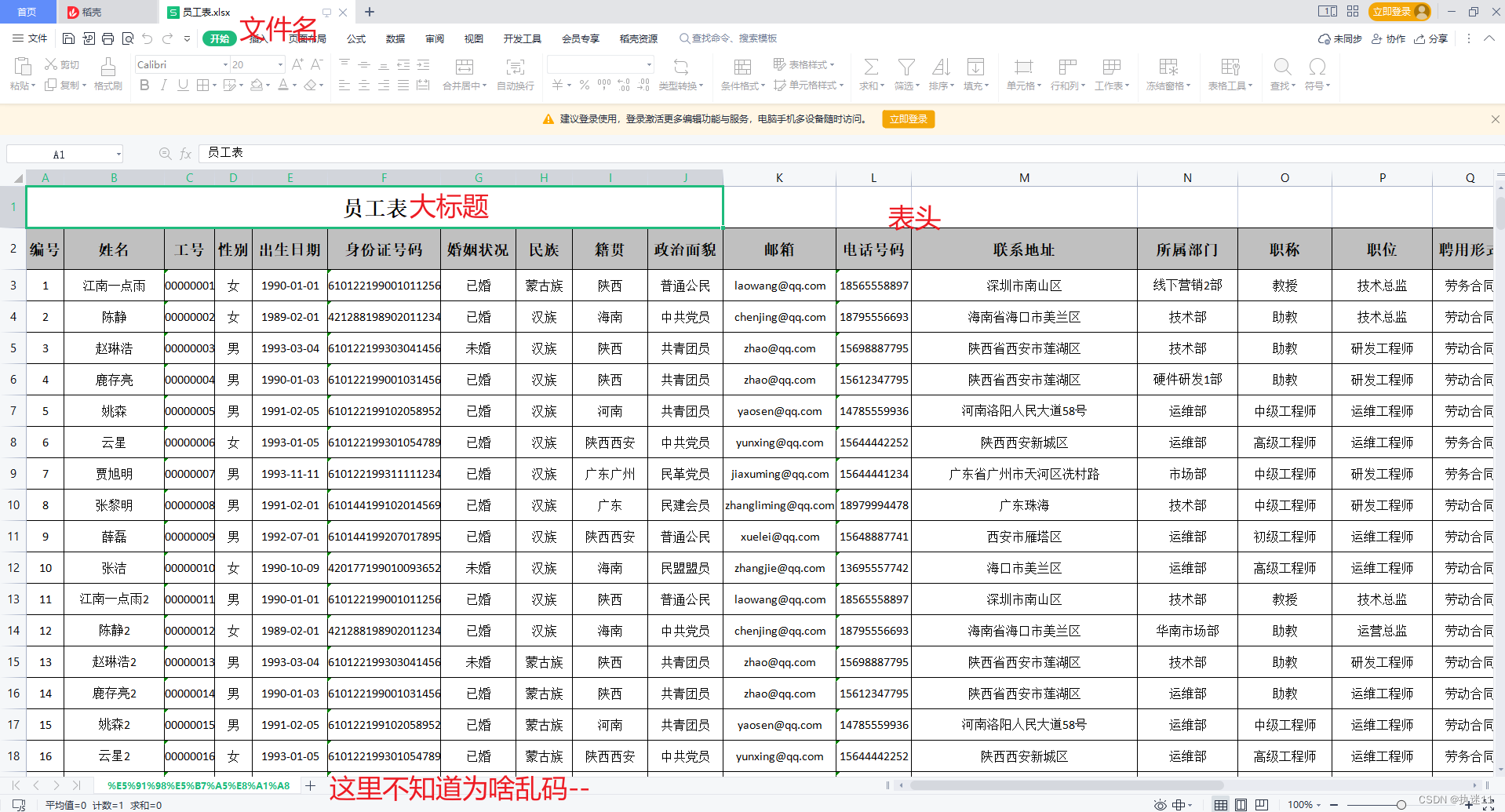
2022-10-28 乱码解决
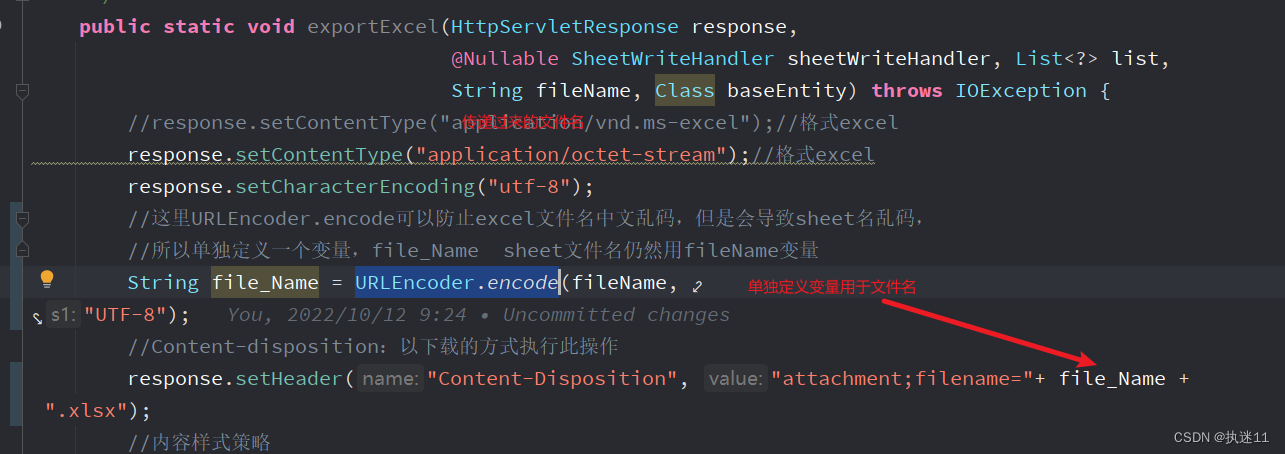
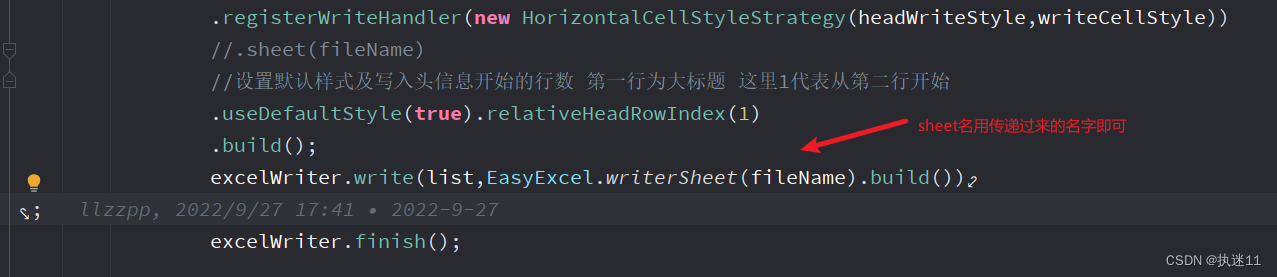
因为文件名经过了 “URLEncoder.encode(fileName, “UTF-8”)”转换,可以保证excel文件名中文正常,但是sheet名就会变成转换的格式。
解决办法是 将文件名单独定义,使用URLEncoder.encode方法转换格式,sheet名用方法传递的参数即可
创建一个listener,逐条插入数据
1.controller
    @PostMapping("/importEmpData")
    public R importEmpData(MultipartFile file){
        this.employeeEntityService.importEmpData(file);
        return R.ok("导入成功!");
    }
service
    public void importEmpData(MultipartFile file) {
        try {
            //headRowNumber 2 代表从第3行开始导入 第一行为大标题 第二行为表头
            EasyExcel.read(file.getInputStream(),EmpExcelVo.class,
                    new MyExcelListener(this)).headRowNumber(2).sheet().doRead();
        } catch (IOException e) {
            e.printStackTrace();
        }
    }
2.通用listener
调用invoke方法,实现数据导入,这里定义通用类型,避免每有一个导入任务就创建一个listener。
定义一个包含添加的接口,业务实现类实现这个接口,重写添加方法,保证数据准确的添加进数据库。
创建listener时,传入对应的业务实现类。
/**
 * @author:lzp
 * @create: 2022-08-02 14:05
 * @Description: 导入数据通用监听器
 */

@Slf4j
public class MyExcelListener<T> extends AnalysisEventListener<T> {

    private Map<String, Object> param;
    //3000条保存一次数据
    private static final int BATCH_COUNT=3000;
    //数据缓存
    private List<T> list = new ArrayList<>(BATCH_COUNT);
    //mapper
    private SaveInterface<T> saveInterface;

    //public MyExcelListener(SaveInterface<T> saveInterface, Map<String, Object> param) {
    //    this.saveInterface = saveInterface;
    //    this.param = param;
    //}
	//构造器
    public MyExcelListener(SaveInterface<T> saveInterface) {
        this.saveInterface = saveInterface;
    }

    @Override
    public void invoke(T data, AnalysisContext analysisContext) {

        try {
            //通用方法数据校验
            ExcelImportValid.valid(data);
        }catch (ExceptionCustom e){
            // System.out.println(e.getMessage());
            //在easyExcel监听器中抛出业务异常
            throw new ExcelAnalysisException(e.getMessage());
        }
        log.info("解析到一条数据:{}",data.toString());
        //先将数据加到list中
        list.add(data);
        // 达到BATCH_COUNT了,需要去存储一次数据库,防止数据几万条数据在内存,容易OOM
        if (list.size() >= BATCH_COUNT) {
            saveData();
            // 存储完成清理 list
            list = new ArrayList<>(BATCH_COUNT);
        }
    }

    //最后再存储一次数据
    @Override
    public void doAfterAllAnalysed(AnalysisContext analysisContext) {
        // 这里也要保存数据,确保最后遗留的数据也存储到数据库
        saveData();

        //logger.info("所有数据解析完成!");
    }
    /**
     * 加上存储数据库
     */
    private void saveData() {
        //logger.info("{}条数据,开始存储数据库!", list.size());
        saveInterface.save(list,param);
        //logger.info("存储数据库成功!");
    }

}
3.接口
public interface SaveInterface <T>{
    void save(List<T> list, Map<String, Object> param);
}
4.业务实现类
实现第三步创建的接口
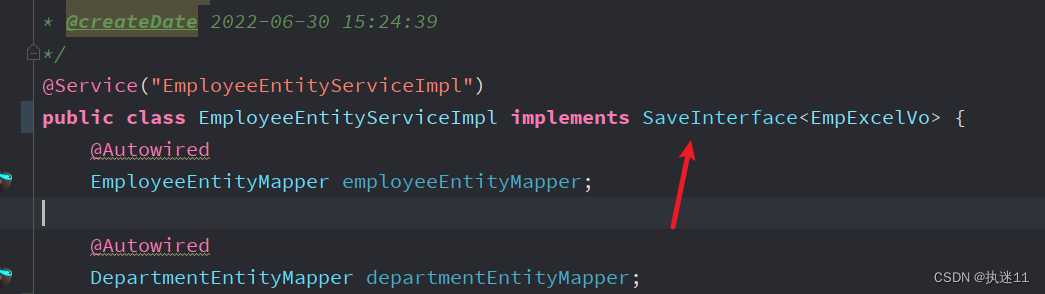
实现方法
将dto转为和数据库对应的实体类
    @Override
    public void save(List<EmpExcelVo> list, Map<String, Object> param) {
        //遍历list集合 逐条保存数据
        for(EmpExcelVo empExcelVo:list){
            EmployeeEntity employeeEntity = new EmployeeEntity();
            //对象拷贝
            BeanUtils.copyProperties(empExcelVo,employeeEntity);
            //时间相关的需要先获取java.util.Date类型的 然后转换为sql.date类型的
            java.util.Date beginContract = empExcelVo.getBeginContract();
            java.util.Date endContract = empExcelVo.getEndContract();
            java.util.Date birthday = empExcelVo.getBirthday();
            java.util.Date beginDate = empExcelVo.getBeginDate();
            java.util.Date conversionTime = empExcelVo.getConversionTime();
            //vo中存的为名称 需要转换为id 存到数据库
            Integer idByName = politicsstatusEntityService.getIdByName(empExcelVo.getPoliticName());
            employeeEntity.setBeginContract(new Date(beginContract.getTime()));
            employeeEntity.setEndContract(new Date(endContract.getTime()));
            employeeEntity.setBirthday(new Date(birthday.getTime()));
            employeeEntity.setBeginDate(new Date(beginDate.getTime()));
            employeeEntity.setConversionTime(new Date(conversionTime.getTime()));
            employeeEntity.setPoliticId(idByName);
            this.addEmp(employeeEntity);
        }
    }
1.自定义注解
@Target({ ElementType.FIELD, ElementType.TYPE })
@Retention(RetentionPolicy.RUNTIME)
public @interface ExcelValid {
    String message() default "导入有为空得字段";
}
2.校验注解类
/**
 * @author:lzp
 * @create: 2022-08-02 10:30
 * @Description: excel字段校验类
 */

public class ExcelImportValid {
    /**
     * Excel导入字段校验
     *
     * @param object 校验的JavaBean 其属性须有自定义注解
     */
    public static void valid(Object object) throws ExceptionCustom {
        //获取当前类的所有属性
        Field[] fields = object.getClass().getDeclaredFields();
        for (Field field : fields) {
            //设置可访问
            field.setAccessible(true);
            //属性的值
            Object fieldValue = null;
            try {
                //获取到字段的值
                fieldValue = field.get(object);
            } catch (IllegalAccessException e) {
                throw new ExceptionCustom("IMPORT_PARAM_CHECK_FAIL", "导入参数检查失败");
            }
            //是否包含必填校验注解
            boolean isExcelValid = field.isAnnotationPresent(ExcelValid.class);
            //如果包含这个注解,并且获取到的值为null,抛出异常
            if (isExcelValid && Objects.isNull(fieldValue)) {
                throw new ExceptionCustom("NULL", field.getAnnotation(ExcelValid.class).message());
            }
        }
    }
}
3.使用方法
在需要校验的字段加上注解
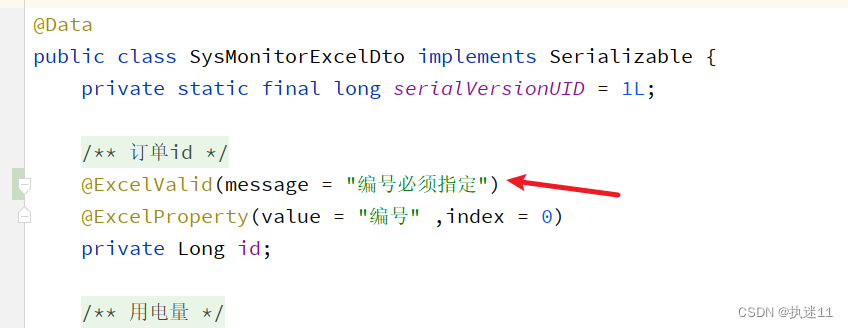
在invoke中开启校验
        try {
            //通用方法数据校验
            ExcelImportValid.valid(data);
        }catch (ExceptionCustom e){
            // System.out.println(e.getMessage());
            //在easyExcel监听器中抛出业务异常 这个异常会被controller捕获,将错误信息返回给前端
            throw new ExcelAnalysisException(e.getMessage());
        }
4.ExceptionCustom 类
/**
 * @author:lzp
 * @create: 2022-08-02 10:35
 * @Description: 自定义异常
 */

@Data
@EqualsAndHashCode(callSuper = true)
public class ExceptionCustom extends RuntimeException{
    private static final long serialVersionUID = 1L;

    public ExceptionCustom()
    {
    }

    /**
     * 错误编码
     */
    private String errorCode;

    /**
     * 消息是否为属性文件中的Key
     */
    private boolean propertiesKey = true;

    /**
     * 构造一个基本异常.
     *
     * @param message
     *            信息描述
     */
    public ExceptionCustom(String message)
    {
        super(message);
    }

    /**
     * 构造一个基本异常.
     *
     * @param errorCode
     *            错误编码
     * @param message
     *            信息描述
     */
    public ExceptionCustom(String errorCode, String message)
    {
        this(errorCode, message, true);
    }

    /**
     * 构造一个基本异常.
     *
     * @param errorCode
     *            错误编码
     * @param message
     *            信息描述
     */
    public ExceptionCustom(String errorCode, String message, Throwable cause)
    {
        this(errorCode, message, cause, true);
    }

    /**
     * 构造一个基本异常.
     *
     * @param errorCode
     *            错误编码
     * @param message
     *            信息描述
     * @param propertiesKey
     *            消息是否为属性文件中的Key
     */
    private ExceptionCustom(String errorCode, String message, boolean propertiesKey)
    {
        super(message);
        this.setErrorCode(errorCode);
        this.setPropertiesKey(propertiesKey);
    }

    /**
     * 构造一个基本异常.
     *
     * @param errorCode
     *            错误编码
     * @param message
     *            信息描述
     */
    public ExceptionCustom(String errorCode, String message, Throwable cause, boolean propertiesKey)
    {
        super(message, cause);
        this.setErrorCode(errorCode);
        this.setPropertiesKey(propertiesKey);
    }

    /**
     * 构造一个基本异常.
     *
     * @param message
     *            信息描述
     * @param cause
     *            根异常类(可以存入任何异常)
     */
    public ExceptionCustom(String message, Throwable cause)
    {
        super(message, cause);
    }
}
我主要使用Ruby来执行此操作,但到目前为止我的攻击计划如下:使用gemsrdf、rdf-rdfa和rdf-microdata或mida来解析给定任何URI的数据。我认为最好映射到像schema.org这样的统一模式,例如使用这个yaml文件,它试图描述数据词汇表和opengraph到schema.org之间的转换:#SchemaXtoschema.orgconversion#data-vocabularyDV:name:namestreet-address:streetAddressregion:addressRegionlocality:addressLocalityphoto:i
有时我需要处理键/值数据。我不喜欢使用数组,因为它们在大小上没有限制(很容易不小心添加超过2个项目,而且您最终需要稍后验证大小)。此外,0和1的索引变成了魔数(MagicNumber),并且在传达含义方面做得很差(“当我说0时,我的意思是head...”)。散列也不合适,因为可能会不小心添加额外的条目。我写了下面的类来解决这个问题:classPairattr_accessor:head,:taildefinitialize(h,t)@head,@tail=h,tendend它工作得很好并且解决了问题,但我很想知道:Ruby标准库是否已经带有这样一个类? 最佳
如何检查Ruby文件是否是通过“require”或“load”导入的,而不是简单地从命令行执行的?例如:foo.rb的内容:puts"Hello"bar.rb的内容require'foo'输出:$./foo.rbHello$./bar.rbHello基本上,我想调用bar.rb以不执行puts调用。 最佳答案 将foo.rb改为:if__FILE__==$0puts"Hello"end检查__FILE__-当前ruby文件的名称-与$0-正在运行的脚本的名称。 关于ruby-检查是否
我正在尝试使用Curbgem执行以下POST以解析云curl-XPOST\-H"X-Parse-Application-Id:PARSE_APP_ID"\-H"X-Parse-REST-API-Key:PARSE_API_KEY"\-H"Content-Type:image/jpeg"\--data-binary'@myPicture.jpg'\https://api.parse.com/1/files/pic.jpg用这个:curl=Curl::Easy.new("https://api.parse.com/1/files/lion.jpg")curl.multipart_form_
无论您是想搭建桌面端、WEB端或者移动端APP应用,HOOPSPlatform组件都可以为您提供弹性的3D集成架构,同时,由工业领域3D技术专家组成的HOOPS技术团队也能为您提供技术支持服务。如果您的客户期望有一种在多个平台(桌面/WEB/APP,而且某些客户端是“瘦”客户端)快速、方便地将数据接入到3D应用系统的解决方案,并且当访问数据时,在各个平台上的性能和用户体验保持一致,HOOPSPlatform将帮助您完成。利用HOOPSPlatform,您可以开发在任何环境下的3D基础应用架构。HOOPSPlatform可以帮您打造3D创新型产品,HOOPSSDK包含的技术有:快速且准确的CAD
本教程将在Unity3D中混合Optitrack与数据手套的数据流,在人体运动的基础上,添加双手手指部分的运动。双手手背的角度仍由Optitrack提供,数据手套提供双手手指的角度。 01 客户端软件分别安装MotiveBody与MotionVenus并校准人体与数据手套。MotiveBodyMotionVenus数据手套使用、校准流程参照:https://gitee.com/foheart_1/foheart-h1-data-summary.git02 数据转发打开MotiveBody软件的Streaming,开始向Unity3D广播数据;MotionVenus中设置->选项选择Unit
文章目录一、概述简介原理模块二、配置Mysql使用版本环境要求1.操作系统2.mysql要求三、配置canal-server离线下载在线下载上传解压修改配置单机配置集群配置分库分表配置1.修改全局配置2.实例配置垂直分库水平分库3.修改group-instance.xml4.启动监听四、配置canal-adapter1修改启动配置2配置映射文件3启动ES数据同步查询所有订阅同步数据同步开关启动4.验证五、配置canal-admin一、概述简介canal是Alibaba旗下的一款开源项目,Java开发。基于数据库增量日志解析,提供增量数据订阅&消费。Git地址:https://github.co
我正在尝试在Rails上安装ruby,到目前为止一切都已安装,但是当我尝试使用rakedb:create创建数据库时,我收到一个奇怪的错误:dyld:lazysymbolbindingfailed:Symbolnotfound:_mysql_get_client_infoReferencedfrom:/Library/Ruby/Gems/1.8/gems/mysql2-0.3.11/lib/mysql2/mysql2.bundleExpectedin:flatnamespacedyld:Symbolnotfound:_mysql_get_client_infoReferencedf
文章目录1.开发板选择*用到的资源2.串口通信(个人理解)3.代码分析(注释比较详细)1.主函数2.串口1配置3.串口2配置以及中断函数4.注意问题5.源码链接1.开发板选择我用的是STM32F103RCT6的板子,不过代码大概在F103系列的板子上都可以运行,我试过在野火103的霸道板上也可以,主要看一下串口对应的引脚一不一样就行了,不一样的就更改一下。*用到的资源keil5软件这里用到了两个串口资源,采集数据一个,串口通信一个,板子对应引脚如下:串口1,TX:PA9,RX:PA10串口2,TX:PA2,RX:PA32.串口通信(个人理解)我就从串口采集传感器数据这个过程说一下我自己的理解,
SPI接收数据左移一位问题目录SPI接收数据左移一位问题一、问题描述二、问题分析三、探究原理四、经验总结最近在工作在学习调试SPI的过程中遇到一个问题——接收数据整体向左移了一位(1bit)。SPI数据收发是数据交换,因此接收数据时从第二个字节开始才是有效数据,也就是数据整体向右移一个字节(1byte)。请教前辈之后也没有得到解决,通过在网上查阅前人经验终于解决问题,所以写一个避坑经验总结。实际背景:MCU与一款芯片使用spi通信,MCU作为主机,芯片作为从机。这款芯片采用的是它规定的六线SPI,多了两根线:RDY和INT,这样从机就可以主动请求主机给主机发送数据了。一、问题描述根据从机芯片手
