个人简介
👨🏻💻个人主页:陈橘又青
🏃🏻♂️博客记录心情,代码编写人生。
🌟如果文章对你有用,麻烦关注点赞收藏走一波,感谢支持!
🌱强力推荐我平时学习编程和准备面试的刷题网站:点这里!
前言
大家好,今天用Java编程实现一个GUI界面的经典俄罗斯方块游戏,以下是完整的开发思路,供大家学习交流。
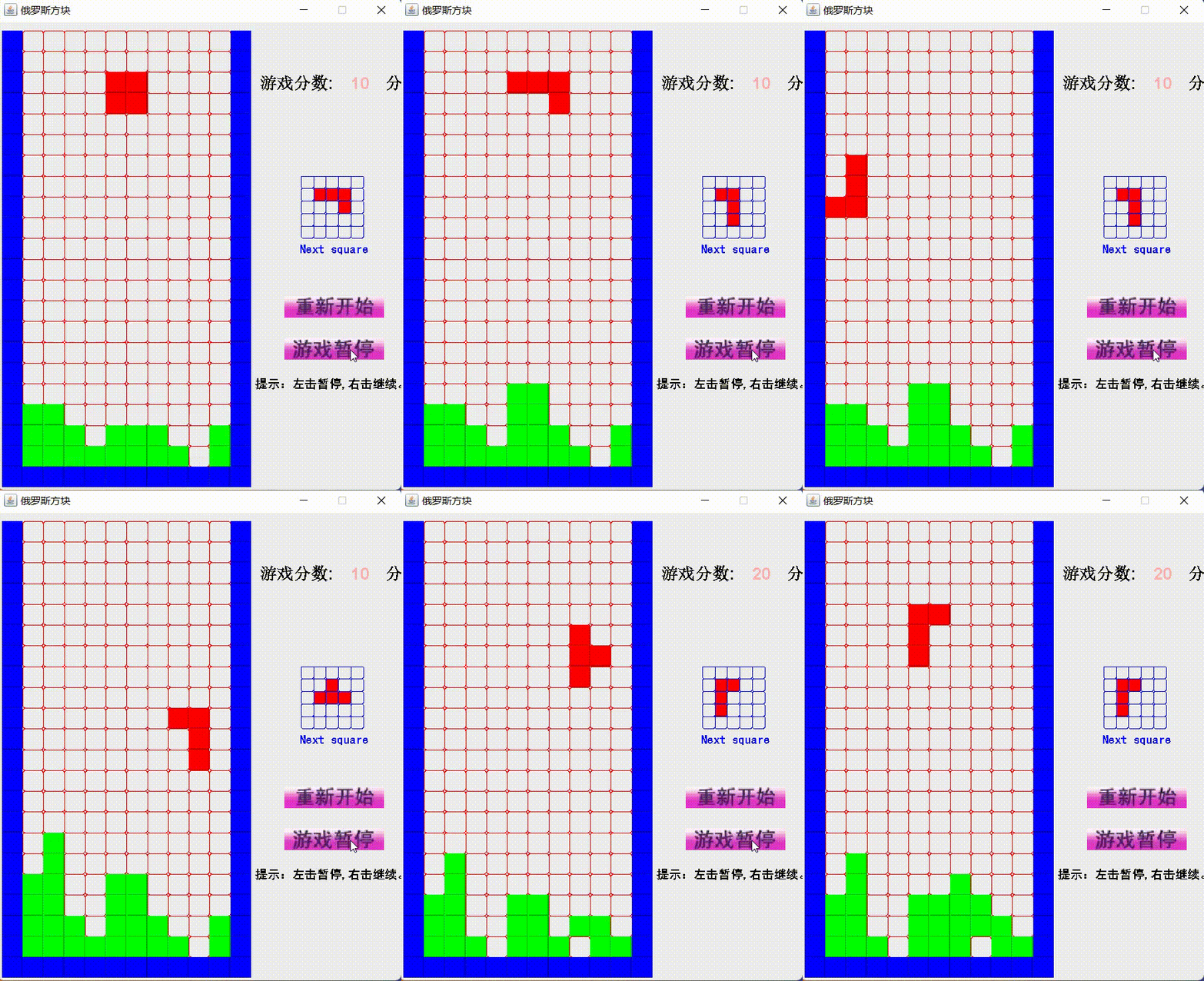
效果展示
目录
“俄罗斯方块”是一个经典的游戏,在游戏中,由小方块组成的不同形状的板块陆续从屏幕上方落下来,玩家通过调整板块的位置和方向,使它们在屏幕底部拼出完整的横条。这些完整的横条会随即消失,给新落下来的板块腾出空间,同时,玩家得到分数奖励。未被消除掉的方块不断堆积起来,一旦堆到屏幕顶端,玩家便告输,游戏结束。
(1)方块的诞生需要用随机原理,另外,它需要初始化的被放置在游戏界面的顶部。
(2)方块需要自动下降,在下降过程中,还需判断它是否与周围环境发生冲突,能否继续下降。
(3)方块本身可以变形,变形后的方块具有不同的数据,判断的方式又会不一样。
(4)当用户一直按住 ↓ 键的时候,方块需要持续往下掉。
(1) 左右操作。需要监听KeyEvent,让方块左右移动,直到碰到边界。
(2) 变形操作。也要监听KeyEvent,让方块切换形状。
(3) 下降操作。同样监听KeyEvent,让方块快速的下降。
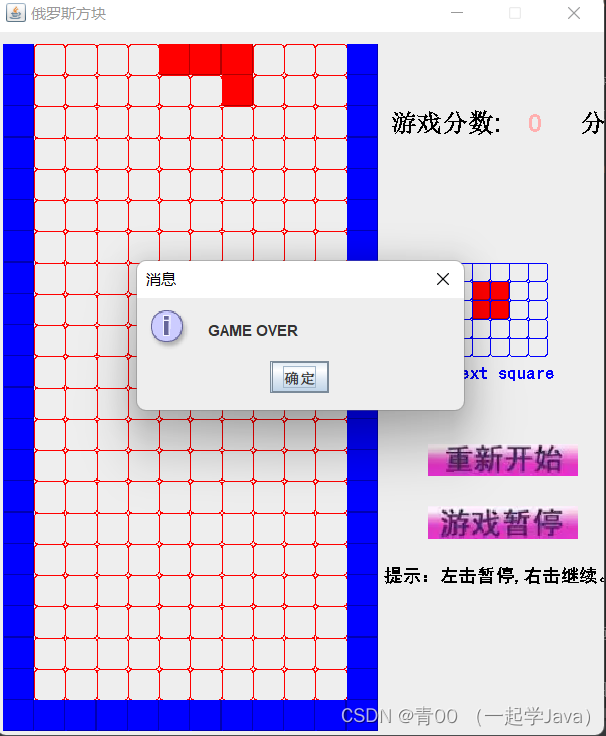
(4)当诞生的方块出世与其他方块冲突时,判定游戏结束。
(1)用户可以通过单击界面上提供的按钮,随时暂停与继续游戏 。
(2)用户可以通过单机界面上提供的按钮,重新开始游戏。
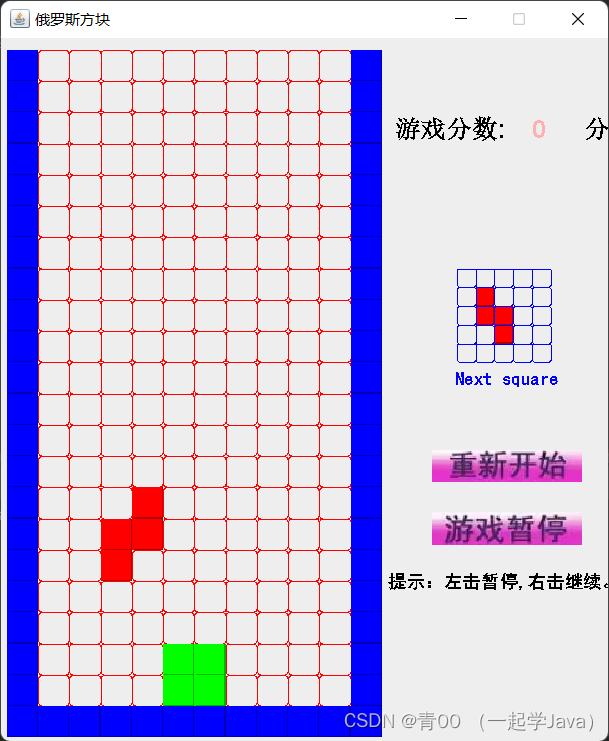
设计游戏窗口的图形化界面以及各功能按钮。
import java.awt.*;
import java.awt.event.*;
import java.io.*;
import java.util.*;
import javax.imageio.*;
import javax.swing.*;
import javax.swing.Timer;
public class MyGame extends JFrame {
    public MyGame(){
        GameBody gamebody=new GameBody();
        gamebody.setBounds(5,10,500,600);  //
        gamebody.setOpaque(false);
        gamebody.setLayout(null);
        addKeyListener(gamebody);
        add(gamebody);

        int w=Toolkit.getDefaultToolkit().getScreenSize().width;
        int h=Toolkit.getDefaultToolkit().getScreenSize().height;
        final JButton login=new JButton(new ImageIcon("image/cxks.png"));
        login.setContentAreaFilled(false);
        login.setMargin(new Insets(0,0,0,0));
        login.setBorderPainted(false);
        login.setBounds(340,320,120,26);
        gamebody.add(login);

        login.addActionListener(new ActionListener(){
            public void actionPerformed(ActionEvent e) {    //登录的按钮
                if(e.getSource()==login){
                    requestFocus(true);    //获得焦点,不用失去焦点
                    gamebody.resetMap();   //重置地图
                    gamebody.drawWall();   //冲重新绘制边界墙体
                    gamebody.createshape();   //重新产生新的地图
                    gamebody.setStart(false);  //唤醒定时下落的线程
                    gamebody.score=0;       //将分数置为零
                    repaint();
                }
            }
        });

        final JButton pauselogin=new JButton(new ImageIcon("image/zt.png"));
        pauselogin.setContentAreaFilled(false);
        pauselogin.setMargin(new Insets(0,0,0,0));
        pauselogin.setBorderPainted(false);
        pauselogin.setBounds(340,370,120,26);
        gamebody.add(pauselogin);

        pauselogin.addMouseListener(new MouseListener(){   //暂停的按钮
            //鼠标点击事件,可以分别判断不同的事件,做出不同的反应
            public void mouseClicked(MouseEvent e){
                if(e.getButton()==e.BUTTON1 ){     //单击左键暂停
                    gamebody.setStart(true);   //将自动下落线程关闭
                    //requestFocus(true);    //同时整个JFrame失去焦点,无法操作,但可以点击按钮
                }
                else if(e.getButton()==e.BUTTON3 ){   //右击暂停,继续游戏
                    gamebody.setStart(false);   //唤醒自动下落线程
                    requestFocus(true);
                }
           /*     if(e.getClickCount()==2){     //左键双击,也可以继续游戏
                    gamebody.setStart(false);
                    requestFocus(true);
                }*/
            }
            public void mouseEntered(MouseEvent e){}
            public void mouseExited(MouseEvent e){}
            public void mousePressed(MouseEvent e){}
            public void mouseReleased(MouseEvent e){}

        });

        setTitle("俄罗斯方块");
        setResizable(false);
        setFocusable(true);
        setBounds((w-500)/2,(h-600)/2,500,600);
        setLayout(null);

        setVisible(true);
        setDefaultCloseOperation(3);
    }
    public static void main(String[] args) {
        new MyGame();
    }
①创建需要定义的局部变量和游戏GameBody类。
class GameBody extends JPanel implements KeyListener{
        private int shapeType=-1;  //定义方块的类型  定义的为7种
        private int shapeState=-1; //定义方块为何种状态,每种都有四种状态
        private int nextshapeType=-1;  //定义下一块产生的类型
        private int nextshapeState=-1;  //定义下一块的方块的状态
        private final int CELL=25;   //定义方格的大小
        private int score=0;    //定义显示的成绩
        private int left;       //定义初始图形与两边的墙的距离
        private int top;        //定义初始图形与上下墙的距离
        private int i=0;        //表示列
        private int j=0;        //表示行
        public int flag=0;
        public  volatile boolean start=false;  //暂停的判断条件,为轻量锁,保持同步的
        Random randomcolor=new Random();
        Random random=new Random();
②定义地图的大小,初始化地图并画出围墙 。
        //定义地图的大小,创建二位的数组
        int[][] map=new int[13][23];

        //初始化地图
        public void resetMap(){
            for(i=0;i<12;i++){
                for(j=0;j<22;j++){  //遍历的范围不能小
                    map[i][j]=0;
                }
            }
        }

        //画围墙的方法
        public void drawWall(){
            for(j=0;j<22;j++)  //0到21行
            {
                map[0][j]=2;
                map[11][j]=2;    //第0行和第11行为墙
            }
            for(i=0;i<12;i++){  //0到11列
                map[i][21]=2;    //第21行划墙
            }
        }
③定义随机的图形种类和产生图形的方法。
private final int[][][] shapes=new int[][][]{
                // i
                {       { 0, 0, 0, 0, 1, 1, 1, 1, 0, 0, 0, 0, 0, 0, 0, 0 },
                        { 0, 1, 0, 0, 0, 1, 0, 0, 0, 1, 0, 0, 0, 1, 0, 0 },
                        { 0, 0, 0, 0, 1, 1, 1, 1, 0, 0, 0, 0, 0, 0, 0, 0 },
                        { 0, 1, 0, 0, 0, 1, 0, 0, 0, 1, 0, 0, 0, 1, 0, 0 } },
                // s
                {		{ 0, 1, 1, 0, 1, 1, 0, 0, 0, 0, 0, 0, 0, 0, 0, 0 },
                        { 1, 0, 0, 0, 1, 1, 0, 0, 0, 1, 0, 0, 0, 0, 0, 0 },
                        { 0, 1, 1, 0, 1, 1, 0, 0, 0, 0, 0, 0, 0, 0, 0, 0 },
                        { 1, 0, 0, 0, 1, 1, 0, 0, 0, 1, 0, 0, 0, 0, 0, 0 } },
                // z
                {		{ 1, 1, 0, 0, 0, 1, 1, 0, 0, 0, 0, 0, 0, 0, 0, 0 },
                        { 0, 1, 0, 0, 1, 1, 0, 0, 1, 0, 0, 0, 0, 0, 0, 0 },
                        { 1, 1, 0, 0, 0, 1, 1, 0, 0, 0, 0, 0, 0, 0, 0, 0 },
                        { 0, 1, 0, 0, 1, 1, 0, 0, 1, 0, 0, 0, 0, 0, 0, 0 } },
                // j
                {		{ 0, 1, 0, 0, 0, 1, 0, 0, 1, 1, 0, 0, 0, 0, 0, 0 },
                        { 1, 0, 0, 0, 1, 1, 1, 0, 0, 0, 0, 0, 0, 0, 0, 0 },
                        { 1, 1, 0, 0, 1, 0, 0, 0, 1, 0, 0, 0, 0, 0, 0, 0 },
                        { 1, 1, 1, 0, 0, 0, 1, 0, 0, 0, 0, 0, 0, 0, 0, 0 } },
                // o
                {		{ 1, 1, 0, 0, 1, 1, 0, 0, 0, 0, 0, 0, 0, 0, 0, 0 },
                        { 1, 1, 0, 0, 1, 1, 0, 0, 0, 0, 0, 0, 0, 0, 0, 0 },
                        { 1, 1, 0, 0, 1, 1, 0, 0, 0, 0, 0, 0, 0, 0, 0, 0 },
                        { 1, 1, 0, 0, 1, 1, 0, 0, 0, 0, 0, 0, 0, 0, 0, 0 } },
                // l
                {		{ 1, 0, 0, 0, 1, 0, 0, 0, 1, 1, 0, 0, 0, 0, 0, 0 },
                        { 1, 1, 1, 0, 1, 0, 0, 0, 0, 0, 0, 0, 0, 0, 0, 0 },
                        { 1, 1, 0, 0, 0, 1, 0, 0, 0, 1, 0, 0, 0, 0, 0, 0 },
                        { 0, 0, 1, 0, 1, 1, 1, 0, 0, 0, 0, 0, 0, 0, 0, 0 } },
                // t
                {		{ 0, 1, 0, 0, 1, 1, 1, 0, 0, 0, 0, 0, 0, 0, 0, 0 },
                        { 0, 1, 0, 0, 1, 1, 0, 0, 0, 1, 0, 0, 0, 0, 0, 0 },
                        { 1, 1, 1, 0, 0, 1, 0, 0, 0, 0, 0, 0, 0, 0, 0, 0 },
                        { 0, 1, 0, 0, 0, 1, 1, 0, 0, 1, 0, 0, 0, 0, 0, 0 } }
        };
        //产生新图形的方法
        public void createshape(){
            if(shapeType==-1&&shapeState==-1){
                shapeType = random.nextInt(shapes.length);
                shapeState = random.nextInt(shapes[0].length);
            }else{
                shapeType=nextshapeType;
                shapeState=nextshapeState;
            }
            nextshapeType = random.nextInt(shapes.length);
            nextshapeState = random.nextInt(shapes[0].length);
            //shapeType=(int)(Math.random()*1000)%7;   //在7中类型中随机选取
            //shapeState=(int)(Math.random()*1000)%4;  //在四种状态中随机选取
            left=4; top=0;  //图形产生的初始位置为(4,0)
④判断游戏实时进行状态 。
if(gameOver(left,top)==1){
                resetMap();
                drawWall();
                score=0;
                JOptionPane.showMessageDialog(null, "GAME OVER");
            }
        }
        //遍历[4][4]数组产生的方块并判断状态
        public int judgeState(int left,int top,int shapeType,int shapeState){
            for(int a=0;a<4;a++){
                for(int b=0;b<4;b++){
                    if(((shapes[shapeType][shapeState][a*4+b]==1 &&   //遍历数组中为1的个数,即判断是否有图形
                            map[left+b+1][top+a]==1))||                   //判断地图中是否还有障碍物
                            ((shapes[shapeType][shapeState][a*4+b]==1 &&   //遍历数组中为1的个数,即判断是否有图形
                                    map[left+b+1][top+a]==2))){                   //判断是否撞墙
                        return 0;    //表明无法不能正常运行
                    }
                }
            }
            return 1;
        }
⑤创建键盘事件监听。
 public void keyPressed(KeyEvent e){
            switch(e.getKeyCode()){
                case KeyEvent.VK_LEFT:
                    leftMove();//调用左移的方法
                    repaint();
                    break;
                case KeyEvent.VK_RIGHT:
                    rightMove();//调用右移的方法
                    repaint();
                    break;
                case KeyEvent.VK_DOWN:
                    downMove();//调用左移的方法
                    repaint();
                    break;
                case KeyEvent.VK_UP:
                    turnShape();//调用变形的方法
                    repaint();
                    break;
            }
            }
        }
        public void keyReleased(KeyEvent e) {
        }
        public void keyTyped(KeyEvent e) {
        }
        //创建左移的方法
        public void leftMove(){
            if(judgeState(left-1,top,shapeType,shapeState)==1){
                left-=1;
            }
        }
        //创建右移的方法
        public void rightMove(){
            if(judgeState(left+1,top,shapeType,shapeState)==1){
                left+=1;
            };
        }
        //创建下移的方法
        public void downMove(){
            if(judgeState(left,top+1,shapeType,shapeState)==1){  //判断有图形
                top+=1;
                deleteLine();   //判断下移后是否有满行
            }
            if(judgeState(left,top+1,shapeType,shapeState)==0){   //判断没有图形

                addshape(left,top,shapeType,shapeState);
                createshape();
                deleteLine();
            }
        }
        //创建旋转变形的方法
        public void turnShape(){
            int tempshape=shapeState;
            shapeState=(shapeState+1)%4; //在四中的状态中选取
            if(judgeState(left,top,shapeType,shapeState)==1){

            }
            if(judgeState(left,top,shapeType,shapeState)==0){
                shapeState=tempshape;   //没有图形,不能进行旋转,还原原来状态
            }
            repaint();
        }
⑥绘制界面中的各文字及图形 。
public void paintComponent(Graphics g){
            super.paintComponent(g);
            int t=randomcolor.nextInt(5);
            int count=randomcolor.nextInt(5);
            Color[] color=new Color[]{Color.pink,Color.green,Color.red,Color.yellow,Color.blue};
            //绘制围墙
            for(j=0;j<22;j++){
                for(i=0;i<12;i++){
                    if(map[i][j]==2){//判断是否为墙并绘制
                        g.setColor(Color.blue);
                        g.fill3DRect(i*CELL,j*CELL,CELL,CELL,true);
                    }
                    if(map[i][j]==0){//判断是否为墙并绘制
                        g.setColor(Color.red);
                        g.drawRoundRect(i*CELL,j*CELL,CELL,CELL,6,6);}
                }
            }
            //绘制正在下落的图形
            for(int k=0;k<16;k++){
                if(shapes[shapeType][shapeState][k]==1){
                    g.setColor(Color.red);
                    g.fill3DRect((left+k%4+1)*CELL,(top+k/4)*CELL,CELL,CELL,true);  //left\top为左上角的坐标
                }
            }
            //绘制落下的图形
            for(j=0;j<22;j++){
                for(i=0;i<12;i++){
                    if(map[i][j]==1){
                        g.setColor(Color.green);
                        g.fill3DRect(i*CELL,j*CELL,CELL,CELL,true);
                    }
                }
            }
            //显示右边预览图形
            for(int i = 0; i < 4; i++) {
                for(int j = 0; j < 4; j++){
                    if(shapes[nextshapeType][nextshapeState][i*4+j] == 1) {
                        g.setColor(Color.red);
                        g.fill3DRect(375+(j*(CELL-10)),190+(i*(CELL-10)), CELL-10, CELL-10,true);
                    }
                }
            }
            //添加右边预览图形方格
            for(int i = 0; i < 5; i++) {
                for(int j = 0; j < 5; j++){
                    g.setColor(Color.blue);
                    g.drawRoundRect(360+(j*(CELL-10)),175+(i*(CELL-10)),CELL-10, CELL-10,3,3);
                }
            }
            g.setFont(new Font("楷书",Font.BOLD,20));
            g.setColor(Color.BLACK);
            g.drawString("游戏分数:", 310, 70);
            g.setColor(Color.pink);
            g.drawString(score+" ", 420, 70);
            g.setColor(Color.BLACK);
            g.drawString("  分", 450, 70);
            g.setColor(Color.BLACK);
            g.setFont(new Font("黑体",Font.BOLD,14));
            g.drawString("提示:左击暂停,右击继续。", 305, 430);
            g.setColor(Color.blue);
            g.drawString("Next square", 358, 268);
        }
        //创建添加新图形到地图的方法
        public void addshape(int left,int top,int shapeType,int shapeState){
            int temp=0;
            for(int a=0;a<4;a++){
                for(int b=0;b<4;b++){   //对存储方块队的[4][4]数组遍历
                    if(map[left+b+1][top+a]==0){ //表明[4][4]数组没有方块

                        map[left+b+1][top+a]=shapes[shapeType][shapeState][temp];
                    }
                    temp++;
                }
            }
        }
⑦创建监听器,消行方法等其它函数。
public void deleteLine(){
            int tempscore=0;      //定义满行的列个数满足1
            for(int a=0;a<22;a++){   //对地图进行遍历
                for(int b=0;b<12;b++){
                    if(map[b][a]==1){    //表示找到满行
                        tempscore++;     // 记录一行有多少个1
                        if(tempscore==10){
                            score+=10;
                            for(int k=a;k>0;k--){     //从满行开始回历
                                for(int c=1;c<12;c++){
                                    map[c][k]=map[c][k-1];  //将图形整体下移一行
                                }
                            }
                        }
                    }
                }
                tempscore=0;
            }
        }
        //判断游戏结束,1、判断新块的状态是否不存在,即judgeState()==0
        //2、判断初始产生的位置是否一直为1;
        public int gameOver(int left,int top){
            if(judgeState(left,top,shapeType,shapeState)==0){
                return 1;
            }
            return 0;
        }
        //创建构造方法
        public GameBody(){
            resetMap();
            drawWall();
            createshape();
            //Timer timer=new Timer(1000,new TimeListener());
            Thread timer=new Thread(new	TimeListener());
            timer.start();
        }

        public void setStart(boolean start){   //改变start值的方法
            this.start=start;
        }
        //创建定时下落的监听器
        class TimeListener implements Runnable{
            public void run(){
                while(true){
                    if(!start){
                        try{
                            repaint();
                            if(judgeState(left,top+1,shapeType,shapeState)==1){
                                top+=1;
                                deleteLine();}
                            if(judgeState(left,top+1,shapeType,shapeState)==0){
                                if(flag==1){
                                    addshape(left,top,shapeType,shapeState);
                                    deleteLine();
                                    createshape();
                                    flag=0;
                                }
                                flag=1;
                            }
                            Thread.sleep(800);
                        }catch(Exception e){
                            e.getMessage();
                        }
                    }
                }
            }
        }
    }
} Java语言是当今流行的网络编程语言,它具有面向对象、跨平台、分布应用等特点。而俄罗斯方块游戏的设计工作复杂且富有挑战性,它包含的内容多,涉及的知识广泛,与图形界面联系较大,包括界面的显示与更新、数据收集等,在设计的过程中,必将运用到各方面的知识,这对于设计者而言,是个很好的锻炼机会。
俄罗斯方块游戏的实现可以使开发者巩固所学基本知识,深刻掌握Java语言的重要概念及其面向对象的特性,增进Java语言编辑基本功,拓宽常用类库的应用,培养熟练地应用面向对象的思想和设计方法解决实际问题的能力,为今后从事实际开发工作打下坚实的基础。

我有一个模型:classItem项目有一个属性“商店”基于存储的值,我希望Item对象对特定方法具有不同的行为。Rails中是否有针对此的通用设计模式?如果方法中没有大的if-else语句,这是如何干净利落地完成的? 最佳答案 通常通过Single-TableInheritance. 关于ruby-on-rails-Rails-子类化模型的设计模式是什么?,我们在StackOverflow上找到一个类似的问题: https://stackoverflow.co
我将应用程序升级到Rails4,一切正常。我可以登录并转到我的编辑页面。也更新了观点。使用标准View时,用户会更新。但是当我添加例如字段:name时,它不会在表单中更新。使用devise3.1.1和gem'protected_attributes'我需要在设备或数据库上运行某种更新命令吗?我也搜索过这个地方,找到了许多不同的解决方案,但没有一个会更新我的用户字段。我没有添加任何自定义字段。 最佳答案 如果您想允许额外的参数,您可以在ApplicationController中使用beforefilter,因为Rails4将参数
我真的很习惯使用Ruby编写以下代码:my_hash={}my_hash['test']=1Java中对应的数据结构是什么? 最佳答案 HashMapmap=newHashMap();map.put("test",1);我假设? 关于java-等价于Java中的RubyHash,我们在StackOverflow上找到一个类似的问题: https://stackoverflow.com/questions/22737685/
我正在尝试使用boilerpipe来自JRuby。我看过guide从JRuby调用Java,并成功地将它与另一个Java包一起使用,但无法弄清楚为什么同样的东西不能用于boilerpipe。我正在尝试基本上从JRuby中执行与此Java等效的操作:URLurl=newURL("http://www.example.com/some-location/index.html");Stringtext=ArticleExtractor.INSTANCE.getText(url);在JRuby中试过这个:require'java'url=java.net.URL.new("http://www
我只想对我一直在思考的这个问题有其他意见,例如我有classuser_controller和classuserclassUserattr_accessor:name,:usernameendclassUserController//dosomethingaboutanythingaboutusersend问题是我的User类中是否应该有逻辑user=User.newuser.do_something(user1)oritshouldbeuser_controller=UserController.newuser_controller.do_something(user1,user2)我
什么是ruby的rack或python的Java的wsgi?还有一个路由库。 最佳答案 来自Python标准PEP333:Bycontrast,althoughJavahasjustasmanywebapplicationframeworksavailable,Java's"servlet"APImakesitpossibleforapplicationswrittenwithanyJavawebapplicationframeworktoruninanywebserverthatsupportstheservletAPI.ht
导读:随着叮咚买菜业务的发展,不同的业务场景对数据分析提出了不同的需求,他们希望引入一款实时OLAP数据库,构建一个灵活的多维实时查询和分析的平台,统一数据的接入和查询方案,解决各业务线对数据高效实时查询和精细化运营的需求。经过调研选型,最终引入ApacheDoris作为最终的OLAP分析引擎,Doris作为核心的OLAP引擎支持复杂地分析操作、提供多维的数据视图,在叮咚买菜数十个业务场景中广泛应用。作者|叮咚买菜资深数据工程师韩青叮咚买菜创立于2017年5月,是一家专注美好食物的创业公司。叮咚买菜专注吃的事业,为满足更多人“想吃什么”而努力,通过美好食材的供应、美好滋味的开发以及美食品牌的孵
这篇文章是继上一篇文章“Observability:从零开始创建Java微服务并监控它(一)”的续篇。在上一篇文章中,我们讲述了如何创建一个Javaweb应用,并使用Filebeat来收集应用所生成的日志。在今天的文章中,我来详述如何收集应用的指标,使用APM来监控应用并监督web服务的在线情况。源码可以在地址 https://github.com/liu-xiao-guo/java_observability 进行下载。摄入指标指标被视为可以随时更改的时间点值。当前请求的数量可以改变任何毫秒。你可能有1000个请求的峰值,然后一切都回到一个请求。这也意味着这些指标可能不准确,你还想提取最小/
HashMap中为什么引入红黑树,而不是AVL树呢1.概述开始学习这个知识点之前我们需要知道,在JDK1.8以及之前,针对HashMap有什么不同。JDK1.7的时候,HashMap的底层实现是数组+链表JDK1.8的时候,HashMap的底层实现是数组+链表+红黑树我们要思考一个问题,为什么要从链表转为红黑树呢。首先先让我们了解下链表有什么不好???2.链表上述的截图其实就是链表的结构,我们来看下链表的增删改查的时间复杂度增:因为链表不是线性结构,所以每次添加的时候,只需要移动一个节点,所以可以理解为复杂度是N(1)删:算法时间复杂度跟增保持一致查:既然是非线性结构,所以查询某一个节点的时候
C#实现简易绘图工具一.引言实验目的:通过制作窗体应用程序(C#画图软件),熟悉基本的窗体设计过程以及控件设计,事件处理等,熟悉使用C#的winform窗体进行绘图的基本步骤,对于面向对象编程有更加深刻的体会.Tutorial任务设计一个具有基本功能的画图软件**·包括简单的新建文件,保存,重新绘图等功能**·实现一些基本图形的绘制,包括铅笔和基本形状等,学习橡皮工具的创建**·设计一个合理舒适的UI界面**注明:你可能需要先了解一些关于winform窗体应用程序绘图的基本知识,以及关于GDI+类和结构的知识二.实验环境Windows系统下的visualstudio2017C#窗体应用程序三.
