文章目录
springcloud 集成 seata1.3.0 时报错:
2022-08-04 00:00:00.000 ERROR 78958 --- [eoutChecker_2_1] i.s.c.r.netty.NettyClientChannelManager  : Failed to get available servers: endpoint format should like ip:port

java.lang.IllegalArgumentException: endpoint format should like ip:port
	at io.seata.discovery.registry.FileRegistryServiceImpl.lookup(FileRegistryServiceImpl.java:95) ~[seata-all-1.3.0.jar:1.3.0]
	at io.seata.core.rpc.netty.NettyClientChannelManager.getAvailServerList(NettyClientChannelManager.java:217) ~[seata-all-1.3.0.jar:1.3.0]
	at io.seata.core.rpc.netty.NettyClientChannelManager.reconnect(NettyClientChannelManager.java:162) ~[seata-all-1.3.0.jar:1.3.0]
	at io.seata.core.rpc.netty.AbstractNettyRemotingClient$1.run(AbstractNettyRemotingClient.java:106) [seata-all-1.3.0.jar:1.3.0]
	at java.util.concurrent.Executors$RunnableAdapter.call(Executors.java:511) [na:1.8.0_275]
	at java.util.concurrent.FutureTask.runAndReset(FutureTask.java:308) [na:1.8.0_275]
	at java.util.concurrent.ScheduledThreadPoolExecutor$ScheduledFutureTask.access$301(ScheduledThreadPoolExecutor.java:180) [na:1.8.0_275]
	at java.util.concurrent.ScheduledThreadPoolExecutor$ScheduledFutureTask.run(ScheduledThreadPoolExecutor.java:294) [na:1.8.0_275]
	at java.util.concurrent.ThreadPoolExecutor.runWorker(ThreadPoolExecutor.java:1149) [na:1.8.0_275]
	at java.util.concurrent.ThreadPoolExecutor$Worker.run(ThreadPoolExecutor.java:624) [na:1.8.0_275]
	at io.netty.util.concurrent.FastThreadLocalRunnable.run(FastThreadLocalRunnable.java:30) [netty-all-4.1.58.Final.jar:4.1.58.Final]
	at java.lang.Thread.run(Thread.java:748) [na:1.8.0_275]
本文基于seata1.3.0版本,代表这1.X的版本,0.x版本的略有不同。
在文件类型的注册服务时,会通过FileRegistryServiceImpl#lookup(String)方法根据VgroupMapping的key去寻找可用的Seata-server实例;报错的体现正是无法根据service.VgroupMapping这个配置找到具体的Seata实例(IP:PORT信息);
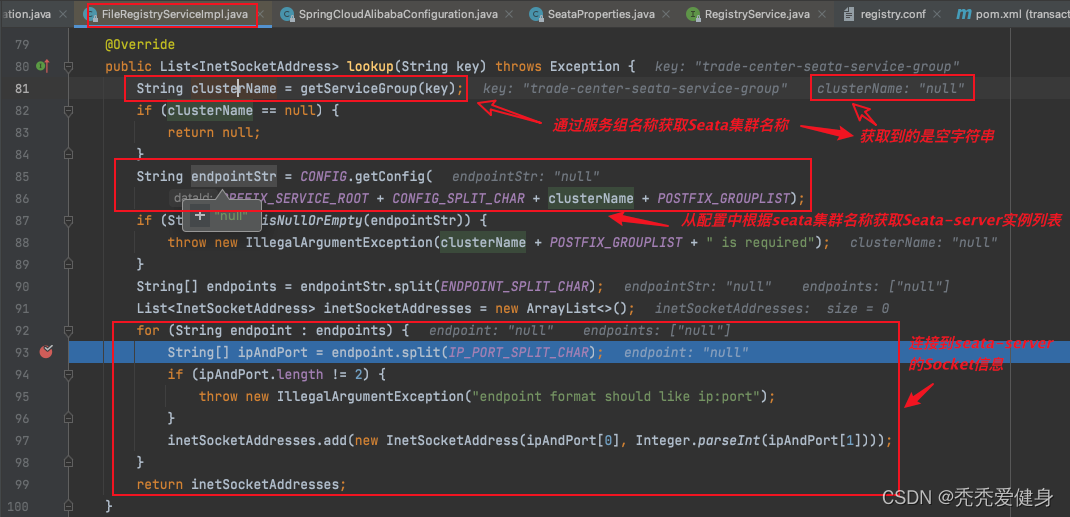
几个字符串常量值如下:
        String PREFIX_SERVICE_MAPPING = "vgroupMapping.";
        String PREFIX_SERVICE_ROOT = "service";
    String CONFIG_SPLIT_CHAR = ".";
    private static final String POSTFIX_GROUPLIST = ".grouplist";
    private static final String ENDPOINT_SPLIT_CHAR = ";";
    private static final String IP_PORT_SPLIT_CHAR = ":";
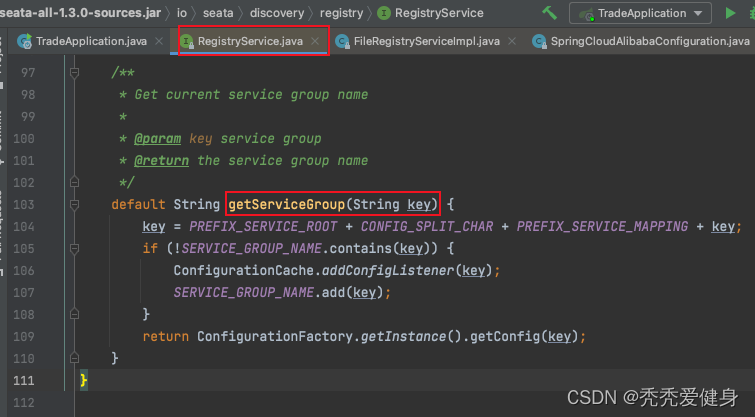
获取当前服务组名称对应的seata集群名称的代码逻辑如下:
针对 service.vgroupMapping,官方案例:Spring Cloud 快速集成 Seata是这么说的:
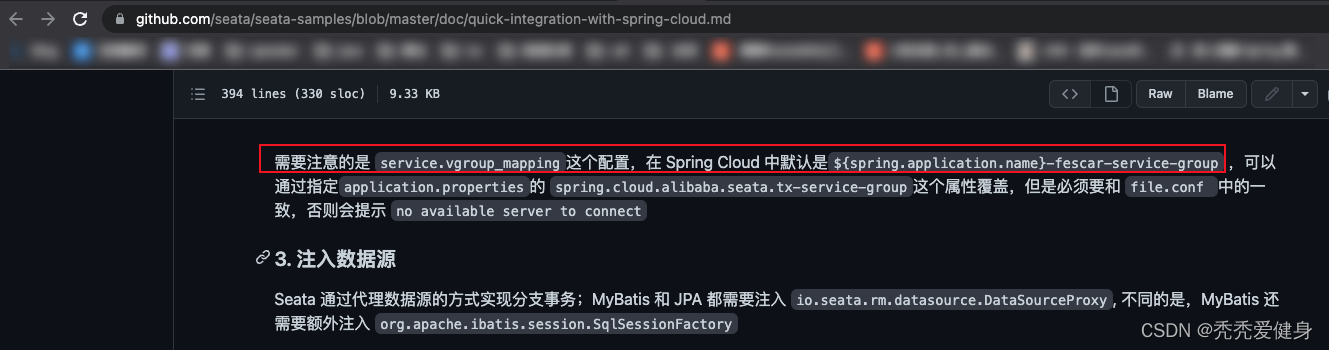
划重点:需要注意的是 service.vgroupMapping这个配置,在 Spring Cloud 中默认是${spring.application.name}-fescar-service-group
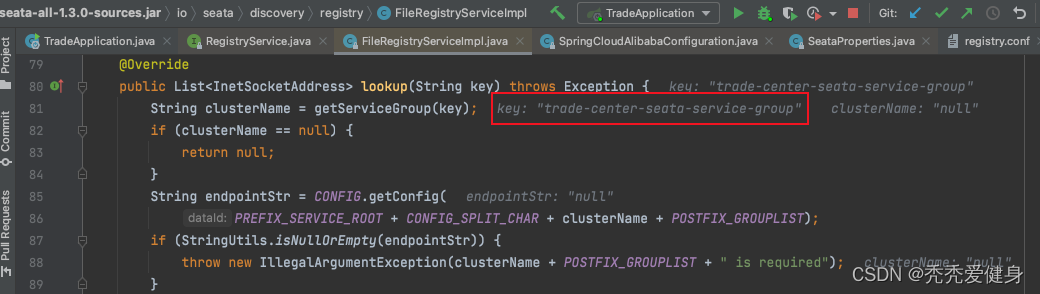
再看博主debug时的默认 service.vgroupMapping配置,居然是${spring.application.name}-seata-service-group;
- 我程序的
spring.application.name为trade-centerservice.vgroupMapping的配置为trade-center-seata-service-group,不说好的是${spring.application.name}-fescar-service-group吗!!!!!!!
等下我们再继续说,先让我喷一会:***********,官方文档不更新的吗?不注意版本之间的差异吗?不标明版本差异吗?******。
所以原因本质上只有一个:无法根据service.VgroupMapping这个配置找到具体的Seata实例(IP:PORT信息);但导致该原因产生的方式会有很多种;
service.vgroupMapping配置的服务组名称不符合Seata默认要求;前提:不在application.yml配置文件中手动通过seata.tx-service-group属性指定seata服务组名称。
默认 service.vgroupMapping这个配置,在 Spring Cloud 中默认是${spring.application.name}-seata-service-group
所以,当我们未按${spring.application.name}-seata-service-group这个规则配置service.vgroupMapping时会报错。
报错配置样例:
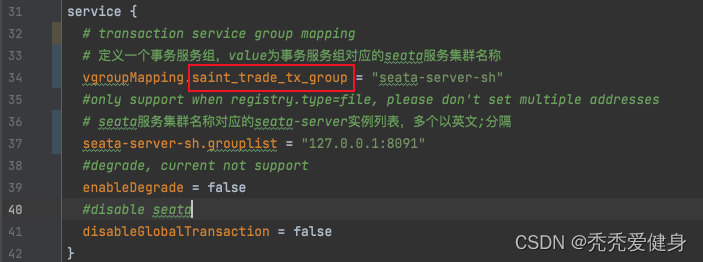
解决方案对应下面的方案一、方案二。
service.vgroupMapping配置的seata集群名称没有对应的grouplist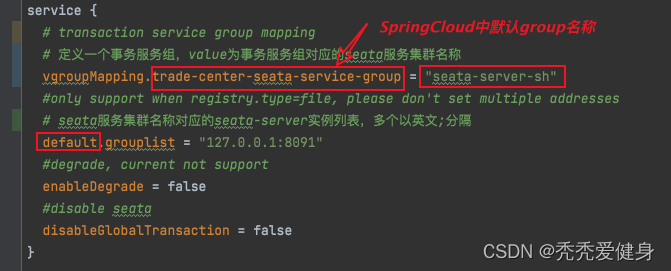
比如:这里我配置的service.vgroupMapping值为seata-server-sh,而配置的grouplist是属于default的;
所以报错是因为通过service.vgroupMapping配置找到seata集群名称seata-server-sh,但是seata-server-sh没有对应的grouplist,即seata实例信息。
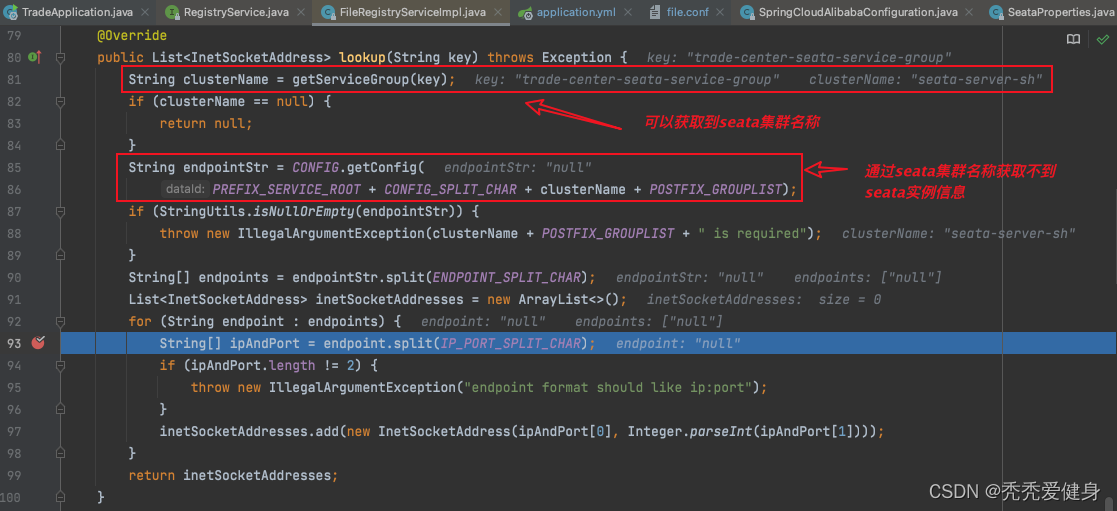
解决方案:把grouplist的的所属方调整为和service.vgroupMapping配置的seata集群名称一致;
${spring.application.name}-seata-service-group;就博主程序而言,application.yml、file.conf配置如下:
1> application.yml:
spring:
  application:
    name: trade-center
2> file.conf关键配置:
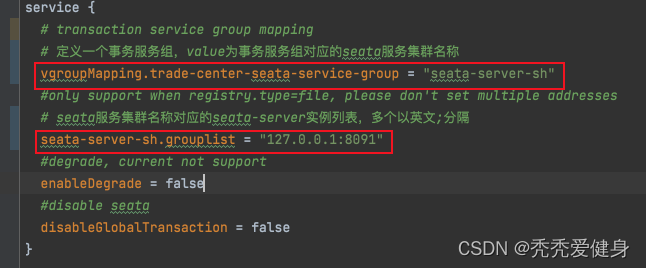
seata.tx-service-group就博主程序而言,application.yml、file.conf配置如下:
1> application.yml:
spring:
  application:
    name: trade-center
seata:
  # tx-service-group的值一定要和file.conf中service.vgroupMapping配置对应上
  tx-service-group: saint_trade_tx_group
或者使用:
spring:
  application:
    name: trade-center
  cloud:
    alibaba:
      seata:
        # tx-service-group的值一定要和file.conf中service.vgroupMapping配置对应上
        tx-service-group: saint_trade_tx_group
2> file.conf关键配置:
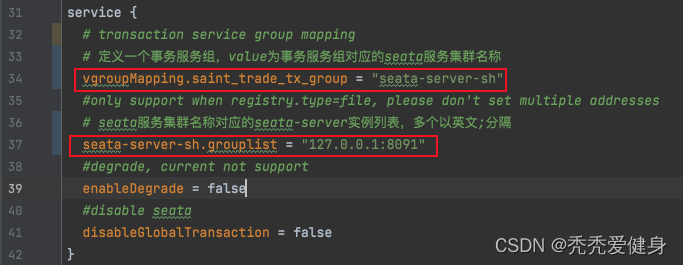
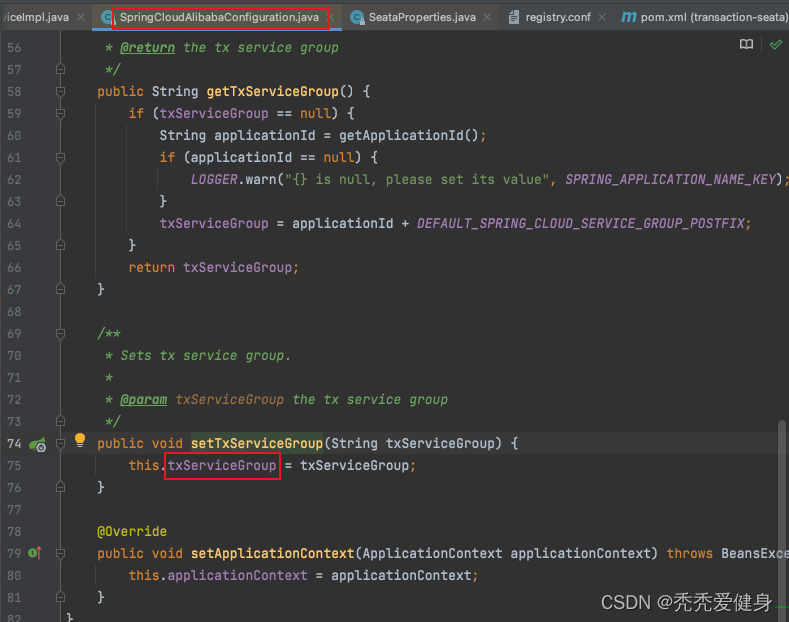
我们注意到可以使用spring.cloud.alibaba.seata.tx-service-group 或 seata.tx-service-group 属性指定service.vgroupMapping配置,为啥呢?
spring.cloud.alibaba.seata.tx-service-group 属于SpringCloudAlibabaConfiguration类:
seata.tx-service-group 属性属于SeataProperties类:
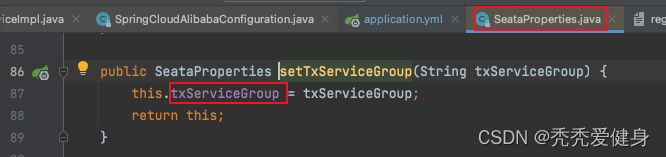
而SeataProperties类又被注解@EnableConfigurationProperties(SpringCloudAlibabaConfiguration.class)标注,所以会使SpringCloudAlibabaConfiguration的配置生效;又SeataProperties类中通过@Autowired的方式组合了SpringCloudAlibabaConfiguration,在通过getTxServiceGroup()方法获取txServiceGroup属性时如果SeataProperties类自己没有配置txServiceGroup,则从SpringCloudAlibabaConfiguration中获取;
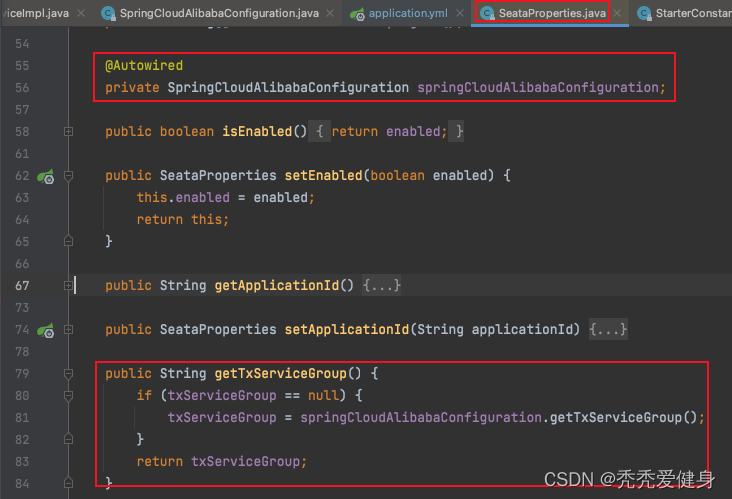
简单来说;就是优先取 seata.tx-service-group 属性值,没有则再取spring.cloud.alibaba.seata.tx-service-group属性值。
seata-server和 项目程序 部署在不同的机器上时,可能会出现 can not connect to services-server。
如果配置的 default.grouplist = “192.168.7.254:8091”,则并不会生效,default.grouplist读取的还是默认的127.0.0.1:8091;
建议把seata集群名称调整为非dafault,例如:
service {
  vgroupMapping.saint_trade_tx_group = "seata-server-sh"
  seata-server-sh.grouplist = "127.0.0.1:8091"
}
在MRIRuby中我可以这样做:deftransferinternal_server=self.init_serverpid=forkdointernal_server.runend#Maketheserverprocessrunindependently.Process.detach(pid)internal_client=self.init_client#Dootherstuffwithconnectingtointernal_server...internal_client.post('somedata')ensure#KillserverProcess.kill('KILL',
相信很多人在录制视频的时候都会遇到各种各样的问题,比如录制的视频没有声音。屏幕录制为什么没声音?今天小编就和大家分享一下如何录制音画同步视频的具体操作方法。如果你有录制的视频没有声音,你可以试试这个方法。 一、检查是否打开电脑系统声音相信很多小伙伴在录制视频后会发现录制的视频没有声音,屏幕录制为什么没声音?如果当时没有打开音频录制,则录制好的视频是没有声音的。因此,建议在录制前进行检查。屏幕上没有声音,很可能是因为你的电脑系统的声音被禁止了。您只需打开电脑系统的声音,即可录制音频和图画同步视频。操作方法:步骤1:点击电脑屏幕右下侧的“小喇叭”图案,在上方的选项中,选择“声音”。 步骤2:在“声
首先回顾一下拉格朗日定理的内容:函数f(x)是在闭区间[a,b]上连续、开区间(a,b)上可导的函数,那么至少存在一个,使得:通过这个表达式我们可以知道,f(x)是函数的主体,a和b可以看作是主体函数f(x)中所取的两个值。那么可以有, 也就意味着我们可以用来替换 这种替换可以用在求某些多项式差的极限中。方法: 外层函数f(x)是一致的,并且h(x)和g(x)是等价无穷小。此时,利用拉格朗日定理,将原式替换为 ,再进行求解,往往会省去复合函数求极限的很多麻烦。使用要注意:1.要先找到主体函数f(x),即外层函数必须相同。2.f(x)找到后,复合部分是等价无穷小。3.要满足作差的形式。如果是加
深度学习部署:Windows安装pycocotools报错解决方法1.pycocotools库的简介2.pycocotools安装的坑3.解决办法更多Ai资讯:公主号AiCharm本系列是作者在跑一些深度学习实例时,遇到的各种各样的问题及解决办法,希望能够帮助到大家。ERROR:Commanderroredoutwithexitstatus1:'D:\Anaconda3\python.exe'-u-c'importsys,setuptools,tokenize;sys.argv[0]='"'"'C:\\Users\\46653\\AppData\\Local\\Temp\\pip-instal
我有一个应用程序正在从Ruby迁移到JRuby(由于需要通过Java提供更好的Web服务安全支持)。我使用的gem之一是daemons创建后台作业。问题在于它使用fork+exec来创建后台进程,但这对JRuby来说是禁忌。那么-是否有用于创建后台作业的替代gem/wrapper?我目前的想法是只从shell脚本调用rake并让rake任务永远运行......提前致谢,克里斯。更新我们目前正在使用几个与Java线程相关的包装器,即https://github.com/jmettraux/rufus-scheduler和https://github.com/philostler/acts
原始问题Letd(n)bedefinedasthesumofproperdivisorsofn(numberslessthannwhichdivideevenlyinton).Ifd(a)=bandd(b)=a,whereab,thenaandbareanamicablepairandeachofaandbarecalledamicablenumbers.Forexample,theproperdivisorsof220are1,2,4,5,10,11,20,22,44,55and110;therefored(220)=284.Theproperdivisorsof284are1,2,
我有两个文本文件,master.txt和926.txt。如果926.txt中有一行不在master.txt中,我想写入一个新文件notinbook.txt。我写了我能想到的最好的东西,但考虑到我是一个糟糕的/新手程序员,它失败了。这是我的东西g=File.new("notinbook.txt","w")File.open("926.txt","r")do|f|while(line=f.gets)x=line.chompifFile.open("master.txt","w")do|h|endwhile(line=h.gets)ifline.chomp!=xputslineendende
这个问题在这里已经有了答案:WhydoRubysettersneed"self."qualificationwithintheclass?(3个答案)关闭29天前。给定这段代码:classSomethingattr_accessor:my_variabledefinitialize@my_variable=0enddeffoomy_variable=my_variable+3endends=Something.news.foo我收到这个错误:test.rb:9:in`foo':undefinedmethod`+'fornil:NilClass(NoMethodError)fromtes
电脑启动出现显示器黑屏是一个相当常见的问题。如果您遇到了这个问题,不要惊慌,因为它有很多可能的原因,可以采取一些简单的措施来解决它。在本文中,小编将介绍下面4种常见的电脑启动后显示器黑屏的原因,排查这些原因,快速解决! 演示机型:联想Ideapad700-15ISK-ISE系统版本:Windows10一、显示器问题如果出现电脑启动后显示器黑屏的情况。那么首先您需要检查一下显示器是否正常工作。您可以通过更换另一个显示器或将当前显示器连接到另一台计算机来检查显示器是否存在问题。如果问题仍然存在,那么您可以排除显示器故障的可能性。 二、显卡问题如果您的电脑配备了独立显卡,那么显卡故障也可能是导致电脑
安全产品安全网关类防火墙Firewall防火墙防火墙主要用于边界安全防护的权限控制和安全域的划分。防火墙•信息安全的防护系统,依照特定的规则,允许或是限制传输的数据通过。防火墙是一个由软件和硬件设备组合而成,在内外网之间、专网与公网之间的界面上构成的保护屏障。下一代防火墙•下一代防火墙,NextGenerationFirewall,简称NGFirewall,是一款可以全面应对应用层威胁的高性能防火墙,提供网络层应用层一体化安全防护。生产厂家•联想网御、CheckPoint、深信服、网康、天融信、华为、H3C等防火墙部署部署于内、外网编辑额,用于权限访问控制和安全域划分。UTM统一威胁管理(Un
