Git 使用 SSH 密钥身份验证
在 macOS、Linux 或 Windows 上通过 SSH 连接到 Git 存储库,以使用 HTTPS 身份验证安全连接。 在 Windows 上,我们建议使用 Git 凭据管理器 或 个人访问令牌。
❗重要
SSH URL 已更改,但旧的 SSH URL 将继续生效 。 如果已设置 SSH,则应将远程 URL 更新为新格式:
git remote -v 验证哪些远程程序正在使用 SSH。git remote set-url <remote name, e.g. origin> <new SSH URL> 或者,在 Visual Studio 中,转到 存储库设置并编辑远程。SSH 公钥身份验证适用于生成的加密密钥的非对称对。 公钥与 Azure DevOps 共享,用于验证初始 ssh 连接。 私钥在系统上保持安全。
以下步骤介绍了在以下平台上配置 SSH 密钥身份验证:
使用命令行配置 SSH。 bash 是 Linux 和 macOS 上的常用 shell,Git for Windows 安装会在“开始”菜单中向 Git Bash 添加快捷方式。 其他 shell 环境将正常工作
此处的命令将允许创建新的默认 SSH 密钥,覆盖现有的默认密钥。 在继续之前,请检查 ~/.ssh 文件夹 (例如 /home/jamal/.ssh 或 C:\Users\jamal.ssh) 并查找以下文件:
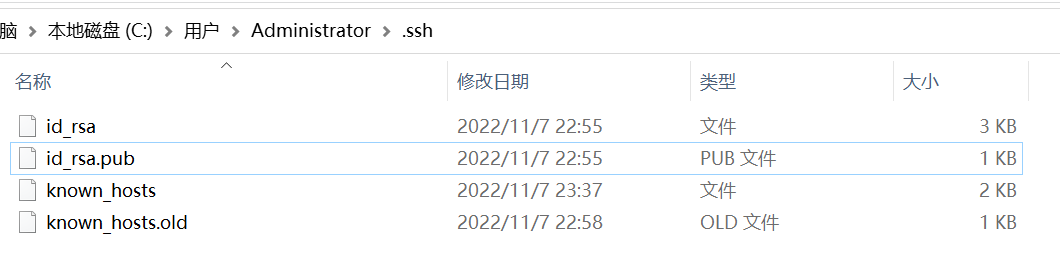
如果这些文件存在,则已创建 SSH 密钥。 可以使用以下命令覆盖密钥,或跳过此步骤
使用ssh-keygen``bash命令提示符创建 SSH 密钥。
ssh-keygen bash
ssh-keygen -t rsa -C “email@.com”

此命令生成 SSH 身份验证所需的两个密钥:私钥 ( id_rsa) 和公钥 ( id_rsa.pub ) 。 请务必从不共享私钥的内容。 如果私钥遭到入侵,攻击者可以使用它欺骗服务器来认为连接来自你。
另请注意,存储在 Azure DevOps 中的 SSH 密钥会在五年后过期。 如果密钥过期,可以上传新密钥或相同的密钥,以继续通过 SSH 访问 Azure DevOps。
将上一步中生成的公钥与用户 ID 相关联。
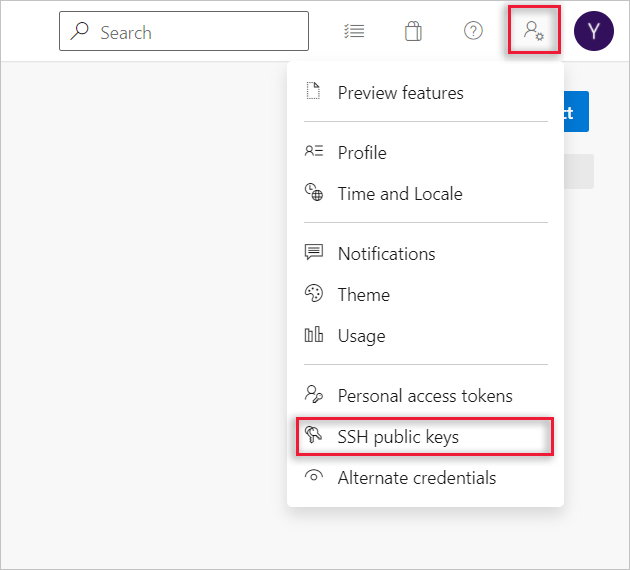
浏览到 Web 门户并选择用户界面右上角的头像,打开安全设置。 在显示的菜单中选择 SSH 公钥 。
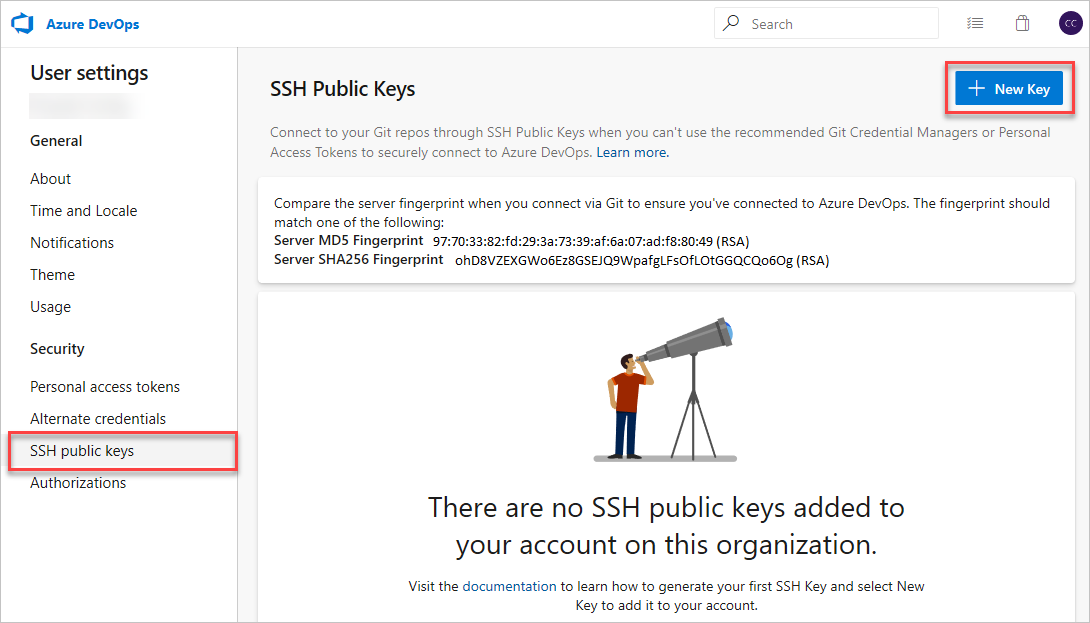
选择“+ 新建密钥”。
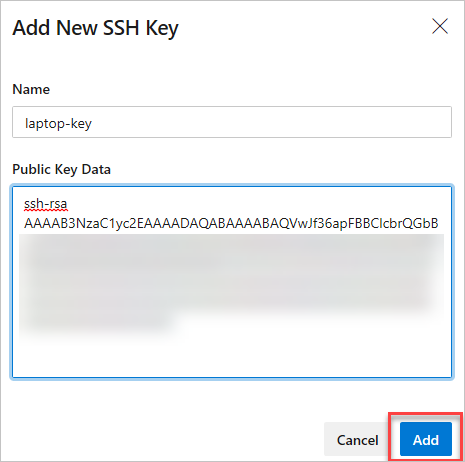
例如,复制公钥 (的内容,例如,id_rsa.pub) 生成的 公钥数据 字段。
重要
避免在密钥数据字段中添加空格或新行,因为它们可能会导致Azure DevOps Services使用无效公钥。 粘贴键时,通常会在末尾添加换行符。 如果发生此换行,请务必删除此换行符。
运行以下命令来测试连接: ssh -T git@ssh.dev.azure.com 如果一切正常工作,你将收到一个回复,指出: remote: Shell access is not supported.
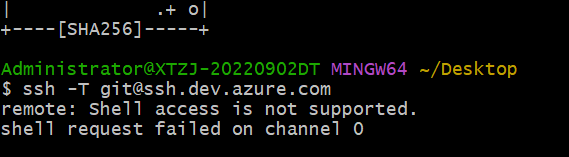
git clone。git clone git@ssh.dev.azure.com:v3/fabrikam-fiber/FabrikamFiber/FabrikamFiber
通过命令提示符运行 git clone。
yes。 Git 将克隆存储库,并设置 origin 远程以使用 SSH 进行连接,以便将来使用 Git 命令进行连接。
$ git clone git@ssh.dev.azure.com:v3/fabrikam-fiber/FabrikamFiber/FabrikamFiber
Cloning into 'FabrikamFiber'...
The authenticity of host 'ssh.dev.azure.com (65.52.8.37)' can't be established.
RSA key fingerprint is SHA256:********************************************
Are you sure you want to continue connecting (yes/no)? yes
Warning: Permanently added 'ssh.dev.azure.com,65.52.8.37' (RSA) to the list of known hosts.
Enter passphrase for key '/c/Users/jamal/.ssh/id_rsa':
remote: Azure Repos
remote: Found 127 objects to send. (50 ms)
Receiving objects: 100% (127/127), 56.67 KiB | 2.58 MiB/s, done.
Resolving deltas: 100% (15/15), done.
git clone后,我收到以下错误。 应采取何种操作?复制
Host key verification failed.
fatal: Could not read from remote repository.
答: 通过运行以下命令手动记录 SSH 密钥: ssh-keyscan -t rsa ssh.dev.azure.com >> ~/.ssh/known_hosts
答: 运行 Git for Windows 中包含的以下命令,在 PowerShell 或 Windows 命令提示符中启动 ssh-agent 进程。 ssh-agent 将缓存通行短语,因此每次连接到存储库时都无需提供密码。
复制
start-ssh-agent.cmd
如果使用 Bash shell (包括 Git Bash) ,请使用以下命令启动 ssh-agent:
复制
eval `ssh-agent`
答: 可以使用命令行通过以下命令针对公钥运行, ssh-keygen 验证使用配置文件中显示的公钥上传的公钥 bash 的指纹。 如果不使用默认值,则需要更改路径和公钥文件名。
复制
ssh-keygen -l -E md5 -f ~/.ssh/id_rsa.pub
然后,可以将 MD5 签名与配置文件中的签名进行比较。 如果在将密钥添加到Azure DevOps Services时,存在连接问题,或者担心在公钥中错误地粘贴到密钥数据字段中,则此检查非常有用。
答: 需要更新 origin Git 中的远程设备以从 HTTPS 更改为 SSH URL。 获得 SSH 克隆 URL 后,运行以下命令:
复制
git remote set-url origin git@ssh.dev.azure.com:v3/fabrikam-fiber/FabrikamFiber/FabrikamFiber
现在可以运行连接到 origin的任何 Git 命令。
答: 若要在与默认值不同的位置使用创建的 ssh-keygen 密钥,请执行以下两项任务:
ssh-add ,从而提供私钥的完整路径。复制
ssh-add /home/jamal/.ssh/id_jamal.rsa
在 Windows 上,在运行 ssh-add之前,需要从 Git for Windows 中运行以下命令:
复制
start-ssh-agent.cmd
此命令在 PowerShell 和命令提示符中运行。 如果使用 Git Bash,需要使用的命令是:
复制
eval `ssh-agent`
可以在 ssh-add Git for Windows 分发版中找到它,并在 Windows 上的任何 shell 环境中运行它。
在 macOS 和 Linux 上,还必须在运行之前运行ssh-agent``ssh-add,但这些平台上的命令环境通常负责启动ssh-agent。
答: 通常,如果为 SSH 客户端配置多个密钥并连接到 SSH 服务器,则客户端可以一次尝试一个密钥,直到服务器接受一个密钥。
但是,这不适用于 Azure DevOps,因为与 SSH 协议相关的技术原因以及 Git SSH URL 的结构。 Azure DevOps 会盲目接受客户端在身份验证期间提供的第一个密钥。 如果请求的存储库的密钥无效,则请求将失败并出现以下错误:
复制
remote: Public key authentication failed.
fatal: Could not read from remote repository.
对于 Azure DevOps,需要将 SSH 配置为显式使用特定的密钥文件。 例如,执行此操作以编辑 ~/.ssh/config 文件 (或 /home/jamal/.ssh``C:\Users\jamal\.ssh) ,如下所示:
复制
# The settings in each Host section are applied to any Git SSH remote URL with a
# matching hostname.
# Generally:
# * SSH uses the first matching line for each parameter name, e.g. if there's
#   multiple values for a parameter across multiple matching Host sections
# * "IdentitiesOnly yes" prevents keys cached in ssh-agent from being tried before
#   the IdentityFile values we explicitly set.
# * On Windows, ~/.ssh/your_private_key maps to %USERPROFILE%\.ssh\your_private_key,
#   e.g. C:\Users\<username>\.ssh\your_private_key.

# Most common scenario: to use the same key across all hosted Azure DevOps
# organizations, add a Host entry like this:
Host ssh.dev.azure.com
  IdentityFile ~/.ssh/your_private_key
  IdentitiesOnly yes

# This model will also work if you still use the older SSH URLs with a
# hostname of vs-ssh.visualstudio.com:
Host vs-ssh.visualstudio.com
  IdentityFile ~/.ssh/your_private_key
  IdentitiesOnly yes

# OpenSSL 8.7 has DEPRECATED RSA. IF using OpenSSL version > 8.6 you will need to
# add the 'HostkeyAlgorithms' and 'PubkeyAcceptedAlgorithms' entries below. You can
# check the version of OpenSSL/OpenSSH you're using by running the command 'ssh -v localhost'
Host ssh.dev.azure.com
  IdentityFile ~/.ssh/id_rsa
  HostkeyAlgorithms +ssh-rsa
  PubkeyAcceptedAlgorithms +ssh-rsa

# Less common scenario: if you need different keys for different organizations,
# you'll need to use host aliases to create separate Host sections.
# This is because all hosted Azure DevOps URLs have the same hostname
# (ssh.dev.azure.com), so SSH has no way to distinguish them by default.
#
# Imagine that we have the following two SSH URLs:
# * git@ssh.dev.azure.com:v3/Fabrikam/Project1/fab_repo
#   * For this, we want to use `fabrikamkey`, so we'll create `devops_fabrikam` as
#     a Host alias and tell SSH to use `fabrikamkey`.
# * git@ssh.dev.azure.com:v3/Contoso/Project2/con_repo
#   * For this, we want to use `contosokey`, so we'll create `devops_contoso` as
#     a Host alias and tell SSH to use `contosokey`.
#
# To set explicit keys for the two host aliases and to tell SSH to use the correct
# actual hostname, add the next two Host sections:
Host devops_fabrikam
  HostName ssh.dev.azure.com
  IdentityFile ~/.ssh/private_key_for_fabrikam
  IdentitiesOnly yes
Host devops_contoso
  HostName ssh.dev.azure.com
  IdentityFile ~/.ssh/private_key_for_contoso
  IdentitiesOnly yes
#
# Then, instead of using the real URLs, tell Git you want to use these URLs:
# * git@devops_fabrikam:v3/Fabrikam/Project1/fab_repo
# * git@devops_contoso:v3/Contoso/Project2/con_repo
#

# At the end of the file, you can put global defaults for other SSH hosts you
# may connect to.  Note that "*" also matches any hosts that match the sections
# above, and remember that SSH uses the first matching line for each parameter name.
Host *
我正在学习如何使用Nokogiri,根据这段代码我遇到了一些问题:require'rubygems'require'mechanize'post_agent=WWW::Mechanize.newpost_page=post_agent.get('http://www.vbulletin.org/forum/showthread.php?t=230708')puts"\nabsolutepathwithtbodygivesnil"putspost_page.parser.xpath('/html/body/div/div/div/div/div/table/tbody/tr/td/div
我有一个Ruby程序,它使用rubyzip压缩XML文件的目录树。gem。我的问题是文件开始变得很重,我想提高压缩级别,因为压缩时间不是问题。我在rubyzipdocumentation中找不到一种为创建的ZIP文件指定压缩级别的方法。有人知道如何更改此设置吗?是否有另一个允许指定压缩级别的Ruby库? 最佳答案 这是我通过查看rubyzip内部创建的代码。level=Zlib::BEST_COMPRESSIONZip::ZipOutputStream.open(zip_file)do|zip|Dir.glob("**/*")d
类classAprivatedeffooputs:fooendpublicdefbarputs:barendprivatedefzimputs:zimendprotecteddefdibputs:dibendendA的实例a=A.new测试a.foorescueputs:faila.barrescueputs:faila.zimrescueputs:faila.dibrescueputs:faila.gazrescueputs:fail测试输出failbarfailfailfail.发送测试[:foo,:bar,:zim,:dib,:gaz].each{|m|a.send(m)resc
很好奇,就使用rubyonrails自动化单元测试而言,你们正在做什么?您是否创建了一个脚本来在cron中运行rake作业并将结果邮寄给您?git中的预提交Hook?只是手动调用?我完全理解测试,但想知道在错误发生之前捕获错误的最佳实践是什么。让我们理所当然地认为测试本身是完美无缺的,并且可以正常工作。下一步是什么以确保他们在正确的时间将可能有害的结果传达给您? 最佳答案 不确定您到底想听什么,但是有几个级别的自动代码库控制:在处理某项功能时,您可以使用类似autotest的内容获得关于哪些有效,哪些无效的即时反馈。要确保您的提
假设我做了一个模块如下:m=Module.newdoclassCendend三个问题:除了对m的引用之外,还有什么方法可以访问C和m中的其他内容?我可以在创建匿名模块后为其命名吗(就像我输入“module...”一样)?如何在使用完匿名模块后将其删除,使其定义的常量不再存在? 最佳答案 三个答案:是的,使用ObjectSpace.此代码使c引用你的类(class)C不引用m:c=nilObjectSpace.each_object{|obj|c=objif(Class===objandobj.name=~/::C$/)}当然这取决于
我正在尝试使用ruby和Savon来使用网络服务。测试服务为http://www.webservicex.net/WS/WSDetails.aspx?WSID=9&CATID=2require'rubygems'require'savon'client=Savon::Client.new"http://www.webservicex.net/stockquote.asmx?WSDL"client.get_quotedo|soap|soap.body={:symbol=>"AAPL"}end返回SOAP异常。检查soap信封,在我看来soap请求没有正确的命名空间。任何人都可以建议我
关闭。这个问题是opinion-based.它目前不接受答案。想要改进这个问题?更新问题,以便editingthispost可以用事实和引用来回答它.关闭4年前。Improvethisquestion我想在固定时间创建一系列低音和高音调的哔哔声。例如:在150毫秒时发出高音调的蜂鸣声在151毫秒时发出低音调的蜂鸣声200毫秒时发出低音调的蜂鸣声250毫秒的高音调蜂鸣声有没有办法在Ruby或Python中做到这一点?我真的不在乎输出编码是什么(.wav、.mp3、.ogg等等),但我确实想创建一个输出文件。
给定这段代码defcreate@upgrades=User.update_all(["role=?","upgraded"],:id=>params[:upgrade])redirect_toadmin_upgrades_path,:notice=>"Successfullyupgradeduser."end我如何在该操作中实际验证它们是否已保存或未重定向到适当的页面和消息? 最佳答案 在Rails3中,update_all不返回任何有意义的信息,除了已更新的记录数(这可能取决于您的DBMS是否返回该信息)。http://ar.ru
我在我的项目目录中完成了compasscreate.和compassinitrails。几个问题:我已将我的.sass文件放在public/stylesheets中。这是放置它们的正确位置吗?当我运行compasswatch时,它不会自动编译这些.sass文件。我必须手动指定文件:compasswatchpublic/stylesheets/myfile.sass等。如何让它自动运行?文件ie.css、print.css和screen.css已放在stylesheets/compiled。如何在编译后不让它们重新出现的情况下删除它们?我自己编译的.sass文件编译成compiled/t
我想安装一个带有一些身份验证的私有(private)Rubygem服务器。我希望能够使用公共(public)Ubuntu服务器托管内部gem。我读到了http://docs.rubygems.org/read/chapter/18.但是那个没有身份验证-如我所见。然后我读到了https://github.com/cwninja/geminabox.但是当我使用基本身份验证(他们在他们的Wiki中有)时,它会提示从我的服务器获取源。所以。如何制作带有身份验证的私有(private)Rubygem服务器?这是不可能的吗?谢谢。编辑:Geminabox问题。我尝试“捆绑”以安装新的gem..
