docker pull apache/iotdb:0.13.1-nodedocker volume create mydata
docker volume create mylogsdocker run --name iotdb -p 6667:6667 -v mydata:/iotdb/data -v mylogs:/iotdb/logs -d apache/iotdb:0.13.1-node /iotdb/bin/start-server.shdocker exec -it iotdb /bin/bash
/iotdb/sbin/start-cli.sh -h localhost -p 6667 -u root -pw root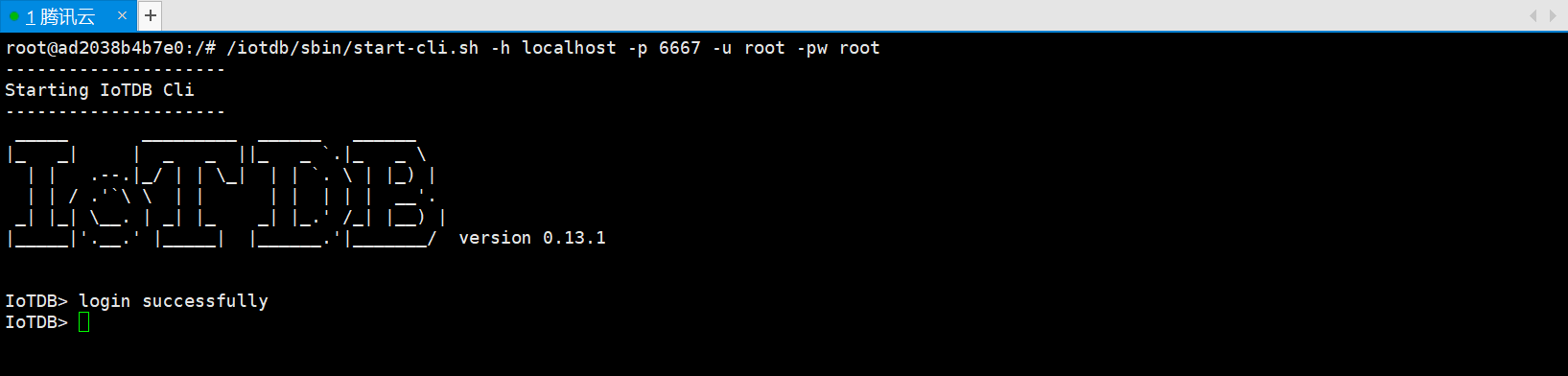
    <dependency>
            <groupId>org.apache.iotdb</groupId>
            <artifactId>iotdb-session</artifactId>
            <version>0.14.0-preview1</version>
        </dependency>

        <dependency>
            <groupId>cn.hutool</groupId>
            <artifactId>hutool-all</artifactId>
            <version>5.6.3</version>
        </dependency>

        <dependency>
            <groupId>com.alibaba</groupId>
            <artifactId>fastjson</artifactId>
            <version>1.2.83</version>
        </dependency>

        <dependency>
            <groupId>org.springframework.boot</groupId>
            <artifactId>spring-boot-starter-web</artifactId>
        </dependency>

        <dependency>
            <groupId>org.projectlombok</groupId>
            <artifactId>lombok</artifactId>
            <optional>true</optional>
        </dependency>
        <dependency>
            <groupId>org.springframework.boot</groupId>
            <artifactId>spring-boot-starter-test</artifactId>
            <scope>test</scope>
            <exclusions>
                <exclusion>
                    <groupId>org.junit.vintage</groupId>
                    <artifactId>junit-vintage-engine</artifactId>
                </exclusion>
            </exclusions>
</dependency>package com.zhouhong.iotdbdemo.config;
import lombok.extern.log4j.Log4j2;
import org.apache.iotdb.rpc.IoTDBConnectionException;
import org.apache.iotdb.rpc.StatementExecutionException;
import org.apache.iotdb.session.Session;
import org.apache.iotdb.session.SessionDataSet;
import org.apache.iotdb.session.util.Version;
import org.apache.iotdb.tsfile.file.metadata.enums.TSDataType;
import org.apache.iotdb.tsfile.write.record.Tablet;
import org.apache.iotdb.tsfile.write.schema.MeasurementSchema;
import org.springframework.context.annotation.Bean;
import org.springframework.context.annotation.Configuration;
import org.springframework.stereotype.Component;
import java.rmi.ServerException;
import java.util.ArrayList;
import java.util.List;
/**
* description: iotdb 配置工具类(常用部分,如需要可以自行扩展)
* 注意:可以不需要创建分组,插入时默认前两个节点名称为分组名称 比如: root.a1eaKSRpRty.CA3013A303A25467 或者
* root.a1eaKSRpRty.CA3013A303A25467.heart 他们的分组都为 root.a1eaKSRpRty
* author: zhouhong
*/
@Log4j2
@Component
@Configuration
public class IotDBSessionConfig {
private static Session session;
private static final String LOCAL_HOST = "XXX.XX.XXX.XX";
@Bean
public Session getSession() throws IoTDBConnectionException, StatementExecutionException {
if (session == null) {
log.info("正在连接iotdb.......");
session = new Session.Builder().host(LOCAL_HOST).port(6667).username("root").password("root").version(Version.V_0_13).build();
session.open(false);
session.setFetchSize(100);
log.info("iotdb连接成功~");
// 设置时区
session.setTimeZone("+08:00");
}
return session;
}
/**
* description: 带有数据类型的添加操作 - insertRecord没有指定类型
* author: zhouhong
* @param * @param deviceId:节点路径如:root.a1eaKSRpRty.CA3013A303A25467
* time:时间戳
* measurementsList:物理量 即:属性
* type:数据类型: BOOLEAN((byte)0), INT32((byte)1),INT64((byte)2),FLOAT((byte)3),DOUBLE((byte)4),TEXT((byte)5),VECTOR((byte)6);
* valuesList:属性值 --- 属性必须与属性值一一对应
* @return
*/
public void insertRecordType(String deviceId, Long time,List<String> measurementsList, TSDataType type,List<Object> valuesList) throws StatementExecutionException, IoTDBConnectionException, ServerException {
if (measurementsList.size() != valuesList.size()) {
throw new ServerException("measurementsList 与 valuesList 值不对应");
}
List<TSDataType> types = new ArrayList<>();
measurementsList.forEach(item -> {
types.add(type);
});
session.insertRecord(deviceId, time, measurementsList, types, valuesList);
}
/**
* description: 带有数据类型的添加操作 - insertRecord没有指定类型
* author: zhouhong
* @param deviceId:节点路径如:root.a1eaKSRpRty.CA3013A303A25467
* @param time:时间戳
* @param measurementsList:物理量 即:属性
* @param valuesList:属性值 --- 属性必须与属性值一一对应
* @return
*/
public void insertRecord(String deviceId, Long time,List<String> measurementsList, List<String> valuesList) throws StatementExecutionException, IoTDBConnectionException, ServerException {
if (measurementsList.size() == valuesList.size()) {
session.insertRecord(deviceId, time, measurementsList, valuesList);
} else {
log.error("measurementsList 与 valuesList 值不对应");
}
}
/**
* description: 批量插入
* author: zhouhong
*/
public void insertRecords(List<String> deviceIdList, List<Long> timeList, List<List<String>> measurementsList, List<List<String>> valuesList) throws StatementExecutionException, IoTDBConnectionException, ServerException {
if (measurementsList.size() == valuesList.size()) {
session.insertRecords(deviceIdList, timeList, measurementsList, valuesList);
} else {
log.error("measurementsList 与 valuesList 值不对应");
}
}
/**
* description: 插入操作
* author: zhouhong
* @param deviceId:节点路径如:root.a1eaKSRpRty.CA3013A303A25467
* @param time:时间戳
* @param schemaList: 属性值 + 数据类型 例子: List<MeasurementSchema> schemaList = new ArrayList<>(); schemaList.add(new MeasurementSchema("breath", TSDataType.INT64));
* @param maxRowNumber:
* @return
*/
public void insertTablet(String deviceId, Long time,List<MeasurementSchema> schemaList, List<Object> valueList,int maxRowNumber) throws StatementExecutionException, IoTDBConnectionException {
Tablet tablet = new Tablet(deviceId, schemaList, maxRowNumber);
// 向iotdb里面添加数据
int rowIndex = tablet.rowSize++;
tablet.addTimestamp(rowIndex, time);
for (int i = 0; i < valueList.size(); i++) {
tablet.addValue(schemaList.get(i).getMeasurementId(), rowIndex, valueList.get(i));
}
if (tablet.rowSize == tablet.getMaxRowNumber()) {
session.insertTablet(tablet, true);
tablet.reset();
}
if (tablet.rowSize != 0) {
session.insertTablet(tablet);
tablet.reset();
}
}
/**
* description: 根据SQL查询
* author: zhouhong
*/
public SessionDataSet query(String sql) throws StatementExecutionException, IoTDBConnectionException {
return session.executeQueryStatement(sql);
}
/**
* description: 删除分组 如 root.a1eaKSRpRty
* author: zhouhong
* @param groupName:分组名称
* @return
*/
public void deleteStorageGroup(String groupName) throws StatementExecutionException, IoTDBConnectionException {
session.deleteStorageGroup(groupName);
}
/**
* description: 根据Timeseries删除 如:root.a1eaKSRpRty.CA3013A303A25467.breath (个人理解:为具体的物理量)
* author: zhouhong
*/
public void deleteTimeseries(String timeseries) throws StatementExecutionException, IoTDBConnectionException {
session.deleteTimeseries(timeseries);
}
/**
* description: 根据Timeseries批量删除
* author: zhouhong
*/
public void deleteTimeserieList(List<String> timeseriesList) throws StatementExecutionException, IoTDBConnectionException {
session.deleteTimeseries(timeseriesList);
}
/**
* description: 根据分组批量删除
* author: zhouhong
*/
public void deleteStorageGroupList(List<String> storageGroupList) throws StatementExecutionException, IoTDBConnectionException {
session.deleteStorageGroups(storageGroupList);
}
/**
* description: 根据路径和结束时间删除 结束时间之前的所有数据
* author: zhouhong
*/
public void deleteDataByPathAndEndTime(String path, Long endTime) throws StatementExecutionException, IoTDBConnectionException {
session.deleteData(path, endTime);
}
/**
* description: 根据路径集合和结束时间批量删除 结束时间之前的所有数据
* author: zhouhong
*/
public void deleteDataByPathListAndEndTime(List<String> pathList, Long endTime) throws StatementExecutionException, IoTDBConnectionException {
session.deleteData(pathList, endTime);
}
/**
* description: 根据路径集合和时间段批量删除
* author: zhouhong
*/
public void deleteDataByPathListAndTime(List<String> pathList, Long startTime,Long endTime) throws StatementExecutionException, IoTDBConnectionException {
session.deleteData(pathList, startTime, endTime);
}
}package com.zhouhong.iotdbdemo.model.param;
import lombok.Data;
/**
* description: 入参
* date: 2022/8/15 21:53
* author: zhouhong
*/
@Data
public class IotDbParam {
/***
* 产品PK
*/
private String pk;
/***
* 设备号
*/
private String sn;
/***
* 时间
*/
private Long time;
/***
* 实时呼吸
*/
private String breath;
/***
* 实时心率
*/
private String heart;
/***
* 查询开始时间
*/
private String startTime;
/***
* 查询结束时间
*/
private String endTime;
}package com.zhouhong.iotdbdemo.model.result;
import lombok.Data;
/**
* description: 返回结果
* date: 2022/8/15 21:56
* author: zhouhong
*/
@Data
public class IotDbResult {
/***
* 时间
*/
private String time;
/***
* 产品PK
*/
private String pk;
/***
* 设备号
*/
private String sn;
/***
* 实时呼吸
*/
private String breath;
/***
* 实时心率
*/
private String heart;
}package com.zhouhong.iotdbdemo.server.impl;
import com.zhouhong.iotdbdemo.config.IotDBSessionConfig;
import com.zhouhong.iotdbdemo.model.param.IotDbParam;
import com.zhouhong.iotdbdemo.model.result.IotDbResult;
import com.zhouhong.iotdbdemo.server.IotDbServer;
import lombok.extern.log4j.Log4j2;
import org.apache.iotdb.rpc.IoTDBConnectionException;
import org.apache.iotdb.rpc.StatementExecutionException;
import org.apache.iotdb.session.SessionDataSet;
import org.apache.iotdb.tsfile.read.common.Field;
import org.apache.iotdb.tsfile.read.common.RowRecord;
import org.springframework.stereotype.Service;
import javax.annotation.Resource;
import java.rmi.ServerException;
import java.util.ArrayList;
import java.util.HashMap;
import java.util.List;
import java.util.Map;
/**
* description: iot服务实现类
* date: 2022/8/15 9:43
* author: zhouhong
*/
@Log4j2
@Service
public class IotDbServerImpl implements IotDbServer {
@Resource
private IotDBSessionConfig iotDBSessionConfig;
@Override
public void insertData(IotDbParam iotDbParam) throws StatementExecutionException, ServerException, IoTDBConnectionException {
// iotDbParam: 模拟设备上报消息
// bizkey: 业务唯一key PK :产品唯一编码 SN:设备唯一编码
String deviceId = "root.bizkey."+ iotDbParam.getPk() + "." + iotDbParam.getSn();
// 将设备上报的数据存入数据库(时序数据库)
List<String> measurementsList = new ArrayList<>();
measurementsList.add("heart");
measurementsList.add("breath");
List<String> valuesList = new ArrayList<>();
valuesList.add(String.valueOf(iotDbParam.getHeart()));
valuesList.add(String.valueOf(iotDbParam.getBreath()));
iotDBSessionConfig.insertRecord(deviceId, iotDbParam.getTime(), measurementsList, valuesList);
}
@Override
public List<IotDbResult> queryDataFromIotDb(IotDbParam iotDbParam) throws Exception {
List<IotDbResult> iotDbResultList = new ArrayList<>();
if (null != iotDbParam.getPk() && null != iotDbParam.getSn()) {
String sql = "select * from root.bizkey."+ iotDbParam.getPk() +"." + iotDbParam.getSn() + " where time >= "
+ iotDbParam.getStartTime() + " and time < " + iotDbParam.getEndTime();
SessionDataSet sessionDataSet = iotDBSessionConfig.query(sql);
List<String> columnNames = sessionDataSet.getColumnNames();
List<String> titleList = new ArrayList<>();
// 排除Time字段 -- 方便后面后面拼装数据
for (int i = 1; i < columnNames.size(); i++) {
String[] temp = columnNames.get(i).split("\\.");
titleList.add(temp[temp.length - 1]);
}
// 封装处理数据
packagingData(iotDbParam, iotDbResultList, sessionDataSet, titleList);
} else {
log.info("PK或者SN不能为空!!");
}
return iotDbResultList;
}
/**
* 封装处理数据
* @param iotDbParam
* @param iotDbResultList
* @param sessionDataSet
* @param titleList
* @throws StatementExecutionException
* @throws IoTDBConnectionException
*/
private void packagingData(IotDbParam iotDbParam, List<IotDbResult> iotDbResultList, SessionDataSet sessionDataSet, List<String> titleList)
throws StatementExecutionException, IoTDBConnectionException {
int fetchSize = sessionDataSet.getFetchSize();
if (fetchSize > 0) {
while (sessionDataSet.hasNext()) {
IotDbResult iotDbResult = new IotDbResult();
RowRecord next = sessionDataSet.next();
List<Field> fields = next.getFields();
String timeString = new java.text.SimpleDateFormat("yyyy-MM-dd HH:mm:ss").format(next.getTimestamp());
iotDbResult.setTime(timeString);
Map<String, String> map = new HashMap<>();
for (int i = 0; i < fields.size(); i++) {
Field field = fields.get(i);
// 这里的需要按照类型获取
map.put(titleList.get(i), field.getObjectValue(field.getDataType()).toString());
}
iotDbResult.setTime(timeString);
iotDbResult.setPk(iotDbParam.getPk());
iotDbResult.setSn(iotDbParam.getSn());
iotDbResult.setHeart(map.get("heart"));
iotDbResult.setBreath(map.get("breath"));
iotDbResultList.add(iotDbResult);
}
}
}
}package com.zhouhong.iotdbdemo.controller;
import com.zhouhong.iotdbdemo.config.IotDBSessionConfig;
import com.zhouhong.iotdbdemo.model.param.IotDbParam;
import com.zhouhong.iotdbdemo.response.ResponseData;
import com.zhouhong.iotdbdemo.server.IotDbServer;
import lombok.extern.log4j.Log4j2;
import org.apache.iotdb.rpc.IoTDBConnectionException;
import org.apache.iotdb.rpc.StatementExecutionException;
import org.springframework.web.bind.annotation.*;
import javax.annotation.Resource;
import java.rmi.ServerException;
/**
* description: iotdb 控制层
* date: 2022/8/15 21:50
* author: zhouhong
*/
@Log4j2
@RestController
public class IotDbController {
@Resource
private IotDbServer iotDbServer;
@Resource
private IotDBSessionConfig iotDBSessionConfig;
/**
* 插入数据
* @param iotDbParam
*/
@PostMapping("/api/device/insert")
public ResponseData insert(@RequestBody IotDbParam iotDbParam) throws StatementExecutionException, ServerException, IoTDBConnectionException {
iotDbServer.insertData(iotDbParam);
return ResponseData.success();
}
/**
* 插入数据
* @param iotDbParam
*/
@PostMapping("/api/device/queryData")
public ResponseData queryDataFromIotDb(@RequestBody IotDbParam iotDbParam) throws Exception {
return ResponseData.success(iotDbServer.queryDataFromIotDb(iotDbParam));
}
/**
* 删除分组
* @return
*/
@PostMapping("/api/device/deleteGroup")
public ResponseData deleteGroup() throws StatementExecutionException, IoTDBConnectionException {
iotDBSessionConfig.deleteStorageGroup("root.a1eaKSRpRty");
iotDBSessionConfig.deleteStorageGroup("root.smartretirement");
return ResponseData.success();
}
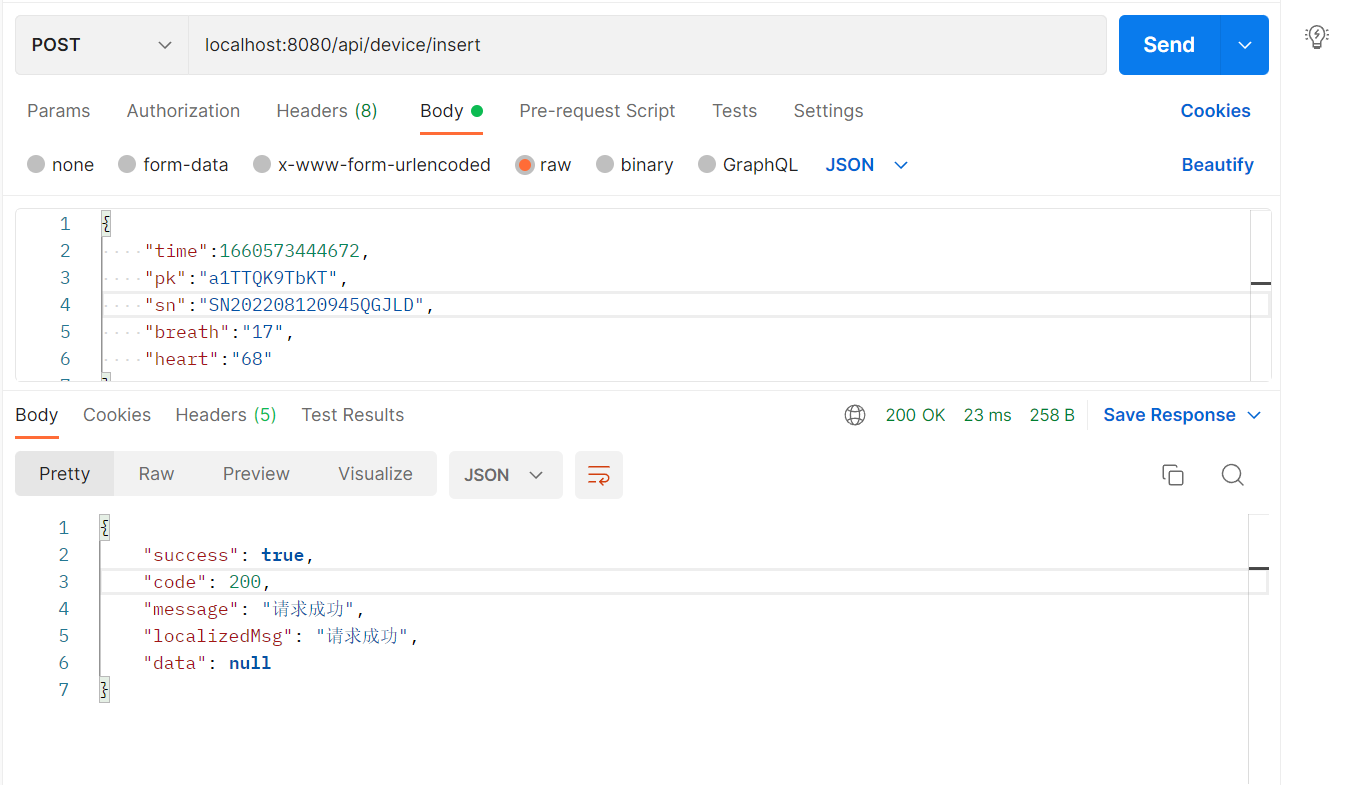
}{
"time":1660573444672,
"pk":"a1TTQK9TbKT",
"sn":"SN202208120945QGJLD",
"breath":"17",
"heart":"68"
}

{
    "pk":"a1TTQK9TbKT",
    "sn":"SN202208120945QGJLD",
    "startTime":"2022-08-14 00:00:00",
    "endTime":"2022-08-16 00:00:00"
}{
"success": true,
"code": 200,
"message": "请求成功",
"localizedMsg": "请求成功",
"data": [
{
"time": "2022-08-15 22:24:04",
"pk": "a1TTQK9TbKT",
"sn": "SN202208120945QGJLD",
"breath": "19.0",
"heart": "75.0"
},
{
"time": "2022-08-15 22:24:04",
"pk": "a1TTQK9TbKT",
"sn": "SN202208120945QGJLD",
"breath": "20.0",
"heart": "78.0"
},
{
"time": "2022-08-15 22:24:04",
"pk": "a1TTQK9TbKT",
"sn": "SN202208120945QGJLD",
"breath": "17.0",
"heart": "68.0"
}
]
}我想为Heroku构建一个Rails3应用程序。他们使用Postgres作为他们的数据库,所以我通过MacPorts安装了postgres9.0。现在我需要一个postgresgem并且共识是出于性能原因你想要pggem。但是我对我得到的错误感到非常困惑当我尝试在rvm下通过geminstall安装pg时。我已经非常明确地指定了所有postgres目录的位置可以找到但仍然无法完成安装:$envARCHFLAGS='-archx86_64'geminstallpg--\--with-pg-config=/opt/local/var/db/postgresql90/defaultdb/po
我主要使用Ruby来执行此操作,但到目前为止我的攻击计划如下:使用gemsrdf、rdf-rdfa和rdf-microdata或mida来解析给定任何URI的数据。我认为最好映射到像schema.org这样的统一模式,例如使用这个yaml文件,它试图描述数据词汇表和opengraph到schema.org之间的转换:#SchemaXtoschema.orgconversion#data-vocabularyDV:name:namestreet-address:streetAddressregion:addressRegionlocality:addressLocalityphoto:i
我打算为ruby脚本创建一个安装程序,但我希望能够确保机器安装了RVM。有没有一种方法可以完全离线安装RVM并且不引人注目(通过不引人注目,就像创建一个可以做所有事情的脚本而不是要求用户向他们的bash_profile或bashrc添加一些东西)我不是要脚本本身,只是一个关于如何走这条路的快速指针(如果可能的话)。我们还研究了这个很有帮助的问题:RVM-isthereawayforsimpleofflineinstall?但有点误导,因为答案只向我们展示了如何离线在RVM中安装ruby。我们需要能够离线安装RVM本身,并查看脚本https://raw.github.com/wayn
我有一个奇怪的问题:我在rvm上安装了rubyonrails。一切正常,我可以创建项目。但是在我输入“railsnew”时重新启动后,我有“程序'rails'当前未安装。”。SystemUbuntu12.04ruby-v"1.9.3p194"gemlistactionmailer(3.2.5)actionpack(3.2.5)activemodel(3.2.5)activerecord(3.2.5)activeresource(3.2.5)activesupport(3.2.5)arel(3.0.2)builder(3.0.0)bundler(1.1.4)coffee-rails(
我刚刚为fedora安装了emacs。我想用emacs编写ruby。为ruby提供代码提示、代码完成类型功能所需的工具、扩展是什么? 最佳答案 ruby-mode已经包含在Emacs23之后的版本中。不过,它也可以通过ELPA获得。您可能感兴趣的其他一些事情是集成RVM、feature-mode(Cucumber)、rspec-mode、ruby-electric、inf-ruby、rinari(用于Rails)等。这是我当前用于Ruby开发的Emacs配置:https://github.com/citizen428/emacs
我正在尝试在我的centos服务器上安装therubyracer,但遇到了麻烦。$geminstalltherubyracerBuildingnativeextensions.Thiscouldtakeawhile...ERROR:Errorinstallingtherubyracer:ERROR:Failedtobuildgemnativeextension./usr/local/rvm/rubies/ruby-1.9.3-p125/bin/rubyextconf.rbcheckingformain()in-lpthread...yescheckingforv8.h...no***e
我的最终目标是安装当前版本的RubyonRails。我在OSXMountainLion上运行。到目前为止,这是我的过程:已安装的RVM$\curl-Lhttps://get.rvm.io|bash-sstable检查已知(我假设已批准)安装$rvmlistknown我看到当前的稳定版本可用[ruby-]2.0.0[-p247]输入命令安装$rvminstall2.0.0-p247注意:我也试过这些安装命令$rvminstallruby-2.0.0-p247$rvminstallruby=2.0.0-p247我很快就无处可去了。结果:$rvminstall2.0.0-p247Search
我实际上是在尝试使用RVM在我的OSX10.7.5上更新ruby,并在输入以下命令后:rvminstallruby我得到了以下回复:Searchingforbinaryrubies,thismighttakesometime.Checkingrequirementsforosx.Installingrequirementsforosx.Updatingsystem.......Errorrunning'requirements_osx_brew_update_systemruby-2.0.0-p247',pleaseread/Users/username/.rvm/log/138121
由于fast-stemmer的问题,我很难安装我想要的任何rubygem。我把我得到的错误放在下面。Buildingnativeextensions.Thiscouldtakeawhile...ERROR:Errorinstallingfast-stemmer:ERROR:Failedtobuildgemnativeextension./System/Library/Frameworks/Ruby.framework/Versions/2.0/usr/bin/rubyextconf.rbcreatingMakefilemake"DESTDIR="cleanmake"DESTDIR=
我在app/helpers/sessions_helper.rb中有一个帮助程序文件,其中包含一个方法my_preference,它返回当前登录用户的首选项。我想在集成测试中访问该方法。例如,这样我就可以在测试中使用getuser_path(my_preference)。在其他帖子中,我读到这可以通过在测试文件中包含requiresessions_helper来实现,但我仍然收到错误NameError:undefinedlocalvariableormethod'my_preference'.我做错了什么?require'test_helper'require'sessions_hel
