小伙伴们你们有没有想过自己搞一个播放器,播上自己喜欢的歌单,那是多么的惬意啊~
之前,小编遇到一个项目,语音导览的播放器。其实跟播放歌单一个道理。
但是一看微信开发文档里面的音频API又是那么多,我们该如何选择呢?在这里小编选择了使用wx.createAudioContext();这个API。
当然啊这个需要注意的是:从基础库 1.6.0 开始,这个接口就停止维护,推荐使用 wx.createInnerAudioContext 代替;并且需要小程序基础库版本不低于 1.9.6。
那么这个接口该如何正确使用呢?
AudioContext 实例,可通过 wx.createAudioContext 获取。
AudioContext 通过 id 跟一个 audio 组件绑定,操作对应的 audio 组件。
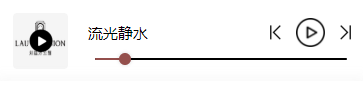
可以看到该播放器有切换上下曲按钮、暂停按钮以及进度条
小编是这样实现的
<!-- 播放器样式 -->

<audio id="myAudio" class="audio_a" src="{{audio}}"  bindtimeupdate='bindtimeupdate'></audio>
<view class="audioV" wx:if="{{audio!=''}}">
  <view class="audioV_L_R">
    <!-- 左边的图片 -->
    <view class="audioV_left">
      <view class="audioV_left_v">
        <image class="audioV_left_img" src="{{detail.audio_cover}}"></image>
        <image class="audioV_left_play" src="/images/play1.png" wx:if="{{isplay==false}}" bindtap="clickplay"></image>
        <image class="audioV_left_play" src="/images/puse1.png" wx:if="{{isplay==true}}" bindtap="stop"></image>
      </view>
    </view>
    <!-- 右边的控制 -->
    <view class="audioV_right">
      <view class="audioV_right_top">
        <view class="audioV_right_top_name">{{CN==true?detail.name:detail.name_e}}</view>
        <view class="audioV_right_top_contro">
          <image class="audioV_right_top_last" src="../../../images/last.png" bindtap="getLast"></image>
          <image class="audioV_right_top_play" wx:if="{{isplay==false}}" bindtap="clickplay" src="../../../images/play2.png"></image>
          <image class="audioV_right_top_play" wx:if="{{isplay==true}}" bindtap="stop" src="../../../images/puse2.png"></image>
          <image class="audioV_right_top_next" src="../../../images/next.png" bindtap="getNext"></image>
        </view>
      </view>
      <!-- 拖动条--进度条 -->
      <view class="audioV_right_slider">
      	<!--slider 进度条的使用可以在微信开发文档上看看这些配置的用法哦-->
        <slider line-size="{{15}}" color="#000" blockColor="#944f4c" bindchange='sliderChange' activeColor='#944f4c' block-size="{{12}}" value='{{playP}}' />
      </view>

    </view>
  </view>
</view>
/* 播放器 */
.audioV{
  width: 100%;
  position: fixed;
  overflow: auto;
  bottom: 0rpx;
  background: #fff;
}
.audioV_L_R{
  width: 100%;
  position: relative;
  overflow: auto;
}
.audioV_left{
  width: 25%;
  padding: 15rpx 21rpx;
  box-sizing: border-box;
  float: left;
  height: 141rpx;
}
.audioV_left_v{
  position: relative;
  overflow: auto;
  height: 100%;
  display: flex;
  justify-content: center;
  align-items: center;
}
.audioV_left_img{
  width: 111rpx;
  height: 100%;
  position: absolute;
  /* background-color: red; */
  border-radius: 8rpx;
}
.audioV_left_play{
  width: 48rpx;
  height: 48rpx;
  z-index: 2;
}
.audioV_right{
  width: 75%;
  float: left;
  padding: 15rpx 36rpx 0rpx 0rpx;
  box-sizing: border-box;

}
.audioV_right_top{
  width: 100%;
  position: relative;
  overflow: auto;
  padding-top: 10rpx;
  box-sizing: border-box;
}
.audioV_right_top_name{
  width: max-content;
  float: left;
  font-size: 30rpx;
  font-family: SourceHanSansCN, SourceHanSansCN-Medium;
  font-weight: 500;
  color: #000000;
  margin-top: 10rpx;
}
.audioV_right_top_contro{
  width: max-content;
  float: right;
  display: flex;
  justify-content: center;
  align-items: center;
}
.audioV_right_top_last{
  width: 22rpx;
  height: 30rpx;
}
.audioV_right_top_play{
  width: 59rpx;
  height: 59rpx;
  margin-left: 30rpx;
  margin-right: 30rpx;
}
.audioV_right_top_next{
  width: 22rpx;
  height: 30rpx;
}
.audioV_right_contro{
  width: 100%;
  height: 6rpx;
  background: #000;
  position: relative;
  border-radius: 20rpx;
  margin-top: 19rpx;
}
.audioV_right_contro view:nth-child(1){
  height: 100%;
  background: #944f4c;
  border-radius: 3rpx;
  float: left;
}
.audioV_right_contro view:nth-child(2){
  width: 15rpx;
  height: 15rpx;
  opacity: 1;
  background: #944f4c;
  border-radius: 50%;
  float: left;
  margin-top: -5rpx;
}
.audioV_right_slider{
  box-sizing: border-box;
  width: 100%;
  position: relative;
  margin-top: -15rpx;
  text-align: center;
}
.audioV_right_slider slider{
  width: 96%;
  margin-left: 15rpx;
}
重点来了!!!!
data: {
    // 判断是否播放,状态
    isplay:false,
    //总的进度
    playAll:0,
    //播放的秒数
    playS:0,
    // 播放的百分比
    playP:0,
	//音频链接
    audio:'',
  },
onLoad: function (options) {
	var that= this;
    that.audioCtx = wx.createAudioContext('myAudio')
    //请求完数据将赋值给data的参数
    //we.request以后
    that.setData({
		audio:e.data.data.data.c_audio,
		isplay:true
    })
    //这里使用的是
    //AudioContext.play()
	//播放音频。
    that.audioCtx.play()
},
//监听播放
//audio 组件的监听事件
bindtimeupdate(res) {
    var that = this;
    // console.log("播放信息",res)
    // console.log('bindtimeupdate', res.detail.currentTime, '时间总时长-->', res.detail.duration);
    that.setData({
      //播放进度
      playAll:res.detail.duration,
      //播放的秒数
      playS:res.detail.currentTime,
      //计算进度条的播放百分比
      playP:(res.detail.currentTime/res.detail.duration)*100,
    })
    //判断当前播放事件大于等于音频的总时长时
    //停止播放。进度条保留在100%
    if(res.detail.currentTime>=res.detail.duration){
      that.setData({
        isplay:false,
        playP:100
      })
      //设置定时器500毫秒以后进度条回到起点
      setTimeout(() => {
        that.setData({
          playP:0
        })
      }, 500);
    }
},


  //切换上一篇
  getLast:function(){
    var that = this;
    console.log("当前的id",that.data.detail)
    //这里是小编的一个全局的歌单-因为这里需求和歌单播放器有点不一样,但是原理一样的
    for(var i = 0;i<app.globalData.GuideMapId.length; i++){
      if(that.data.detail.mid == app.globalData.GuideMapId[i]){
        console.log("上一篇id:",app.globalData.GuideMapId[i-1])
        if(app.globalData.GuideMapId[i-1] == undefined||app.globalData.GuideMapId[i-1]=='undefined'||app.globalData.GuideMapId[i-1]==''||app.globalData.GuideMapId[i-1]==null){
          // wx.showModal({
          //   title: '提示',
          //   content: '无法再上一篇咯~',
          //   success: function(res) {
          //       if (res.confirm) {
          //       console.log('用户点击确定')
          //       } else if (res.cancel) {
          //       console.log('用户点击取消')
          //       }
          //   }
          // })
          that.setData({
            audio:''
          })
          var id = {
            id:app.globalData.GuideMapId[app.globalData.GuideMapId.length-1]
          }
          console.log(id)
          that.onLoad(id)
          // that.setData({
          //   showModel:true,
          //   showToast:true,
          //   modelMsg:'抱歉!这是第一篇咯',
          //   modelMsg_e:'Sorry!No more',
          // })
        }else{
          // that.audioCtx.destroy();
          that.setData({
            audio:''
          })
          var id = {
            id:app.globalData.GuideMapId[i-1]
          }
          console.log(id)
          that.onLoad(id)
        }
      }
    }
  },
  //获取下一篇
  getNext:function(){
    var that = this;
    console.log("当前的id",that.data.detail)
    for(var i = 0;i<app.globalData.GuideMapId.length; i++){
      if(that.data.detail.mid == app.globalData.GuideMapId[i]){
        console.log("下一篇id:",app.globalData.GuideMapId[i+1])
        if(app.globalData.GuideMapId[i+1] == undefined||app.globalData.GuideMapId[i+1]=='undefined'||app.globalData.GuideMapId[i+1]==''||app.globalData.GuideMapId[i+1]==null){
          // wx.showModal({
          //   title: '提示',
          //   content: '无法再下一篇咯~',
          //   success: function(res) {
          //       if (res.confirm) {
          //       console.log('用户点击确定')
          //       } else if (res.cancel) {
          //       console.log('用户点击取消')
          //       }
          //   }
          // })
          // that.setData({
          //   showModel:true,
          //   showToast:true,
          //   modelMsg:'抱歉!这是最后一篇咯',
          //   modelMsg_e:'Sorry!No more',
          // })
          console.log("这是最后一篇:",i,app.globalData.GuideMapId)
          that.setData({
            audio:''
          })
          var id = {
            id:app.globalData.GuideMapId[0]
          }
          console.log(id)
          that.onLoad(id)
        }else{
          // that.audioCtx.destroy();
          that.setData({
            audio:''
          })
          var id = {
            id:app.globalData.GuideMapId[i+1]
          }
          console.log(id)
          that.onLoad(id)
        }
      }
    }
  },
  //拖动进度条--监听进度条的拖动
  sliderChange:function(e){
    console.log("拖动到",e.detail.value)
    var that = this;
    //计算播放的秒数
    var gotoplay = e.detail.value/100*that.data.playAll
    that.setData({
      playS:gotoplay,
      //设置进度条到百分多少
      playP:e.detail.value,
    })
    //AudioContext.seek(number position)
	//跳转到指定播放的秒数位置。
    that.audioCtx.seek(gotoplay);
  },
  //播放
  clickplay: function () {
    var that= this;
    that.audioCtx.play();
    that.setData({
      isplay: true
    });
  },
  // 停止
  stop: function () {
    var that= this;
    //AudioContext.pause()
	//暂停音频
    that.audioCtx.pause()
    that.setData({
      isplay: false
    });
  },
当然,小伙伴们可以使用文档说的wx.createInnerAudioContext()接口试试,他的使用方法跟wx.createAudioContext()接口的使用方法大同小异。
好了,这是小编的一些开发思路,如果各位大佬有更好的方法,麻烦在下方评论或者私聊小编哦~
让小编一起学习。
我正在从erb文件切换到HAML。我将hamlgem添加到我的系统中。我创建了app/views/layouts/application.html.haml文件。我应该只删除application.html.erb文件吗?此外,仍然有/public/index.html文件被呈现为默认页面。我想创建自己的默认index.html.haml页面。我应该把它放在哪里以及如何使系统呈现该文件而不是默认索引文件?谢谢! 最佳答案 是的,您可以删除任何已转换为HAML的View的ERB版本。至于你的另一个问题,删除public/index/h
我有一个用户工厂。我希望默认情况下确认用户。但是鉴于unconfirmed特征,我不希望它们被确认。虽然我有一个基于实现细节而不是抽象的工作实现,但我想知道如何正确地做到这一点。factory:userdoafter(:create)do|user,evaluator|#unwantedimplementationdetailshereunlessFactoryGirl.factories[:user].defined_traits.map(&:name).include?(:unconfirmed)user.confirm!endendtrait:unconfirmeddoenden
我已经构建了一些serverspec代码来在多个主机上运行一组测试。问题是当任何测试失败时,测试会在当前主机停止。即使测试失败,我也希望它继续在所有主机上运行。Rakefile:namespace:specdotask:all=>hosts.map{|h|'spec:'+h.split('.')[0]}hosts.eachdo|host|begindesc"Runserverspecto#{host}"RSpec::Core::RakeTask.new(host)do|t|ENV['TARGET_HOST']=hostt.pattern="spec/cfengine3/*_spec.r
我想学习一些关于Continuation的知识,使用callcc方法从一些文章中键入几个示例,但我遇到了错误:NoMethodError:undefinedmethod`callcc'formain:Objectfrom(pry):2:in`'没有文章提到包含延续库。那么如何解决这个问题呢?谢谢编辑:ruby1.9.2p290(2011-07-09修订版32553)[x86_64-linux] 最佳答案 您需要要求“继续”。require'continuation' 关于ruby-继续,
华为OD机试题本篇题目:明明的随机数题目输入描述输出描述:示例1输入输出说明代码编写思路最近更新的博客华为od2023|什么是华为od,od薪资待遇,od机试题清单华为OD机试真题大全,用Python解华为机试题|机试宝典【华为OD机试】全流程解析+经验分享,题型分享,防作弊指南华为o
C#实现简易绘图工具一.引言实验目的:通过制作窗体应用程序(C#画图软件),熟悉基本的窗体设计过程以及控件设计,事件处理等,熟悉使用C#的winform窗体进行绘图的基本步骤,对于面向对象编程有更加深刻的体会.Tutorial任务设计一个具有基本功能的画图软件**·包括简单的新建文件,保存,重新绘图等功能**·实现一些基本图形的绘制,包括铅笔和基本形状等,学习橡皮工具的创建**·设计一个合理舒适的UI界面**注明:你可能需要先了解一些关于winform窗体应用程序绘图的基本知识,以及关于GDI+类和结构的知识二.实验环境Windows系统下的visualstudio2017C#窗体应用程序三.
运行bundleinstall后出现此错误:Gem::Package::FormatError:nometadatafoundin/Users/jeanosorio/.rvm/gems/ruby-1.9.3-p286/cache/libv8-3.11.8.13-x86_64-darwin-12.gemAnerroroccurredwhileinstallinglibv8(3.11.8.13),andBundlercannotcontinue.Makesurethat`geminstalllibv8-v'3.11.8.13'`succeedsbeforebundling.我试试gemin
MIMO技术的优缺点优点通过下面三个增益来总体概括:阵列增益。阵列增益是指由于接收机通过对接收信号的相干合并而活得的平均SNR的提高。在发射机不知道信道信息的情况下,MIMO系统可以获得的阵列增益与接收天线数成正比复用增益。在采用空间复用方案的MIMO系统中,可以获得复用增益,即信道容量成倍增加。信道容量的增加与min(Nt,Nr)成正比分集增益。在采用空间分集方案的MIMO系统中,可以获得分集增益,即可靠性性能的改善。分集增益用独立衰落支路数来描述,即分集指数。在使用了空时编码的MIMO系统中,由于接收天线或发射天线之间的间距较远,可认为它们各自的大尺度衰落是相互独立的,因此分布式MIMO
前言一般来说,前端根据后台返回code码展示对应内容只需要在前台判断code值展示对应的内容即可,但要是匹配的code码比较多或者多个页面用到时,为了便于后期维护,后台就会使用字典表让前端匹配,下面我将在微信小程序中通过wxs的方法实现这个操作。为什么要使用wxs?{{method(a,b)}}可以看到,上述代码是一个调用方法传值的操作,在vue中很常见,多用于数据之间的转换,但由于微信小程序诸多限制的原因,你并不能优雅的这样操作,可能有人会说,为什么不用if判断实现呢?但是if判断的局限性在于如果存在数据量过大时,大量重复性操作和if判断会让你的代码显得异常冗余。wxswxs相当于是一个独立
项目介绍随着我国经济迅速发展,人们对手机的需求越来越大,各种手机软件也都在被广泛应用,但是对于手机进行数据信息管理,对于手机的各种软件也是备受用户的喜爱小学生兴趣延时班预约小程序的设计与开发被用户普遍使用,为方便用户能够可以随时进行小学生兴趣延时班预约小程序的设计与开发的数据信息管理,特开发了小程序的设计与开发的管理系统。小学生兴趣延时班预约小程序的设计与开发的开发利用现有的成熟技术参考,以源代码为模板,分析功能调整与小学生兴趣延时班预约小程序的设计与开发的实际需求相结合,讨论了小学生兴趣延时班预约小程序的设计与开发的使用。开发环境开发说明:前端使用微信微信小程序开发工具:后端使用ssm:VU
