—— C++11 or C++0x Compiler
——Pangolin
安装依赖项:
sudo apt-get install libglew-dev
sudo apt-get install cmake
sudo apt-get install ffmpeg libavcodec-dev libavutil-dev libavformat-dev libswscale-dev libavdevice-dev
sudo apt-get install libdc1394-22-dev libraw1394-dev
sudo apt-get install libjpeg-dev libpng-dev libtiff5-dev libopenexr-dev
下载并安装Pangolin,安装有权限错误记得加sudo
git clone https://github.com/stevenlovegrove/Pangolin.git
cd Pangolin
mkdir build
cd build
cmake ..
cmake --build .
sudo make install
——OpenCV
参考该博主的链接:https://blog.csdn.net/s15810751918/article/details/107705387
网上有很多相关教程,记录我安装时主要的几个error
(1)安装opencv时会卡在ippicv的安装,无法继续
解决方案:下载ippicv的文件,进行本地安装
进入"/home/ubuntu/cxj/opencv/3rdparty/ippicv/ippicv.cmake",vim打开ippicv.cmake,将原来的下载连接改成自己的ippicv文件的地址,下图为我的示例。
(2)cmake配置opencv命令: cmake -D CMAKE_BUILD_TYPE=Release ..
(3)没有/uer/local/lib/下没有pkgconfig和opencv.pc文件
解决方案:自己写一个,搜一下,有相关教程
——Eigen3(建议安装在Pangolin之前)
sudo apt-get install libeigen3-dev——DBoW2 and g2o (Included in Thirdparty folder)(ORB_SLAM3文件中自带)
进入Thirdparity编译一下就好了
——Python
sudo apt install libpython2.7-dev 安装方法按照github上的来 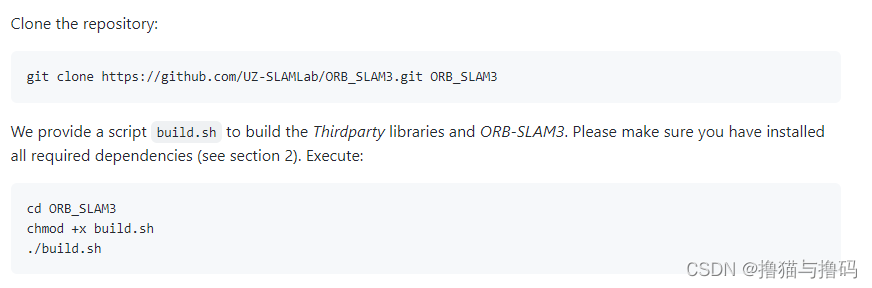
安装过程中可能会有error,往上翻日志,相关error会有记录
首先上传myvideo.mp4到ORB_SLAM3/Examples/Monocular/(参考了其他博客的,放在其它文件夹应该也可以,由于时间关系没有试)
(1)在ORB_SLAM3/Examples/Monocular/新建两个文件:myvideo.cpp myvideo.yaml
myvideo.yaml为以下内容:
%YAML:1.0

#--------------------------------------------------------------------------------------------
# Camera Parameters. Adjust them!
#--------------------------------------------------------------------------------------------
Camera.type: "PinHole"

# Camera calibration and distortion parameters (OpenCV)
Camera.fx: 614.3472290039062
Camera.fy: 613.3615112304688
Camera.cx: 314.36767578125
Camera.cy: 239.8182830810547

Camera.k1: 0.0
Camera.k2: 0.0
Camera.p1: 0.0
Camera.p2: 0.0
Camera.k3: 0.0

# Camera frames per second
Camera.fps: 30.0

# Color order of the images (0: BGR, 1: RGB. It is ignored if images are grayscale)
Camera.RGB: 1

# Camera resolution
Camera.width: 1920
Camera.height: 1080

#--------------------------------------------------------------------------------------------
# ORB Parameters
#--------------------------------------------------------------------------------------------

# ORB Extractor: Number of features per image
ORBextractor.nFeatures: 1000

# ORB Extractor: Scale factor between levels in the scale pyramid
ORBextractor.scaleFactor: 1.2

# ORB Extractor: Number of levels in the scale pyramid
ORBextractor.nLevels: 8

# ORB Extractor: Fast threshold
# Image is divided in a grid. At each cell FAST are extracted imposing a minimum response.
# Firstly we impose iniThFAST. If no corners are detected we impose a lower value minThFAST
# You can lower these values if your images have low contrast
ORBextractor.iniThFAST: 20
ORBextractor.minThFAST: 7

#--------------------------------------------------------------------------------------------
# Viewer Parameters
#--------------------------------------------------------------------------------------------
Viewer.KeyFrameSize: 0.05
Viewer.KeyFrameLineWidth: 5
Viewer.GraphLineWidth: 0.9
Viewer.PointSize:2
Viewer.CameraSize: 0.08
Viewer.CameraLineWidth: 3
Viewer.ViewpointX: 0
Viewer.ViewpointY: -0.7
Viewer.ViewpointZ: -1.8
Viewer.ViewpointF: 500
myvideo.cpp为以下内容:
//需要opencv库
#include <opencv2/opencv.hpp>

//ORB_SLAM的系统接口
#include "System.h"

#include <string>
//计算时间
#include <chrono>
#include <iostream>

using namespace std;

//
string parameterFile = "./myvideo.yaml";
string vocFile = "/home/ubuntu/cxj/ORB_SLAM3/Vocabulary/ORBvoc.bin";

//视频文件,该示例中视频文件存放在/Workspace/src/ORB_SLAM3/Examples/Monocular下
string videoFile = "./myvideo.mp4";

int main(int argc, char **argv){
        //声明ORB_SLAM3系统
        ORB_SLAM3::System SLAM(vocFile, parameterFile, ORB_SLAM3::System::MONOCULAR, true);

        //获取视频图像
        cv::VideoCapture cap(videoFile); //如果使用的是USB相机,将该参数修改成接口名称,如:0,1

        //记录系统时间
        auto start = chrono::system_clock::now();

        while(1){
                cv::Mat frame;
                cap >> frame;  //读取相机数据
                if(frame.data == nullptr)
                        break;
                cv::Mat frame_resized;
                cv::resize(frame, frame_resized, cv::Size(960,540));//运行时显示的视频的尺寸

                auto now = chrono::system_clock::now();
                auto timestamp = chrono::duration_cast<chrono::milliseconds>(now - start);
                SLAM.TrackMonocular(frame_resized, double(timestamp.count())/1000.0);
                cv::waitKey(30);
        }
        SLAM.Shutdown();
        return 0;
}
注意:我的myvideo.yaml和myvideo.mp4为相对路径,vocFile为绝对路径ORBvoc.bin(参考该链接:https://github.com/darlwen/ORB_SLAM3/blob/master/Examples/Monocular/myVideo.cpp)
string parameterFile = "./myvideo.yaml";
string vocFile = "/home/ubuntu/cxj/ORB_SLAM3/Vocabulary/ORBvoc.bin";

//视频文件,该示例中视频文件存放在/Workspace/src/ORB_SLAM3/Examples/Monocular下
string videoFile = "./myvideo.mp4";
(2)打开ORB_SLAM3/CMakeLists.txt文件,把下面的代码
add_executable(myvideo ./Examples/Monocular/myvideo.cpp)
target_link_libraries(myvideo ${PROJECT_NAME})
加入到Monocular examples这一段。(权限问题记得加sudo, 这段代码对应的是Exampls和Examples old文件夹里面的文件夹,放在哪个后面,最后编译生成的myvideo就在哪个文件夹下面)

(3)运行build
./build.sh
然后在Monocular文件夹下找到myvideo, 运行./myvideo
说明:博客内容只记录了当前的安装方式,可能会随着相关库的版本更新,会有error产生,因此建议读者多个参考。
我想为Heroku构建一个Rails3应用程序。他们使用Postgres作为他们的数据库,所以我通过MacPorts安装了postgres9.0。现在我需要一个postgresgem并且共识是出于性能原因你想要pggem。但是我对我得到的错误感到非常困惑当我尝试在rvm下通过geminstall安装pg时。我已经非常明确地指定了所有postgres目录的位置可以找到但仍然无法完成安装:$envARCHFLAGS='-archx86_64'geminstallpg--\--with-pg-config=/opt/local/var/db/postgresql90/defaultdb/po
我打算为ruby脚本创建一个安装程序,但我希望能够确保机器安装了RVM。有没有一种方法可以完全离线安装RVM并且不引人注目(通过不引人注目,就像创建一个可以做所有事情的脚本而不是要求用户向他们的bash_profile或bashrc添加一些东西)我不是要脚本本身,只是一个关于如何走这条路的快速指针(如果可能的话)。我们还研究了这个很有帮助的问题:RVM-isthereawayforsimpleofflineinstall?但有点误导,因为答案只向我们展示了如何离线在RVM中安装ruby。我们需要能够离线安装RVM本身,并查看脚本https://raw.github.com/wayn
我有一个奇怪的问题:我在rvm上安装了rubyonrails。一切正常,我可以创建项目。但是在我输入“railsnew”时重新启动后,我有“程序'rails'当前未安装。”。SystemUbuntu12.04ruby-v"1.9.3p194"gemlistactionmailer(3.2.5)actionpack(3.2.5)activemodel(3.2.5)activerecord(3.2.5)activeresource(3.2.5)activesupport(3.2.5)arel(3.0.2)builder(3.0.0)bundler(1.1.4)coffee-rails(
我刚刚为fedora安装了emacs。我想用emacs编写ruby。为ruby提供代码提示、代码完成类型功能所需的工具、扩展是什么? 最佳答案 ruby-mode已经包含在Emacs23之后的版本中。不过,它也可以通过ELPA获得。您可能感兴趣的其他一些事情是集成RVM、feature-mode(Cucumber)、rspec-mode、ruby-electric、inf-ruby、rinari(用于Rails)等。这是我当前用于Ruby开发的Emacs配置:https://github.com/citizen428/emacs
我正在尝试在我的centos服务器上安装therubyracer,但遇到了麻烦。$geminstalltherubyracerBuildingnativeextensions.Thiscouldtakeawhile...ERROR:Errorinstallingtherubyracer:ERROR:Failedtobuildgemnativeextension./usr/local/rvm/rubies/ruby-1.9.3-p125/bin/rubyextconf.rbcheckingformain()in-lpthread...yescheckingforv8.h...no***e
我的最终目标是安装当前版本的RubyonRails。我在OSXMountainLion上运行。到目前为止,这是我的过程:已安装的RVM$\curl-Lhttps://get.rvm.io|bash-sstable检查已知(我假设已批准)安装$rvmlistknown我看到当前的稳定版本可用[ruby-]2.0.0[-p247]输入命令安装$rvminstall2.0.0-p247注意:我也试过这些安装命令$rvminstallruby-2.0.0-p247$rvminstallruby=2.0.0-p247我很快就无处可去了。结果:$rvminstall2.0.0-p247Search
我实际上是在尝试使用RVM在我的OSX10.7.5上更新ruby,并在输入以下命令后:rvminstallruby我得到了以下回复:Searchingforbinaryrubies,thismighttakesometime.Checkingrequirementsforosx.Installingrequirementsforosx.Updatingsystem.......Errorrunning'requirements_osx_brew_update_systemruby-2.0.0-p247',pleaseread/Users/username/.rvm/log/138121
由于fast-stemmer的问题,我很难安装我想要的任何rubygem。我把我得到的错误放在下面。Buildingnativeextensions.Thiscouldtakeawhile...ERROR:Errorinstallingfast-stemmer:ERROR:Failedtobuildgemnativeextension./System/Library/Frameworks/Ruby.framework/Versions/2.0/usr/bin/rubyextconf.rbcreatingMakefilemake"DESTDIR="cleanmake"DESTDIR=
当我尝试安装Ruby时遇到此错误。我试过查看this和this但无济于事➜~brewinstallrubyWarning:YouareusingOSX10.12.Wedonotprovidesupportforthispre-releaseversion.Youmayencounterbuildfailuresorotherbreakages.Pleasecreatepull-requestsinsteadoffilingissues.==>Installingdependenciesforruby:readline,libyaml,makedepend==>Installingrub
当我执行>rvminstall1.9.2时一切顺利。然后我做>rvmuse1.9.2也很顺利。但是当涉及到ruby-v时..sam@sjones:~$rvminstall1.9.2/home/sam/.rvm/rubies/ruby-1.9.2-p136,thismaytakeawhiledependingonyourcpu(s)...ruby-1.9.2-p136-#fetchingruby-1.9.2-p136-#downloadingruby-1.9.2-p136,thismaytakeawhiledependingonyourconnection...%Total%Rece

 https://github.com/UZ-SLAMLab/ORB_SLAM3