yum -y install gcc gcc-c++ pcre-devel openssl-devel mysql-devel libxml2-devel patch bzip2 bzip2-devel curl-devel libjpeg libjpeg-devel libpng-devel libpng freetype freetype-devel openldap openldap-devel perl-CPAN bison ncurses-devel2、下载安装libiconvwget http://ftp.gnu.org/pub/gnu/libiconv/libiconv-1.14.tar.gz
tar xf libiconv-1.14.tar.gz
cd libiconv-1.14
./configure --prefix=/usr/local/
make && make install3、下载安装libmcrypt(mhash,mcrypt,libmcrypt是我这边线上开发要用的扩展,读者可以自行选择是否安装)wget http://sourceforge.net/projects/mcrypt/files/Libmcrypt/2.5.8/libmcrypt-2.5.8.tar.gz/download
cp /root/下载/libmcrypt-2.5.8.tar.gz . sourceforge好像不允许直接wget下载
tar xf libmcrypt-2.5.8.tar.bz2
cd libmcrypt-2.5.8
./configure
make && make install
/sbin/ldconfig
cd libltdl/
./configure --enable-ltdl-install
make &&make install4、下载安装mhashwget http://sourceforge.net/projects/mhash/files/mhash/0.9.9.9/mhash-0.9.9.9.tar.gz/download
cp /root/下载/mhash-0.9.9.9.tar.gz .
tar xf mhash-0.9.9.9.tar.bz2
cd mhash-0.9.9.9
./configure
make && make install
ln -s /usr/local/lib/libmcrypt.la /usr/lib/libmcrypt.la
ln -s /usr/local/lib/libmcrypt.so /usr/lib/libmcrypt.so
ln -s /usr/local/lib/libmcrypt.so.4 /usr/lib/libmcrypt.so.4
ln -s /usr/local/lib/libmcrypt.so.4.4.8 /usr/lib/libmcrypt.so.4.4.8
ln -s /usr/local/lib/libmhash.a /usr/lib/libmhash.a
ln -s /usr/local/lib/libmhash.la /usr/lib/libmhash.la
ln -s /usr/local/lib/libmhash.so /usr/lib/libmhash.so
ln -s /usr/local/lib/libmhash.so.2 /usr/lib/libmhash.so.2
ln -s /usr/local/lib/libmhash.so.2.0.1 /usr/lib/libmhash.so.2.0.1
ln -s /usr/local/bin/libmcrypt-config /usr/bin/libmcrypt-config5、下载安装mcryptwget http://sourceforge.net/projects/mcrypt/files/latest/download
cp /root/下载/mcrypt-2.6.8.tar.gz .
tar xf mcrypt-2.6.8.tar.gz
cd mcrypt-2.6.8
/sbin/ldconfig
./configure
make && make install6、添加Nginx运行所需的用户、组groupadd -r nginx
useradd -r -g nginx nginx7、下载解压Nginxwget http://nginx.org/download/nginx-1.4.5.tar.gz
tar xf nginx-1.4.5.tar.gz8、为了避免在http响应的时候会出现Nginx等的信息,我们在编译的时候可以稍作配置自定义一个信息!cd nginx-1.4.5/src/http/
vim ngx_http_header_filter_module.c
修改以下两行:
static char ngx_http_server_string[] = "Server: nginx" CRLF;
static char ngx_http_server_full_string[] = "Server: " NGINX_VER CRLF;
修改为:
static char ngx_http_server_string[] = "Server: XZWeb 1.0" CRLF; #XZWeb为想要显示的名称
static char ngx_http_server_full_string[] = "Server: XZWeb 1.0" NGINX_VER CRLF; #XZWeb为想要显示的名称9、编译安装Nginx./configure \
--prefix=/usr \
--sbin-path=/usr/sbin/nginx \
--conf-path=/etc/nginx/nginx.conf \
--error-log-path=/var/log/nginx/error.log \
--http-log-path=/var/log/nginx/access.log \
--pid-path=/var/run/nginx/nginx.pid \
--lock-path=/var/lock/nginx.lock \
--user=nginx \
--group=nginx \
--with-http_ssl_module \
--with-http_flv_module \
--with-http_stub_status_module \
--with-http_gzip_static_module \
--http-client-body-temp-path=/var/tmp/nginx/client/ \
--http-proxy-temp-path=/var/tmp/nginx/proxy/ \
--http-fastcgi-temp-path=/var/tmp/nginx/fcgi/ \
--http-uwsgi-temp-path=/var/tmp/nginx/uwsgi \
--http-scgi-temp-path=/var/tmp/nginx/scgi \
--with-pcre
make && make install10、编写Nginx启动脚本vim /etc/rc.d/init.d/nginx
#!/bin/sh
#
# nginx - this script starts and stops the nginx daemon
#
# chkconfig: - 85 15
# description: Nginx is an HTTP(S) server, HTTP(S) reverse \
# proxy and IMAP/POP3 proxy server
# processname: nginx
# config: /etc/nginx/nginx.conf
# config: /etc/sysconfig/nginx
# pidfile: /var/run/nginx.pid
# Source function library.
. /etc/rc.d/init.d/functions
# Source networking configuration.
. /etc/sysconfig/network
# Check that networking is up.
[ "$NETWORKING" = "no" ] && exit 0
nginx="/usr/sbin/nginx"
prog=$(basename $nginx)
NGINX_CONF_FILE="/etc/nginx/nginx.conf"
[ -f /etc/sysconfig/nginx ] && . /etc/sysconfig/nginx
lockfile=/var/lock/subsys/nginx
make_dirs() {
# make required directories
user=`nginx -V 2>&1 | grep "configure arguments:" | sed 's/[^*]*--user=\([^ ]*\).*/\1/g' -`
options=`$nginx -V 2>&1 | grep 'configure arguments:'`
for opt in $options; do
if [ `echo $opt | grep '.*-temp-path'` ]; then
value=`echo $opt | cut -d "=" -f 2`
if [ ! -d "$value" ]; then
# echo "creating" $value
mkdir -p $value && chown -R $user $value
fi
fi
done
}
start() {
[ -x $nginx ] || exit 5
[ -f $NGINX_CONF_FILE ] || exit 6
make_dirs
echo -n $"Starting $prog: "
daemon $nginx -c $NGINX_CONF_FILE
retval=$?
echo
[ $retval -eq 0 ] && touch $lockfile
return $retval
}
stop() {
echo -n $"Stopping $prog: "
killproc $prog -QUIT
retval=$?
echo
[ $retval -eq 0 ] && rm -f $lockfile
return $retval
}
restart() {
configtest || return $?
stop
sleep 1
start
}
reload() {
configtest || return $?
echo -n $"Reloading $prog: "
killproc $nginx -HUP
RETVAL=$?
echo
}
force_reload() {
restart
}
configtest() {
$nginx -t -c $NGINX_CONF_FILE
}
rh_status() {
status $prog
}
rh_status_q() {
rh_status >/dev/null 2>&1
}
case "$1" in
start)
rh_status_q && exit 0
$1
;;
stop)
rh_status_q || exit 0
$1
;;
restart|configtest)
$1
;;
reload)
rh_status_q || exit 7
$1
;;
force-reload)
force_reload
;;
status)
rh_status
;;
condrestart|try-restart)
rh_status_q || exit 0
;;
*)
echo $"Usage: $0 {start|stop|status|restart|condrestart|try-restart|reload|force-reload|configtest}"
exit 2
esac11、添加Nginx为系统服务并设置开机自启动chmod +x /etc/rc.d/init.d/nginx
chkconfig --add nginx
chkconfig nginx on12、修改Nginx配置文件,屏蔽http响应信息中的Nginx版本等信息 在http{}端添加server_tokens off;13、链接复制linux一些64位的库文件防止在安装PHP的时候报错cp -frp /usr/lib64/libjpeg.* /usr/lib
cp -frp /usr/lib64/libpng* /usr/lib
cp -frp /usr/lib64/libldap* /usr/lib
ln -s /usr/lib64/mysql/libmysqlclient.so.16.0.0 /usr/lib/libmysqlclient.so
ln -s /usr/lib/libmysqlclient.so /usr/lib64/libmysqlclient.so14、下载安装PHPwget http://cn2.php.net/get/php-5.5.9.tar.gz/from/this/mirror
tar xf php-5.5.9
cd php-5.5.9
./configure --prefix=/data/install/php --with-mysql --with-mysqli --with-iconv-dir=/usr/local --with-freetype-dir --with-jpeg-dir --with-png-dir --with-zlib --with-libxml-dir=/usr --enable-xml --disable-rpath --enable-bcmath --enable-shmop --enable-sysvsem --enable-inline-optimization --enable-mbregex --enable-fpm --enable-mbstring --with-mcrypt --with-gd --enable-gd-native-ttf --with-openssl --with-mhash --enable-pcntl --enable-sockets --with-ldap --with-ldap-sasl --with-xmlrpc --enable-zip --enable-soap --with-config-file-path=/etc --with-config-file-scan-dir=/etc/php.d --with-bz2
make ZEND_EXTRA_LIBS='-liconv'
make test
make intall15、为PHP提供配置文件cp php.ini-production /etc/php.ini16、为php-fpm提供Sysv init脚本,并将其添加至服务列表cp sapi/fpm/init.d.php-fpm /etc/rc.d/init.d/php-fpm
chmod +x /etc/rc.d/init.d/php-fpm
chkconfig --add php-fpm
chkconfig php-fpm on17、为php-fpm提供配置文件cp /usr/local/php/etc/php-fpm.conf.default /usr/local/php/etc/php-fpm.conf18、编辑php-fpm的配置文件(此处只贴一些我修改过的,具体还有哪些需要修改会在另一篇中补充)vim /usr/local/php/etc/php-fpm.conf
配置fpm的相关选项为你所需要的值,并启用pid文件(如下最后一行):
pm.max_children = 150
pm.start_servers = 8
pm.min_spare_servers = 5
pm.max_spare_servers = 10
pid = /data/install/php/var/run/php-fpm.pid19、接下来就可以启动php-fpm了service php-fpm start20、使用如下命令来验正(如果此命令输出有中几个php-fpm进程就说明启动成功了)ps -ef |grep php-fpm21、下载安装memcache扩展(PHP连接memcached服务器的扩展)cd /data/software/src/
wget http://pecl.php.net/get/memcache-2.2.7.tgz
tar xf memcache-2.2.6.tgz
cd memcache-2.2.6
/data/install/php/bin/phpize
./configure --with-php-config=/data/install/php/bin/php-config
make && make install22、下载安装xcache扩展wget http://xcache.lighttpd.net/pub/Releases/3.1.0/xcache-3.1.0.tar.gz
tar xf xcache-3.1.0.tar.gz
cd xcache-3.1.0
/data/install/php/bin/phpize
./configure --enable-xcache --with-php-config=/data/install/php/bin/php-config
make && make install23、配置PHP文件,添加扩展vim /etc/php.ini
extension_dir = "/data/install/php/lib/php/extensions/no-debug-non-zts-20121212/"
[memcache]
extension = "memcache.so"
[xcache]
extension = "xcache.so"
Xcache.size = 128M
Xcache.count = 2
Xcache.ttl = 86400
Xcache.gc_interval = 3600
Xcache.var_size = 024、查看扩展是否加载成功/data/install/php/bin/php -v #查看下xcache信息,此处先看下xcache跟zend的,其他的可以在phpinfo中查看;
#有关xcache的详细官方配置介绍 http://xcache.lighttpd.net/wiki/XcacheIni25、修改下php-fpm的配置文件,适应线上环境(此处只给出我修改的一些项目,具体还能改哪些会在后面的博文中补充)pid = /data/install/php/var/run/php-fpm.pid
error_log = /data/logs/php-fpm-error.log
log_level = notice
emergency_restart_threshold = 10
emergency_restart_interval = 1m
process_control_timeout = 5s
daemonize = yes
user = nobody
group = nobody
listen = 127.0.0.1:9000
pm.max_children = 192
pm.start_servers = 20
pm.min_spare_servers = 5
pm.max_spare_servers = 3526、配置fastcgivim /etc/nginx/fastcgi_params
fastcgi_param GATEWAY_INTERFACE CGI/1.1;
fastcgi_param SERVER_SOFTWARE nginx;
fastcgi_param QUERY_STRING $query_string;
fastcgi_param REQUEST_METHOD $request_method;
fastcgi_param CONTENT_TYPE $content_type;
fastcgi_param CONTENT_LENGTH $content_length;
fastcgi_param SCRIPT_FILENAME $document_root$fastcgi_script_name;
fastcgi_param SCRIPT_NAME $fastcgi_script_name;
fastcgi_param REQUEST_URI $request_uri;
fastcgi_param DOCUMENT_URI $document_uri;
fastcgi_param DOCUMENT_ROOT $document_root;
fastcgi_param SERVER_PROTOCOL $server_protocol;
fastcgi_param REMOTE_ADDR $remote_addr;
fastcgi_param REMOTE_PORT $remote_port;
fastcgi_param SERVER_ADDR $server_addr;
fastcgi_param SERVER_PORT $server_port;
fastcgi_param SERVER_NAME $server_name;27、重启php-fpmservice php-fpm restart28、修改Nginx配置文件,使其适合线上环境vim /etc/nginx/nginx.conf
user nobody;
worker_processes 4;
error_log /data/logs/error.log crit;
worker_cpu_affinity 0001 0010 0100 1000;
worker_rlimit_nofile 20480; #可以直接设置为65535
pid /data/logs/nginx.pid;
events {
use epoll;
worker_connections 20480; #可以直接设置成65535,注意尽量跟上面的设置统一
}
http {
include mime.types;
default_type application/octet-stream;
log_format main '$remote_addr - $remote_user [$time_local] "$request" '
'$status $body_bytes_sent "$http_referer" '
'"$http_user_agent" "$http_x_forwarded_for"';
charset utf-8;
server_tokens off;
sendfile on;
tcp_nopush on;
tcp_nodelay on;
server_names_hash_bucket_size 128;
client_header_buffer_size 4k;
large_client_header_buffers 4 4k;
client_max_body_size 8m;
keepalive_timeout 65;
fastcgi_connect_timeout 300;
fastcgi_send_timeout 300;
fastcgi_read_timeout 600;
fastcgi_buffer_size 16k;
fastcgi_buffers 16 16k;
fastcgi_busy_buffers_size 32k;
#open_file_cache max=204800 inactive=20s;
#open_file_cache_min_uses 1;
#open_file_cache_valid 30s;
gzip on;
gzip_min_length 1k;
gzip_buffers 4 16k;
gzip_comp_level 3;
gzip_types text/plain application/x-javascript text/css application/xml;
gzip_vary on;
server {
listen 80;
server_name 192.168.239.130;
#charset koi8-r;
access_log /data/logs/www.access.log main;
location / {
root /data/web;
# index index.html index.htm;
index index.php;
}
location ~ \.(js|css|jpg|png|gif)$ {
root /data/web;
expires 30d;
}
location ~ \.php$ {
root /data/web;
fastcgi_pass 127.0.0.1:9000;
fastcgi_index index.php;
#fastcgi_pass_header on;
if ( $fastcgi_script_name ~ \..*\/.*php ) {
return 403;
}
fastcgi_param SCRIPT_FILENAME $document_root$fastcgi_script_name;
include fastcgi_params;
}
# deny access to .htaccess files, if Apache's document root
# concurs with nginx's one
#
location ~ /\.ht {
deny all;
}
}
}29、重启Nginx(也可以重新reload一下配置文件)service nginx restart30、关于这篇博文的一些问题 1、有人可能会问为什么没有安装mysql的步骤呢,这里安装的只是Nginx跟PHP,一般线上很少会 PHP、Nginx、mysql同在一台服务器吧(即使就有一台服务器最好是用虚拟机的方式将不同服务安 装到不同虚拟机做业务分离),要想解决PHP安装依赖mysql某些文件的话直接yum安装mysql- devel就可以了,节省时间节省空间多好!!! 2、博文中提到的后续文章什么时候能更新?这个不好说 ,我也是菜鸟在摸索中,等我摸索好了自 然会发出来的,哈哈@_@;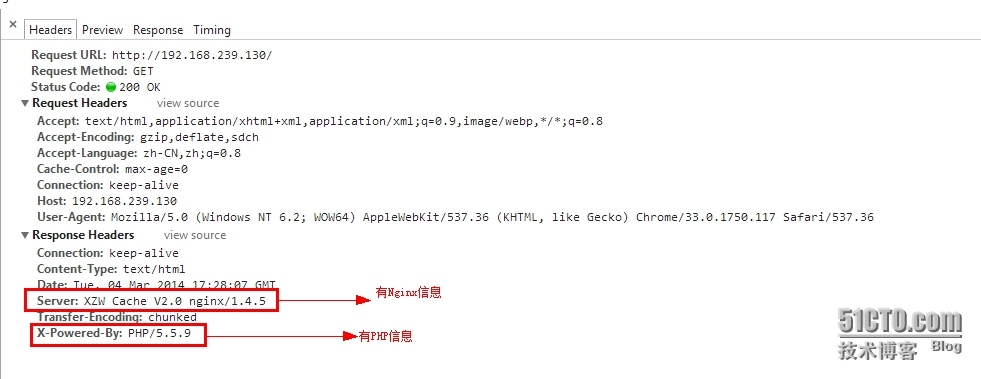 修改后
修改后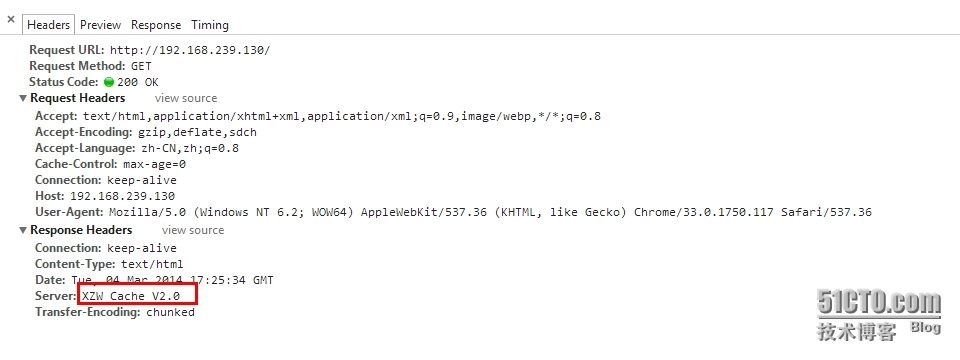 看图你们就知道我的良苦用心了吧!!!!!
29/我的瘦服务器配置了nginx,我的ROR应用程序正在它们上运行。在我发布代码更新时运行thinrestart会给我的应用程序带来一些停机时间。我试图弄清楚如何优雅地重启正在运行的Thin实例,但找不到好的解决方案。有没有人能做到这一点? 最佳答案 #Restartjustthethinserverdescribedbythatconfigsudothin-C/etc/thin/mysite.ymlrestartNginx将继续运行并代理请求。如果您将Nginx设置为使用多个上游服务器,例如server{listen80;server
我正在尝试在我的centos服务器上安装therubyracer,但遇到了麻烦。$geminstalltherubyracerBuildingnativeextensions.Thiscouldtakeawhile...ERROR:Errorinstallingtherubyracer:ERROR:Failedtobuildgemnativeextension./usr/local/rvm/rubies/ruby-1.9.3-p125/bin/rubyextconf.rbcheckingformain()in-lpthread...yescheckingforv8.h...no***e
导读语言模型给我们的生产生活带来了极大便利,但同时不少人也利用他们从事作弊工作。如何规避这些难辨真伪的文字所产生的负面影响也成为一大难题。在3月9日智源Live第33期活动「DetectGPT:判断文本是否为机器生成的工具」中,主讲人Eric为我们讲解了DetectGPT工作背后的思路——一种基于概率曲率检测的用于检测模型生成文本的工具,它可以帮助我们更好地分辨文章的来源和可信度,对保护信息真实、防止欺诈等方面具有重要意义。本次报告主要围绕其功能,实现和效果等展开。(文末点击“阅读原文”,查看活动回放。)Ericmitchell斯坦福大学计算机系四年级博士生,由ChelseaFinn和Chri
需求:要创建虚拟机,就需要给他提供一个虚拟的磁盘,我们就在/opt目录下创建一个10G大小的raw格式的虚拟磁盘CentOS-7-x86_64.raw命令格式:qemu-imgcreate-f磁盘格式磁盘名称磁盘大小qemu-imgcreate-f磁盘格式-o?1.创建磁盘qemu-imgcreate-fraw/opt/CentOS-7-x86_64.raw10G执行效果#ls/opt/CentOS-7-x86_64.raw2.安装虚拟机使用virt-install命令,基于我们提供的系统镜像和虚拟磁盘来创建一个虚拟机,另外在创建虚拟机之前,提前打开vnc客户端,在创建虚拟机的时候,通过vnc
A/ctohttp://wiki.nginx.org/CoreModule#usermaster进程曾经以root用户运行,是否可以以不同的用户运行nginxmaster进程? 最佳答案 只需以非root身份运行init脚本(即/etc/init.d/nginxstart),就可以用不同的用户运行nginxmaster进程。如果这真的是你想要做的,你将需要确保日志和pid目录(通常是/var/log/nginx&/var/run/nginx.pid)对该用户是可写的,并且您所有的listen调用都是针对大于1024的端口(因为绑定(
技术选型1,前端小程序原生MINA框架cssJavaScriptWxml2,管理后台云开发Cms内容管理系统web网页3,数据后台小程序云开发云函数云开发数据库(基于MongoDB)云存储4,人脸识别算法基于百度智能云实现人脸识别一,用户端效果图预览老规矩我们先来看效果图,如果效果图符合你的需求,就继续往下看,如果不符合你的需求,可以跳过。1-1,登录注册页可以看到登录页有注册入口,注册页如下我们的注册,需要管理员审核,审核通过后才可以正常登录使用小程序1-2,个人中心页登录成功以后,我们会进入个人中心页我们在个人中心页可以注册人脸,因为我们做人脸识别签到,需要先注册人脸才可以进行人脸比对,进
按照目前的情况,这个问题不适合我们的问答形式。我们希望答案得到事实、引用或专业知识的支持,但这个问题可能会引发辩论、争论、投票或扩展讨论。如果您觉得这个问题可以改进并可能重新打开,visitthehelpcenter指导。关闭9年前。我来自C、php和bash背景,很容易学习,因为它们都有相同的C结构,我可以将其与我已经知道的联系起来。然后2年前我学了Python并且学得很好,Python对我来说比Ruby更容易学。然后从去年开始,我一直在尝试学习Ruby,然后是Rails,我承认,直到现在我还是学不会,讽刺的是那些打着简单易学的烙印,但是对于我这样一个老练的程序员来说,我只是无法将它
我有带有gemwebsocket-rails0.7的Rails3.2应用程序。在开发机上,一切正常在生产环境中,我使用Nginx/1.6作为代理服务器,Unicorn作为http服务器。Thin用于独立模式(在https://github.com/websocket-rails/websocket-rails/wiki/Standalone-Server-Mode之后)。nginx配置:location/websocket{proxy_passhttp://localhost:3001/websocket;proxy_http_version1.1;proxy_set_headerUp
只是想更新到最新版本的Ruby。在ruby-lang.org/en/documentation/installation/#homebrew上,我发现你应该可以通过自制软件来完成:brewinstallruby但是,当我在“更新”后列出ruby版本(ruby-v)时,它仍然是旧版本2.0.0。Hermes:~Sancho$ruby-vruby2.0.0p481(2014-05-08revision45883)[universal.x86_64-darwin13]我碰巧列出了/usr/local/bin/的内容,我可以看到一个符号链接(symboliclink):ruby->..
Nginx在生产中的重要性通常基于它为慢速客户端提供服务的能力;在RESTfulAPI的设置中,它似乎是生产堆栈的一个不必要的层,尤其是Puma(不像广泛使用的unicorn可以处理nginx工作)。Pumacanallowmultipleslowclientstoconnectwithoutrequiringaworkertobeblockedontherequesttransaction.Becauseofthis,Pumahandlesslowclientsgracefully.HerokurecommendsPumaforuseinscenarioswhereyouexpect
