FTP作为日常工作学习中,非常重要的一个文件传输存储空间,想必大家都非常的熟悉了,那么如何快速的实现文件的上传下载功能呢,本文以一个简单的小例子,简述如何通过FluentFTP实现文件的上传和下载功能。仅供学习分享使用,如有不足之处,还请指正。
文件传输协议(File Transfer Protocol,FTP)是用于在网络上进行文件传输的一套标准协议,它工作在 OSI 模型的第七层, TCP 模型的第四层, 即应用层, 使用 TCP 传输而不是 UDP, 客户在和服务器建立连接前要经过一个“三次握手”的过程, 保证客户与服务器之间的连接是可靠的, 而且是面向连接, 为数据传输提供可靠保证。FTP允许用户以文件操作的方式(如文件的增、删、改、查、传送等)与另一主机相互通信。然而, 用户并不真正登录到自己想要存取的计算机上面而成为完全用户, 可用FTP程序访问远程资源, 实现用户往返传输文件、目录管理以及访问电子邮件等等, 即使双方计算机可能配有不同的操作系统和文件存储方式。
在windows操作系统中,FTP可以通过(Internet Inforamtion Services, IIS)管理器进行创建,创建成功后即可进行查看,如下所示:

FluentFTP是一款基于.Net的FTP和FTPS的客户端动态库,操作简单便捷。
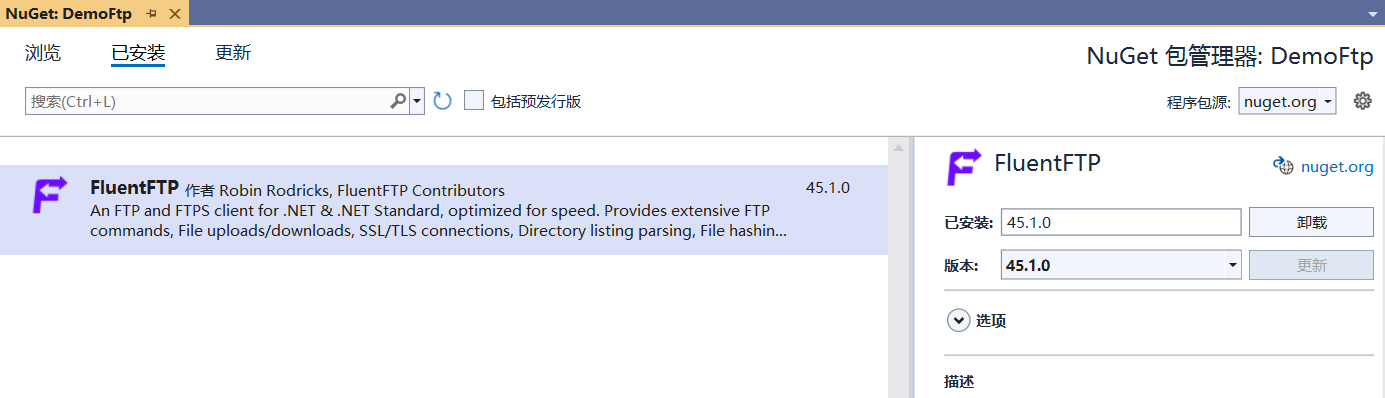
首先创建基于.Net Framework 4.6.1的winform应用程序,然后通过Nuget包管理器进行安装,如下所示:
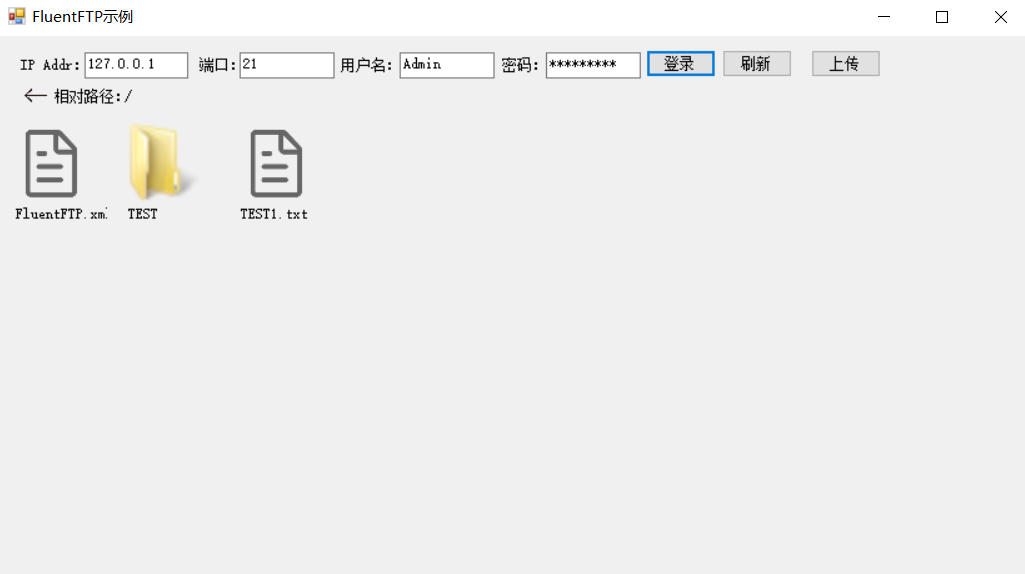
主要实现基于FTP的上传,下载,浏览等功能,如下所示:
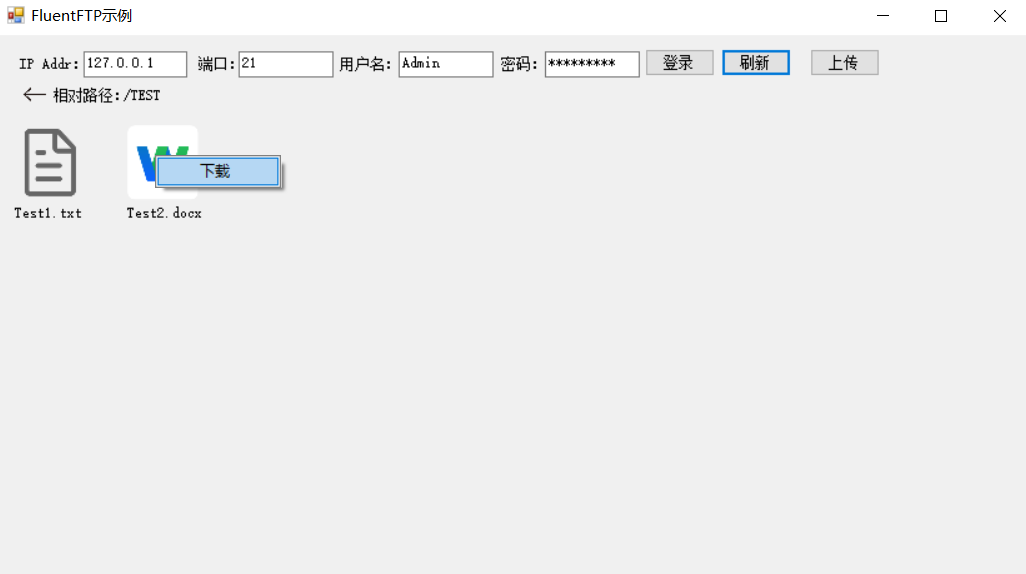
进入文件夹及右键下载,如下所示:
FtpHelper类源码,封装了FTP文件的检索,上传,下载等功能,如下所示:
  1 using System;
  2 using System.Collections.Generic;
  3 using System.IO;
  4 using System.Linq;
  5 using System.Net;
  6 using System.Text;
  7 using System.Threading;
  8 using System.Threading.Tasks;
  9 using FluentFTP;
 10
 11 namespace DemoFtp
 12 {
 13     public class FtpHelper
 14     {
 15         #region 属性与构造函数
 16
 17         /// <summary>
 18         /// IP地址
 19         /// </summary>
 20         public string IpAddr { get; set; }
 21
 22         /// <summary>
 23         /// 相对路径
 24         /// </summary>
 25         public string RelatePath { get; set; }
 26
 27         /// <summary>
 28         /// 端口号
 29         /// </summary>
 30         public int Port { get; set; }
 31
 32         /// <summary>
 33         /// 用户名
 34         /// </summary>
 35         public string UserName { get; set; }
 36
 37         /// <summary>
 38         /// 密码
 39         /// </summary>
 40         public string Password { get; set; }
 41
 42         public FtpHelper()
 43         {
 44
 45         }
 46
 47         public FtpHelper(string ipAddr, int port, string userName, string password, string relatePath)
 48         {
 49             this.IpAddr = ipAddr;
 50             this.Port = port;
 51             this.UserName = userName;
 52             this.Password = password;
 53             this.RelatePath = relatePath;
 54         }
 55
 56         #endregion
 57
 58         #region 方法
 59
 60         public FtpListItem[] ListDir() {
 61             FtpListItem[] lists;
 62             using (var ftpClient = new FtpClient(this.IpAddr, this.UserName, this.Password, this.Port))
 63             {
 64                 ftpClient.Connect();
 65                 ftpClient.SetWorkingDirectory(this.RelatePath);
 66                 lists = ftpClient.GetListing();
 67             }
 68             return lists;
 69         }
 70
 71         public void UpLoad(string dir, string file, out bool isOk)
 72         {
 73             isOk = false;
 74             FileInfo fi = new FileInfo(file);
 75             using (FileStream fs = fi.OpenRead())
 76             {
 77                 //long length = fs.Length;
 78                 using (var ftpClient = new FtpClient(this.IpAddr, this.UserName, this.Password, this.Port))
 79                 {
 80                     ftpClient.Connect();
 81                     ftpClient.SetWorkingDirectory(this.RelatePath);
 82                     string remotePath = dir + "/" + Path.GetFileName(file);
 83                     var ftpRemodeExistsMode = file.EndsWith(".txt") ? FtpRemoteExists.Overwrite : FtpRemoteExists.Skip;
 84                     FtpStatus status = ftpClient.UploadStream(fs, remotePath, ftpRemodeExistsMode, true);
 85                     isOk = status == FtpStatus.Success;
 86
 87                 }
 88             }
 89
 90         }
 91
 92         /// <summary>
 93         /// 上传多个文件
 94         /// </summary>
 95         /// <param name="files"></param>
 96         /// <param name="isOk"></param>
 97         public void UpLoad(string dir, string[] files, out bool isOk)
 98         {
 99             isOk = false;
100             if (CheckDirIsExists(dir))
101             {
102                 foreach (var file in files)
103                 {
104                     UpLoad(dir, file, out isOk);
105                 }
106             }
107         }
108
109
110         private bool CheckDirIsExists(string dir)
111         {
112             bool flag = false;
113             using (var ftpClient = new FtpClient(this.IpAddr, this.UserName, this.Password, this.Port))
114             {
115                 ftpClient.Connect();
116                 ftpClient.SetWorkingDirectory(this.RelatePath);
117                 flag = ftpClient.DirectoryExists(dir);
118                 if (!flag)
119                 {
120                     flag = ftpClient.CreateDirectory(dir);
121                 }
122             }
123             return flag;
124
125
126         }
127
128         /// <summary>
129         /// 下载ftp
130         /// </summary>
131         /// <param name="localAddress"></param>
132         /// <param name="remoteAddress"></param>
133         /// <returns></returns>
134         public bool DownloadFile(string localAddress, string remoteAddress)
135         {
136             using (var ftpClient = new FtpClient(this.IpAddr, this.UserName, this.Password, this.Port))
137             {
138                 ftpClient.SetWorkingDirectory("/");
139                 ftpClient.Connect();
140                 if (ftpClient.DownloadFile(localAddress, remoteAddress) == FtpStatus.Success)
141                 {
142                     return true;
143                 }
144                 return false;
145             }
146         }
147
148         #endregion
149     }
150 }
每一个FTP文件或文件夹,由一个自定义用户控件【PictureBox+Label+ContextMenu】表示,这样便于处理与显示:
 1 using DemoFtp.Properties;
 2 using FluentFTP;
 3 using System;
 4 using System.Collections.Generic;
 5 using System.ComponentModel;
 6 using System.Data;
 7 using System.Drawing;
 8 using System.IO;
 9 using System.Linq;
10 using System.Text;
11 using System.Threading.Tasks;
12 using System.Windows.Forms;
13
14 namespace DemoFtp
15 {
16     public partial class FtpElementControl : UserControl
17     {
18         public Action<FtpListItem> SubFolderClick;
19
20         public Action<FtpListItem> DownLoadClick;
21
22         private FtpListItem ftpListItem;
23
24         public FtpElementControl(FtpListItem ftpListItem)
25         {
26             InitializeComponent();
27             this.ftpListItem = ftpListItem;
28         }
29
30         public FtpElementControl()
31         {
32             InitializeComponent();
33         }
34
35         public void InitControl()
36         {
37             if (ftpListItem.Type == FtpObjectType.Directory)
38             {
39                 this.pbIcon.Image = Resources.folder.ToBitmap();
40             }
41             else if (ftpListItem.Type == FtpObjectType.File)
42             {
43                 var name = ftpListItem.Name;
44                 var ext = Path.GetExtension(name).ToLower().Substring(1);
45                 if (ext == "png" || ext == "jpeg" || ext == "jpg" || ext == "bmp" || ext == "gif")
46                 {
47                     this.pbIcon.Image = Resources.pictures.ToBitmap();
48                 }
49                 else if (ext == "doc" || ext == "docx")
50                 {
51                     this.pbIcon.Image = Resources.doc.ToBitmap();
52                 }
53                 else if (ext == "exe")
54                 {
55                     this.pbIcon.Image = Resources.setup.ToBitmap();
56                 }
57                 else
58                 {
59                     this.pbIcon.Image = Resources.file;
60                 }
61             }
62             else
63             {
64                 this.pbIcon.Image = Resources.file;
65             }
66             this.lblName.Text = ftpListItem.Name;
67         }
68
69         private void FtpElementControl_Load(object sender, EventArgs e)
70         {
71
72         }
73
74         /// <summary>
75         /// 子菜单下载功能
76         /// </summary>
77         /// <param name="sender"></param>
78         /// <param name="e"></param>
79         private void menu_ItemClicked(object sender, ToolStripItemClickedEventArgs e)
80         {
81             this.DownLoadClick?.Invoke(ftpListItem);
82         }
83
84         /// <summary>
85         /// 双击打开
86         /// </summary>
87         /// <param name="sender"></param>
88         /// <param name="e"></param>
89         private void pbIcon_DoubleClick(object sender, EventArgs e)
90         {
91             this.SubFolderClick?.Invoke(ftpListItem);
92         }
93     }
94 }
主页面由一系列用户操作框和按钮组成,完成对FTP的基本操作,如下所示:
  1 using FluentFTP;
  2 using System;
  3 using System.Collections.Generic;
  4 using System.ComponentModel;
  5 using System.Data;
  6 using System.Drawing;
  7 using System.IO;
  8 using System.Linq;
  9 using System.Text;
 10 using System.Threading.Tasks;
 11 using System.Windows.Forms;
 12
 13 namespace DemoFtp
 14 {
 15     public partial class MainForm : Form
 16     {
 17         private FtpHelper ftpHelper;
 18
 19         public MainForm()
 20         {
 21             InitializeComponent();
 22         }
 23
 24         private void btnLogin_Click(object sender, EventArgs e)
 25         {
 26             var url = txtFtpUrl.Text;
 27             var userName = txtUserName.Text;
 28             var password = txtPassword.Text;
 29             var port = txtPort.Text;
 30             if (this.lblRelatePath.Text != "/")
 31             {
 32                 this.lblRelatePath.Text = "/";
 33             }
 34             var relatePath = this.lblRelatePath.Text;
 35             if (string.IsNullOrEmpty(url) || string.IsNullOrEmpty(userName) || string.IsNullOrEmpty(password) || string.IsNullOrEmpty(port))
 36             {
 37                 MessageBox.Show("路径和账号密码不可为空");
 38                 return;
 39             }
 40             if (ftpHelper == null)
 41             {
 42                 ftpHelper = new FtpHelper(url, int.Parse(port), userName, password, relatePath);
 43
 44             }
 45             ListDir();
 46         }
 47
 48         public void SubFolder(FtpListItem ftpListItem)
 49         {
 50             if (ftpListItem.Type == FtpObjectType.Directory)
 51             {
 52                 var fullName = ftpListItem.FullName;
 53                 ftpHelper.RelatePath = fullName;
 54                 ListDir();
 55                 this.lblRelatePath.Text = fullName;
 56             }
 57         }
 58
 59
 60         private void Download(FtpListItem ftpListItem) {
 61             var fullName=ftpListItem.FullName;
 62             var fileName = Path.GetFileName(fullName);
 63             SaveFileDialog sfd = new SaveFileDialog();
 64             sfd.FileName = fileName;
 65             sfd.Title = "不载";
 66             sfd.Filter = "所有文档|*.*";
 67             if (DialogResult.OK == sfd.ShowDialog()) {
 68                 ftpHelper.DownloadFile(sfd.FileName, fullName);
 69             }
 70         }
 71
 72         private void ListDir()
 73         {
 74             this.ftpContainer.Controls.Clear();
 75             var ftpListItems = this.ftpHelper.ListDir();
 76             if (ftpListItems != null && ftpListItems.Length > 0)
 77             {
 78                 foreach (var ftpListItem in ftpListItems)
 79                 {
 80                     FtpElementControl ftpControl = new FtpElementControl(ftpListItem);
 81                     ftpControl.InitControl();
 82                     ftpControl.DownLoadClick += Download;
 83                     ftpControl.SubFolderClick += SubFolder;
 84                     this.ftpContainer.Controls.Add(ftpControl);
 85                 }
 86             }
 87         }
 88
 89         private void btnUpload_Click(object sender, EventArgs e)
 90         {
 91             OpenFileDialog ofd = new OpenFileDialog();
 92             ofd.Filter = "所有文件|*.*";
 93             ofd.Title = "请选择需要上传的文件";
 94             if (DialogResult.OK == ofd.ShowDialog()) {
 95                 var localFile=ofd.FileName;
 96                 ftpHelper.UpLoad(this.lblRelatePath.Text, localFile, out bool isOk);
 97                 if (isOk) {
 98                     ListDir();
 99                 }
100             }
101         }
102
103         private void pbReturn_Click(object sender, EventArgs e)
104         {
105             var relativePath=this.lblRelatePath.Text;
106             if (relativePath == "/") {
107                 return;
108             }
109             relativePath = relativePath.Substring(0, relativePath.LastIndexOf("/")+1);
110             ftpHelper.RelatePath=relativePath;
111             ListDir();
112             this.lblRelatePath.Text = relativePath;
113         }
114     }
115 }
以上就是基于FluentFTP实现FTP上传下载的全部内容,旨在抛砖引玉,共同学习,一起进步。
我正在编写一个小脚本来定位aws存储桶中的特定文件,并创建一个临时验证的url以发送给同事。(理想情况下,这将创建类似于在控制台上右键单击存储桶中的文件并复制链接地址的结果)。我研究过回形针,它似乎不符合这个标准,但我可能只是不知道它的全部功能。我尝试了以下方法:defauthenticated_url(file_name,bucket)AWS::S3::S3Object.url_for(file_name,bucket,:secure=>true,:expires=>20*60)end产生这种类型的结果:...-1.amazonaws.com/file_path/file.zip.A
我发现ActiveRecord::Base.transaction在复杂方法中非常有效。我想知道是否可以在如下事务中从AWSS3上传/删除文件:S3Object.transactiondo#writeintofiles#raiseanexceptionend引发异常后,每个操作都应在S3上回滚。S3Object这可能吗?? 最佳答案 虽然S3API具有批量删除功能,但它不支持事务,因为每个删除操作都可以独立于其他操作成功/失败。该API不提供任何批量上传功能(通过PUT或POST),因此每个上传操作都是通过一个独立的API调用完成的
我有一个用户工厂。我希望默认情况下确认用户。但是鉴于unconfirmed特征,我不希望它们被确认。虽然我有一个基于实现细节而不是抽象的工作实现,但我想知道如何正确地做到这一点。factory:userdoafter(:create)do|user,evaluator|#unwantedimplementationdetailshereunlessFactoryGirl.factories[:user].defined_traits.map(&:name).include?(:unconfirmed)user.confirm!endendtrait:unconfirmeddoenden
当我尝试安装Ruby时遇到此错误。我试过查看this和this但无济于事➜~brewinstallrubyWarning:YouareusingOSX10.12.Wedonotprovidesupportforthispre-releaseversion.Youmayencounterbuildfailuresorotherbreakages.Pleasecreatepull-requestsinsteadoffilingissues.==>Installingdependenciesforruby:readline,libyaml,makedepend==>Installingrub
如何在ruby中调用C#dll? 最佳答案 我能想到几种可能性:为您的DLL编写(或找人编写)一个COM包装器,如果它还没有,则使用Ruby的WIN32OLE库来调用它;看看RubyCLR,其中一位作者是JohnLam,他继续在Microsoft从事IronRuby方面的工作。(估计不会再维护了,可能不支持.Net2.0以上的版本);正如其他地方已经提到的,看看使用IronRuby,如果这是您的技术选择。有一个主题是here.请注意,最后一篇文章实际上来自JohnLam(看起来像是2009年3月),他似乎很自在地断言RubyCL
我正在尝试在Ruby中复制Convert.ToBase64String()行为。这是我的C#代码:varsha1=newSHA1CryptoServiceProvider();varpasswordBytes=Encoding.UTF8.GetBytes("password");varpasswordHash=sha1.ComputeHash(passwordBytes);returnConvert.ToBase64String(passwordHash);//returns"W6ph5Mm5Pz8GgiULbPgzG37mj9g="当我在Ruby中尝试同样的事情时,我得到了相同sha
只是想确保我理解了事情。据我目前收集到的信息,Cucumber只是一个“包装器”,或者是一种通过将事物分类为功能和步骤来组织测试的好方法,其中实际的单元测试处于步骤阶段。它允许您根据事物的工作方式组织您的测试。对吗? 最佳答案 有点。它是一种组织测试的方式,但不仅如此。它的行为就像最初的Rails集成测试一样,但更易于使用。这里最大的好处是您的session在整个Scenario中保持透明。关于Cucumber的另一件事是您(应该)从使用您的代码的浏览器或客户端的角度进行测试。如果您愿意,您可以使用步骤来构建对象和设置状态,但通常您
我有带有Logo图像的公司模型has_attached_file:logo我用他们的Logo创建了许多公司。现在,我需要添加新样式has_attached_file:logo,:styles=>{:small=>"30x15>",:medium=>"155x85>"}我是否应该重新上传所有旧数据以重新生成新样式?我不这么认为……或者有什么rake任务可以重新生成样式吗? 最佳答案 参见Thumbnail-Generation.如果rake任务不适合你,你应该能够在控制台中使用一个片段来调用重新处理!关于相关公司
我在Rails应用程序中使用CarrierWave/Fog将视频上传到AmazonS3。有没有办法判断上传的进度,让我可以显示上传进度如何? 最佳答案 CarrierWave和Fog本身没有这种功能;你需要一个前端uploader来显示进度。当我不得不解决这个问题时,我使用了jQueryfileupload因为我的堆栈中已经有jQuery。甚至还有apostonCarrierWaveintegration因此您只需按照那里的说明操作即可获得适用于您的应用的进度条。 关于ruby-on-r
华为OD机试题本篇题目:明明的随机数题目输入描述输出描述:示例1输入输出说明代码编写思路最近更新的博客华为od2023|什么是华为od,od薪资待遇,od机试题清单华为OD机试真题大全,用Python解华为机试题|机试宝典【华为OD机试】全流程解析+经验分享,题型分享,防作弊指南华为o
