1.背景知识:
git clone https://github.com/Chia-Network/chia-blockchain.git -b main --recurse-submodules

cd chia-blockchain

sh install.sh

. ./activate

chia init

chia start node
chia start wallet
3)安装CAT admin tool
sudo apt-get install -y build-essential python3-dev
git clone https://github.com/Chia-Network/CAT-admin-tool.git -b main --recurse-submodules
cd CAT-admin-tool
python3 -m venv venv
. ./venv/bin/activate
pip install .
pip install chia-dev-tools --no-deps
pip install pytest
3.1) 确认安装:cats --help
cats --help
Usage: cats [OPTIONS]

Options:
  -l, --tail TEXT            The TAIL program to launch this CAT with
                             [required]

  -c, --curry TEXT           An argument to curry into the TAIL
  -s, --solution TEXT        The solution to the TAIL program  [default: ();
                             required]

  -t, --send-to TEXT         The address these CATs will appear at once they
                             are issued  [required]

  -a, --amount INTEGER       The amount to issue in mojos (regular XCH will be
                             used to fund this)  [required]

  -m, --fee INTEGER          The XCH fee to use for this issuance  [default:
                             0; required]

  -f, --fingerprint INTEGER  The wallet fingerprint to use as funds
  -sig, --signature TEXT     A signature to aggregate with the transaction
  -as, --spend TEXT          An additional spend to aggregate with the
                             transaction

  -b, --as-bytes             Output the spend bundle as a sequence of bytes
                             instead of JSON

  -sc, --select-coin         Stop the process once a coin from the wallet has
                             been selected and return the coin

  --help                     Show this message and exit.
cdv --help:
 cdv --help
Usage: cdv [OPTIONS] COMMAND [ARGS]...

  Dev tooling for Chia development

Options:
  --version   Show the version and exit.
  -h, --help  Show this message and exit.

Commands:
  clsp     Commands to use when developing with chialisp
  decode   Decode a bech32m address to a puzzle hash
  encode   Encode a puzzle hash to a bech32m address
  hash     SHA256 hash UTF-8 strings or bytes (use 0x prefix for bytes)
  inspect  Inspect various data structures
  rpc      Make RPC requests to a Chia full node
  test     Run the local test suite (located in ./tests)
如果执行命令如上图显示,表示安装成功了!
4)确保钱包里有足够的xch(如果没有xch到 catsfounder 的 XCH Faucet 获取一些),准备工作完成,下面我们开始铸币
5)single-mint CAT(这是一种一次性铸造的货币,比如现在我铸造的数量是100,以后我想扩展数量到1万是不行的)
直接上代码:
cats --tail /root/CAT-admin-tool/reference_tails/genesis_by_coin_id.clsp.hex --send-to xch1n9a6juhyzhdfqrerl88qr7q5paxapfaeuptfug43xytf9ke3pcdsxqz5mq --amount 10000 -m 1000 --as-bytes --select-coin -f 345372340

--coin id:
--0676c170b12efc1e3bf05a0cd44318d9cf93dd11f93f2d762f40d868ac51b395

cats --tail /root/CAT-admin-tool/reference_tails/genesis_by_coin_id.clsp.hex --send-to xch1n9a6juhyzhdfqrerl88qr7q5paxapfaeuptfug43xytf9ke3pcdsxqz5mq --amount 10000 -m 1000 --as-bytes -f 345372340 --curry 0x0676c170b12efc1e3bf05a0cd44318d9cf93dd11f93f2d762f40d868ac51b395

--弹出是否发布到full node 输入(注意前提是full node 是synced状态): yes

--Asset ID: 6661d443c742055835e055c3ddd9c4f516086f261005fcd98a32711ef5e4c6b5
各参数解释及注意事项:
你接收新货币的地址:--send-to xch1n9a6juhyzhdfqrerl88qr7q5paxapfaeuptfug43xytf9ke3pcdsxqz5mq
铸造的数量(单位mojos):--amount 10000
手续费用(单位mojos): -m 1000
你钱包的指纹 : -f 345372340
coin id:执行完cats --tail 后的结果,后面的语句要带上这个coinid
注意 --curry 后面的coinid要加上 "0x"
0x0676c170b12efc1e3bf05a0cd44318d9cf93dd11f93f2d762f40d868ac51b395
最终我们要的就是Assert ID
Assert ID:6661d443c742055835e055c3ddd9c4f516086f261005fcd98a32711ef5e4c6b5
6) 在钱包里面添加我们刚刚的新币
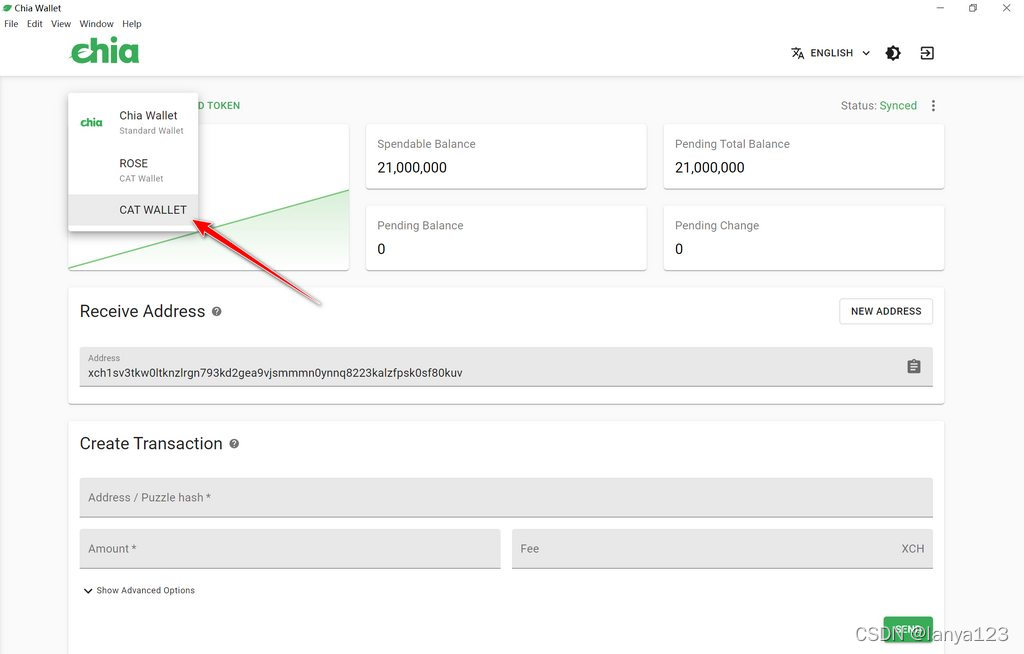
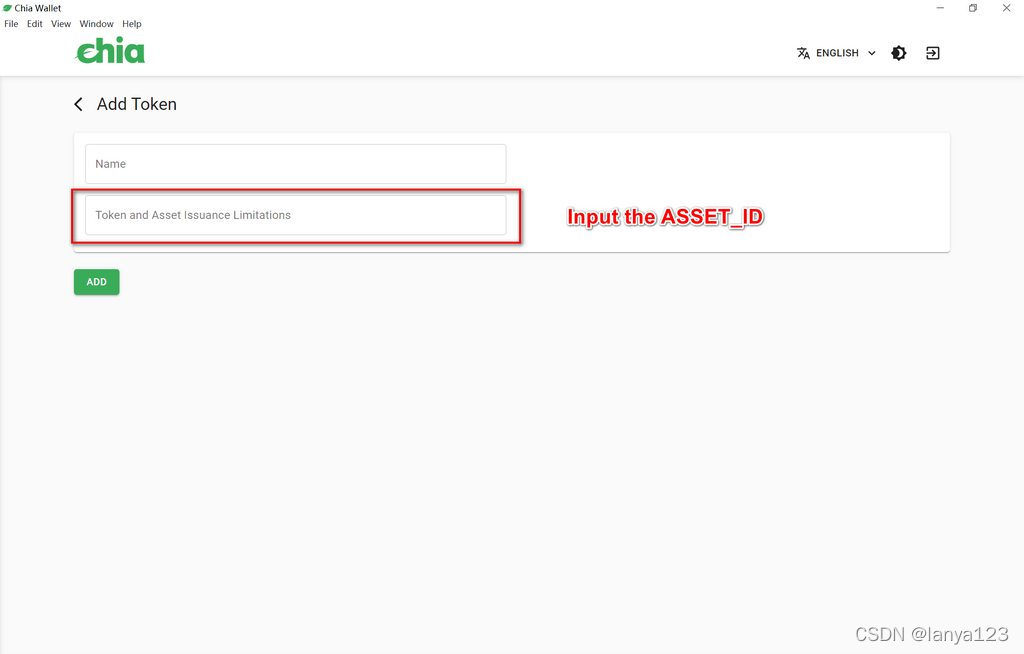
3.开放的在线工具(适合小白用户)
3.1 CATs Founder
如果我想创建自己的Chia Assert Token,但没有任何编程基础,我该如何创建它?不用担心,CATs Founder 已经开启了CAT发行功能,用户可以轻松在线创建Chia资产代币(CAT)。
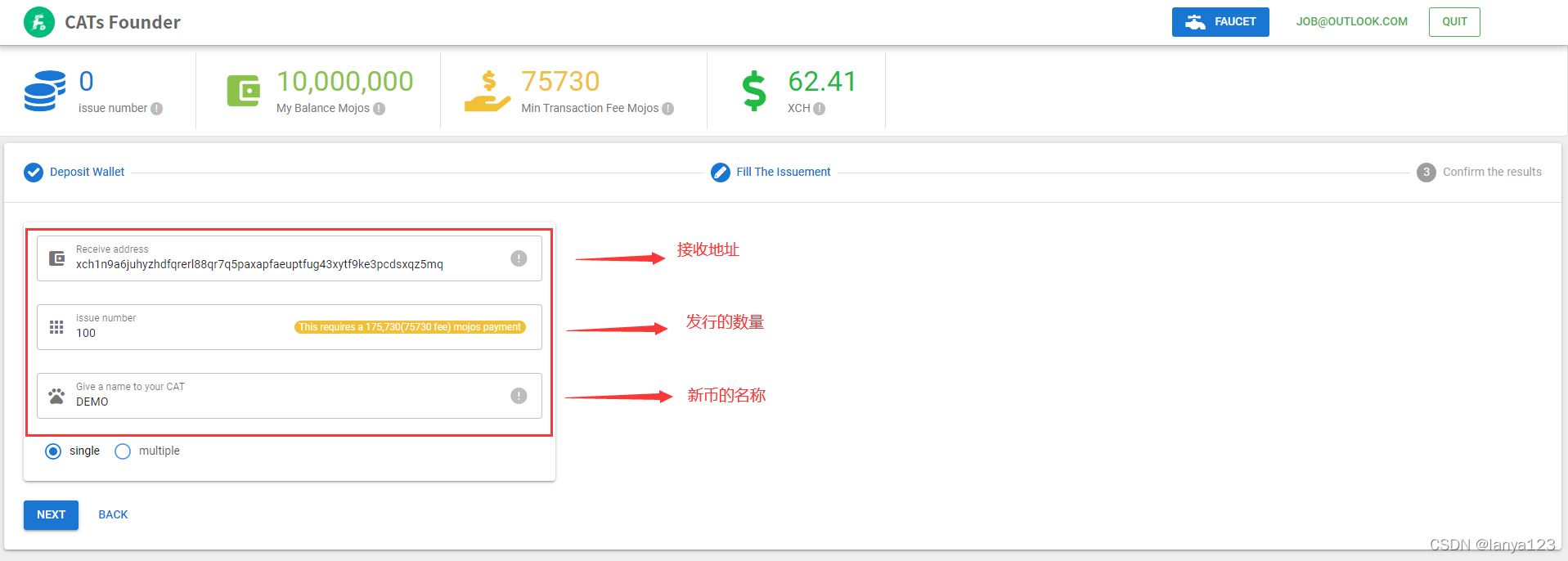
填写接收地址,发行数量,币种名称
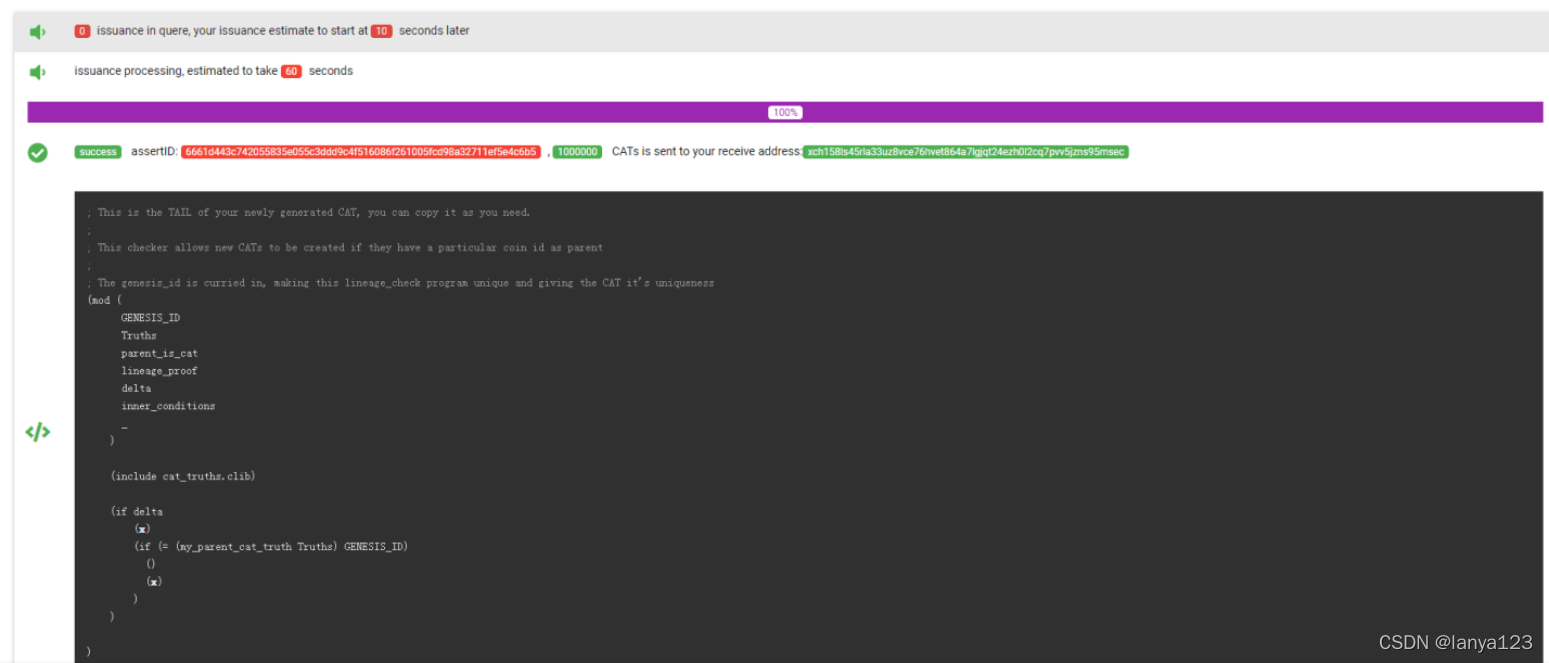
发行成功后可以看到Assert ID
3.2 把Assert ID添加到钱包(同之前chia钱包添加新币的操作 这里省略)
3.3 linux环境下添加Assert ID
chia wallet add_token -id 6661d443c742055835e055c3ddd9c4f516086f261005fcd98a32711ef5e4c6b5 -n CFD -f 345372340参数介绍
Usage: chia wallet add_token [OPTIONS]

Options:
  -wp, --wallet-rpc-port INTEGER  Set the port where the Wallet is hosting the
                                  RPC interface. See the rpc_port under wallet
                                  in config.yaml

  -id, --asset-id TEXT            The Asset ID of the coin you wish to
                                  add/rename (the treehash of the TAIL
                                  program)  [required]

  -n, --token-name TEXT           The name you wish to designate to the token
  -f, --fingerprint INTEGER       The wallet fingerprint you wish to add the
                                  token to

  -h, --help                      Show this message and exit.
最后我们执行 chia wallet show 查看一下新币是否到账
chia wallet show

Wallet height: 1834731
Sync status: Synced
Balances, fingerprint: 345372340
Wallet ID 1 type STANDARD_WALLET Chia Wallet
   -Total Balance: 3.173013e-05 xch (31730130 mojo)
   -Pending Total Balance: 3.173013e-05 xch (31730130 mojo)
   -Spendable: 3.173013e-05 xch (31730130 mojo)
Wallet ID 2 type CAT CFD
   -Total Balance: 1000000.0  (1000000000 mojo)
   -Pending Total Balance: 1000000.0  (1000000000 mojo)
   -Spendable: 1000000.0  (1000000000 mojo)
可以看到 Wallet ID 2 type CAT CFD 就是我们新铸造的代币了
注意事项:
1) 发行之前一定要确保钱包里面有足够的余额mojos
2) 小编亲自试过目前是不需要发行费用的,但以后不保证平台是否会收费
3) 如果这篇文章帮助到你,请给小编点赞吧~
出于纯粹的兴趣,我很好奇如何按顺序创建PI,而不是在过程结果之后生成数字,而是让数字在过程本身生成时显示。如果是这种情况,那么数字可以自行产生,我可以对以前看到的数字实现垃圾收集,从而创建一个无限系列。结果只是在Pi系列之后每秒生成一个数字。这是我通过互联网筛选的结果:这是流行的计算机友好算法,类机器算法:defarccot(x,unity)xpow=unity/xn=1sign=1sum=0loopdoterm=xpow/nbreakifterm==0sum+=sign*(xpow/n)xpow/=x*xn+=2sign=-signendsumenddefcalc_pi(digits
关闭。这个问题是opinion-based.它目前不接受答案。想要改进这个问题?更新问题,以便editingthispost可以用事实和引用来回答它.关闭4年前。Improvethisquestion我想在固定时间创建一系列低音和高音调的哔哔声。例如:在150毫秒时发出高音调的蜂鸣声在151毫秒时发出低音调的蜂鸣声200毫秒时发出低音调的蜂鸣声250毫秒的高音调蜂鸣声有没有办法在Ruby或Python中做到这一点?我真的不在乎输出编码是什么(.wav、.mp3、.ogg等等),但我确实想创建一个输出文件。
使用带有Rails插件的vim,您可以创建一个迁移文件,然后一次性打开该文件吗?textmate也可以这样吗? 最佳答案 你可以使用rails.vim然后做类似的事情::Rgeneratemigratonadd_foo_to_bar插件将打开迁移生成的文件,这正是您想要的。我不能代表textmate。 关于ruby-使用VimRails,您可以创建一个新的迁移文件并一次性打开它吗?,我们在StackOverflow上找到一个类似的问题: https://sta
我对最新版本的Rails有疑问。我创建了一个新应用程序(railsnewMyProject),但我没有脚本/生成,只有脚本/rails,当我输入ruby./script/railsgeneratepluginmy_plugin"Couldnotfindgeneratorplugin.".你知道如何生成插件模板吗?没有这个命令可以创建插件吗?PS:我正在使用Rails3.2.1和ruby1.8.7[universal-darwin11.0] 最佳答案 随着Rails3.2.0的发布,插件生成器已经被移除。查看变更日志here.现在
如何使用RSpec::Core::RakeTask初始化RSpecRake任务?require'rspec/core/rake_task'RSpec::Core::RakeTask.newdo|t|#whatdoIputinhere?endInitialize函数记录在http://rubydoc.info/github/rspec/rspec-core/RSpec/Core/RakeTask#initialize-instance_method没有很好的记录;它只是说:-(RakeTask)initialize(*args,&task_block)AnewinstanceofRake
关闭。这个问题需要detailsorclarity.它目前不接受答案。想改进这个问题吗?通过editingthispost添加细节并澄清问题.关闭8年前。Improvethisquestion为什么SecureRandom.uuid创建一个唯一的字符串?SecureRandom.uuid#=>"35cb4e30-54e1-49f9-b5ce-4134799eb2c0"SecureRandom.uuid方法创建的字符串从不重复?
我正在阅读SandiMetz的POODR,并且遇到了一个我不太了解的编码原则。这是代码:classBicycleattr_reader:size,:chain,:tire_sizedefinitialize(args={})@size=args[:size]||1@chain=args[:chain]||2@tire_size=args[:tire_size]||3post_initialize(args)endendclassMountainBike此代码将为其各自的属性输出1,2,3,4,5。我不明白的是查找方法。当一辆山地自行车被实例化时,因为它没有自己的initialize方法
我正在尝试按0-9和a-z的顺序创建数字和字母列表。我有一组值value_array=['0','1','2','3','4','5','6','7','8','9','a','b','光盘','e','f','g','h','i','j','k','l','m','n','o','p','q','r','s','','u','v','w','x','y','z']和一个组合列表的数组,按顺序,这些数字可以产生x个字符,比方说三个list_array=[]和一个当前字母和数字组合的数组(在将它插入列表数组之前我会把它变成一个字符串,]current_combo['0','0','0']
这篇文章是继上一篇文章“Observability:从零开始创建Java微服务并监控它(一)”的续篇。在上一篇文章中,我们讲述了如何创建一个Javaweb应用,并使用Filebeat来收集应用所生成的日志。在今天的文章中,我来详述如何收集应用的指标,使用APM来监控应用并监督web服务的在线情况。源码可以在地址 https://github.com/liu-xiao-guo/java_observability 进行下载。摄入指标指标被视为可以随时更改的时间点值。当前请求的数量可以改变任何毫秒。你可能有1000个请求的峰值,然后一切都回到一个请求。这也意味着这些指标可能不准确,你还想提取最小/
我正在尝试在Rails上安装ruby,到目前为止一切都已安装,但是当我尝试使用rakedb:create创建数据库时,我收到一个奇怪的错误:dyld:lazysymbolbindingfailed:Symbolnotfound:_mysql_get_client_infoReferencedfrom:/Library/Ruby/Gems/1.8/gems/mysql2-0.3.11/lib/mysql2/mysql2.bundleExpectedin:flatnamespacedyld:Symbolnotfound:_mysql_get_client_infoReferencedf
