本篇文章主要讲的是:在Springboot环境下,利用JAVA环境操作索引,集成SpringBoot等相关知识
开发工具,这里选择的是IDEA 2019.2,构建Maven工程等一堆通用操作,不清楚的自行百度。
我这边选择 elasticsearch-rest-high-level-client 方式来集成,发现这有个坑,开始没注意,踩了好久,就是要排除掉 elasticsearch、elasticsearch-rest-client ,这里没有选择 spring-boot-starter-data-elasticsearch ,因为最新版的 starter 现在依然是6.x版本号,并没有集成 elasticsearch7.4.0,导致使用过程中有很多版本冲突,读者在选择的时候多加留意。
<dependency>
    <groupId>org.elasticsearch.client</groupId>
    <artifactId>elasticsearch-rest-high-level-client</artifactId>
    <version>7.4.0</version>
    <exclusions>
        <exclusion>
            <groupId>org.elasticsearch</groupId>
            <artifactId>elasticsearch</artifactId>
        </exclusion>
        <exclusion>
            <groupId>org.elasticsearch.client</groupId>
            <artifactId>elasticsearch-rest-client</artifactId>
        </exclusion>
    </exclusions>
</dependency>
<dependency>
    <groupId>org.elasticsearch.client</groupId>
    <artifactId>elasticsearch-rest-client</artifactId>
    <version>7.4.0</version>
</dependency>
<dependency>
    <groupId>org.elasticsearch</groupId>
    <artifactId>elasticsearch</artifactId>
    <version>7.4.0</version>
</dependency>server:
port: 9090
spring:
datasource:
name: mysql
type: com.alibaba.druid.pool.DruidDataSource
driver-class-name: com.mysql.cj.jdbc.Driver
url: jdbc:mysql://127.0.0.1:3306/springboot?useUnicode=true&characterEncoding=utf8&useSSL=false&serverTimezone=UTC
username: root
password: 123456
druid:
initial-size: 5
min-idle: 5
max-active: 20
max-wait: 30000
time-between-eviction-runs-millis: 60000
min-evictable-idle-time-millis: 300000
validation-query: select 1
test-while-idle: true
test-on-borrow: false
test-on-return: false
pool-prepared-statements: false
max-pool-prepared-statement-per-connection-size: 20
connectionProperties: druid.stat.mergeSql=true;druid.stat.slowSqlMillis=6000
es:
host: 192.168.147.132
port: 9200
scheme: http
mybatis:
mapperLocations: classpath:mapper/**/*.xml这里定义 es 节点下即 elasticsearch 的地址端口信息,修改为自己的即可。
为了规范索引管理,这里将所有的操作都封装成一个基类,实现对索引的增删改查。同时还集成了对数据的单个以及批量的插入以及删除。避免针对每个索引都自己写一套实现,杜绝代码的冗余,同时这样的集成对代码的结构本身也是低侵入性。
package xyz.wongs.weathertop.base.dao;

import com.alibaba.fastjson.JSON;
import lombok.extern.slf4j.Slf4j;
import org.elasticsearch.action.admin.indices.delete.DeleteIndexRequest;
import org.elasticsearch.action.bulk.BulkRequest;
import org.elasticsearch.action.delete.DeleteRequest;
import org.elasticsearch.action.index.IndexRequest;
import org.elasticsearch.action.search.SearchRequest;
import org.elasticsearch.action.search.SearchResponse;
import org.elasticsearch.action.support.IndicesOptions;
import org.elasticsearch.client.RequestOptions;
import org.elasticsearch.client.RestHighLevelClient;
import org.elasticsearch.client.indices.CreateIndexRequest;
import org.elasticsearch.client.indices.CreateIndexResponse;
import org.elasticsearch.client.indices.GetIndexRequest;
import org.elasticsearch.common.settings.Settings;
import org.elasticsearch.common.xcontent.XContentType;
import org.elasticsearch.index.query.QueryBuilder;
import org.elasticsearch.index.reindex.DeleteByQueryRequest;
import org.elasticsearch.search.SearchHit;
import org.elasticsearch.search.builder.SearchSourceBuilder;
import org.springframework.beans.factory.annotation.Autowired;
import org.springframework.stereotype.Component;
import sun.rmi.runtime.Log;
import xyz.wongs.weathertop.base.entiy.Ela1tity;

import java.util.ArrayList;
import java.util.Collection;
import java.util.List;

@Slf4j
@Component
public class BaseElasticDao {

    @Autowired
    RestHighLevelClient restHighLevelClient;

    /**
     * @author wuKeFan
     * @See
     * @date 2019/10/17 17:30
     * @param idxName   索引名称
     * @param idxSQL    索引描述
     * @return void
     * @throws
     * @since
     */
    public void createIndex(String idxName,String idxSQL){

        try {

            if (!this.indexExist(idxName)) {
                log.error(" idxName={} 已经存在,idxSql={}",idxName,idxSQL);
                return;
            }
            CreateIndexRequest request = new CreateIndexRequest(idxName);
            buildSetting(request);
            request.mapping(idxSQL, XContentType.JSON);
            //request.settings() 手工指定Setting
            CreateIndexResponse res = restHighLevelClient.indices().create(request, RequestOptions.DEFAULT);
            if (!res.isAcknowledged()) {
                throw new RuntimeException("初始化失败");
            }
        } catch (Exception e) {
            e.printStackTrace();
            System.exit(0);
        }
    }

    /** 断某个index是否存在
     * @author wuKeFan
     * @See
     * @date 2019/10/17 17:27
     * @param idxName index名
     * @return boolean
     * @throws
     * @since
     */
    public boolean indexExist(String idxName) throws Exception {
        GetIndexRequest request = new GetIndexRequest(idxName);
        request.local(false);
        request.humanReadable(true);
        request.includeDefaults(false);

        request.indicesOptions(IndicesOptions.lenientExpandOpen());
        return restHighLevelClient.indices().exists(request, RequestOptions.DEFAULT);
    }

    /** 设置分片
     * @author wuKeFan
     * @See
     * @date 2019/10/17 19:27
     * @param request
     * @return void
     * @throws
     * @since
     */
    public void buildSetting(CreateIndexRequest request){

        request.settings(Settings.builder().put("index.number_of_shards",3)
                .put("index.number_of_replicas",2));
    }
    /**
     * @author wuKeFan
     * @See
     * @date 2019/10/17 17:27
     * @param idxName index
     * @param entity    对象
     * @return void
     * @throws
     * @since
     */
    public void insertOrUpdateOne(String idxName, ElasticEntity entity) {

        IndexRequest request = new IndexRequest(idxName);
        request.id(entity.getId());
        request.source(JSON.toJSONString(entity.getData()), XContentType.JSON);
        try {
            restHighLevelClient.index(request, RequestOptions.DEFAULT);
        } catch (Exception e) {
            throw new RuntimeException(e);
        }
    }


    /** 批量插入数据
     * @author wuKeFan
     * @See
     * @date 2019/10/17 17:26
     * @param idxName index
     * @param list 带插入列表
     * @return void
     * @throws
     * @since
     */
    public void insertBatch(String idxName, List<ElasticEntity> list) {

        BulkRequest request = new BulkRequest();
        list.forEach(item -> request.add(new IndexRequest(idxName).id(item.getId())
                .source(JSON.toJSONString(item.getData()), XContentType.JSON)));
        try {
            restHighLevelClient.bulk(request, RequestOptions.DEFAULT);
        } catch (Exception e) {
            throw new RuntimeException(e);
        }
    }

    /** 批量删除
     * @author wuKeFan
     * @See
     * @date 2019/10/17 17:14
     * @param idxName index
     * @param idList    待删除列表
     * @return void
     * @throws
     * @since
     */
    public <T> void deleteBatch(String idxName, Collection<T> idList) {

        BulkRequest request = new BulkRequest();
        idList.forEach(item -> request.add(new DeleteRequest(idxName, item.toString())));
        try {
            restHighLevelClient.bulk(request, RequestOptions.DEFAULT);
        } catch (Exception e) {
            throw new RuntimeException(e);
        }
    }

    /**
     * @author wuKeFan
     * @See
     * @date 2019/10/17 17:14
     * @param idxName index
     * @param builder   查询参数
     * @param c 结果类对象
     * @return java.util.List<T>
     * @throws
     * @since
     */
    public <T> List<T> search(String idxName, SearchSourceBuilder builder, Class<T> c) {

        SearchRequest request = new SearchRequest(idxName);
        request.source(builder);
        try {
            SearchResponse response = restHighLevelClient.search(request, RequestOptions.DEFAULT);
            SearchHit[] hits = response.getHits().getHits();
            List<T> res = new ArrayList<>(hits.length);
            for (SearchHit hit : hits) {
                res.add(JSON.parseObject(hit.getSourceAsString(), c));
            }
            return res;
        } catch (Exception e) {
            throw new RuntimeException(e);
        }
    }

    /** 删除index
     * @author wuKeFan
     * @See
     * @date 2019/10/17 17:13
     * @param idxName
     * @return void
     * @throws
     * @since
     */
    public void deleteIndex(String idxName) {
        try {
            if (!this.indexExist(idxName)) {
                log.error(" idxName={} 已经存在",idxName);
                return;
            }
            restHighLevelClient.indices().delete(new DeleteIndexRequest(idxName), RequestOptions.DEFAULT);
        } catch (Exception e) {
            throw new RuntimeException(e);
        }
    }


    /**
     * @author wuKeFan
     * @See
     * @date 2019/10/17 17:13
     * @param idxName
     * @param builder
     * @return void
     * @throws
     * @since
     */
    public void deleteByQuery(String idxName, QueryBuilder builder) {

        DeleteByQueryRequest request = new DeleteByQueryRequest(idxName);
        request.setQuery(builder);
        //设置批量操作数量,最大为10000
        request.setBatchSize(10000);
        request.setConflicts("proceed");
        try {
            restHighLevelClient.deleteByQuery(request, RequestOptions.DEFAULT);
        } catch (Exception e) {
            throw new RuntimeException(e);
        }
    }
}
通过以上的集成,我们看到完成在项目中对 elasticsearch 的集成,同时也用基类,将所有可能的操作都封装起来。下来我们通过对基类的讲解,来逐个说明!
由于在BaseElasticDao类中createIndex方法,我在Controller层将索引名称和索引SQL封装过,详细见Github演示源码 中xyz.wongs.weathertop.palant.vo.IdxVo
我们在创建索引过程中需要先判断是否有这个索引,否则不允许创建,由于我案例采用的是手动指定indexName和Settings,大家看的过程中要特别注意下,而且还有一点indexName必须是小写,如果是大写在创建过程中会有错误
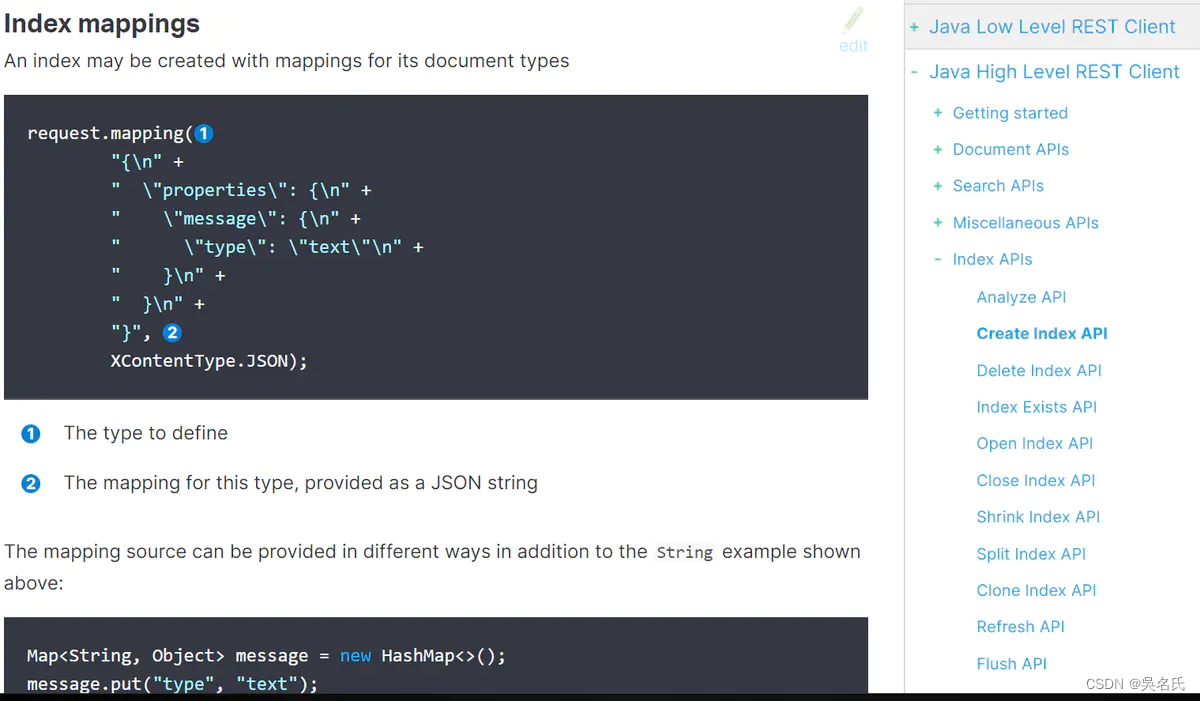

详细的代码实现见如下:
/**
    * @Description 创建Elastic索引
    * @param idxVo
    * @return xyz.wongs.weathertop.base.message.response.ResponseResult
    * @throws
    * @date 2019/11/19 11:07
    */
@RequestMapping(value = "/createIndex",method = RequestMethod.POST)
public ResponseResult createIndex(@RequestBody IdxVo idxVo){
    ResponseResult response = new ResponseResult();
    try {
        //索引不存在,再创建,否则不允许创建
        if(!baseElasticDao.indexExist(idxVo.getIdxName())){
            String idxSql = JSONObject.toJSONString(idxVo.getIdxSql());
            log.warn(" idxName={}, idxSql={}",idxVo.getIdxName(),idxSql);
            baseElasticDao.createIndex(idxVo.getIdxName(),idxSql);
        } else{
            response.setStatus(false);
            response.setCode(ResponseCode.DUPLICATEKEY_ERROR_CODE.getCode());
            response.setMsg("索引已经存在,不允许创建");
        }
    } catch (Exception e) {
        response.setStatus(false);
        response.setCode(ResponseCode.ERROR.getCode());
        response.setMsg(ResponseCode.ERROR.getMsg());
    }
    return response;
}创建索引需要设置分片,这里采用Settings.Builder方式,当然也可以JSON自定义方式,本文篇幅有限,不做演示。查看xyz.wongs.weathertop.base.service.BaseElasticService.buildSetting方法,这里是默认值。
index.number_of_shards:分片数
number_of_replicas:副本数
/** 设置分片
    * @author wuKeFan
    * @See
    * @date 2019/10/17 19:27
    * @param request
    * @return void
    * @throws
    * @since
    */
public void buildSetting(CreateIndexRequest request){
    request.settings(Settings.builder().put("index.number_of_shards",3)
            .put("index.number_of_replicas",2));
}这时候我们通过Postman工具调用Controller,发现创建索引成功。
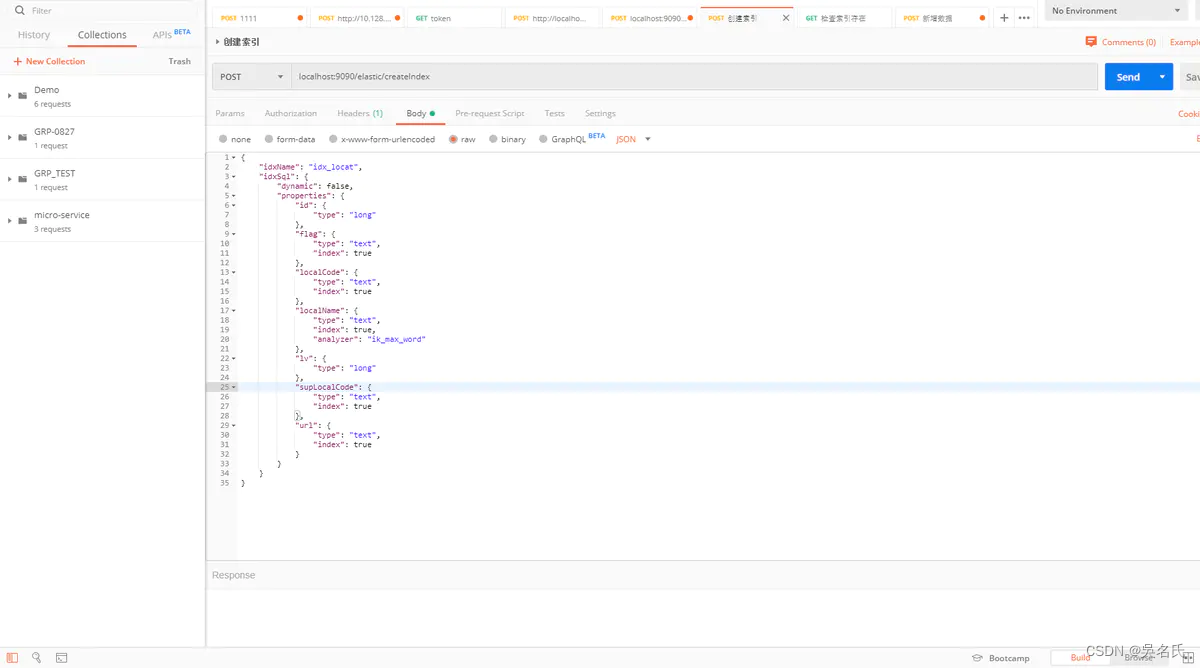
再命令行执行curl -H "Content-Type: application/json" -X GET "http://localhost:9200/_cat/indices?v",效果如图:
[elastic@localhost elastic]$ curl -H "Content-Type: application/json" -X GET "http://localhost:9200/_cat/indices?v"
health status index        uuid                   pri rep docs.count docs.deleted store.size pri.store.size
yellow open   twitter      scSSD1SfRCio4F77Hh8aqQ   3   2          2            0      8.3kb          8.3kb
yellow open   idx_location _BJ_pOv0SkS4tv-EC3xDig   3   2          1            0        4kb            4kb
yellow open   wongs        uT13XiyjSW-VOS3GCqao8w   3   2          1            0      3.4kb          3.4kb
yellow open   idx_locat    Kr3wGU7JT_OUrRJkyFSGDw   3   2          3            0     13.2kb         13.2kb
yellow open   idx_copy_to  HouC9s6LSjiwrJtDicgY3Q   3   2          1            0        4kb            4kb
说明创建成功,这里总是通过命令行来验证,有点繁琐,既然我都有WEB服务,为什么不直接通过HTTP验证了?
我们写一个对外以HTTP+GET方式对外提供查询的服务。存在为TRUE,否则False.
/**
    * @Description 判断索引是否存在;存在-TRUE,否则-FALSE
    * @param index
    * @return xyz.wongs.weathertop.base.message.response.ResponseResult
    * @throws
    * @date 2019/11/19 18:48
    */
@RequestMapping(value = "/exist/{index}")
public ResponseResult indexExist(@PathVariable(value = "index") String index){

    ResponseResult response = new ResponseResult();
    try {
        if(!baseElasticDao.isExistsIndex(index)){
            log.error("index={},不存在",index);
            response.setCode(ResponseCode.RESOURCE_NOT_EXIST.getCode());
            response.setMsg(ResponseCode.RESOURCE_NOT_EXIST.getMsg());
        } else {
            response.setMsg(" 索引已经存在, " + index);
        }
    } catch (Exception e) {
        response.setCode(ResponseCode.NETWORK_ERROR.getCode());
        response.setMsg(" 调用ElasticSearch 失败!");
        response.setStatus(false);
    }
    return response;
}删除的逻辑就比较简单,这里就不多说。
/** 删除index
    * @author wuKeFan
    * @See
    * @date 2019/10/17 17:13
    * @param idxName
    * @return void
    * @throws
    * @since
    */
public void deleteIndex(String idxName) {
    try {
        if (!this.indexExist(idxName)) {
            log.error(" idxName={} 已经存在",idxName);
            return;
        }
        restHighLevelClient.indices().delete(new DeleteIndexRequest(idxName), RequestOptions.DEFAULT);
    } catch (Exception e) {
        throw new RuntimeException(e);
    }
}一、SpringBoot集成Elasticsearch7.4 实战(一)
二、SpringBoot集成Elasticsearch7.4 实战(二)
三、SpringBoot集成Elasticsearch7.4 实战(三)
我在app/helpers/sessions_helper.rb中有一个帮助程序文件,其中包含一个方法my_preference,它返回当前登录用户的首选项。我想在集成测试中访问该方法。例如,这样我就可以在测试中使用getuser_path(my_preference)。在其他帖子中,我读到这可以通过在测试文件中包含requiresessions_helper来实现,但我仍然收到错误NameError:undefinedlocalvariableormethod'my_preference'.我做错了什么?require'test_helper'require'sessions_hel
我一直很高兴地使用DelayedJob习惯用法:foo.send_later(:bar)这会调用DelayedJob进程中对象foo的方法bar。我一直在使用DaemonSpawn在我的服务器上启动DelayedJob进程。但是...如果foo抛出异常,Hoptoad不会捕获它。这是任何这些包中的错误...还是我需要更改某些配置...或者我是否需要在DS或DJ中插入一些异常处理来调用Hoptoad通知程序?回应下面的第一条评论。classDelayedJobWorker 最佳答案 尝试monkeypatchingDelayed::W
前置步骤我们都操作完了,这篇开始介绍jenkins的集成。话不多说,看操作1、登录进入jenkins后会让你选择安装插件,选择第一个默认的就行。安装完成后设置账号密码,重新登录。2、配置JDK和Git都需要执行路径,所以需要先把执行路径找到,先进入服务器的docker容器,2.1JDK的路径root@69eef9ee86cf:/usr/bin#echo$JAVA_HOME/usr/local/openjdk-82.2Git的路径root@69eef9ee86cf:/#whichgit/usr/bin/git3、先配置JDK和Git。点击:ManageJenkins>>GlobalToolCon
@作者:SYFStrive @博客首页:HomePage📜:微信小程序📌:个人社区(欢迎大佬们加入)👉:社区链接🔗📌:觉得文章不错可以点点关注👉:专栏连接🔗💃:感谢支持,学累了可以先看小段由小胖给大家带来的街舞👉微信小程序(🔥)目录自定义组件-behaviors 1、什么是behaviors 2、behaviors的工作方式 3、创建behavior 4、导入并使用behavior 5、behavior中所有可用的节点 6、同名字段的覆盖和组合规则总结最后自定义组件-behaviors 1、什么是behaviorsbehaviors是小程序中,用于实现
不知何故,我似乎无法获得包含我的聚合的响应...使用curl它按预期工作:HBZUMB01$curl-XPOST"http://localhost:9200/contents/_search"-d'{"size":0,"aggs":{"sport_count":{"value_count":{"field":"dwid"}}}}'我收到回复:{"took":4,"timed_out":false,"_shards":{"total":5,"successful":5,"failed":0},"hits":{"total":90,"max_score":0.0,"hits":[]},"a
三分钟集成Tap防沉迷SDK(Unity版)一、SDK介绍基于国家对上线所有游戏必须增加防沉迷功能的政策下,TapTap推出防沉迷SDK,供游戏开发者进行接入;允许未成年用户在周五、六、日以及法定节假日晚上8:00-9:00进行游戏,防沉谜时间段进入游戏会弹窗进行提示!开发环境要求:Unity2019.4或更高版本iOS10或更高版本Android5.0(APIlevel21)或更高版本🔗Unity集成Demo参考链接🔗UnityTapSDK功能体验APK下载链接二、集成前准备1.创建应用进入开发者后台,按照提示开始创建应用;2.开通服务在使用TDS实名认证和防沉迷服务之前,需要在上面创建的应
1.回顾.TransportServicepublicclassTransportServiceextendsAbstractLifecycleComponentTransportService:方法:1publicfinalTextendsTransportResponse>voidsendRequest(finalTransport.Connectionconnection,finalStringaction,finalTransportRequestrequest,finalTransportRequestOptionsoptions,TransportResponseHandlerT>
我被这个难住了。到目前为止教程中的一切都进行得很顺利,但是当我将这段代码添加到我的/spec/requests/users_spec.rb文件中时,事情开始变得糟糕:describe"success"doit"shouldmakeanewuser"dolambdadovisitsignup_pathfill_in"Name",:with=>"ExampleUser"fill_in"Email",:with=>"ryan@example.com"fill_in"Password",:with=>"foobar"fill_in"Confirmation",:with=>"foobar"cl
我有一个Rails应用程序,现在设置了ElasticSearch和Tiregem以在模型上进行搜索,我想知道我应该如何设置我的应用程序以对模型中的某些索引进行模糊字符串匹配。我将我的模型设置为索引标题、描述等内容,但我想对其中一些进行模糊字符串匹配,但我不确定在何处进行此操作。如果您想发表评论,我将在下面包含我的代码!谢谢!在Controller中:defsearch@resource=Resource.search(params[:q],:page=>(params[:page]||1),:per_page=>15,load:true)end在模型中:classResource'Us
我需要一些指导来了解如何将Angular整合到rails中。选择Rails的原因:我喜欢他们偏执的做事方式。还有迁移,gem真的很酷。使用angular的原因:我正在研究和寻找最适合SPA的框架。Backbone似乎太抽象了。我不得不在Angular和Ember之间做出选择。我首先开始阅读Angular,它对我来说很有意义。所以我从来没有去读过关于ember的文章。使用Angular和Rails的原因:我研究并尝试使用小型框架,例如grape、slim(是的,我也使用php)。但我觉得需要坚持项目的长期范围。我个人喜欢用Rails的方式做事。这就是我需要帮助的地方,我在Rails4中有
