1、elasticsearch集群启用SSL
编辑所有elasticsearch节点 elasticsearch/config/elasticsearch.yml 配置文件新增以下内容:
vi elasticsearch.yml

xpack.security.enabled: true
xpack.security.transport.ssl.enabled: true
xpack.security.transport.ssl.verification_mode: certificate
xpack.security.transport.ssl.keystore.path: certs/elastic-certificates.p12
xpack.security.transport.ssl.truststore.path: certs/elastic-certificates.p12
2、生成证书
注意:如果是在docker中部署的,需要进入到容器中进行操作
生成的证书默认都在 /usr/share/elasticsearch 目录下:
cd /usr/share/elasticsearch/bin
 ./elasticsearch-certutil cert -out /usr/share/elasticsearch/elastic-certificates.p12 -pass ""

WARNING: An illegal reflective access operation has occurred
WARNING: Illegal reflective access by org.bouncycastle.jcajce.provider.drbg.DRBG (file:/home/estestuser/elasticsearch-7.1.1/lib/tools/security-cli/bcprov-jdk15on-1.61.jar) to constructor sun.security.provider.Sun()
WARNING: Please consider reporting this to the maintainers of org.bouncycastle.jcajce.provider.drbg.DRBG
WARNING: Use --illegal-access=warn to enable warnings of further illegal reflective access operations
WARNING: All illegal access operations will be denied in a future release
This tool assists you in the generation of X.509 certificates and certificate
signing requests for use with SSL/TLS in the Elastic stack.

The 'cert' mode generates X.509 certificate and private keys.
    * By default, this generates a single certificate and key for use
       on a single instance.
    * The '-multiple' option will prompt you to enter details for multiple
       instances and will generate a certificate and key for each one
    * The '-in' option allows for the certificate generation to be automated by describing
       the details of each instance in a YAML file

    * An instance is any piece of the Elastic Stack that requires a SSL certificate.
      Depending on your configuration, Elasticsearch, Logstash, Kibana, and Beats
      may all require a certificate and private key.
    * The minimum required value for each instance is a name. This can simply be the
      hostname, which will be used as the Common Name of the certificate. A full
      distinguished name may also be used.
    * A filename value may be required for each instance. This is necessary when the
      name would result in an invalid file or directory name. The name provided here
      is used as the directory name (within the zip) and the prefix for the key and
      certificate files. The filename is required if you are prompted and the name
      is not displayed in the prompt.
    * IP addresses and DNS names are optional. Multiple values can be specified as a
      comma separated string. If no IP addresses or DNS names are provided, you may
      disable hostname verification in your SSL configuration.

    * All certificates generated by this tool will be signed by a certificate authority (CA).
    * The tool can automatically generate a new CA for you, or you can provide your own with the
         -ca or -ca-cert command line options.

By default the 'cert' mode produces a single PKCS#12 output file which holds:
    * The instance certificate
    * The private key for the instance certificate
    * The CA certificate

If you specify any of the following options:
    * -pem (PEM formatted output)
    * -keep-ca-key (retain generated CA key)
    * -multiple (generate multiple certificates)
    * -in (generate certificates from an input file)
then the output will be be a zip file containing individual certificate/key files


Certificates written to /home/estestuser/elasticsearch-7.1.1/config/elastic-certificates.p12

This file should be properly secured as it contains the private key for
your instance.

This file is a self contained file and can be copied and used 'as is'
For each Elastic product that you wish to configure, you should copy
this '.p12' file to the relevant configuration directory
and then follow the SSL configuration instructions in the product guide.
查看是否成功生成证书
ls -l /usr/share/elasticsearch/elastic-*
-rw------- 1 root root 3596 May 27 05:58 /usr/share/elasticsearch/elastic-certificates.p12
-rw------- 1 root root 2672 May 27 05:53 /usr/share/elasticsearch/elastic-stack-ca.p12
把这两个证书移动到 /usr/share/elasticsearch/config/certs(elasticsearch.yml同级目录下) 目录里
mkdir /usr/share/elasticsearch/config/certs
mv /usr/share/elasticsearch/elastic-* /usr/share/elasticsearch/config/certs
另外,需要注意修改证书的权限
生成的elastic-certificates.p12文件拷贝到每个节点的/usr/share/elasticsearch/config/certs目录下
3、重启 ES 集群
ES 集群不启动,下面的添加密码操作执行不了,所以依次重启 3 个节点。首先重启节点 1。
ps -ef|grep elasticsearch
kill -9 pid

bin/elasticsearch -d
依次重启节点 2 和节点 3。
4、创建 Elasticsearch 集群密码
在主节点 上执行如下命令,设置用户密码。设置完之后,数据会自动同步到其他节点。
bin/elasticsearch-setup-passwords interactive 设置密码
bin/elasticsearch-setup-passwords auto 自动生成密码
[root@wecity elasticsearch-7.1.1]$ bin/elasticsearch-setup-passwords interactive

Initiating the setup of passwords for reserved users elastic,apm_system,kibana,logstash_system,beats_system,remote_monitoring_user.
You will be prompted to enter passwords as the process progresses.
Please confirm that you would like to continue [y/N]y


Enter password for [elastic]:
Reenter password for [elastic]:
Enter password for [apm_system]:
Reenter password for [apm_system]:
Enter password for [kibana]:
Reenter password for [kibana]:
Enter password for [logstash_system]:
Reenter password for [logstash_system]:
Enter password for [beats_system]:
Reenter password for [beats_system]:
Enter password for [remote_monitoring_user]:
Reenter password for [remote_monitoring_user]:
Changed password for user [apm_system]
Changed password for user [kibana]
Changed password for user [logstash_system]
Changed password for user [beats_system]
Changed password for user [remote_monitoring_user]
Changed password for user [elastic]
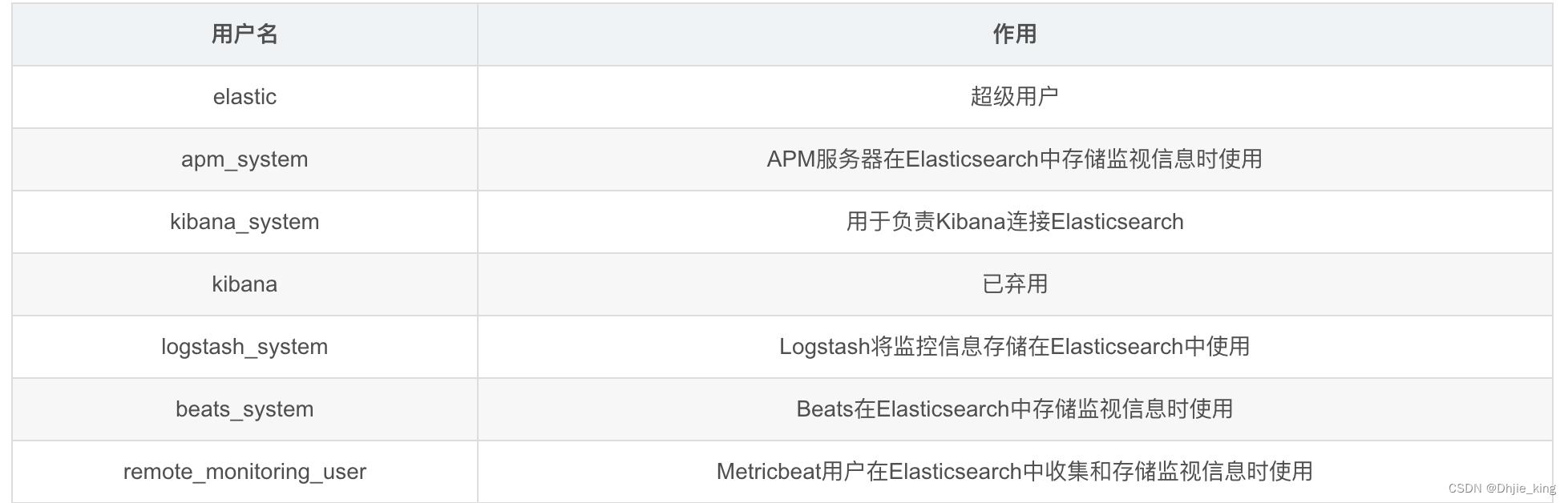
5、访问验证
 curl http://localhost:9200
{"error":{"root_cause":[{"type":"security_exception","reason":"missing authentication credentials for REST request [/]","header":{"WWW-Authenticate":"Basic realm=\"security\" charset=\"UTF-8\""}}],"type":"security_exception","reason":"missing authentication credentials for REST request [/]","header":{"WWW-Authenticate":"Basic realm=\"security\" charset=\"UTF-8\""}},"status":401}
输入帐号:elastic,密码:password(此密码非真实密码,仅为了写博客记录),再次访问,发现成功。
[estestuser@vm-10-201-42-9 elasticsearch-7.1.1]$ curl --user elastic:password http://localhost:9200
{
  "name" : "node-1",
  "cluster_name" : "my-application",
  "cluster_uuid" : "l-kTWdoxRCuTIm6x8ekG7w",
  "version" : {
    "number" : "7.1.1",
    "build_flavor" : "default",
    "build_type" : "tar",
    "build_hash" : "7a013de",
    "build_snapshot" : false,
    "lucene_version" : "8.0.0",
    "minimum_wire_compatibility_version" : "6.8.0",
    "minimum_index_compatibility_version" : "6.0.0-beta1"
  },
  "tagline" : "You Know, for Search"
}
为集群添加用户安全认证成功。
1、 在kibana.yml中添加配置用户名和密码
elasticsearch.username: "kibana"
elasticsearch.password: "*****"
server.publicBaseUrl: "http://10.185.1.178:5600" #默认访问地址,如果挂了域名指向,这里可以写域名地址
i18n.locale: "zh-CN" #kibana的默认语言配置,默认是英文,我这里改成了中文,英文好的同学可以忽略
2、重启Kibana
service kibana restart
重启后,输入http://ip:5600打开登录页面,使用elastic账号登录。登录进入系统后进入管理按钮(Management),就可以看到多了一块东西,就是用户与角色权限配置,在角色和用户管理中添加用户指定 索引用于访问ES。
1、在logstash.yml中配置用户名和密码
xpack.monitoring.enabled: true
xpack.monitoring.elasticsearch.username: logstash_system
xpack.monitoring.elasticsearch.password: *****
xpack.monitoring.elasticsearch.hosts: ["http://ip:9200"]
2、在logstash指定的conf文件中加上用户名密码
在本案例中获取nginx的日志,文件是 logstash/conf.d/nginx.conf。在这个文件的output 方法下增加user 和 password。
output {
    elasticsearch {
        hosts => ["192.168.1.240:9200"]
        index => "nginx-access-log-%{+YYYY.MM.dd}"
        user => "elastic"
        password => "******"
    }
    stdout { codec => rubydebug }
}
2、重启Logstash
启动命令 bin/logstash -f 上面配置的文件位置
bin/logstash -f nginx.conf
小知识验证logstash
bin/logstash -e 'input { stdin { } } output { stdout {} }'
当我使用Bundler时,是否需要在我的Gemfile中将其列为依赖项?毕竟,我的代码中有些地方需要它。例如,当我进行Bundler设置时:require"bundler/setup" 最佳答案 没有。您可以尝试,但首先您必须用鞋带将自己抬离地面。 关于ruby-我需要将Bundler本身添加到Gemfile中吗?,我们在StackOverflow上找到一个类似的问题: https://stackoverflow.com/questions/4758609/
我有一个ModularSinatra应用程序,我正在尝试将Bootstrap添加到应用程序中。get'/bootstrap/application.css'doless:"bootstrap/bootstrap"end我在views/bootstrap中有所有less文件,包括bootstrap.less。我收到这个错误:Less::ParseErrorat/bootstrap/application.css'reset.less'wasn'tfound.Bootstrap.less的第一行是://CSSReset@import"reset.less";我尝试了所有不同的路径格式,但它
我正在使用Sequel构建一个愿望list系统。我有一个wishlists和itemstable和一个items_wishlists连接表(该名称是续集选择的名称)。items_wishlists表还有一个用于facebookid的额外列(因此我可以存储opengraph操作),这是一个NOTNULL列。我还有Wishlist和Item具有续集many_to_many关联的模型已建立。Wishlist类也有:selectmany_to_many关联的选项设置为select:[:items.*,:items_wishlists__facebook_action_id].有没有一种方法可以
我正在编写一个小脚本来定位aws存储桶中的特定文件,并创建一个临时验证的url以发送给同事。(理想情况下,这将创建类似于在控制台上右键单击存储桶中的文件并复制链接地址的结果)。我研究过回形针,它似乎不符合这个标准,但我可能只是不知道它的全部功能。我尝试了以下方法:defauthenticated_url(file_name,bucket)AWS::S3::S3Object.url_for(file_name,bucket,:secure=>true,:expires=>20*60)end产生这种类型的结果:...-1.amazonaws.com/file_path/file.zip.A
当谈到运行时自省(introspection)和动态代码生成时,我认为ruby没有任何竞争对手,可能除了一些lisp方言。前几天,我正在做一些代码练习来探索ruby的动态功能,我开始想知道如何向现有对象添加方法。以下是我能想到的3种方法:obj=Object.new#addamethoddirectlydefobj.new_method...end#addamethodindirectlywiththesingletonclassclass这只是冰山一角,因为我还没有探索instance_eval、module_eval和define_method的各种组合。是否有在线/离线资
我注意到类定义,如果我打开classMyClass,并在不覆盖的情况下添加一些东西我仍然得到了之前定义的原始方法。添加的新语句扩充了现有语句。但是对于方法定义,我仍然想要与类定义相同的行为,但是当我打开defmy_method时似乎,def中的现有语句和end被覆盖了,我需要重写一遍。那么有什么方法可以使方法定义的行为与定义相同,类似于super,但不一定是子类? 最佳答案 我想您正在寻找alias_method:classAalias_method:old_func,:funcdeffuncold_func#similartoca
我有带有Logo图像的公司模型has_attached_file:logo我用他们的Logo创建了许多公司。现在,我需要添加新样式has_attached_file:logo,:styles=>{:small=>"30x15>",:medium=>"155x85>"}我是否应该重新上传所有旧数据以重新生成新样式?我不这么认为……或者有什么rake任务可以重新生成样式吗? 最佳答案 参见Thumbnail-Generation.如果rake任务不适合你,你应该能够在控制台中使用一个片段来调用重新处理!关于相关公司
在Ruby中是否有Gem或安全删除文件的方法?我想避免系统上可能不存在的外部程序。“安全删除”指的是覆盖文件内容。 最佳答案 如果您使用的是*nix,一个很好的方法是使用exec/open3/open4调用shred:`shred-fxuz#{filename}`http://www.gnu.org/s/coreutils/manual/html_node/shred-invocation.html检查这个类似的帖子:Writingafileshredderinpythonorruby?
我正在尝试使用Curbgem执行以下POST以解析云curl-XPOST\-H"X-Parse-Application-Id:PARSE_APP_ID"\-H"X-Parse-REST-API-Key:PARSE_API_KEY"\-H"Content-Type:image/jpeg"\--data-binary'@myPicture.jpg'\https://api.parse.com/1/files/pic.jpg用这个:curl=Curl::Easy.new("https://api.parse.com/1/files/lion.jpg")curl.multipart_form_
我正在使用ruby2.1.0我有一个json文件。例如:test.json{"item":[{"apple":1},{"banana":2}]}用YAML.load加载这个文件安全吗?YAML.load(File.read('test.json'))我正在尝试加载一个json或yaml格式的文件。 最佳答案 YAML可以加载JSONYAML.load('{"something":"test","other":4}')=>{"something"=>"test","other"=>4}JSON将无法加载YAML。JSON.load("
