在有的项目场景中,服务器是不允许连接外网的。此时若想在服务器上安装部署docker容器,就不能采用在线方式了,不过可以采取离线方式进行安装。下面我们就一起看看离线安装的两种办法。
一种是分步安装法,一种是一键安装法。
首先在另一台可外网的电脑上,下载docker离线安装包。下载地址如下:
Index of linux/static/stable/x86_64/
这里我们选择稳定的社区版docker-18.06.3-ce.tgz。

下载好后,将文件docker-18.06.3-ce.tgz用WinSCP等工具,上传到不能外网的linux系统服务器上,这里用Centos7.9系统作为示例。

tar -zxvf docker-18.06.3-ce.tgz解压后的文件夹docker中文件如下所示:
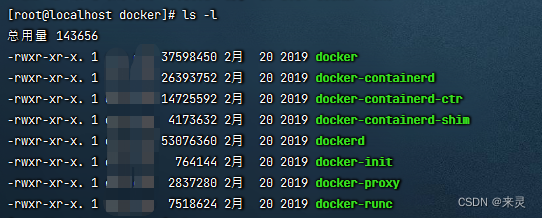
将docker中的全部文件,使用下边命令,复制到/usr/bin
cp ./docker/* /usr/bincd /etc/systemd/system/
touch docker.service

首先打开docker.service
vim docker.service然后将下边内容复制到docker.service。
注意,将其中的ip地址,改成您的服务器地址,其它参数不用改。
--insecure-registry=192.168.205.230
[Unit]
Description=Docker Application Container Engine
Documentation=https://docs.docker.com
After=network-online.target firewalld.service
Wants=network-online.target

[Service]
Type=notify
# the default is not to use systemd for cgroups because the delegate issues still
# exists and systemd currently does not support the cgroup feature set required
# for containers run by docker
ExecStart=/usr/bin/dockerd --selinux-enabled=false --insecure-registry=192.168.205.230
ExecReload=/bin/kill -s HUP $MAINPID
# Having non-zero Limit*s causes performance problems due to accounting overhead
# in the kernel. We recommend using cgroups to do container-local accounting.
LimitNOFILE=infinity
LimitNPROC=infinity
LimitCORE=infinity
# Uncomment TasksMax if your systemd version supports it.
# Only systemd 226 and above support this version.
#TasksMax=infinity
TimeoutStartSec=0
# set delegate yes so that systemd does not reset the cgroups of docker containers
Delegate=yes
# kill only the docker process, not all processes in the cgroup
KillMode=process
# restart the docker process if it exits prematurely
Restart=on-failure
StartLimitBurst=3
StartLimitInterval=60s

[Install]
WantedBy=multi-user.target
编辑好后,ESC键à:wq保存并退出docker.service文件。
chmod +x docker.servicesystemctl daemon-reload注意,若修改了docker.service文件,则要重新加载该文件。
systemctl start dockersystemctl status docker
docker -v 
systemctl enable docker.service这样每次系统启动时,docker就自动随机启动了。
如果您觉得上边的步骤繁琐,也可以用下边的办法,一键安装docker。
在docker-18.06.3-ce.tgz同目录下,创建docker.service,打开编辑文件,文件内容与3.4节完全一样,此处不再赘述。
touch install.sh打开编辑install.sh,将以下内容复制到install.sh,保存退出。
#!/bin/sh

echo '解压tar包'
tar -xvf $1
echo '将docker目录下所有文件复制到/usr/bin目录'
cp docker/* /usr/bin
echo '将docker.service 复制到/etc/systemd/system/目录'
cp docker.service /etc/systemd/system/
echo '添加文件可执行权限'
chmod +x /etc/systemd/system/docker.service
echo '重新加载配置文件'
systemctl daemon-reload
echo '启动docker'
systemctl start docker
echo '设置开机自启'
systemctl enable docker.service
echo 'docker安装成功'
docker -vTouch uninstall.sh,将以下内容复制到uninstall.sh,保存退出。
#!/bin/sh

echo '停止docker'
systemctl stop docker
echo '删除docker.service'
rm -f /etc/systemd/system/docker.service
echo '删除docker文件'
rm -rf /usr/bin/docker*
echo '重新加载配置文件'
systemctl daemon-reload
echo '卸载成功'此时docker-18.06.3-ce.tgz同目录下,还有上边创建的docker.service,install.sh,uninstall.sh这3个文件:

分别给install.sh和uninstall.sh赋予可执行权限。
chmod +x install.sh
chmod +x uninstall.sh
开始安装
sh install.sh docker-18.06.3-ce.tgz查看docker状态

一键安装法,其实是将分步安装法的步骤,集中写到一个shell脚本,其过程实质上是一样的,优点就是在一台新的机器上安装时,能节约时间,也不容易出错。如果想卸载docker,一键操作也很方便。
我正在尝试测试是否存在表单。我是Rails新手。我的new.html.erb_spec.rb文件的内容是:require'spec_helper'describe"messages/new.html.erb"doit"shouldrendertheform"dorender'/messages/new.html.erb'reponse.shouldhave_form_putting_to(@message)with_submit_buttonendendView本身,new.html.erb,有代码:当我运行rspec时,它失败了:1)messages/new.html.erbshou
我在从html页面生成PDF时遇到问题。我正在使用PDFkit。在安装它的过程中,我注意到我需要wkhtmltopdf。所以我也安装了它。我做了PDFkit的文档所说的一切......现在我在尝试加载PDF时遇到了这个错误。这里是错误:commandfailed:"/usr/local/bin/wkhtmltopdf""--margin-right""0.75in""--page-size""Letter""--margin-top""0.75in""--margin-bottom""0.75in""--encoding""UTF-8""--margin-left""0.75in""-
我在我的项目目录中完成了compasscreate.和compassinitrails。几个问题:我已将我的.sass文件放在public/stylesheets中。这是放置它们的正确位置吗?当我运行compasswatch时,它不会自动编译这些.sass文件。我必须手动指定文件:compasswatchpublic/stylesheets/myfile.sass等。如何让它自动运行?文件ie.css、print.css和screen.css已放在stylesheets/compiled。如何在编译后不让它们重新出现的情况下删除它们?我自己编译的.sass文件编译成compiled/t
我想为Heroku构建一个Rails3应用程序。他们使用Postgres作为他们的数据库,所以我通过MacPorts安装了postgres9.0。现在我需要一个postgresgem并且共识是出于性能原因你想要pggem。但是我对我得到的错误感到非常困惑当我尝试在rvm下通过geminstall安装pg时。我已经非常明确地指定了所有postgres目录的位置可以找到但仍然无法完成安装:$envARCHFLAGS='-archx86_64'geminstallpg--\--with-pg-config=/opt/local/var/db/postgresql90/defaultdb/po
我有一个对象has_many应呈现为xml的子对象。这不是问题。我的问题是我创建了一个Hash包含此数据,就像解析器需要它一样。但是rails自动将整个文件包含在.........我需要摆脱type="array"和我该如何处理?我没有在文档中找到任何内容。 最佳答案 我遇到了同样的问题;这是我的XML:我在用这个:entries.to_xml将散列数据转换为XML,但这会将条目的数据包装到中所以我修改了:entries.to_xml(root:"Contacts")但这仍然将转换后的XML包装在“联系人”中,将我的XML代码修改为
为了将Cucumber用于命令行脚本,我按照提供的说明安装了arubagem。它在我的Gemfile中,我可以验证是否安装了正确的版本并且我已经包含了require'aruba/cucumber'在'features/env.rb'中为了确保它能正常工作,我写了以下场景:@announceScenario:Testingcucumber/arubaGivenablankslateThentheoutputfrom"ls-la"shouldcontain"drw"假设事情应该失败。它确实失败了,但失败的原因是错误的:@announceScenario:Testingcucumber/ar
我打算为ruby脚本创建一个安装程序,但我希望能够确保机器安装了RVM。有没有一种方法可以完全离线安装RVM并且不引人注目(通过不引人注目,就像创建一个可以做所有事情的脚本而不是要求用户向他们的bash_profile或bashrc添加一些东西)我不是要脚本本身,只是一个关于如何走这条路的快速指针(如果可能的话)。我们还研究了这个很有帮助的问题:RVM-isthereawayforsimpleofflineinstall?但有点误导,因为答案只向我们展示了如何离线在RVM中安装ruby。我们需要能够离线安装RVM本身,并查看脚本https://raw.github.com/wayn
我在我的项目中添加了一个系统来重置用户密码并通过电子邮件将密码发送给他,以防他忘记密码。昨天它运行良好(当我实现它时)。当我今天尝试启动服务器时,出现以下错误。=>BootingWEBrick=>Rails3.2.1applicationstartingindevelopmentonhttp://0.0.0.0:3000=>Callwith-dtodetach=>Ctrl-CtoshutdownserverExiting/Users/vinayshenoy/.rvm/gems/ruby-1.9.3-p0/gems/actionmailer-3.2.1/lib/action_mailer
我有一个奇怪的问题:我在rvm上安装了rubyonrails。一切正常,我可以创建项目。但是在我输入“railsnew”时重新启动后,我有“程序'rails'当前未安装。”。SystemUbuntu12.04ruby-v"1.9.3p194"gemlistactionmailer(3.2.5)actionpack(3.2.5)activemodel(3.2.5)activerecord(3.2.5)activeresource(3.2.5)activesupport(3.2.5)arel(3.0.2)builder(3.0.0)bundler(1.1.4)coffee-rails(
我刚刚为fedora安装了emacs。我想用emacs编写ruby。为ruby提供代码提示、代码完成类型功能所需的工具、扩展是什么? 最佳答案 ruby-mode已经包含在Emacs23之后的版本中。不过,它也可以通过ELPA获得。您可能感兴趣的其他一些事情是集成RVM、feature-mode(Cucumber)、rspec-mode、ruby-electric、inf-ruby、rinari(用于Rails)等。这是我当前用于Ruby开发的Emacs配置:https://github.com/citizen428/emacs
