一、链路聚合技术
随着我们网络的不断拓展,业务流量也随之增多,那么我们就开始需要多链路进行通信
故研究出一个技术==Eth-Trunk(链路捆绑)
作用:
可以把多个独立的物理端口绑定在一起,当做一个大带宽逻辑接口去使用,这样的方法既不用替换端口也不必浪费IP地址资源
组建网络遇到的问题:
1. 网络需求大,单链路无法完成,增加链路又浪费IP地址,更换高带宽接口(E口换G口)又会增加维护设备的成本
2. 如果链路发生故障,又会影响通信和办公
解决:
两个问题均可以用eth-trunk来解决,将多个e口绑定为一起带宽转发就会增加(不必使用G口)由于是多个端口绑定故即便发生端口故障或者是单条链路故障也没有关系,因为其他端口也会进行转发(如果物理端口断掉,带宽转发也会稍微影响:比如,我用四条链路组成了一个链路捆绑(4000M)那么断开一个的话(-1000M),转发就会变成3000M)
Eth-Trunk链路聚合模式:
静态配置模式(手工负载分担)
动态配置模式(LACP)
Eth-trunk接口负载分担:
可以选择IP地址或者包作为负载分担依据
设置成员接口的负载分担分配
如果一个成员的分配权重值越大,承担的负载就越大
逐流负载分担:
当源地址、目标地址都相同或者报文的源MAC地址、目标MAC地址都相同时,就会在一条链路上传输
逐包负载分担:
以报文为单位分别从不同的成员链路上发送
手工负载分担模式:
当两台设备其中一个不支持LACP时,可以用手工负载方式来增加设备间的带宽和可靠性
Eth-Trunk接口配置流程:
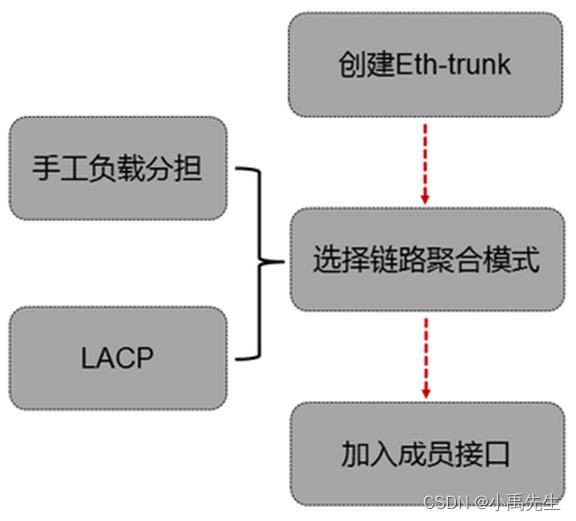
Eth-Trunk接口配置流程:
[Huawei]interface eth-trunk 1
[Huawei-Eth-trunk1]mode manual load-balan//设置为手工负载分担
[Huawei-Eth-trunk1]trunkport g 0/0/X//加入端口
[Huawei-Eth-trunk1]port link-t access/trunk//设置端口模式,这里根据拓扑要求来设置即可
实验一 配置手工负载分担模式

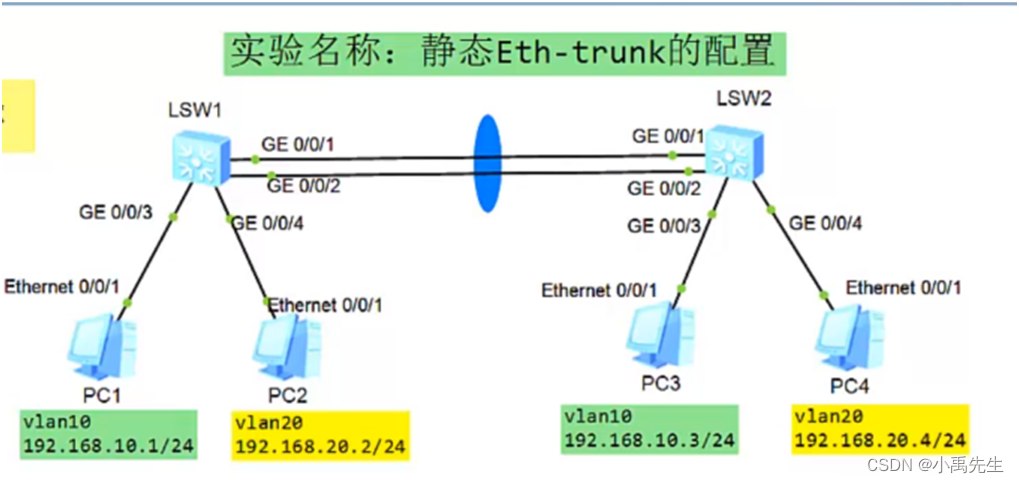
S1交换机的初始配置
<Huawei>u t m
<Huawei>system-view
[S1]sysname S1
创建vlan并将接口加入vlan设置接口的模式为acess:
[S1]vlan batch 10 20 \\创建vlan 10 20
[S1]interface g0/0/1\\进入接口0/0/1
[S1-GigabitEthernet0/0/1]port link-type access \\设置接口模式为接入链路
[S1-GigabitEthernet0/0/1]port default vlan 10 \\将接口加入vlan10
[S1]interface g0/0/2\\进入接口0/0/2
[S1-GigabitEthernet0/0/2]port link-type access\\设置接口模式为接入链路
[S1-GigabitEthernet0/0/2]port default vlan 20 \\将接口加入vlan20
配置链路聚合:手工负载分担模式
[S1] interface(接口) eth-trunk(以太 - 中继)1 \\创建链路聚合的端口1(0-63)
[S1-Eth-Trunk1]mode(模式) manual(手控制的) load(负载)-balance(均衡)
[S1-Eth-Trunk1]trunkport(中继端口) g0/0/3 \\将接口加入到负载模式
[S1-Eth-Trunk1]trunkport(中继端口) g0/0/4 \\将接口加入到负载模式
[S1-Eth-Trunk1]display eth-trunk 1 \\查看 eth-trunk
[S1]int eth-trunk 1 \\进入eth-trunk1
[S1-Eth-Trunk1]port link-type trunk \\设置为trunk链路
[S1-Eth-Trunk1]port trunk allow-pass vlan all \\ 设置为允许所有vlan
S2交换机的初始配置
<Huawei>u t m
<Huawei>system-view
[Huawei]sysname S2
创建vlan并将接口加入vlan:
[S2]vlan batch 10 20 \\创建vlan 10 20
[S2]interface g0/0/1\\进入接口0/0/5
[S2-GigabitEthernet0/0/1]port link-type access \\设置接口模式为接入链路
[S2-GigabitEthernet0/0/1]port default vlan 10 \\将接口加入vlan10
[S2]interface g0/0/2\\进入接口0/0/5
[S2-GigabitEthernet0/0/2]port link-type access\\设置接口模式为接入链路
[S2-GigabitEthernet0/0/2]port default vlan 20 \\将接口加入vlan20
配置链路聚合:手工负载分担模式
[S2] interface(接口) eth-trunk(以太 - 中继)1 \\创建链路聚合的端口1(0-63)
[S2-Eth-Trunk1]mode(模式) manual(手控制的) load(负载)-balance(均衡)
[S2-Eth-Trunk1]trunkport(中继端口) g0/0/3 \\将接口加入到负载模式
[S2-Eth-Trunk1]trunkport(中继端口) g0/0/4 \\将接口加入到负载模式
[S2-Eth-Trunk1]display eth-trunk 1 \\查看 eth-trunk
[S2]int eth-trunk 1 \\进入eth-trunk1
[S2-Eth-Trunk1]port link-type trunk \\设置为trunk链路
[S2-Eth-Trunk1]port trunk allow-pass vlan all \\ 设置为允许所有vlan
[S2-Eth-Trunk1]display eth-trunk 1 \\查看 eth-trunk
[S2]display port vlan \\查看 vlan
二、LACP模式
也可以称之为M:N模式
M代表处于活动状态的转发数据
N代表处于非活动状态的备份链路
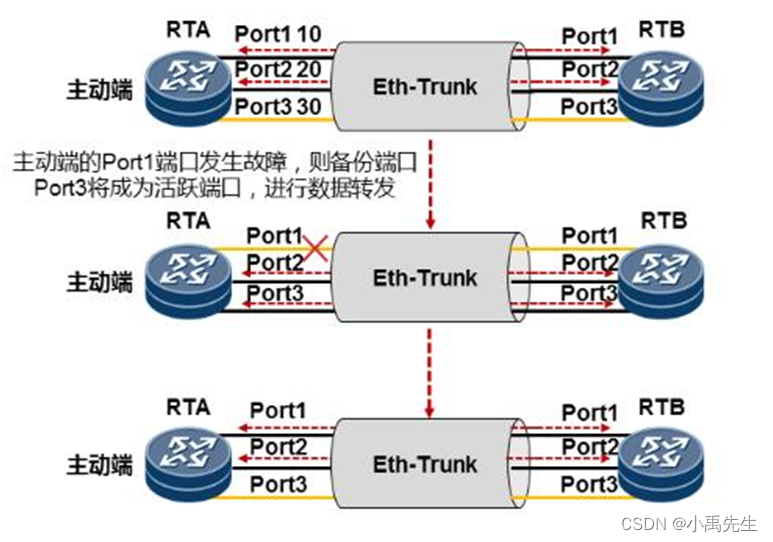
比如我们建立的三条链路,就是两条转发,1条备份,当转发链路出现故障的时候,备份链路才会进行数据转发,平时是不转发数据的
LACP的选取:
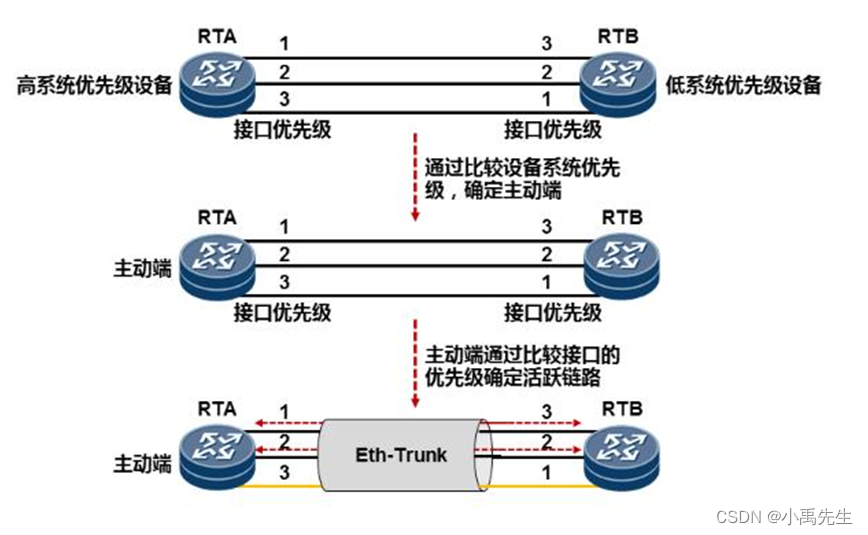
LACP的抢占:
实验二 配置LACP负载分担模式
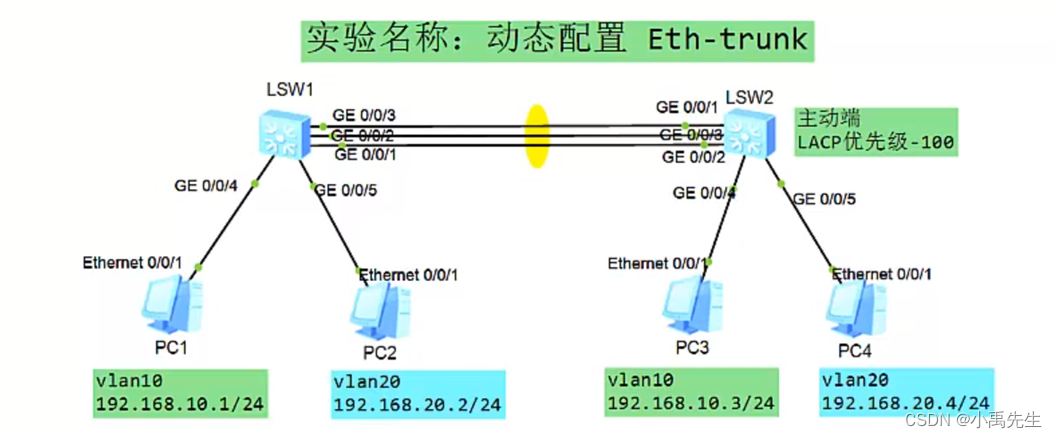
S1交换机的初始配置
<Huawei>u t m
<Huawei>system-view
[S1]sysname S1
创建vlan并将接口加入vlan设置接口的模式为acess:
[S1]vlan batch 10 20 \\创建vlan 10 20
[S1]interface g0/0/4 \\进入接口0/0/4
[S1-GigabitEthernet0/0/4]port link-type access \\设置接口模式为接入链路
[S1-GigabitEthernet0/0/4]port default vlan 10 \\将接口加入vlan10
[S1]interface gth0/0/5 \\进入接口0/0/5
[S1-GigabitEthernet0/0/5]port link-type access\\设置接口模式为接入链路
[S1-GigabitEthernet0/0/5]port default vlan 20 \\将接口加入vlan20
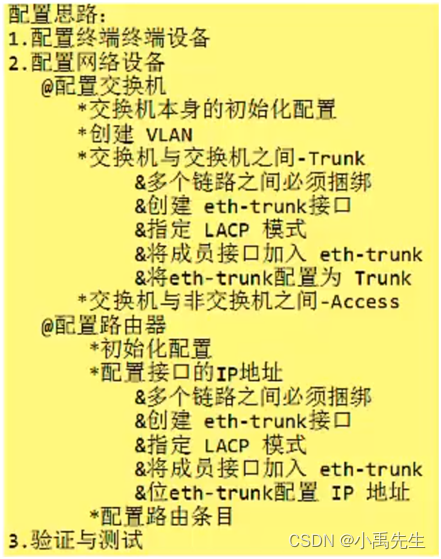
配置链路聚合:LACP模式
[S1] interface(接口) eth-trunk(以太 - 中继)1 \\创建链路聚合的端口1(0-63)
[S1-Eth-Trunk1]mode(模式) lacp(动态)-static(均衡)
[S1-Eth-Trunk1]trunkport(中继端口) g0/0/1 \\将接口加入到负载模式
[S1-Eth-Trunk1]trunkport(中继端口) g0/0/2 \\将接口加入到负载模式
[S1-Eth-Trunk1]trunkport(中继端口) g0/0/3 \\将接口加入到负载模式
[S1-Eth-Trunk1]port link-type trunk \\设置为trunk链路
[S1-Eth-Trunk1]port trunk allow-pass vlan all \\ 设置为允许所有vlan
[S1-Eth-Trunk1]display eth-trunk 1 \\查看 eth-trunk
[S1]int eth-trunk 1 \\进入eth-trunk1
S2交换机的初始配置
<Huawei>u t m
<Huawei>system-view
[Huawei]sysname S2
创建vlan并将接口加入vlan:
[S2]vlan batch 10 20 \\创建vlan 10 20
[S2]interface g0/0/4 \\进入接口0/0/5
[S2-GigabitEthernet0/0/4]port link-type access \\设置接口模式为接入链路
[S2-GigabitEthernet0/0/4]port default vlan 10 \\将接口加入vlan10
[S2]interface g0/0/5 \\进入接口0/0/5
[S2-GigabitEthernet0/0/5]port link-type access\\设置接口模式为接入链路
[S2-GigabitEthernet0/0/5]port default vlan 20 \\将接口加入vlan20
配置链路聚合:LACP模式
[S2] interface(接口) eth-trunk(以太 - 中继)1 \\创建链路聚合的端口1(0-63)
[S2-Eth-Trunk1] mode(模式) lacp(动态)-static(均衡)
[S2-Eth-Trunk1]trunkport(中继端口)g0/0/1 \\将接口加入到负载模式
[S2-Eth-Trunk1]trunkport(中继端口) g0/0/2 \\将接口加入到负载模式
[S2-Eth-Trunk1]trunkport(中继端口) g0/0/3 \\将接口加入到负载模式
[S2-Eth-Trunk1]port link-type trunk \\设置为trunk链路
[S2-Eth-Trunk1]port trunk allow-pass vlpe trunkan all \\ 设置为允许所有vlan
[S2-Eth-Trunk1]display eth-trunk 1 \\查看 eth-trunk
[S2]display port vlan \\查看 vlan
[S2]display eth-trunk 1 \\查看 eth-trunk
Local:本地信息 Partner:对端信息
Svstem Prioritv:32768 系统的优先级
System ID:4clf-cc4e-5 系统的mac地址
MAX Active-linknumber:8 最大的活动链路数是8条
链路数是可以进行调整的我们可以调整为2条
Number of Up Port In Trunk:0 目前有几条
端口的编号端口的状态端口的带宽 接口的优先级 接口编号
UNSELECT 为备份端口 Selected 为活动端口
我们使用的是千兆端口,目前对方的信息都是0还没有启动

S2设置他的链路为2:
[S2]display eth-trunk 1 \\查看 eth-trunk
[S2]int eth-trunk 1 \\进入eth-trunk1
[S2-Eth-Trunk1]max active-linknumber 2\\设置为2条链路
修改sw2为主设备,默认值是32768 我们可以设置为100
[S2]lacp priority 100 \\设置默认值为100
[S2]display eth-trunk 1 \\查看 eth-trunk
设置S2抢占功能:
[S2]int g0/0/1 \\加入接口1
[S2-GigabitEthernet0/0/1]shutdows \\关闭接口
[S2]display eth-trunk 1 \\查看 eth-trunk
[S2]display eth-trunk \\查看 eth-trunk
Preempt Delay:Disabled 当前抢占功能未开启
[S2]display eth-trunk 2 \\查看 eth-trunk
[S2-Eth-Trunk1]lacp preempt enable \\配置抢占模式
[S1]display eth-trunk 1 \\查看 eth-trunk
[S1-Eth-Trunk1]lacp preempt enable \\配置抢占模式
[S2]display eth-trunk \\查看 eth-trunk
Preempt Delay Time:30 当前抢占功能已开启 30秒后抢
综合实验
三、链路聚合综合实战:

一、二层交换机的配置 S1 S2 S3 S4 S5 S6
1.S1交换机的初始配置
<Huawei>u t m \\关闭信息干扰
<Huawei>system-view \\进入系统视图
[Huawei]sysname S1 \\设置交换机的名字为S1
[S1]vlan batch 10 20 \\创建vlan 10 20
3.创建链路聚合接口eth-trunk 1 、2并将设置模式为lacp、加入成员并设置链路为tunk并允许所有vlan通过
[S1]interface Eth-Trunk 1 \\创建链路聚合的端口1
[S1-Eth-Trunk1]mode lacp-static \\设置链路为动态lacp
[S1-Eth-Trunk1]trunkport e0/0/3 \\将接口加入到负载模式
[S1-Eth-Trunk1]trunkport e0/0/4 \\将接口加入到负载模式
[S1-Eth-Trunk1]port link-type trunk \\设置为trunk链路
[S1-Eth-Trunk1] port trunk allow-pass vlan all \\并允许所有vlan通过
[S1-Eth-Trunk1]display eth-trunk 1 \\查看 eth-trunk
[S1]interface Eth-Trunk2\\创建链路聚合的端口2
[S1-Eth-Trunk2]mode lacp-static \\设置链路为动态lacp
[S1-Eth-Trunk2]trunkport e0/0/5\\将接口加入到负载模式
[S1-Eth-Trunk2]trunkport e0/0/6 \\将接口加入到负载模式
[S1-Eth-Trunk2]port link-type trunk \\设置为trunk链路
[S1-Eth-Trunk2] port trunk allow-pass vlan all \\并允许所有vlan通过
[S1-Eth-Trunk2]display eth-trunk 2 \\查看 eth-trunk
4.创建链路聚合接口eth-trunk 3 并将设置模式为lacp、加入成员并设置链路为access并将此端口加入vlan10
[S1]interface Eth-Trunk3\\创建链路聚合的端口3
[S1-Eth-Trunk3]mode lacp-static \\设置链路为动态lacp
[S1-Eth-Trunk3]trunkport e0/0/1\\将接口加入到负载模式
[S1-Eth-Trunk3]trunkport e0/0/2 \\将接口加入到负载模式
[S1-Eth-Trunk3]port link-type access\\设置为access链路
[S1-Eth-Trunk3] port default vlan 10\\并将此端口加入vlan10
1.S2交换机的初始配置
<Huawei>u t m \\关闭信息干扰
<Huawei>system-view \\进入系统视图
[Huawei]sysname S2 \\设置交换机的名字为S2
[S2]vlan batch 10 20 \\创建vlan 10 20
3.创建链路聚合接口eth-trunk 1 、2并将设置模式为lacp、加入成员并设置链路为tunk并允许所有vlan通过
[S2]interface Eth-Trunk 1 \\创建链路聚合的端口1
[S2-Eth-Trunk1]mode lacp-static \\设置链路为动态lacp
[S2-Eth-Trunk1]trunkport e0/0/3 \\将接口加入到负载模式
[S2-Eth-Trunk1]trunkport e0/0/4 \\将接口加入到负载模式
[S2-Eth-Trunk1]port link-type trunk \\设置为trunk链路
[S2-Eth-Trunk1] port trunk allow-pass vlan all \\并允许所有vlan通过
[S2-Eth-Trunk1]display eth-trunk 1 \\查看 eth-trunk
[S2]interface Eth-Trunk2\\创建链路聚合的端口2
[S2-Eth-Trunk2]mode lacp-static \\设置链路为动态lacp
[S2-Eth-Trunk2]trunkport e0/0/5\\将接口加入到负载模式
[S2-Eth-Trunk2]trunkport e0/0/6 \\将接口加入到负载模式
[S2-Eth-Trunk2]port link-type trunk \\设置为trunk链路
[S2-Eth-Trunk2] port trunk allow-pass vlan all \\并允许所有vlan通过
[S2-Eth-Trunk2]display eth-trunk 2 \\查看 eth-trunk
4.创建链路聚合接口eth-trunk 3 并将设置模式为lacp、加入成员并设置链路为access并将此端口加入vlan10
[S2]interface Eth-Trunk3\\创建链路聚合的端口3
[S2-Eth-Trunk3]mode lacp-static \\设置链路为动态lacp
[S2-Eth-Trunk3]trunkport e0/0/1\\将接口加入到负载模式
[S2-Eth-Trunk3]trunkport e0/0/2 \\将接口加入到负载模式
[S2-Eth-Trunk3]port link-type access\\设置为access链路
[S2-Eth-Trunk3] port default vlan 20\\并将此端口加入vlan20
1.S3交换机的初始配置
<Huawei>u t m \\关闭信息干扰
<Huawei>system-view \\进入系统视图
[Huawei]sysname S3 \\设置交换机的名字为S3
[S3]vlan batch 10 20 \\创建vlan 10 20
3.创建链路聚合接口eth-trunk 1并将设置模式为lacp、加入成员并设置链路为tunk并允许所有vlan通过
[S3]interface Eth-Trunk 1 \\创建链路聚合的端口1
[S3-Eth-Trunk1]mode lacp-static \\设置链路为动态lacp
[S3-Eth-Trunk1]trunkport e0/0/3 \\将接口加入到负载模式
[S3-Eth-Trunk1]trunkport e0/0/4 \\将接口加入到负载模式
[S3-Eth-Trunk1]port link-type trunk \\设置为trunk链路
[S3-Eth-Trunk1] port trunk allow-pass vlan all \\并允许所有vlan通过
[S3-Eth-Trunk1]display eth-trunk 1 \\查看 eth-trunk
4.S3将e0/0/1加入vlan10 并设置链路是access链路
[S3]int e0/0/1 \\进入接口0/0/1
[S3-Ethernet0/0/1]port link-type access \\设置链路为接入链路(access链路)
[S3-Ethernet0/0/1]port default vlan 10 \\将接口加入vlan10
1.S4交换机的初始配置
<Huawei>u t m \\关闭信息干扰
<Huawei>system-view \\进入系统视图
[Huawei]sysname S4 \\设置交换机的名字为S4
[S4]vlan batch 10 20 \\创建vlan 10 20
3.S4创建链路聚合接口eth-trunk 2 并将设置模式为lacp、加入成员并设置链路为tunk并允许所有vlan通过
[S4]interface Eth-Trunk 2\\创建链路聚合的端口2
[S4-Eth-Trunk2]mode lacp-static \\设置链路为动态lacp
[S4-Eth-Trunk2]trunkport e0/0/5\\将接口加入到负载模式
[S4-Eth-Trunk2]trunkport e0/0/6 \\将接口加入到负载模式
[S4-Eth-Trunk2]port link-type trunk \\设置为trunk链路
[S4-Eth-Trunk2] port trunk allow-pass vlan all \\并允许所有vlan通过
[S4-Eth-Trunk2]display eth-trunk 2 \\查看 eth-trunk
4.S4将e0/0/1加入vlan10 并设置链路是access链路
[S4]int e0/0/1 \\进入接口0/0/1
[S4-Ethernet0/0/1]port link-type access \\设置链路为接入链路(access链路)
[S4-Ethernet0/0/1]port default vlan 10 \\将接口加入vlan10
1.S5交换机的初始配置
<Huawei>u t m \\关闭信息干扰
<Huawei>system-view \\进入系统视图
[Huawei]sysname S5\\设置交换机的名字为S5
[S5]vlan batch 10 20 \\创建vlan 10 20
3.创建链路聚合接口eth-trunk 1并将设置模式为lacp、加入成员并设置链路为tunk并允许所有vlan通过
[S5]interface Eth-Trunk 1 \\创建链路聚合的端口1
[S5-Eth-Trunk1]mode lacp-static \\设置链路为动态lacp
[S5-Eth-Trunk1]trunkport e0/0/3 \\将接口加入到负载模式
[S5-Eth-Trunk1]trunkport e0/0/4 \\将接口加入到负载模式
[S5-Eth-Trunk1]port link-type trunk \\设置为trunk链路
[S5-Eth-Trunk1] port trunk allow-pass vlan all \\并允许所有vlan通过
[S5-Eth-Trunk1]display eth-trunk 1 \\查看 eth-trunk
4.S5将e0/0/1加入vlan20 并设置链路是access链路
[S5]int e0/0/1 \\进入接口0/0/1
[S5-Ethernet0/0/1]port link-type access \\设置链路为接入链路(access链路)
[S5-Ethernet0/0/1]port default vlan 20 \\将接口加入vlan10
1.S6交换机的初始配置
<Huawei>u t m \\关闭信息干扰
<Huawei>system-view \\进入系统视图
[Huawei]sysname S6 \\设置交换机的名字为S6
[S6]vlan batch 10 20 \\创建vlan 10 20
3.S6创建链路聚合接口eth-trunk 2 并将设置模式为lacp、加入成员并设置链路为tunk并允许所有vlan通过
[S6]interface Eth-Trunk 2\\创建链路聚合的端口2
[S6-Eth-Trunk2]mode lacp-static \\设置链路为动态lacp
[S6-Eth-Trunk2]trunkport e0/0/5\\将接口加入到负载模式
[S6-Eth-Trunk2]trunkport e0/0/6 \\将接口加入到负载模式
[S6-Eth-Trunk2]port link-type trunk \\设置为trunk链路
[S6-Eth-Trunk2] port trunk allow-pass vlan all \\并允许所有vlan通过
[S6-Eth-Trunk2]display eth-trunk 2 \\查看 eth-trunk
4.S6将e0/0/1加入vlan20 并设置链路是access链路
[S6]int e0/0/1 \\进入接口0/0/1
[S6-Ethernet0/0/1]port link-type access \\设置链路为接入链路(access链路)
[S6-Ethernet0/0/1]port default vlan 20 \\将接口加入vlan20
三、路由器的配置R1 R2
1.R1路由器的初始配置
<Huawei>u t m
<Huawei>system-view
[Huawei]sysname R1
2.R1路由器接口2/0/1 2/0/2接口设置链路聚合3并配置IP地址
[R1]interface Eth-Trunk 3 \\创建链路聚合的端口3
[R1-Eth-Trunk3]undo portswitch \\关闭接口的交换功能(默认无法配置IP地址)
[R1-Eth-Trunk3]mode lacp-static\\设置链路为动态lacp
[R1-Eth-Trunk3]trunkport g2/0/1\\将接口加入到负载模式
[R1-Eth-Trunk3]trunkport g2/0/2\\将接口加入到负载模式
[R1-Eth-Trunk3]ip add 192.168.10.254 24\\配置IP地址
[R1-Eth-Trunk3]quit
3.R1路由器接口0/0/0 0/0/1接口设置链路聚合1并配置IP地址
[R1]interface Eth-Trunk 1
[R1-Eth-Trunk1]undo portswitch\\关闭接口的交换功能(默认无法配置IP地址)
[R1-Eth-Trunk1]mode lacp-static \\设置链路为动态lacp
[R1-Eth-Trunk1]trunkport g0/0/0\\将接口加入到负载模式
[R1-Eth-Trunk1]trunkport g0/0/1\\将接口加入到负载模式
[R1-Eth-Trunk1]ip add 192.168.12.1 24\\配置IP地址
1.R2路由器的初始配置
<Huawei>u t m
<Huawei>system-view
[Huawei]sysname R2
2.R2路由器接口2/0/1 2/0/2接口设置链路聚合3并配置IP地址
[R2]interface Eth-Trunk 3 \\创建链路聚合的端口3
[R2-Eth-Trunk3]undo portswitch \\关闭接口的交换功能(默认无法配置IP地址)
[R2-Eth-Trunk3]mode lacp-static\\设置链路为动态lacp
[R2-Eth-Trunk3]trunkport g2/0/1\\将接口加入到负载模式
[R2-Eth-Trunk3]trunkport g2/0/2\\将接口加入到负载模式
[R2-Eth-Trunk3]ip add 192.168.20.254 24\\配置IP地址
[R2-Eth-Trunk3]quit
3.R1路由器接口0/0/0 0/0/1接口设置链路聚合1并配置IP地址
[R2]interface Eth-Trunk 1
[R2-Eth-Trunk1]undo portswitch\\关闭接口的交换功能(默认无法配置IP地址)
[R2-Eth-Trunk1]mode lacp-static \\设置链路为动态lacp
[R2-Eth-Trunk1]trunkport g0/0/0\\将接口加入到负载模式
[R2-Eth-Trunk1]trunkport g0/0/1\\将接口加入到负载模式
[R2-Eth-Trunk1]ip add 192.168.12.2 24\\配置IP地址
四、路由器的静态配置
1.R1路由器的静态路由配置
[R1]ip route-static 192.168.20.0 24 192.168.12.2
4.R2路由器的静态路由配置
[R2]ip route-static 192.168.10.0 24 192.168.12.1
PC1: ping 192.168.20.1
PC1: ping 192.168.20.2
华为OD机试题本篇题目:明明的随机数题目输入描述输出描述:示例1输入输出说明代码编写思路最近更新的博客华为od2023|什么是华为od,od薪资待遇,od机试题清单华为OD机试真题大全,用Python解华为机试题|机试宝典【华为OD机试】全流程解析+经验分享,题型分享,防作弊指南华为o
system-view进入系统视图quit退到系统视图sysname交换机命名vlan20创建vlan(进入vlan20)displayvlan显示vlanundovlan20删除vlan20displayvlan20显示vlan里的端口20Interfacee1/0/24进入端口24portlink-typeaccessvlan20把当前端口放入vlan20undoporte1/0/10删除当前VLAN端口10displaycurrent-configuration显示当前配置02配置交换机支持TELNETinterfacevlan1进入VLAN1ipaddress192.168.3.100
不知何故,我似乎无法获得包含我的聚合的响应...使用curl它按预期工作:HBZUMB01$curl-XPOST"http://localhost:9200/contents/_search"-d'{"size":0,"aggs":{"sport_count":{"value_count":{"field":"dwid"}}}}'我收到回复:{"took":4,"timed_out":false,"_shards":{"total":5,"successful":5,"failed":0},"hits":{"total":90,"max_score":0.0,"hits":[]},"a
什么是Linq聚合方法的ruby等价物。它的工作原理是这样的varfactorial=new[]{1,2,3,4,5}.Aggregate((acc,i)=>acc*i);每次将数组序列中的值传递给lambda时,变量acc都会累积。 最佳答案 这在数学以及几乎所有编程语言中通常称为折叠。它是更普遍的变形概念的一个实例。Ruby从Smalltalk中继承了这个特性的名称,它被称为inject:into:(像aCollectioninject:aStartValueinto:aBlock一样使用。)所以,在Ruby中,它称为inj
所有题目均有五种语言实现。C实现目录、C++实现目录、Python实现目录、Java实现目录、JavaScript实现目录题目n行m列的矩阵,每个位置上有一个元素你可以上下左右行走,代价是前后两个位置元素值差的绝对值.另外,你最多可以使用一次传送阵(只能从一个数跳到另外一个相同的数)求从走上角走到右下角最少需要多少时间。输入描述:第一行两个整数n,m,分别代表矩阵的行和列。后面n行,每行m个整数,分别代表矩阵中的元素。输出描述:一个整数,表示最少需要多少时间。
西安华为OD面试体验开始投简历技术面试进展工作进展开始投简历去年一整年一直在考研和工作之间纠结,感觉自己的状态好像当时的疫情一样差劲。之前刚毕业的时候投了个大厂的简历,结果一面写算法的时候太拉跨了,虽然知道时dfs但是代码熟练度不够,放在平时给足时间自己可以调试通过,但是熟练度不够那面试当时就写不出来被刷了。说真的算法学到后期我感觉最重要的是熟练度和背板子(对于我这种普通玩家来说),面试题如果一上来短时间内想不出思路就完蛋了。然后由于当时找的工作不是很理想就又想考研了。但是考研是有风险的,我自我感觉自己可能冲不上那个学校,而找工作一个没成可以继续找嘛。本着抱着试试看的态度在boss上投了简历,
目录一、安装包链接二、安装详细步骤1.安装Wireshark和WinPcap2.安装OracleVMVirtualBox3.安装ensp三、安装后注册四、启动路由器出现40错误怎么解决一、安装包链接二、安装详细步骤链接:https://pan.baidu.com/s/1QbUUYMOMIV2oeIKHWP1SpA?pwd=xftx提取码:xftx1.安装Wireshark和WinPcap找到Wireshark安装包所在文件夹,双击它,按照以下步骤安装。2.安装OracleVMVirtualBox找到OracleVMVirtualBox安装包所在文件夹,双击它,按照以下步骤安装。注:可自定义安装
近日,上海证券交易所科创板披露的信息显示,嘉兴中润光学科技股份有限公司(下称“中润光学”)获得上市委会议通过。这意味着,中润光学的上市之路获得实质性进展,接下来将提交注册。据贝多财经了解,中润光学的招股书于2022年5月20日获得科创板受理,5个月后便获得上市委会议通过,进度不可谓不快。本次冲刺科创板上市,中润光学拟募资4.05亿元,计划用于高端光学镜头智能制造项目、高端光学镜头研发中心升级项目等。天眼查信息显示,中润光学成立于2012年8月,是一家以从事非金属矿物制品业为主的企业。当前,该公司的注册资本为6600万元,法定代表人为张平华。穿透股权可知,张平华也是该公司的实际控制人。据招股书介
三大公有云厂商,香港地区主机测评一、ping时延比对(厦门电信本地测试):Ping时延测试腾讯云阿里云华为云延迟率最低时延44ms,最高72ms,平均46ms47.242段:最低时延59ms,最高204ms,平均107ms最低时延45ms,最高93ms,平均47ms丢包率丢包率小有的ip段丢包率较大每个段都会有概率丢包阿里云:47.242段:最低时延59ms,最高204ms,平均107ms,有的ip段丢包率较大8.210段:最低时延64ms,最高232ms,平均119ms,丢包率较好腾讯云:最低时延44ms,最高72ms,平均46ms,丢包率小华为云:最低时延45ms,最高93ms,平均47m
华为认证分等级的,相当于初中高三个等级,当然高级是比较难考的,也是含金量最高的。我就慢慢给你介绍一下。1.了解华为认证华为认证网络工程师是由华为公司认证与采购部推出的独立认证体系,与之前的华为认证不同,简称HCIA。同时华为认证是华为技术有限公司凭借多年信息通信技术人才培养经验,以及对行业发展的理解,以层次化的职业技术认证为指引,推出的覆盖IP、IT、CT以及ICT融合技术领域的认证体系,是ICT全技术领域认证体系。2.怎么考取华为认证网络工程师?要考取华为认证网络工程师必须选择最近的Prometric授权考试中心APTC报名并参加GB0-190的考试,考试通过后,以获得由华为统一签发的“华
