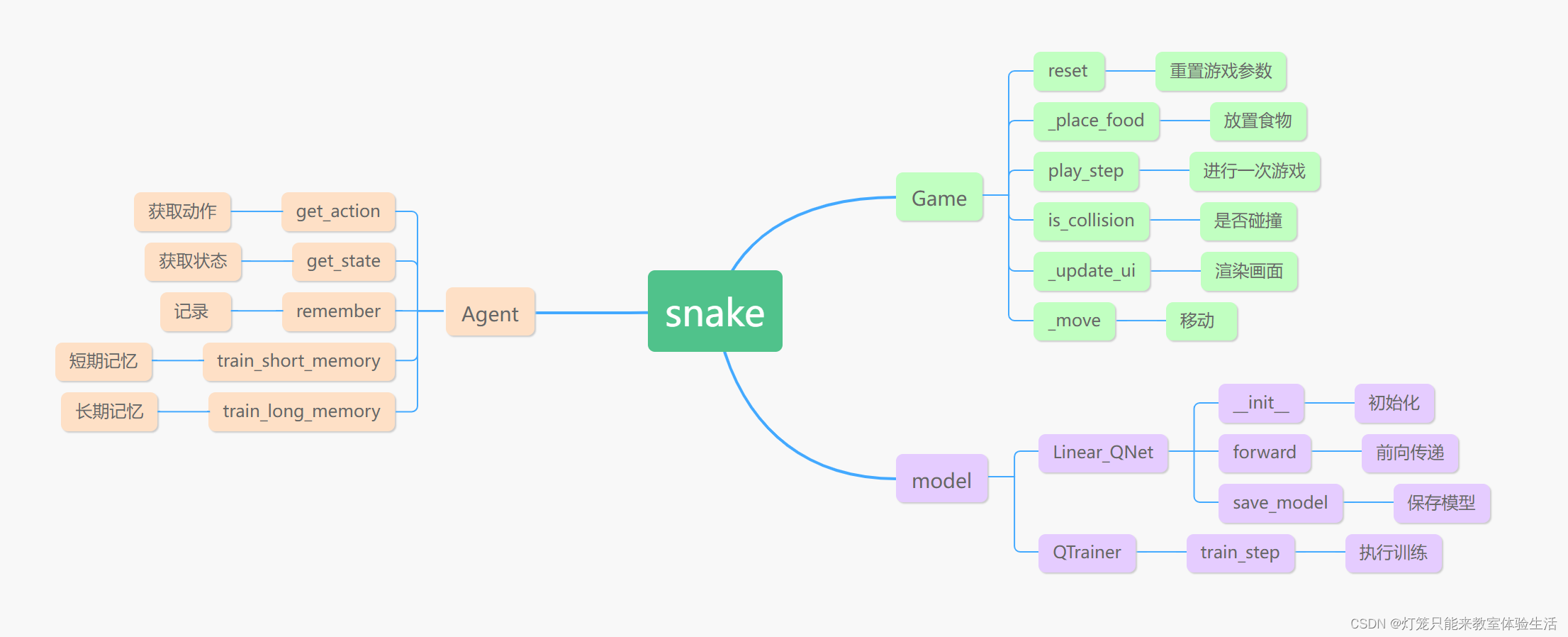
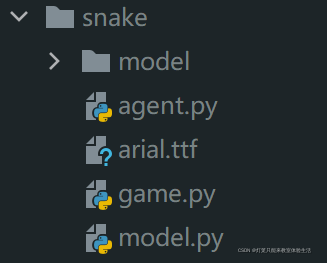
游戏用的是pygame库。
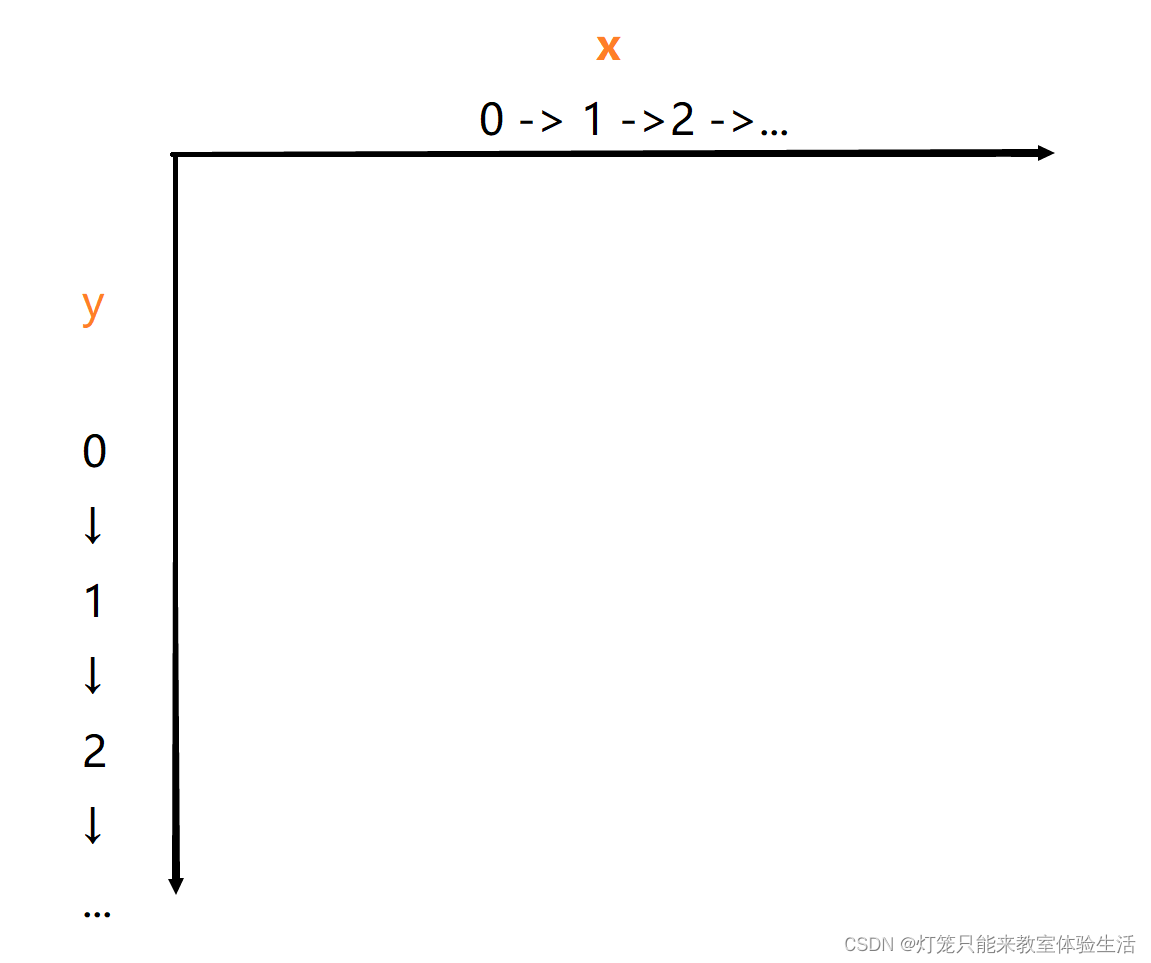
我使用了collections中的namedtuple作为坐标。游戏中的蛇头、蛇身、食物都会用Point表示。
定义了方向的枚举类,用来表示方向。
Point = namedtuple('Point', 'x, y')
class Direction(Enum):
    LEFT = 1
    RIGHT = 2
    UP = 3
    DOWN = 4
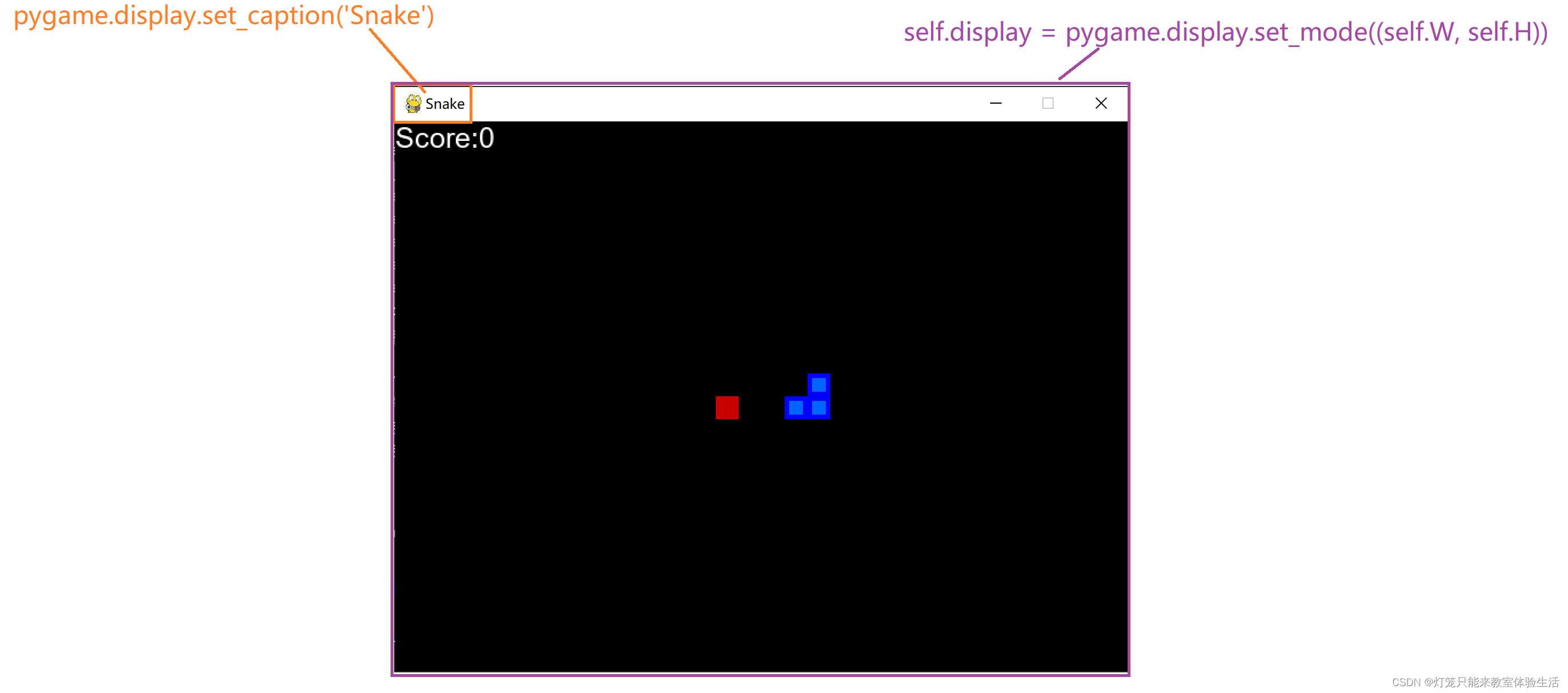
    def __init__(self, w=640, h=480):
        self.W = w  # 窗口的宽
        self.H = h  # 窗口的高
        self.direction = Direction.RIGHT  # 一开始的方向为右
        self.display = pygame.display.set_mode((self.W, self.H))  # 设置游戏窗口大小
        self.clock = pygame.time.Clock()  # 帮助跟踪时间的对象
        pygame.display.set_caption('Snake')  # 设置窗口标题
        self.reset()  # 重置游戏参数
    def reset(self):
        #   蛇一开始长这样:   --@
        self.head = Point(x=self.W / 2, y=self.H / 2)  # 初始化蛇头位置,位于正中央
        self.snake = [  # 蛇身,包括头部
            self.head,
            Point(x=self.head.x - BLOCK_SIZE, y=self.head.y),
            Point(x=2 * self.head.x - BLOCK_SIZE, y=self.head.y),
        ]
        self.food = None  # 食物
        self._place_food()  # 生成食物的坐标
        self.frame_iteration = 0  # 定义游戏的持续帧
        self.score = 0  # 游戏的分数,吃到苹果会加分
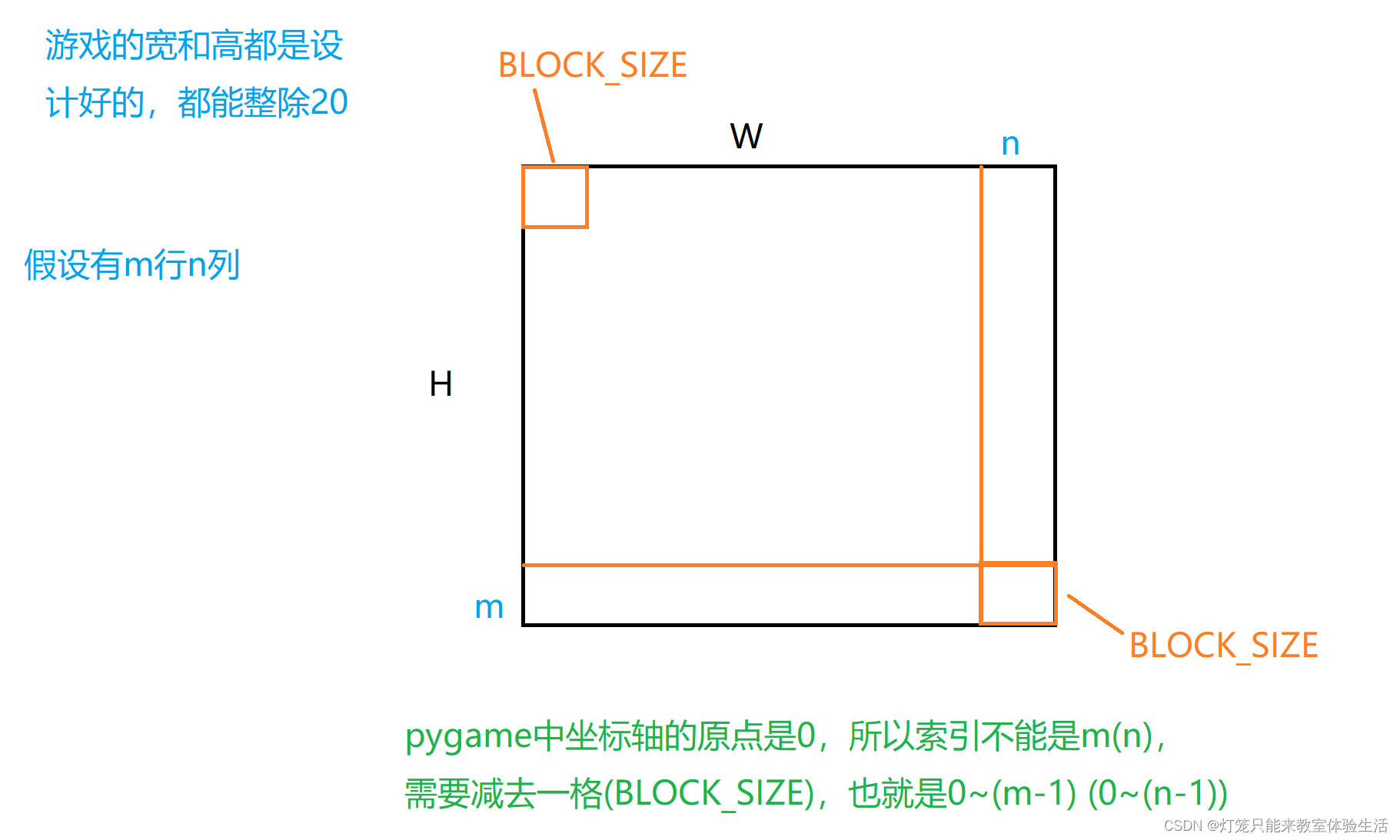
 x = random.randint(0, (self.W - BLOCK_SIZE) // BLOCK_SIZE) * BLOCK_SIZE
 y = random.randint(0, (self.H - BLOCK_SIZE) // BLOCK_SIZE) * BLOCK_SIZE
def _place_food(self):
  	# BLOCK_SIZE 是每个单元格的大小;
    # //是整除操作, 4//3 = 1, 4/3 = 1.3333333333333333
    x = random.randint(0, (self.W - BLOCK_SIZE) // BLOCK_SIZE) * BLOCK_SIZE  # 随机生成x坐标
    y = random.randint(0, (self.H - BLOCK_SIZE) // BLOCK_SIZE) * BLOCK_SIZE  # 随机生成y坐标
    self.food = Point(x, y)  # 设置食物的坐标
    if Point(x, y) in self.snake:  # 如果生成的坐标在蛇的身体里,就再重新生成一次
        self._place_food()
    def is_collision(self, pt=None):  # pt是Point的缩写
        if pt is None:
            pt = self.head
        if pt in self.snake[1:]:  #切片操作是因为snake[0]是头部,碰撞之一是指头部撞到身体
            return True
        if pt.x < 0 or pt.x > self.W - BLOCK_SIZE or pt.y < 0 or pt.y > self.H - BLOCK_SIZE:  # 撞墙
            return True
        return False
def _update_ui(self):
    self.display.fill(BLACK)  # 将背景填充为黑色,其中BLACK = (0, 0, 0),就是一个RGB元组
    for pt in self.snake:
        # 画矩形,并填充颜色BLUE1,这里画的是蛇头和蛇身
        # 如果希望区分蛇头和蛇身的颜色:for pt in self.snake[1:],但要单独定义一个RGB元组来渲染蛇头
        pygame.draw.rect(self.display, BLUE1, pygame.Rect(pt.x, pt.y, BLOCK_SIZE, BLOCK_SIZE))
        pygame.draw.rect(self.display, BLUE2, pygame.Rect(pt.x + 4, pt.y + 4, 12, 12))
    # 绘制食物
    pygame.draw.rect(self.display, RED, pygame.Rect(self.food.x, self.food.y, BLOCK_SIZE, BLOCK_SIZE))
    # pygame文本,其中FONT是FONT = pygame.font.Font('arial.ttf', 25)
    # arial.ttf是字体文件,25是字体大小
    text = FONT.render('Score:' + str(self.score), True, WHITE)
    self.display.blit(text, [0, 0])  # 将text放在窗口的(0,0)位置(左上角)
    pygame.display.flip()  # 更新整个待显示的Surface对象到屏幕上
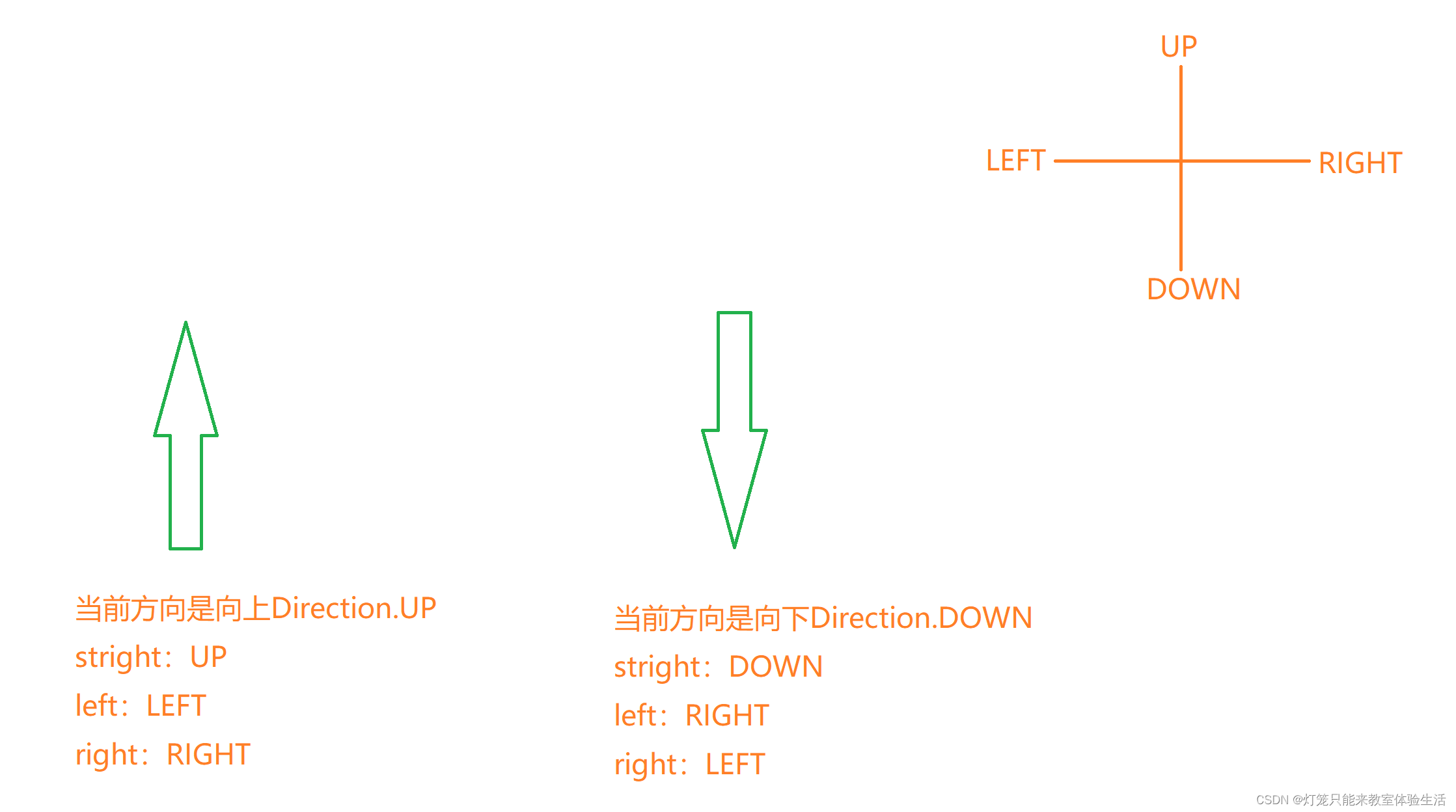
贪吃蛇游戏中,是不允许反向移动的(往左的时候不能立刻往右)。
解决办法有很多,我这里采用的方法是限制移动的方向为[straight:往前,right:往右,left:往左]
核心思想就是相对当前的方向,按照:
def _move(self, action):
    # action = [straight, right, left]
    clock_wise = [Direction.UP, Direction.RIGHT,
                  Direction.DOWN, Direction.LEFT]  # clock_wise:顺时针方向↑→↓←

    # 定位到当前方向在clock_wise中的索引
    idx = clock_wise.index(self.direction)

    if np.array_equal(action, [1, 0, 0]):  # action是stright
        new_direction = clock_wise[idx]  # 当前方向是往前,操作也是往前,那么方向是不会变的。

    elif np.array_equal(action, [0, 1, 0]):  # action是right
        new_direction = clock_wise[(idx + 1) % 4]  # 当前的方向是往右,对于的"操作右"就是往下

    elif np.array_equal(action, [0, 0, 1]):  # action是left
        new_direction = clock_wise[(idx - 1) % 4]

    self.direction = new_direction
    x = self.head.x
    y = self.head.y

    # 根据方向更新坐标
    if self.direction == Direction.RIGHT:
        x += BLOCK_SIZE
    elif self.direction == Direction.LEFT:
        x -= BLOCK_SIZE
    elif self.direction == Direction.UP:
        y -= BLOCK_SIZE
    elif self.direction == Direction.DOWN:
        y += BLOCK_SIZE
    self.head = Point(x, y)
    def __init__(self):
        self.model = Linear_QNet(11, 256, 3)
        self.gama = 0.9
        self.epsilon = 0
        self.n_games = 0  # 游戏的总局数
        self.memory = deque(maxlen=MEMORY_SIZE)  # 经验池的大小
        self.trainer = QTrainer(self.model, LR, self.gama)  # 训练过程封装在类中了
>>> import torch
>>> x = torch.randn(5)  # 获取随机的5个值组成的tensor
>>> x
tensor([0.6875, 0.2979, 0.3359, 0.0452, 0.7232])
>>> max_idx = torch.argmax(x)
>>> max_idx
tensor(4)
>>> max_idx.item()  # 将tensor转为python的普通类型
4
>>> x[4]
tensor(0.7232)
    def get_action(self, state):
        self.epsilon = 80 - self.n_games
        final_move = [0, 0, 0]
        # epsilon会越来越小,那么采取随机动作的概率也会逐渐减小到0
        # move是一个1x3的列表,对于3种动作
        if random.randint(0, 200) < self.epsilon:
            move = random.randint(0, 2)
            final_move[move] = 1
        else:
            state0 = torch.tensor(state, dtype=torch.float)
            prediction = self.model(state0)
            # 网络的输出是三种结果对于的价值期望,用argmax选出最高的那一个
            move = torch.argmax(prediction).item()
            final_move[move] = 1

        return final_move
这里我的状态是一个1x11的数组:
1.三个方向上是否有危险(如果按该方向走一步是否有危险)
2.当前的方向,如果是向上则是[1, 0, 0, 0],向下则是[0, 1, 0, 0];当然你定义的不一样也没有关系,反正只有一个方向是1。
3.食物的位置
    def get_state(self, game):
    	head = game.snake[0]

        pt_left = Point(head.x - BLOCK_SIZE, head.y)
        pt_right = Point(head.x + BLOCK_SIZE, head.y)
        pt_up = Point(head.x, head.y - BLOCK_SIZE)
        pt_down = Point(head.x, head.y + BLOCK_SIZE)

        dir_left = game.direction == Direction.LEFT
        dir_right = game.direction == Direction.RIGHT
        dir_up = game.direction == Direction.UP
        dir_down = game.direction == Direction.DOWN

        state = [
            # danger straight
            (dir_up and game.is_collision(pt_up)) or
            (dir_down and game.is_collision(pt_down)) or
            (dir_left and game.is_collision(pt_left)) or
            (dir_right and game.is_collision(pt_right)),

            # danger left
            (dir_up and game.is_collision(pt_left)) or
            (dir_down and game.is_collision(pt_right)) or
            (dir_left and game.is_collision(pt_down)) or
            (dir_right and game.is_collision(pt_up)),

            # danger right
            (dir_up and game.is_collision(pt_right)) or
            (dir_down and game.is_collision(pt_left)) or
            (dir_left and game.is_collision(pt_up)) or
            (dir_right and game.is_collision(pt_down)),

            # move direction
            dir_up,
            dir_down,
            dir_left,
            dir_right,

            # food location
            game.food.x < head.x,  # food in left
            game.food.x > head.x,  # food in right
            game.food.y < head.y,  # food in up
            game.food.y > head.y,  # food in down

        ]
        return np.array(state, dtype=int)
保存记录
def remember(self, state, action, reward, next_state, is_done):
    self.memory.append((state, action, reward, next_state, is_done))
拿一组训练数据训练。
def train_short_memory(self, state, action, reward, next_state, is_done):
    self.trainer.train_step(state, action, reward, next_state, is_done)
>>>x = [[1,2,3], [4,5,6]]
>>>x1 = zip(*x)
>>>x1
<zip at 0x255cebb5b40>
>>>for i in x1:
    print(i)
(1, 4)
(2, 5)
(3, 6)
    def train_long_memory(self):
        if len(self.memory) > BATCH_SIZE:  # 如果当前经验池中的数据够,就随机采用
            mini_sample = random.sample(self.memory, BATCH_SIZE)
        else:
            mini_sample = self.memory  # 数据量不够,直接全部拿过来
        states, actions, rewards, next_states, is_dones = zip(*mini_sample)
        self.trainer.train_step(states, actions, rewards, next_states, is_dones)
模型用的是很普通的线性层。
    def __init__(self, input_size, hidden_size, output_size):
        super().__init__()
        self.net = nn.Sequential(
            nn.Linear(input_size, hidden_size),
            nn.ReLU(),
            nn.Linear(hidden_size, output_size)
        )
def forward(self, x):
    return self.net(x)
    def save_model(self, file_name='model.pth'):
        model_folder_path = './model'
        if not os.path.exists(model_folder_path):
            os.mkdir(model_folder_path)
        file_name = os.path.join(model_folder_path, file_name)
        torch.save(self.state_dict(), file_name)
    def __init__(self, model, lr, gama):
        self.model = model
        self.lr = lr
        self.gama = gama
        self.optimizer = optim.Adam(self.model.parameters(), lr=self.lr)
        self.creterion = nn.MSELoss()
    def train_step(self, state, action, reward, next_state, is_done):
        # 参数都是np.array,转换成tensor
        state = torch.tensor(state, dtype=torch.float)
        action = torch.tensor(action, dtype=torch.float)
        reward = torch.tensor(reward, dtype=torch.long)
        next_state = torch.tensor(next_state, dtype=torch.float)

        # 如果是训练一组数据,shape是n,则要将tensor的shape增加一个维度
        # 多组数据不需要,因为shape是 1xn的
        if len(state.shape) == 1:
            is_done = (is_done,)
            state = torch.unsqueeze(state, 0)
            action = torch.unsqueeze(action, 0)
            reward = torch.unsqueeze(reward, 0)
            next_state = torch.unsqueeze(next_state, 0)

        pred = self.model(state)
        target = pred.clone()
        for idx in range(len(is_done)):
            Q_new = reward[idx]
            if not is_done:
                # gama:模型对未来的奖励的重视程度,一般gama=0.9
                Q_new = Q_new + self.gama * torch.max(self.model(next_state[idx]))
            # torch.argmax(action).item() 更新价值期望
            target[idx][torch.argmax(action).item()] = Q_new
        self.optimizer.zero_grad()
        loss = self.creterion(target, pred)
        loss.backward()
        self.optimizer.step()
这个函数可以单独放在一个文件中,不过我为了方便,放在了agent.py。
def train():
    # 用来记录score,平均score,用于画图
    plot_scores = []
    plot_mean_scores = []
    total_score = 0

    record = 0  # 最好的记录
    agent = Agent()
    game = SnakeGameAI()
    while True:
        state_old = agent.get_state(game)
        final_move = agent.get_action(state_old)
        reward, is_done, score = game.play_step(final_move)
        state_next = agent.get_state(game)

        agent.train_short_memory(state_old, final_move, reward, state_next, is_done)
        agent.remember(state_old, final_move, reward, state_next, is_done)

        if is_done:
            agent.n_games += 1
            game.reset()
            agent.train_long_memory()
            # 如果分数比最好的记录还要好,那就保存一下模型
            if score > record:
                record = score
                agent.model.save_model()
            print('Game', agent.n_games, 'Score', score, 'Record:', record)
            total_score += score
            mean_scores = total_score / agent.n_games
            plot_mean_scores.append(mean_scores)


if __name__ == '__main__':
    train()
from game import BLOCK_SIZE, Direction, Point, SnakeGameAI
import torch
import numpy as np
from model import Linear_QNet, QTrainer
from collections import deque
import random

LR = 0.001
MEMORY_SIZE = 100_1000
BATCH_SIZE = 100


class Agent:
    def __init__(self):
        self.model = Linear_QNet(11, 256, 3)
        self.gama = 0.9
        self.epsilon = 0
        self.n_games = 0
        self.memory = deque(maxlen=MEMORY_SIZE)
        self.trainer = QTrainer(self.model, LR, self.gama)

    def get_action(self, state):
        self.epsilon = 80 - self.n_games
        final_move = [0, 0, 0]
        if random.randint(0, 200) < self.epsilon:
            move = random.randint(0, 2)
            final_move[move] = 1
        else:
            state0 = torch.tensor(state, dtype=torch.float)
            prediction = self.model(state0)
            move = torch.argmax(prediction).item()
            final_move[move] = 1

        return final_move

    def get_state(self, game):
        head = game.snake[0]

        pt_left = Point(head.x - BLOCK_SIZE, head.y)
        pt_right = Point(head.x + BLOCK_SIZE, head.y)
        pt_up = Point(head.x, head.y - BLOCK_SIZE)
        pt_down = Point(head.x, head.y + BLOCK_SIZE)

        dir_left = game.direction == Direction.LEFT
        dir_right = game.direction == Direction.RIGHT
        dir_up = game.direction == Direction.UP
        dir_down = game.direction == Direction.DOWN

        state = [
            # danger straight
            (dir_up and game.is_collision(pt_up)) or
            (dir_down and game.is_collision(pt_down)) or
            (dir_left and game.is_collision(pt_left)) or
            (dir_right and game.is_collision(pt_right)),

            # danger left
            (dir_up and game.is_collision(pt_left)) or
            (dir_down and game.is_collision(pt_right)) or
            (dir_left and game.is_collision(pt_down)) or
            (dir_right and game.is_collision(pt_up)),

            # danger right
            (dir_up and game.is_collision(pt_right)) or
            (dir_down and game.is_collision(pt_left)) or
            (dir_left and game.is_collision(pt_up)) or
            (dir_right and game.is_collision(pt_down)),

            # move direction
            dir_up,
            dir_down,
            dir_left,
            dir_right,

            # food location
            game.food.x < head.x,  # food in left
            game.food.x > head.x,  # food in right
            game.food.y < head.y,  # food in up
            game.food.y > head.y,  # food in down

        ]
        return np.array(state, dtype=int)

    def remember(self, state, action, reward, next_state, is_done):
        self.memory.append((state, action, reward, next_state, is_done))

    def train_short_memory(self, state, action, reward, next_state, is_done):
        self.trainer.train_step(state, action, reward, next_state, is_done)

    def train_long_memory(self):
        if len(self.memory) > BATCH_SIZE:
            mini_sample = random.sample(self.memory, BATCH_SIZE)
        else:
            mini_sample = self.memory
        states, actions, rewards, next_states, is_dones = zip(*mini_sample)
        self.trainer.train_step(states, actions, rewards, next_states, is_dones)


def train():
    plot_scores = []
    plot_mean_scores = []
    total_score = 0
    record = 0
    agent = Agent()
    game = SnakeGameAI()
    while True:
        state_old = agent.get_state(game)
        final_move = agent.get_action(state_old)
        reward, is_done, score = game.play_step(final_move)
        state_next = agent.get_state(game)

        agent.train_short_memory(state_old, final_move, reward, state_next, is_done)
        agent.remember(state_old, final_move, reward, state_next, is_done)

        if is_done:
            agent.n_games += 1
            game.reset()
            agent.train_long_memory()
            if score > record:
                record = score
                agent.model.save_model()
            print('Game', agent.n_games, 'Score', score, 'Record:', record)
            total_score += score
            mean_scores = total_score / agent.n_games
            plot_mean_scores.append(mean_scores)


if __name__ == '__main__':
    train()
from re import S
from matplotlib import collections
import pygame
from enum import Enum
import random
from collections import namedtuple, deque
import numpy as np

pygame.init()
BLOCK_SIZE = 20
BLACK = (0, 0, 0)
WHITE = (255, 255, 255)
RED = (200, 0, 0)
BLUE1 = (0, 0, 255)
BLUE2 = (0, 100, 255)
SPEED = 20
FONT = pygame.font.Font('arial.ttf', 25)
Point = namedtuple('Point', 'x, y')


class Direction(Enum):
    LEFT = 1
    RIGHT = 2
    UP = 3
    DOWN = 4


class SnakeGameAI:
    def __init__(self, w=640, h=480):
        self.W = w
        self.H = h
        self.direction = Direction.RIGHT
        self.display = pygame.display.set_mode((self.W, self.H))
        self.clock = pygame.time.Clock()
        pygame.display.set_caption('Snake')
        self.reset()

    def reset(self):
        #   --@
        self.head = Point(x=self.W / 2, y=self.H / 2)
        self.snake = [
            self.head,
            Point(x=self.head.x - BLOCK_SIZE, y=self.head.y),
            Point(x=2 * self.head.x - BLOCK_SIZE, y=self.head.y),
        ]
        self.food = None
        self._place_food()
        self.frame_iteration = 0
        self.score = 0

    def _place_food(self):
        x = random.randint(0, (self.W - BLOCK_SIZE) // BLOCK_SIZE) * BLOCK_SIZE
        y = random.randint(0, (self.H - BLOCK_SIZE) // BLOCK_SIZE) * BLOCK_SIZE
        self.food = Point(x, y)
        if Point(x, y) in self.snake:
            self._place_food()

    def play_step(self, action):
        # return -> reward, is_done, score
        self.frame_iteration += 1
        for event in pygame.event.get():
            if event.type == pygame.QUIT:
                pygame.quit()
                quit()
        # 1. move
        self._move(action)
        self.snake.insert(0, self.head)

        # 2.check game is over
        is_done = False
        reward = 0
        if self.is_collision() or self.frame_iteration > 100 * len(self.snake):
            is_done = True
            reward -= 10
            return reward, is_done, self.score

        # 3. food is eaten
        if self.head == self.food:
            self._place_food()
            self.score += 1
            reward = 10
        else:
            self.snake.pop()

        # 4. update ui
        self._update_ui()
        self.clock.tick(SPEED)

        # 5. return info
        return reward, is_done, self.score

    def is_collision(self, pt=None):
        if pt is None:
            pt = self.head
        if pt in self.snake[1:]:
            return True
        if pt.x < 0 or pt.x > self.W - BLOCK_SIZE or pt.y < 0 or pt.y > self.H - BLOCK_SIZE:
            return True
        return False

    def _update_ui(self):
        self.display.fill(BLACK)
        for pt in self.snake:
            pygame.draw.rect(self.display, BLUE1, pygame.Rect(pt.x, pt.y, BLOCK_SIZE, BLOCK_SIZE))
            pygame.draw.rect(self.display, BLUE2, pygame.Rect(pt.x + 4, pt.y + 4, 12, 12))
        pygame.draw.rect(self.display, RED, pygame.Rect(self.food.x, self.food.y, BLOCK_SIZE, BLOCK_SIZE))
        text = FONT.render('Score:' + str(self.score), True, WHITE)
        self.display.blit(text, [0, 0])
        pygame.display.flip()  # 更新整个待显示的Surface对象到屏幕上

    def _move(self, action):
        # action = [straight, right, left]
        clock_wise = [Direction.UP, Direction.RIGHT,
                      Direction.DOWN, Direction.LEFT]
        idx = clock_wise.index(self.direction)
        if np.array_equal(action, [1, 0, 0]):
            new_direction = clock_wise[idx]
        if np.array_equal(action, [0, 1, 0]):
            new_direction = clock_wise[(idx + 1) % 4]
        if np.array_equal(action, [0, 0, 1]):
            new_direction = clock_wise[(idx - 1) % 4]
        self.direction = new_direction
        x = self.head.x
        y = self.head.y
        if self.direction == Direction.RIGHT:
            x += BLOCK_SIZE
        elif self.direction == Direction.LEFT:
            x -= BLOCK_SIZE
        elif self.direction == Direction.UP:
            y -= BLOCK_SIZE
        elif self.direction == Direction.DOWN:
            y += BLOCK_SIZE
        self.head = Point(x, y)
import torch
import torch.optim as optim
import torch.nn as nn
import os


class Linear_QNet(nn.Module):
    def __init__(self, input_size, hidden_size, output_size):
        super().__init__()
        self.net = nn.Sequential(
            nn.Linear(input_size, hidden_size),
            nn.ReLU(),
            nn.Linear(hidden_size, output_size)
        )

    def forward(self, x):
        return self.net(x)

    def save_model(self, file_name='model.pth'):
        model_folder_path = './model'
        if not os.path.exists(model_folder_path):
            os.mkdir(model_folder_path)
        file_name = os.path.join(model_folder_path, file_name)
        torch.save(self.state_dict(), file_name)


class QTrainer:
    def __init__(self, model, lr, gama):
        self.model = model
        self.lr = lr
        self.gama = gama
        self.optimizer = optim.Adam(self.model.parameters(), lr=self.lr)
        self.creterion = nn.MSELoss()

    def train_step(self, state, action, reward, next_state, is_done):
        state = torch.tensor(state, dtype=torch.float)
        action = torch.tensor(action, dtype=torch.float)
        reward = torch.tensor(reward, dtype=torch.long)
        next_state = torch.tensor(next_state, dtype=torch.float)

        if len(state.shape) == 1:
            is_done = (is_done,)
            state = torch.unsqueeze(state, 0)
            action = torch.unsqueeze(action, 0)
            reward = torch.unsqueeze(reward, 0)
            next_state = torch.unsqueeze(next_state, 0)

        pred = self.model(state)
        target = pred.clone()
        for idx in range(len(is_done)):
            Q_new = reward[idx]
            if not is_done:
                Q_new = Q_new + self.gama * torch.max(self.model(next_state[idx]))
            target[idx][torch.argmax(action).item()] = Q_new
        self.optimizer.zero_grad()
        loss = self.creterion(target, pred)
        loss.backward()
        self.optimizer.step()
https://www.aliyundrive.com/s/J8jPL6ibosg
链接:https://pan.baidu.com/s/18t5V8dsh_0fF5FZFtwRrBw
提取码:0i40
目录前言滤波电路科普主要分类实际情况单位的概念常用评价参数函数型滤波器简单分析滤波电路构成低通滤波器RC低通滤波器RL低通滤波器高通滤波器RC高通滤波器RL高通滤波器部分摘自《LC滤波器设计与制作》,侵权删。前言最近需要学习放大电路和滤波电路,但是由于只在之前做音乐频谱分析仪的时候简单了解过一点点运放,所以也是相当从零开始学习了。滤波电路科普主要分类滤波器:主要是从不同频率的成分中提取出特定频率的信号。有源滤波器:由RC元件与运算放大器组成的滤波器。可滤除某一次或多次谐波,最普通易于采用的无源滤波器结构是将电感与电容串联,可对主要次谐波(3、5、7)构成低阻抗旁路。无源滤波器:无源滤波器,又称
最近在学习CAN,记录一下,也供大家参考交流。推荐几个我觉得很好的CAN学习,本文也是在看了他们的好文之后做的笔记首先是瑞萨的CAN入门,真的通透;秀!靠这篇我竟然2天理解了CAN协议!实战STM32F4CAN!原文链接:https://blog.csdn.net/XiaoXiaoPengBo/article/details/116206252CAN详解(小白教程)原文链接:https://blog.csdn.net/xwwwj/article/details/105372234一篇易懂的CAN通讯协议指南1一篇易懂的CAN通讯协议指南1-知乎(zhihu.com)视频推荐CAN总线个人知识总
深度学习部署:Windows安装pycocotools报错解决方法1.pycocotools库的简介2.pycocotools安装的坑3.解决办法更多Ai资讯:公主号AiCharm本系列是作者在跑一些深度学习实例时,遇到的各种各样的问题及解决办法,希望能够帮助到大家。ERROR:Commanderroredoutwithexitstatus1:'D:\Anaconda3\python.exe'-u-c'importsys,setuptools,tokenize;sys.argv[0]='"'"'C:\\Users\\46653\\AppData\\Local\\Temp\\pip-instal
@作者:SYFStrive @博客首页:HomePage📜:微信小程序📌:个人社区(欢迎大佬们加入)👉:社区链接🔗📌:觉得文章不错可以点点关注👉:专栏连接🔗💃:感谢支持,学累了可以先看小段由小胖给大家带来的街舞👉微信小程序(🔥)目录自定义组件-behaviors 1、什么是behaviors 2、behaviors的工作方式 3、创建behavior 4、导入并使用behavior 5、behavior中所有可用的节点 6、同名字段的覆盖和组合规则总结最后自定义组件-behaviors 1、什么是behaviorsbehaviors是小程序中,用于实现
我完全不是程序员,正在学习使用Ruby和Rails框架进行编程。我目前正在使用Ruby1.8.7和Rails3.0.3,但我想知道我是否应该升级到Ruby1.9,因为我真的没有任何升级的“遗留”成本。缺点是什么?我是否会遇到与普通gem的兼容性问题,或者甚至其他我不太了解甚至无法预料的问题? 最佳答案 你应该升级。不要坚持从1.8.7开始。如果您发现不支持1.9.2的gem,请避免使用它们(因为它们很可能不被维护)。如果您对gem是否兼容1.9.2有任何疑问,您可以在以下位置查看:http://www.railsplugins.or
如何学习ruby的正则表达式?(对于假人) 最佳答案 http://www.rubular.com/在Ruby中使用正则表达式时是一个很棒的工具,因为它可以立即将结果可视化。 关于ruby-我如何学习ruby的正则表达式?,我们在StackOverflow上找到一个类似的问题: https://stackoverflow.com/questions/1881231/
深度学习12.CNN经典网络VGG16一、简介1.VGG来源2.VGG分类3.不同模型的参数数量4.3x3卷积核的好处5.关于学习率调度6.批归一化二、VGG16层分析1.层划分2.参数展开过程图解3.参数传递示例4.VGG16各层参数数量三、代码分析1.VGG16模型定义2.训练3.测试一、简介1.VGG来源VGG(VisualGeometryGroup)是一个视觉几何组在2014年提出的深度卷积神经网络架构。VGG在2014年ImageNet图像分类竞赛亚军,定位竞赛冠军;VGG网络采用连续的小卷积核(3x3)和池化层构建深度神经网络,网络深度可以达到16层或19层,其中VGG16和VGG
文章目录1、自相关函数ACF2、偏自相关函数PACF3、ARIMA(p,d,q)的阶数判断4、代码实现1、引入所需依赖2、数据读取与处理3、一阶差分与绘图4、ACF5、PACF1、自相关函数ACF自相关函数反映了同一序列在不同时序的取值之间的相关性。公式:ACF(k)=ρk=Cov(yt,yt−k)Var(yt)ACF(k)=\rho_{k}=\frac{Cov(y_{t},y_{t-k})}{Var(y_{t})}ACF(k)=ρk=Var(yt)Cov(yt,yt−k)其中分子用于求协方差矩阵,分母用于计算样本方差。求出的ACF值为[-1,1]。但对于一个平稳的AR模型,求出其滞
写在之前Shader变体、Shader属性定义技巧、自定义材质面板,这三个知识点任何一个单拿出来都是一套知识体系,不能一概而论,本文章目的在于将学习和实际工作中遇见的问题进行总结,类似于网络笔记之用,方便后续回顾查看,如有以偏概全、不祥不尽之处,还望海涵。1、Shader变体先看一段代码......Properties{ [KeywordEnum(on,off)]USL_USE_COL("IsUseColorMixTex?",int)=0 [Toggle(IS_RED_ON)]_IsRed("IsRed?",int)=0}......//中间省略,后续会有完整代码 #pragmamulti_c
按照目前的情况,这个问题不适合我们的问答形式。我们希望答案得到事实、引用或专业知识的支持,但这个问题可能会引发辩论、争论、投票或扩展讨论。如果您觉得这个问题可以改进并可能重新打开,visitthehelpcenter指导。关闭9年前。我来自C、php和bash背景,很容易学习,因为它们都有相同的C结构,我可以将其与我已经知道的联系起来。然后2年前我学了Python并且学得很好,Python对我来说比Ruby更容易学。然后从去年开始,我一直在尝试学习Ruby,然后是Rails,我承认,直到现在我还是学不会,讽刺的是那些打着简单易学的烙印,但是对于我这样一个老练的程序员来说,我只是无法将它
