starter提供了一个自动化配置类,一般命名为 XXXAutoConfiguration ,在这个配置类中通过条件注解来决定一个配置是否生效(条件注解就是 Spring 中原本就有的),然后它还会提供一系列的默认配置,也允许开发者根据实际情况自定义相关配置,然后通过类型安全的属性注入将这些配置属性注入进来,新注入的属性会代替掉默认属性。正因为如此,很多第三方框架,我们只需要引入依赖就可以直接使用了。
本文已经收录到Github仓库,该仓库包含计算机基础、Java基础、多线程、JVM、数据库、Redis、Spring、Mybatis、SpringMVC、SpringBoot、分布式、微服务、设计模式、架构、校招社招分享等核心知识点,欢迎star~
如果访问不了Github,可以访问gitee地址。
启动类上面的注解是@SpringBootApplication,它也是 Spring Boot 的核心注解,主要组合包含了以下 3 个注解:
@SpringBootConfiguration:组合了 @Configuration 注解,实现配置文件的功能。
@EnableAutoConfiguration:打开自动配置的功能,也可以关闭某个自动配置的选项,如关闭数据源自动配置功能: @SpringBootApplication(exclude = { DataSourceAutoConfiguration.class })。
@ComponentScan:Spring组件扫描。
SpringBoot实现自动配置原理图解:
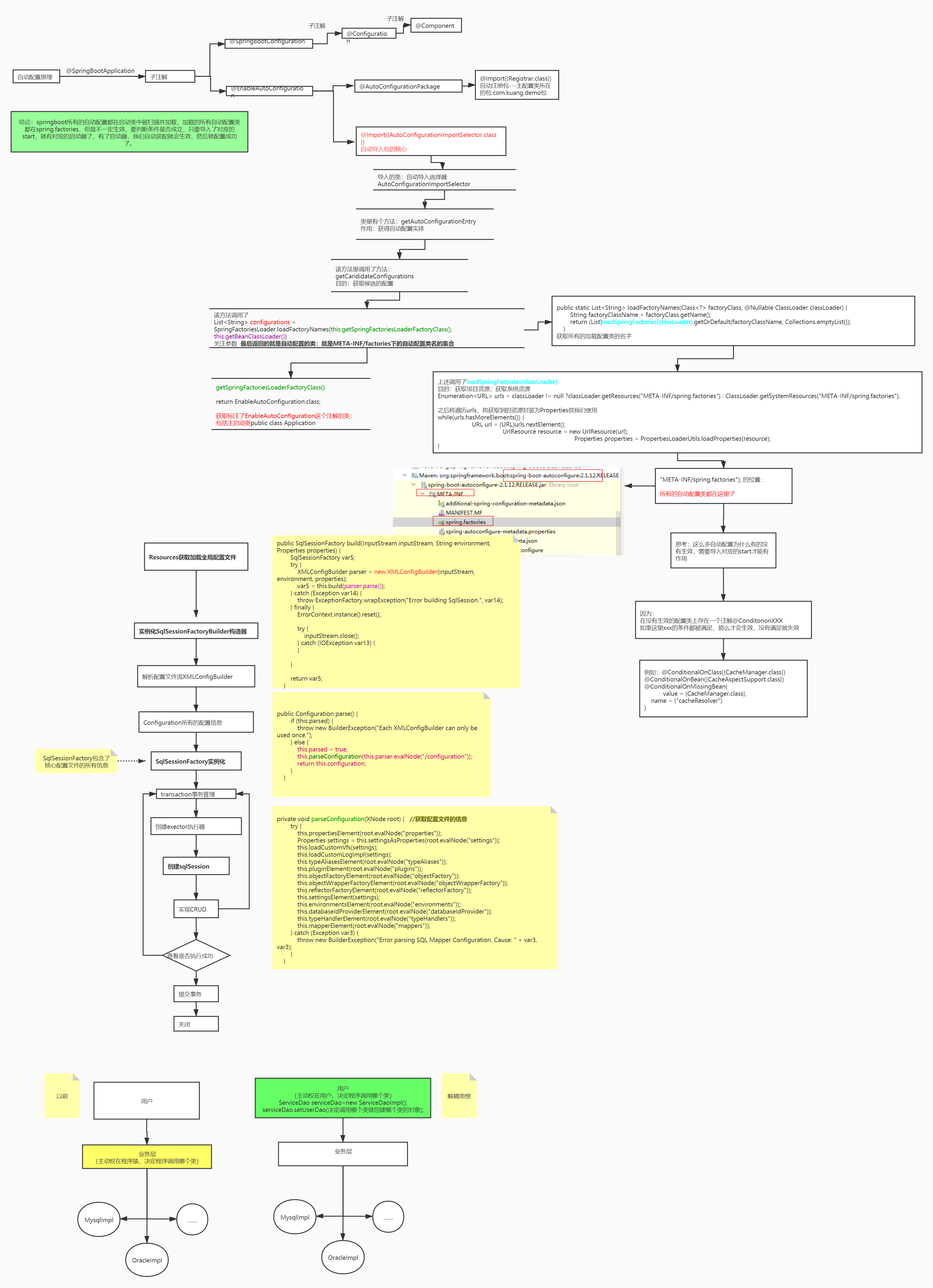
在 application.properties 中设置属性 debug=true,可以在控制台查看已启用和未启用的自动配置。
@SpringBootApplication是@Configuration、@EnableAutoConfiguration和@ComponentScan的组合。
@Configuration表示该类是Java配置类。
@ComponentScan开启自动扫描符合条件的bean(添加了@Controller、@Service等注解)。
@EnableAutoConfiguration会根据类路径中的jar依赖为项目进行自动配置,比如添加了spring-boot-starter-web依赖,会自动添加Tomcat和Spring MVC的依赖,然后Spring Boot会对Tomcat和Spring MVC进行自动配置(spring.factories EnableAutoConfiguration配置了WebMvcAutoConfiguration)。
@Target(ElementType.TYPE)
@Retention(RetentionPolicy.RUNTIME)
@Documented
@Inherited
@AutoConfigurationPackage
@Import(EnableAutoConfigurationImportSelector.class)
public @interface EnableAutoConfiguration {
}
EnableAutoConfiguration主要由 @AutoConfigurationPackage,@Import(EnableAutoConfigurationImportSelector.class)这两个注解组成的。
给大家分享一个Github仓库,上面有大彬整理的300多本经典的计算机书籍PDF,包括C语言、C++、Java、Python、前端、数据库、操作系统、计算机网络、数据结构和算法、机器学习、编程人生等,可以star一下,下次找书直接在上面搜索,仓库持续更新中~
@AutoConfigurationPackage用于将启动类所在的包里面的所有组件注册到spring容器。
@Import 将EnableAutoConfigurationImportSelector注入到spring容器中,EnableAutoConfigurationImportSelector通过SpringFactoriesLoader从类路径下去读取META-INF/spring.factories文件信息,此文件中有一个key为org.springframework.boot.autoconfigure.EnableAutoConfiguration,定义了一组需要自动配置的bean。
# Auto Configure
org.springframework.boot.autoconfigure.EnableAutoConfiguration=\
org.springframework.boot.autoconfigure.admin.SpringApplicationAdminJmxAutoConfiguration,\
org.springframework.boot.autoconfigure.aop.AopAutoConfiguration,\
org.springframework.boot.autoconfigure.amqp.RabbitAutoConfiguration,\
org.springframework.boot.autoconfigure.batch.BatchAutoConfiguration,\
org.springframework.boot.autoconfigure.cache.CacheAutoConfiguration,\
这些配置类不是都会被加载,会根据xxxAutoConfiguration上的@ConditionalOnClass等条件判断是否加载,符合条件才会将相应的组件被加载到spring容器。(比如mybatis-spring-boot-starter,会自动配置sqlSessionFactory、sqlSessionTemplate、dataSource等mybatis所需的组件)
@Configuration
@ConditionalOnClass({ EnableAspectJAutoProxy.class, Aspect.class, Advice.class,
		AnnotatedElement.class }) //类路径存在EnableAspectJAutoProxy等类文件,才会加载此配置类
@ConditionalOnProperty(prefix = "spring.aop", name = "auto", havingValue = "true", matchIfMissing = true)
public class AopAutoConfiguration {

	@Configuration
	@EnableAspectJAutoProxy(proxyTargetClass = false)
	@ConditionalOnProperty(prefix = "spring.aop", name = "proxy-target-class", havingValue = "false", matchIfMissing = false)
	public static class JdkDynamicAutoProxyConfiguration {

	}

	@Configuration
	@EnableAspectJAutoProxy(proxyTargetClass = true)
	@ConditionalOnProperty(prefix = "spring.aop", name = "proxy-target-class", havingValue = "true", matchIfMissing = true)
	public static class CglibAutoProxyConfiguration {

	}

}
全局配置文件中的属性如何生效,比如:server.port=8081,是如何生效的?
@ConfigurationProperties的作用就是将配置文件的属性绑定到对应的bean上。全局配置的属性如:server.port等,通过@ConfigurationProperties注解,绑定到对应的XxxxProperties bean,通过这个 bean 获取相应的属性(serverProperties.getPort())。
//server.port = 8080
@ConfigurationProperties(prefix = "server", ignoreUnknownFields = true)
public class ServerProperties {
	private Integer port;
	private InetAddress address;

	@NestedConfigurationProperty
	private final ErrorProperties error = new ErrorProperties();
	private Boolean useForwardHeaders;
	private String serverHeader;
    //...
}
实现当某个类存在时,自动配置这个类的bean,并且可以在application.properties中配置bean的属性。
(1)新建Maven项目spring-boot-starter-hello,修改pom.xml如下:
<?xml version="1.0" encoding="UTF-8"?>
<project xmlns="http://maven.apache.org/POM/4.0.0"
         xmlns:xsi="http://www.w3.org/2001/XMLSchema-instance"
         xsi:schemaLocation="http://maven.apache.org/POM/4.0.0 http://maven.apache.org/xsd/maven-4.0.0.xsd">
    <modelVersion>4.0.0</modelVersion>

    <groupId>com.tyson</groupId>
    <artifactId>spring-boot-starter-hello</artifactId>
    <version>1.0-SNAPSHOT</version>

    <dependencies>
        <dependency>
            <groupId>org.springframework.boot</groupId>
            <artifactId>spring-boot-autoconfigure</artifactId>
            <version>1.3.0.M1</version>
        </dependency>
        <dependency>
            <groupId>junit</groupId>
            <artifactId>junit</artifactId>
            <version>3.8.1</version>
        </dependency>
    </dependencies>

</project>
(2)属性配置
public class HelloService {
    private String msg;

    public String getMsg() {
        return msg;
    }

    public void setMsg(String msg) {
        this.msg = msg;
    }

    public String sayHello() {
        return "hello" + msg;

    }
}


import org.springframework.boot.context.properties.ConfigurationProperties;

@ConfigurationProperties(prefix="hello")
public class HelloServiceProperties {
    private static final String MSG = "world";
    private String msg = MSG;

    public String getMsg() {
        return msg;
    }

    public void setMsg(String msg) {
        this.msg = msg;
    }
}
(3)自动配置类
import com.tyson.service.HelloService;
import org.springframework.beans.factory.annotation.Autowired;
import org.springframework.boot.autoconfigure.condition.ConditionalOnClass;
import org.springframework.boot.autoconfigure.condition.ConditionalOnMissingBean;
import org.springframework.boot.autoconfigure.condition.ConditionalOnProperty;
import org.springframework.boot.context.properties.EnableConfigurationProperties;
import org.springframework.context.annotation.Bean;
import org.springframework.context.annotation.Configuration;

@Configuration
@EnableConfigurationProperties(HelloServiceProperties.class) //1
@ConditionalOnClass(HelloService.class) //2
@ConditionalOnProperty(prefix="hello", value = "enabled", matchIfMissing = true) //3
public class HelloServiceAutoConfiguration {

    @Autowired
    private HelloServiceProperties helloServiceProperties;

    @Bean
    @ConditionalOnMissingBean(HelloService.class) //4
    public HelloService helloService() {
        HelloService helloService = new HelloService();
        helloService.setMsg(helloServiceProperties.getMsg());
        return helloService;
    }
}
@EnableConfigurationProperties 注解开启属性注入,将带有@ConfigurationProperties 注解的类注入为Spring 容器的 Bean。
当 HelloService 在类路径的条件下。
当设置 hello=enabled 的情况下,如果没有设置则默认为 true,即条件符合。
当容器没有这个 Bean 的时候。
(4)注册配置
想要自动配置生效,需要注册自动配置类。在 src/main/resources 下新建 META-INF/spring.factories。添加以下内容:
org.springframework.boot.autoconfigure.EnableAutoConfiguration=\
com.tyson.config.HelloServiceAutoConfiguration
"\"是为了换行后仍然能读到属性。若有多个自动配置,则用逗号隔开。
(5)使用starter
在 Spring Boot 项目的 pom.xml 中添加:
<dependency>
    <groupId>com.tyson</groupId>
    <artifactId>spring-boot-starter-hello</artifactId>
    <version>1.0-SNAPSHOT</version>
</dependency>
运行类如下:
import com.tyson.service.HelloService;
import org.springframework.beans.factory.annotation.Autowired;
import org.springframework.boot.SpringApplication;
import org.springframework.boot.autoconfigure.SpringBootApplication;
import org.springframework.web.bind.annotation.RequestMapping;
import org.springframework.web.bind.annotation.RestController;

@RestController
@SpringBootApplication
public class SpringbootDemoApplication {

    @Autowired
    public HelloService helloService;

    @RequestMapping("/")
    public String index() {
        return helloService.getMsg();
    }

    public static void main(String[] args) {
        SpringApplication.run(SpringbootDemoApplication.class, args);
    }

}
在项目中没有配置 HelloService bean,但是我们可以注入这个bean,这是通过自动配置实现的。
在 application.properties 中添加 debug 属性,运行配置类,在控制台可以看到:
   HelloServiceAutoConfiguration matched:
      - @ConditionalOnClass found required class 'com.tyson.service.HelloService' (OnClassCondition)
      - @ConditionalOnProperty (hello.enabled) matched (OnPropertyCondition)

   HelloServiceAutoConfiguration#helloService matched:
      - @ConditionalOnMissingBean (types: com.tyson.service.HelloService; SearchStrategy: all) did not find any beans (OnBeanCondition)
可以在 application.properties 中配置 msg 的内容:
hello.msg=大彬
@Value的解析就是在bean初始化阶段。BeanPostProcessor定义了bean初始化前后用户可以对bean进行操作的接口方法,它的一个重要实现类AutowiredAnnotationBeanPostProcessor为bean中的@Autowired和@Value注解的注入功能提供支持。
不需要,内置了 Tomcat/ Jetty 等容器。
Spring Boot 支持 Java Util Logging, Log4j2, Lockback 作为日志框架,如果你使用 Starters 启动器,Spring Boot 将使用 Logback 作为默认日志框架,但是不管是那种日志框架他都支持将配置文件输出到控制台或者文件中。
YAML 配置和传统的 properties 配置相比之下,有这些优势:
缺点就是不支持 @PropertySource 注解导入自定义的 YAML 配置。
在项目的开发中,有些配置文件在开发、测试或者生产等不同环境中可能是不同的,例如数据库连接、redis的配置等等。那我们如何在不同环境中自动实现配置的切换呢?Spring给我们提供了profiles机制给我们提供的就是来回切换配置文件的功能
Spring Profiles 允许用户根据配置文件(dev,test,prod 等)来注册 bean。因此,当应用程序在开发中运行时,只有某些 bean 可以加载,而在 PRODUCTION中,某些其他 bean 可以加载。假设我们的要求是 Swagger 文档仅适用于 QA 环境,并且禁用所有其他文档。这可以使用配置文件来完成。Spring Boot 使得使用配置文件非常简单。
第一种方式是在service层的@TransactionManager中使用transactionManager指定DataSourceConfig中配置的事务。
第二种是使用jta-atomikos实现分布式事务管理。
新创建一个 Spring Boot 项目,默认都是有 parent 的,这个 parent 就是 spring-boot-starter-parent ,spring-boot-starter-parent 主要有如下作用:
java -jar xxx.jar 命令来运行,这种 jar 不可以作为普通的 jar 被其他项目依赖,即使依赖了也无法使用其中的类。\BOOT-INF\classes 目录下才是我们的代码,因此无法被直接引用。如果非要引用,可以在 pom.xml 文件中增加配置,将 Spring Boot 项目打包成两个 jar ,一个可执行,一个可引用。先在properties配置文件中配置两个数据源,创建分包mapper,使用@ConfigurationProperties读取properties中的配置,使用@MapperScan注册到对应的mapper包中 。
目录第1题连续问题分析:解法:第2题分组问题分析:解法:第3题间隔连续问题分析:解法:第4题打折日期交叉问题分析:解法:第5题同时在线问题分析:解法:第1题连续问题如下数据为蚂蚁森林中用户领取的减少碳排放量iddtlowcarbon10012021-12-1212310022021-12-124510012021-12-134310012021-12-134510012021-12-132310022021-12-144510012021-12-1423010022021-12-154510012021-12-1523.......找出连续3天及以上减少碳排放量在100以上的用户分析:遇到这类
?作者主页:静Yu?简介:CSDN全栈优质创作者、华为云享专家、阿里云社区博客专家,前端知识交流社区创建者?社区地址:前端知识交流社区?博主的个人博客:静Yu的个人博客?博主的个人笔记本:前端面试题个人笔记本只记录前端领域的面试题目,项目总结,面试技巧等等。接下来会更新蓝桥杯官方系统基础练习的VIP试题,依然包括解题思路,源代码等等。问题描述:给定当前的时间,请用英文的读法将它读出来。时间用时h和分m表示,在英文的读法中,读一个时间的方法是: 如果m为0,则将时读出来,然后加上“o’clock”,如3:00读作“threeo’clock”。 如果m不为0,则将时读出来,然后将分读出来,如5
如果您希望在Spring中启用定时任务功能,则需要在主类上添加 @EnableScheduling 注解。这样Spring才会扫描 @Scheduled 注解并执行定时任务。在大多数情况下,只需要在主类上添加 @EnableScheduling 注解即可,不需要在Service层或其他类中再次添加。以下是一个示例,演示如何在SpringBoot中启用定时任务功能:@SpringBootApplication@EnableSchedulingpublicclassApplication{publicstaticvoidmain(String[]args){SpringApplication.ru
软件特点部署后能通过浏览器查看线上日志。支持Linux、Windows服务器。采用随机读取的方式,支持大文件的读取。支持实时打印新增的日志(类终端)。支持日志搜索。使用手册基本页面配置路径配置日志所在的目录,配置后按回车键生效,下拉框选择日志名称。选择日志后点击生效,即可加载日志。windows路径E:\java\project\log-view\logslinux路径/usr/local/XX历史模式历史模式下,不会读取新增的日志。针对历史文件可以分页读取,配置分页大小、跳转。历史模式下,支持根据关键词搜索。目前搜索引擎使用的是jdk自带类库,搜索速度相对较低,优点是比较简单。2G日志全文搜
1.依赖导入org.springframework.bootspring-boot-starter-weborg.springframework.bootspring-boot-starter-validation2.validation常用注解@Null被注释的元素必须为null@NotNull被注释的元素不能为null,可以为空字符串@AssertTrue被注释的元素必须为true@AssertFalse被注释的元素必须为false@Min(value)被注释的元素必须是一个数字,其值必须大于等于指定的最小值@Max(value)被注释的元素必须是一个数字,其值必须小于等于指定的最大值@D
Iparking停车收费管理系统-可商用介绍Iparking是一款基于springBoot的停车收费管理系统,支持封闭车场和路边车场,支持微信支付宝多种支付渠道,支持多种硬件,涵盖了停车场管理系统的所有基础功能。技术栈Springboot,MybatisPlus,Beetl,Mysql,Redis,RabbitMQ,UniApp功能云端功能序号模块功能描述1系统管理菜单管理配置系统菜单2系统管理组织管理管理组织机构3系统管理角色管理配置系统角色,包含数据权限和功能权限配置4系统管理用户管理管理后台用户5系统管理租户管理多租户管理6系统管理公众号配置租户公众号配置7系统管理操作日志审计日志8系统
最近更新的博客华为OD机试-卡片组成的最大数字(Python)|机试题算法思路华为OD机试-网上商城优惠活动(一)(Python)|机试题算法思路华为OD机试-统计匹配的二元组个数(Python)|机试题算法思路华为OD机试-找到它(Python)|机试题算法思路华为OD机试-九宫格按键输入(Python)|机试算法备考思路华为OD机试-身高排序(Python)|备考思路使用说明参加华为od机试,一定要注意不要完全背诵代码,需要理解之后模仿写出,通过率才会高。华为OD清单查看地址:blog.csdn.net/hihell/catego
一、Elasticsearch简介实际业务场景中,多端的查询功能都有很大的优化空间。常见的处理方式有:建索引、建物化视图简化查询逻辑、DB层之上建立缓存、分页…然而随着业务数据量的不断增多,总有那么一张表或一个业务,是无法通过常规的处理方式来缩短查询时间的。在查询功能优化上,作为开发人员应该站在公司的角度,本着优化客户体验的目的去寻找解决方案。本人有幸做过Tomcat整合solr,今天一起研究一下当前比较火热的Elasticsearch搜索引擎。Elasticsearch是一个非常强大的搜索引擎。它目前被广泛地使用于各个IT公司。Elasticsearch是由Elastic公司创建。它的代码位
前言介绍了网络安全岗位常见的面试题,仅供参考!一、常识部分1.Linux服务器种用户关键信息存储在那个文件中?启动、停止、重启、开机自启mysql服务命令?如何查找/etc/test.txt文件中"password"关键字信息?如何精确查找80端口?/etc/passwdsystemctlstartmysqld或systemmysqldstart 启动systemctlstopmysqld或systemmysqldstop 停止systemctlrestartmysqld或systemmysqldrestart 重启systemctlenablemysqld或systemmysqldenabl
我在之前的面试中遇到了这个问题,但做不到,知道吗?这是做什么的:`$=`;$_=\%!;($_)=/(.)/;$==++$|;($.,$/,$,,$\,$",$;,$^,$#,$~,$*,$:,@%)=($!=~/(.)(.).(.)(.)(.)(.)..(.)(.)(.)..(.)......(.)/,$"),$=++;$.++;$.++;$_++;$_++;($_,$\,$,)=($~.$"."$;$/$%[$?]$_$\$,$:$%[$?]",$"&$~,$#,);$,++;$,++;$^|=$";`$_$\$,$/$:$;$~$*$%[$?]$.$~$*${#}$%[$?]$;
