launch文件的编写及ROS配置文件的详细介绍
根据ROS的架构和通信机制来看,ROS的各个功能的实现离不开节点(node)和话题(topic)、参数(parameter)、服务(service)等构成的网络拓扑(rosgraph),其中每个j节点 都可以完成对应的功能。而一个机器人完整功能的实现,通常需要启动多个节点,如果一个节点一个节点的启动,比较麻烦。官方给出的优化策略是使用 launch 文件,可以一次性启动多个 ROS 节点。通过launch文件以及roslaunch命令可以一次性启动多个节点,并且可以设置丰富的参数。
在官方给出的例程中,发部分功能的实现都是通过launch文件来实现的,我们也应该学会这种优化策略,通过launch文件来启动自己的功能包,高效的实现各种功能。
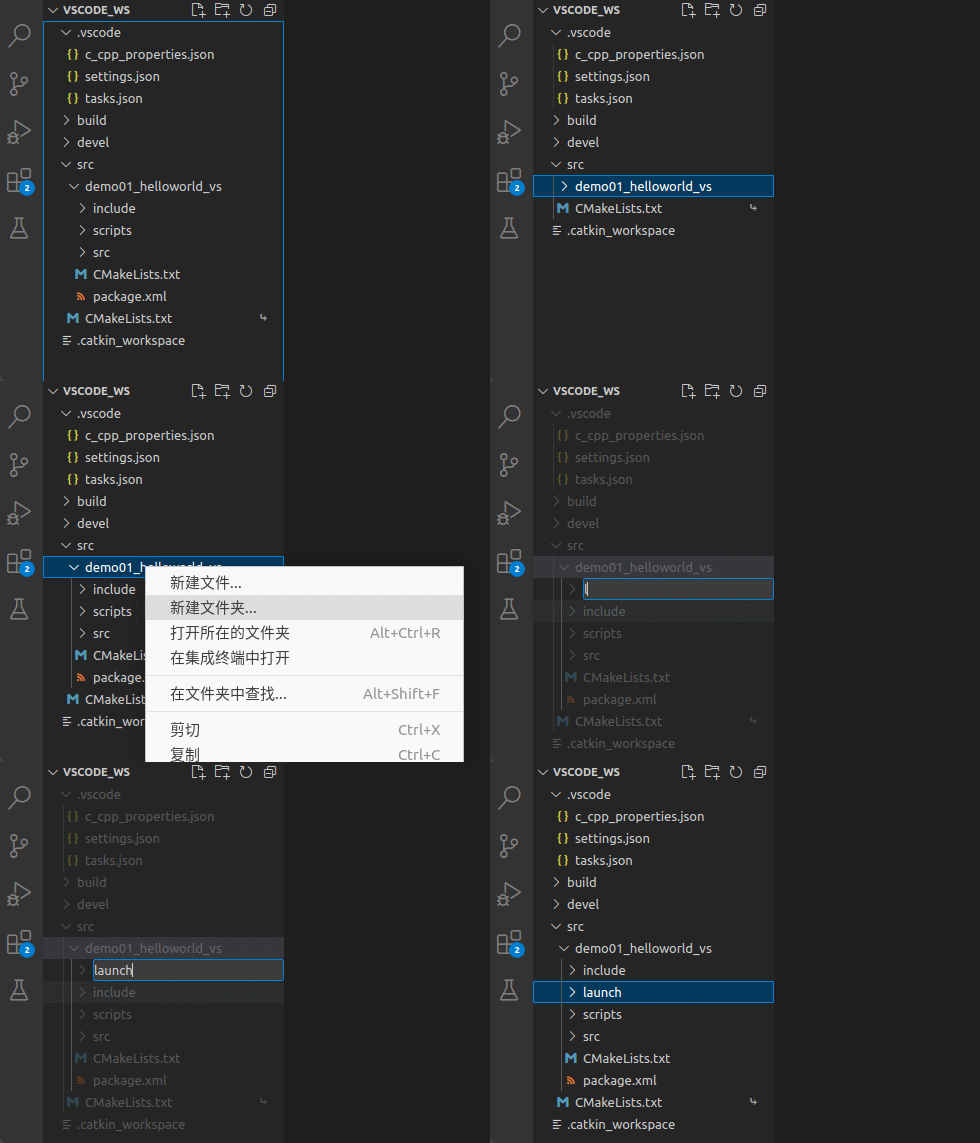
1.对于launch文件的存放,我们可以在功能包下新建一个launch文件夹来专门存在launch文件,方便我们进行调用,下面进行实操
VSode在工作空间目录下打开,这里我们打开的是之前演示的VScode_ws工作空间,打开后在功能包下创建launch文件夹即可
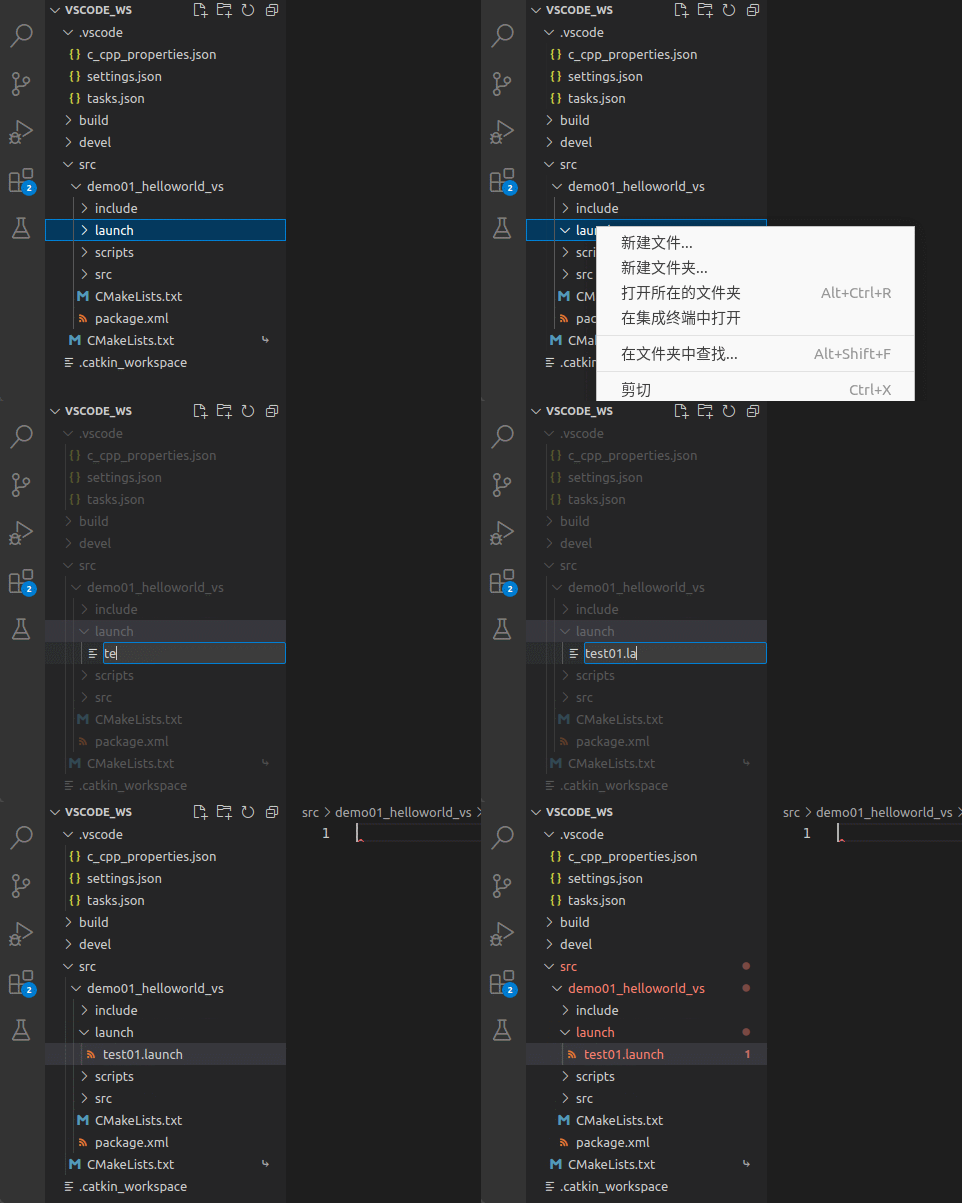
2.在launch文件夹下新建一个名为test01的*.launch文件
3.在编写launch文件之前,我们先介绍一下launch文件的格式,launch文件本质是一个xml类型的文件,通过各种标签进行功能的实现,下面列举launch文件的基本格式及各标签的作用
launch文件的基本格式如下:
<launch>
    <node .../>
   	<param .../>
    <rosparam .../>
    <include .../>
    <remap .../>
    <arg .../>
    <group>  </group>
</launch>
launch
<!-- launch 标签是 launch 文件的根节点,它是其他子标签的容器,没有其他特殊功能。 -->
<launch>
	...
</launch>
node
node标签会指定一个准备运行的ROS节点,node标签是 launch 文件中最重要的标签,因为它实现了launch文件的基本功能,即同时启动多个ROS节点。
<node pkg="package_name" type="executable_node" name="node_name" args="$()" respawn="true" output="sceen">
pkg:节点所在功能包的名称package_name;
type:节点类型是可执行文件(节点)的名称executable_node;
name:节点运行时的名称node_name;
args:传递命令行设置的参数;
respawn:是否自动重启,true表示如果节点未启动或异常关闭,则自动重启;false则表示不自动重启,默认值为false;
output:是否将节点信息输出到屏幕,如果不设置该属性,则节点信息会被写入到日志文件,并不会显示到屏幕上。
param
在工程项目开发中,我们常常需要改变程序变量的一些参数,如果在程序中赋值,我们每次修改参数都需要重新编译程序,大大降低了开发效率,而param标签则可以实现传递参数的功能,它可以定义一个将要被设置到参数服务器的参数,它的参数值可以通过文本文件、二进制文件或命令等属性来设置。
<param name="param_name" type="param_type" value="param_value" />
<!-- param 标签可以嵌入到 node 标签中,以此来作为该 node 的私有参数 -->
<node>
	<param name="param_name" type="param_type" value="param_value" />
</node>
name:参数名称param_name
type:参数类型double,str,int,bool,yaml
value:需要设置的参数值param_value
rosparam
rosparam标签可以实现节点从参数服务器上加载(load)、导出(dump)和删除(delete)YAML文件
<!-- 加载package_name功能包下的example.yaml文件 -->
<rosparam command="load" file="$(find package_name)/example.yaml">
<!-- 导出example_out.yaml文件到package_name功能包下 -->
<rosparam command="dump" file="$(find package_name)/example_out.yaml" />
<!-- 删除参数 -->
<rosparam command="delete" param="xxx/param">
command:功能类型(load、dump、delete)
file:参数文件的路径
param:参数名称
include
include标签功能和编程语言中的include预处理类似,它可以导入其他launch文件到当前include标签所在的位置,实现launch文件复用。
<include file="$(find package_name)/launch_file_name">
remap
remap标签可以实现节点名称的重映射,每个remap标签包含一个原始名称和一个新名称,在系统运行后原始名称会被替换为新名称。
<remap from="turtle1/cmd_vel" to="/cmd_vel" />
<!-- remap 标签同样可以嵌入到 node 标签中,以此来作为该 node 的私有重映射 -->
<node>
	<remap from="turtle1/cmd_vel" to="/cmd_vel" />
</node>
arg
arg标签表示启动参数,该标签允许创建更多可重用和可配置的启动文件,其可以通过命令行、include 标签、定义在高级别的文件这 3 种方式配置值。同时注意:arg标签声明的参数不是全局的,只能在声明的单个启动文件中使用,可以当成函数的局部参数来理解。
<arg name="arg_name" default="arg_default" />
<arg name="arg_name" value="arg_value" />
<!-- 命令行传递的 arg 参数可以覆盖 default,但不能覆盖 value。 -->
注意:arg和param标签的区别:
| 函数 | 作用 |
|---|---|
| arg | 启动时的参数,只在launch文件中有意义 |
| param | 运行时的参数,参数会存储在参数服务器中 |
group
group标签可以实现将一组配置应用到组内的所有节点,它也具有命名空间ns特点,可以将不同的节点放入不同的 namespace。
<!-- 用法1 -->
<group ns="namespace_1">
    <node pkg="pkg_name1" .../>
    <node pkg="pkg_name2" .../>
    ...
</group>

<group ns="namespace_2">
    <node pkg="pkg_name3" .../>
    <node pkg="pkg_name4" .../>
    ...
</group>
<!-- 用法2 -->
<!-- if = value:value 为 true 则包含内部信息 -->
<group if="$(arg foo1)">
    <node pkg="pkg_name1" .../>
</group>

<!-- unless = value:value 为 false 则包含内部信息 -->
<group unless="$(arg foo2)">
    <node pkg="pkg_name2" .../>
</group>
<!--
	当 foo1 == true 时包含其标签内部
	当 foo2 == false 时包含其标签内部
-->
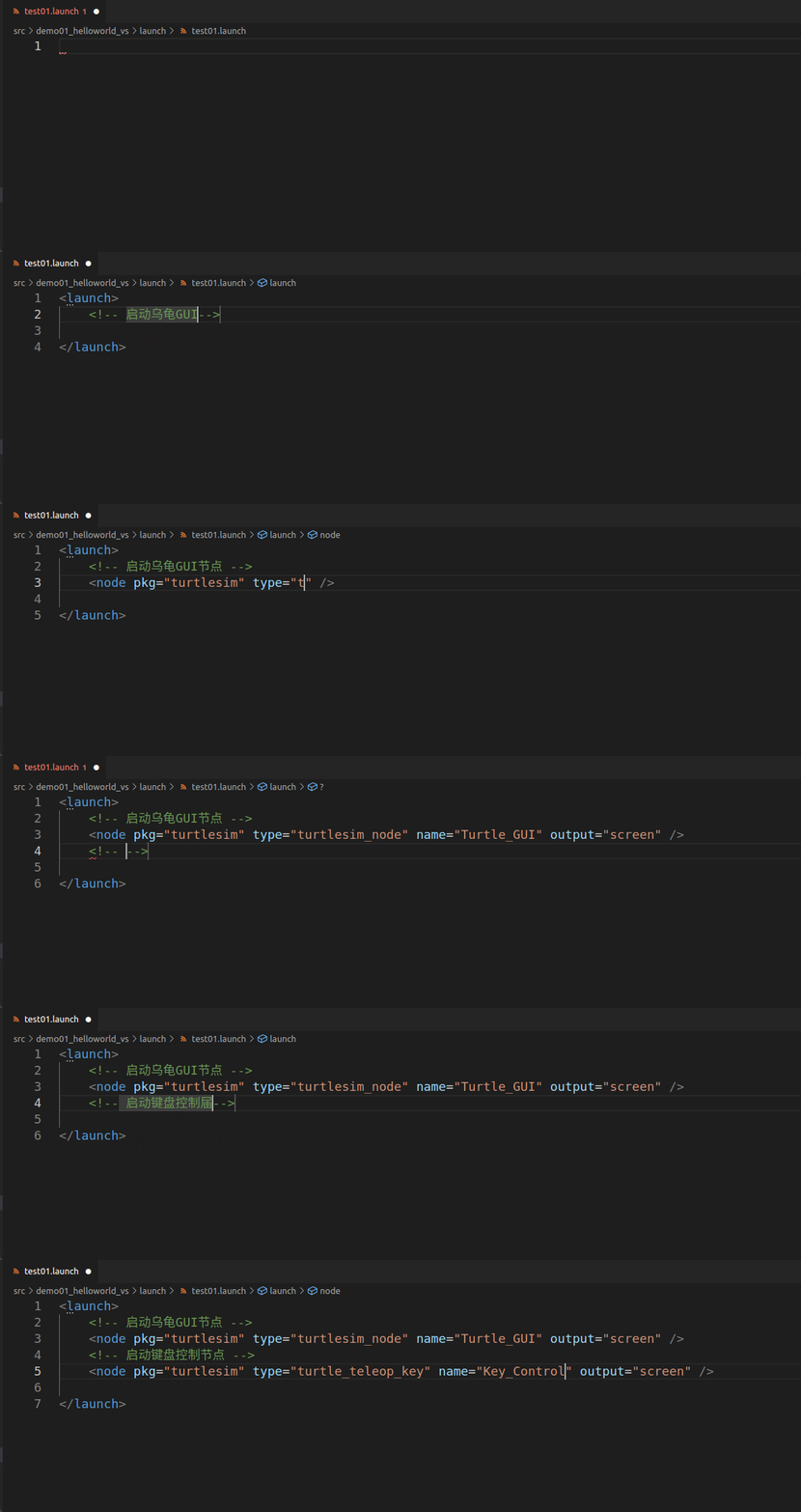
4.下面我们通过几个简单的实例,来演示一下上述函数可以实现的功能
<launch>
	<!-- 启动乌龟GUI节点 -->
	<node pkg="turtlesim" type="turtlesim_node" name="Turtle_Gui" output="screen" />
	<!-- 启动键盘控制节点 -->
	<node pkg="turtlesim" type="turtle_teleop_key"  name="Key_Control" output="screen" />
</launch>
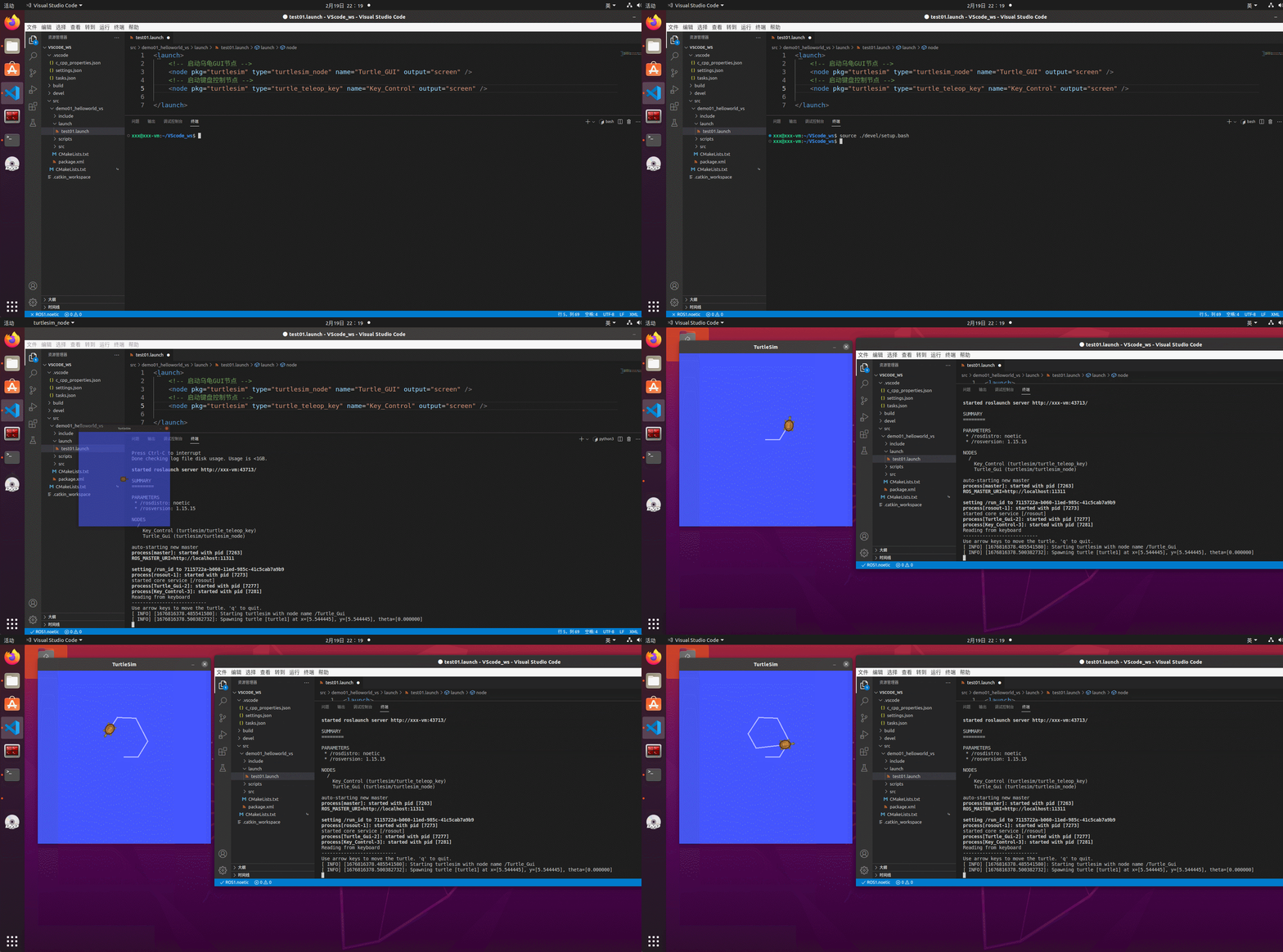
终端下launch文件运行格式如下,第一次运行记得使用指令更新环境变量source ./devel/setup.bash
roslaunch 功能包名 launch文件名字.launch
本教程在VScode终端下的指令为:
source ./devel/setup.bash
roslaunch demo01_helloworld_vs test01.launch
运行结果如下,我们可以看到,键盘可以成功控制乌龟运动。
注意:launch文件启动之前,无需再执行roscore指令启动rosmaster,launch文件可以自启动rosmaster
我们以功能包demo01_helloworld_vs下的package.xml文件为例介绍package.xml文件格式及配置
<?xml version="1.0"?>
<!-- 格式: 以前是 1,推荐使用格式 2 -->
<package format="2">
  <!-- 功能包名 -->
  <name>demo01_helloworld_vs</name>
  <!-- 版本 -->
  <version>0.0.0</version>
  <!-- 功能包描述信息 -->
  <description>The demo01_helloworld_vs package</description>

  <!-- One maintainer tag required, multiple allowed, one person per tag -->
  <!-- Example:  -->
  <!-- <maintainer email="jane.doe@example.com">Jane Doe</maintainer> -->
  <!-- 开发维护人员信息 -->
  <maintainer email="xxx@todo.todo">xxx</maintainer>


  <!-- One license tag required, multiple allowed, one license per tag -->
  <!-- Commonly used license strings: -->
  <!--   BSD, MIT, Boost Software License, GPLv2, GPLv3, LGPLv2.1, LGPLv3 -->
  <!-- 许可证信息,ROS核心组件默认 BSD -->
  <license>TODO</license>


  <!-- Url tags are optional, but multiple are allowed, one per tag -->
  <!-- Optional attribute type can be: website, bugtracker, or repository -->
  <!-- Example: -->
  <!-- <url type="website">http://wiki.ros.org/demo01_helloworld_vs</url> -->


  <!-- Author tags are optional, multiple are allowed, one per tag -->
  <!-- Authors do not have to be maintainers, but could be -->
  <!-- Example: -->
  <!-- <author email="jane.doe@example.com">Jane Doe</author> -->


  <!-- The *depend tags are used to specify dependencies -->
  <!-- Dependencies can be catkin packages or system dependencies -->
  <!-- Examples: -->
  <!-- Use depend as a shortcut for packages that are both build and exec dependencies -->
  <!--   <depend>roscpp</depend> -->
  <!--   Note that this is equivalent to the following: -->
  <!--   <build_depend>roscpp</build_depend> -->
  <!--   <exec_depend>roscpp</exec_depend> -->
  <!-- Use build_depend for packages you need at compile time: -->
  <!--   <build_depend>message_generation</build_depend> -->
  <!-- Use build_export_depend for packages you need in order to build against this package: -->
  <!--   <build_export_depend>message_generation</build_export_depend> -->
  <!-- Use buildtool_depend for build tool packages: -->
  <!--   <buildtool_depend>catkin</buildtool_depend> -->
  <!-- Use exec_depend for packages you need at runtime: -->
  <!--   <exec_depend>message_runtime</exec_depend> -->
  <!-- Use test_depend for packages you need only for testing: -->
  <!--   <test_depend>gtest</test_depend> -->
  <!-- Use doc_depend for packages you need only for building documentation: -->
  <!--   <doc_depend>doxygen</doc_depend> -->
  <!-- 依赖的构建工具,这是必须的 -->
  <buildtool_depend>catkin</buildtool_depend>

  <!-- 指定构建此软件包所需的软件包 -->
  <build_depend>roscpp</build_depend>
  <build_depend>rospy</build_depend>
  <build_depend>std_msgs</build_depend>

  <!-- 指定根据这个包构建库所需要的包 -->
  <build_export_depend>roscpp</build_export_depend>
  <build_export_depend>rospy</build_export_depend>
  <build_export_depend>std_msgs</build_export_depend>

  <!-- 运行该程序包中的代码所需的程序包 -->
  <exec_depend>roscpp</exec_depend>
  <exec_depend>rospy</exec_depend>
  <exec_depend>std_msgs</exec_depend>


  <!-- The export tag contains other, unspecified, tags -->
  <export>
    <!-- Other tools can request additional information be placed here -->

  </export>
</package>
我们以功能包demo01_helloworld_vs下的CMakeLists.txt文件为例介绍CMakeLists.txt文件格式及配置
cmake_minimum_required(VERSION 3.0.2) #所需 cmake 版本
project(demo01_helloworld_vs) #功能包名称,会被 ${PROJECT_NAME} 的方式调用

## Compile as C++11, supported in ROS Kinetic and newer
# add_compile_options(-std=c++11)

## Find catkin macros and libraries
## if COMPONENTS list like find_package(catkin REQUIRED COMPONENTS xyz)
## is used, also find other catkin packages
# 设置构建所需要的软件包
find_package(catkin REQUIRED COMPONENTS
  roscpp
  rospy
  std_msgs
)

## System dependencies are found with CMake's conventions
# 默认添加系统依赖
# find_package(Boost REQUIRED COMPONENTS system)


## Uncomment this if the package has a setup.py. This macro ensures
## modules and global scripts declared therein get installed
## See http://ros.org/doc/api/catkin/html/user_guide/setup_dot_py.html
# 启动 python 模块支持
# catkin_python_setup()

################################################
## Declare ROS messages, services and actions ##
################################################

## To declare and build messages, services or actions from within this
## package, follow these steps:
## * Let MSG_DEP_SET be the set of packages whose message types you use in
##   your messages/services/actions (e.g. std_msgs, actionlib_msgs, ...).
## * In the file package.xml:
##   * add a build_depend tag for "message_generation"
##   * add a build_depend and a exec_depend tag for each package in MSG_DEP_SET
##   * If MSG_DEP_SET isn't empty the following dependency has been pulled in
##     but can be declared for certainty nonetheless:
##     * add a exec_depend tag for "message_runtime"
## * In this file (CMakeLists.txt):
##   * add "message_generation" and every package in MSG_DEP_SET to
##     find_package(catkin REQUIRED COMPONENTS ...)
##   * add "message_runtime" and every package in MSG_DEP_SET to
##     catkin_package(CATKIN_DEPENDS ...)
##   * uncomment the add_*_files sections below as needed
##     and list every .msg/.srv/.action file to be processed
##   * uncomment the generate_messages entry below
##   * add every package in MSG_DEP_SET to generate_messages(DEPENDENCIES ...)

## Generate messages in the 'msg' folder
## 配置 msg 源文件
# add_message_files(
#   FILES
#   Message1.msg
#   Message2.msg
# )

## Generate services in the 'srv' folder
## 配置 srv 源文件
# add_service_files(
#   FILES
#   Service1.srv
#   Service2.srv
# )

## Generate actions in the 'action' folder
## 配置 action 源文件
# add_action_files(
#   FILES
#   Action1.action
#   Action2.action
# )

## Generate added messages and services with any dependencies listed here
# 生成消息、服务时的依赖包
# generate_messages(
#   DEPENDENCIES
#   std_msgs
# )

################################################
## Declare ROS dynamic reconfigure parameters ##
## 声明 ROS 动态参数配置 ##
################################################

## To declare and build dynamic reconfigure parameters within this
## package, follow these steps:
## * In the file package.xml:
##   * add a build_depend and a exec_depend tag for "dynamic_reconfigure"
## * In this file (CMakeLists.txt):
##   * add "dynamic_reconfigure" to
##     find_package(catkin REQUIRED COMPONENTS ...)
##   * uncomment the "generate_dynamic_reconfigure_options" section below
##     and list every .cfg file to be processed

## Generate dynamic reconfigure parameters in the 'cfg' folder
# generate_dynamic_reconfigure_options(
#   cfg/DynReconf1.cfg
#   cfg/DynReconf2.cfg
# )

###################################
## catkin specific configuration ##
## catkin 特定配置##
###################################
## The catkin_package macro generates cmake config files for your package
## Declare things to be passed to dependent projects
## INCLUDE_DIRS: uncomment this if your package contains header files
## LIBRARIES: libraries you create in this project that dependent projects also need
## CATKIN_DEPENDS: catkin_packages dependent projects also need
## DEPENDS: system dependencies of this project that dependent projects also need
# 运行时依赖
catkin_package(
#  INCLUDE_DIRS include
#  LIBRARIES demo01_helloworld_vs
#  CATKIN_DEPENDS roscpp rospy std_msgs
#  DEPENDS system_lib
)

###########
## Build ##
###########

## Specify additional locations of header files
## Your package locations should be listed before other locations
# 添加头文件路径,当前程序包的头文件路径位于其他文件路径之前
include_directories(
# include
  ${catkin_INCLUDE_DIRS}
)

## Declare a C++ library
# 声明 C++ 库
# add_library(${PROJECT_NAME}
#   src/${PROJECT_NAME}/demo01_helloworld_vs.cpp
# )

## Add cmake target dependencies of the library
## as an example, code may need to be generated before libraries
## either from message generation or dynamic reconfigure
# 添加库的 cmake 目标依赖
# add_dependencies(${PROJECT_NAME} ${${PROJECT_NAME}_EXPORTED_TARGETS} ${catkin_EXPORTED_TARGETS})

## Declare a C++ executable
## With catkin_make all packages are built within a single CMake context
## The recommended prefix ensures that target names across packages don't collide
# 声明 C++ 可执行文件
# add_executable(${PROJECT_NAME}_node src/demo01_helloworld_vs_node.cpp)
  add_executable(helloworld_vs_c src/helloworld_vs_c.cpp)

## Rename C++ executable without prefix
## The above recommended prefix causes long target names, the following renames the
## target back to the shorter version for ease of user use
## e.g. "rosrun someones_pkg node" instead of "rosrun someones_pkg someones_pkg_node"
# 重命名c++可执行文件
# set_target_properties(${PROJECT_NAME}_node PROPERTIES OUTPUT_NAME node PREFIX "")

## Add cmake target dependencies of the executable
## same as for the library above
# 添加可执行文件的 cmake 目标依赖
# add_dependencies(${PROJECT_NAME}_node ${${PROJECT_NAME}_EXPORTED_TARGETS} ${catkin_EXPORTED_TARGETS})
  add_dependencies(helloworld_vs_c ${${PROJECT_NAME}_EXPORTED_TARGETS} ${catkin_EXPORTED_TARGETS})

## Specify libraries to link a library or executable target against
# 指定库、可执行文件的链接库
# target_link_libraries(${PROJECT_NAME}_node
#   ${catkin_LIBRARIES}
# )
 target_link_libraries(helloworld_vs_c
   ${catkin_LIBRARIES}
 )

#############
## Install ##
## 安装 ##
#############

# all install targets should use catkin DESTINATION variables
# See http://ros.org/doc/api/catkin/html/adv_user_guide/variables.html

## Mark executable scripts (Python etc.) for installation
## in contrast to setup.py, you can choose the destination
# 设置用于安装的可执行脚本
# catkin_install_python(PROGRAMS
#   scripts/my_python_script
#   DESTINATION ${CATKIN_PACKAGE_BIN_DESTINATION}
# )
catkin_install_python(PROGRAMS
  scripts/helloworld_vs_p.py
  DESTINATION ${CATKIN_PACKAGE_BIN_DESTINATION}
)
## Mark executables for installation
## See http://docs.ros.org/melodic/api/catkin/html/howto/format1/building_executables.html
# install(TARGETS ${PROJECT_NAME}_node
#   RUNTIME DESTINATION ${CATKIN_PACKAGE_BIN_DESTINATION}
# )

## Mark libraries for installation
## See http://docs.ros.org/melodic/api/catkin/html/howto/format1/building_libraries.html
# install(TARGETS ${PROJECT_NAME}
#   ARCHIVE DESTINATION ${CATKIN_PACKAGE_LIB_DESTINATION}
#   LIBRARY DESTINATION ${CATKIN_PACKAGE_LIB_DESTINATION}
#   RUNTIME DESTINATION ${CATKIN_GLOBAL_BIN_DESTINATION}
# )

## Mark cpp header files for installation
# install(DIRECTORY include/${PROJECT_NAME}/
#   DESTINATION ${CATKIN_PACKAGE_INCLUDE_DESTINATION}
#   FILES_MATCHING PATTERN "*.h"
#   PATTERN ".svn" EXCLUDE
# )

## Mark other files for installation (e.g. launch and bag files, etc.)
# install(FILES
#   # myfile1
#   # myfile2
#   DESTINATION ${CATKIN_PACKAGE_SHARE_DESTINATION}
# )

#############
## Testing ##
#############

## Add gtest based cpp test target and link libraries
# catkin_add_gtest(${PROJECT_NAME}-test test/test_demo01_helloworld_vs.cpp)
# if(TARGET ${PROJECT_NAME}-test)
#   target_link_libraries(${PROJECT_NAME}-test ${PROJECT_NAME})
# endif()

## Add folders to be run by python nosetests
# catkin_add_nosetests(test)
launch文件的编写及ROS配置文件介绍到此就更新完毕,创作不易,希望大家多多点赞收藏,感谢大家!!!
参考资料:
http://www.autolabor.com.cn/book/ROSTutorials/
http://events.jianshu.io/p/0450e74cbe4a
我有一个Ruby程序,它使用rubyzip压缩XML文件的目录树。gem。我的问题是文件开始变得很重,我想提高压缩级别,因为压缩时间不是问题。我在rubyzipdocumentation中找不到一种为创建的ZIP文件指定压缩级别的方法。有人知道如何更改此设置吗?是否有另一个允许指定压缩级别的Ruby库? 最佳答案 这是我通过查看rubyzip内部创建的代码。level=Zlib::BEST_COMPRESSIONZip::ZipOutputStream.open(zip_file)do|zip|Dir.glob("**/*")d
我试图在一个项目中使用rake,如果我把所有东西都放到Rakefile中,它会很大并且很难读取/找到东西,所以我试着将每个命名空间放在lib/rake中它自己的文件中,我添加了这个到我的rake文件的顶部:Dir['#{File.dirname(__FILE__)}/lib/rake/*.rake'].map{|f|requiref}它加载文件没问题,但没有任务。我现在只有一个.rake文件作为测试,名为“servers.rake”,它看起来像这样:namespace:serverdotask:testdoputs"test"endend所以当我运行rakeserver:testid时
我的目标是转换表单输入,例如“100兆字节”或“1GB”,并将其转换为我可以存储在数据库中的文件大小(以千字节为单位)。目前,我有这个:defquota_convert@regex=/([0-9]+)(.*)s/@sizes=%w{kilobytemegabytegigabyte}m=self.quota.match(@regex)if@sizes.include?m[2]eval("self.quota=#{m[1]}.#{m[2]}")endend这有效,但前提是输入是倍数(“gigabytes”,而不是“gigabyte”)并且由于使用了eval看起来疯狂不安全。所以,功能正常,
Rails2.3可以选择随时使用RouteSet#add_configuration_file添加更多路由。是否可以在Rails3项目中做同样的事情? 最佳答案 在config/application.rb中:config.paths.config.routes在Rails3.2(也可能是Rails3.1)中,使用:config.paths["config/routes"] 关于ruby-on-rails-Rails3中的多个路由文件,我们在StackOverflow上找到一个类似的问题
对于具有离线功能的智能手机应用程序,我正在为Xml文件创建单向文本同步。我希望我的服务器将增量/差异(例如GNU差异补丁)发送到目标设备。这是计划:Time=0Server:hasversion_1ofXmlfile(~800kiB)Client:hasversion_1ofXmlfile(~800kiB)Time=1Server:hasversion_1andversion_2ofXmlfile(each~800kiB)computesdeltaoftheseversions(=patch)(~10kiB)sendspatchtoClient(~10kiBtransferred)Cl
我正在寻找执行以下操作的正确语法(在Perl、Shell或Ruby中):#variabletoaccessthedatalinesappendedasafileEND_OF_SCRIPT_MARKERrawdatastartshereanditcontinues. 最佳答案 Perl用__DATA__做这个:#!/usr/bin/perlusestrict;usewarnings;while(){print;}__DATA__Texttoprintgoeshere 关于ruby-如何将脚
使用带有Rails插件的vim,您可以创建一个迁移文件,然后一次性打开该文件吗?textmate也可以这样吗? 最佳答案 你可以使用rails.vim然后做类似的事情::Rgeneratemigratonadd_foo_to_bar插件将打开迁移生成的文件,这正是您想要的。我不能代表textmate。 关于ruby-使用VimRails,您可以创建一个新的迁移文件并一次性打开它吗?,我们在StackOverflow上找到一个类似的问题: https://sta
我想用ruby编写一个小的命令行实用程序并将其作为gem分发。我知道安装后,Guard、Sass和Thor等某些gem可以从命令行自行运行。为了让gem像二进制文件一样可用,我需要在我的gemspec中指定什么。 最佳答案 Gem::Specification.newdo|s|...s.executable='name_of_executable'...endhttp://docs.rubygems.org/read/chapter/20 关于ruby-在Ruby中编写命令行实用程序
好的,所以我的目标是轻松地将一些数据保存到磁盘以备后用。您如何简单地写入然后读取一个对象?所以如果我有一个简单的类classCattr_accessor:a,:bdefinitialize(a,b)@a,@b=a,bendend所以如果我从中非常快地制作一个objobj=C.new("foo","bar")#justgaveitsomerandomvalues然后我可以把它变成一个kindaidstring=obj.to_s#whichreturns""我终于可以将此字符串打印到文件或其他内容中。我的问题是,我该如何再次将这个id变回一个对象?我知道我可以自己挑选信息并制作一个接受该信
我正在编写一个小脚本来定位aws存储桶中的特定文件,并创建一个临时验证的url以发送给同事。(理想情况下,这将创建类似于在控制台上右键单击存储桶中的文件并复制链接地址的结果)。我研究过回形针,它似乎不符合这个标准,但我可能只是不知道它的全部功能。我尝试了以下方法:defauthenticated_url(file_name,bucket)AWS::S3::S3Object.url_for(file_name,bucket,:secure=>true,:expires=>20*60)end产生这种类型的结果:...-1.amazonaws.com/file_path/file.zip.A
