很多小伙伴在开发微信小程序的时候,需要获取当前用户位置信息时,都会遇到该如何获取位置详细信息的问题,以下是我的处理方法。
首先,我在生活智打卡小程序使用的是微信小程序自带的获取用户的位置信息的接口(wx.getLocation),但是这个接口不会返回具体的地址信息(比如xxx地名),主要调用方法和返回参数如下:
wx.getLocation({
	type: 'gcj02', // 默认为 wgs84 返回 gps 坐标,gcj02 返回可用于 wx.openLocation 的坐标
	success: function (res) {
		console.log("定位成功", res);
	}
});

//返回结果
{	// 位置的精确度,反应与真实位置之间的接近程度,可以理解成10即与真实位置相差10m,越小越精确
	accuracy: 65
	errMsg: "getLocation:ok"
	// 水平精度,单位 m
	horizontalAccuracy: 65
	latitude: 纬度
	longitude: 经度
	// 速度
	speed: -1
	// 垂直精度,单位 m
	verticalAccuracy: 65
}
要想获取具体位置信息,还需要做下一步处理
首先,进入腾讯地图开发者平台,没有账号的先完成账号注册,随后进入控制台应用管理列表添加应用
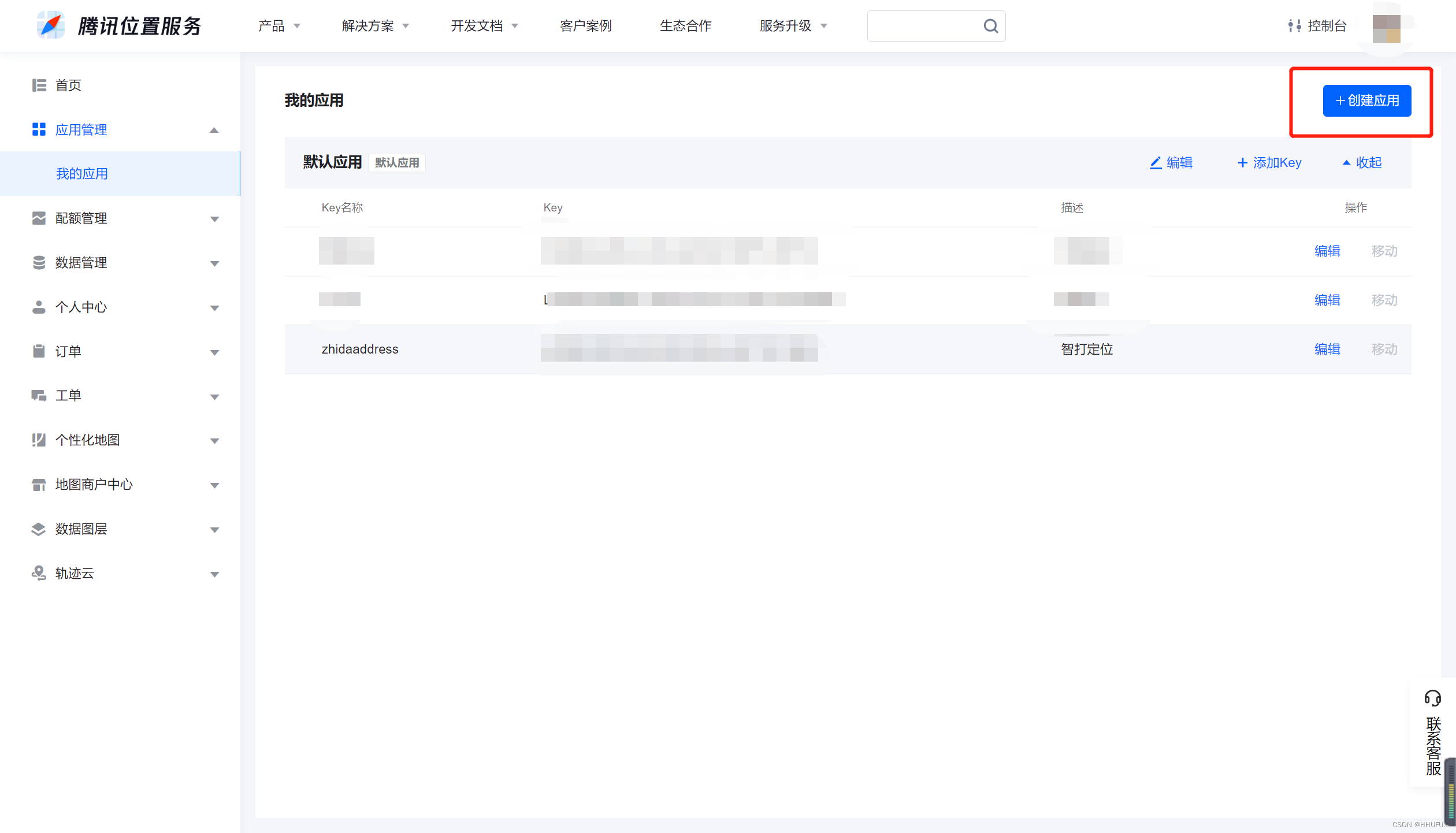
添加key
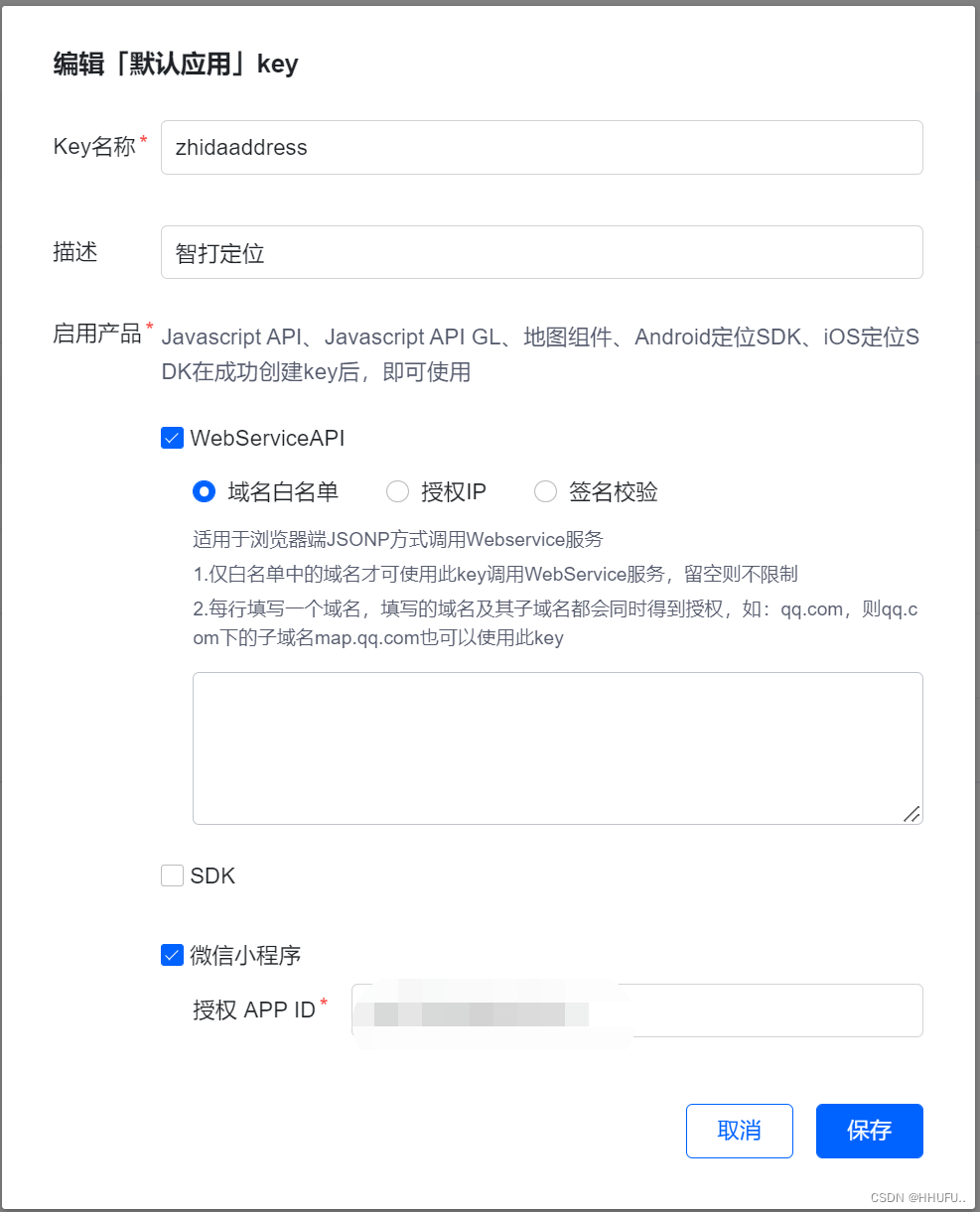
最后可查看官方文档进行逆地址解析了,以下是我写的示例,仅供参考:
wx.request({
	url: 'https://apis.map.qq.com/ws/geocoder/v1/?l&get_poi=1',
	data: {
		"key": "你申请的key",
		"location": "39.984154,116.307490"
	},
	method: 'GET',
	success: function (res) {
    	// success
    	console.log(res.data);
        console.log("请求数据:" + address);
    },
    fail: function () {
    	// fail
    	console.log("请求失败");
    },
    complete: function () {
    // complete
    	console.log("请求完成");
    }
});
部分响应结果(详细可查看官方文档)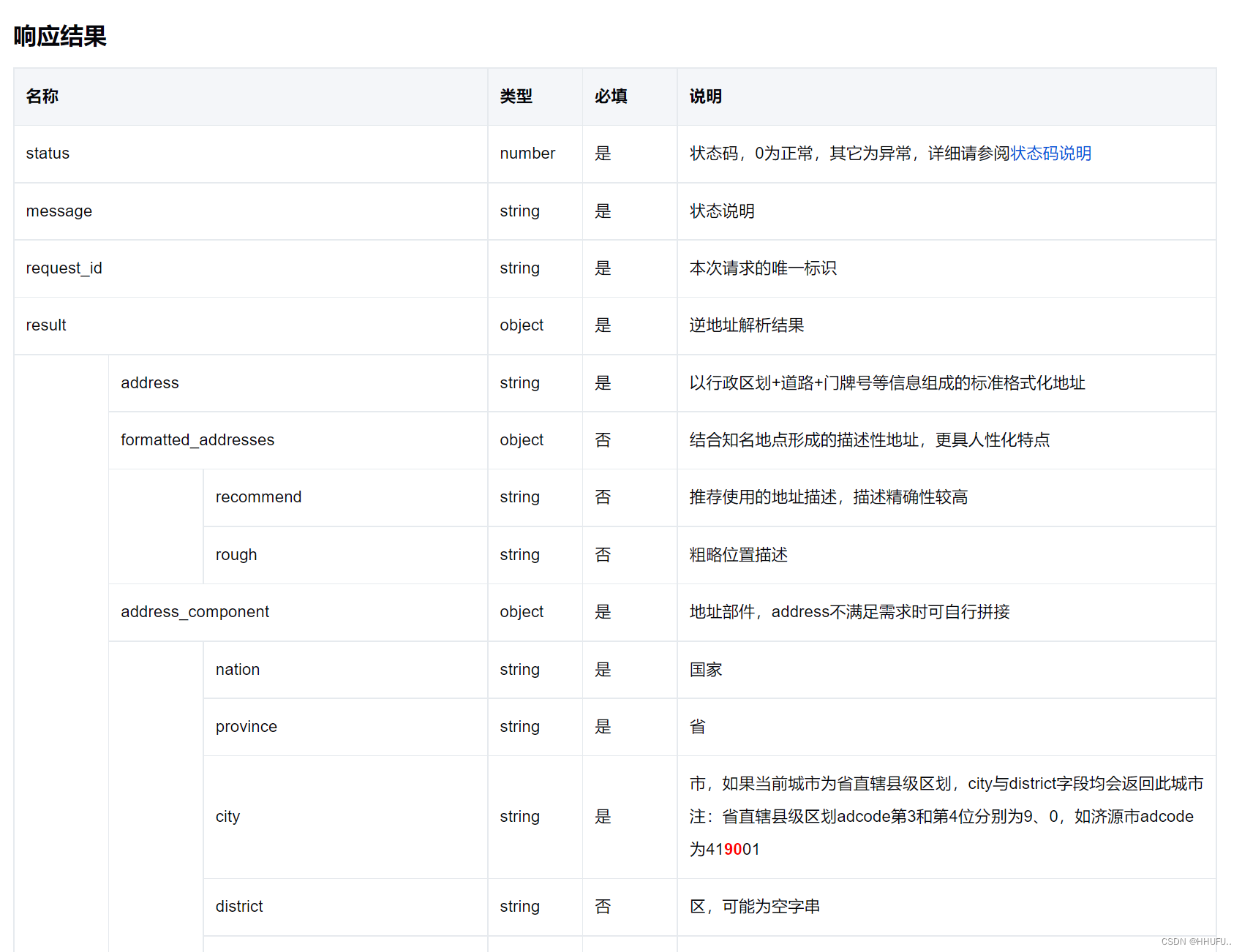
:
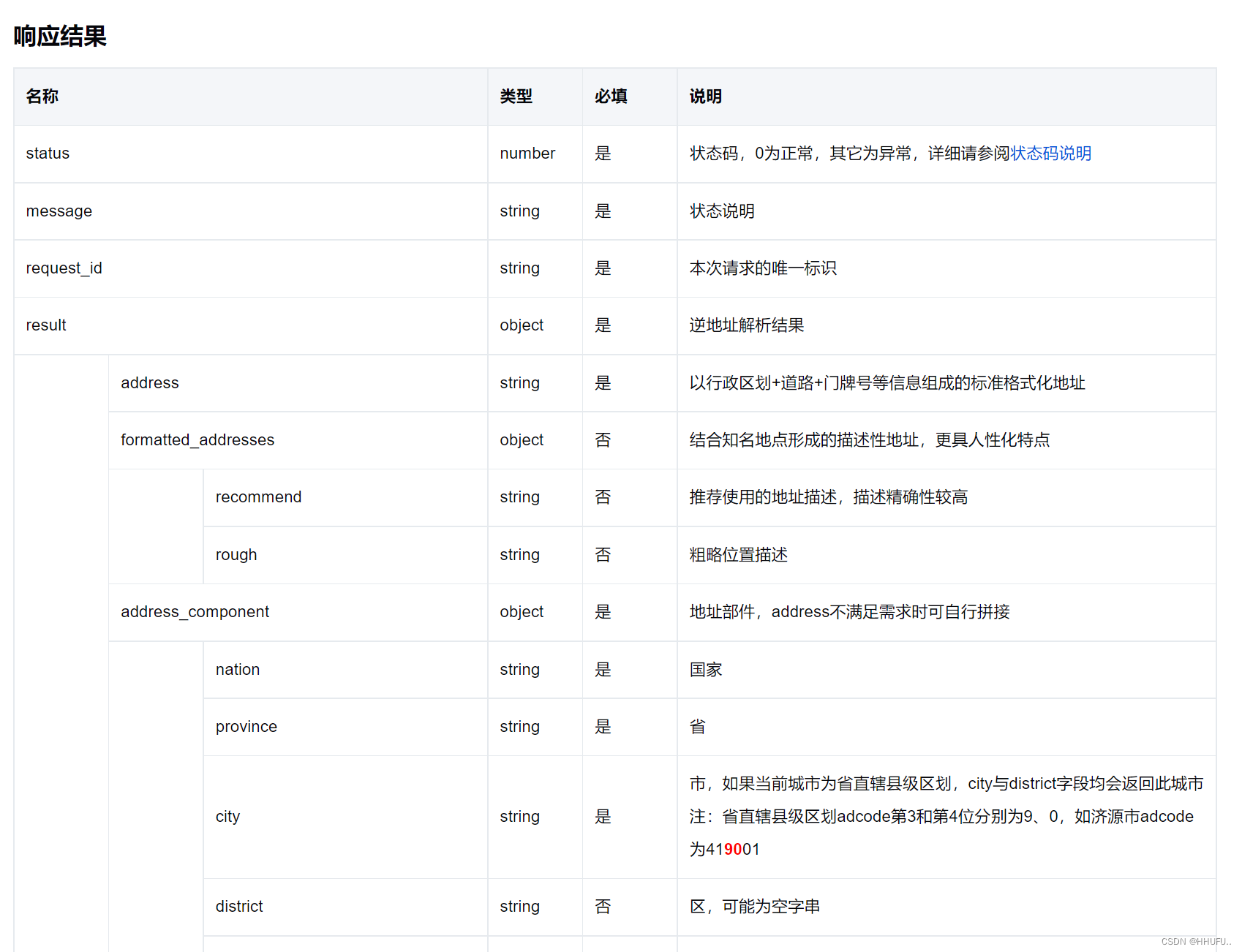
如何在地图上展示当前位置图标?请查看以下代码
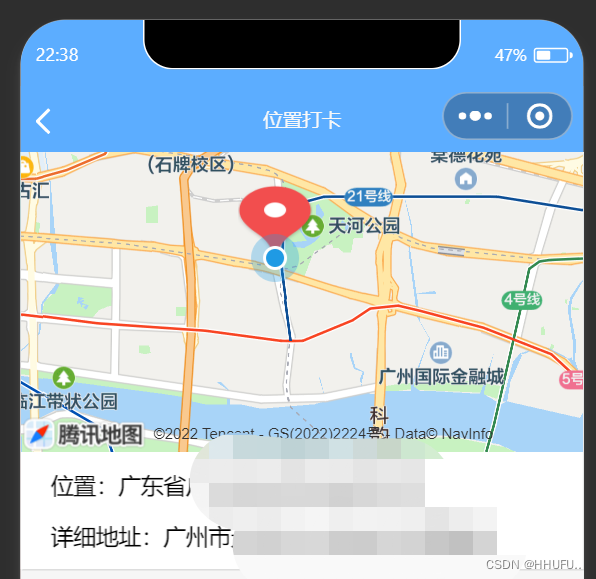
// 前端
<!--pages/position/position.wxml-->
<view class="container">
	<view class="map">
		<map id="myMap" longitude="{{longitude}}" latitude="{{latitude}}" scale="16" markers="{{markers}}"
			polyline="{{polyline}}" show-location="true" show-location style="width: 100%; height: 400rpx;font-size:32rpx"></map>
		<view class="address">位置:{{address}}</view>
		<view class="address">详细地址:{{detail}}</view>
		<view class="address" wx:if="{{!isPosition}}" style="color:red;font-size:24rpx;">请打开手机位置服务,才可以打卡</view>
	</view>
	<view class="content" style="{{'margin-top:'+ marginTop +'rpx'}}">
		<scroll-view scroll-y="true">
			<block wx:if="{{clock_in}}">
				<view class="clockinfo" wx:for="{{clock_in}}" wx:key="item">
					<i-card title="地址:{{clock_in[index].address}}">
						<view slot="content">详细地址:{{clock_in[index].detail}}</view>
						<view slot="footer">打卡时间:{{clock_in[index].time}}</view>
					</i-card>
				</view>
			</block>
			<view wx:if="{{!ifData}}" style="text-align: center;">暂无打卡记录</view>
		</scroll-view>
	</view>
	<view class="btn">
		<button class="button" bindtap="onAdd" type='primary'>开始打卡</button>
	</view>
	<view wx:if="{{showCon}}" class="modal-mask" bindtap="changeModalCancel">
		<view class="modal-dialog">
			<view class="modal-title">温馨提示</view>
			<view class="modal-content">
				获取定位失败,请前往设置打开定位权限,我们将用于定位打卡功能。
			</view>
			<view class="modal-footer">
				<view class="btn-cancel" catchtap="changeModalCancel">取消</view>
				<button open-type="openSetting" class="btn-confirm button-on-view" style="padding:16rpx;"
					catchtap="changeModalCancel">设置</button>
			</view>
		</view>
	</view>
</view>
js代码
const app = getApp();
Page({
    /**
     * 页面的初始数据
     */
    data: {
        address: '',
        latitude: '',
        longitude: '',
        detail: '',
        markers: [],
        _openid: '',
        clock_in: '',
        showCon: false,
        marginTop: 0, // 距离顶部高度
        city: '',
        district: '',
        isPosition: true,
        ifData: true
    },
    /**
     * 页面相关事件处理函数--监听用户下拉动作
     */
    onPullDownRefresh: function () {
        wx.showNavigationBarLoading() //在标题栏中显示加载
        this.getCityNameOFLocation();
        setTimeout(function () {
            wx.hideNavigationBarLoading() //完成停止加载
            wx.stopPullDownRefresh() //停止下拉刷新
        }, 1000);
    },
    changeModalCancel: function () {
        this.setData({
            showCon: false
        })
    },
    /**
     * 生命周期函数--监听页面加载
     */
    onLoad: function (options) {
        wx.startPullDownRefresh() //下拉刷新
        this.setData({
            _openid: app.getOpenid()
        })
        var that = this;
        setTimeout(function () {
            that.onList();
        }, 1000)
    },
    getCityNameOFLocation: function () {
        var that = this;
        wx.getLocation({
            type: 'gcj02', // 默认为 wgs84 返回 gps 坐标,gcj02 返回可用于 wx.openLocation 的坐标
            success: function (res) {
                console.log("定位成功", res);
                var latitude = res.latitude;
                var longitude = res.longitude;
                var locationString = latitude + "," + longitude;
                wx.request({
                    url: 'https://apis.map.qq.com/ws/geocoder/v1/?l&get_poi=1',
                    data: {
                        "key": "你申请的key",
                        "location": locationString
                    },
                    method: 'GET',
                    // header: {},
                    success: function (res) {
                        // success
                        console.log(res.data);
                        var address = res.data.result.address
                        var detail = res.data.result.formatted_addresses.rough
                        console.log("请求数据:" + address);
                        that.setData({
                            markers: [{
                                iconPath: "",
                                id: 0,
                                latitude: latitude,
                                longitude: longitude,
                                width: 50,
                                height: 50
                            }],
                            address: address,
                            detail: detail,
                            latitude: latitude,
                            longitude: longitude,
                            city: res.data.result.ad_info.city,
                            district: res.data.result.ad_info.district
                        })
                    },
                    fail: function () {
                        // fail
                        console.log("请求失败");
                    },
                    complete: function () {
                        // complete
                        console.log("请求完成");
                    }
                })
            },
            fail: function () {
                // fail
                console.log("定位失败");
                wx.getSetting({
                    success: (res) => {
                        if (!res.authSetting['scope.userLocation']) {
                            that.setData({
                                showCon: true,
                                isPosition: false
                            })
                        }
                    }
                })
            },
            complete: function () {
                // complete
                console.log("定位完成");
            }
        })
    },
    //添加位置信息
    onAdd: function () {
        if (this.data.address) {
            var time = util.formatTime(new Date);
            const db = wx.cloud.database();
            db.collection('position').add({
                data: {
                    address: this.data.address,
                    detail: this.data.detail,
                    latitude: this.data.latitude,
                    longitude: this.data.longitude,
                    time: new Date(time),
                    city: this.data.city,
                    district: this.data.district
                },
                success: res => {
                    // 在返回结果
                    wx.showToast({
                        title: '添加成功',
                    })
                    var that = this;
                    setTimeout(function () {
                        that.onList()
                    }, 1000)
                },
                fail: err => {
                    wx.showToast({
                        icon: 'none',
                        title: '添加失败'
                    })
                    console.error('[数据库] [新增记录] 失败:', err)
                }
            })
        } else {
            wx.showToast({
                title: '请打开位置服务,才可以打卡',
                icon: 'none'
            })
        }
    },
    //查询打卡记录
    onList: function () {
        const db = wx.cloud.database();
        db.collection('position').where({
                _openid: this.data._openid
            }).skip(0).orderBy('time', 'desc')
            .get({
                success: res => {
                    console.log(res.data);
                    if (res.data.length > 0) {
                        var info = [{}];
                        for (var i = 0; i < res.data.length; i++) {
                            var date = new Date(res.data[i].time);
                            var date_value = util.formatTime(date);
                            info[i] = {
                                time: date_value,
                                address: res.data[i].address,
                                detail: res.data[i].detail
                            };
                            // console.log(date_value)
                        }
                        this.setData({
                            clock_in: info
                        })
                    } else {
                        this.setData({
                            ifData: false
                        })
                    }
                    // console.log('[数据库] [查询记录] 成功: ', this.data.clock_in)
                },
                fail: err => {
                    wx.showToast({
                        icon: 'none',
                        title: '查询失败',
                    })
                    console.log(' 获取 clock_in 失败,请检查是否有部署云函数,错误信息:', err)
                }
            });
    },
    /**
     * 生命周期函数--监听页面初次渲染完成
     */
    onReady(e) {
        var that = this
        // 页面渲染完成
        setTimeout(() => {
            var query = wx.createSelectorQuery();
            query.select('.map').boundingClientRect();
            query.selectViewport().scrollOffset();
            query.exec((res) => {
                console.log(res)
                var listHeight = res[0].height; // 获取list高度
                that.setData({
                    marginTop: listHeight * 2 + 20
                })
            });
        }, 1000)

    }
})
css代码
page {
	background: #F6F6F6;
}
.address{
	margin: 20rpx 20rpx 20rpx 40rpx;
  font-size:30rpx;
}
.map {
  width: 100%;
  position: fixed;
	top: 0;
  z-index: 1;
	background: white;
	box-shadow: 1px 1px rgba(0, 0, 0, 0.1);
}
.title {
	margin: 20rpx 0 20rpx 0;
	width: 100%;
  text-align: center;
	font-weight: bold;
}
.clockinfo {
	margin-top:20rpx;
  width: 100%;
  float: left;
}
.content {
  font-size: 28rpx;
  margin-bottom: 200rpx;
}
.btn {
	position: fixed;
  height: 140rpx;
  text-align: center;
	width: 100%;
  bottom: 0rpx;
  background-color: white;
}
.button {
  margin-top: 24rpx;
}
.modal-mask {
	width: 100%;
	height: 100%;
	position: fixed;
	top: 0;
	left: 0;
	background-color: rgba(0, 0, 0, 0.5);
	overflow: hidden;
	z-index: 9999;
	display: flex;
	align-items: center;
	justify-content: center;
}
.modal-dialog {
	width: 540rpx;
	overflow: hidden;
	z-index: 9999;
	background: #f9f9f9;
	border-radius: 5rpx;
}
.modal-title {
	padding-top: 30rpx;
	font-size: 32rpx;
	color: #030303;
	text-align: center;
}
.modal-content {
	padding: 20rpx 32rpx;
	font-size: 28rpx;
}
.modal-footer {
	display: flex;
	flex-direction: row;
	height: 86rpx;
	border-top: 1px solid #dedede;
	font-size: 34rpx;
	line-height: 86rpx;
}
.btn-cancel {
	width: 50%;
	color: #abb4bd;
	text-align: center;
	border-right: 1px solid #dedede;
}
.btn-confirm {
	width: 50%;
	color: #6fb64b;
	text-align: center;
	font-weight: 500;
}
好了,在此如果有什么不懂的在评论区留言或者私信联系作者,感谢您的支持!!!
大约一年前,我决定确保每个包含非唯一文本的Flash通知都将从模块中的方法中获取文本。我这样做的最初原因是为了避免一遍又一遍地输入相同的字符串。如果我想更改措辞,我可以在一个地方轻松完成,而且一遍又一遍地重复同一件事而出现拼写错误的可能性也会降低。我最终得到的是这样的:moduleMessagesdefformat_error_messages(errors)errors.map{|attribute,message|"Error:#{attribute.to_s.titleize}#{message}."}enddeferror_message_could_not_find(obje
我主要使用Ruby来执行此操作,但到目前为止我的攻击计划如下:使用gemsrdf、rdf-rdfa和rdf-microdata或mida来解析给定任何URI的数据。我认为最好映射到像schema.org这样的统一模式,例如使用这个yaml文件,它试图描述数据词汇表和opengraph到schema.org之间的转换:#SchemaXtoschema.orgconversion#data-vocabularyDV:name:namestreet-address:streetAddressregion:addressRegionlocality:addressLocalityphoto:i
有没有办法在这个简单的get方法中添加超时选项?我正在使用法拉第3.3。Faraday.get(url)四处寻找,我只能先发起连接后应用超时选项,然后应用超时选项。或者有什么简单的方法?这就是我现在正在做的:conn=Faraday.newresponse=conn.getdo|req|req.urlurlreq.options.timeout=2#2secondsend 最佳答案 试试这个:conn=Faraday.newdo|conn|conn.options.timeout=20endresponse=conn.get(url
我有一个存储主机名的Ruby数组server_names。如果我打印出来,它看起来像这样:["hostname.abc.com","hostname2.abc.com","hostname3.abc.com"]相当标准。我想要做的是获取这些服务器的IP(可能将它们存储在另一个变量中)。看起来IPSocket类可以做到这一点,但我不确定如何使用IPSocket类遍历它。如果它只是尝试像这样打印出IP:server_names.eachdo|name|IPSocket::getaddress(name)pnameend它提示我没有提供服务器名称。这是语法问题还是我没有正确使用类?输出:ge
我想获取模块中定义的所有常量的值:moduleLettersA='apple'.freezeB='boy'.freezeendconstants给了我常量的名字:Letters.constants(false)#=>[:A,:B]如何获取它们的值的数组,即["apple","boy"]? 最佳答案 为了做到这一点,请使用mapLetters.constants(false).map&Letters.method(:const_get)这将返回["a","b"]第二种方式:Letters.constants(false).map{|c
我安装了ruby版本管理器,并将RVM安装的ruby实现设置为默认值,这样'哪个ruby'显示'~/.rvm/ruby-1.8.6-p383/bin/ruby'但是当我在emacs中打开inf-ruby缓冲区时,它使用安装在/usr/bin中的ruby。有没有办法让emacs像shell一样尊重ruby的路径?谢谢! 最佳答案 我创建了一个emacs扩展来将rvm集成到emacs中。如果您有兴趣,可以在这里获取:http://github.com/senny/rvm.el
假设我有这个范围:("aaaaa".."zzzzz")如何在不事先/每次生成整个项目的情况下从范围中获取第N个项目? 最佳答案 一种快速简便的方法:("aaaaa".."zzzzz").first(42).last#==>"aaabp"如果出于某种原因你不得不一遍又一遍地这样做,或者如果你需要避免为前N个元素构建中间数组,你可以这样写:moduleEnumerabledefskip(n)returnto_enum:skip,nunlessblock_given?each_with_indexdo|item,index|yieldit
我目前正在使用以下方法获取页面的源代码:Net::HTTP.get(URI.parse(page.url))我还想获取HTTP状态,而无需发出第二个请求。有没有办法用另一种方法做到这一点?我一直在查看文档,但似乎找不到我要找的东西。 最佳答案 在我看来,除非您需要一些真正的低级访问或控制,否则最好使用Ruby的内置Open::URI模块:require'open-uri'io=open('http://www.example.org/')#=>#body=io.read[0,50]#=>"["200","OK"]io.base_ur
如何在Ruby中获取BasicObject实例的类名?例如,假设我有这个:classMyObjectSystem我怎样才能使这段代码成功?编辑:我发现Object的实例方法class被定义为returnrb_class_real(CLASS_OF(obj));。有什么方法可以从Ruby中使用它? 最佳答案 我花了一些时间研究irb并想出了这个:classBasicObjectdefclassklass=class这将为任何从BasicObject继承的对象提供一个#class您可以调用的方法。编辑评论中要求的进一步解释:假设你有对象
是否可以在应用程序中包含的gem代码中知道应用程序的Rails文件系统根目录?这是gem来源的示例:moduleMyGemdefself.included(base)putsRails.root#returnnilendendActionController::Base.send:include,MyGem谢谢,抱歉我的英语不好 最佳答案 我发现解决类似问题的解决方案是使用railtie初始化程序包含我的模块。所以,在你的/lib/mygem/railtie.rbmoduleMyGemclassRailtie使用此代码,您的模块将在
