使用 el-tree 和 el-table 时,往往需要根据项目整体环境做一些样式调整,记录一下常用样式。
el-tree
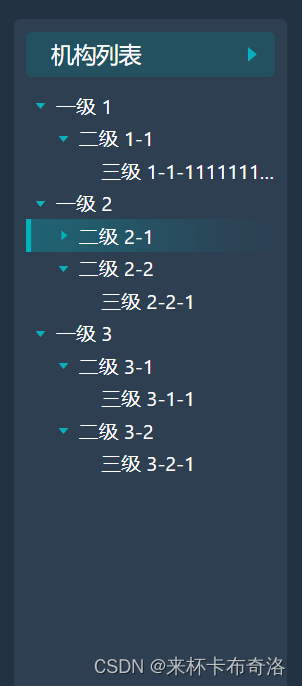
<!-- 树结构 -->
<el-tree
  ref="tree"
  :data="data"
  :props="defaultProps"
  :default-expand-all="isExpanded"
  :highlight-current="true"
  node-key="id"
  @node-click="nodeClick"
>
  <template slot-scope="{ node }">
    <span class="span-ellipsis" :title="node.label">{{ node.label }}</span>
  </template>
</el-tree>
// 树结构样式调整
::v-deep .el-tree {
  background-color: $bottomContainerBackColor;

  // 未展开时三角图标颜色
  .el-icon-caret-right:before {
    color: #02B3BE;
  }

  // 展开时三角图标颜色
  .el-tree-node__expand-icon.expanded.el-icon-caret-right:before {
    color: #02B3BE;
  }

  // 没有子节点时三角图标颜色(一般不显示)
  .el-tree-node__expand-icon.is-leaf::before {
    color: rgba(0, 0, 0, 0); // 透明
  }

  // 鼠标经过节点时高亮样式
  .el-tree-node__content:hover {
    background-color: $bottomContainerBackColor;
    background: url("~@/assets/bg-tree-item.png") no-repeat;
    background-size: cover;
  }

  // 点击节点左边三角形聚焦时的当前节点样式
  .el-tree-node:focus>.el-tree-node__content {
    background-color: $bottomContainerBackColor;
  }
}

// 当前选中节点的样式
::v-deep.el-tree--highlight-current .el-tree-node.is-current>.el-tree-node__content {
  background-color: $bottomContainerBackColor;
  background: url("~@/assets/bg-tree-item.png") no-repeat;
  background-size: cover;
}

// 标签超出宽度显示省略号
.span-ellipsis {
  width: 100%;
  overflow: hidden;
  white-space: nowrap;
  text-overflow: ellipsis;
  color: #fff; // 字体颜色
}
el-table
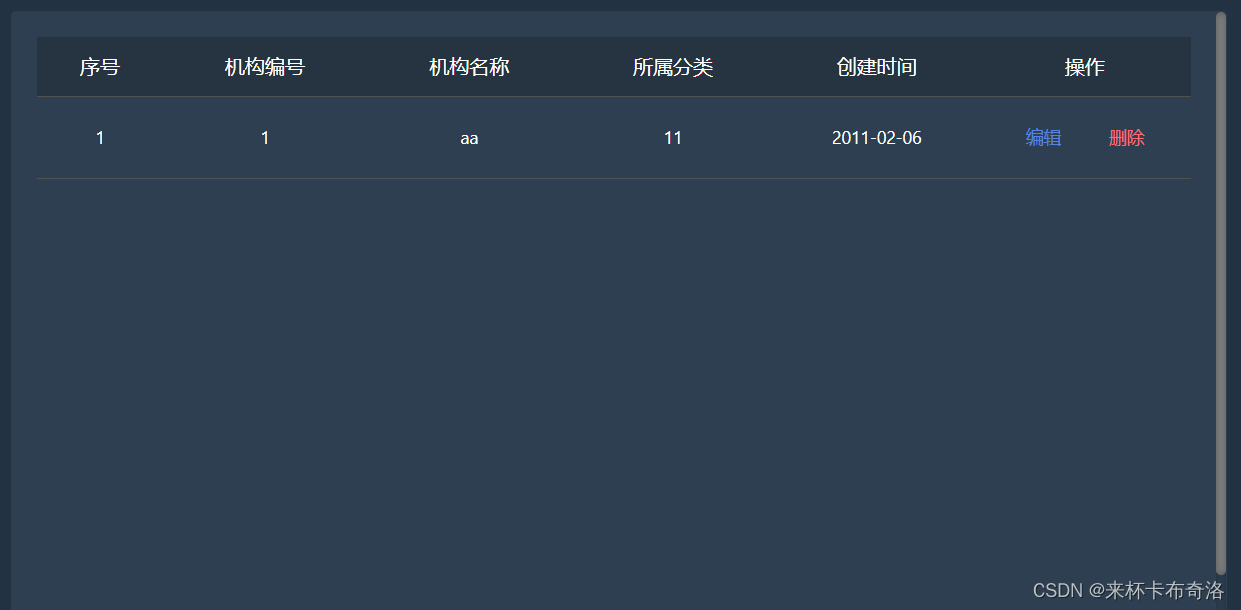
<el-table
    ref="flashTable"
    :data="tableData"
    style="width: 100%"
    height="560"
    :header-cell-style="{
      background: 'rgba(236, 236, 236, 0.6)',
      color: '#333333',
      fontSize: '16px',
      fontFamily: 'Microsoft YaHei',
      fontWeight: '400',
    }"
  >
    <el-table-column label="序号" align="center" width="100"
      ><template slot-scope="scope">{{
        scope.$index + 1
      }}</template></el-table-column
    >
    <el-table-column label="机构编号" align="center" prop="code" />
    <el-table-column label="机构名称" align="center" prop="name" />
    <el-table-column label="所属分类" align="center" prop="cate" />
    <el-table-column label="创建时间" align="center" prop="createTime" />
    <el-table-column label="操作" align="center" width="170">
      <template slot-scope="scope">
        <div class="textbutton">
          <el-button
            type="text"
            :style="{
              color: buttonPremission ? 'grey' : 'rgb(87, 132, 226)',
            }"
            @click="handleEdit(scope.row)"
            :disabled="buttonPremission"
          >
            编辑
          </el-button>
          <el-button
            type="text"
            :style="{
              color: buttonPremission ? 'grey' : 'rgba(255, 106, 117, 1)',
            }"
            @click="handleDelete(scope.row)"
            :disabled="buttonPremission"
          >
            删除
          </el-button>
        </div>
      </template>
    </el-table-column>
  </el-table>
.el-table {
  // thead 背景色
  .el-table__header-wrapper th {
    background: #263341!important;
  }

  // tbody 背景色
  .el-table__row {
    background: $bottomContainerBackColor;
  }

  // 表格 body 有数据和无数据时的背景色
  .el-table__empty-block,
  .el-table__body-wrapper {
    background: $bottomContainerBackColor;
  }

  // 单元格字体颜色
  .cell {
    color: #fff;
  }

  // 每行底部边框颜色
  td, th.is-leaf {
    border-bottom: 1px solid #4F5153;
  }
}

.el-table::before {
  background-color: #4F5153;
}

// table 鼠标经过时当前行高亮
.el-table--enable-row-hover .el-table__body tr:hover > td{
  background-color: #374C62;
}

// 滚动条样式
::-webkit-scrollbar {
  background: $bottomContainerBackColor!important;
}

// 滚动条下背景
::-webkit-scrollbar-track {
  background-color: #2d3f51!important;
}
PS: $bottomContainerBackColor 是 scss 变量:$bottomContainerBackColor: #2D3F51;
我正在使用i18n从头开始构建一个多语言网络应用程序,虽然我自己可以处理一大堆yml文件,但我说的语言(非常)有限,最终我想寻求外部帮助帮助。我想知道这里是否有人在使用UI插件/gem(与django上的django-rosetta不同)来处理多个翻译器,其中一些翻译器不愿意或无法处理存储库中的100多个文件,处理语言数据。谢谢&问候,安德拉斯(如果您已经在rubyonrails-talk上遇到了这个问题,我们深表歉意) 最佳答案 有一个rails3branchofthetolkgem在github上。您可以通过在Gemfi
我有一大串格式化数据(例如JSON),我想使用Psychinruby同时保留格式转储到YAML。基本上,我希望JSON使用literalstyle出现在YAML中:---json:|{"page":1,"results":["item","another"],"total_pages":0}但是,当我使用YAML.dump时,它不使用文字样式。我得到这样的东西:---json:!"{\n\"page\":1,\n\"results\":[\n\"item\",\"another\"\n],\n\"total_pages\":0\n}\n"我如何告诉Psych以想要的样式转储标量?解
我正在为一个项目制作一个简单的shell,我希望像在Bash中一样解析参数字符串。foobar"helloworld"fooz应该变成:["foo","bar","helloworld","fooz"]等等。到目前为止,我一直在使用CSV::parse_line,将列分隔符设置为""和.compact输出。问题是我现在必须选择是要支持单引号还是双引号。CSV不支持超过一个分隔符。Python有一个名为shlex的模块:>>>shlex.split("Test'helloworld'foo")['Test','helloworld','foo']>>>shlex.split('Test"
我需要一个表,其中行实际上是2行表,一个嵌套表是..我怎样才能在Prawn中做到这一点?也许我需要延期..但哪一个? 最佳答案 现在支持子表:Prawn::Document.generate("subtable.pdf")do|pdf|subtable=pdf.make_table([["sub"],["table"]])pdf.table([[subtable,"original"]])end 关于ruby-on-rails-PrawnPDF:Ineedtogeneratenested
我有带有Logo图像的公司模型has_attached_file:logo我用他们的Logo创建了许多公司。现在,我需要添加新样式has_attached_file:logo,:styles=>{:small=>"30x15>",:medium=>"155x85>"}我是否应该重新上传所有旧数据以重新生成新样式?我不这么认为……或者有什么rake任务可以重新生成样式吗? 最佳答案 参见Thumbnail-Generation.如果rake任务不适合你,你应该能够在控制台中使用一个片段来调用重新处理!关于相关公司
按照目前的情况,这个问题不适合我们的问答形式。我们希望答案得到事实、引用或专业知识的支持,但这个问题可能会引发辩论、争论、投票或扩展讨论。如果您觉得这个问题可以改进并可能重新打开,visitthehelpcenter指导。关闭10年前。问题1)我想知道rubyonrails是否有功能类似于primefaces的gem。我问的原因是如果您使用primefaces(http://www.primefaces.org/showcase-labs/ui/home.jsf),开发人员无需担心javascript或jquery的东西。据我所知,JSF是一个规范,基于规范的各种可用实现,prim
编辑:我稍微更改了规范,以更好地符合我的想象。好吧,我真的不想伪造C#属性,我想将它们合而为一并支持AOP。给定程序:classObjectdefObject.profile#magiccodehereendendclassFoo#Thisisthefakeattribute,itprofilesasinglemethod.profiledefbar(b)putsbenddefbarbar(b)puts(b)endcomment("thisreallyshouldbefixed")defsnafu(b)endendFoo.new.bar("test")Foo.new.barbar("t
我为Devise用户和管理员提供了不同的模型。我也在使用Basecamp风格的子域。除了我需要能够以用户或管理员身份进行身份验证的一些Controller和操作外,一切都运行良好。目前我有authenticate_user!在我的application_controller.rb中设置,对于那些只有管理员才能访问的Controller和操作,我使用skip_before_filter跳过它。不幸的是,我不能简单地指定每个Controller的身份验证要求,因为我仍然需要一些Controller和操作才能被用户或管理员访问。我尝试了一些方法都无济于事。看来,如果我移动authentica
我在下面定义了api端点:paramsdorequires:ids,type:Array,desc:'Arrayofgroupids'end我无法从Swagger生成的UI传递数组。如果我输入[1,2,3,4]或ids%5b%5d=1&ids%5b%5d=2&ids%5b%5d=3然后两者都无效.如果我使用数组调用spec中的api,它就可以工作。我的客户想尝试Swagger的整个api,所以我想要一个适用于SwaggerUI的解决方案。 最佳答案 我对所有情况的解决方案:paramsdorequires:ids,type:Arra
我有一个中等复杂度的Rails应用程序。主Controller(执行应用程序所要做的事情的Controller)只有一个操作方法。(它不是标准的RESTful应用程序;它充当中介,并且对其调用方式有外部限制。)但是,它确实有很多方法和一些过滤器,以及一个不断增长的测试套件。随着时间的推移,结构发生了很大变化,我不再相信为之前编写的测试设置的某些Mocha期望仍然合适。有多个人在开发该应用程序,因此我正在构建一本用于编写功能测试的指南。“当你想在有/没有[那些]副作用的情况下进行测试时,使用[这些]期望和断言”等等。调用树/图在编写此类文档时非常有用。除了过滤器之外,这些甚至可以静态地从
