先导知识
在本例中,我们使用 I2C 通信协议。ESP32 中最适合 I2C 通信的引脚是通用输入输出接口 22(SCL) 和通用输入输出接口 21(SDA)。
安装 SSD1306 OLED 库 – ESP32
(也可以用u8g2库,在Arduino IDE中可以搜索下载该库)
有几个库可用于使用 ESP32 控制 OLED 显示器。在本教程中,我们将使用两个 Adafruit 库:Adafruit_SSD1306 库和Adafruit_GFX 库。
下载库文件,解压在Arduino IDE安装的对应路径。


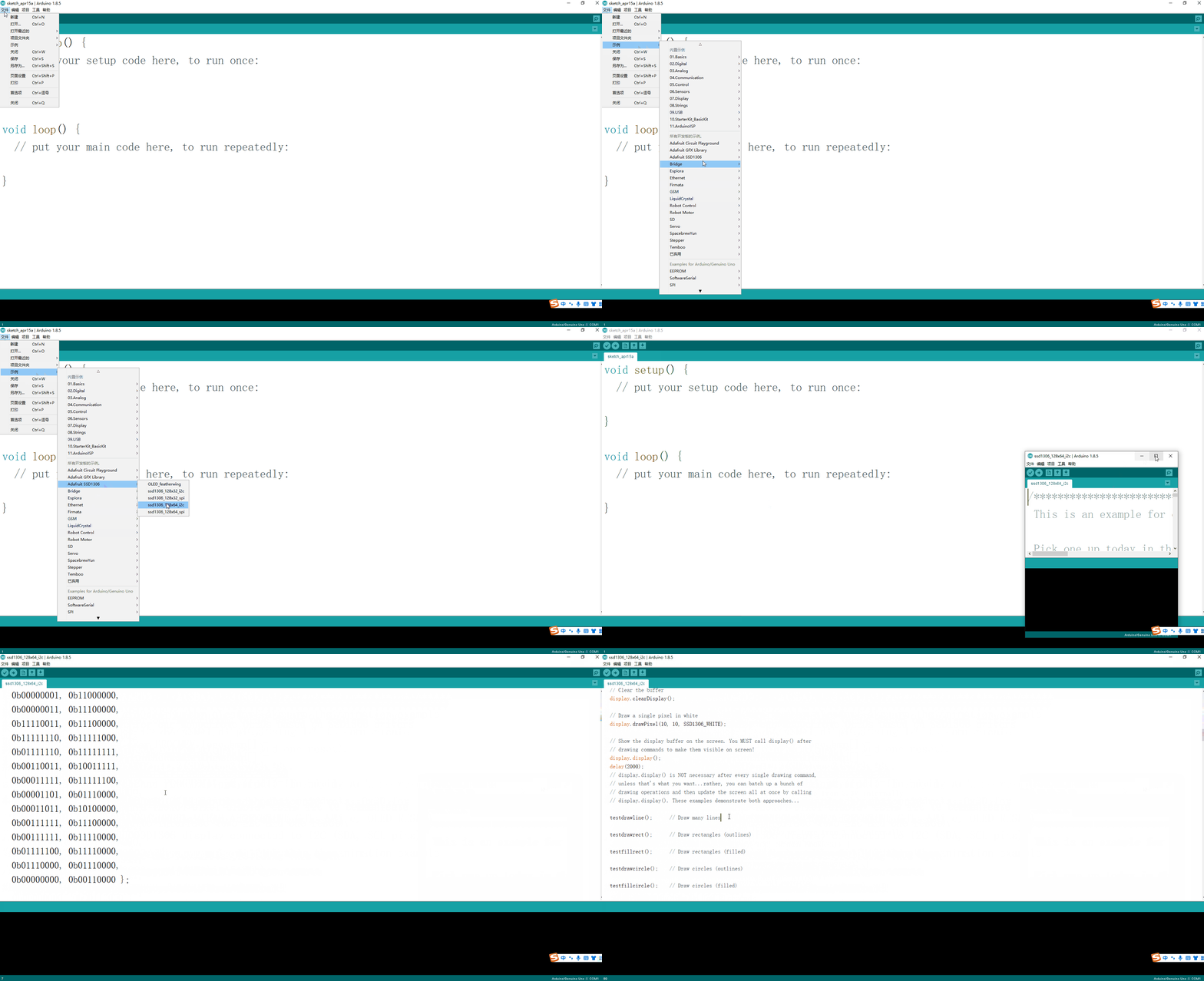
在您的 Arduino IDE 中,转到文件>示例> Adafruit SSD1306并选择您正在使用的显示器的示例。
编译报错:libraries\Adafruit-GFX-Library-master\Adafruit_GrayOLED.h:30:32: fatal error: Adafruit_I2CDevice.h: No such file or directory为开发板 ESP32 Dev Module 编译时出错。
解决方法:如果使用较早版本的 Arduino IDE1.8.10 之前,请找到并安装 Adafruit_BusIO,较新版本会自动处理此先决条件。
Adafruit_BusIO 库和Adafruit_EPD库。
如果您的 OLED 模块没有 RESET 引脚,则应将 OLED_RESET 变量设置为 -1,如下所示:
#define OLED_RESET     -1 // Reset pin # (or -1 if sharing Arduino reset pin)
#define SCREEN_ADDRESS 0x3C ///< See datasheet for Address; 0x3D for 128x64, 0x3C for 128x32
再次遇到问题: OLED 显示屏没有显示任何内容。
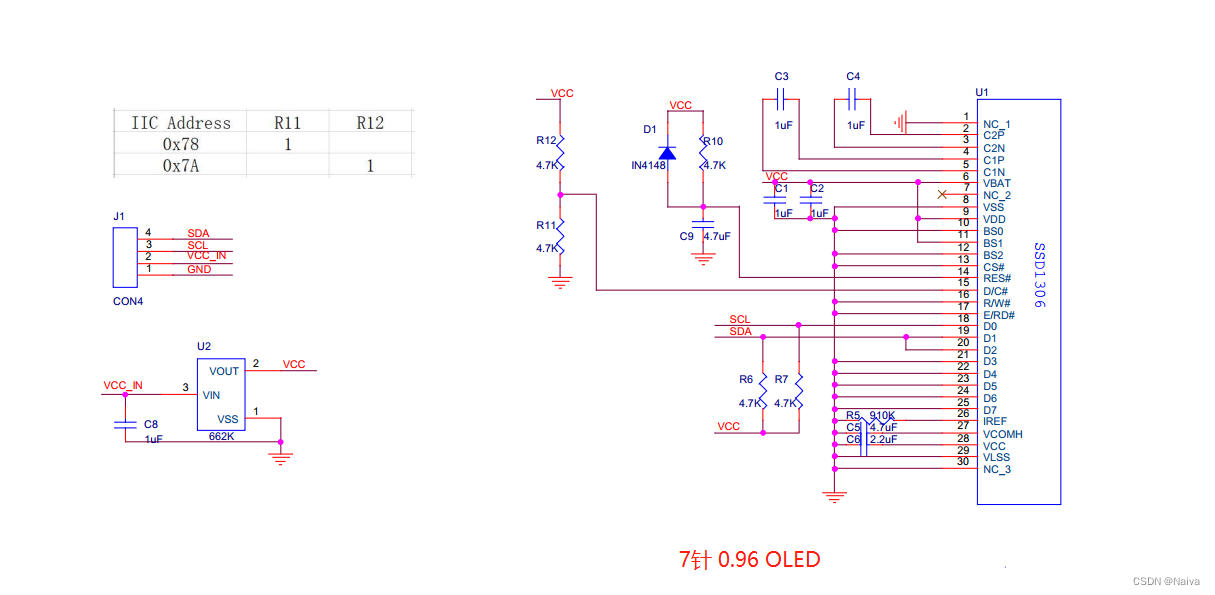
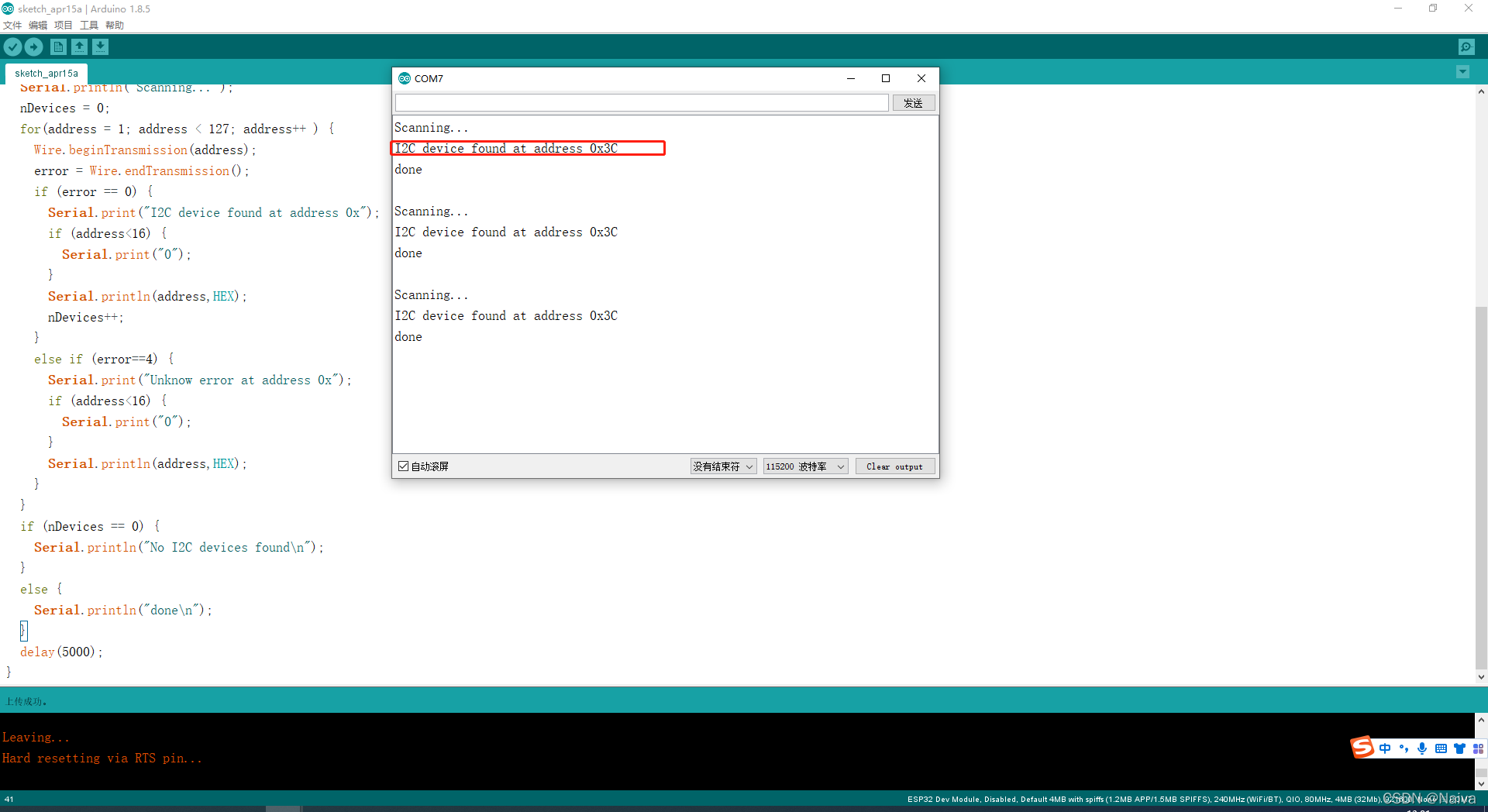
0x3C。/*********
Rui Santos
Complete project details at https://randomnerdtutorials.com
*********/
#include <Wire.h>
void setup() {
Wire.begin();
Serial.begin(115200);
Serial.println("\nI2C Scanner");
}
void loop() {
byte error, address;
int nDevices;
Serial.println("Scanning...");
nDevices = 0;
for(address = 1; address < 127; address++ ) {
Wire.beginTransmission(address);
error = Wire.endTransmission();
if (error == 0) {
Serial.print("I2C device found at address 0x");
if (address<16) {
Serial.print("0");
}
Serial.println(address,HEX);
nDevices++;
}
else if (error==4) {
Serial.print("Unknow error at address 0x");
if (address<16) {
Serial.print("0");
}
Serial.println(address,HEX);
}
}
if (nDevices == 0) {
Serial.println("No I2C devices found\n");
}
else {
Serial.println("done\n");
}
delay(5000);
}
完成以上操作后,将ssd1306_128x64_i2c示例编译上传到ESP32开发板中,上传过程中按住BOOT按键或者RST按键,直到上传成功。程序上传完毕后,单击RST重启开发板即可看见OLED屏幕显示的动画。
注意:上传程序的时候需要拔掉OLED模块的电源,不然也有可能上传失败,报错信息Warning: Could not auto-detect Flash size (FlashID=0xffffff, SizeID=0xff), defaulting to 4MB Compressed 8192 bytes to 47...
Adafruit OLED 库提供了有用的方法来轻松滚动文本:
startscrollright(0x00, 0x0F): 从左到右滚动文本startscrollleft(0x00, 0x0F): 从右到左滚动文本startscrolldiagright(0x00, 0x07): 将文本从左下角滚动到右上角startscrolldiagleft(0x00, 0x07): 将文本从右下角滚动到左上角#include <Wire.h> // 使用 I2C 的库
#include <Adafruit_GFX.h> //Adafruit 库写入显示器
#include <Adafruit_SSD1306.h>
#define SCREEN_WIDTH 128 // 使用的是 128×64 OLED 显示屏
#define SCREEN_HEIGHT 64 //
// Declaration for an SSD1306 display connected to I2C (SDA, SCL pins)
// I2C 通信协议
Adafruit_SSD1306 display(SCREEN_WIDTH, SCREEN_HEIGHT, &Wire, -1);// (-1) 参数表示您的 OLED 显示器没有 RESET 引脚
void testscrolltext(void); //函数声明
void setup() {
Serial.begin(115200);//115200 的波特率初始化串行监视器以进行调试
if(!display.begin(SSD1306_SWITCHCAPVCC, 0x3C)) 0x3d 0x3c 0x78 0x7A // Address 0x3D for 128x64
{
Serial.println(F("SSD1306 allocation failed"));
for(;;);
}
delay(2000);
display.clearDisplay();// 清除显示
display.setTextSize(2);// 设置文本大小
display.setTextColor(WHITE);// 设置文本颜色
display.setCursor(0, 30);//设置显示坐标
// Display static text
display.println("naiva");//
display.display(); // 屏幕上实际显示文本
}
void loop() {
// //testscrolltext();
// display.clearDisplay();
// display.setTextSize(1); //
// display.setTextColor(WHITE);
// display.setCursor(10, 0);
// display.println(F("naiva"));
// display.display(); //
delay(100);
display.startscrollright(0x00, 0x0F);// 从左到右滚动文本
delay(4000);
display.stopscroll();// 停止滚动
delay(1000);
display.startscrollleft(0x00, 0x0F);// 从右到左滚动文本
delay(4000);
display.stopscroll();
delay(1000);
}
void testscrolltext(void) {
display.clearDisplay();
display.setTextSize(2); // Draw 2X-scale text
display.setTextColor(WHITE);
display.setCursor(10, 0);
display.println(F("NAIVA415"));
display.display(); // Show initial text
delay(100);
// Scroll in various directions, pausing in-between:
display.startscrollright(0x00, 0x0F);
delay(2000);
display.stopscroll();
delay(1000);
display.startscrollleft(0x00, 0x0F);
delay(2000);
display.stopscroll();
delay(1000);
display.startscrolldiagright(0x00, 0x07);
delay(2000);
display.startscrolldiagleft(0x00, 0x07);
delay(2000);
display.stopscroll();
delay(1000);
}
在 OLED 中显示位图图像

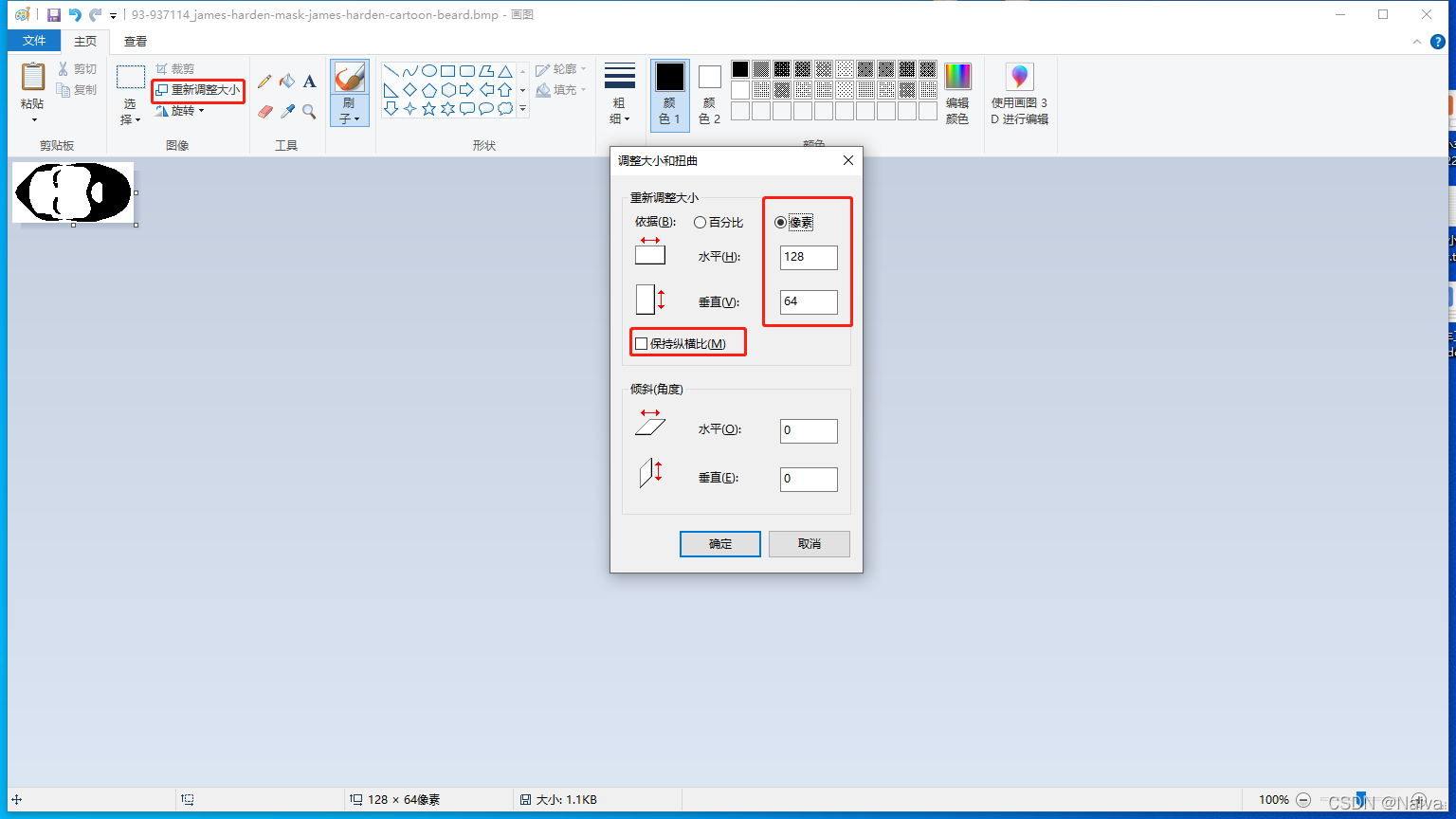
您可以在 OLED 显示屏上显示 128×64 位图单色图像。
首先,使用成像程序调整照片或图片的大小并将其保存为单色位图。如果您使用的是 Windows PC,则可以使用 Paint。
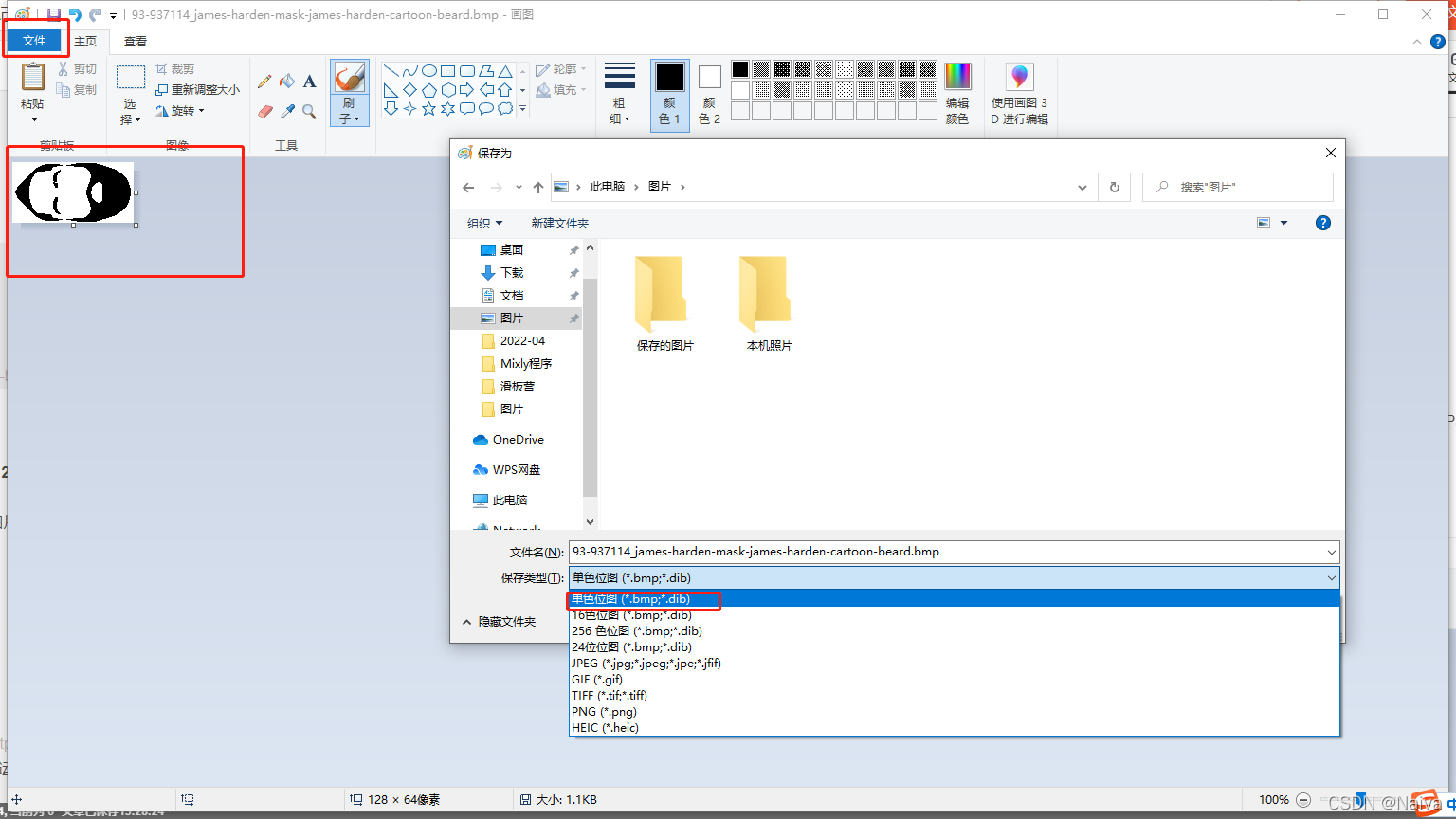
然后,使用 Image to C Array 转换软件(LCD Image Converter)将图像转换为数组。 运行程序并从新图像开始。转到 Image > Import并选择您之前创建的位图图像。
转至Options > Conversion,然后在准备选项卡中,选择以下选项:
Monochrome, Threshold DitherTop to Bottom Forward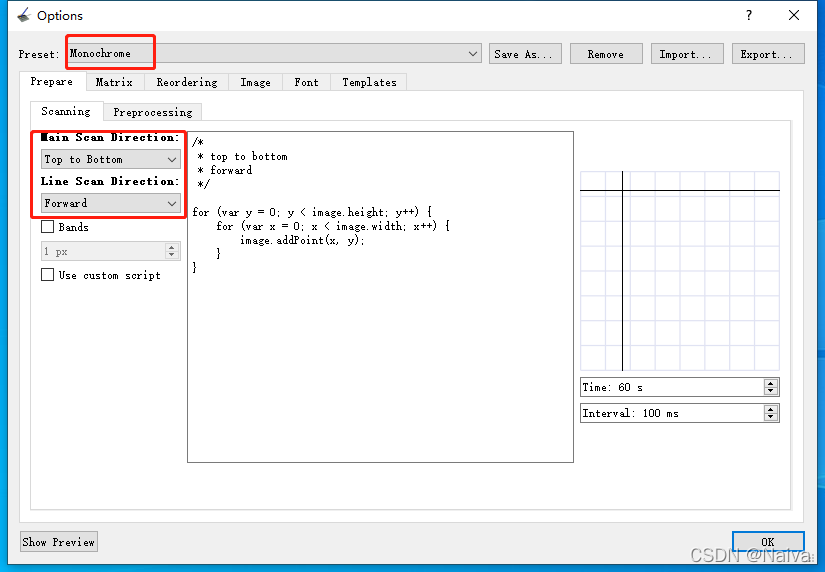
Go to the Image tab and select the following options:

然后,单击 OK。最后,在主菜单中,转到File > Convert。应保存一个带有.c扩展名的新文件。该文件包含图像的 C 数组。使用文本编辑器打开该文件,然后复制数组。
在我们的例子中,这是我们得到的数组:
static const jamesharden[1024] = {
    0xff, 0xff, 0xff, 0xff, 0xff, 0xff, 0xff, 0xff, 0xff, 0xff, 0xff, 0xff, 0xff, 0xff, 0xff, 0xff,
    0xff, 0xff, 0xff, 0xff, 0xff, 0xff, 0xff, 0xff, 0xe0, 0x00, 0x00, 0x7f, 0xff, 0xff, 0xff, 0xff,
    0xff, 0xff, 0xff, 0xff, 0xe0, 0x00, 0x3f, 0xfc, 0x00, 0x00, 0x00, 0x07, 0xff, 0xff, 0xff, 0xff,
    0xff, 0xff, 0xff, 0xfe, 0x00, 0x00, 0x07, 0x80, 0x00, 0x00, 0x00, 0x00, 0xff, 0xff, 0xff, 0xff,
    0xff, 0xff, 0xff, 0xf8, 0x00, 0x01, 0xff, 0xff, 0x80, 0x00, 0x00, 0x00, 0x1f, 0xff, 0xff, 0xff,
    0xff, 0xff, 0xff, 0xe0, 0x00, 0x1f, 0xff, 0xff, 0xff, 0xf0, 0x00, 0x00, 0x03, 0xff, 0xff, 0xff,
    0xff, 0xff, 0xff, 0x80, 0x00, 0x3f, 0xff, 0xff, 0xff, 0xfc, 0x00, 0x00, 0x00, 0x7f, 0xff, 0xff,
    0xff, 0xff, 0xff, 0x00, 0x00, 0x3f, 0xff, 0xff, 0xff, 0xfe, 0x00, 0x00, 0x00, 0x0f, 0xff, 0xff,
    0xff, 0xff, 0xfe, 0x00, 0x00, 0x7f, 0xdf, 0xff, 0xff, 0xff, 0x00, 0x00, 0x00, 0x03, 0xff, 0xff,
    0xff, 0xff, 0xfc, 0x00, 0x3f, 0xff, 0x1f, 0xff, 0xff, 0xff, 0x80, 0x00, 0x00, 0x01, 0xff, 0xff,
    0xff, 0xff, 0xf8, 0x3f, 0xff, 0xfc, 0x3f, 0xff, 0xff, 0xff, 0xc0, 0x00, 0x00, 0x00, 0x7f, 0xff,
    0xff, 0xff, 0xf0, 0x7f, 0xff, 0xf8, 0x7f, 0xff, 0xff, 0xff, 0xc0, 0x00, 0x00, 0x00, 0x3f, 0xff,
    0xff, 0xff, 0xe0, 0xff, 0xff, 0xf0, 0xff, 0xff, 0xff, 0xff, 0xc0, 0x00, 0x00, 0x00, 0x0f, 0xff,
    0xff, 0xff, 0xc1, 0xff, 0xff, 0xf0, 0xff, 0xff, 0xff, 0xff, 0xe0, 0x00, 0x00, 0x00, 0x07, 0xff,
    0xff, 0xff, 0x81, 0xff, 0xff, 0xe1, 0xff, 0xff, 0xff, 0xff, 0xe0, 0x00, 0x00, 0x00, 0x03, 0xff,
    0xff, 0xff, 0x03, 0xff, 0xff, 0xe1, 0xff, 0xff, 0xff, 0xff, 0xe0, 0x00, 0x00, 0x00, 0x01, 0xff,
    0xff, 0xfe, 0x07, 0xff, 0xff, 0xe1, 0xff, 0xff, 0xff, 0xff, 0xe0, 0x00, 0x00, 0x00, 0x00, 0xff,
    0xff, 0xfc, 0x07, 0xff, 0xff, 0xe1, 0xff, 0xff, 0xff, 0xff, 0xc0, 0x00, 0x00, 0x00, 0x00, 0x7f,
    0xff, 0xf8, 0x0f, 0xff, 0xff, 0xe1, 0xff, 0xff, 0xff, 0xff, 0xc0, 0x00, 0x00, 0x00, 0x00, 0x7f,
    0xff, 0xf0, 0x0f, 0xff, 0xff, 0xe1, 0xff, 0xff, 0xff, 0xff, 0xc0, 0x00, 0x00, 0x00, 0x00, 0x3f,
    0xff, 0xe0, 0x0f, 0xff, 0xff, 0xf1, 0xff, 0xff, 0xff, 0xff, 0xc0, 0x00, 0x00, 0x00, 0x00, 0x3f,
    0xff, 0xc0, 0x1f, 0xff, 0xff, 0xe7, 0xff, 0xff, 0xff, 0xff, 0x80, 0x38, 0x00, 0x00, 0x00, 0x1f,
    0xff, 0x80, 0x1f, 0xff, 0xff, 0xe0, 0xff, 0xff, 0xff, 0xff, 0x80, 0xfc, 0x00, 0x00, 0x00, 0x1f,
    0xff, 0x00, 0x1f, 0xff, 0xff, 0xf0, 0xff, 0xff, 0xff, 0xff, 0x01, 0xfe, 0x00, 0x00, 0x00, 0x1f,
    0xfe, 0x00, 0x1f, 0xff, 0xff, 0xf0, 0xff, 0xff, 0xff, 0xff, 0x03, 0xfe, 0x00, 0x00, 0x00, 0x0f,
    0xfc, 0x00, 0x3f, 0xff, 0xff, 0xf8, 0xff, 0xff, 0xff, 0xff, 0x07, 0xfe, 0x00, 0x00, 0x00, 0x0f,
    0xf8, 0x00, 0x3f, 0xff, 0xff, 0xf8, 0xff, 0xff, 0xff, 0xfe, 0x0f, 0xfe, 0x00, 0x00, 0x00, 0x0f,
    0xf8, 0x00, 0x3f, 0xff, 0xff, 0xff, 0xff, 0xff, 0xff, 0xfe, 0x0f, 0xfe, 0x00, 0x00, 0x00, 0x07,
    0xf8, 0x00, 0x3f, 0xff, 0xff, 0xff, 0xff, 0xff, 0xff, 0xfe, 0x0f, 0xfe, 0x00, 0x00, 0x00, 0x07,
    0xf0, 0x00, 0x3f, 0xff, 0xff, 0xff, 0xff, 0xff, 0xff, 0xfc, 0x0f, 0xfe, 0x00, 0x00, 0x00, 0x07,
    0xf0, 0x00, 0x3f, 0xff, 0xff, 0xff, 0xff, 0xff, 0xff, 0xfc, 0x1f, 0xfe, 0x00, 0x00, 0x00, 0x07,
    0xe0, 0x00, 0x3f, 0xff, 0xff, 0xff, 0xff, 0xff, 0xff, 0xfc, 0x1f, 0xfe, 0x00, 0x00, 0x00, 0x07,
    0xe0, 0x00, 0x3f, 0xff, 0xff, 0xff, 0xff, 0xff, 0xff, 0xfc, 0x1f, 0xfe, 0x00, 0x00, 0x00, 0x07,
    0xf0, 0x00, 0x3f, 0xff, 0xff, 0xff, 0xff, 0xff, 0xff, 0xfc, 0x1f, 0xfe, 0x00, 0x00, 0x00, 0x07,
    0xf0, 0x00, 0x3f, 0xff, 0xff, 0xff, 0xff, 0xff, 0xff, 0xfc, 0x0f, 0xfe, 0x00, 0x00, 0x00, 0x07,
    0xf8, 0x00, 0x3f, 0xff, 0xff, 0xff, 0xff, 0xff, 0xff, 0xfe, 0x0f, 0xfe, 0x00, 0x00, 0x00, 0x07,
    0xf8, 0x00, 0x3f, 0xff, 0xff, 0xff, 0xff, 0xff, 0xff, 0xfe, 0x0f, 0xfe, 0x00, 0x00, 0x00, 0x0f,
    0xf8, 0x00, 0x3f, 0xff, 0xff, 0xf8, 0xff, 0xff, 0xff, 0xfe, 0x0f, 0xfe, 0x00, 0x00, 0x00, 0x0f,
    0xfc, 0x00, 0x3f, 0xff, 0xff, 0xf8, 0xff, 0xff, 0xff, 0xff, 0x07, 0xfe, 0x00, 0x00, 0x00, 0x0f,
    0xfe, 0x00, 0x1f, 0xff, 0xff, 0xf0, 0xff, 0xff, 0xff, 0xff, 0x03, 0xfe, 0x00, 0x00, 0x00, 0x0f,
    0xff, 0x00, 0x1f, 0xff, 0xff, 0xf0, 0xff, 0xff, 0xff, 0xff, 0x01, 0xfe, 0x00, 0x00, 0x00, 0x1f,
    0xff, 0x80, 0x1f, 0xff, 0xff, 0xe0, 0xff, 0xff, 0xff, 0xff, 0x80, 0xfc, 0x00, 0x00, 0x00, 0x1f,
    0xff, 0xc0, 0x1f, 0xff, 0xff, 0xe1, 0xff, 0xff, 0xff, 0xff, 0x80, 0x38, 0x00, 0x00, 0x00, 0x1f,
    0xff, 0xe0, 0x0f, 0xff, 0xff, 0xe1, 0xff, 0xff, 0xff, 0xff, 0xc0, 0x00, 0x00, 0x00, 0x00, 0x3f,
    0xff, 0xf0, 0x0f, 0xff, 0xff, 0xe1, 0xff, 0xff, 0xff, 0xff, 0xc0, 0x00, 0x00, 0x00, 0x00, 0x3f,
    0xff, 0xf8, 0x07, 0xff, 0xff, 0xe1, 0xff, 0xff, 0xff, 0xff, 0xc0, 0x00, 0x00, 0x00, 0x00, 0x7f,
    0xff, 0xfc, 0x07, 0xff, 0xff, 0xe1, 0xff, 0xff, 0xff, 0xff, 0xc0, 0x00, 0x00, 0x00, 0x00, 0x7f,
    0xff, 0xfe, 0x07, 0xff, 0xff, 0xe1, 0xff, 0xff, 0xff, 0xff, 0xe0, 0x00, 0x00, 0x00, 0x00, 0xff,
    0xff, 0xff, 0x03, 0xff, 0xff, 0xe1, 0xff, 0xff, 0xff, 0xff, 0xe0, 0x00, 0x00, 0x00, 0x01, 0xff,
    0xff, 0xff, 0x81, 0xff, 0xff, 0xe1, 0xff, 0xff, 0xff, 0xff, 0xe0, 0x00, 0x00, 0x00, 0x03, 0xff,
    0xff, 0xff, 0xc1, 0xff, 0xff, 0xf0, 0xff, 0xff, 0xff, 0xff, 0xe0, 0x00, 0x00, 0x00, 0x07, 0xff,
    0xff, 0xff, 0xe0, 0xff, 0xff, 0xf8, 0xff, 0xff, 0xff, 0xff, 0xc0, 0x00, 0x00, 0x00, 0x0f, 0xff,
    0xff, 0xff, 0xf0, 0x7f, 0xff, 0xf8, 0x7f, 0xff, 0xff, 0xff, 0xc0, 0x00, 0x00, 0x00, 0x3f, 0xff,
    0xff, 0xff, 0xf8, 0x3f, 0xff, 0xfc, 0x3f, 0xff, 0xff, 0xff, 0xc0, 0x00, 0x00, 0x00, 0x7f, 0xff,
    0xff, 0xff, 0xfc, 0x00, 0x1f, 0xff, 0x1f, 0xff, 0xff, 0xff, 0x80, 0x00, 0x00, 0x01, 0xff, 0xff,
    0xff, 0xff, 0xfe, 0x00, 0x00, 0x7f, 0xff, 0xff, 0xff, 0xff, 0x00, 0x00, 0x00, 0x03, 0xff, 0xff,
    0xff, 0xff, 0xff, 0x00, 0x00, 0x3f, 0xff, 0xff, 0xff, 0xfe, 0x00, 0x00, 0x00, 0x0f, 0xff, 0xff,
    0xff, 0xff, 0xff, 0x80, 0x00, 0x3f, 0xff, 0xff, 0xff, 0xfc, 0x00, 0x00, 0x00, 0x7f, 0xff, 0xff,
    0xff, 0xff, 0xff, 0xe0, 0x00, 0x1f, 0xff, 0xff, 0xff, 0xf0, 0x00, 0x00, 0x03, 0xff, 0xff, 0xff,
    0xff, 0xff, 0xff, 0xf8, 0x00, 0x00, 0xff, 0xff, 0x00, 0x00, 0x00, 0x00, 0x1f, 0xff, 0xff, 0xff,
    0xff, 0xff, 0xff, 0xfe, 0x00, 0x00, 0x07, 0x80, 0x00, 0x00, 0x00, 0x01, 0xff, 0xff, 0xff, 0xff,
    0xff, 0xff, 0xff, 0xff, 0xe0, 0x00, 0x7f, 0xfc, 0x00, 0x00, 0x00, 0x0f, 0xff, 0xff, 0xff, 0xff,
    0xff, 0xff, 0xff, 0xff, 0xff, 0xff, 0xff, 0xff, 0xf0, 0x00, 0x00, 0x7f, 0xff, 0xff, 0xff, 0xff,
    0xff, 0xff, 0xff, 0xff, 0xff, 0xff, 0xff, 0xff, 0xff, 0xff, 0xff, 0xff, 0xff, 0xff, 0xff, 0xff
};
#include <Wire.h>
#include <Adafruit_GFX.h>
#include <Adafruit_SSD1306.h>

#define SCREEN_WIDTH 128
#define SCREEN_HEIGHT 64

Adafruit_SSD1306 display(SCREEN_WIDTH, SCREEN_HEIGHT, &Wire, -1);// -1
static const uint8_t jamesharden[1024] = {
    0xff, 0xff, 0xff, 0xff, 0xff, 0xff, 0xff, 0xff, 0xff, 0xff, 0xff, 0xff, 0xff, 0xff, 0xff, 0xff,
    0xff, 0xff, 0xff, 0xff, 0xff, 0xff, 0xff, 0xff, 0xe0, 0x00, 0x00, 0x7f, 0xff, 0xff, 0xff, 0xff,
    0xff, 0xff, 0xff, 0xff, 0xe0, 0x00, 0x3f, 0xfc, 0x00, 0x00, 0x00, 0x07, 0xff, 0xff, 0xff, 0xff,
    0xff, 0xff, 0xff, 0xfe, 0x00, 0x00, 0x07, 0x80, 0x00, 0x00, 0x00, 0x00, 0xff, 0xff, 0xff, 0xff,
    0xff, 0xff, 0xff, 0xf8, 0x00, 0x01, 0xff, 0xff, 0x80, 0x00, 0x00, 0x00, 0x1f, 0xff, 0xff, 0xff,
    0xff, 0xff, 0xff, 0xe0, 0x00, 0x1f, 0xff, 0xff, 0xff, 0xf0, 0x00, 0x00, 0x03, 0xff, 0xff, 0xff,
    0xff, 0xff, 0xff, 0x80, 0x00, 0x3f, 0xff, 0xff, 0xff, 0xfc, 0x00, 0x00, 0x00, 0x7f, 0xff, 0xff,
    0xff, 0xff, 0xff, 0x00, 0x00, 0x3f, 0xff, 0xff, 0xff, 0xfe, 0x00, 0x00, 0x00, 0x0f, 0xff, 0xff,
    0xff, 0xff, 0xfe, 0x00, 0x00, 0x7f, 0xdf, 0xff, 0xff, 0xff, 0x00, 0x00, 0x00, 0x03, 0xff, 0xff,
    0xff, 0xff, 0xfc, 0x00, 0x3f, 0xff, 0x1f, 0xff, 0xff, 0xff, 0x80, 0x00, 0x00, 0x01, 0xff, 0xff,
    0xff, 0xff, 0xf8, 0x3f, 0xff, 0xfc, 0x3f, 0xff, 0xff, 0xff, 0xc0, 0x00, 0x00, 0x00, 0x7f, 0xff,
    0xff, 0xff, 0xf0, 0x7f, 0xff, 0xf8, 0x7f, 0xff, 0xff, 0xff, 0xc0, 0x00, 0x00, 0x00, 0x3f, 0xff,
    0xff, 0xff, 0xe0, 0xff, 0xff, 0xf0, 0xff, 0xff, 0xff, 0xff, 0xc0, 0x00, 0x00, 0x00, 0x0f, 0xff,
    0xff, 0xff, 0xc1, 0xff, 0xff, 0xf0, 0xff, 0xff, 0xff, 0xff, 0xe0, 0x00, 0x00, 0x00, 0x07, 0xff,
    0xff, 0xff, 0x81, 0xff, 0xff, 0xe1, 0xff, 0xff, 0xff, 0xff, 0xe0, 0x00, 0x00, 0x00, 0x03, 0xff,
    0xff, 0xff, 0x03, 0xff, 0xff, 0xe1, 0xff, 0xff, 0xff, 0xff, 0xe0, 0x00, 0x00, 0x00, 0x01, 0xff,
    0xff, 0xfe, 0x07, 0xff, 0xff, 0xe1, 0xff, 0xff, 0xff, 0xff, 0xe0, 0x00, 0x00, 0x00, 0x00, 0xff,
    0xff, 0xfc, 0x07, 0xff, 0xff, 0xe1, 0xff, 0xff, 0xff, 0xff, 0xc0, 0x00, 0x00, 0x00, 0x00, 0x7f,
    0xff, 0xf8, 0x0f, 0xff, 0xff, 0xe1, 0xff, 0xff, 0xff, 0xff, 0xc0, 0x00, 0x00, 0x00, 0x00, 0x7f,
    0xff, 0xf0, 0x0f, 0xff, 0xff, 0xe1, 0xff, 0xff, 0xff, 0xff, 0xc0, 0x00, 0x00, 0x00, 0x00, 0x3f,
    0xff, 0xe0, 0x0f, 0xff, 0xff, 0xf1, 0xff, 0xff, 0xff, 0xff, 0xc0, 0x00, 0x00, 0x00, 0x00, 0x3f,
    0xff, 0xc0, 0x1f, 0xff, 0xff, 0xe7, 0xff, 0xff, 0xff, 0xff, 0x80, 0x38, 0x00, 0x00, 0x00, 0x1f,
    0xff, 0x80, 0x1f, 0xff, 0xff, 0xe0, 0xff, 0xff, 0xff, 0xff, 0x80, 0xfc, 0x00, 0x00, 0x00, 0x1f,
    0xff, 0x00, 0x1f, 0xff, 0xff, 0xf0, 0xff, 0xff, 0xff, 0xff, 0x01, 0xfe, 0x00, 0x00, 0x00, 0x1f,
    0xfe, 0x00, 0x1f, 0xff, 0xff, 0xf0, 0xff, 0xff, 0xff, 0xff, 0x03, 0xfe, 0x00, 0x00, 0x00, 0x0f,
    0xfc, 0x00, 0x3f, 0xff, 0xff, 0xf8, 0xff, 0xff, 0xff, 0xff, 0x07, 0xfe, 0x00, 0x00, 0x00, 0x0f,
    0xf8, 0x00, 0x3f, 0xff, 0xff, 0xf8, 0xff, 0xff, 0xff, 0xfe, 0x0f, 0xfe, 0x00, 0x00, 0x00, 0x0f,
    0xf8, 0x00, 0x3f, 0xff, 0xff, 0xff, 0xff, 0xff, 0xff, 0xfe, 0x0f, 0xfe, 0x00, 0x00, 0x00, 0x07,
    0xf8, 0x00, 0x3f, 0xff, 0xff, 0xff, 0xff, 0xff, 0xff, 0xfe, 0x0f, 0xfe, 0x00, 0x00, 0x00, 0x07,
    0xf0, 0x00, 0x3f, 0xff, 0xff, 0xff, 0xff, 0xff, 0xff, 0xfc, 0x0f, 0xfe, 0x00, 0x00, 0x00, 0x07,
    0xf0, 0x00, 0x3f, 0xff, 0xff, 0xff, 0xff, 0xff, 0xff, 0xfc, 0x1f, 0xfe, 0x00, 0x00, 0x00, 0x07,
    0xe0, 0x00, 0x3f, 0xff, 0xff, 0xff, 0xff, 0xff, 0xff, 0xfc, 0x1f, 0xfe, 0x00, 0x00, 0x00, 0x07,
    0xe0, 0x00, 0x3f, 0xff, 0xff, 0xff, 0xff, 0xff, 0xff, 0xfc, 0x1f, 0xfe, 0x00, 0x00, 0x00, 0x07,
    0xf0, 0x00, 0x3f, 0xff, 0xff, 0xff, 0xff, 0xff, 0xff, 0xfc, 0x1f, 0xfe, 0x00, 0x00, 0x00, 0x07,
    0xf0, 0x00, 0x3f, 0xff, 0xff, 0xff, 0xff, 0xff, 0xff, 0xfc, 0x0f, 0xfe, 0x00, 0x00, 0x00, 0x07,
    0xf8, 0x00, 0x3f, 0xff, 0xff, 0xff, 0xff, 0xff, 0xff, 0xfe, 0x0f, 0xfe, 0x00, 0x00, 0x00, 0x07,
    0xf8, 0x00, 0x3f, 0xff, 0xff, 0xff, 0xff, 0xff, 0xff, 0xfe, 0x0f, 0xfe, 0x00, 0x00, 0x00, 0x0f,
    0xf8, 0x00, 0x3f, 0xff, 0xff, 0xf8, 0xff, 0xff, 0xff, 0xfe, 0x0f, 0xfe, 0x00, 0x00, 0x00, 0x0f,
    0xfc, 0x00, 0x3f, 0xff, 0xff, 0xf8, 0xff, 0xff, 0xff, 0xff, 0x07, 0xfe, 0x00, 0x00, 0x00, 0x0f,
    0xfe, 0x00, 0x1f, 0xff, 0xff, 0xf0, 0xff, 0xff, 0xff, 0xff, 0x03, 0xfe, 0x00, 0x00, 0x00, 0x0f,
    0xff, 0x00, 0x1f, 0xff, 0xff, 0xf0, 0xff, 0xff, 0xff, 0xff, 0x01, 0xfe, 0x00, 0x00, 0x00, 0x1f,
    0xff, 0x80, 0x1f, 0xff, 0xff, 0xe0, 0xff, 0xff, 0xff, 0xff, 0x80, 0xfc, 0x00, 0x00, 0x00, 0x1f,
    0xff, 0xc0, 0x1f, 0xff, 0xff, 0xe1, 0xff, 0xff, 0xff, 0xff, 0x80, 0x38, 0x00, 0x00, 0x00, 0x1f,
    0xff, 0xe0, 0x0f, 0xff, 0xff, 0xe1, 0xff, 0xff, 0xff, 0xff, 0xc0, 0x00, 0x00, 0x00, 0x00, 0x3f,
    0xff, 0xf0, 0x0f, 0xff, 0xff, 0xe1, 0xff, 0xff, 0xff, 0xff, 0xc0, 0x00, 0x00, 0x00, 0x00, 0x3f,
    0xff, 0xf8, 0x07, 0xff, 0xff, 0xe1, 0xff, 0xff, 0xff, 0xff, 0xc0, 0x00, 0x00, 0x00, 0x00, 0x7f,
    0xff, 0xfc, 0x07, 0xff, 0xff, 0xe1, 0xff, 0xff, 0xff, 0xff, 0xc0, 0x00, 0x00, 0x00, 0x00, 0x7f,
    0xff, 0xfe, 0x07, 0xff, 0xff, 0xe1, 0xff, 0xff, 0xff, 0xff, 0xe0, 0x00, 0x00, 0x00, 0x00, 0xff,
    0xff, 0xff, 0x03, 0xff, 0xff, 0xe1, 0xff, 0xff, 0xff, 0xff, 0xe0, 0x00, 0x00, 0x00, 0x01, 0xff,
    0xff, 0xff, 0x81, 0xff, 0xff, 0xe1, 0xff, 0xff, 0xff, 0xff, 0xe0, 0x00, 0x00, 0x00, 0x03, 0xff,
    0xff, 0xff, 0xc1, 0xff, 0xff, 0xf0, 0xff, 0xff, 0xff, 0xff, 0xe0, 0x00, 0x00, 0x00, 0x07, 0xff,
    0xff, 0xff, 0xe0, 0xff, 0xff, 0xf8, 0xff, 0xff, 0xff, 0xff, 0xc0, 0x00, 0x00, 0x00, 0x0f, 0xff,
    0xff, 0xff, 0xf0, 0x7f, 0xff, 0xf8, 0x7f, 0xff, 0xff, 0xff, 0xc0, 0x00, 0x00, 0x00, 0x3f, 0xff,
    0xff, 0xff, 0xf8, 0x3f, 0xff, 0xfc, 0x3f, 0xff, 0xff, 0xff, 0xc0, 0x00, 0x00, 0x00, 0x7f, 0xff,
    0xff, 0xff, 0xfc, 0x00, 0x1f, 0xff, 0x1f, 0xff, 0xff, 0xff, 0x80, 0x00, 0x00, 0x01, 0xff, 0xff,
    0xff, 0xff, 0xfe, 0x00, 0x00, 0x7f, 0xff, 0xff, 0xff, 0xff, 0x00, 0x00, 0x00, 0x03, 0xff, 0xff,
    0xff, 0xff, 0xff, 0x00, 0x00, 0x3f, 0xff, 0xff, 0xff, 0xfe, 0x00, 0x00, 0x00, 0x0f, 0xff, 0xff,
    0xff, 0xff, 0xff, 0x80, 0x00, 0x3f, 0xff, 0xff, 0xff, 0xfc, 0x00, 0x00, 0x00, 0x7f, 0xff, 0xff,
    0xff, 0xff, 0xff, 0xe0, 0x00, 0x1f, 0xff, 0xff, 0xff, 0xf0, 0x00, 0x00, 0x03, 0xff, 0xff, 0xff,
    0xff, 0xff, 0xff, 0xf8, 0x00, 0x00, 0xff, 0xff, 0x00, 0x00, 0x00, 0x00, 0x1f, 0xff, 0xff, 0xff,
    0xff, 0xff, 0xff, 0xfe, 0x00, 0x00, 0x07, 0x80, 0x00, 0x00, 0x00, 0x01, 0xff, 0xff, 0xff, 0xff,
    0xff, 0xff, 0xff, 0xff, 0xe0, 0x00, 0x7f, 0xfc, 0x00, 0x00, 0x00, 0x0f, 0xff, 0xff, 0xff, 0xff,
    0xff, 0xff, 0xff, 0xff, 0xff, 0xff, 0xff, 0xff, 0xf0, 0x00, 0x00, 0x7f, 0xff, 0xff, 0xff, 0xff,
    0xff, 0xff, 0xff, 0xff, 0xff, 0xff, 0xff, 0xff, 0xff, 0xff, 0xff, 0xff, 0xff, 0xff, 0xff, 0xff
};

void setup() {
  Serial.begin(115200);
 // 0x3C IIC地址
  if(!display.begin(SSD1306_SWITCHCAPVCC, 0x3C)) {
    Serial.println(F("SSD1306 allocation failed"));
    for(;;);
  }
  delay(2000); // Pause for 2 seconds

  // Clear the buffer.
  display.clearDisplay();

  // Draw bitmap on the screen
  display.drawBitmap(0, 0, jamesharden, 128, 64, 1);
  display.display();
}

void loop() {

}
资料下载:
参考资料:
Mixly米思齐 Micropyton[ESP32 Generic] 下载程序是要比Arduino IDE 快很多,但是米思齐的限制也很多,OLED屏幕显示的字体大小,还有特殊符号显示都很麻烦,很受限制。
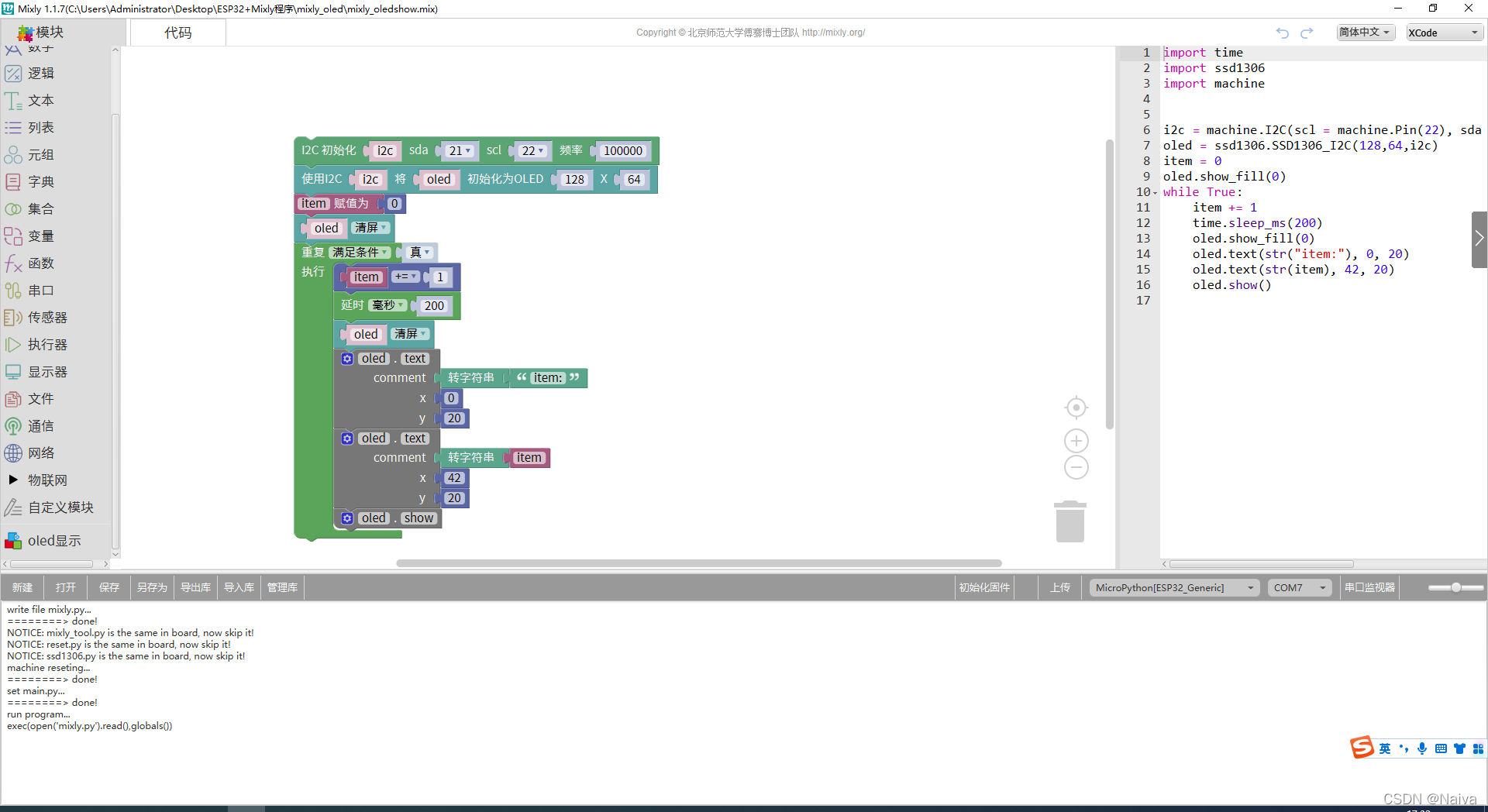

资料下载:Mixly米思齐 Micropython 0.96oled显示库文件和Mixly显示实验源程序
OLED丝滑菜单
#include <U8g2lib.h>
#include <Wire.h>
#include <math.h>
const uint8_t sanlian[] U8X8_PROGMEM  =
{
0x00,0x00,0x00,0x00,0x00,0x00,0x00,0x00,
0x00,0x00,0x00,0x00,0x00,0x00,0x00,0x00,
0x00,0x00,0x1C,0x00,0x00,0x00,0x00,0x00,
0x00,0x00,0x00,0x00,0x00,0x00,0x00,0x00,
0x00,0x00,0x3E,0x00,0x00,0x00,0x00,0xE0,
0x07,0x00,0x00,0x00,0x00,0xE0,0x00,0x00,
0x00,0x00,0x7E,0x00,0x00,0x00,0x00,0xFC,
0x7F,0x00,0x00,0x00,0x00,0xF0,0x01,0x00,
0x00,0x00,0x7E,0x00,0x00,0x00,0x00,0xFF,
0xFF,0x01,0x00,0x00,0x00,0xF8,0x01,0x00,
0x00,0x00,0x7F,0x00,0x00,0x00,0xC0,0xFF,
0xFF,0x03,0x00,0x00,0x00,0xF8,0x03,0x00,
0x00,0x00,0x7F,0x00,0x00,0x00,0xE0,0xFF,
0xFF,0x07,0x00,0x00,0x00,0xFC,0x03,0x00,
0x00,0x00,0x7F,0x00,0x00,0x00,0xF0,0xFF,
0xFF,0x1F,0x00,0x00,0x00,0xFC,0x03,0x00,
0x00,0x80,0x7F,0x00,0x00,0x00,0xF8,0x01,
0x00,0x1F,0x00,0x00,0x00,0xFC,0x07,0x00,
0x00,0x80,0x7F,0x00,0x00,0x00,0xFC,0x00,
0x00,0x3F,0x00,0x00,0x00,0xFE,0x0F,0x00,
0x00,0xC0,0x7F,0x00,0x00,0x00,0xFC,0x00,
0x00,0x7F,0x00,0x00,0x00,0xFF,0x1F,0x00,
0x00,0xE0,0x7F,0x00,0x00,0x00,0xFE,0x7F,
0xFC,0x7F,0x00,0x00,0xC0,0xFF,0x3F,0x00,
0x00,0xF8,0x7F,0x00,0x00,0x00,0xFE,0x7F,
0xFC,0xFF,0x00,0x00,0xFE,0xFF,0xFF,0x0F,
0xF0,0xF8,0xFF,0xFF,0x01,0x00,0xFE,0x1F,
0xF0,0xFF,0x00,0xC0,0xFF,0xFF,0xFF,0x7F,
0xFC,0xF8,0xFF,0xFF,0x07,0x00,0xFF,0x07,
0xC0,0xFF,0x00,0xE0,0xFF,0xFF,0xFF,0x7F,
0xFC,0xF8,0xFF,0xFF,0x07,0x00,0xFF,0x01,
0x80,0xFF,0x01,0xC0,0xFF,0xFF,0xFF,0x7F,
0xFE,0xF8,0xFF,0xFF,0x07,0x00,0xFF,0x41,
0x00,0xFF,0x01,0xC0,0xFF,0xFF,0xFF,0x3F,
0xFE,0xF8,0xFF,0xFF,0x07,0x00,0xFF,0x70,
0x0C,0xFE,0x01,0x80,0xFF,0xFF,0xFF,0x1F,
0xFE,0xF8,0xFF,0xFF,0x07,0x00,0x7F,0x78,
0x3C,0xFE,0x01,0x00,0xFF,0xFF,0xFF,0x0F,
0xFE,0xF8,0xFF,0xFF,0x07,0x00,0x7F,0x7C,
0x3C,0xFC,0x01,0x00,0xFE,0xFF,0xFF,0x07,
0xFE,0xF8,0xFF,0xFF,0x07,0x00,0x7F,0x7C,
0x3C,0xFC,0x01,0x00,0xFC,0xFF,0xFF,0x03,
0xFE,0xF8,0xFF,0xFF,0x03,0x00,0x7F,0x7C,
0x7C,0xFC,0x01,0x00,0xF8,0xFF,0xFF,0x03,
0xFE,0xF8,0xFF,0xFF,0x03,0x00,0x7F,0x7C,
0x7C,0xFC,0x01,0x00,0xF0,0xFF,0xFF,0x01,
0xFE,0xF8,0xFF,0xFF,0x03,0x00,0x7F,0x7C,
0x7C,0xFC,0x00,0x00,0xF0,0xFF,0xFF,0x01,
0xFE,0xF8,0xFF,0xFF,0x03,0x00,0x7E,0x7C,
0x7C,0xFC,0x00,0x00,0xF0,0xFF,0xFF,0x00,
0xFE,0xF8,0xFF,0xFF,0x01,0x00,0xFE,0x7F,
0xFC,0xFF,0x00,0x00,0xF0,0xFF,0xFF,0x00,
0xFE,0xF8,0xFF,0xFF,0x01,0x00,0xFE,0x7F,
0xFC,0x7F,0x00,0x00,0xF0,0xFF,0xFF,0x00,
0xFE,0xF8,0xFF,0xFF,0x01,0x00,0xFC,0x7F,
0xFC,0x7F,0x00,0x00,0xF0,0xFF,0xFF,0x00,
0xFE,0xF8,0xFF,0xFF,0x01,0x00,0xFC,0x7F,
0xFC,0x3F,0x00,0x00,0xF0,0xFF,0xFF,0x00,
0xFE,0xF8,0xFF,0xFF,0x00,0x00,0xF8,0x7F,
0xFC,0x1F,0x00,0x00,0xF0,0xFF,0xFF,0x01,
0xFE,0xF8,0xFF,0xFF,0x00,0x00,0xF0,0xFF,
0xFF,0x1F,0x00,0x00,0xF0,0xFF,0xFF,0x01,
0xFC,0xF8,0xFF,0x7F,0x00,0x00,0xE0,0xFF,
0xFF,0x0F,0x00,0x00,0xF8,0x0F,0xFF,0x01,
0xFC,0xF8,0xFF,0x3F,0x00,0x00,0xC0,0xFF,
0xFF,0x03,0x00,0x00,0xF8,0x03,0xFC,0x01,
0xF8,0xF8,0xFF,0x1F,0x00,0x00,0x00,0xFF,
0xFF,0x01,0x00,0x00,0xF8,0x01,0xF0,0x01,
0x00,0x00,0x00,0x00,0x00,0x00,0x00,0xFC,
0x7F,0x00,0x00,0x00,0x70,0x00,0xC0,0x01,
0x00,0x00,0x00,0x00,0x00,0x00,0x00,0xC0,
0x07,0x00,0x00,0x00,0x00,0x00,0x00,0x00,
};
// U8G2_SH1106_128X64_NONAME_F_HW_I2C u8g2(U8G2_R0, /* reset=*/ U8X8_PIN_NONE);//该驱动是1.3寸的OLED屏幕。
U8G2_SSD1306_128X64_NONAME_F_HW_I2C u8g2(U8G2_R0, /* reset=*/ U8X8_PIN_NONE);
uint8_t ui_disapper(void)
{
  static short disapper_temp = 0; // 0 ~8  消失时右移的位数
  int len = 8 * u8g2.getBufferTileHeight() * u8g2.getBufferTileWidth(); // len = 1024 , 8 * 8 * 16
  uint8_t *p = u8g2.getBufferPtr(); // 1bye = 8bit  即 1111 1111
  uint8_t return_flag = 0;
  // Serial.println("len:" + String(len));
  // delay(2000);
  for( int i = 0;i< len ;i++)
  {
    p[i] = p[i] & (rand()%0xff) >> disapper_temp;   // 随机与清除掉一些像素,呈现像素的颗粒感 假如p[1024]=8bit=1111 1111  0xff=8bit=1111 1111
    // p[i] = p[i]  >> disapper_temp;  // p[i] = 1111 1111 >> 2 ,即0011 1111 1是点亮像素 0是熄灭像素
    // Serial.println("P"+String(i)+"="+ String(p[i])); // p[0]~p[1024] 整个屏幕每一个像素点都要右移 0位 2位 4位 6位 8位 共右移5次屏幕才完全消失
    // delay(30);
  }
  disapper_temp +=2;
  if(disapper_temp > 8)
  {
      return_flag = 1;
      disapper_temp = 0;
      // Serial.println("右移消失完毕");
  }
  return return_flag ? 0 : 1;
}
uint8_t ui_come(void)
{
    static short come_temp = 8;     // 8 ~ 0 显示时左移的位数
    int len = 8 * u8g2.getBufferTileHeight() * u8g2.getBufferTileWidth();
    uint8_t *p = u8g2.getBufferPtr();
    uint8_t return_flag = 0;
    for( int i = 0;i< len ;i++)
    {
        p[i] = p[i] & (rand()%0xff) >> come_temp;
        // p[i] = p[i]  >> come_temp;    // 右移8位 6 位 4 位 2位 0位

    }
    come_temp -=2;
    if(come_temp < 0)
    {
        return_flag = 1;
        come_temp = 8;
        // Serial.println("右移显示完毕");
    }
    return return_flag ? 0 : 1;
}

void setup(void)
{
 	// pinMode(2, INPUT_PULLUP);
  // pinMode(3, INPUT_PULLUP);
  Serial.begin(9600);
  u8g2.begin();
  u8g2.setFont(u8g2_font_t0_22_mf ); //设置字体
}

void loop(void)
{
  static uint8_t flag = 0;
  static uint8_t stop_flag = 0;
  u8g2.clearBuffer();                  // 清除内部缓冲区
  u8g2.drawXBMP(0,20,128,36,sanlian);  // 第一段输出位置
  if(flag==1)
  {
    if(ui_disapper() == 0)
    {
      // Serial.println("消失完毕");
      flag = 0;
    }
  }
  else// flag = 0 先显示 后消失
  {
    if(ui_come() == 0)
    {
      // Serial.println("显示完毕");
      flag = 1;
      stop_flag = 1;   // 暂停1秒的flag

    }
  }
  u8g2.sendBuffer();          // transfer internal memory to the displa
  if(stop_flag == 1)
  {
    stop_flag = 0;
    delay(1000); // 暂停一秒
  }
}
资料下载:
我得到了一个包含嵌套链接的表单。编辑时链接字段为空的问题。这是我的表格:Editingkategori{:action=>'update',:id=>@konkurrancer.id})do|f|%>'Trackingurl',:style=>'width:500;'%>'Editkonkurrence'%>|我的konkurrencer模型:has_one:link我的链接模型:classLink我的konkurrancer编辑操作:defedit@konkurrancer=Konkurrancer.find(params[:id])@konkurrancer.link_attrib
我主要使用Ruby来执行此操作,但到目前为止我的攻击计划如下:使用gemsrdf、rdf-rdfa和rdf-microdata或mida来解析给定任何URI的数据。我认为最好映射到像schema.org这样的统一模式,例如使用这个yaml文件,它试图描述数据词汇表和opengraph到schema.org之间的转换:#SchemaXtoschema.orgconversion#data-vocabularyDV:name:namestreet-address:streetAddressregion:addressRegionlocality:addressLocalityphoto:i
所以我在关注Railscast,我注意到在html.erb文件中,ruby代码有一个微弱的背景高亮效果,以区别于其他代码HTML文档。我知道Ryan使用TextMate。我正在使用SublimeText3。我怎样才能达到同样的效果?谢谢! 最佳答案 为SublimeText安装ERB包。假设您安装了SublimeText包管理器*,只需点击cmd+shift+P即可获得命令菜单,然后键入installpackage并选择PackageControl:InstallPackage获取包管理器菜单。在该菜单中,键入ERB并在看到包时选择
我试图在索引页中创建一个超链接,但它没有显示,也没有给出任何错误。这是我的index.html.erb代码。ListingarticlesTitleTextssss我检查了我的路线,我认为它们也没有问题。PrefixVerbURIPatternController#Actionwelcome_indexGET/welcome/index(.:format)welcome#indexarticlesGET/articles(.:format)articles#indexPOST/articles(.:format)articles#createnew_articleGET/article
我是rails的新手,想在form字段上应用验证。myviewsnew.html.erb.....模拟.rbclassSimulation{:in=>1..25,:message=>'Therowmustbebetween1and25'}end模拟Controller.rbclassSimulationsController我想检查模型类中row字段的整数范围,如果不在范围内则返回错误信息。我可以检查上面代码的范围,但无法返回错误消息提前致谢 最佳答案 关键是您使用的是模型表单,一种显示ActiveRecord模型实例属性的表单。c
目前,Itembelongs_toCompany和has_manyItemVariants。我正在尝试使用嵌套的fields_for通过Item表单添加ItemVariant字段,但是使用:item_variants不显示该表单。只有当我使用单数时才会显示。我检查了我的关联,它们似乎是正确的,这可能与嵌套在公司下的项目有关,还是我遗漏了其他东西?提前致谢。注意:下面的代码片段中省略了不相关的代码。编辑:不知道这是否相关,但我正在使用CanCan进行身份验证。routes.rbresources:companiesdoresources:itemsenditem.rbclassItemi
文章目录1.开发板选择*用到的资源2.串口通信(个人理解)3.代码分析(注释比较详细)1.主函数2.串口1配置3.串口2配置以及中断函数4.注意问题5.源码链接1.开发板选择我用的是STM32F103RCT6的板子,不过代码大概在F103系列的板子上都可以运行,我试过在野火103的霸道板上也可以,主要看一下串口对应的引脚一不一样就行了,不一样的就更改一下。*用到的资源keil5软件这里用到了两个串口资源,采集数据一个,串口通信一个,板子对应引脚如下:串口1,TX:PA9,RX:PA10串口2,TX:PA2,RX:PA32.串口通信(个人理解)我就从串口采集传感器数据这个过程说一下我自己的理解,
目录前言滤波电路科普主要分类实际情况单位的概念常用评价参数函数型滤波器简单分析滤波电路构成低通滤波器RC低通滤波器RL低通滤波器高通滤波器RC高通滤波器RL高通滤波器部分摘自《LC滤波器设计与制作》,侵权删。前言最近需要学习放大电路和滤波电路,但是由于只在之前做音乐频谱分析仪的时候简单了解过一点点运放,所以也是相当从零开始学习了。滤波电路科普主要分类滤波器:主要是从不同频率的成分中提取出特定频率的信号。有源滤波器:由RC元件与运算放大器组成的滤波器。可滤除某一次或多次谐波,最普通易于采用的无源滤波器结构是将电感与电容串联,可对主要次谐波(3、5、7)构成低阻抗旁路。无源滤波器:无源滤波器,又称
@作者:SYFStrive @博客首页:HomePage📜:微信小程序📌:个人社区(欢迎大佬们加入)👉:社区链接🔗📌:觉得文章不错可以点点关注👉:专栏连接🔗💃:感谢支持,学累了可以先看小段由小胖给大家带来的街舞👉微信小程序(🔥)目录自定义组件-behaviors 1、什么是behaviors 2、behaviors的工作方式 3、创建behavior 4、导入并使用behavior 5、behavior中所有可用的节点 6、同名字段的覆盖和组合规则总结最后自定义组件-behaviors 1、什么是behaviorsbehaviors是小程序中,用于实现
如果我在模型中设置验证消息validates:name,:presence=>{:message=>'Thenamecantbeblank.'}我如何让该消息显示在闪光警报中,这是我迄今为止尝试过的方法defcreate@message=Message.new(params[:message])if@message.valid?ContactMailer.send_mail(@message).deliverredirect_to(root_path,:notice=>"Thanksforyourmessage,Iwillbeintouchsoon")elseflash[:error]
