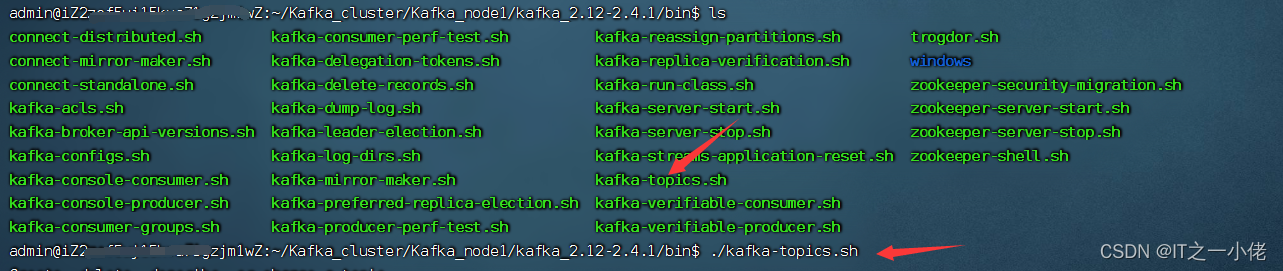
执行./kafka-topics.sh会有下述参数提示:
Create, delete, describe, or change a topic.
Option                                   Description
------                                   -----------
--alter                                  Alter the number of partitions,
                                           replica assignment, and/or
                                           configuration for the topic.
--at-min-isr-partitions                  if set when describing topics, only
                                           show partitions whose isr count is
                                           equal to the configured minimum. Not
                                           supported with the --zookeeper
                                           option.
--bootstrap-server <String: server to    REQUIRED: The Kafka server to connect
  connect to>                              to. In case of providing this, a
                                           direct Zookeeper connection won't be
                                           required.
--command-config <String: command        Property file containing configs to be
  config property file>                    passed to Admin Client. This is used
                                           only with --bootstrap-server option
                                           for describing and altering broker
                                           configs.
--config <String: name=value>            A topic configuration override for the
                                           topic being created or altered.The
                                           following is a list of valid
                                           configurations:
                                                cleanup.policy
                                                compression.type
                                                delete.retention.ms
                                                file.delete.delay.ms
                                                flush.messages
                                                flush.ms
                                                follower.replication.throttled.
                                           replicas
                                                index.interval.bytes
                                                leader.replication.throttled.replicas
                                                max.compaction.lag.ms
                                                max.message.bytes
                                                message.downconversion.enable
                                                message.format.version
                                                message.timestamp.difference.max.ms
                                                message.timestamp.type
                                                min.cleanable.dirty.ratio
                                                min.compaction.lag.ms
                                                min.insync.replicas
                                                preallocate
                                                retention.bytes
                                                retention.ms
                                                segment.bytes
                                                segment.index.bytes
                                                segment.jitter.ms
                                                segment.ms
                                                unclean.leader.election.enable
                                         See the Kafka documentation for full
                                           details on the topic configs.It is
                                           supported only in combination with --
                                           create if --bootstrap-server option
                                           is used.
--create                                 Create a new topic.
--delete                                 Delete a topic
--delete-config <String: name>           A topic configuration override to be
                                           removed for an existing topic (see
                                           the list of configurations under the
                                           --config option). Not supported with
                                           the --bootstrap-server option.
--describe                               List details for the given topics.
--disable-rack-aware                     Disable rack aware replica assignment
--exclude-internal                       exclude internal topics when running
                                           list or describe command. The
                                           internal topics will be listed by
                                           default
--force                                  Suppress console prompts
--help                                   Print usage information.
--if-exists                              if set when altering or deleting or
                                           describing topics, the action will
                                           only execute if the topic exists.
                                           Not supported with the --bootstrap-
                                           server option.
--if-not-exists                          if set when creating topics, the
                                           action will only execute if the
                                           topic does not already exist. Not
                                           supported with the --bootstrap-
                                           server option.
--list                                   List all available topics.
--partitions <Integer: # of partitions>  The number of partitions for the topic
                                           being created or altered (WARNING:
                                           If partitions are increased for a
                                           topic that has a key, the partition
                                           logic or ordering of the messages
                                           will be affected). If not supplied
                                           for create, defaults to the cluster
                                           default.
--replica-assignment <String:            A list of manual partition-to-broker
  broker_id_for_part1_replica1 :           assignments for the topic being
  broker_id_for_part1_replica2 ,           created or altered.
  broker_id_for_part2_replica1 :
  broker_id_for_part2_replica2 , ...>
--replication-factor <Integer:           The replication factor for each
  replication factor>                      partition in the topic being
                                           created. If not supplied, defaults
                                           to the cluster default.
--topic <String: topic>                  The topic to create, alter, describe
                                           or delete. It also accepts a regular
                                           expression, except for --create
                                           option. Put topic name in double
                                           quotes and use the '\' prefix to
                                           escape regular expression symbols; e.
                                           g. "test\.topic".
--topics-with-overrides                  if set when describing topics, only
                                           show topics that have overridden
                                           configs
--unavailable-partitions                 if set when describing topics, only
                                           show partitions whose leader is not
                                           available
--under-min-isr-partitions               if set when describing topics, only
                                           show partitions whose isr count is
                                           less than the configured minimum.
                                           Not supported with the --zookeeper
                                           option.
--under-replicated-partitions            if set when describing topics, only
                                           show under replicated partitions
--version                                Display Kafka version.
--zookeeper <String: hosts>              DEPRECATED, The connection string for
                                           the zookeeper connection in the form
                                           host:port. Multiple hosts can be
                                           given to allow fail-over.
创建Topic命令:若命令中缺少某些参数,命令执行时会提示的。
./kafka-topics.sh --create --zookeeper node1:2181,node2:2182,node3:2183 --topic test_kafka --partitions 3 --replication-factor 2参数说明:

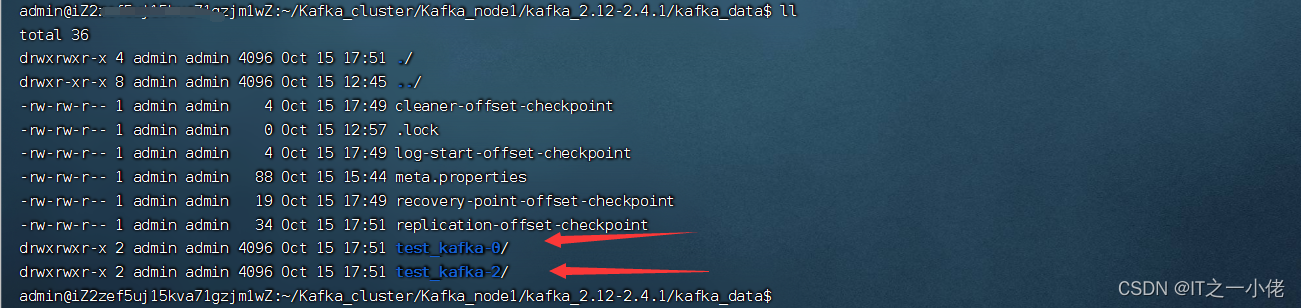
./kafka-topics.sh --list --zookeeper node1:2181,node2:2182,node3:2183
./kafka-topics.sh --describe --zookeeper node1:2181,node2:2182,node3:2183 --topic test_kafka

以上这些信息来源于:zookeeper。

可以增加分片的数量,不能减少分片的数量,不支持副本的修改。
./kafka-topics.sh --alter --zookeeper node1:2181,node2:2182,node3:2183 --topic test_kafka --partitions 5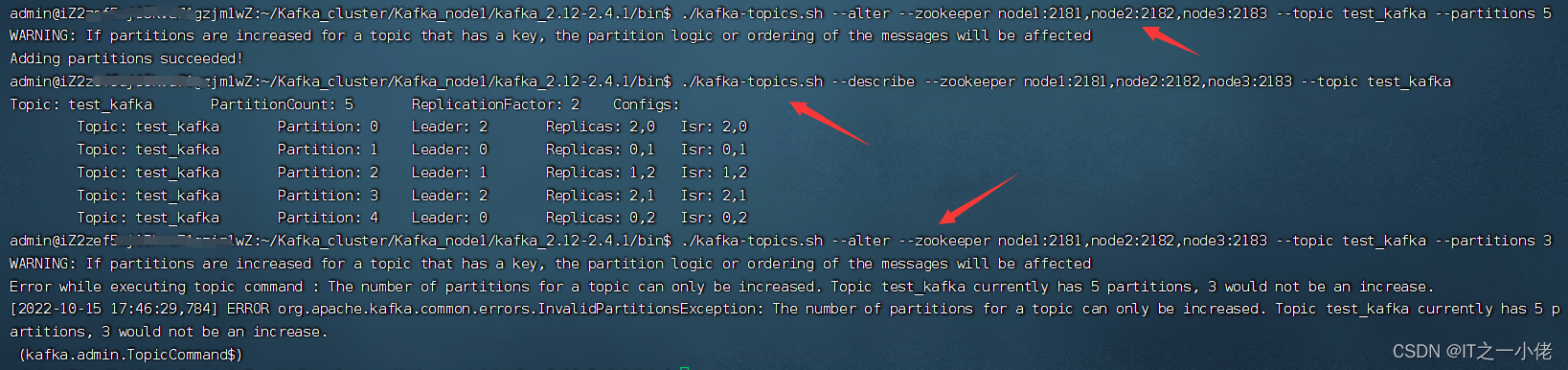
./kafka-topics.sh --delete --zookeeper node1:2181,node2:2182,node3:2183 --topic test_kafka
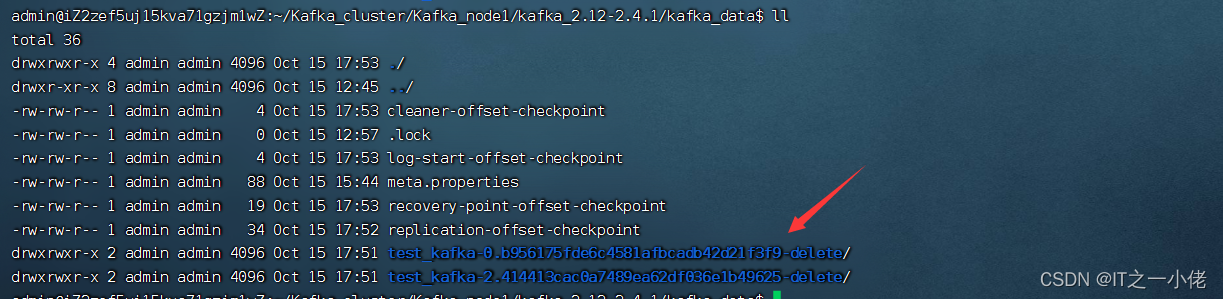

当没有数据时,先逻辑删除,等待一小会直接物理删除。

当执行 ./kafka-console-producer.sh命令时会提示下述参数:
This tool helps to read data from standard input and publish it to Kafka.
Option                                   Description
------                                   -----------
--batch-size <Integer: size>             Number of messages to send in a single
                                           batch if they are not being sent
                                           synchronously. (default: 200)
--broker-list <String: broker-list>      REQUIRED: The broker list string in
                                           the form HOST1:PORT1,HOST2:PORT2.
--compression-codec [String:             The compression codec: either 'none',
  compression-codec]                       'gzip', 'snappy', 'lz4', or 'zstd'.
                                           If specified without value, then it
                                           defaults to 'gzip'
--help                                   Print usage information.
--line-reader <String: reader_class>     The class name of the class to use for
                                           reading lines from standard in. By
                                           default each line is read as a
                                           separate message. (default: kafka.
                                           tools.
                                           ConsoleProducer$LineMessageReader)
--max-block-ms <Long: max block on       The max time that the producer will
  send>                                    block for during a send request
                                           (default: 60000)
--max-memory-bytes <Long: total memory   The total memory used by the producer
  in bytes>                                to buffer records waiting to be sent
                                           to the server. (default: 33554432)
--max-partition-memory-bytes <Long:      The buffer size allocated for a
  memory in bytes per partition>           partition. When records are received
                                           which are smaller than this size the
                                           producer will attempt to
                                           optimistically group them together
                                           until this size is reached.
                                           (default: 16384)
--message-send-max-retries <Integer>     Brokers can fail receiving the message
                                           for multiple reasons, and being
                                           unavailable transiently is just one
                                           of them. This property specifies the
                                           number of retires before the
                                           producer give up and drop this
                                           message. (default: 3)
--metadata-expiry-ms <Long: metadata     The period of time in milliseconds
  expiration interval>                     after which we force a refresh of
                                           metadata even if we haven't seen any
                                           leadership changes. (default: 300000)
--producer-property <String:             A mechanism to pass user-defined
  producer_prop>                           properties in the form key=value to
                                           the producer.
--producer.config <String: config file>  Producer config properties file. Note
                                           that [producer-property] takes
                                           precedence over this config.
--property <String: prop>                A mechanism to pass user-defined
                                           properties in the form key=value to
                                           the message reader. This allows
                                           custom configuration for a user-
                                           defined message reader.
--request-required-acks <String:         The required acks of the producer
  request required acks>                   requests (default: 1)
--request-timeout-ms <Integer: request   The ack timeout of the producer
  timeout ms>                              requests. Value must be non-negative
                                           and non-zero (default: 1500)
--retry-backoff-ms <Integer>             Before each retry, the producer
                                           refreshes the metadata of relevant
                                           topics. Since leader election takes
                                           a bit of time, this property
                                           specifies the amount of time that
                                           the producer waits before refreshing
                                           the metadata. (default: 100)
--socket-buffer-size <Integer: size>     The size of the tcp RECV size.
                                           (default: 102400)
--sync                                   If set message send requests to the
                                           brokers are synchronously, one at a
                                           time as they arrive.
--timeout <Integer: timeout_ms>          If set and the producer is running in
                                           asynchronous mode, this gives the
                                           maximum amount of time a message
                                           will queue awaiting sufficient batch
                                           size. The value is given in ms.
                                           (default: 1000)
--topic <String: topic>                  REQUIRED: The topic id to produce
                                           messages to.
--version                                Display Kafka version.
生产者命令:
./kafka-console-producer.sh --broker-list node1:9091,node2:9092,node3:9093 --topic test_kafka

当执行 ./kafka-console-consumer.sh命令时会提示下述参数:
This tool helps to read data from Kafka topics and outputs it to standard output.
Option                                   Description
------                                   -----------
--bootstrap-server <String: server to    REQUIRED: The server(s) to connect to.
  connect to>
--consumer-property <String:             A mechanism to pass user-defined
  consumer_prop>                           properties in the form key=value to
                                           the consumer.
--consumer.config <String: config file>  Consumer config properties file. Note
                                           that [consumer-property] takes
                                           precedence over this config.
--enable-systest-events                  Log lifecycle events of the consumer
                                           in addition to logging consumed
                                           messages. (This is specific for
                                           system tests.)
--formatter <String: class>              The name of a class to use for
                                           formatting kafka messages for
                                           display. (default: kafka.tools.
                                           DefaultMessageFormatter)
--from-beginning                         If the consumer does not already have
                                           an established offset to consume
                                           from, start with the earliest
                                           message present in the log rather
                                           than the latest message.
--group <String: consumer group id>      The consumer group id of the consumer.
--help                                   Print usage information.
--isolation-level <String>               Set to read_committed in order to
                                           filter out transactional messages
                                           which are not committed. Set to
                                           read_uncommittedto read all
                                           messages. (default: read_uncommitted)
--key-deserializer <String:
  deserializer for key>
--max-messages <Integer: num_messages>   The maximum number of messages to
                                           consume before exiting. If not set,
                                           consumption is continual.
--offset <String: consume offset>        The offset id to consume from (a non-
                                           negative number), or 'earliest'
                                           which means from beginning, or
                                           'latest' which means from end
                                           (default: latest)
--partition <Integer: partition>         The partition to consume from.
                                           Consumption starts from the end of
                                           the partition unless '--offset' is
                                           specified.
--property <String: prop>                The properties to initialize the
                                           message formatter. Default
                                           properties include:
                                                print.timestamp=true|false
                                                print.key=true|false
                                                print.value=true|false
                                                key.separator=<key.separator>
                                                line.separator=<line.separator>
                                                key.deserializer=<key.deserializer>
                                                value.deserializer=<value.
                                           deserializer>
                                         Users can also pass in customized
                                           properties for their formatter; more
                                           specifically, users can pass in
                                           properties keyed with 'key.
                                           deserializer.' and 'value.
                                           deserializer.' prefixes to configure
                                           their deserializers.
--skip-message-on-error                  If there is an error when processing a
                                           message, skip it instead of halt.
--timeout-ms <Integer: timeout_ms>       If specified, exit if no message is
                                           available for consumption for the
                                           specified interval.
--topic <String: topic>                  The topic id to consume on.
--value-deserializer <String:
  deserializer for values>
--version                                Display Kafka version.
--whitelist <String: whitelist>          Regular expression specifying
                                           whitelist of topics to include for
                                           consumption.
消费者命令:
./kafka-console-consumer.sh --bootstrap-server node1:9091,node2:9092,node3:9093 --topic test_kafka
指定消费者消费哪个分区的数据:
./kafka-console-consumer.sh --bootstrap-server node1:9091,node2:9092,node3:9093 --topic test_kafka --partition 0

出现上述情形,说明测试成功!
注意:当生产者和消费者命令执行时的topic不存在时,会新建的。

我正在学习如何使用Nokogiri,根据这段代码我遇到了一些问题:require'rubygems'require'mechanize'post_agent=WWW::Mechanize.newpost_page=post_agent.get('http://www.vbulletin.org/forum/showthread.php?t=230708')puts"\nabsolutepathwithtbodygivesnil"putspost_page.parser.xpath('/html/body/div/div/div/div/div/table/tbody/tr/td/div
我有一个Ruby程序,它使用rubyzip压缩XML文件的目录树。gem。我的问题是文件开始变得很重,我想提高压缩级别,因为压缩时间不是问题。我在rubyzipdocumentation中找不到一种为创建的ZIP文件指定压缩级别的方法。有人知道如何更改此设置吗?是否有另一个允许指定压缩级别的Ruby库? 最佳答案 这是我通过查看rubyzip内部创建的代码。level=Zlib::BEST_COMPRESSIONZip::ZipOutputStream.open(zip_file)do|zip|Dir.glob("**/*")d
类classAprivatedeffooputs:fooendpublicdefbarputs:barendprivatedefzimputs:zimendprotecteddefdibputs:dibendendA的实例a=A.new测试a.foorescueputs:faila.barrescueputs:faila.zimrescueputs:faila.dibrescueputs:faila.gazrescueputs:fail测试输出failbarfailfailfail.发送测试[:foo,:bar,:zim,:dib,:gaz].each{|m|a.send(m)resc
很好奇,就使用rubyonrails自动化单元测试而言,你们正在做什么?您是否创建了一个脚本来在cron中运行rake作业并将结果邮寄给您?git中的预提交Hook?只是手动调用?我完全理解测试,但想知道在错误发生之前捕获错误的最佳实践是什么。让我们理所当然地认为测试本身是完美无缺的,并且可以正常工作。下一步是什么以确保他们在正确的时间将可能有害的结果传达给您? 最佳答案 不确定您到底想听什么,但是有几个级别的自动代码库控制:在处理某项功能时,您可以使用类似autotest的内容获得关于哪些有效,哪些无效的即时反馈。要确保您的提
假设我做了一个模块如下:m=Module.newdoclassCendend三个问题:除了对m的引用之外,还有什么方法可以访问C和m中的其他内容?我可以在创建匿名模块后为其命名吗(就像我输入“module...”一样)?如何在使用完匿名模块后将其删除,使其定义的常量不再存在? 最佳答案 三个答案:是的,使用ObjectSpace.此代码使c引用你的类(class)C不引用m:c=nilObjectSpace.each_object{|obj|c=objif(Class===objandobj.name=~/::C$/)}当然这取决于
出于纯粹的兴趣,我很好奇如何按顺序创建PI,而不是在过程结果之后生成数字,而是让数字在过程本身生成时显示。如果是这种情况,那么数字可以自行产生,我可以对以前看到的数字实现垃圾收集,从而创建一个无限系列。结果只是在Pi系列之后每秒生成一个数字。这是我通过互联网筛选的结果:这是流行的计算机友好算法,类机器算法:defarccot(x,unity)xpow=unity/xn=1sign=1sum=0loopdoterm=xpow/nbreakifterm==0sum+=sign*(xpow/n)xpow/=x*xn+=2sign=-signendsumenddefcalc_pi(digits
我正在尝试使用ruby和Savon来使用网络服务。测试服务为http://www.webservicex.net/WS/WSDetails.aspx?WSID=9&CATID=2require'rubygems'require'savon'client=Savon::Client.new"http://www.webservicex.net/stockquote.asmx?WSDL"client.get_quotedo|soap|soap.body={:symbol=>"AAPL"}end返回SOAP异常。检查soap信封,在我看来soap请求没有正确的命名空间。任何人都可以建议我
关闭。这个问题是opinion-based.它目前不接受答案。想要改进这个问题?更新问题,以便editingthispost可以用事实和引用来回答它.关闭4年前。Improvethisquestion我想在固定时间创建一系列低音和高音调的哔哔声。例如:在150毫秒时发出高音调的蜂鸣声在151毫秒时发出低音调的蜂鸣声200毫秒时发出低音调的蜂鸣声250毫秒的高音调蜂鸣声有没有办法在Ruby或Python中做到这一点?我真的不在乎输出编码是什么(.wav、.mp3、.ogg等等),但我确实想创建一个输出文件。
我在我的项目目录中完成了compasscreate.和compassinitrails。几个问题:我已将我的.sass文件放在public/stylesheets中。这是放置它们的正确位置吗?当我运行compasswatch时,它不会自动编译这些.sass文件。我必须手动指定文件:compasswatchpublic/stylesheets/myfile.sass等。如何让它自动运行?文件ie.css、print.css和screen.css已放在stylesheets/compiled。如何在编译后不让它们重新出现的情况下删除它们?我自己编译的.sass文件编译成compiled/t
我想将html转换为纯文本。不过,我不想只删除标签,我想智能地保留尽可能多的格式。为插入换行符标签,检测段落并格式化它们等。输入非常简单,通常是格式良好的html(不是整个文档,只是一堆内容,通常没有anchor或图像)。我可以将几个正则表达式放在一起,让我达到80%,但我认为可能有一些现有的解决方案更智能。 最佳答案 首先,不要尝试为此使用正则表达式。很有可能你会想出一个脆弱/脆弱的解决方案,它会随着HTML的变化而崩溃,或者很难管理和维护。您可以使用Nokogiri快速解析HTML并提取文本:require'nokogiri'h
