文章目录

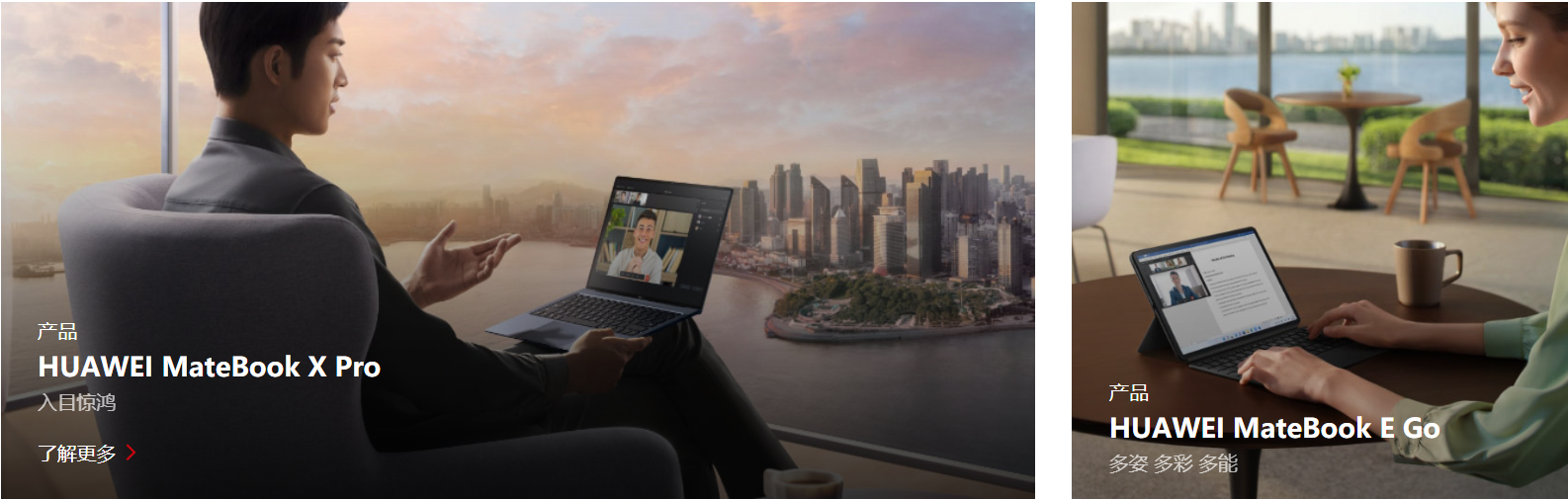
看了这个gif后,可以清楚的看到产生了三个动画效果:图片"拉近","了解更多"从下往上显示出来,阴影。

我看了华为官网的源代码,发现图片本身就是有一个mask的,这样能让图片看起来暗一些,也就意味着,当鼠标进入的时候,只需要让mask的背景颜色更深一些,就实现了阴影的效果。至于图片"拉近",我早就写过了,无非是把图片放大,然后超出盒子的不显示,这个也容易。但了解更多显现,难度就大了一些。我想了很久,最后只有通过位置,来把"了解更多"显示出来,想过用visibility: visible;但效果不太好,也想过用Vue的过渡效果,但是好像又不能同时产生三个效果。所以笨人先用笨法,先能实现再说。
 <div class="div_container">
      <div class="div_title">
        <h2 class="title_h2">推荐信息</h2>
      </div>
      <div class="container_imgs">
        <div class="div_row1">
          <div class="row1_col1">
            <a href="" class="col1_a1" @mouseenter="showDiv1(1)" @mouseleave="hideDiv1(1)">
              <div class="a_div1">
                <div class="mask"></div>
                <img src="@/assets/matebook-x-pro2.jpg" alt="" class="a1_img1">
              </div>
              <div class="a_div2">
                <div class="div2_title">
                  产品
                </div>
                <div class="div2_info">
                  HUAWEI MateBook X Pro
                </div>
                <div class="div2_info2">
                  入目惊鸿
                </div>
                <div class="div2_hidden">
                  了解更多
                </div>
              </div>
            </a>
          </div>
          <div class="row1_col2" @mouseenter="showDiv1(2)" @mouseleave="hideDiv1(2)">
            <a href="" class="col1_a1">
              <div class="a_div1">
                <div class="mask"></div>
                <img src="@/assets/2.jpg" alt="" class="a1_img1">
              </div>
              <div class="a_div2">
                <div class="div2_title">
                  产品
                </div>
                <div class="div2_info">
                  HUAWEI MateBook X Pro
                </div>
                <div class="div2_info2">
                  入目惊鸿
                </div>
                <div class="div2_hidden">
                  了解更多
                </div>
              </div>
            </a>
          </div>
        </div>
        <div class="div_row1">
          <div class="row1_col2 " @mouseenter="showDiv1(3)" @mouseleave="hideDiv1(3)">
            <a href="" class="col1_a1">
              <div class="a_div1">
                <div class="mask"></div>
                <img src="@/assets/3.jpg" alt="" class="a1_img1">

              </div>
              <div class="a_div2">
                <div class="div2_title">
                  产品
                </div>
                <div class="div2_info">
                  HUAWEI MateBook X Pro
                </div>
                <div class="div2_info2">
                  入目惊鸿
                </div>
                <div class="div2_hidden">
                  了解更多
                </div>
              </div>
            </a>
          </div>
          <div class="row1_col3" @mouseenter="showDiv1(4)" @mouseleave="hideDiv1(4)">
            <a href="" class="col1_a1">
              <div class="a_div1">
                <div class="mask"></div>
                <img src="@/assets/4.jpg" alt="" class="a1_img1">
              </div>
              <div class="a_div2">
                <div class="div2_title">
                  产品
                </div>
                <div class="div2_info">
                  HUAWEI MateBook X Pro
                </div>
                <div class="div2_info2">
                  入目惊鸿
                </div>
                <div class="div2_hidden">
                  了解更多
                </div>
              </div>
            </a>
          </div>
        </div>
        <div class="div_row3">
          <div class="row1_col2 " @mouseenter="showDiv1(5)" @mouseleave="hideDiv1(5)">
            <a href="" class="col1_a1">
              <div class="a_div1">
                <div class="mask"></div>
                <img src="@/assets/5.jpg" alt="" class="a1_img1">
              </div>
              <div class="a_div2">
                <div class="div2_title">
                  产品
                </div>
                <div class="div2_info">
                  HUAWEI MateBook X Pro
                </div>
                <div class="div2_info2">
                  入目惊鸿
                </div>
                <div class="div2_hidden">
                  了解更多
                </div>
              </div>
            </a>
          </div>
          <div class="row1_col2 col2_displacement" @mouseenter="showDiv1(6)" @mouseleave="hideDiv1(6)">
            <a href="" class="col1_a1">
              <div class="a_div1">
                <div class="mask"></div>
                <img src="@/assets/6.jpg" alt="" class="a1_img1">
              </div>
              <div class="a_div2">
                <div class="div2_title">
                  产品
                </div>
                <div class="div2_info">
                  HUAWEI MateBook X Pro
                </div>
                <div class="div2_info2">
                  入目惊鸿
                </div>
                <div class="div2_hidden">
                  了解更多
                </div>
              </div>
            </a>
          </div>
          <div class="row1_col2 col2_displacement" @mouseenter="showDiv1(7)" @mouseleave="hideDiv1(7)">
            <a href="" class="col1_a1">
              <div class="a_div1">
                <div class="mask"></div>
                <img src="@/assets/7.jpg" alt="" class="a1_img1">
              </div>
              <div class="a_div2">
                <div class="div2_title">
                  产品
                </div>
                <div class="div2_info">
                  HUAWEI MateBook X Pro
                </div>
                <div class="div2_info2">
                  入目惊鸿
                </div>
                <div class="div2_hidden">
                  了解更多
                </div>
              </div>
            </a>
          </div>
        </div>
      </div>
    </div>
这里需要提一下,由于需要操作的是多个div,我用了根据类名操作Dom的方式,所以需要传一下是第几个Dom
 methods: {
    showDiv1(value) {
      var d1 = document.getElementsByClassName('a_div2')[value - 1];
      // alert("悬浮上来了")
      d1.style.cssText = 'animation-name:example; animation-duration:0.5s;animation-fill-mode: forwards;z-index:3;'
      var d3 = document.getElementsByClassName('a1_img1')[value - 1];
      d3.style.cssText = 'animation-name:showBigImg2; animation-duration:0.5s;animation-fill-mode: forwards; '
      var d2 = document.getElementsByClassName('mask')[value - 1];
      d2.style.cssText = ' z-index:2; background: linear-gradient(rgba(0, 0, 0, 0) 0%, rgba(0, 0, 0, 0.4) 70%);'


    },
    hideDiv1(value) {
      var d1 = document.getElementsByClassName('a_div2')[value - 1];
      d1.style.cssText = ' animation-name:backwards; animation-duration:0.5s;animation-fill-mode: forwards;z-index:3;';
      var d3 = document.getElementsByClassName('a1_img1')[value - 1];
      d3.style.cssText = 'animation-name:cancelBigImg2; animation-duration:0.5s;animation-fill-mode: forwards; '

      var d2 = document.getElementsByClassName('mask')[value - 1];
      d2.style.cssText = 'background: linear-gradient(rgba(0, 0, 0, 0) 0%, rgba(0, 0, 0, 0.3) 70%);z-index:2;'

      // d1.style.cssText = ' animation-name:backwards; animation-duration:0.5s;animation-fill-mode: forwards;';

    }
 }
要记得设置一下mask的z-index级别(比图片大即可),不然在图片放大的过程中,mask会被遮挡住,这样就实现不了阴影的效果,而且很突兀。
.div_container {
  width: 85.652%;
  /* border: 1px solid; */
  margin: 0 auto;
  text-align: center;
}

.div_title {
  width: 100%;
  height: 100%;
  margin-bottom: 5%;
}

.title_h2 {
  width: 10%;
  height: 90%;
  padding-bottom: 8px;
  font-size: 30px;
  margin: 0 auto;
  position: relative;
}

.title_h2::after {

  position: absolute;
  content: '';
  height: 2px;
  width: 47%;
  top: 100%;
  left: 27%;
  background-color: #c7000b;

}

.container_imgs {
  height: auto;
  width: 100%;

}

.div_row1 {
  height: auto;
  width: 100%;
  display: flex;
  margin-bottom: 30px !important;
  overflow: hidden;

}

.div_row3 {
  height: auto;
  width: 100%;
  display: flex;
  margin-bottom: 30px !important;

}

.row1_col1 {
  width: 836.98px;
  height: auto;
  position: relative;
  margin-right: 30px;
  z-index: 3;
}


.row1_col3 {
  width: 836.98px;
  height: auto;
  position: relative;
  margin-left: 30px;
  z-index: 3;
}

.col1_a1 {
  width: 100%;
  height: auto;


}

.a1_img1 {
  width: 100%;
  height: 100%;

}

.a_div1 {
  width: 100%;
  height: 100%;
  overflow: hidden;

}

.mask {
  position: absolute;
  top: 30%;
  width: 100%;
  height: 70%;
  opacity: 1;
  background: linear-gradient(rgba(0, 0, 0, 0) 0%, rgba(0, 0, 0, 0.3) 70%);
}

.row1_col2 {
  width: 403.24px;
  height: auto;
  position: relative;
  overflow: hidden;
  z-index: 3;
  /* border: 2px solid sienna; */
}

.col2_displacement {
  margin-left: 30px;
}

/* 从-30px到10px */
.a_div2 {
  width: 90%;
  height: auto;
  padding: 0% 5%;
  bottom: -30px;
  position: absolute;
  display: inline-block;
  left: 0px;
  /* border: 1px solid purple; */
  text-align: left;


}

.div2_title {
  font-size: 1em;
  line-height: 1.0em;
  margin-bottom: 10px;
  color: white;
}

.div2_info {
  font-size: 1.3em;
  line-height: 1.4em;
  font-weight: 600;
  margin-bottom: 10px;
  color: white;
}

.div2_info2 {
  font-size: 1em;
  line-height: 1.0em;
  margin-bottom: 20px;
  color: rgb(198, 199, 199);
}

.div2_hidden {
  color: white;
  height: 20px;
  line-height: 20px;
  visibility: visible;
  margin-bottom: 10px;

}
在写这个效果的时候,我遇到了一个很大的问题,就是鼠标一旦离开这个框(如下)的位置,动画效果就会被取消。我尝试了各种方法都无济于事。起初我以为是子组件遮挡住了父组件导致,所以一度往如何让子组件彻底变成父组件的一部分上思考。但后来搜索Vue中的鼠标事件的时候,得到了解决。
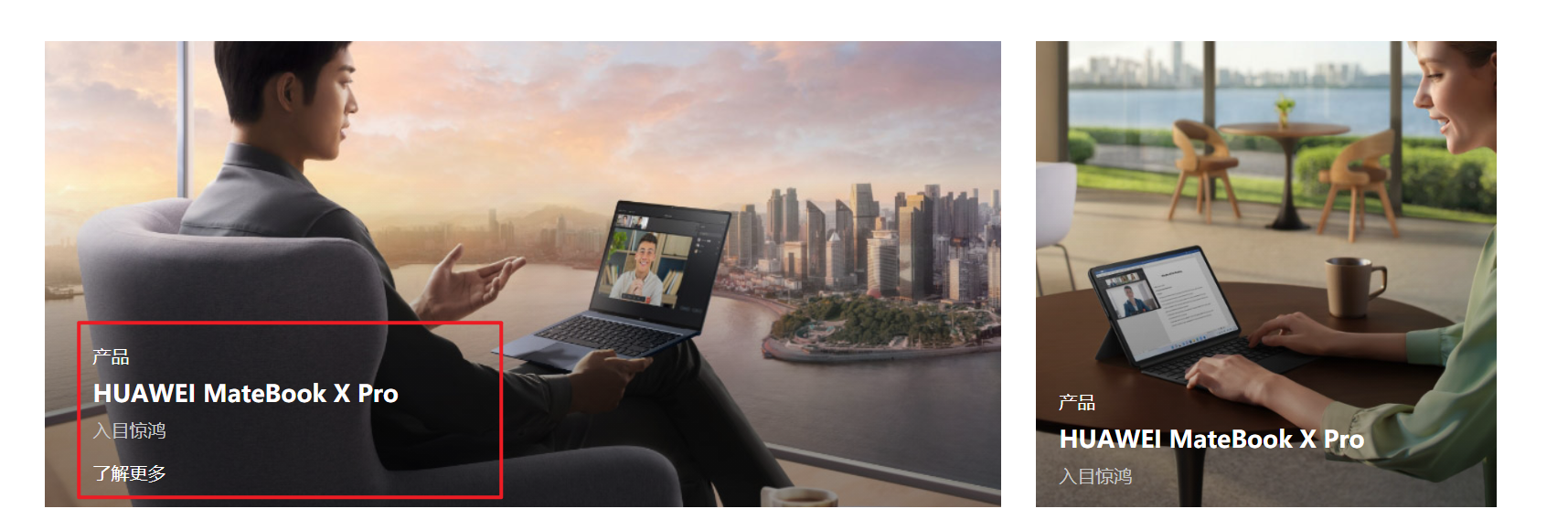
原因是因为最开始我用了mouseout鼠标事件,而mouseout事件一旦离开父元素或者子元素都会触发,所以鼠标离开子元素的时候,也会触发父元素上的mouseout鼠标事件,但是mouseleave则不同,只有离开被选元素的时候,才会触发效果,这样遇到的问题就被完美解决了。
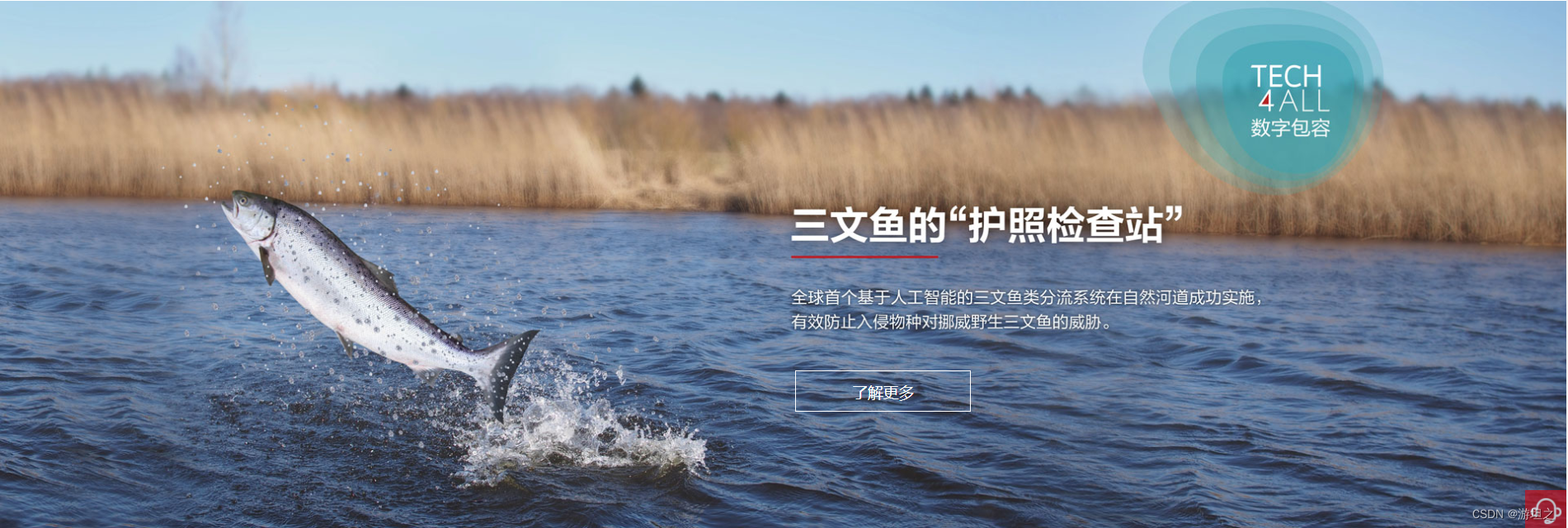
这个实现起来很容易,"了解更多"按钮和父组件分别使用position:absolute , position:relative,然后"了解更多"按钮相对于父组件定位,利用top和left(或者bottom、right)定位,将其放置在合适的位置。
至于"了解更多"的悬浮效果,则通过:hover即可实现
<div class="div_bill">

      <img src="@/assets/sanwenyu.jpg" class="bill_img">
      <button class="img_btn">了解更多</button>
</div>
.div_bill {
  width: 100%;
  margin-top: 7%;
  height: auto;
  position: relative;
}

.bill_img {
  width: 100%;
  height: auto;
}

.img_btn {
  z-index: 100;
  width: 170px;
  height: 42px;
  position: absolute;
  border: 1px solid #ffffff;
  left: 50.6%;
  top: 65%;
  color: #ffffff;
  cursor: pointer;
  /* opacity: 1; */
  background-color: rgba(11, 11, 11, 0);
}

.img_btn:hover {
  background-color: rgb(199, 0, 11);
  border: 0px;
  color: #fff;
}

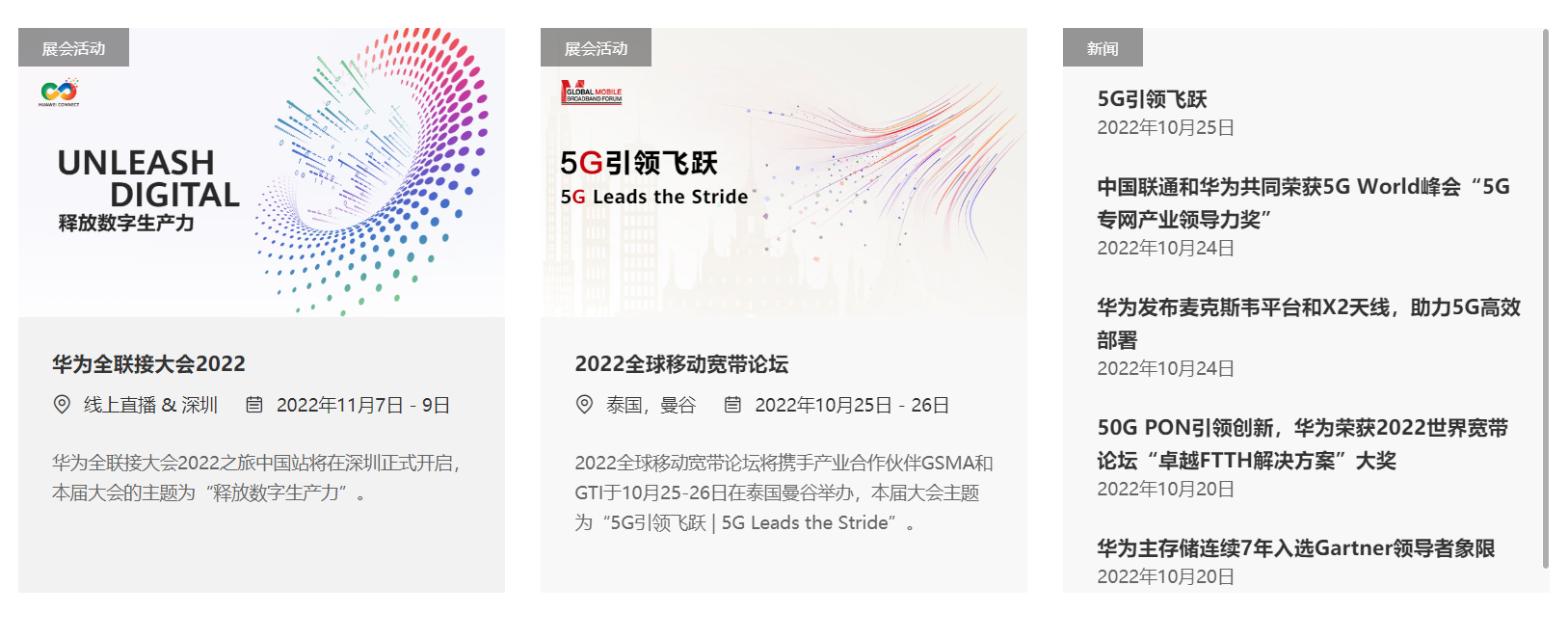
首先是分成三个组件,宽度为30%,中间两个间距分别为5%。
第一第二两个组件的形式一样,都是分成三大部分:展会活动、图片、内容信息。
其中展会活动很显然用到了相对父组件定位,图片和内容使用普通定位即可
另外,当鼠标悬浮上去的时候,图片会被拉近,而内容信息的颜色会变深一些。
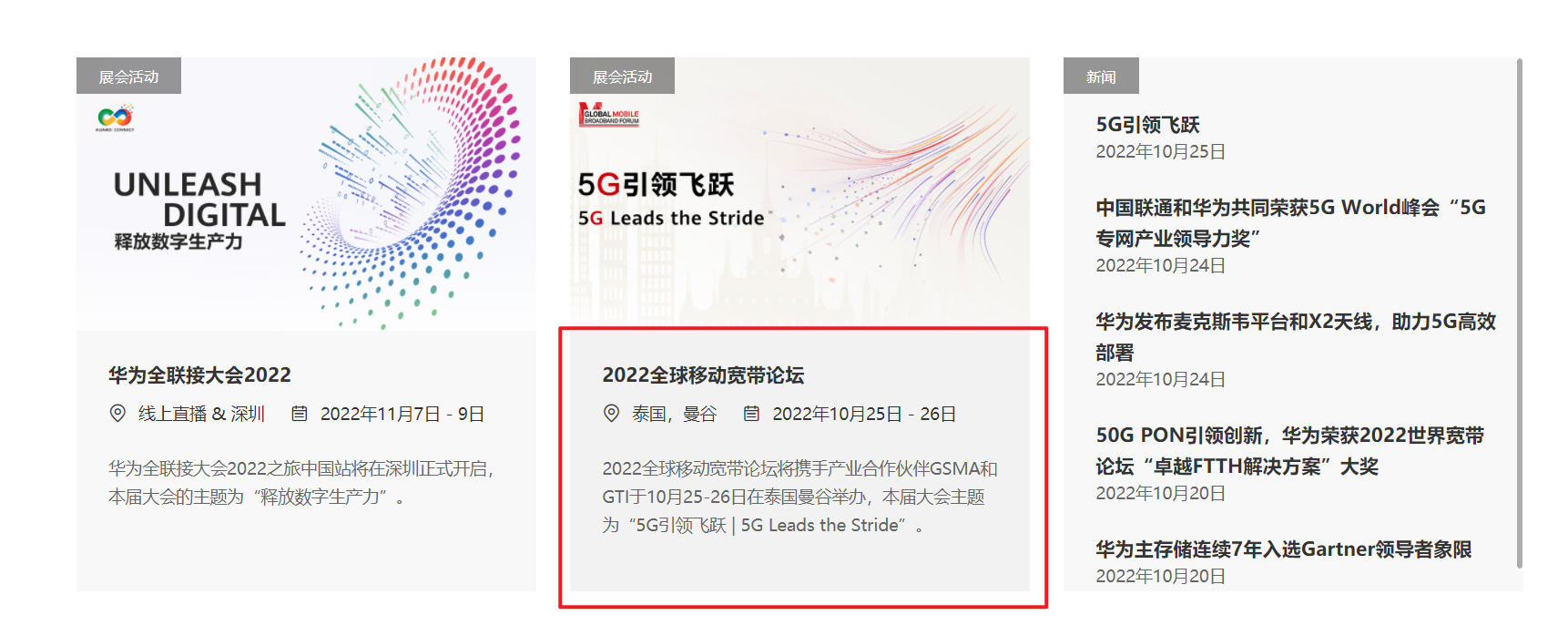
当然这个也不是很难,大多数都是用过的知识。
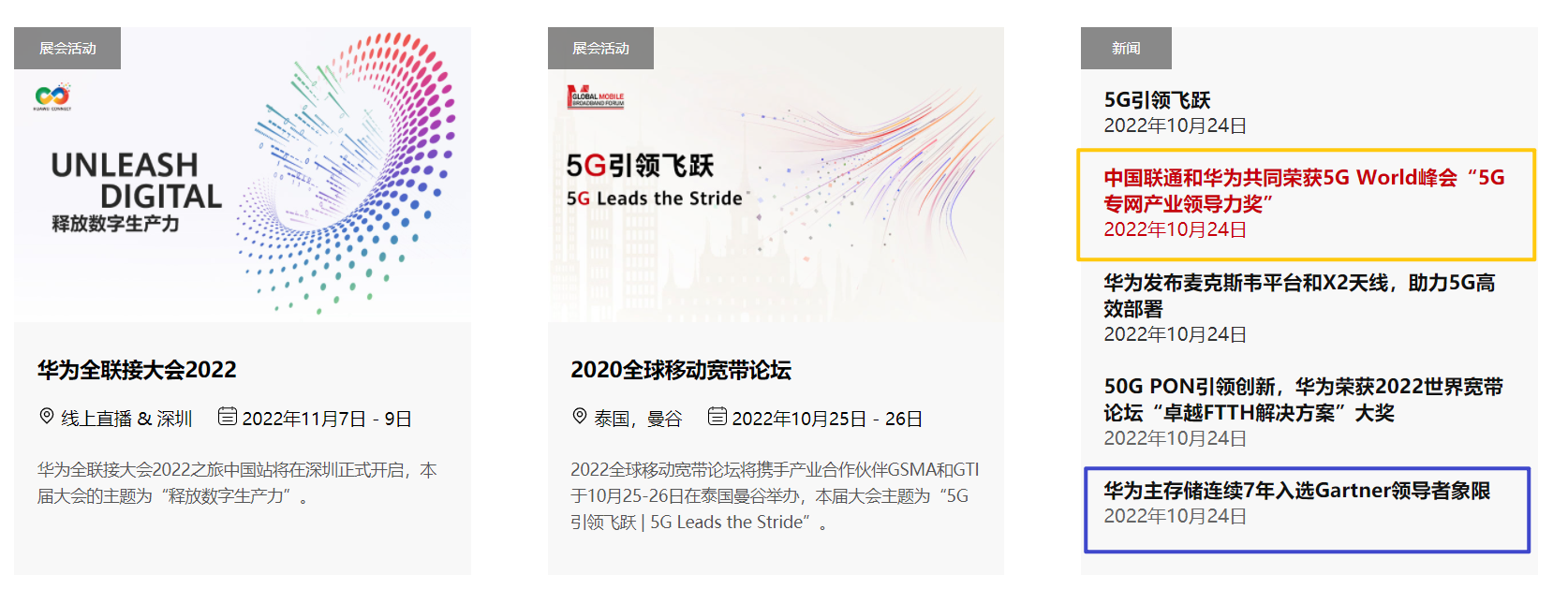
对于第三个组件,相对复杂一些。所谓相对复杂,也不过是因为一个hover实现不了这个效果。因为如果用悬浮的话,要求两个字体的color都需要继承父组件,但是这样的话,就不能保证两个字体的颜色不同,所以需要用到一个鼠标事件,对两者的Dom进行操作实现。
<div class="div_news">
<div class="news_title">
<h2>新闻与活动</h2>
</div>
<div class="news_info">
<div class="info1" @mouseenter="showDiv2(1)" @mouseleave="hideDiv2(1)">
<div class="info_title">展会活动</div>
<div class="info_main">
<img src="@/assets/info1.jpg" alt="" class="main_img">
<div class="info_words">
<div class="words_container">
<div class="container_first">
<span>华为全联接大会2022</span>
</div>
<div class="container_second">
<span>
<svg t="1666685534558" class="icon" viewBox="0 0 1024 1024" version="1.1"
xmlns="http://www.w3.org/2000/svg" p-id="3562" width="16" height="16">
<path
d="M512 960.13L251.06 699.11c-71.15-70.33-110.32-164.02-110.32-263.99 0-204.71 166.55-371.25 371.25-371.25s371.25 166.54 371.25 371.25c0 100.04-39.22 193.8-110.46 264.13l-1.19 1.26L512 960.13z m0-832.29c-169.44 0-307.28 137.85-307.28 307.28 0 83.11 32.72 160.99 92.12 219.29l1.84 1.96L512 869.66l215.16-215.25c59.4-58.29 92.12-136.17 92.12-219.29 0-169.43-137.84-307.28-307.28-307.28z"
p-id="3563"></path>
<path
d="M512 590.36c-91.72 0-166.34-74.63-166.34-166.35S420.28 257.66 512 257.66c91.73 0 166.36 74.63 166.36 166.35S603.73 590.36 512 590.36z m0-268.73c-56.45 0-102.37 45.93-102.37 102.38S455.55 526.39 512 526.39s102.38-45.93 102.38-102.38S568.45 321.63 512 321.63z"
p-id="3564"></path>
</svg> 线上直播 & 深圳
<svg t="1666685766326" class="icon" viewBox="0 0 1024 1024" version="1.1"
xmlns="http://www.w3.org/2000/svg" p-id="4521" width="16" height="16" style="margin-left:5%;" >
<path
d="M840.691358 63.209877h-50.567901V25.283951a25.283951 25.283951 0 0 0-50.567901 0v37.925926H284.444444V25.283951a25.283951 25.283951 0 0 0-50.567901 0v37.925926H183.308642a176.987654 176.987654 0 0 0-176.987654 176.987654v606.814815a176.987654 176.987654 0 0 0 176.987654 176.987654h657.382716a176.987654 176.987654 0 0 0 176.987654-176.987654v-606.814815a176.987654 176.987654 0 0 0-176.987654-176.987654z m126.419753 783.802469a126.419753 126.419753 0 0 1-126.419753 126.419753H183.308642a126.419753 126.419753 0 0 1-126.419753-126.419753v-455.111111h910.222222z m0-505.679013H56.888889v-101.135802a126.419753 126.419753 0 0 1 126.419753-126.419753h50.567901V176.987654a25.283951 25.283951 0 0 0 50.567901 0V113.777778h455.111112V176.987654a25.283951 25.283951 0 0 0 50.567901 0V113.777778h50.567901a126.419753 126.419753 0 0 1 126.419753 126.419753z"
p-id="4522"></path>
<path
d="M257.643457 613.135802h510.482963a23.766914 23.766914 0 0 0 0-47.280987H257.643457a23.766914 23.766914 0 0 0 0 47.533827zM257.643457 815.407407h510.482963a23.766914 23.766914 0 1 0 0-47.280987H257.643457a23.766914 23.766914 0 0 0 0 47.533827z"
p-id="4523"></path>
</svg> 2022年11月7日 - 9日
</span>
</div>
<div class="container_third">
<span>
华为全联接大会2022之旅中国站将在深圳正式开启,本届大会的主题为“释放数字生产力”。
</span>
</div>
</div>
</div>
</div>
</div>
<div class="info1" @mouseenter="showDiv2(2)" @mouseleave="hideDiv2(2)">
<div class="info_title">展会活动</div>
<div class="info_main">
<img src="@/assets/mbbf2022-cn2.jpg" alt="" class="main_img">
<div class="info_words">
<div class="words_container">
<div class="container_first">
<span>2020全球移动宽带论坛</span>
</div>
<div class="container_second">
<span>
<svg t="1666685534558" class="icon" viewBox="0 0 1024 1024" version="1.1"
xmlns="http://www.w3.org/2000/svg" p-id="3562" width="16" height="16">
<path
d="M512 960.13L251.06 699.11c-71.15-70.33-110.32-164.02-110.32-263.99 0-204.71 166.55-371.25 371.25-371.25s371.25 166.54 371.25 371.25c0 100.04-39.22 193.8-110.46 264.13l-1.19 1.26L512 960.13z m0-832.29c-169.44 0-307.28 137.85-307.28 307.28 0 83.11 32.72 160.99 92.12 219.29l1.84 1.96L512 869.66l215.16-215.25c59.4-58.29 92.12-136.17 92.12-219.29 0-169.43-137.84-307.28-307.28-307.28z"
p-id="3563"></path>
<path
d="M512 590.36c-91.72 0-166.34-74.63-166.34-166.35S420.28 257.66 512 257.66c91.73 0 166.36 74.63 166.36 166.35S603.73 590.36 512 590.36z m0-268.73c-56.45 0-102.37 45.93-102.37 102.38S455.55 526.39 512 526.39s102.38-45.93 102.38-102.38S568.45 321.63 512 321.63z"
p-id="3564"></path>
</svg> 泰国,曼谷
<svg t="1666685766326" class="icon" viewBox="0 0 1024 1024" version="1.1"
xmlns="http://www.w3.org/2000/svg" p-id="4521" width="16" height="16" style="margin-left:5%;">
<path
d="M840.691358 63.209877h-50.567901V25.283951a25.283951 25.283951 0 0 0-50.567901 0v37.925926H284.444444V25.283951a25.283951 25.283951 0 0 0-50.567901 0v37.925926H183.308642a176.987654 176.987654 0 0 0-176.987654 176.987654v606.814815a176.987654 176.987654 0 0 0 176.987654 176.987654h657.382716a176.987654 176.987654 0 0 0 176.987654-176.987654v-606.814815a176.987654 176.987654 0 0 0-176.987654-176.987654z m126.419753 783.802469a126.419753 126.419753 0 0 1-126.419753 126.419753H183.308642a126.419753 126.419753 0 0 1-126.419753-126.419753v-455.111111h910.222222z m0-505.679013H56.888889v-101.135802a126.419753 126.419753 0 0 1 126.419753-126.419753h50.567901V176.987654a25.283951 25.283951 0 0 0 50.567901 0V113.777778h455.111112V176.987654a25.283951 25.283951 0 0 0 50.567901 0V113.777778h50.567901a126.419753 126.419753 0 0 1 126.419753 126.419753z"
p-id="4522"></path>
<path
d="M257.643457 613.135802h510.482963a23.766914 23.766914 0 0 0 0-47.280987H257.643457a23.766914 23.766914 0 0 0 0 47.533827zM257.643457 815.407407h510.482963a23.766914 23.766914 0 1 0 0-47.280987H257.643457a23.766914 23.766914 0 0 0 0 47.533827z"
p-id="4523"></path>
</svg> 2022年10月25日 - 26日
</span>
</div>
<div class="container_third">
<span>
2022全球移动宽带论坛将携手产业合作伙伴GSMA和GTI于10月25-26日在泰国曼谷举办,本届大会主题为“5G引领飞跃 | 5G Leads the Stride”。
</span>
</div>
</div>
</div>
</div>
</div>
<div class="info3">
<div class="info_title f2">新闻</div>
<div class="info_main">
<div class="info_info1 info1_top" @mouseenter="changeColor(1)" @mouseleave="cancelColor(1)">
<h4 class="info_word">
5G引领飞跃
</h4>
<div class="info_time">
2022年10月24日
</div>
</div>
<div class="info_info1" @mouseenter="changeColor(2)" @mouseleave="cancelColor(2)">
<h4 class="info_word">
中国联通和华为共同荣获5G World峰会“5G专网产业领导力奖”
</h4>
<div class="info_time">
2022年10月24日
</div>
</div>
<div class="info_info1" @mouseenter="changeColor(3)" @mouseleave="cancelColor(3)">
<h4 class="info_word">
华为发布麦克斯韦平台和X2天线,助力5G高效部署
</h4>
<div class="info_time">
2022年10月24日
</div>
</div>
<div class="info_info1" @mouseenter="changeColor(4)" @mouseleave="cancelColor(4)">
<h4 class="info_word">
50G PON引领创新,华为荣获2022世界宽带论坛“卓越FTTH解决方案”大奖
</h4>
<div class="info_time">
2022年10月24日
</div>
</div>
<div class="info_info1" @mouseenter="changeColor(5)" @mouseleave="cancelColor(5)">
<h4 class="info_word">
华为主存储连续7年入选Gartner领导者象限
</h4>
<div class="info_time">
2022年10月24日
</div>
</div>
</div>
</div>
</div>
</div>
methods:{
     showDiv2(value) {
      var d1 = document.getElementsByClassName('info1')[value - 1];
      d1.style.cssText = 'background-color: rgba(242,242,242); ';
      var d3 = document.getElementsByClassName('main_img')[value - 1];
      d3.style.cssText = 'animation-name:showBigImg; animation-duration:0.5s;animation-fill-mode: forwards; '
    },
    hideDiv2(value) {
      var d1 = document.getElementsByClassName('info1')[value - 1];
      d1.style.cssText = '  background-color: rgba(248,248,248); ';
      var d3 = document.getElementsByClassName('main_img')[value - 1];
      d3.style.cssText = 'animation-name:cancelBigImg; animation-duration:0.5s;animation-fill-mode: forwards; '
    },
    changeColor(value) {
      var d1 = document.getElementsByClassName('info_word')[value - 1];
      d1.style.cssText = '  color: rgb(199, 0, 11);';
      var d3 = document.getElementsByClassName('info_time')[value - 1];
      d3.style.cssText = 'color: rgb(199, 0, 11);'
    },
    cancelColor(value) {
      var d1 = document.getElementsByClassName('info_word')[value - 1];
      d1.style.cssText = ' color:#111111;  ';
      var d3 = document.getElementsByClassName('info_time')[value - 1];
      d3.style.cssText = 'color: #333;'
    }
}
.div_news {
  width: 85.652%;
  margin: 0 auto;
  height: auto;
  margin-top: 5%;
}

.news_title {
  width: 100%;
  height: auto;
  margin-bottom: 5%;

}

.news_title h2 {
  padding: 0 0;
  position: relative;
  width: 10%;
  margin: 0 auto;
  line-height: 40px;
}

.news_title h2::after {
  position: absolute;
  content: '';
  height: 2px;
  width: 47%;
  top: 100%;
  left: 25%;
  background-color: #c7000b;
}

.news_info {
  width: 100%;
  height: 65vh;
  position: relative;
}

.info1 {
  width: 30%;
  float: left;
  height: 65vh;
  margin-right: 5%;
  background-color: rgba(248, 248, 248);
  cursor: pointer;


}

.info_main {
  width: 100%;
  height: auto;
  overflow: hidden;

}

.info_main img {
  width: 100%;
  height: 35vh;
}

.info_words {
  width: 100%;
  height: 30vh;

}

.words_container {
  padding: 5% 5%;
  width: 90%;
  height: 90%;
  /* display: inline-block; */
}

.container_first {
  width: 100%;
  height: auto;
}

.container_first span {
  font-size: 18px;
  font-weight: 600;
  line-height: 34px;
}

.container_second {
  width: 100%;
  font-size: 15px;
  margin-top: 3%;
  line-height: 30px;
  height: auto;
}

.container_third {
  width: 100%;
  font-size: 14px;
  margin-top: 5%;
  line-height: 23px;
  color: #555;
}

.info3 {
  width: 30%;
  float: right;
  height: 65vh;
  position: relative;
  overflow: inherit;
  /* border-bottom: 1px solid red; */
  background-color: rgba(248, 248, 248);
}

.info_info1 {
  padding: 3% 5%;
  width: 90%;
  height: auto;
  cursor: pointer;
  color: #666;
}

.info1_top {
  margin-top: 10%;
}

.info_word {
  padding: 0px 0px;
  margin: 0px 0px;
  font-size: 17px;
  color: #111111;
}

.info_time {
  color: inherit;
}

.info_title {
  width: 7%;
  height: 5vh;
  position: absolute;
  line-height: 5vh;
  top: 0;
  text-align: center;
  font-size: 10px;
  color: #ffffff;
  z-index: 2;
  background-color: rgba(90, 90, 90, 0.7);
}

.f2 {
  width: 20%;

}
项目介绍随着我国经济迅速发展,人们对手机的需求越来越大,各种手机软件也都在被广泛应用,但是对于手机进行数据信息管理,对于手机的各种软件也是备受用户的喜爱小学生兴趣延时班预约小程序的设计与开发被用户普遍使用,为方便用户能够可以随时进行小学生兴趣延时班预约小程序的设计与开发的数据信息管理,特开发了小程序的设计与开发的管理系统。小学生兴趣延时班预约小程序的设计与开发的开发利用现有的成熟技术参考,以源代码为模板,分析功能调整与小学生兴趣延时班预约小程序的设计与开发的实际需求相结合,讨论了小学生兴趣延时班预约小程序的设计与开发的使用。开发环境开发说明:前端使用微信微信小程序开发工具:后端使用ssm:VU
参考文章搭建文章gitte源码在线体验可以注册两个号来测试演示图:一.整体介绍 介绍SignalR一种通讯模型Hub(中心模型,或者叫集线器模型),调用这个模型写好的方法,去发送消息。 内容有: ①:Hub模型的方法介绍 ②:服务器端代码介绍 ③:前端vue3安装并调用后端方法 ④:聊天室样例整体流程:1、进入网站->调用连接SignalR的方法2、与好友发送消息->调用SignalR的自定义方法 前端通过,signalR内置方法.invoke() 去请求接口3、监听接受方法(渲染消息)通过new signalR.HubConnectionBuilder().on
平时开发中我们经常会遇到这样的需求,在一个不限高度的盒子中会有很多内容,如果全部显示用户体验会非常不好,所以可以先折叠起来,当内容达到一定高度时,显示展开更多按钮,点击即可显示全部内容,先来看看效果图: 这样做用户体验瞬间得到提升,接下来看看具体细节。0">主要操作在内容这里{{item.username}},……展开更多样式大家可依据自己项目需求进行设计,这里就不贴了,主要说几个关键的。1、在data中定义三个属性isShowMore:false, //控制展开更多的显示与隐藏textHeight:null, //框中内容的高度status:false, //内容状态是否打开2.计算内容是否
这里写自定义目录标题一、问题二、解决三、解决方案四、打包预览一、问题在使用vue3.2和vite2开发一个移动端或者钉钉端H5微服务iosapp内置浏览器打开没问题安卓app内置浏览器打开空白页面vconsole打印出现报错globalthisundefind二、解决内置浏览器版本比较低打印出来是63vue3代码不兼容低版本浏览器三、解决方案步骤一:vite.config.ts里build.target配置项指定构建目标为es2015或者步骤二:安装@vitejs/plugin-legacy安装完报错也还在指定版本可以解决“@vitejs/plugin-legacy”:“1.8.0”,步骤三:
Vue3的新特性包括:CompositionAPI:一种新的API风格,可将有关组件功能的代码逻辑封装在单独的函数中,从而更好地管理和重用代码。Teleport:可以让组件在DOM层次结构中的任何位置渲染。Suspense:一种新的异步渲染模式,可以优化应用程序的性能。更快的渲染速度:Vue3使用了新的虚拟DOM算法,并且对渲染过程进行了优化,因此在渲染大型应用时性能更高。更小的包大小:Vue3的打包大小比Vue2更小,因为它不再需要依赖像vue-template-compiler这样的工具。其他改进:Vue3还具有其他一些改进,例如更好的TypeScript支持、更好的错误提示和更好的调试工
一、概览实现效果如下:二、项目环境1、nodejs版本node-vv16.16.02、npm版本npm-vnpmWARNconfigglobal`--global`,`--local`aredeprecated.Use`--location=global`instead.8.15.03、vue脚手架版本vue-V@vue/cli5.0.8三、创建vue项目1、创建名为vuetest的项目vuecreatevuetest选择Default([Vue2]babel,eslint) 2、切换到项目目录,启动项目cdvuetestnpmrunserve 3、使用浏览器预览 http://localh
记个笔记以免遗忘,建议还是查看Element-UI提供的官方文档学习,自己摸索比较难受官方文档:Element-UI组件TableElement-UI官网提供了许多Table格式,这里以一个带有筛选器的表格为例表格的官网显示效果:直接将官方提供的示例代码贴入.vue文件中即可使用显示的数据是通过data()方法提供的假数据。方法见下:data(){return{tableData:[{date:'2016-05-02',name:'王小虎',address:'上海市普陀区金沙江路1518弄'},{date:'2016-05-04',name:'王小虎',address:'上海市普陀区金沙江路1
目录:1.在数据库中创建表2.使用代码生成功能,生成基础代码2.1修改代码生成器中配置文件generator.yml2.2使用系统工具代码生成3.新建子模块,迁移代码3.1创建grayskyax-assetsmanagement模块3.2在RuoYi整个项目下的`pom.xml`中引入刚刚新建的模块:3.3在ruoyi-admin模块的pom.xml中引入新建的模块3.4在新建的assetsManagement模块中引入ruoyi-common模块3.5将之前解压后的文件放如项目的对应目录下;3.6在数据库中执行生成的sql脚本3.7配置扫描路径application.yml,applicat
因为期末了,要检查web大作业,虽然没有要求,但我想把项目部署一下,以免每次都要打开运行了,部署过踩了许多坑,这里总结一一下这次部署的流程吧。项目我个人进行前后端分离的全栈开发,有后台,后台部署的过程由于篇幅原因将在下一篇中讲解准备工作准备一台虚拟机或者云服务器(linux系统)首先,由于真实的项目基本上都部署在linux系统上,因此为了贴近真实,我们需要准备一台带有linux系统的虚拟机或者云服务器,由于虚拟机不能在自己的电脑关机了以后继续运行,因此这里推荐云服务器,目前用过阿里云,腾讯云两款云服务器部署项目,操作基本上都十分简单。新用户可以在腾讯云和阿里云平台都有两周的免费云服务器可以领取
有没有使用vue.js的on-shown和on-show的回调方法?我在div元素上使用v-show="my-condition"。但里面有一些charts.js图表,除非可见,否则无法呈现。任何人都知道如何仅在父级可见时才渲染chart.js?它们位于可选择的选项卡内,因此它可能会触发多次。我正在使用Vue.js和vue-strap。 最佳答案 查看thisanswer-在类似情况下,使用nextTick()对我有用。简而言之:newVue({...data:{myCondition:false},watch:{myConditi
