ChatGPT 对于 Python 程序员有用吗?特别是我们这些使用 Python 进行数据处理、数据清洗和构建机器学习模型的人?我们试试就知道了。
来自 OpenAI 的 ChatGPT 是什么?假设你已经知道了。网上铺天盖地的宣传呐喊,我想不再需要介绍了。加入您碰巧不知道 ChatGPT 是什么,赶快去查查,不然会被人嘲笑的,然后再回来继续。
与 ChatGPT 的对话可以是有趣的,甚至是有启发性的。但是让我们看看它实际上有多大帮助。
让我们看看 ChatGPT 在根据我们提供的规范编写代码时能做些什么。我们将从简单开始,并从那里开始构建。
我认为最好从某种数据处理脚本开始。因为我打算稍后让 ChatGPT 使用各种 Python 库编写一些机器学习脚本,所以这似乎是一个合理的起点。
首先,我想尝试加载一个数据集; 确保所有数据集值都是数值,或者将它们转换为数值; 检查缺失的值; 并将数据集分割为训练集和测试集。
Write a Python script that does the following:
- loads a dataset from csv on disk to Pandas DataFrame
- ensures that dataset is entirely numeric; converts string values to numeric and tracks this conversion in a dictionary to reference later
- checks for missing values in the DataFrame and imputes missing values for any record that has one missing value; entirely drops a record that has more than one missing value
- splits the dataset into test and training sets编写一个 Python 脚本,执行以下操作:
- 将磁盘上的 csv 数据集加载到 Pandas DataFrame
- 确保数据集完全是数字; 将字符串值转换为数字,并在字典中跟踪这种转换,以便以后引用
- 检查 DataFrame 中是否缺少值,并为缺少一个值的任何记录计算缺少值; 完全删除一个缺少多个值的记录
- 将数据集分成测试集和训练集
import pandas as pd
import numpy as np
from sklearn.model_selection import train_test_split

# Load the dataset from csv to a Pandas DataFrame
df = pd.read_csv("dataset.csv")

# Ensure the dataset is entirely numeric
# Convert string values to numeric and track this conversion in a dictionary to reference later
string_columns = df.columns[df.dtypes == 'object']
string_to_numeric = {}
for column in string_columns:
    unique_values = df[column].unique()
    mapping = {value: i for i, value in enumerate(unique_values)}
    string_to_numeric[column] = mapping
    df[column] = df[column].map(mapping)

# Check for missing values in the DataFrame
missing_values = df.isna().sum()

# Impute missing values for any record that has one missing value; entirely drop a record that has more than one missing value
for column, missing_value_count in missing_values.items():
    if missing_value_count == 1:
        df[column].fillna(df[column].mean(), inplace=True)
    elif missing_value_count > 1:
        df.dropna(subset=[column], inplace=True)

# Split the dataset into test and training sets
train_data, test_data, train_target, test_target = train_test_split(df.drop('target', axis=1), df['target'], test_size=0.2, random_state=0)
注意: 此脚本假定目标变量存储在 DataFrame 中名为 target 的列中。您需要根据数据集的结构修改此代码。
ChatGPT 生成了一个有用的脚本。它可以加载一个data.csv的数据集,以及训练集/测试集分割的比例,并记录了这两点以及如果需要的话如何更改它们。总的来说,任务完成了。
现在我们已经有了一个执行某些操作的脚本,让我们对它进行一些重构。良好编码的基础是使用函数来组织逻辑代码,促进重用,并确保您不会重复。
Rewrite the above script to use a series of functions that make sense
重写上面的脚本,使用一系列有意义的函数
Here’s the script refactored into a series of functions that make sense:
import pandas as pd
import numpy as np
from sklearn.model_selection import train_test_split

def load_dataset(filepath):
    """Loads a dataset from a csv file to a Pandas DataFrame"""
    return pd.read_csv(filepath)

def convert_to_numeric(df):
    """Ensures the dataset is entirely numeric and converts string values to numeric"""
    string_columns = df.columns[df.dtypes == 'object']
    string_to_numeric = {}
    for column in string_columns:
        unique_values = df[column].unique()
        mapping = {value: i for i, value in enumerate(unique_values)}
        string_to_numeric[column] = mapping
        df[column] = df[column].map(mapping)
    return df, string_to_numeric

def handle_missing_values(df):
    """Handles missing values by imputing a mean for records with one missing value, and dropping records with more than one missing value"""
    missing_values = df.isna().sum()
    for column, missing_value_count in missing_values.items():
        if missing_value_count == 1:
            df[column].fillna(df[column].mean(), inplace=True)
        elif missing_value_count > 1:
            df.dropna(subset=[column], inplace=True)
    return df

def split_dataset(df, target_column, test_size=0.2, random_state=0):
    """Splits the dataset into test and training sets"""
    train_data, test_data, train_target, test_target = train_test_split(df.drop(target_column, axis=1), df[target_column], test_size=test_size, random_state=random_state)
    return train_data, test_data, train_target, test_target

# Load the dataset from csv to a Pandas DataFrame
df = load_dataset("dataset.csv")

# Convert string values to numeric and handle missing values
df, string_to_numeric = convert_to_numeric(df)
df = handle_missing_values(df)

# Split the dataset into test and training sets
train_data, test_data, train_target, test_target = split_dataset(df, "target")
Note: This script assumes that the target variable is stored in a column named target in the DataFrame. You’ll need to modify this code based on the structure of your dataset.
在这里,ChatGPT使用了四个函数:
1.load_dataset(filepath) :加载 csv 数据集
2.convert_to_numeric(df) :将字符串值转换为数值。
3.handle_missing_values(df):处理数据集中缺少的值。
4.split_dataset(df, target_column, test_size=0.2, random_state=0) :将数据集划分为测试集和训练集。
测试样例使用这些函数来加载、转换和清理数据集,然后将其拆分为测试集和训练集。
数据集的路径和测试比例是这些函数的输入。
我们从 ChatGPT 的第一个脚本可以看出一些非常明显的逻辑代码块,可以将这些代码块按功能封装成函数。ChatGPT 做了我期望它做的事情。同样,生成了一个合格的脚本。
我们的脚本现在看起来好看点了,因为它使用了一些函数。接下来,让我们稍微扩展一下脚本,以便用户可以在运行脚本时指定一些参数。
Rewrite the above program to solicit the following from the command line in the form of arguments, and use them in the program:
- the path/name of the dataset csv file
- the train/test split size
- the threshold for the number of missing values per record to drop after which to drop entire record, instead of imputing the missing values重写上面的程序,以参数的形式从命令行获取以下内容,并在程序中使用它们:
- 数据集 csv 文件的路径/名称
- 训练集/测试集的分割比例
- 每条记录丢失值数量的阈值,在该阈值之后删除整条记录,而不是输入丢失值
Here’s the script refactored to solicit the arguments from the command line:
import pandas as pd
import numpy as np
import argparse
from sklearn.model_selection import train_test_split

def load_dataset(filepath):
    """Loads a dataset from a csv file to a Pandas DataFrame"""
    return pd.read_csv(filepath)

def convert_to_numeric(df):
    """Ensures the dataset is entirely numeric and converts string values to numeric"""
    string_columns = df.columns[df.dtypes == 'object']
    string_to_numeric = {}
    for column in string_columns:
        unique_values = df[column].unique()
        mapping = {value: i for i, value in enumerate(unique_values)}
        string_to_numeric[column] = mapping
        df[column] = df[column].map(mapping)
    return df, string_to_numeric

def handle_missing_values(df, missing_value_threshold):
    """Handles missing values by imputing a mean for records with one missing value, and dropping records with more than one missing value"""
    missing_values = df.isna().sum()
    for column, missing_value_count in missing_values.items():
        if missing_value_count <= missing_value_threshold:
            df[column].fillna(df[column].mean(), inplace=True)
        elif missing_value_count > missing_value_threshold:
            df.dropna(subset=[column], inplace=True)
    return df

def split_dataset(df, target_column, test_size=0.2, random_state=0):
    """Splits the dataset into test and training sets"""
    train_data, test_data, train_target, test_target = train_test_split(df.drop(target_column, axis=1), df[target_column], test_size=test_size, random_state=random_state)
    return train_data, test_data, train_target, test_target

if __name__ == '__main__':
    # Define the command line arguments
    parser = argparse.ArgumentParser(description='Handles missing values and splits a dataset into test and training sets')
    parser.add_argument('filepath', type=str, help='The path/name of the dataset csv file')
    parser.add_argument('test_size', type=float, help='The test/train split size')
    parser.add_argument('missing_value_threshold', type=int, help='The number of missing values per record after which to drop the entire record, instead of imputing the missing values')
    args = parser.parse_args()

    # Load the dataset from csv to a Pandas DataFrame
    df = load_dataset(args.filepath)

    # Convert string values to numeric and handle missing values
    df, string_to_numeric = convert_to_numeric(df)
    df = handle_missing_values(df, args.missing_value_threshold)

    # Split the dataset into test and training sets
    train_data, test_data, train_target, test_target = split_dataset(df, df.columns[-1], test_size=args.test_size)
This script can be run from the command line with the following command format:
python script_name.py filepath test_size missing_value_threshold
老实说,这里不需要太多的分析,因为 ChatGPT 的注释已经很好地解释了它的功能。他竟然告诉我们该怎么执行代码!!!
现在,让假设我们想让这段代码在应用程序中使用。让 ChatGPT 将这些函数包装到 Streamlit 应用程序中。
Rewrite the above program as a Streamlit app, allowing for the user to provide the same arguments as in the command line args above
将上面的程序重写为 Streamlit 应用程序,允许用户提供与上面命令行 args 中相同的参数
Here’s the script refactored as a Streamlit app:
import streamlit as st
import pandas as pd
import numpy as np
from sklearn.model_selection import train_test_split

def load_dataset(filepath):
    """Loads a dataset from a csv file to a Pandas DataFrame"""
    return pd.read_csv(filepath)

def convert_to_numeric(df):
    """Ensures the dataset is entirely numeric and converts string values to numeric"""
    string_columns = df.columns[df.dtypes == 'object']
    string_to_numeric = {}
    for column in string_columns:
        unique_values = df[column].unique()
        mapping = {value: i for i, value in enumerate(unique_values)}
        string_to_numeric[column] = mapping
        df[column] = df[column].map(mapping)
    return df, string_to_numeric

def handle_missing_values(df, missing_value_threshold):
    """Handles missing values by imputing a mean for records with one missing value, and dropping records with more than one missing value"""
    missing_values = df.isna().sum()
    for column, missing_value_count in missing_values.items():
        if missing_value_count <= missing_value_threshold:
            df[column].fillna(df[column].mean(), inplace=True)
        elif missing_value_count > missing_value_threshold:
            df.dropna(subset=[column], inplace=True)
    return df

def split_dataset(df, target_column, test_size=0.2, random_state=0):
    """Splits the dataset into test and training sets"""
    train_data, test_data, train_target, test_target = train_test_split(df.drop(target_column, axis=1), df[target_column], test_size=test_size, random_state=random_state)
    return train_data, test_data, train_target, test_target

def main():
    """Main function for the Streamlit app"""
    st.title("Dataset Preprocessing App")

    # Get the file path, test size, and missing value threshold from the user
    file_path = st.text_input("Enter the path/name of the dataset csv file:")
    test_size = st.slider("Enter the test/train split size:", 0.0, 1.0, 0.2)
    missing_value_threshold = st.slider("Enter the number of missing values per record after which to drop the entire record, instead of imputing the missing values:", 0, 100, 1)

    # Load the dataset and convert string values to numeric
    df = load_dataset(file_path)
    df, string_to_numeric = convert_to_numeric(df)

    # Handle missing values
    df = handle_missing_values(df, missing_value_threshold)

    # Split the dataset into test and training sets
    train_data, test_data, train_target, test_target = split_dataset(df, df.columns[-1], test_size=test_size)

    # Show the final processed data
    st.write("Processed Dataset:")
    st.write(df)

    st.write("Train Data:")
    st.write(train_data)
    st.write("Train Target:")
    st.write(train_target)

    st.write("Test Data:")
    st.write(test_data)
    st.write("Test Target:")
    st.write(test_target)
if name == 'main':
	main()
To run the Streamlit app, you can save the above code in a
.pyfile and run it in the command line with the following command:要运行 Streamlit 应用程序,可以将上面的代码保存在‘.py‘ 文件中,并使用以下命令在命令行中运行它:
streamlit run file_name.py
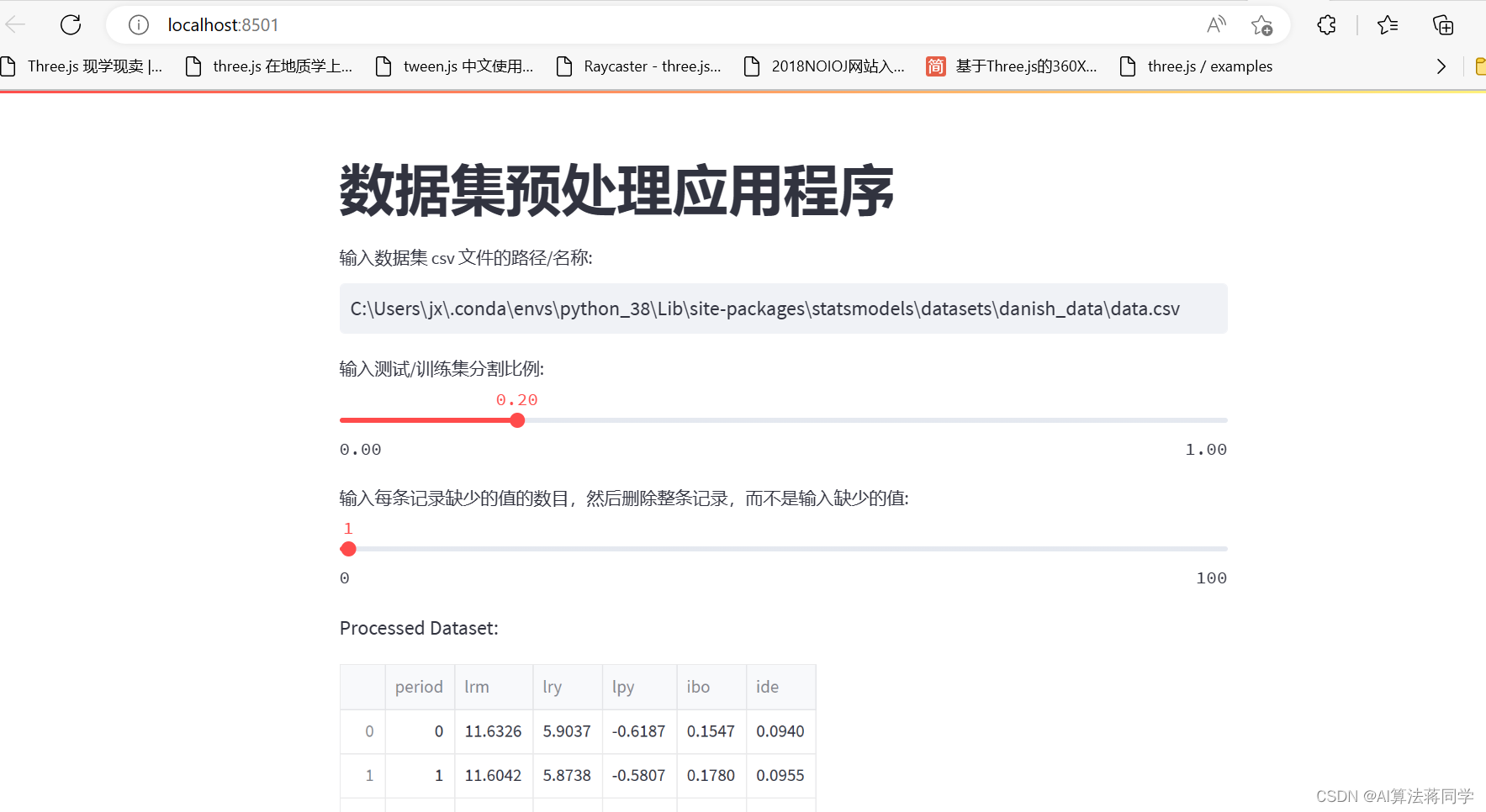
它做了它该做的事。ChatGPT 利用我们的功能,建立了一个简单的 Streamlit Web应用。
完成以上四步之后,我们检验下代码是否可以正常运行,需要做一下几步操作:
1、安装streamlit 库
pip install streamlit
2、安装 scikit-learn库
pip install scikit-learn
3、开开心心的执行
streamlit run main.py
vscode代码:
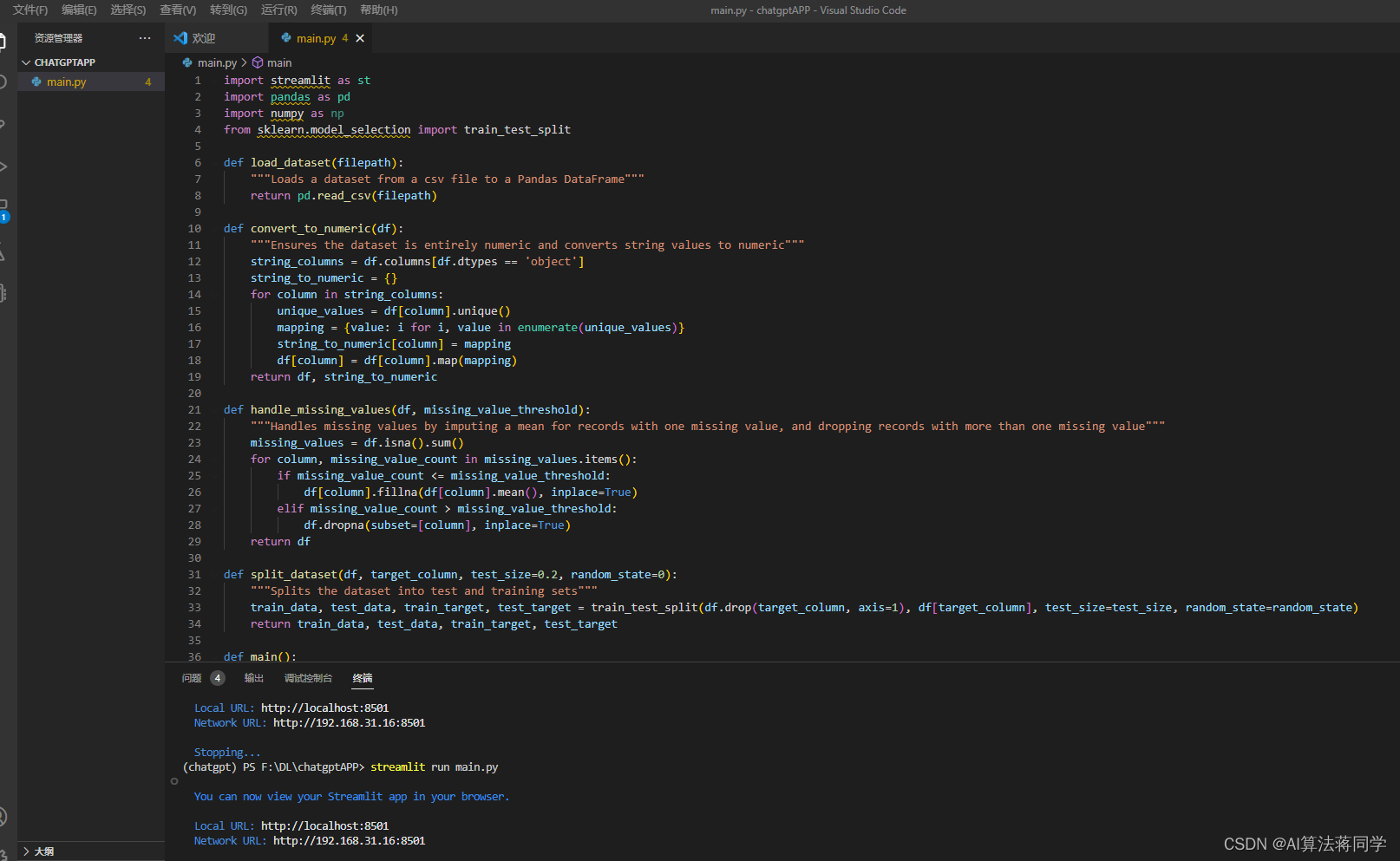
运行的web程序:
搞定!NB class ChatGPT!
我正在学习如何使用Nokogiri,根据这段代码我遇到了一些问题:require'rubygems'require'mechanize'post_agent=WWW::Mechanize.newpost_page=post_agent.get('http://www.vbulletin.org/forum/showthread.php?t=230708')puts"\nabsolutepathwithtbodygivesnil"putspost_page.parser.xpath('/html/body/div/div/div/div/div/table/tbody/tr/td/div
我有一个Ruby程序,它使用rubyzip压缩XML文件的目录树。gem。我的问题是文件开始变得很重,我想提高压缩级别,因为压缩时间不是问题。我在rubyzipdocumentation中找不到一种为创建的ZIP文件指定压缩级别的方法。有人知道如何更改此设置吗?是否有另一个允许指定压缩级别的Ruby库? 最佳答案 这是我通过查看rubyzip内部创建的代码。level=Zlib::BEST_COMPRESSIONZip::ZipOutputStream.open(zip_file)do|zip|Dir.glob("**/*")d
类classAprivatedeffooputs:fooendpublicdefbarputs:barendprivatedefzimputs:zimendprotecteddefdibputs:dibendendA的实例a=A.new测试a.foorescueputs:faila.barrescueputs:faila.zimrescueputs:faila.dibrescueputs:faila.gazrescueputs:fail测试输出failbarfailfailfail.发送测试[:foo,:bar,:zim,:dib,:gaz].each{|m|a.send(m)resc
很好奇,就使用rubyonrails自动化单元测试而言,你们正在做什么?您是否创建了一个脚本来在cron中运行rake作业并将结果邮寄给您?git中的预提交Hook?只是手动调用?我完全理解测试,但想知道在错误发生之前捕获错误的最佳实践是什么。让我们理所当然地认为测试本身是完美无缺的,并且可以正常工作。下一步是什么以确保他们在正确的时间将可能有害的结果传达给您? 最佳答案 不确定您到底想听什么,但是有几个级别的自动代码库控制:在处理某项功能时,您可以使用类似autotest的内容获得关于哪些有效,哪些无效的即时反馈。要确保您的提
假设我做了一个模块如下:m=Module.newdoclassCendend三个问题:除了对m的引用之外,还有什么方法可以访问C和m中的其他内容?我可以在创建匿名模块后为其命名吗(就像我输入“module...”一样)?如何在使用完匿名模块后将其删除,使其定义的常量不再存在? 最佳答案 三个答案:是的,使用ObjectSpace.此代码使c引用你的类(class)C不引用m:c=nilObjectSpace.each_object{|obj|c=objif(Class===objandobj.name=~/::C$/)}当然这取决于
我正在尝试使用ruby和Savon来使用网络服务。测试服务为http://www.webservicex.net/WS/WSDetails.aspx?WSID=9&CATID=2require'rubygems'require'savon'client=Savon::Client.new"http://www.webservicex.net/stockquote.asmx?WSDL"client.get_quotedo|soap|soap.body={:symbol=>"AAPL"}end返回SOAP异常。检查soap信封,在我看来soap请求没有正确的命名空间。任何人都可以建议我
关闭。这个问题是opinion-based.它目前不接受答案。想要改进这个问题?更新问题,以便editingthispost可以用事实和引用来回答它.关闭4年前。Improvethisquestion我想在固定时间创建一系列低音和高音调的哔哔声。例如:在150毫秒时发出高音调的蜂鸣声在151毫秒时发出低音调的蜂鸣声200毫秒时发出低音调的蜂鸣声250毫秒的高音调蜂鸣声有没有办法在Ruby或Python中做到这一点?我真的不在乎输出编码是什么(.wav、.mp3、.ogg等等),但我确实想创建一个输出文件。
我在我的项目目录中完成了compasscreate.和compassinitrails。几个问题:我已将我的.sass文件放在public/stylesheets中。这是放置它们的正确位置吗?当我运行compasswatch时,它不会自动编译这些.sass文件。我必须手动指定文件:compasswatchpublic/stylesheets/myfile.sass等。如何让它自动运行?文件ie.css、print.css和screen.css已放在stylesheets/compiled。如何在编译后不让它们重新出现的情况下删除它们?我自己编译的.sass文件编译成compiled/t
对于具有离线功能的智能手机应用程序,我正在为Xml文件创建单向文本同步。我希望我的服务器将增量/差异(例如GNU差异补丁)发送到目标设备。这是计划:Time=0Server:hasversion_1ofXmlfile(~800kiB)Client:hasversion_1ofXmlfile(~800kiB)Time=1Server:hasversion_1andversion_2ofXmlfile(each~800kiB)computesdeltaoftheseversions(=patch)(~10kiB)sendspatchtoClient(~10kiBtransferred)Cl
我想将html转换为纯文本。不过,我不想只删除标签,我想智能地保留尽可能多的格式。为插入换行符标签,检测段落并格式化它们等。输入非常简单,通常是格式良好的html(不是整个文档,只是一堆内容,通常没有anchor或图像)。我可以将几个正则表达式放在一起,让我达到80%,但我认为可能有一些现有的解决方案更智能。 最佳答案 首先,不要尝试为此使用正则表达式。很有可能你会想出一个脆弱/脆弱的解决方案,它会随着HTML的变化而崩溃,或者很难管理和维护。您可以使用Nokogiri快速解析HTML并提取文本:require'nokogiri'h
