接到一个项目,需要用c++和单片机通信,还要使用yolo模型来做到目标检测的任务,但目前网上的各种博客并没有完整的流程教程,让我在部署过程费了不少劲,也踩了不少坑(甚至一度把ubuntu干黑屏)。于是想把训练及部署过程记录下来,并留给后来者方便使用。(博主使用的系统是ubuntu20.04)
作为一个经典且实用的目标检测模型,yolo的性能强大已无需多言,现在(2023.4.1)yolo模型已经推出到yolov8,但是推理速度上yolov5还是够快且够用,而且对各种外部硬件的适配性强,如oak相机支持的模型还在yolov5-yolov6,所以博主这里选择yolov5进行训练。
onnxruntime是微软推出的一款推理框架,我们可以很方便的利用它运行一个onnx模型,而且它支持多种运行后端,包括CPU,GPU,TensorRT,DML等。onnxruntime可以说是对onnx模型最原生的支持了,而且onnxruntime也有在C++上部署使用的相关库,所以我们选择onnxruntime作为我们的推理框架进行部署。
对于yolov5模型的训练,其实选择哪个都可以,博主这里模型使用的是https://github.com/ultralytics/yolov5/tree/v5.0
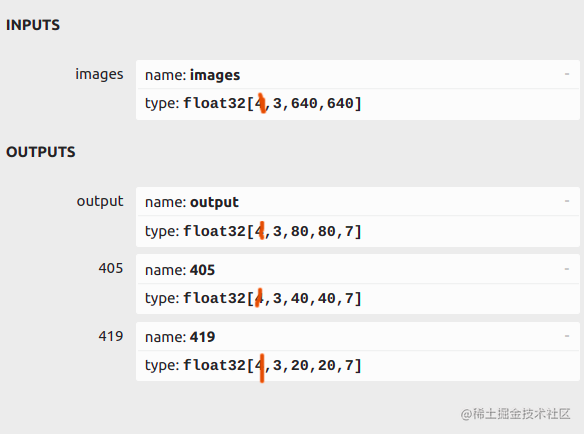
可以看到这个图片中有三个output,这样的结果是不能用的,我们需要的output是类似于[1,25200,7]这样的结果,并且这个结果必须在第一位上,通过观察可以知道25200是上图中三个输出结果中三个先验框大小和数量相乘得到的而我们训练使用的yolov5模型export的转换结果却不是这样的总和。
很简单,通过观察yolov5中yolo部分的代码发现

这个代码中的return是有问题的,返回结果不是我们想要的存在类似与[1,25200,7]的结果,而是详细细分的。这里我们最好不要改动yolo部分的代码,这可能会牵连其他部分从而产生错误。我们直接使用https://github.com/ultralytics/yolov5 这个模型来进行转换
python export.py --weights yolov5s.pt --include torchscript onnx openvino engine coreml tflite ...
注意yolov5s.pt处填自己训练结果的pt文件地址。然后我们使用netron查看得到的onnx模型
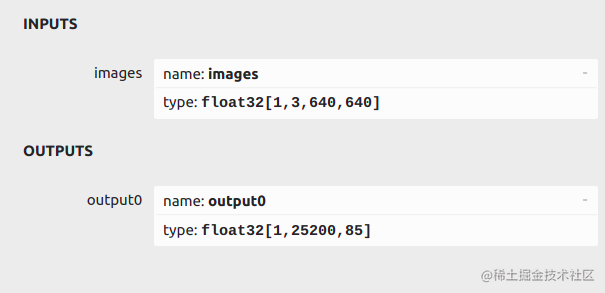
惊奇的发现我们得到了我们想要的output!(win!)(注意最后的85只是80个labels和5个参数,自己训练的模型有自己设置的labels所以数量可能不一样)
到这里我们已经完成了yolov5模型的训练和转换,请带好自己的随身物品(onnx模型),我们要赶往下一站了
#pragma comment(lib, "k4a.lib")
#include <fstream>
#include <sstream>
#include <iostream>
#include <opencv2/imgproc.hpp>
#include <opencv2/highgui.hpp>
#include <k4a/k4a.h>
#include <k4arecord/record.h>
#include <k4arecord/playback.h>
#include <k4a/k4a.hpp>
#include <stdio.h>
#include <stdlib.h>
#include <opencv2/opencv.hpp>

#include <cstdlib>
#include <omp.h>
#include <opencv2/highgui/highgui_c.h>
#include "opencv2/imgproc/imgproc_c.h"
#include<opencv2/imgproc/types_c.h>

//onnxruntime
// #include <core/session/onnxruntime_cxx_api.h>
// #include <core/providers/cuda/cuda_provider_factory.h>
// #include <core/session/onnxruntime_c_api.h>
// #include <core/providers/tensorrt/tensorrt_provider_factory.h>
#include <onnxruntime_cxx_api.h>
#include <onnxruntime_c_api.h>
#include <cuda_provider_factory.h>
// 命名空间
using namespace std;
using namespace cv;
using namespace Ort;

// 自定义配置结构
struct Configuration
{
	public:
	float confThreshold; // Confidence threshold置信度阈值
	float nmsThreshold;  // Non-maximum suppression threshold非最大抑制阈值
	float objThreshold;  //Object Confidence threshold对象置信度阈值
	string modelpath;
};

// 定义BoxInfo结构类型
typedef struct BoxInfo
{
	float x1;
	float y1;
	float x2;
	float y2;
	float score;
	int label;
} BoxInfo;

// int endsWith(string s, string sub) {
// 	return s.rfind(sub) == (s.length() - sub.length()) ? 1 : 0;
// }

// const float anchors_640[3][6] = { {10.0,  13.0, 16.0,  30.0,  33.0,  23.0},
// 								 {30.0,  61.0, 62.0,  45.0,  59.0,  119.0},
// 								 {116.0, 90.0, 156.0, 198.0, 373.0, 326.0} };

// const float anchors_1280[4][6] = { {19, 27, 44, 40, 38, 94},{96, 68, 86, 152, 180, 137},{140, 301, 303, 264, 238, 542},
// 					   {436, 615, 739, 380, 925, 792} };

class YOLOv5
{
public:
	YOLOv5(Configuration config);
	void detect(Mat& frame);
private:
	float confThreshold;
	float nmsThreshold;
	float objThreshold;
	int inpWidth;
	int inpHeight;
	int nout;
	int num_proposal;
	int num_classes;
	string classes[1] = {"tower"};
// string classes[80] = {"person", "bicycle", "car", "motorbike", "aeroplane", "bus",
// 							"train", "truck", "boat", "traffic light", "fire hydrant",
// 							"stop sign", "parking meter", "bench", "bird", "cat", "dog",
// 							"horse", "sheep", "cow", "elephant", "bear", "zebra", "giraffe",
// 							"backpack", "umbrella", "handbag", "tie", "suitcase", "frisbee",
// 							"skis", "snowboard", "sports ball", "kite", "baseball bat",
// 							"baseball glove", "skateboard", "surfboard", "tennis racket",
// 							"bottle", "wine glass", "cup", "fork", "knife", "spoon", "bowl",
// 							"banana", "apple", "sandwich", "orange", "broccoli", "carrot",
// 							"hot dog", "pizza", "donut", "cake", "chair", "sofa", "pottedplant",
// 							"bed", "diningtable", "toilet", "tvmonitor", "laptop", "mouse",
// 							"remote", "keyboard", "cell phone", "microwave", "oven", "toaster",
// 							"sink", "refrigerator", "book", "clock", "vase", "scissors",
// 							"teddy bear", "hair drier", "toothbrush"};


	const bool keep_ratio = true;
	vector<float> input_image_;		// 输入图片
	void normalize_(Mat img);		// 归一化函数
	void nms(vector<BoxInfo>& input_boxes);
	Mat resize_image(Mat srcimg, int *newh, int *neww, int *top, int *left);

	Env env = Env(ORT_LOGGING_LEVEL_ERROR, "yolov5-6.1"); // 初始化环境
	Session *ort_session = nullptr;    // 初始化Session指针选项
	SessionOptions sessionOptions = SessionOptions();  //初始化Session对象
	//SessionOptions sessionOptions;
	vector<char*> input_names;  // 定义一个字符指针vector
	vector<char*> output_names; // 定义一个字符指针vector
	vector<vector<int64_t>> input_node_dims; // >=1 outputs  ,二维vector
	vector<vector<int64_t>> output_node_dims; // >=1 outputs ,int64_t C/C++标准
};

YOLOv5::YOLOv5(Configuration config)
{
	this->confThreshold = config.confThreshold;
	this->nmsThreshold = config.nmsThreshold;
	this->objThreshold = config.objThreshold;
	this->num_classes = 1;//sizeof(this->classes)/sizeof(this->classes[0]);  // 类别数量
	this->inpHeight = 640;
	this->inpWidth = 640;

	string model_path = config.modelpath;
	//std::wstring widestr = std::wstring(model_path.begin(), model_path.end());  //用于UTF-16编码的字符

	//gpu, https://blog.csdn.net/weixin_44684139/article/details/123504222
	//CUDA加速开启

    //OrtSessionOptionsAppendExecutionProvider_Tensorrt(sessionOptions, 0);
    OrtSessionOptionsAppendExecutionProvider_CUDA(sessionOptions, 0);

	sessionOptions.SetGraphOptimizationLevel(ORT_ENABLE_BASIC);  //设置图优化类型
	//ort_session = new Session(env, widestr.c_str(), sessionOptions);  // 创建会话,把模型加载到内存中
	//ort_session = new Session(env, (const ORTCHAR_T*)model_path.c_str(), sessionOptions); // 创建会话,把模型加载到内存中
	ort_session = new Session(env, (const char*)model_path.c_str(), sessionOptions);
	size_t numInputNodes = ort_session->GetInputCount();  //输入输出节点数量
	size_t numOutputNodes = ort_session->GetOutputCount();
	AllocatorWithDefaultOptions allocator;   // 配置输入输出节点内存
	for (int i = 0; i < numInputNodes; i++)
	{
		input_names.push_back(ort_session->GetInputName(i, allocator));		// 内存
		Ort::TypeInfo input_type_info = ort_session->GetInputTypeInfo(i);   // 类型
		auto input_tensor_info = input_type_info.GetTensorTypeAndShapeInfo();  //
		auto input_dims = input_tensor_info.GetShape();    // 输入shape
		input_node_dims.push_back(input_dims);	// 保存
	}
	for (int i = 0; i < numOutputNodes; i++)
	{
		output_names.push_back(ort_session->GetOutputName(i, allocator));
		Ort::TypeInfo output_type_info = ort_session->GetOutputTypeInfo(i);
		auto output_tensor_info = output_type_info.GetTensorTypeAndShapeInfo();
		auto output_dims = output_tensor_info.GetShape();
		output_node_dims.push_back(output_dims);
	}
	this->inpHeight = input_node_dims[0][2];
	this->inpWidth = input_node_dims[0][3];
	this->nout = output_node_dims[0][2];      // 5+classes
	this->num_proposal = output_node_dims[0][1];  // pre_box

}

Mat YOLOv5::resize_image(Mat srcimg, int *newh, int *neww, int *top, int *left)  //修改图片大小并填充边界防止失真
{
	int srch = srcimg.rows, srcw = srcimg.cols;
	*newh = this->inpHeight;
	*neww = this->inpWidth;
	Mat dstimg;
	if (this->keep_ratio && srch != srcw) {
		float hw_scale = (float)srch / srcw;
		if (hw_scale > 1) {
			*newh = this->inpHeight;
			*neww = int(this->inpWidth / hw_scale);
			resize(srcimg, dstimg, Size(*neww, *newh), INTER_AREA);
			*left = int((this->inpWidth - *neww) * 0.5);
			copyMakeBorder(dstimg, dstimg, 0, 0, *left, this->inpWidth - *neww - *left, BORDER_CONSTANT, 114);
		}
		else {
			*newh = (int)this->inpHeight * hw_scale;
			*neww = this->inpWidth;
			resize(srcimg, dstimg, Size(*neww, *newh), INTER_AREA);  //等比例缩小,防止失真
			*top = (int)(this->inpHeight - *newh) * 0.5;  //上部缺失部分
			copyMakeBorder(dstimg, dstimg, *top, this->inpHeight - *newh - *top, 0, 0, BORDER_CONSTANT, 114); //上部填补top大小,下部填补剩余部分,左右不填补
		}
	}
	else {
		resize(srcimg, dstimg, Size(*neww, *newh), INTER_AREA);
	}
	return dstimg;
}

void YOLOv5::normalize_(Mat img)  //归一化
{
	//    img.convertTo(img, CV_32F);
    //cout<<"picture size"<<img.rows<<img.cols<<img.channels()<<endl;
	int row = img.rows;
	int col = img.cols;
	this->input_image_.resize(row * col * img.channels());  // vector大小

	for (int c = 0; c < 3; c++)  // bgr
	{
		for (int i = 0; i < row; i++)  // 行
		{
			for (int j = 0; j < col; j++)  // 列
			{
				float pix = img.ptr<uchar>(i)[j * 3 + 2 - c];  // Mat里的ptr函数访问任意一行像素的首地址,2-c:表示rgb
				this->input_image_[c * row * col + i * col + j] = pix / 255.0; //将每个像素块归一化后装进容器
			}
		}
	}
}

void YOLOv5::nms(vector<BoxInfo>& input_boxes)
{
	// sort(input_boxes.begin(), input_boxes.end(), [](BoxInfo a, BoxInfo b) { return a.score > b.score; }); // 降序排列
	// vector<float> vArea(input_boxes.size());
	// for (int i = 0; i < input_boxes.size(); ++i)
	// {
	// 	vArea[i] = (input_boxes[i].x2 - input_boxes[i].x1 + 1)
	// 		* (input_boxes[i].y2 - input_boxes[i].y1 + 1);
	// }
	// // 全初始化为false,用来作为记录是否保留相应索引下pre_box的标志vector
	// vector<bool> isSuppressed(input_boxes.size(), false);
	// for (int i = 0; i < input_boxes.size(); ++i)
	// {
	// 	if (isSuppressed[i]) { continue; }
	// 	for (int j = i + 1; j < input_boxes.size(); ++j)
	// 	{
	// 		if (isSuppressed[j]) { continue; }
	// 		float xx1 = max(input_boxes[i].x1, input_boxes[j].x1);
	// 		float yy1 = max(input_boxes[i].y1, input_boxes[j].y1);
	// 		float xx2 = min(input_boxes[i].x2, input_boxes[j].x2);
	// 		float yy2 = min(input_boxes[i].y2, input_boxes[j].y2);

	// 		float w = max(0.0f, xx2 - xx1 + 1);
	// 		float h = max(0.0f, yy2 - yy1 + 1);
	// 		float inter = w * h;	// 交集
	// 		if(input_boxes[i].label == input_boxes[j].label)
	// 		{
	// 			float ovr = inter / (vArea[i] + vArea[j] - inter);  // 计算iou
	// 			if (ovr >= this->nmsThreshold)
	// 			{
	// 				isSuppressed[j] = true;
	// 			}
	// 		}
	// 	}
	// }
	// // return post_nms;
	// int idx_t = 0;
    //    // remove_if()函数 remove_if(beg, end, op) //移除区间[beg,end)中每一个“令判断式:op(elem)获得true”的元素
	// input_boxes.erase(remove_if(input_boxes.begin(), input_boxes.end(), [&idx_t, &isSuppressed](const BoxInfo& f) { return isSuppressed[idx_t++]; }), input_boxes.end());
	// 另一种写法
	sort(input_boxes.begin(), input_boxes.end(), [](BoxInfo a, BoxInfo b) { return a.score > b.score; }); // 降序排列
	vector<bool> remove_flags(input_boxes.size(),false);
	auto iou = [](const BoxInfo& box1,const BoxInfo& box2)
	{
		float xx1 = max(box1.x1, box2.x1);
		float yy1 = max(box1.y1, box2.y1);
		float xx2 = min(box1.x2, box2.x2);
		float yy2 = min(box1.y2, box2.y2);
		// 交集
		float w = max(0.0f, xx2 - xx1 + 1);
		float h = max(0.0f, yy2 - yy1 + 1);
		float inter_area = w * h;
		// 并集
		float union_area = max(0.0f,box1.x2-box1.x1) * max(0.0f,box1.y2-box1.y1)
						   + max(0.0f,box2.x2-box2.x1) * max(0.0f,box2.y2-box2.y1) - inter_area;
		return inter_area / union_area;
	};
	for (int i = 0; i < input_boxes.size(); ++i)
	{
		if(remove_flags[i]) continue;
		for (int j = i + 1; j < input_boxes.size(); ++j)
		{
			if(remove_flags[j]) continue;
			if(input_boxes[i].label == input_boxes[j].label && iou(input_boxes[i],input_boxes[j])>=this->nmsThreshold)
			{
				remove_flags[j] = true;
			}
		}
	}
	int idx_t = 0;
    // remove_if()函数 remove_if(beg, end, op) //移除区间[beg,end)中每一个“令判断式:op(elem)获得true”的元素
	input_boxes.erase(remove_if(input_boxes.begin(), input_boxes.end(), [&idx_t, &remove_flags](const BoxInfo& f) { return remove_flags[idx_t++]; }), input_boxes.end());
}

void YOLOv5::detect(Mat& frame)
{
	int newh = 0, neww = 0, padh = 0, padw = 0;
	Mat dstimg = this->resize_image(frame, &newh, &neww, &padh, &padw);   //改大小后做padding防失真
	this->normalize_(dstimg);       //归一化
	// 定义一个输入矩阵,int64_t是下面作为输入参数时的类型
	array<int64_t, 4> input_shape_{ 1, 3, this->inpHeight, this->inpWidth };  //1,3,640,640

    //创建输入tensor
    /*
    这一行代码的作用是创建一个指向CPU内存的分配器信息对象(AllocatorInfo),用于在运行时分配和释放CPU内存。
    它调用了CreateCpu函数并传递两个参数:OrtDeviceAllocator和OrtMemTypeCPU。
    其中,OrtDeviceAllocator表示使用默认的设备分配器,OrtMemTypeCPU表示在CPU上分配内存。
    通过这个对象,我们可以在运行时为张量分配内存,并且可以保证这些内存在计算完成后被正确地释放,避免内存泄漏的问题。
    */
	auto allocator_info = MemoryInfo::CreateCpu(OrtDeviceAllocator, OrtMemTypeCPU);
    //使用Ort库创建一个输入张量,其中包含了需要进行目标检测的图像数据。
	Value input_tensor_ = Value::CreateTensor<float>(allocator_info, input_image_.data(), input_image_.size(), input_shape_.data(), input_shape_.size());
	// 开始推理
	vector<Value> ort_outputs = ort_session->Run(RunOptions{ nullptr }, &input_names[0], &input_tensor_, 1, output_names.data(), output_names.size());   // 开始推理
	/generate proposals
    //cout<<"ort_outputs_size"<<ort_outputs.size()<<endl;
	vector<BoxInfo> generate_boxes;  // BoxInfo自定义的结构体
    float ratioh = (float)frame.rows / newh, ratiow = (float)frame.cols / neww;  //原图高和新高比,原图宽与新宽比

	float* pdata = ort_outputs[0].GetTensorMutableData<float>(); // GetTensorMutableData

	for(int i = 0; i < num_proposal; ++i) // 遍历所有的num_pre_boxes
	{
		int index = i * nout;      // prob[b*num_pred_boxes*(classes+5)]
		float obj_conf = pdata[index + 4];  // 置信度分数
        //cout<<"k"<<obj_conf<<endl;
		if (obj_conf > this->objThreshold)  // 大于阈值
		{
			int class_idx = 0;
			float max_class_socre = 0;
			for (int k = 0; k < this->num_classes; ++k)
			{
				if (pdata[k + index + 5] > max_class_socre)
				{
					max_class_socre = pdata[k + index + 5];
					class_idx = k;
				}
			}
			max_class_socre *= obj_conf;   // 最大的类别分数*置信度
			if (max_class_socre > this->confThreshold) // 再次筛选
			{
				//const int class_idx = classIdPoint.x;
				float cx = pdata[index];  //x
				float cy = pdata[index+1];  //y
				float w = pdata[index+2];  //w
				float h = pdata[index+3];  //h
				//cout<<cx<<cy<<w<<h<<endl;
				float xmin = (cx - padw - 0.5 * w)*ratiow;
				float ymin = (cy - padh - 0.5 * h)*ratioh;
				float xmax = (cx - padw + 0.5 * w)*ratiow;
				float ymax = (cy - padh + 0.5 * h)*ratioh;
				//cout<<xmin<<ymin<<xmax<<ymax<<endl;
				generate_boxes.push_back(BoxInfo{ xmin, ymin, xmax, ymax, max_class_socre, class_idx });
			}
		}
	}

	// Perform non maximum suppression to eliminate redundant overlapping boxes with
	// lower confidences
	nms(generate_boxes);
	for (size_t i = 0; i < generate_boxes.size(); ++i)
	{
		int xmin = int(generate_boxes[i].x1);
		int ymin = int(generate_boxes[i].y1);
		rectangle(frame, Point(xmin, ymin), Point(int(generate_boxes[i].x2), int(generate_boxes[i].y2)), Scalar(0, 0, 255), 2);
		string label = format("%.2f", generate_boxes[i].score);
		label = this->classes[generate_boxes[i].label] + ":" + label;
		putText(frame, label, Point(xmin, ymin - 5), FONT_HERSHEY_SIMPLEX, 0.75, Scalar(0, 255, 0), 1);
	}
	}


int main(int argc,char *argv[])
{

	/*

		找到并打开 Azure Kinect 设备
	*/
	//发现已连接的设备数

	const uint32_t device_count = k4a::device::get_installed_count();
	if (0 == device_count) {
		cout << "Error: no K4A devices found. " << endl;
		return -1;
	}
	else {
		std::cout << "Found " << device_count << " connected devices. " << std::endl;
		if (1 != device_count)// 超过1个设备,也输出错误信息。
		{
			std::cout << "Error: more than one K4A devices found. " << std::endl;
			return -1;
		}
		else// 该示例代码仅限对1个设备操作
		{
			std::cout << "Done: found 1 K4A device. " << std::endl;
		}
	}
	//打开(默认)设备
	k4a::device device = k4a::device::open(K4A_DEVICE_DEFAULT);
	std::cout << "Done: open device. " << std::endl;

	/*
		检索并保存 Azure Kinect 图像数据
	*/
	//配置并启动设备
	k4a_device_configuration_t config = K4A_DEVICE_CONFIG_INIT_DISABLE_ALL;
	config.camera_fps = K4A_FRAMES_PER_SECOND_15;
	config.color_format = K4A_IMAGE_FORMAT_COLOR_BGRA32;
	config.color_resolution = K4A_COLOR_RESOLUTION_720P;
	config.depth_mode = K4A_DEPTH_MODE_NFOV_UNBINNED;
	//config.depth_mode = K4A_DEPTH_MODE_WFOV_2X2BINNED;
	config.synchronized_images_only = true; // ensures that depth and color images are both available in the capture
	device.start_cameras(&config);

	k4a::image rgbImage;
	Mat cv_rgbImage_no_alpha;
	Mat cv_rgbImage_with_alpha;
    // Camera capture and application specific code would go here
	k4a::capture capture;


	Configuration yolo_nets = { 0.3, 0.5, 0.3,"/home/xue/picture/modle/best.onnx" }; //初始化属性
	YOLOv5 yolo_model(yolo_nets);
	clock_t startTime,endTime; //计算时间
	while(true)
	{
		if (device.get_capture(&capture, std::chrono::milliseconds(0)))
				if (device.get_capture(&capture)) {
			//cv::Mat src;

			rgbImage = capture.get_color_image();
			//src = cv::Mat(rgbImage.get_height_pixels(), rgbImage.get_width_pixels(), CV_8UC4, rgbImage.get_buffer());
			cv_rgbImage_with_alpha = cv::Mat(rgbImage.get_height_pixels(), rgbImage.get_width_pixels(), CV_8UC4,
						(void *)rgbImage.get_buffer());
			cv::cvtColor(cv_rgbImage_with_alpha, cv_rgbImage_no_alpha, cv::COLOR_BGRA2BGR);
			double timeStart = (double)getTickCount();
			startTime = clock();//计时开始
			yolo_model.detect(cv_rgbImage_no_alpha);
			endTime = clock();//计时结束
			double nTime = ((double)getTickCount() - timeStart) / getTickFrequency();
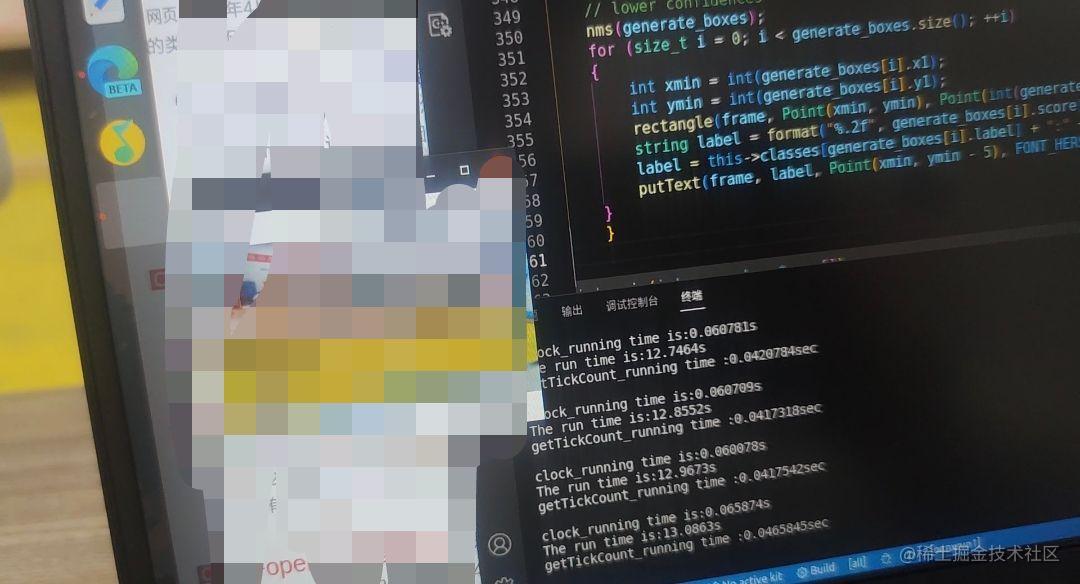
			cout << "clock_running time is:" <<(double)(endTime - startTime) / CLOCKS_PER_SEC << "s" << endl;
			cout << "The run time is:" << (double)clock() /CLOCKS_PER_SEC<< "s" << endl;
			cout << "getTickCount_running time :" << nTime << "sec\n" << endl;
			// static const string kWinName = "Deep learning object detection in ONNXRuntime";

			cv::namedWindow("color", CV_WINDOW_NORMAL);
			cv::imshow("color",cv_rgbImage_no_alpha);

			cv_rgbImage_with_alpha.release();
			cv_rgbImage_no_alpha.release();

			capture.reset();
			if (cv::waitKey(1) == ' ')
					{//按键采集,用户按下' ',跳出循环,结束采集
						std::cout << "----------------------------------" << std::endl;
						std::cout << "------------- closed -------------" << std::endl;
						std::cout << "----------------------------------" << std::endl;
						break;
					}

				}
		}

    // Shut down the camera when finished with application logic
	cv::destroyAllWindows();
	device.close();
	rgbImage.reset();
	capture.reset();
    return 0;

}
# cmake needs this line

cmake_minimum_required(VERSION 3.9.1)

# Define project name
project(yourproject)

# Kinect DK相机
find_package(k4a REQUIRED)
# Find OpenCV
find_package(OpenCV REQUIRED)
#find_package(Threads REQUIRED)
#find_package(OpenMP REQUIRED)
# Add includes
include_directories( ${CMAKE_CURRENT_LIST_DIR} ) # 包含当前目录下我的头文件
include_directories( ${OpenCV_INCLUDE_DIRS} )
include_directories(include)

# Enable C++11
set(CMAKE_CXX_FLAGS "-std=c++11")
set(CMAKE_CXX_STANDARD 11)
set(CMAKE_CUDA_STANDARD 11)
set(CMAKE_CXX_STANDARD_REQUIRED TRUE)

set(ONNXRUNTIME_INCLUDE_DIRS your_include)
set(ONNXRUNTIME_LIBS your_libonnxruntime.so)

include_directories(${ONNXRUNTIME_INCLUDE_DIRS})


# Link your application with other libraries
add_executable(${PROJECT_NAME} "main.cpp")

target_include_directories(${PROJECT_NAME} PUBLIC ${ONNXRUNTIME_INCLUDE_DIRS})
target_link_libraries(onnxrun1 ${CUDA_LIBRARIES})
target_link_libraries(${PROJECT_NAME} k4a::k4a ${ONNXRUNTIME_LIBS} ${OpenCV_LIBS})
英伟达驱动官网可以在这里下载驱动
具体安装过程可以参考https://zhuanlan.zhihu.com/p/344925795 ,装完一定不要忘了sudo service lightdm start开启图形化界面,nvidia版本或者图形化界面的问题都会导致ubuntu黑屏,装驱动一定要小心细心!(博主的血泪经历)
如果你之前装了NVIDIA的驱动,检查一下它的版本,ubuntu一般自带的那个驱动是不能用来跑这个的。
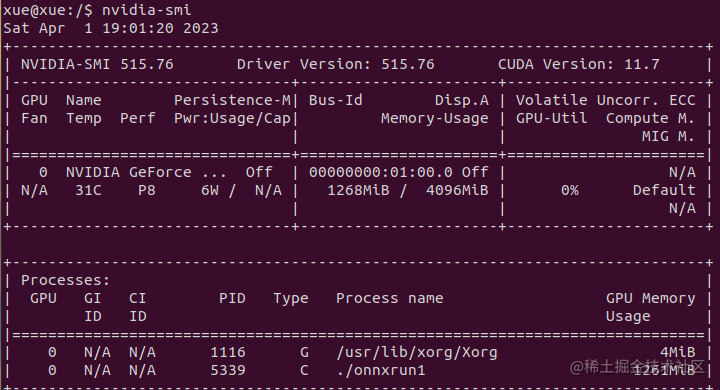
博主的驱动版本:nvidia-smi 515.76 (可以终端输入nvidia-smi查看,记住表格中的CUDA Version后的数字,等会下载cuda时版本号必须小于等于这个版本)
sudo apt-mark hold nvidia-driver-525版本改成你自己的。这个命令可以阻止驱动自我更新,不然如果更新后会出现两个版本的驱动,出现系统版本和自己装的驱动版本不同从而导致错误的情况。我正在学习如何使用Nokogiri,根据这段代码我遇到了一些问题:require'rubygems'require'mechanize'post_agent=WWW::Mechanize.newpost_page=post_agent.get('http://www.vbulletin.org/forum/showthread.php?t=230708')puts"\nabsolutepathwithtbodygivesnil"putspost_page.parser.xpath('/html/body/div/div/div/div/div/table/tbody/tr/td/div
我有一个Ruby程序,它使用rubyzip压缩XML文件的目录树。gem。我的问题是文件开始变得很重,我想提高压缩级别,因为压缩时间不是问题。我在rubyzipdocumentation中找不到一种为创建的ZIP文件指定压缩级别的方法。有人知道如何更改此设置吗?是否有另一个允许指定压缩级别的Ruby库? 最佳答案 这是我通过查看rubyzip内部创建的代码。level=Zlib::BEST_COMPRESSIONZip::ZipOutputStream.open(zip_file)do|zip|Dir.glob("**/*")d
类classAprivatedeffooputs:fooendpublicdefbarputs:barendprivatedefzimputs:zimendprotecteddefdibputs:dibendendA的实例a=A.new测试a.foorescueputs:faila.barrescueputs:faila.zimrescueputs:faila.dibrescueputs:faila.gazrescueputs:fail测试输出failbarfailfailfail.发送测试[:foo,:bar,:zim,:dib,:gaz].each{|m|a.send(m)resc
很好奇,就使用rubyonrails自动化单元测试而言,你们正在做什么?您是否创建了一个脚本来在cron中运行rake作业并将结果邮寄给您?git中的预提交Hook?只是手动调用?我完全理解测试,但想知道在错误发生之前捕获错误的最佳实践是什么。让我们理所当然地认为测试本身是完美无缺的,并且可以正常工作。下一步是什么以确保他们在正确的时间将可能有害的结果传达给您? 最佳答案 不确定您到底想听什么,但是有几个级别的自动代码库控制:在处理某项功能时,您可以使用类似autotest的内容获得关于哪些有效,哪些无效的即时反馈。要确保您的提
假设我做了一个模块如下:m=Module.newdoclassCendend三个问题:除了对m的引用之外,还有什么方法可以访问C和m中的其他内容?我可以在创建匿名模块后为其命名吗(就像我输入“module...”一样)?如何在使用完匿名模块后将其删除,使其定义的常量不再存在? 最佳答案 三个答案:是的,使用ObjectSpace.此代码使c引用你的类(class)C不引用m:c=nilObjectSpace.each_object{|obj|c=objif(Class===objandobj.name=~/::C$/)}当然这取决于
我正在尝试使用ruby和Savon来使用网络服务。测试服务为http://www.webservicex.net/WS/WSDetails.aspx?WSID=9&CATID=2require'rubygems'require'savon'client=Savon::Client.new"http://www.webservicex.net/stockquote.asmx?WSDL"client.get_quotedo|soap|soap.body={:symbol=>"AAPL"}end返回SOAP异常。检查soap信封,在我看来soap请求没有正确的命名空间。任何人都可以建议我
关闭。这个问题是opinion-based.它目前不接受答案。想要改进这个问题?更新问题,以便editingthispost可以用事实和引用来回答它.关闭4年前。Improvethisquestion我想在固定时间创建一系列低音和高音调的哔哔声。例如:在150毫秒时发出高音调的蜂鸣声在151毫秒时发出低音调的蜂鸣声200毫秒时发出低音调的蜂鸣声250毫秒的高音调蜂鸣声有没有办法在Ruby或Python中做到这一点?我真的不在乎输出编码是什么(.wav、.mp3、.ogg等等),但我确实想创建一个输出文件。
我有一个模型:classItem项目有一个属性“商店”基于存储的值,我希望Item对象对特定方法具有不同的行为。Rails中是否有针对此的通用设计模式?如果方法中没有大的if-else语句,这是如何干净利落地完成的? 最佳答案 通常通过Single-TableInheritance. 关于ruby-on-rails-Rails-子类化模型的设计模式是什么?,我们在StackOverflow上找到一个类似的问题: https://stackoverflow.co
我在我的项目目录中完成了compasscreate.和compassinitrails。几个问题:我已将我的.sass文件放在public/stylesheets中。这是放置它们的正确位置吗?当我运行compasswatch时,它不会自动编译这些.sass文件。我必须手动指定文件:compasswatchpublic/stylesheets/myfile.sass等。如何让它自动运行?文件ie.css、print.css和screen.css已放在stylesheets/compiled。如何在编译后不让它们重新出现的情况下删除它们?我自己编译的.sass文件编译成compiled/t
我想将html转换为纯文本。不过,我不想只删除标签,我想智能地保留尽可能多的格式。为插入换行符标签,检测段落并格式化它们等。输入非常简单,通常是格式良好的html(不是整个文档,只是一堆内容,通常没有anchor或图像)。我可以将几个正则表达式放在一起,让我达到80%,但我认为可能有一些现有的解决方案更智能。 最佳答案 首先,不要尝试为此使用正则表达式。很有可能你会想出一个脆弱/脆弱的解决方案,它会随着HTML的变化而崩溃,或者很难管理和维护。您可以使用Nokogiri快速解析HTML并提取文本:require'nokogiri'h
