内核版本:linux 4.9.225,以freescale为例。(部分内容待修改和补充,不一定准确)
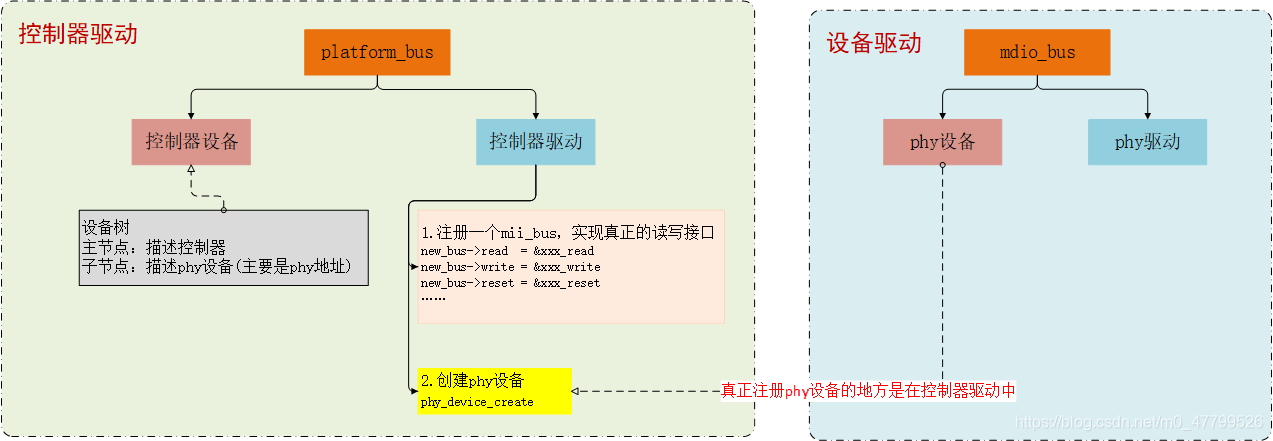
上一篇文章讲了控制器的驱动使用的是platform总线的连接方式,本节要讲的PHY设备驱动是基于device、driver、bus的连接方式。
其驱动涉及如下几个重要部分:
关于PHY设备的创建和注册已经在上一篇控制器的probe函数中有过详细的描述(需要注意的是:phy设备不像i2c/spi有一个board_info函数进行设备的添加,而是直接读取phy中的寄存器<根据IEEE的规定,PHY芯片的前16个寄存器的内容必须是固定的>),本节就不再描述;本节主要讲解总线、设备、驱动模型中剩下的mdio_bus总线和PHY设备对应的驱动。
# linux-4.9.225\drivers\net\phy\phy_device.c
static int __init phy_init(void)
{
	int rc;

	rc = mdio_bus_init(); //mdio_bus总线的注册
	if (rc)
		return rc;

	rc = phy_drivers_register(genphy_driver,ARRAY_SIZE(genphy_driver), THIS_MODULE); //通用PHY驱动
	if (rc)
		mdio_bus_exit();

	return rc;
}

subsys_initcall(phy_init);
subsys_initcall(phy_init) 这行的作用非常重要,这一行就决定了内核在启动的时候会调用该函数,注册完了之后紧接着又注册一个通用的PHY驱动。关于intcall的机制请参见我之前写的专题:linux内核链接脚本vmlinux.lds分析续篇之 --- initcall机制(十三)
# linux-4.9.225\drivers\net\phy\mdio_bus.c
static struct class mdio_bus_class = {
	.name		= "mdio_bus",
	.dev_release	= mdiobus_release,
};

static int mdio_bus_match(struct device *dev, struct device_driver *drv)
{
	struct mdio_device *mdio = to_mdio_device(dev);

	if (of_driver_match_device(dev, drv))
		return 1;

	if (mdio->bus_match)
		return mdio->bus_match(dev, drv);

	return 0;
}

struct bus_type mdio_bus_type = {
	.name		= "mdio_bus",     //总线名称
	.match		= mdio_bus_match, //用来匹配总线上设备和驱动的函数
	.pm		= MDIO_BUS_PM_OPS,
};
EXPORT_SYMBOL(mdio_bus_type);

int __init mdio_bus_init(void)
{
	int ret;

	ret = class_register(&mdio_bus_class); //注册设备类 (在linux设备模型中,我再仔细讲这个类的概念)
	if (!ret) {
		ret = bus_register(&mdio_bus_type);//总线注册
		if (ret)
			class_unregister(&mdio_bus_class);
	}

	return ret;
}
其中
(1) class_register(&mdio_bus_class)执行后会有以下设备类:
(2)bus_register(&mdio_bus_type)执行后会有以下总线类型:
/**
 * mdio_bus_match - determine if given MDIO driver supports the given
 *		    MDIO device
 * @dev: target MDIO device
 * @drv: given MDIO driver
 *
 * Description: Given a MDIO device, and a MDIO driver, return 1 if
 *   the driver supports the device.  Otherwise, return 0. This may
 *   require calling the devices own match function, since different classes
 *   of MDIO devices have different match criteria.
 */
static int mdio_bus_match(struct device *dev, struct device_driver *drv)
{
	struct mdio_device *mdio = to_mdio_device(dev);

	if (of_driver_match_device(dev, drv))
		return 1;

	if (mdio->bus_match)               //实现匹配的函数
		return mdio->bus_match(dev, drv);

	return 0;
}
在phy_init函数中不仅注册了mdio_bus总线,还注册了一个通用的PHY驱动作为缺省的内核PHY驱动,但是如果PHY芯片的内部寄存器和802.3定义的并不一样或者需要特殊的功能配置以实现更强的功能,这就需要专有的驱动。关于通用PHY驱动的知识,网上有一大堆讲解,本节就不再重复的去描述。
对于市场上存在的主流PHY品牌,一般在内核源码 drivers\net\phy目录下都有对应的驱动。本节主要以realtek RTL8211F为例,讲述PHY的驱动,代码如下:
# linux-4.9.225\drivers\net\phy\realtek.c
static struct phy_driver realtek_drvs[] = {
	......
	, {
		.phy_id		= 0x001cc916,
		.name		= "RTL8211F Gigabit Ethernet",
		.phy_id_mask	= 0x001fffff,
		.features	= PHY_GBIT_FEATURES,
		.flags		= PHY_HAS_INTERRUPT,
		.config_aneg	= &genphy_config_aneg,
		.config_init	= &rtl8211f_config_init,
		.read_status	= &genphy_read_status,
		.ack_interrupt	= &rtl8211f_ack_interrupt,
		.config_intr	= &rtl8211f_config_intr,
		.suspend	= genphy_suspend,
		.resume		= genphy_resume,
	},
};

module_phy_driver(realtek_drvs);                           //注册PHY驱动

static struct mdio_device_id __maybe_unused realtek_tbl[] = {
	{ 0x001cc912, 0x001fffff },
	{ 0x001cc914, 0x001fffff },
	{ 0x001cc915, 0x001fffff },
	{ 0x001cc916, 0x001fffff },
	{ }
};

MODULE_DEVICE_TABLE(mdio, realtek_tbl);
(1)同一品牌的PHY设备有多种不同的型号,内核为了支持一次可以注册多个型号的PHY的驱动,在include\linux\phy.h中提供了用于注册PHY驱动的宏module_phy_driver。该宏的定义如下:
# linux-4.9.225\include\linux\phy.h

#define phy_module_driver(__phy_drivers, __count)			\
static int __init phy_module_init(void)					\
{									\
	return phy_drivers_register(__phy_drivers, __count, THIS_MODULE); \
}

#define module_phy_driver(__phy_drivers)				\
	phy_module_driver(__phy_drivers, ARRAY_SIZE(__phy_drivers))
(2)其中phy_driver_register定义如下(注意这里与老版本内核有一定的改动)
/**
 * phy_driver_register - register a phy_driver with the PHY layer
 * @new_driver: new phy_driver to register
 * @owner: module owning this PHY
 */
int phy_driver_register(struct phy_driver *new_driver, struct module *owner)
{
	int retval;

	new_driver->mdiodrv.flags |= MDIO_DEVICE_IS_PHY;
	new_driver->mdiodrv.driver.name = new_driver->name;//驱动名称
	new_driver->mdiodrv.driver.bus = &mdio_bus_type;   //驱动挂载的总线
	new_driver->mdiodrv.driver.probe = phy_probe;      //PHY设备和驱动匹配后调用的probe函数
	new_driver->mdiodrv.driver.remove = phy_remove;
	new_driver->mdiodrv.driver.owner = owner;

	retval = driver_register(&new_driver->mdiodrv.driver); //向linux设备模型框架中注册device_driver驱动
	if (retval) {
		pr_err("%s: Error %d in registering driver\n",
		       new_driver->name, retval);

		return retval;
	}

	pr_debug("%s: Registered new driver\n", new_driver->name);

	return 0;
}

int phy_drivers_register(struct phy_driver *new_driver, int n,
			 struct module *owner)
{
	int i, ret = 0;

	for (i = 0; i < n; i++) {
		ret = phy_driver_register(new_driver + i, owner);//注册数组中所有的phy驱动
		if (ret) {
			while (i-- > 0)
				phy_driver_unregister(new_driver + i);
			break;
		}
	}
	return ret;
}
1 . ## 连接符号
"##" 连接符号其功能是在带参数的宏定义中将两个子串(token)联接起来,从而形成一个新的子串。但它不可以是第一个或者最后一个子串。所谓的子串(token)就是指编译器能够识别的最小语法单元。
简单的说,“##”是一种分隔连接方式,它的作用是先分隔,然后进行强制连接。其中,分隔的作用类似于空格。
我们知道在普通的宏定义中,预处理器一般把空格解释成分段标志,并把分隔后的每一段和前面的定义比较,相同的就被替换。如果采用空格来分隔,被替换后段与段之间存在一些空格。如果我们不希望出现这些空格,就可以通过添加一些 “##”来替代空格。例如:
#define example(name, type) name_##type##_type
"name"和第一个 " "之间,以及第2个""和第二个 "type" 之间没有被分隔,所以预处理器会把name_##type##type解释成3段:"name"、"type"、以及"_type",其中只有"type"是在宏前面出现过的,所以它可以被宏替换。
2 . # 符号
单独的一个 "#" 则表示: 替换这个变量后,再加双引号引起来。例如,宏定义 __stringify_1(x) :
# linux-4.9.225\include\linux\stringify.h
 #define  __stringify_1(x)   #x
那么 __stringify_1(realtek_tbl) <=等价于=> ”realtek_tbl"
alias定义的函数将作为另一个函数的别名。
gcc官方的说明部分内容如下:5.24 Declaring Attributes of Functions:
alias (“target”)
The alias attribute causes the declaration to be emitted as an alias for another symbol, which must be specified. For instance,
void __f () { /* Do something. */; }
void f () __attribute__ ((weak, alias ("__f")));
declares f' to be a weak alias for __f'. In C++, the mangled name for the target must be used. It is an error if `__f' is not defined in the same translation unit.
unused 表示该函数或变量可能不使用,这个属性可以避免编译器产生警告信息。在gcc官方的说明部分内容如下:5.31 Specifying Attributes of Variables:
unused
This attribute, attached to a variable, means that the variable is meant to be possibly unused. GCC will not produce a warning for this variable.
MODULE_DEVICE_TABLE宏定义在 /include/linux/module.h中,如下:
/* Creates an alias so file2alias.c can find device table. */
#define MODULE_DEVICE_TABLE(type, name)					\
extern const typeof(name) __mod_##type##__##name##_device_table		\
  __attribute__ ((unused, alias(__stringify(name))))
根据代码把这个宏展开之后会发现:
生成了一个 _mod_type__name_device_table 的符号表,其中type为类型,name是这个驱动的名称。在内核编译的时候将这部分符号单独放置在一个区域。当内核运行的时,用户可以通过类型(tpye)和类型对应的设备表中名称(name)中动态的加载驱动,在表中查找到了这个符号之后可以迅速的加载驱动。
MODULE_DEVICE_TABLE的第一个参数是设备的类型,如果是PHY设备,那自然是MDIO(如果是PCI设备,那将是pci)。后面一个参数是设备表,这个设备表的最后一个元素是空的,用于标识结束。
1. 定义
/**
 * struct mdio_device_id - identifies PHY devices on an MDIO/MII bus
 * @phy_id: The result of
 *     (mdio_read(&MII_PHYSID1) << 16 | mdio_read(&PHYSID2)) & @phy_id_mask
 *     for this PHY type
 * @phy_id_mask: Defines the significant bits of @phy_id.  A value of 0
 *     is used to terminate an array of struct mdio_device_id.
 */
struct mdio_device_id {
	__u32 phy_id;
	__u32 phy_id_mask;
};

static struct mdio_device_id __maybe_unused realtek_tbl[] = {
	{ 0x001cc912, 0x001fffff },
	{ 0x001cc914, 0x001fffff },
	{ 0x001cc915, 0x001fffff },
	{ 0x001cc916, 0x001fffff },
	{ }
};

MODULE_DEVICE_TABLE(mdio, realtek_tbl);
2 . 展开:
#define MODULE_DEVICE_TABLE(mdio, realtek_tbl)					\
extern const struct mdio_device_id __mod_mdio__realtek_tbl_device_table		\
  __attribute__ ((unused, "realtek_tbl")))
生成一个名为__mod_mdio__realtek_tbl_device_table,内核构建时,depmod程序会在所有模块中搜索符号__mod_mdio__realtek_tbl_device_table,把数据(设备列表)从模块中抽出,添加到映射文件 /lib/modules/KERNEL_VERSION/modules.mdiomap 中,当depmod结束之后,所有的MDIO设备连同他们的模块名字都被该文件列出。在需要驱动的时候,由modules.mdiomap 文件来找寻恰当的驱动程序。
GivenIamadumbprogrammerandIamusingrspecandIamusingsporkandIwanttodebug...mmm...let'ssaaay,aspecforPhone.那么,我应该把“require'ruby-debug'”行放在哪里,以便在phone_spec.rb的特定点停止处理?(我所要求的只是一个大而粗的箭头,即使是一个有挑战性的程序员也能看到:-3)我已经尝试了很多位置,除非我没有正确测试它们,否则会发生一些奇怪的事情:在spec_helper.rb中的以下位置:require'rubygems'require'spork'
使用Ruby1.9.2运行IDE提示说需要gemruby-debug-base19x并提供安装它。但是,在尝试安装它时会显示消息Failedtoinstallgems.Followinggemswerenotinstalled:C:/ProgramFiles(x86)/JetBrains/RubyMine3.2.4/rb/gems/ruby-debug-base19x-0.11.30.pre2.gem:Errorinstallingruby-debug-base19x-0.11.30.pre2.gem:The'linecache19'nativegemrequiresinstall
我有:When/^(?:|I)follow"([^"]*)"(?:within"([^"]*)")?$/do|link,selector|with_scope(selector)doclick_link(link)endend我打电话的地方:Background:GivenIamanexistingadminuserWhenIfollow"CLIENTS"我的HTML是这样的:CLIENTS我一直收到这个错误:.F-.F--U-----U(::)failedsteps(::)nolinkwithtitle,idortext'CLIENTS'found(Capybara::Element
按照目前的情况,这个问题不适合我们的问答形式。我们希望答案得到事实、引用或专业知识的支持,但这个问题可能会引发辩论、争论、投票或扩展讨论。如果您觉得这个问题可以改进并可能重新打开,visitthehelpcenter指导。关闭10年前。问题1)我想知道rubyonrails是否有功能类似于primefaces的gem。我问的原因是如果您使用primefaces(http://www.primefaces.org/showcase-labs/ui/home.jsf),开发人员无需担心javascript或jquery的东西。据我所知,JSF是一个规范,基于规范的各种可用实现,prim
在应用开发中,有时候我们需要获取系统的设备信息,用于数据上报和行为分析。那在鸿蒙系统中,我们应该怎么去获取设备的系统信息呢,比如说获取手机的系统版本号、手机的制造商、手机型号等数据。1、获取方式这里分为两种情况,一种是设备信息的获取,一种是系统信息的获取。1.1、获取设备信息获取设备信息,鸿蒙的SDK包为我们提供了DeviceInfo类,通过该类的一些静态方法,可以获取设备信息,DeviceInfo类的包路径为:ohos.system.DeviceInfo.具体的方法如下:ModifierandTypeMethodDescriptionstatic StringgetAbiList()Obt
本教程将在Unity3D中混合Optitrack与数据手套的数据流,在人体运动的基础上,添加双手手指部分的运动。双手手背的角度仍由Optitrack提供,数据手套提供双手手指的角度。 01 客户端软件分别安装MotiveBody与MotionVenus并校准人体与数据手套。MotiveBodyMotionVenus数据手套使用、校准流程参照:https://gitee.com/foheart_1/foheart-h1-data-summary.git02 数据转发打开MotiveBody软件的Streaming,开始向Unity3D广播数据;MotionVenus中设置->选项选择Unit
Ruby是否有逐步调试器,类似于Perl的“perl-d”? 最佳答案 ruby-debug(对于ruby1.8),debugger(对于ruby1.9),byebug(对于ruby2.0)以及trepanning系列都有一个-x或--trace选项。在调试器内部,命令setlinetrace将打开或关闭线路跟踪。这是themanualforruby-debug原来的答案已经修改,因为数据噪声文章的链接,唉,不再有效了。还添加了ruby-debug的后继者 关于ruby-Ruby
Devise是一个Ruby库,它为我提供了这个User类:classUser当写入:confirmable时,注册时会发送一封确认邮件。上周我不得不批量创建300个用户,所以我在恢复之前注释掉了:confirmable几分钟。现在我正在为用户批量创建创建一个UI,因此我需要即时添加/删除:confirmable。(我也可以直接修改Devise的源码,但我宁愿不去调和它)问题:如何即时添加/删除:confirmable? 最佳答案 WayneConrad的解决方案:user=User.newuser.skip_confirmation
文章目录一、项目场景二、基本模块原理与调试方法分析——信源部分:三、信号处理部分和显示部分:四、基本的通信链路搭建:四、特殊模块:interpretedMATLABfunction:五、总结和坑点提醒一、项目场景 最近一个任务是使用simulink搭建一个MIMO串扰消除的链路,并用实际收到的数据进行测试,在搭建的过程中也遇到了不少的问题(当然这比vivado里面的debug好不知道多少倍)。准备趁着这个机会,先以一个很基本的通信链路对simulink基础和相关的debug方法进行总结。 在本篇中,主要记录simulink的基本原理和基本的SISO通信传输链路(QPSK方式),计划在下篇记
我已经开始使用RubyMine6。我正在处理Rails4、Ruby2.1.1项目。我无法找到如何使用Pow作为服务器调试到RubyMine。你能给我指明正确的方向吗? 最佳答案 我能够使用远程调试从RubyMine进行调试。我正在使用RubyMine6、Rails3、Ruby2.1.1。首先创建一个.powenv文件并添加:exportRUBY_DEBUG_PORT=1234exportPOW_WORKERS=1将以下gem添加到您的Gemfile:gem'ruby-debug-ide'gem'debase'创建一个新的初始化器st
