作者: WangXi2016
日期: 2022.10.27
摘要: 本示例教程使用3D CNN实现CT数据二分类。
本示例将展示构建3D卷积神经网络(3D CNN),以预测电子计算机断层扫描(CT)是否感染新冠病毒肺炎。
2D CNN通常用于处理RGB图像(3个通道)。
3D CNN:它将3D数据或2D帧序列(例如CT扫描中的切片)作为输入,这个架构可以从3D深度或者连续视频帧中产生多通道的信息,然后在每一个通道都分离地进行卷积和下采样操作。最后将所有通道的信息组合起来得到最终的特征描述。
完整数据集链接:https://www.medrxiv.org/content/10.1101/2020.05.20.20100362v1
import os
import zipfile
# Make a directory to store the data.
os.makedirs("MosMedData")

# Unzip data in the newly created directory.
with zipfile.ZipFile("data/data112472/ct-0.zip", "r") as z_fp:
    z_fp.extractall("./MosMedData/")

with zipfile.ZipFile("data/data112472/ct-23.zip", "r") as z_fp:
    z_fp.extractall("./MosMedData/")
!pip install nibabel -t /home/aistudio/external-libraries
!pip install scipy -t /home/aistudio/external-libraries
import os
import zipfile
import numpy as np

import paddle
import paddle.nn as nn
from paddle.io import Dataset
import random

import sys
sys.path.append('/home/aistudio/external-libraries')

paddle.__version__
'2.3.2'
我们将使用CT扫描的相关放射学发现作为标签来构建分类器,来预测新冠病毒肺炎是否存在。因此,该任务是一个二分类问题。
这些文件以Nifti格式提供,扩展名为.nii。为了读取扫描,我们通过安装该软件包。CT扫描以Hounsfield单位(HU)存储原始体素强度。在这个数据集中,它们的范围从-1024到2000以上。400以上是具有不同放射性强度的骨头,因此这被用作更高的界限。1000到400之间的阈值通常用于标准化CT扫描。
为了处理数据,我们执行以下操作:
首先将体积旋转90度,因此方向是固定的
将HU值缩放为介于0和1之间。
调整宽度、高度和深度。
这里我们定义了几个帮助函数来处理数据,这些功能将用于构建训练和验证数据集。
import nibabel as nib

from scipy import ndimage


def read_nifti_file(filepath):
    """Read and load volume"""
    # Read file
    scan = nib.load(filepath)
    # Get raw data
    scan = scan.get_fdata()
    return scan


def normalize(volume):
    """Normalize the volume"""
    min = -1000
    max = 400
    volume[volume < min] = min
    volume[volume > max] = max
    volume = (volume - min) / (max - min)
    volume = volume.astype("float32")
    return volume


def resize_volume(img):
    """Resize across z-axis"""
    # Set the desired depth
    desired_depth = 64
    desired_width = 128
    desired_height = 128
    # Get current depth
    current_depth = img.shape[-1]
    current_width = img.shape[0]
    current_height = img.shape[1]
    # Compute depth factor
    depth = current_depth / desired_depth
    width = current_width / desired_width
    height = current_height / desired_height
    depth_factor = 1 / depth
    width_factor = 1 / width
    height_factor = 1 / height
    # Rotate
    img = ndimage.rotate(img, 90, reshape=False)
    # Resize across z-axis
    img = ndimage.zoom(img, (width_factor, height_factor, depth_factor), order=1)
    return img


def process_scan(path):
    """Read and resize volume"""
    # Read scan
    volume = read_nifti_file(path)
    # Normalize
    volume = normalize(volume)
    # Resize width, height and depth
    volume = resize_volume(volume)
    return volume
从类目录中读取 CT 扫描的路径。
# 文件夹“CT-0”包括具有正常肺组织的CT扫描,
# 没有病毒性肺炎的CT。
normal_scan_paths = [
    os.path.join(os.getcwd(), "MosMedData/CT-0", x)
    for x in os.listdir("MosMedData/CT-0")
]

#文件夹“CT-23”包括具有感染的CT扫描,

abnormal_scan_paths = [
    os.path.join(os.getcwd(), "MosMedData/CT-23", x)
    for x in os.listdir("MosMedData/CT-23")
]

print("CT scans with normal lung tissue: " + str(len(normal_scan_paths)))
print("CT scans with abnormal lung tissue: " + str(len(abnormal_scan_paths)))
CT scans with normal lung tissue: 100
CT scans with abnormal lung tissue: 100
从数据集目录中读取扫描并分配标签。
对扫描结果进行缩减采样,使其形状为 128x128x64。
将原始 HU 值重新缩放到 0 到 1 的范围。最后,将数据集拆分为训练子集和验证子集。
import os
abnormal_path = "abnormal_scans.npy"
normal_path = "normal_scans.npy"
# 因此处转换比较耗时,故缓存一下
if os.path.exists(abnormal_path) and os.path.exists(normal_path):
    abnormal_scans = np.load(abnormal_path)
    normal_scans = np.load(normal_path)
else:
    abnormal_scans = np.array([process_scan(path) for path in abnormal_scan_paths])
    normal_scans = np.array([process_scan(path) for path in normal_scan_paths])
    np.save(abnormal_path,abnormal_scans)
    np.save(normal_path,normal_scans)
CT扫描还通过在训练期间以随机角度旋转来增强。由于数据存储在形状的 rank-3 张量中,我们在轴 4 处添加一个大小为 1 的维度,以便能够对数据执行 3D 卷积。
import random
# 定义数据读取器
class dataset(Dataset):
    def __init__(self, abnormal_scans,normal_scans, mode='train'):
        super().__init__()
        self.imgs = []
        self.labels = []
        self.train = False
        abnormal_labels = np.array([1 for _ in range(len(abnormal_scans))])
        normal_labels = np.array([0 for _ in range(len(normal_scans))])
        if mode == 'train':
            x_train = np.concatenate((abnormal_scans[:70], normal_scans[:70]), axis=0)
            y_train = np.concatenate((abnormal_labels[:70], normal_labels[:70]), axis=0)
            self.imgs = x_train
            self.labels = y_train
            self.train = True

        else:
            x_val = np.concatenate((abnormal_scans[70:], normal_scans[70:]), axis=0)
            y_val = np.concatenate((abnormal_labels[70:], normal_labels[70:]), axis=0)
            self.imgs = x_val
            self.labels = y_val


    def __getitem__(self, index):
        """
        获取一组数据
        :param index: 文件索引号
        :return:
        """
        img = self.imgs[index]
        lab = self.labels[index]
        if self.train:
            img = self.rotate(img)
        img = np.array(img).astype('float32')
        lab = np.array([lab], dtype="int64")
        img = np.expand_dims(img,3)
        return img, lab


    def __len__(self):
        return len(self.labels)

    def rotate(self,volume):
        # define some rotation angles
        angles = [-20, -10, -5, 5, 10, 20]
        # pick angles at random
        angle = random.choice(angles)
        # rotate volume
        volume = ndimage.rotate(volume, angle, reshape=False)
        volume[volume < 0] = 0
        volume[volume > 1] = 1
        return volume
train_dataset = dataset(abnormal_scans,normal_scans)
validation_dataset= dataset(abnormal_scans,normal_scans,mode='val')

train_loader = paddle.io.DataLoader(train_dataset, batch_size=10, shuffle=True)
validation_loader = paddle.io.DataLoader(validation_dataset, batch_size = 10, shuffle=False)
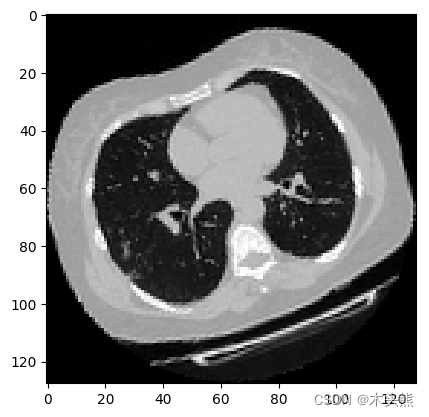
可视化增强型 CT 扫描。
import matplotlib.pyplot as plt


images, labels  = train_dataset.__getitem__(0)
print(images.shape)
image =np.squeeze(images, 3)
print("Dimension of the CT scan is:", image.shape)
plt.imshow(np.squeeze(image[:, :, 30]), cmap="gray")
plt.show()
(128, 128, 64, 1)
Dimension of the CT scan is: (128, 128, 64)
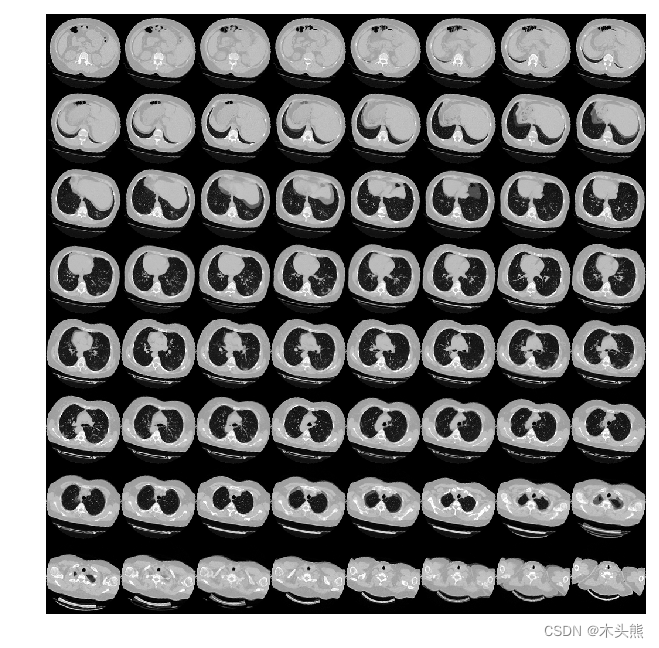
由于CT扫描有许多层切片,可视化多层切片。
def plot_slices(num_rows, num_columns, width, height, data):
    """Plot a montage of 64 CT slices"""
    data = np.rot90(np.array(data))
    data = np.transpose(data)
    data = np.reshape(data, (num_rows, num_columns, width, height))
    rows_data, columns_data = data.shape[0], data.shape[1]
    heights = [slc[0].shape[0] for slc in data]
    widths = [slc.shape[1] for slc in data[0]]
    fig_width = 6.0
    fig_height = fig_width * sum(heights) / sum(widths)
    f, axarr = plt.subplots(
        rows_data,
        columns_data,
        figsize=(fig_width, fig_height),
        gridspec_kw={"height_ratios": heights},
    )
    for i in range(rows_data):
        for j in range(columns_data):
            axarr[i, j].imshow(data[i][j], cmap="gray")
            axarr[i, j].axis("off")
    plt.subplots_adjust(wspace=0, hspace=0, left=0, right=1, bottom=0, top=1)
    plt.show()


# Visualize montage of slices.
# 4 rows and 10 columns for 100 slices of the CT scan.
plot_slices(8, 8, 128, 128, image[:, :, :64])
[外链图片转存失败,源站可能有防盗链机制,建议将图片保存下来直接上传(img-ge8WgmCs-1669725295367)(output_19_0.png)]
当我们说卷积神经网络(CNN)时,通常是指用于图像分类的二维CNN。但是,现实世界中还使用了其他两种类型的卷积神经网络,即1维CNN和3维CNN。在本指南中,我们将介绍1D和3D CNN及其在现实世界中的应用。我假设您已经大体上熟悉卷积网络的概念。
初学者可能会理解为1维CNN处理一维的数据,2维CNN处理二维的数据,这是错误的!!!
在卷积神经网络(CNN)中,一维和二维滤波器并不是真正的一维和二维。这是只是描述的惯例。
在Lenet-5架构中首次引入的标准卷积神经网络,其Conv2D通常用于图像数据。之所以称其为2维CNN,是因为内核在数据上沿2维滑动,如下图所示。
内核在图像上滑动
使用CNN的整体优势在于,它可以使用其内核从数据中提取空间特征,而其他网络则无法做到。例如,CNN可以检测图像中的边缘,颜色分布等,这使得这些网络在图像分类和包含空间属性的其他类似数据中非常强大。
在介绍Conv1D之前,首先给出一个提示。即在Conv1D中,内核沿一维滑动。现在,让我们在此处暂停,考虑哪种类型的数据仅需要内核在一个维度上滑动并具有空间特性?
答案是时间序列数据。让我们看一下以下数据。
来自加速度计的序列数据
该数据是从人戴在手臂上的加速度计中收集的。数据表示所有三个轴的加速度。一维CNN可以根据加速度计数据执行活动识别任务,例如人的身姿,行走,跳跃等。此数据有2个维度。第一维是时间步长,其他维是3轴上的加速度值。
下图说明了内核如何在加速度计数据上移动。每行代表某个轴的时间序列加速度。内核只能沿时间轴一维移动。
Conv1D广泛应用于感官数据,加速度计数据就是其中之一。
在Conv3D中,内核按3个维度滑动,如下所示。让我们再考虑一下哪种数据类型需要内核在3维上移动?
内核在3D数据上滑动
Conv3D主要用于3D图像数据。例如磁共振成像(MRI)数据。MRI数据被广泛用于检查大脑,脊髓,内部器官等。
还有本案例,甲计算机断层扫描(CT)扫描也是三维数据,这是通过组合从身体周围的不同角度拍摄的一系列X射线图像。
我们可以使用Conv3D对该医学数据进行分类或从中提取特征。
基于Layer定义模型网络结构,模型的可视化展示。
# 3D CNN网络
class CNN3D(nn.Layer):
    def __init__(self):
        super(CNN3D, self).__init__()
        self.con1 = nn.Conv3D(in_channels=1,out_channels=64,kernel_size=3)
        self.con2 = nn.Conv3D(in_channels=64,out_channels=64,kernel_size=3)
        self.con3 = nn.Conv3D(in_channels=64,out_channels=128,kernel_size=3)
        self.con4 = nn.Conv3D(in_channels=128,out_channels=256,kernel_size=3)
        self.relu = nn.ReLU()
        self.bn1 = nn.BatchNorm3D(num_features=64)
        self.bn2 = nn.BatchNorm3D(num_features=64)
        self.bn3 = nn.BatchNorm3D(num_features=128)
        self.bn4 = nn.BatchNorm3D(num_features=256)
        self.maxpool = nn.MaxPool3D(kernel_size=2)
        self.globalave= nn.AvgPool3D((2,6,6))
        self.line1 = nn.Linear(256,512)
        self.line2 = nn.Linear(512,1)
        self.sig = nn.Sigmoid()
        self.drop= nn.Dropout(p=0.3)

    def forward(self, inputs):
        # 因为数据输入是 【批次、宽度、高度、深度、通道】,调整Paddle默认输入要求,【批次、通道、深度、宽度、高度】
        inputs = inputs.transpose((0,4,3,1,2))

        x = self.relu(self.con1(inputs))
        x = self.maxpool(x)
        x = self.bn1(x)

        x = self.relu(self.con2(x))
        x = self.maxpool(x)
        x = self.bn2(x)

        x = self.bn3(self.maxpool(self.relu(self.con3(x))))
        x = self.bn4(self.maxpool(self.relu(self.con4(x))))
        x = self.globalave(x)
        x= x.reshape((x.shape[0], -1))
        x = self.relu(self.line1(x))
        x = self.drop(x)
        x = self.sig(self.line2(x))
        return x
cnn = CNN3D()
paddle.summary(cnn,(1,128,128,64,1))
W1027 12:01:54.666692   335 gpu_resources.cc:61] Please NOTE: device: 0, GPU Compute Capability: 7.0, Driver API Version: 11.2, Runtime API Version: 11.2
W1027 12:01:54.671041   335 gpu_resources.cc:91] device: 0, cuDNN Version: 8.2.


------------------------------------------------------------------------------
 Layer (type)        Input Shape           Output Shape          Param #
==============================================================================
   Conv3D-1     [[1, 1, 64, 128, 128]] [1, 64, 62, 126, 126]      1,792
    ReLU-1            [[1, 512]]             [1, 512]               0
  MaxPool3D-1   [[1, 256, 4, 12, 12]]    [1, 256, 2, 6, 6]          0
 BatchNorm3D-1  [[1, 64, 31, 63, 63]]   [1, 64, 31, 63, 63]        256
   Conv3D-2     [[1, 64, 31, 63, 63]]   [1, 64, 29, 61, 61]      110,656
 BatchNorm3D-2  [[1, 64, 14, 30, 30]]   [1, 64, 14, 30, 30]        256
   Conv3D-3     [[1, 64, 14, 30, 30]]  [1, 128, 12, 28, 28]      221,312
 BatchNorm3D-3  [[1, 128, 6, 14, 14]]   [1, 128, 6, 14, 14]        512
   Conv3D-4     [[1, 128, 6, 14, 14]]   [1, 256, 4, 12, 12]      884,992
 BatchNorm3D-4   [[1, 256, 2, 6, 6]]     [1, 256, 2, 6, 6]        1,024
  AvgPool3D-1    [[1, 256, 2, 6, 6]]     [1, 256, 1, 1, 1]          0
   Linear-1           [[1, 256]]             [1, 512]            131,584
   Dropout-1          [[1, 512]]             [1, 512]               0
   Linear-2           [[1, 512]]              [1, 1]               513
   Sigmoid-1           [[1, 1]]               [1, 1]                0
==============================================================================
Total params: 1,352,897
Trainable params: 1,350,849
Non-trainable params: 2,048
------------------------------------------------------------------------------
Input size (MB): 4.00
Forward/backward pass size (MB): 611.30
Params size (MB): 5.16
Estimated Total Size (MB): 620.46
------------------------------------------------------------------------------


{'total_params': 1352897, 'trainable_params': 1350849}
使用前面构建的3D CNN和数据集进行模型训练。
我们这个是二分类任务,网络的最后输出是一个0-1之间的浮点数,所以我们这边使用BCE损失。
def Accuracy(pre,label):
    a = np.squeeze(pre.cpu().numpy(), -1)
    a = a<0.5
    b = np.squeeze(label.cpu().numpy(), -1)==0
    c = np.sum(a==b)
    return c / len(a)

scheduler = paddle.optimizer.lr.ExponentialDecay(learning_rate=0.0001, gamma=0.96, verbose=True)
optim = paddle.optimizer.AdamW(learning_rate=scheduler,parameters=cnn.parameters())
criterion = paddle.nn.BCELoss()
num_epochs = 30
max_accuracy = 0
save_path ="best3dcnn"
his_trainloss = []
his_trainacc = []
his_valloss = []
his_valacc = []
for epoch in range(num_epochs):

    traintotal,trainacc,trainloss = 0, 0, 0
    cnn.train()
    for i, (img, labels) in enumerate(train_loader):
        predict = cnn(img)
        loss = criterion(predict, labels.astype(np.float32))
        optim.clear_grad()
        loss.backward()
        optim.minimize(loss)
        acc = Accuracy(predict, labels)
        trainacc += acc
        trainloss += loss.numpy()
        if i%10==0:
            print(f"epoch {epoch} iter {i} loss: {loss.numpy()}, accuracy {acc}")
        traintotal += 1
    valtotal, valacc,valloss = 0, 0, 0
    cnn.eval()
    for i ,(img, labels) in enumerate(validation_loader):
        with paddle.no_grad():
            predict = cnn(img)
            loss = criterion(predict, labels.astype(np.float32))
        valacc +=Accuracy(predict, labels)
        valloss += loss.numpy()
        valtotal+=1
    print(f"epoch {epoch} val Loss {valloss/valtotal} Accuray {valacc/valtotal} ")
    # 只保存最优模型
    if valacc/valtotal>max_accuracy:
        max_accuracy = valacc/valtotal
        model_state = cnn.state_dict()
        paddle.save(model_state, save_path)
        print("max accuracy {}".format(max_accuracy))
    scheduler.step()
    his_trainloss.append(trainloss/traintotal)
    his_trainacc.append(trainacc/traintotal)
    his_valloss.append(valloss/valtotal)
    his_valacc.append(valacc/valtotal)
这里绘制了训练和验证集的模型精度和损失。
由于验证集是类平衡的,准确率可以无偏见表示模型性能。
fig, ax = plt.subplots(2, 1, figsize=(8, 12))
ax = ax.ravel()


ax[0].plot(his_trainloss)
ax[0].plot(his_valloss)
ax[0].set_title("Model {}".format("Loss"))
ax[0].set_xlabel("epochs")
ax[0].legend(["train", "val"])

ax[1].plot(his_trainacc)
ax[1].plot(his_valacc)
ax[1].set_title("Model {}".format("Accuracy"))
ax[1].set_xlabel("epochs")
# ax[1].set_ylabel(metric)
ax[1].legend(["train", "val"])
<matplotlib.legend.Legend at 0x7fae38c26a50>
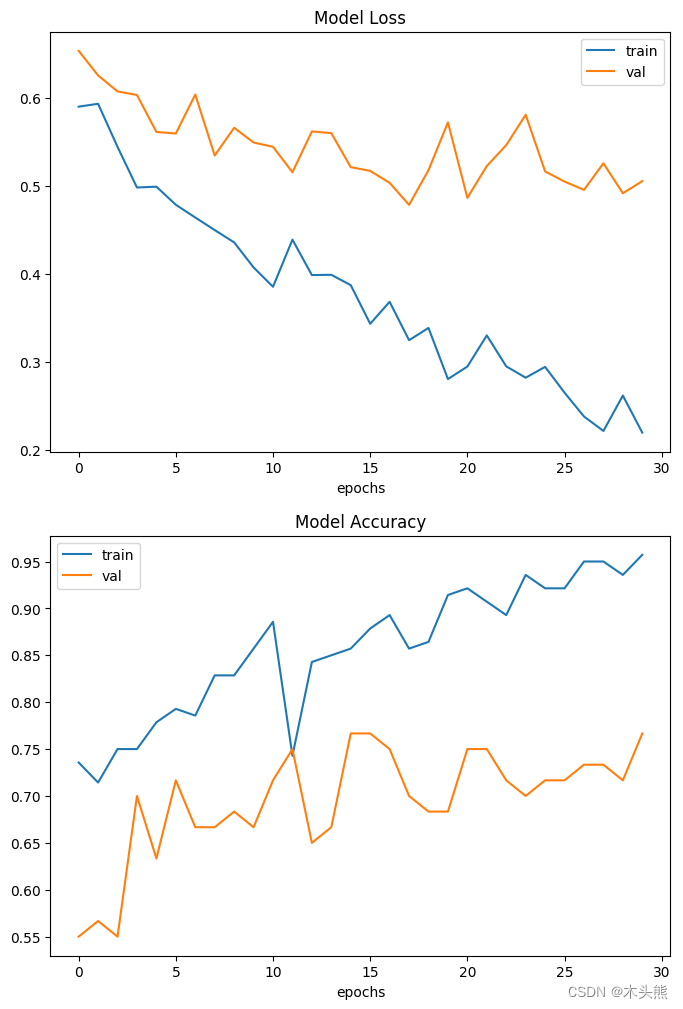
需要注意的是,样本的数量非常少只有200个。
因此,验证集与训练集中预测结果有显著差异。这里可以找到由1000多个CT扫描组成的完整数据集。
使用完整的数据集,准确率达到83%。
在这两种情况下,分类性能的变异性均为6-7%。
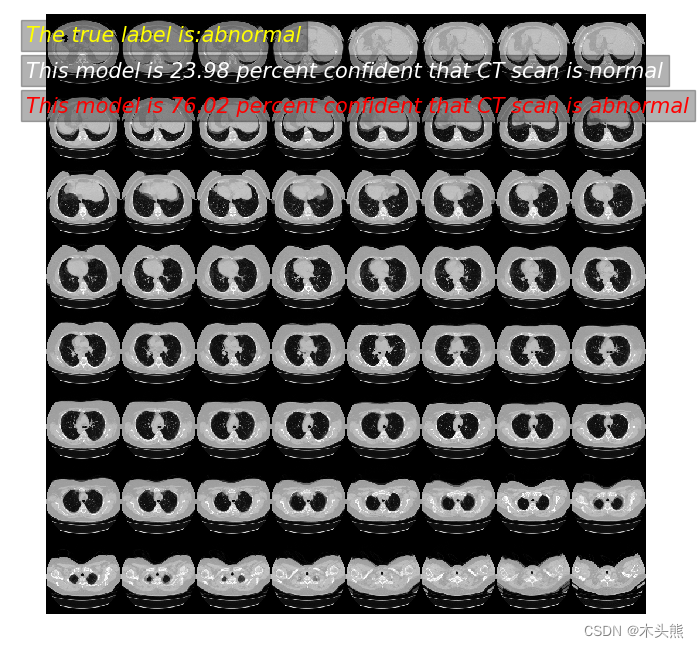
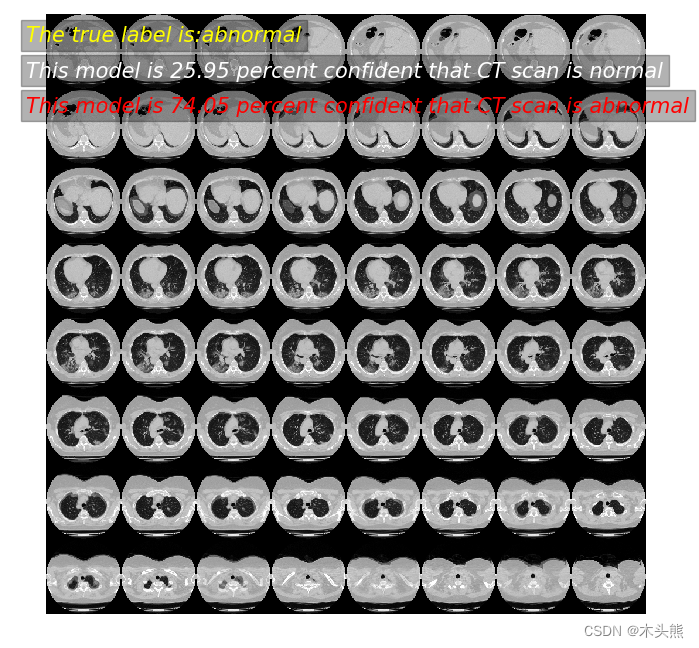
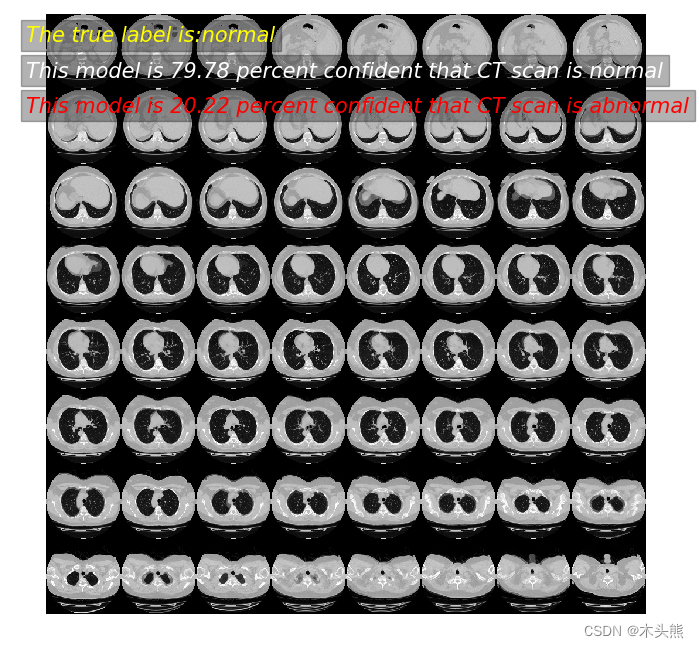
对模型进行预测,展示效果。
param_state_dict = paddle.load( "best3dcnn")
cnn.set_dict(param_state_dict)
cnn.eval() #预测模式
def prediction(index):
    imagen,label = validation_dataset.__getitem__(index)
    image = paddle.to_tensor(np.expand_dims(imagen, axis=0), dtype=paddle.float32)
    prediction = cnn(image)
    scores = [1 - prediction[0][0], prediction[0][0]]
    class_names = ["normal", "abnormal"]
    for score, name in zip(scores, class_names):
        print(
            "模型预测: %.2f 概率,这张CT %s"
            % ((100 * score), name)
        )
    print("真实标签为:",class_names[int(label[0])])
    data = np.rot90(imagen)
    data = np.transpose(data)
    data = np.reshape(data, (8, 8, 128, 128))
    rows_data, columns_data = data.shape[0], data.shape[1]
    heights = [slc[0].shape[0] for slc in data]
    widths = [slc.shape[1] for slc in data[0]]
    fig_width = 6.0
    fig_height = fig_width * sum(heights) / sum(widths)

    f, axarr = plt.subplots(
        rows_data,
        columns_data,
        figsize=(fig_width, fig_height),
        gridspec_kw={"height_ratios": heights},
    )

    for i in range(rows_data):
        for j in range(columns_data):
            axarr[i, j].imshow(data[i][j], cmap="gray")
            axarr[i, j].axis("off")
    plt.subplots_adjust(wspace=0, hspace=0, left=0, right=1, bottom=0, top=1)

    plt.text(-930,-850 , "The true label is:"+class_names[int(label[0])], size = 15,\
            family = "微软雅黑", color = "yellow", style = "italic", weight = "light",\
            bbox = dict(facecolor = "black", alpha = 0.3))
    plt.text(-930,-790 , "This model is %.2f percent confident that CT scan is %s"% ((100 * scores[0]),class_names[0]), size = 15,\
            family = "微软雅黑", color = "w", style = "italic", weight = "light",\
            bbox = dict(facecolor = "black", alpha = 0.3))
    plt.text(-930,-730 , "This model is %.2f percent confident that CT scan is %s"% ((100 * scores[1]),class_names[1]), size = 15,\
            family = "微软雅黑", color = "r", style = "italic", weight = "light",\
            bbox = dict(facecolor = "black", alpha = 0.3))
    plt.show()
prediction(2)
模型预测: 23.98 概率,这张CT normal
模型预测: 76.02 概率,这张CT abnormal
真实标签为: abnormal
prediction(11)
模型预测: 25.95 概率,这张CT normal
模型预测: 74.05 概率,这张CT abnormal
真实标签为: abnormal
prediction(55)
模型预测: 79.78 概率,这张CT normal
模型预测: 20.22 概率,这张CT abnormal
真实标签为: normal
无论您是想搭建桌面端、WEB端或者移动端APP应用,HOOPSPlatform组件都可以为您提供弹性的3D集成架构,同时,由工业领域3D技术专家组成的HOOPS技术团队也能为您提供技术支持服务。如果您的客户期望有一种在多个平台(桌面/WEB/APP,而且某些客户端是“瘦”客户端)快速、方便地将数据接入到3D应用系统的解决方案,并且当访问数据时,在各个平台上的性能和用户体验保持一致,HOOPSPlatform将帮助您完成。利用HOOPSPlatform,您可以开发在任何环境下的3D基础应用架构。HOOPSPlatform可以帮您打造3D创新型产品,HOOPSSDK包含的技术有:快速且准确的CAD
导读:随着叮咚买菜业务的发展,不同的业务场景对数据分析提出了不同的需求,他们希望引入一款实时OLAP数据库,构建一个灵活的多维实时查询和分析的平台,统一数据的接入和查询方案,解决各业务线对数据高效实时查询和精细化运营的需求。经过调研选型,最终引入ApacheDoris作为最终的OLAP分析引擎,Doris作为核心的OLAP引擎支持复杂地分析操作、提供多维的数据视图,在叮咚买菜数十个业务场景中广泛应用。作者|叮咚买菜资深数据工程师韩青叮咚买菜创立于2017年5月,是一家专注美好食物的创业公司。叮咚买菜专注吃的事业,为满足更多人“想吃什么”而努力,通过美好食材的供应、美好滋味的开发以及美食品牌的孵
本教程将在Unity3D中混合Optitrack与数据手套的数据流,在人体运动的基础上,添加双手手指部分的运动。双手手背的角度仍由Optitrack提供,数据手套提供双手手指的角度。 01 客户端软件分别安装MotiveBody与MotionVenus并校准人体与数据手套。MotiveBodyMotionVenus数据手套使用、校准流程参照:https://gitee.com/foheart_1/foheart-h1-data-summary.git02 数据转发打开MotiveBody软件的Streaming,开始向Unity3D广播数据;MotionVenus中设置->选项选择Unit
Unity自动旋转动画1.开门需要门把手先动,门再动2.关门需要门先动,门把手再动3.中途播放过程中不可以再次进行操作觉得太复杂?查看我的文章开关门简易进阶版效果:如果这个门可以直接打开的话,就不需要放置"门把手"如果门把手还有钥匙需要旋转,那就可以把钥匙放在门把手的"门把手",理论上是可以无限套娃的可调整参数有:角度,反向,轴向,速度运行时点击Test进行测试自己写的代码比较垃圾,命名与结构比较拉,高手轻点喷,新手有类似的需求可以拿去做参考上代码usingSystem.Collections;usingSystem.Collections.Generic;usingUnityEngine;u
之前说过10之后的版本没有3dScan了,所以还是9.8的版本或者之前更早的版本。 3d物体扫描需要先下载扫描的APK进行扫面。首先要在手机上装一个扫描程序,扫描现实中的三维物体,然后上传高通官网,在下载成UnityPackage类型让Unity能够使用这个扫描程序可以从高通官网上进行下载,是一个安卓程序。点到Tools往下滑,找到VuforiaObjectScanner下载后解压数据线连接手机,将apk文件拷入手机安装然后刚才解压文件中的Media文件夹打开,两个PDF图打印第一张A4-ObjectScanningTarget.pdf,主要是用来辅助扫描的。好了,接下来就是扫描三维物体。将瓶
C#实现简易绘图工具一.引言实验目的:通过制作窗体应用程序(C#画图软件),熟悉基本的窗体设计过程以及控件设计,事件处理等,熟悉使用C#的winform窗体进行绘图的基本步骤,对于面向对象编程有更加深刻的体会.Tutorial任务设计一个具有基本功能的画图软件**·包括简单的新建文件,保存,重新绘图等功能**·实现一些基本图形的绘制,包括铅笔和基本形状等,学习橡皮工具的创建**·设计一个合理舒适的UI界面**注明:你可能需要先了解一些关于winform窗体应用程序绘图的基本知识,以及关于GDI+类和结构的知识二.实验环境Windows系统下的visualstudio2017C#窗体应用程序三.
需求:要创建虚拟机,就需要给他提供一个虚拟的磁盘,我们就在/opt目录下创建一个10G大小的raw格式的虚拟磁盘CentOS-7-x86_64.raw命令格式:qemu-imgcreate-f磁盘格式磁盘名称磁盘大小qemu-imgcreate-f磁盘格式-o?1.创建磁盘qemu-imgcreate-fraw/opt/CentOS-7-x86_64.raw10G执行效果#ls/opt/CentOS-7-x86_64.raw2.安装虚拟机使用virt-install命令,基于我们提供的系统镜像和虚拟磁盘来创建一个虚拟机,另外在创建虚拟机之前,提前打开vnc客户端,在创建虚拟机的时候,通过vnc
Transformers开始在视频识别领域的“猪突猛进”,各种改进和魔改层出不穷。由此作者将开启VideoTransformer系列的讲解,本篇主要介绍了FBAI团队的TimeSformer,这也是第一篇使用纯Transformer结构在视频识别上的文章。如果觉得有用,就请点赞、收藏、关注!paper:https://arxiv.org/abs/2102.05095code(offical):https://github.com/facebookresearch/TimeSformeraccept:ICML2021author:FacebookAI一、前言Transformers(VIT)在图
我正在寻找用于Rails的优质管理插件。似乎大多数现有的插件/gem(例如“restful_authentication”、“acts_as_authenticated”)都围绕着self注册等展开。但是,我正在寻找一种功能齐全的基于管理/管理角色的解决方案——但不是简单地附加到另一个非基于角色的解决方案。如果我找不到,我想我会自己动手......只是不想重新发明轮子。 最佳答案 RyanBates最近做了两个关于授权的railscast(注意身份验证和授权之间的区别;身份验证检查用户是否如她所说的那样,授权检查用户是否有权访问资源
关闭。这个问题不符合StackOverflowguidelines.它目前不接受答案。要求我们推荐或查找工具、库或最喜欢的场外资源的问题对于StackOverflow来说是偏离主题的,因为它们往往会吸引自以为是的答案和垃圾邮件。相反,describetheproblem以及迄今为止为解决该问题所做的工作。关闭9年前。Improvethisquestion是否有适用于这些的3d游戏引擎?
