1.准备
先从github官网上clone elasticsearch源码到本地,选择合适的分支。笔者这里选用的是7.4.0(与笔者工作环境使用的分支一致),此版本编译需要jdk11。
2.编译
Readme 中说明了编译命令
./gradlew assemble
执行此命令,等待1h左右即可,根据机器性能可能会有差异
> Task :x-pack:plugin:sql:qa:compileJava
注: /Users/xxx/IdeaProjects/elasticsearch-my/x-pack/plugin/sql/qa/src/main/java/org/elasticsearch/xpack/sql/qa/jdbc/CsvTestUtils.java使用或覆盖了已过时的 API。
注: 有关详细信息, 请使用 -Xlint:deprecation 重新编译。

BUILD SUCCESSFUL in 52m 0s
947 actionable tasks: 946 executed, 1 up-to-date
编译过程中可能会遇到的问题:
FAILURE: Build failed with an exception.

* What went wrong:
a problem occurred running Docker from [/usr/local/bin/docker] yet it is required to run the following tasks:
  :distribution:docker:buildDockerImage
  :distribution:docker:buildOssDockerImage
the problem is that Docker exited with exit code [1] with standard error output [Cannot connect to the Docker daemon at unix:///var/run/docker.sock. Is the docker daemon running?]
you can address this by attending to the reported issue, removing the offending tasks from being executed, or by passing -Dbuild.docker=false
新版本 elasticsearch 编译过程依赖docker,启动docker后台或者注释掉以下代码
文件路径:/distribution/docker/build.gradle

void addBuildDockerImage(final boolean oss) {
//  final Task buildDockerImageTask = task(taskName("build", oss, "DockerImage"), type: LoggedExec) {
//    dependsOn taskName("copy", oss, "DockerContext")
//    List<String> tags
//    if (oss) {
//      tags = [
//        "docker.elastic.co/elasticsearch/elasticsearch-oss:${VersionProperties.elasticsearch}",
//        "elasticsearch-oss:test"
//      ]
//    } else {
//      tags = [
//        "elasticsearch:${VersionProperties.elasticsearch}",
//        "docker.elastic.co/elasticsearch/elasticsearch:${VersionProperties.elasticsearch}",
//        "docker.elastic.co/elasticsearch/elasticsearch-full:${VersionProperties.elasticsearch}",
//        "elasticsearch:test",
//      ]
//    }
//    executable 'docker'
//    final List<String> dockerArgs = ['build', files(oss), '--pull', '--no-cache']
//    for (final String tag : tags) {
//      dockerArgs.add('--tag')
//      dockerArgs.add(tag)
//    }
//    args dockerArgs.toArray()
//  }
//  BuildPlugin.requireDocker(buildDockerImageTask)
}

for (final boolean oss : [false, true]) {
  addCopyDockerContextTask(oss)
  addBuildDockerImage(oss)
}

//assemble.dependsOn "buildOssDockerImage"
//assemble.dependsOn "buildDockerImage"
3.启动
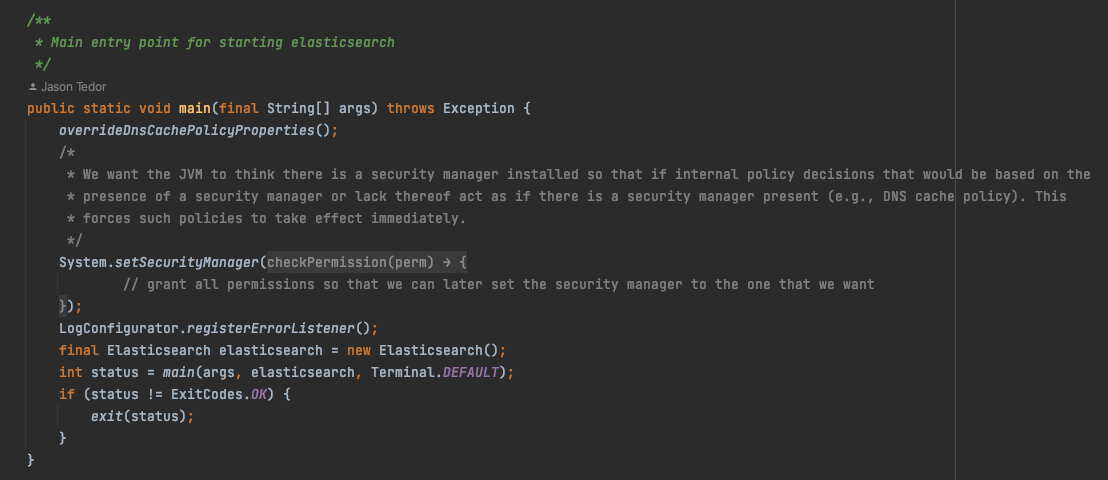
启动elasticsearch 服务,启动类是 org.elasticsearch.bootstrap.Elasticsearch
启动过程中可能会出现的问题:
问题1:
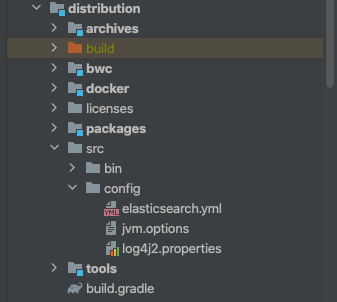
the system property [es.path.conf] must be set在vm启动项加入参数:-Des.path.conf=/Users/xxx/IdeaProjects/elasticsearch-my/config,然后将配置文件elasticsearch.yml ,log4j2.properties, modules 复制到这个目录
项目中有配置文件的例子
笔者是这样配置的
# Use a descriptive name for your cluster:
#
cluster.name: my-application
#
# ------------------------------------ Node ------------------------------------
#
# Use a descriptive name for the node:
#
node.name: tiger
#
# Add custom attributes to the node:
#
#node.attr.rack: r1
#
# ----------------------------------- Paths ------------------------------------
#
# Path to directory where to store the data (separate multiple locations by comma):
#
path.data: /Users/xxx/IdeaProjects/elasticsearch-my/home/data
#
# Path to log files:
#
path.logs: /Users/xxx/IdeaProjects/elasticsearch-my/home/data
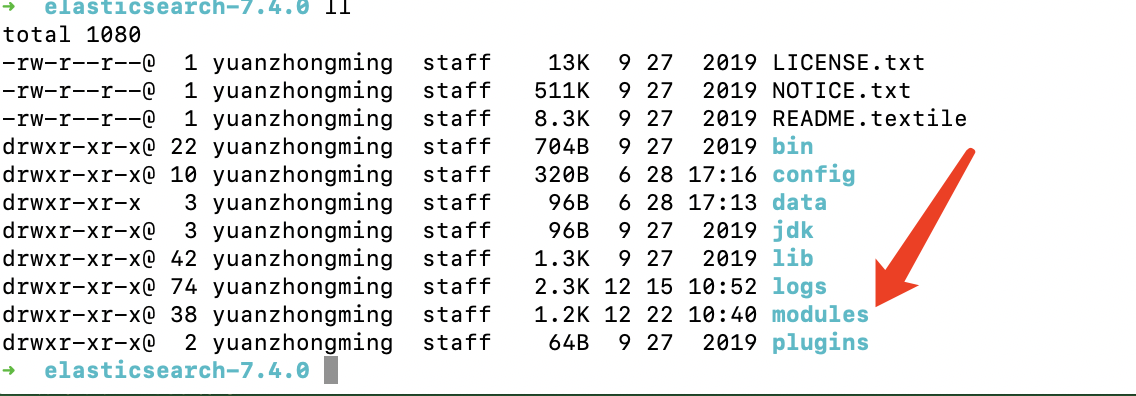
modules 包在发行版elasticsearch中可以找到,这里就不自行编译了
问题2:
Exception in thread "main" java.lang.IllegalStateException: path.home is not configured
	at org.elasticsearch.env.Environment.<init>(Environment.java:104)
	at org.elasticsearch.env.Environment.<init>(Environment.java:95)
	at org.elasticsearch.node.InternalSettingsPreparer.prepareEnvironment(InternalSettingsPreparer.java:69)
	at org.elasticsearch.cli.EnvironmentAwareCommand.createEnv(EnvironmentAwareCommand.java:95)
	at org.elasticsearch.cli.EnvironmentAwareCommand.execute(EnvironmentAwareCommand.java:86)
	at org.elasticsearch.cli.Command.mainWithoutErrorHandling(Command.java:125)
	at org.elasticsearch.cli.Command.main(Command.java:90)
	at org.elasticsearch.bootstrap.Elasticsearch.main(Elasticsearch.java:115)
	at org.elasticsearch.bootstrap.Elasticsearch.main(Elasticsearch.java:92)
同样的,在vm参数中设定home地址即可,-Des.path.home=/Users/xxx/IdeaProjects/elasticsearch-my/home
问题3:
no log4j2.properties found; tried [/Users/xxx/IdeaProjects/elasticsearch-my/config] and its subdirectories
同问题1,没有复制log4j2.properties引起的问题
问题4:
java.lang.NoClassDefFoundError: org/elasticsearch/plugins/ExtendedPluginsClassLoader找到
compileOnly project(':libs:elasticsearch-plugin-classloader')修改为
compile project(':libs:elasticsearch-plugin-classloader')问题5:
Caused by: org.elasticsearch.ElasticsearchException: Failure running machine learning native code. This could be due to running on an unsupported OS or distribution, missing OS libraries, or a problem with the temp directory. To bypass this problem by running Elasticsearch without machine learning functionality set [xpack.ml.enabled: false].意思是我的机器不支持机器学习,把modules中的插件 x-pack-ml 去掉就行
最后启动完成如下
[2022-12-22T11:19:36,704][INFO ][o.e.p.PluginsService     ] [tiger] loaded module [x-pack-sql]
[2022-12-22T11:19:36,705][INFO ][o.e.p.PluginsService     ] [tiger] loaded module [x-pack-voting-only-node]
[2022-12-22T11:19:36,705][INFO ][o.e.p.PluginsService     ] [tiger] loaded module [x-pack-watcher]
[2022-12-22T11:19:36,706][INFO ][o.e.p.PluginsService     ] [tiger] no plugins loaded
[2022-12-22T11:19:37,238][INFO ][i.n.u.i.PlatformDependent] [tiger] Your platform does not provide complete low-level API for accessing direct buffers reliably. Unless explicitly requested, heap buffer will always be preferred to avoid potential system instability.
[2022-12-22T11:19:43,453][DEBUG][o.e.a.ActionModule       ] [tiger] Using REST wrapper from plugin org.elasticsearch.xpack.security.Security
[2022-12-22T11:19:43,530][INFO ][i.n.u.i.PlatformDependent] [tiger] Your platform does not provide complete low-level API for accessing direct buffers reliably. Unless explicitly requested, heap buffer will always be preferred to avoid potential system instability.
[2022-12-22T11:19:43,914][INFO ][o.e.d.DiscoveryModule    ] [tiger] using discovery type [zen] and seed hosts providers [settings]
[2022-12-22T11:19:45,141][INFO ][o.e.n.Node               ] [tiger] initialized
[2022-12-22T11:19:45,142][INFO ][o.e.n.Node               ] [tiger] starting ...
[2022-12-22T11:19:45,383][INFO ][o.e.t.TransportService   ] [tiger] publish_address {127.0.0.1:9300}, bound_addresses {[::1]:9300}, {127.0.0.1:9300}
[2022-12-22T11:19:45,417][WARN ][o.e.b.BootstrapChecks    ] [tiger] initial heap size [268435456] not equal to maximum heap size [4294967296]; this can cause resize pauses and prevents mlockall from locking the entire heap
[2022-12-22T11:19:45,418][WARN ][o.e.b.BootstrapChecks    ] [tiger] the default discovery settings are unsuitable for production use; at least one of [discovery.seed_hosts, discovery.seed_providers, cluster.initial_master_nodes] must be configured
[2022-12-22T11:19:45,425][INFO ][o.e.c.c.Coordinator      ] [tiger] cluster UUID [hhUOjQTPTxC11orp9ptAoQ]
[2022-12-22T11:19:45,450][INFO ][o.e.c.c.ClusterBootstrapService] [tiger] no discovery configuration found, will perform best-effort cluster bootstrapping after [3s] unless existing master is discovered
[2022-12-22T11:19:45,588][INFO ][o.e.c.s.MasterService    ] [tiger] elected-as-master ([1] nodes joined)[{tiger}{alQTCfqOStya2j1epxaskQ}{qDAgKIDeTmCbif0-EDJ0FA}{127.0.0.1}{127.0.0.1:9300}{dim}{xpack.installed=true} elect leader, _BECOME_MASTER_TASK_, _FINISH_ELECTION_], term: 2, version: 18, reason: master node changed {previous [], current [{tiger}{alQTCfqOStya2j1epxaskQ}{qDAgKIDeTmCbif0-EDJ0FA}{127.0.0.1}{127.0.0.1:9300}{dim}{xpack.installed=true}]}
[2022-12-22T11:19:45,733][INFO ][o.e.c.s.ClusterApplierService] [tiger] master node changed {previous [], current [{tiger}{alQTCfqOStya2j1epxaskQ}{qDAgKIDeTmCbif0-EDJ0FA}{127.0.0.1}{127.0.0.1:9300}{dim}{xpack.installed=true}]}, term: 2, version: 18, reason: Publication{term=2, version=18}
[2022-12-22T11:19:45,796][INFO ][o.e.h.AbstractHttpServerTransport] [tiger] publish_address {127.0.0.1:9200}, bound_addresses {[::1]:9200}, {127.0.0.1:9200}
[2022-12-22T11:19:45,797][INFO ][o.e.n.Node               ] [tiger] started
[2022-12-22T11:19:46,175][INFO ][o.e.l.LicenseService     ] [tiger] license [003ac67e-0dd0-42ee-8b76-59e2c21c444a] mode [basic] - valid
[2022-12-22T11:19:46,175][INFO ][o.e.x.s.s.SecurityStatusChangeListener] [tiger] Active license is now [BASIC]; Security is disabled
[2022-12-22T11:19:46,184][INFO ][o.e.g.GatewayService     ] [tiger] recovered [0] indices into cluster_state
这里推荐一个chrome下的小插件elaticsearch-head,可视化当前集群的状态

4.参考列表
https://www.cnblogs.com/Jackeyzhe/p/13352543.html
最近,当我启动我的Rails服务器时,我收到了一长串警告。虽然它不影响我的应用程序,但我想知道如何解决这些警告。我的估计是imagemagick以某种方式被调用了两次?当我在警告前后检查我的git日志时。我想知道如何解决这个问题。-bcrypt-ruby(3.1.2)-better_errors(1.0.1)+bcrypt(3.1.7)+bcrypt-ruby(3.1.5)-bcrypt(>=3.1.3)+better_errors(1.1.0)bcrypt和imagemagick有关系吗?/Users/rbchris/.rbenv/versions/2.0.0-p247/lib/ru
我不知道为什么,但是当我设置这个设置时它无法编译设置:static_cache_control,[:public,:max_age=>300]这是我得到的syntaxerror,unexpectedtASSOC,expecting']'(SyntaxError)set:static_cache_control,[:public,:max_age=>300]^我只想将“过期”header设置为css、javaascript和图像文件。谢谢。 最佳答案 我猜您使用的是Ruby1.8.7。Sinatra文档中显示的语法似乎是在Ruby1.
一、引擎主循环UE版本:4.27一、引擎主循环的位置:Launch.cpp:GuardedMain函数二、、GuardedMain函数执行逻辑:1、EnginePreInit:加载大多数模块int32ErrorLevel=EnginePreInit(CmdLine);PreInit模块加载顺序:模块加载过程:(1)注册模块中定义的UObject,同时为每个类构造一个类默认对象(CDO,记录类的默认状态,作为模板用于子类实例创建)(2)调用模块的StartUpModule方法2、FEngineLoop::Init()1、检查Engine的配置文件找出使用了哪一个GameEngine类(UGame
最近因为项目需要,需要将Android手机系统自带的某个系统软件反编译并更改里面某个资源,并重新打包,签名生成新的自定义的apk,下面我来介绍一下我的实现过程。APK修改,分为以下几步:反编译解包,修改,重打包,修改签名等步骤。安卓apk修改准备工作1.系统配置好JavaJDK环境变量2.需要root权限的手机(针对系统自带apk,其他软件免root)3.Auto-Sign签名工具4.apktool工具安卓apk修改开始反编译本文拿Android系统里面的Settings.apk做demo,具体如何将apk获取出来在此就不过多介绍了,直接进入主题:按键win+R输入cmd,打开命令窗口,并将路
是否有适用于Ruby语言的.NETFramework编译器?我听说过DLR(动态语言运行时),这是否将使Ruby能够用于.NET开发? 最佳答案 IronRuby是Microsoft支持的项目,建立在动态语言运行时之上。 关于.net-是否有Ruby.NET编译器?,我们在StackOverflow上找到一个类似的问题: https://stackoverflow.com/questions/199638/
我想用Capistrano启动sidekiq。下面是代码namespace:sidekiqdotask:startdorun"cd#{current_path}&&bundleexecsidekiq-c10-eproduction-Llog/sidekiq.log&"pcapture("psaux|grepsidekiq|awk'{print$2}'|sed-n1p").strip!endend它执行成功但sidekiq仍然没有在服务器上启动。输出:$capsidekiq:starttriggeringloadcallbacks*2014-06-0315:03:01executing`
不知何故,我似乎无法获得包含我的聚合的响应...使用curl它按预期工作:HBZUMB01$curl-XPOST"http://localhost:9200/contents/_search"-d'{"size":0,"aggs":{"sport_count":{"value_count":{"field":"dwid"}}}}'我收到回复:{"took":4,"timed_out":false,"_shards":{"total":5,"successful":5,"failed":0},"hits":{"total":90,"max_score":0.0,"hits":[]},"a
关闭。这个问题是off-topic.它目前不接受答案。想改进这个问题吗?Updatethequestion所以它是on-topic用于堆栈溢出。关闭10年前。ImprovethisquestionLinux专家正在转向Mac(10.8)。因为我懒...我使用MacPorts安装MacVim。它似乎安装没有错误。我只需要mvim中的python、ruby和perl支持。$/opt/local/bin/mvim--version|egrep'patches|python|ruby|perl'Includedpatches:1-244,246-646+multi_lang-mzscheme+
我有一个正在升级到Rails3的Rails2.3.5应用程序。我做了所有我需要做的升级以及当我使用启动Rails服务器时要做的事情railsserver它给了我这个PleaseswitchtoRuby1.9'sstandardCSVlibrary.It'sFasterCSVplussupportforRuby1.9'sm17nencodingengine.我正在使用ruby-1.9.2-p0并安装了fastercsv(1.5.3)gem。在puts语句的帮助下,我能够追踪到错误发生的位置。我发现执行在这一行停止了Bundler.require(:default,Rails.env)if
电脑启动出现显示器黑屏是一个相当常见的问题。如果您遇到了这个问题,不要惊慌,因为它有很多可能的原因,可以采取一些简单的措施来解决它。在本文中,小编将介绍下面4种常见的电脑启动后显示器黑屏的原因,排查这些原因,快速解决! 演示机型:联想Ideapad700-15ISK-ISE系统版本:Windows10一、显示器问题如果出现电脑启动后显示器黑屏的情况。那么首先您需要检查一下显示器是否正常工作。您可以通过更换另一个显示器或将当前显示器连接到另一台计算机来检查显示器是否存在问题。如果问题仍然存在,那么您可以排除显示器故障的可能性。 二、显卡问题如果您的电脑配备了独立显卡,那么显卡故障也可能是导致电脑
