目录
在Opencv项目实战:15 手势缩放图片中,我们搭建了HandTrackingModule模块,但在这里你还得用本节的HandTrackingModule,因为有些功能并不需要,且也是分散了一些函数的功能。
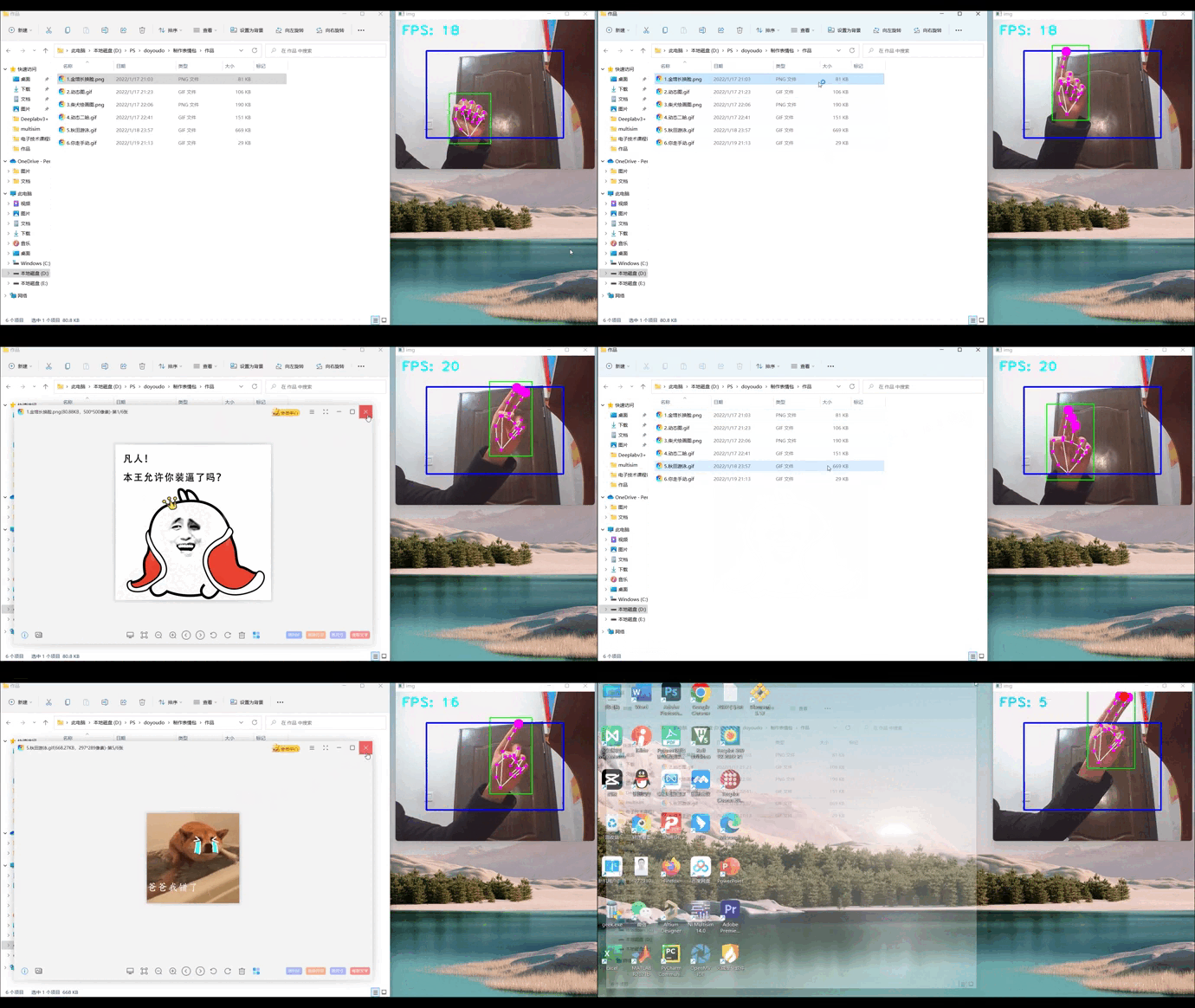
在这一节中,我的想法是通过点单个食指控制move,双指合并控制click,这样就能够实现手势控制鼠标。
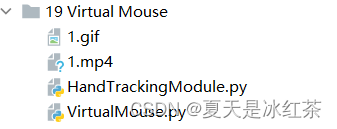
简单来说,并没有上面需要添加的,只是在此之前你需要下载autopy:
pip install autopy
import cv2
import mediapipe as mp
import math
import time

class handDetector:

    def __init__(self, mode=False, maxHands=2, detectionCon=0.5, minTrackCon=0.5):
        self.mode = mode
        self.maxHands = maxHands
        self.detectionCon = detectionCon
        self.minTrackCon = minTrackCon

        self.mpHands = mp.solutions.hands
        self.hands = self.mpHands.Hands(static_image_mode=self.mode, max_num_hands=self.maxHands,
                                        min_detection_confidence=self.detectionCon,
                                        min_tracking_confidence=self.minTrackCon)
        self.mpDraw = mp.solutions.drawing_utils
        self.tipIds = [4, 8, 12, 16, 20]
        self.fingers = []
        self.lmList = []

    def findHands(self, img, draw=True):
        imgRGB = cv2.cvtColor(img, cv2.COLOR_BGR2RGB)
        self.results = self.hands.process(imgRGB)
        # print(results.multi_hand_landmarks)

        if self.results.multi_hand_landmarks:
            for handLms in self.results.multi_hand_landmarks:
                if draw:
                    self.mpDraw.draw_landmarks(img, handLms,
                                               self.mpHands.HAND_CONNECTIONS)

        return img


    def findPosition(self, img, handNo=0, draw=True):
        self.lmList=[]
        bbox = 0
        if self.results.multi_hand_landmarks:
            myHand = self.results.multi_hand_landmarks[handNo]
            xList = []
            yList = []
            for id, lm in enumerate(myHand.landmark):
                # print(id, lm)
                h, w, c = img.shape
                cx, cy = int(lm.x * w), int(lm.y * h)
                xList.append(cx)
                yList.append(cy)
                # print(id, cx, cy)
                self.lmList.append([id, cx, cy])
                if draw:
                    cv2.circle(img, (cx, cy), 5, (255, 0, 255), cv2.FILLED)

            xmin, xmax = min(xList), max(xList)
            ymin, ymax = min(yList), max(yList)
            bbox = xmin, ymin, xmax, ymax

            if draw:
                cv2.rectangle(img, (xmin - 20, ymin - 20), (xmax + 20, ymax + 20),
                                (0, 255, 0), 2)

        return self.lmList, bbox

    def fingersUp(self):
        fingers = []
        # Thumb
        if self.lmList[self.tipIds[0]][1] > self.lmList[self.tipIds[0] - 1][1]:
            fingers.append(1)
        else:
            fingers.append(0)

        # Fingers
        for id in range(1, 5):
            if self.lmList[self.tipIds[id]][2] < self.lmList[self.tipIds[id] - 2][2]:
                fingers.append(1)
            else:
                fingers.append(0)

            # totalFingers = fingers.count(1)

        return fingers

    def findDistance(self, p1, p2, img=None):
        x1, y1 = self.lmList[p1][1:]
        x2, y2 = self.lmList[p2][1:]
        cx, cy = (x1 + x2) // 2, (y1 + y2) // 2
        length = math.hypot(x2 - x1, y2 - y1)
        info = (x1, y1, x2, y2, cx, cy)
        if img is not None:
            cv2.circle(img, (x1, y1), 15, (255, 0, 255), cv2.FILLED)
            cv2.circle(img, (x2, y2), 15, (255, 0, 255), cv2.FILLED)
            cv2.line(img, (x1, y1), (x2, y2), (255, 0, 255), 3)
            cv2.circle(img, (cx, cy), 15, (255, 0, 255), cv2.FILLED)
            return length, info, img
        else:
            return length, info


def main():
    pTime = 0
    cTime = 0
    cap = cv2.VideoCapture(0)
    detector = handDetector()
    while True:
        success, img = cap.read()
        img = detector.findHands(img)
        lmList, bbox = detector.findPosition(img)
        if len(lmList) != 0:
            print(lmList[4])

        cTime = time.time()
        fps = 1 / (cTime - pTime)
        pTime = cTime

        cv2.putText(img, str(int(fps)), (10, 70), cv2.FONT_HERSHEY_PLAIN, 3,
        (255, 0, 255), 3)

        cv2.imshow("Image", img)
        k=cv2.waitKey(1)
        if k==27:
            break

if __name__ == "__main__":
    main()
import cv2
import numpy as np
import time
import autopy
import HandTrackingModule as htm

class fpsReader():
    def __init__(self):
        self.pTime = time.time()
    def FPS(self,img=None,pos=(20, 50), color=(255, 255, 0), scale=3, thickness=3):
        cTime = time.time()
        try:
            fps = 1 / (cTime - self.pTime)
            self.pTime = cTime
            if img is None:
                return fps
            else:
                cv2.putText(img, f'FPS: {int(fps)}', pos, cv2.FONT_HERSHEY_PLAIN,
                            scale, color, thickness)
                return fps, img
        except:
            return 0
fpsReader = fpsReader()
cap=cv2.VideoCapture(0)

smooth=6
clocx,plocx=0,0
clocy,plocy=0,0
Boundary=100
Wcam, Hcam=640,480
Wscr, Hscr=autopy.screen.size()
# print(Wscr,Hscr)
#1536.0 864.0

cap.set(3,Wcam)
cap.set(4,Hcam)
detector=htm.handDetector(maxHands=1, detectionCon=0.65)


while True:
    _, img=cap.read()

    img=detector.findHands(img, draw=True)
    lmList,bbox=detector.findPosition(img)
    if len(lmList)!=0:
        x1,y1=lmList[8][1:]
        x2,y2=lmList[12][1:]

        fingersUp=detector.fingersUp()
        # print(fingersUp)
        cv2.rectangle(img,(Boundary,Boundary),(Wcam-Boundary,Hcam-Boundary),(255,0,0),thickness=3)
        if fingersUp[1]==1 and fingersUp[2]==0:
            x3 = np.interp(x1, (0, Wcam), (0, Wscr))
            y3 = np.interp(y1, (0, Hcam), (0, Hscr))

            clocx=plocx+(x3-plocx)/smooth
            clocy = plocy + (y3 - plocy) / smooth

            autopy.mouse.move(Wscr-clocx,clocy)
            cv2.circle(img,(x1,y1),15,(255,0,255),cv2.FILLED)
            plocx,plocy=clocx,clocy


        if fingersUp[1] == 1 and fingersUp[2] == 1:
            length, info, img=detector.findDistance(8,12,img)
            # print(length) 30可能是一个不错的范围
            if length<30:
                cv2.circle(img,(info[-2],info[-1]),15,(0,0,255),cv2.FILLED)
                autopy.mouse.click()
    new_window = cv2.flip(img, 1)
    fps, img = fpsReader.FPS(new_window)
    cv2.imshow("img",img)
    k=cv2.waitKey(1)
    if k==27:
        break
几个重要的参数讲解:
GitHub:Opencv项目实战:19 Virtual Mouse
本次项目通过autopy,HandTrackingModule制作了本次项目虚拟鼠标,在最后的展示当中也能看到窗口的帧率适合,手指控制鼠标比较的平滑,基本的功能很好的实现了。
如何在buildr项目中使用Ruby?我在很多不同的项目中使用过Ruby、JRuby、Java和Clojure。我目前正在使用我的标准Ruby开发一个模拟应用程序,我想尝试使用Clojure后端(我确实喜欢功能代码)以及JRubygui和测试套件。我还可以看到在未来的不同项目中使用Scala作为后端。我想我要为我的项目尝试一下buildr(http://buildr.apache.org/),但我注意到buildr似乎没有设置为在项目中使用JRuby代码本身!这看起来有点傻,因为该工具旨在统一通用的JVM语言并且是在ruby中构建的。除了将输出的jar包含在一个独特的、仅限ruby
当我在Rails控制台中按向上或向左箭头时,出现此错误:irb(main):001:0>/Users/me/.rvm/gems/ruby-2.0.0-p247/gems/rb-readline-0.4.2/lib/rbreadline.rb:4269:in`blockin_rl_dispatch_subseq':invalidbytesequenceinUTF-8(ArgumentError)我使用rvm来管理我的ruby安装。我正在使用=>ruby-2.0.0-p247[x86_64]我使用bundle来管理我的gem,并且我有rb-readline(0.4.2)(人们推荐的最少
我在我的Rails项目中使用Pow和powifygem。现在我尝试升级我的ruby版本(从1.9.3到2.0.0,我使用RVM)当我切换ruby版本、安装所有gem依赖项时,我通过运行railss并访问localhost:3000确保该应用程序正常运行以前,我通过使用pow访问http://my_app.dev来浏览我的应用程序。升级后,由于错误Bundler::RubyVersionMismatch:YourRubyversionis1.9.3,butyourGemfilespecified2.0.0,此url不起作用我尝试过的:重新创建pow应用程序重启pow服务器更新战俘
我已经像这样安装了一个新的Rails项目:$railsnewsite它执行并到达:bundleinstall但是当它似乎尝试安装依赖项时我得到了这个错误Gem::Ext::BuildError:ERROR:Failedtobuildgemnativeextension./System/Library/Frameworks/Ruby.framework/Versions/2.0/usr/bin/rubyextconf.rbcheckingforlibkern/OSAtomic.h...yescreatingMakefilemake"DESTDIR="cleanmake"DESTDIR="
我正在使用Ruby2.1.1和Rails4.1.0.rc1。当执行railsc时,它被锁定了。使用Ctrl-C停止,我得到以下错误日志:~/.rvm/gems/ruby-2.1.1/gems/spring-1.1.2/lib/spring/client/run.rb:47:in`gets':Interruptfrom~/.rvm/gems/ruby-2.1.1/gems/spring-1.1.2/lib/spring/client/run.rb:47:in`verify_server_version'from~/.rvm/gems/ruby-2.1.1/gems/spring-1.1.
我将我的Rails应用程序部署到OpenShift,它运行良好,但我无法在生产服务器上运行“Rails控制台”。它给了我这个错误。我该如何解决这个问题?我尝试更新rubygems,但它也给出了权限被拒绝的错误,我也无法做到。railsc错误:Warning:You'reusingRubygems1.8.24withSpring.UpgradetoatleastRubygems2.1.0andrun`gempristine--all`forbetterstartupperformance./opt/rh/ruby193/root/usr/share/rubygems/rubygems
假设我有这个范围:("aaaaa".."zzzzz")如何在不事先/每次生成整个项目的情况下从范围中获取第N个项目? 最佳答案 一种快速简便的方法:("aaaaa".."zzzzz").first(42).last#==>"aaabp"如果出于某种原因你不得不一遍又一遍地这样做,或者如果你需要避免为前N个元素构建中间数组,你可以这样写:moduleEnumerabledefskip(n)returnto_enum:skip,nunlessblock_given?each_with_indexdo|item,index|yieldit
之前在培训新生的时候,windows环境下配置opencv环境一直教的都是网上主流的vsstudio配置属性表,但是这个似乎对新生来说难度略高(虽然个人觉得完全是他们自己的问题),加之暑假之后对cmake实在是爱不释手,且这样配置确实十分简单(其实都不需要配置),故斗胆妄言vscode下配置CV之法。其实极为简单,图比较多所以很长。如果你看此文还配不好,你应该思考一下是不是自己的问题。闲话少说,直接开始。0.CMkae简介有的人到大二了都不知道cmake是什么,我不说是谁。CMake是一个开源免费并且跨平台的构建工具,可以用简单的语句来描述所有平台的编译过程。它能够根据当前所在平台输出对应的m
说在前面这部分我本来是合为一篇来写的,因为目的是一样的,都是通过独立按键来控制LED闪灭本质上是起到开关的作用,即调用函数和中断函数。但是写一篇太累了,我还是决定分为两篇写,这篇是调用函数篇。在本篇中你主要看到这些东西!!!1.调用函数的方法(主要讲语法和格式)2.独立按键如何控制LED亮灭3.程序中的一些细节(软件消抖等)1.调用函数的方法思路还是比较清晰地,就是通过按下按键来控制LED闪灭,即每按下一次,LED取反一次。重要的是,把按键与LED联系在一起。我打算用K1来作为开关,看了一下开发板原理图,K1连接的是单片机的P31口,当按下K1时,P31是与GND相连的,也就是说,当我按下去时
@作者:SYFStrive @博客首页:HomePage📜:微信小程序📌:个人社区(欢迎大佬们加入)👉:社区链接🔗📌:觉得文章不错可以点点关注👉:专栏连接🔗💃:感谢支持,学累了可以先看小段由小胖给大家带来的街舞👉微信小程序(🔥)目录自定义组件-behaviors 1、什么是behaviors 2、behaviors的工作方式 3、创建behavior 4、导入并使用behavior 5、behavior中所有可用的节点 6、同名字段的覆盖和组合规则总结最后自定义组件-behaviors 1、什么是behaviorsbehaviors是小程序中,用于实现
