UBOOT版本:uboot2018.03,开发板myimx8mmek240。
在编译构建目标时(如 make xxx),顶层 Makefile 的 dot-config 变量值设置为 1 。 如下:
#note: 顶层Makefile
dot-config     := 1

ifneq ($(filter $(no-dot-config-targets), $(MAKECMDGOALS)),)
	ifeq ($(filter-out $(no-dot-config-targets), $(MAKECMDGOALS)),)
		dot-config := 0
	endif
endi
在顶层 Makefile 中:
#note: 顶层Makefile
KCONFIG_CONFIG	?= .config
export KCONFIG_CONFIG

ifeq ($(dot-config),1)
# Read in config
-include include/config/auto.conf                (1)

# Read in dependencies to all Kconfig* files, make sure to run
# oldconfig if changes are detected.
-include include/config/auto.conf.cmd            (2)

# To avoid any implicit rule to kick in, define an empty command
$(KCONFIG_CONFIG) include/config/auto.conf.cmd: ;
# If .config is newer than include/config/auto.conf, someone tinkered
# with it and forgot to run make oldconfig.
# if auto.conf.cmd is missing then we are probably in a cleaned tree so
# we execute the config step to be sure to catch updated Kconfig files
include/config/%.conf: $(KCONFIG_CONFIG) include/config/auto.conf.cmd
	$(Q)$(MAKE) -f $(srctree)/Makefile silentoldconfig
	@# If the following part fails, include/config/auto.conf should be
	@# deleted so "make silentoldconfig" will be re-run on the next build.
	$(Q)$(MAKE) -f $(srctree)/scripts/Makefile.autoconf || \
		{ rm -f include/config/auto.conf; false; }
	@# include/config.h has been updated after "make silentoldconfig".
	@# We need to touch include/config/auto.conf so it gets newer
	@# than include/config.h.
	@# Otherwise, 'make silentoldconfig' would be invoked twice.
	$(Q)touch include/config/auto.conf

#endif
其中(1)(2)两行尝试包含 auto.conf 和 auto.conf.cmd 这两个文件。由于使用 -include 进行声明,所以即使这两个文件不存在也不会报错退出,比如在第 1 次编译uboot,且已经配置好 .config 文件时,这两个文件还未生成。
假如我们已经编译好了xxx_deconfig 这个目标,那么我们会在 include/config 这个目录下看到 auto.conf 和 auto.conf.cmd 这两个文件。
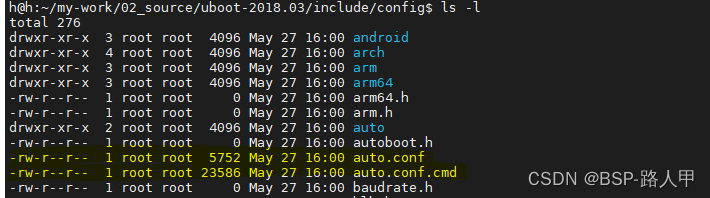
从 include/config/%.conf: $(KCONFIG_CONFIG) include/config/auto.conf.cmd 这条规则可以知道,auto.conf 文件依赖于 $(KCONFIG_CONFIG) 和 include/config/auto.conf.cmd 。其中 $(KCONFIG_CONFIG) 变量的值就是 .config 这个配置文件。
# To avoid any implicit rule to kick in, define an empty command
$(KCONFIG_CONFIG) include/config/auto.conf.cmd: ;
现在仍然假设 auto.conf 和 auto.conf.cmd 还没有生成,那么由上面这条语句可以知道,该语句中的目标没有依赖,也没有生成它的规则命令,所以可想 GNU Make 本身无法生成 auto.conf.cmd 的。然后该条语句后面的一个分号表明,这两个目标被强制是最新的。所以下面标注的这几条命令得以执行:
#note: 顶层Makefile
include/config/%.conf: $(KCONFIG_CONFIG) include/config/auto.conf.cmd
	$(Q)$(MAKE) -f $(srctree)/Makefile silentoldconfig                          (1)
	@# If the following part fails, include/config/auto.conf should be
	@# deleted so "make silentoldconfig" will be re-run on the next build.
	$(Q)$(MAKE) -f $(srctree)/scripts/Makefile.autoconf || \
		{ rm -f include/config/auto.conf; false; }                              (2)
	@# include/config.h has been updated after "make silentoldconfig".
	@# We need to touch include/config/auto.conf so it gets newer
	@# than include/config.h.
	@# Otherwise, 'make silentoldconfig' would be invoked twice.
	$(Q)touch include/config/auto.conf                                          (3)
这里我们看到要生成一个目标 silentoldconfig ,这个目标定义在 scripts/kconfig/Makefile 中。因为这里使用 -f 选项重新指定了顶层 Makefile,而目标又是 silentoldconfig ,所以该命令最终会在顶层 Makefile 里执行:
#note: 顶层Makefile
# We need some generic definitions (do not try to remake the file).
scripts/Kbuild.include: ;
include scripts/Kbuild.include            //注意这个引用
......
%config: scripts_basic outputmakefile FORCE
	$(Q)$(MAKE) $(build)=scripts/kconfig $@
在scripts/kconfig/Makefile中(至于为什么会引用scripts/kconfig/Makefile,参见UBOOT编译--- make xxx_deconfig过程详解(一)4.1.4.3 小节)
# note:scripts/kconfig/Makefile
ifdef KBUILD_KCONFIG
Kconfig := $(KBUILD_KCONFIG)
else
Kconfig := Kconfig
endif
......
silentoldconfig: $(obj)/conf
	$(Q)mkdir -p include/config include/generated
	$(Q)test -e include/generated/autoksyms.h || \
	    touch   include/generated/autoksyms.h
	$< $(silent) --$@ $(Kconfig)
从上面看到,silentoldconfig 目标需要依赖 conf 这个程序,该程序也在 scripts/kconfig 目录下生成。
$ < $ (silent) --$ @ $ (Kconfig)该条命令相当于 scripts/kconfig/conf -s --myimx8mmek240-8mm-2g_defconfig .config 。
其中scripts/kconfig/conf的生成:参见UBOOT编译--- make xxx_deconfig过程详解(一)4.4小节。
conf 程序的源代码的主函数在同目录的 conf.c 文件中,在 main() 函数中看到:
#note:/scripts/kconfig/conf.c
enum input_mode {
	oldaskconfig,
	silentoldconfig, //1
	oldconfig,
	allnoconfig,
	allyesconfig,
	allmodconfig,
	alldefconfig,
	randconfig,
	defconfig,
	savedefconfig,
	listnewconfig,
	olddefconfig,
} input_mode = oldaskconfig;

......
	while ((opt = getopt_long(ac, av, "s", long_opts, NULL)) != -1) {
		if (opt == 's') {
			conf_set_message_callback(NULL);
			continue;
		}
		input_mode = (enum input_mode)opt;
		switch (opt) {
		case silentoldconfig:
			sync_kconfig = 1;
			break;
所以,
(1) 在使用 s 参数时,message的回调函数被注册为空,即conf_message函数无输出打印;
(2) 同时参数opt被赋值为1,等价于silentoldconfig;sync_kconfig = 1;
(3) input_mode = silentoldconfig;
同样在 main() 函数还看到:
#note:/scripts/kconfig/confdata.c
const char *conf_get_configname(void)
{
	char *name = getenv("KCONFIG_CONFIG");

	return name ? name : ".config";
}

#note:/scripts/kconfig/conf.c
	if (sync_kconfig) {
		name = conf_get_configname();
		if (stat(name, &tmpstat)) {
			fprintf(stderr, _("***\n"
				"*** Configuration file \"%s\" not found!\n"
				"***\n"
				"*** Please run some configurator (e.g. \"make oldconfig\" or\n"
				"*** \"make menuconfig\" or \"make xconfig\").\n"
				"***\n"), name);
			exit(1);
		}
	}
上面代码中,如果我们从未配置过UBOOT,那么就会打印出错误信息,然后退出。这里假设已经配置过UBOOT(参见UBOOT编译--- make xxx_deconfig过程详解(一)),并生成了 .config 文件,那么在 main() 函数中会来到:
#note:/scripts/kconfig/conf.c
	switch (input_mode) {
	case defconfig:
		if (!defconfig_file)
			defconfig_file = conf_get_default_confname();
		if (conf_read(defconfig_file)) {
			printf(_("***\n"
				"*** Can't find default configuration \"%s\"!\n"
				"***\n"), defconfig_file);
			exit(1);
		}
		break;
	case savedefconfig:
	case silentoldconfig:
	case oldaskconfig:
	case oldconfig:
	case listnewconfig:
	case olddefconfig:
		conf_read(NULL);
		break;
前面已经讲过由于使用 -s 选项,则 input_mode 为silentoldconfig,所以这里会执行 conf_read(NULL)函数。
conf_read(NULL) 函数用来读取 .config 文件。读取的各种相关内容主要存放在一个 struct symbol 结构链表里,而各个结构的相关指针则放在一个 symbol_hash[] 的数组中,对于数组中元素的寻找通过 fnv32 哈希算法进行定位。
最后会来到 conf.c 中的底部:
#note:/scripts/kconfig/conf.c
	if (sync_kconfig) {
		/* silentoldconfig is used during the build so we shall update autoconf.
		 * All other commands are only used to generate a config.
		 */
		if (conf_get_changed() && conf_write(NULL)) {
			fprintf(stderr, _("\n*** Error during writing of the configuration.\n\n"));
			exit(1);
		}
		if (conf_write_autoconf()) {
			fprintf(stderr, _("\n*** Error during update of the configuration.\n\n"));
			return 1;
		}
	} else if (input_mode == savedefconfig) {
		if (conf_write_defconfig(defconfig_file)) {
			fprintf(stderr, _("n*** Error while saving defconfig to: %s\n\n"),
				defconfig_file);
			return 1;
		}
	} else if (input_mode != listnewconfig) {
		if (conf_write(NULL)) {
			fprintf(stderr, _("\n*** Error during writing of the configuration.\n\n"));
			exit(1);
		}
	}
实际上也只有当处理 silentoldconfig 目标时 sync_kconfig 变量才会为 1 。
(1)在 if (conf_get_changed() && conf_write(NULL)) 这个判断里,conf_get_changed() 函数判断 .config 文件是否做过变动,如果是,那么会调用 conf_write(NULL) 来重新写 .config 文件。实际上,对于 defconfig, oldconfig,menuconfig,***xxx_deconfig 等目标来说,conf 程序最终也是调用 conf_write() 函数将配置结果写入 .config 文件中。
(2)确保了 .config 已经最新后,那么调用 conf_write_autoconf() 生成 auto.conf,auto.conf.cmd 以及 autoconf.h 这 3 个文件。
来到 conf_write_autoconf() 函数:
#note:/scripts/kconfig/confdata.c
int conf_write_autoconf(void)
{
	struct symbol *sym;
	const char *name;
	FILE *out, *tristate, *out_h;
	int i;

	sym_clear_all_valid();

	file_write_dep("include/config/auto.conf.cmd");

	if (conf_split_config())
		return 1;
......
在 conf_write_autoconf() 里,调用 file_write_dep("include/config/auto.conf.cmd"); 函数将相关内容写入 auto.conf.cmd 文件。在生成的 auto.conf.cmd 文件中可以看到:
deps_config := \
	test/overlay/Kconfig \
	test/env/Kconfig \
	test/dm/Kconfig \

	......

	board/abilis/tb100/Kconfig \
	arch/arc/Kconfig \
	arch/Kconfig \
	Kconfig

include/config/auto.conf: \
	$(deps_config)

ifneq "$(UBOOTVERSION)" "2018.03"
include/config/auto.conf: FORCE
endif

$(deps_config): ;
可以看到 auto.conf 文件中的内容依赖于 $(deps_config) 变量里定义的东西,这些东西基本上是各个目录下的 Kconfig 以及其它一些相关文件。
仍然在 conf_write_autoconf() 里,分别建立了 .tmpconfig,.tmpconfig_tristate 和 .tmpconfig.h 这 3 个临时文件,然后将文件头的注释部分分别写入到这几个临时文件中,接着在 for_all_symbols(i, sym) 这个循环里(是一个宏)里将相关内容分别写入到这几个文件中。
#note:/scripts/kconfig/confdata.c
	out = fopen(".tmpconfig", "w");
	if (!out)
		return 1;

	tristate = fopen(".tmpconfig_tristate", "w");
	if (!tristate) {
		fclose(out);
		return 1;
	}

	out_h = fopen(".tmpconfig.h", "w");
	if (!out_h) {
		fclose(out);
		fclose(tristate);
		return 1;
	}

	conf_write_heading(out, &kconfig_printer_cb, NULL);

	conf_write_heading(tristate, &tristate_printer_cb, NULL);

	conf_write_heading(out_h, &header_printer_cb, NULL);

	for_all_symbols(i, sym) {
		sym_calc_value(sym);
		if (!(sym->flags & SYMBOL_WRITE) || !sym->name)
			continue;

		/* write symbol to auto.conf, tristate and header files */
		conf_write_symbol(out, sym, &kconfig_printer_cb, (void *)1);

		conf_write_symbol(tristate, sym, &tristate_printer_cb, (void *)1);

		conf_write_symbol(out_h, sym, &header_printer_cb, NULL);
	}
	fclose(out);
	fclose(tristate);
	fclose(out_h);

在最后一段代码中,将这几个临时文件进行改名:
#note:/scripts/kconfig/confdata.c
const char *conf_get_autoconfig_name(void)
{
	char *name = getenv("KCONFIG_AUTOCONFIG");

	return name ? name : "include/config/auto.conf";
}

......

	name = getenv("KCONFIG_AUTOHEADER");
	if (!name)
		name = "include/generated/autoconf.h";
	if (rename(".tmpconfig.h", name))
		return 1;
	name = getenv("KCONFIG_TRISTATE");
	if (!name)
		name = "include/config/tristate.conf";
	if (rename(".tmpconfig_tristate", name))
		return 1;
	name = conf_get_autoconfig_name();
	/*
	 * This must be the last step, kbuild has a dependency on auto.conf
	 * and this marks the successful completion of the previous steps.
	 */
	if (rename(".tmpconfig", name))
		return 1;
从上面可以看到,分别生成了以下几个文件:
include/generated/autoconf.h
include/config/tristate.conf
include/config/auto.conf
由于篇幅的原因,放在下一讲。
(1)auto.conf 和 .config 的差别是:auto.conf 里去掉了 .config 中的注释项目以及空格行,其它的都一样。
(2) include/generated/autoconf.h 头文件由UBOOT本身使用,主要用来预处理 C 代码,把auto.conf中的定义转换成C语言的宏定义。。
(1)在 .config 或 auto.conf 中后接"=y"的项,如:
CONFIG_OF_LIBFDT=y
在 autoconfig.h 中会被定义为:
#define CONFIG_OF_LIBFDT 1
(2)在 .config 或 auto.conf 中后接字符串值的项,如:
CONFIG_DEFAULT_FDT_FILE="myimx8mmek240-8mm.dtb"
在 autoconfig.h 中会被定义为:
#define CONFIG_DEFAULT_FDT_FILE "myimx8mmek240-8mm.dtb"
(3)在 .config 或 auto.conf 中后接数值的项,如:
CONFIG_SDP_LOADADDR=0x40400000
在 autoconfig.h 中会被定义为:
#define CONFIG_SDP_LOADADDR 0x40400000
我需要一个表,其中行实际上是2行表,一个嵌套表是..我怎样才能在Prawn中做到这一点?也许我需要延期..但哪一个? 最佳答案 现在支持子表:Prawn::Document.generate("subtable.pdf")do|pdf|subtable=pdf.make_table([["sub"],["table"]])pdf.table([[subtable,"original"]])end 关于ruby-on-rails-PrawnPDF:Ineedtogeneratenested
我一直致力于让我们的Rails2.3.8应用程序在JRuby下正确运行。一切正常,直到我启用config.threadsafe!以实现JRuby提供的并发性。这导致lib/中的模块和类不再自动加载。使用config.threadsafe!启用:$rubyscript/runner-eproduction'pSim::Sim200Provisioner'/Users/amchale/.rvm/gems/jruby-1.5.1@web-services/gems/activesupport-2.3.8/lib/active_support/dependencies.rb:105:in`co
我不知道为什么,但是当我设置这个设置时它无法编译设置:static_cache_control,[:public,:max_age=>300]这是我得到的syntaxerror,unexpectedtASSOC,expecting']'(SyntaxError)set:static_cache_control,[:public,:max_age=>300]^我只想将“过期”header设置为css、javaascript和图像文件。谢谢。 最佳答案 我猜您使用的是Ruby1.8.7。Sinatra文档中显示的语法似乎是在Ruby1.
最近因为项目需要,需要将Android手机系统自带的某个系统软件反编译并更改里面某个资源,并重新打包,签名生成新的自定义的apk,下面我来介绍一下我的实现过程。APK修改,分为以下几步:反编译解包,修改,重打包,修改签名等步骤。安卓apk修改准备工作1.系统配置好JavaJDK环境变量2.需要root权限的手机(针对系统自带apk,其他软件免root)3.Auto-Sign签名工具4.apktool工具安卓apk修改开始反编译本文拿Android系统里面的Settings.apk做demo,具体如何将apk获取出来在此就不过多介绍了,直接进入主题:按键win+R输入cmd,打开命令窗口,并将路
转自:spring.profiles.active和spring.profiles.include的使用及区别说明下文笔者讲述spring.profiles.active和spring.profiles.include的区别简介说明,如下所示我们都知道,在日常开发中,开发|测试|生产环境都拥有不同的配置信息如:jdbc地址、ip、端口等此时为了避免每次都修改全部信息,我们则可以采用以上的属性处理此类异常spring.profiles.active属性例:配置文件,可使用以下方式定义application-${profile}.properties开发环境配置文件:application-dev
有谁知道在Heroku的Bamboo堆栈上启动并运行使用DataMapper的Sinatra应用程序所需的魔法咒语?Bamboo堆栈不包含任何预安装的系统gem,无论我尝试使用何种gem组合,我都会不断收到此错误:undefinedmethod`auto_upgrade!'forDataMapper:Module(NoMethodError)这是我的.gems文件中的内容:sinatrapgdatamapperdo_postgresdm-postgres-adapter这些是我将应用程序推送到Heroku时安装的依赖项:----->Herokureceivingpush----->Si
Devise是一个Ruby库,它为我提供了这个User类:classUser当写入:confirmable时,注册时会发送一封确认邮件。上周我不得不批量创建300个用户,所以我在恢复之前注释掉了:confirmable几分钟。现在我正在为用户批量创建创建一个UI,因此我需要即时添加/删除:confirmable。(我也可以直接修改Devise的源码,但我宁愿不去调和它)问题:如何即时添加/删除:confirmable? 最佳答案 WayneConrad的解决方案:user=User.newuser.skip_confirmation
我在Rails3.1项目中有以下助手-我只是想知道是否有办法测试CSV.generate调用。我很想说我知道如何去做,但事实是我什至不知道从哪里开始。任何想法表示赞赏。require'csv'moduleAdmin::PurchasesHelperdefcsv_purchase_listcolumns=['course','amount','first_name','last_name','contact_phone','contact_mobile','created_at']CSV.generate(:col_sep=>";",:row_sep=>"\r\n",:headers=>
我正在使用Rails3.2.3和Ruby1.9.3p0。我发现我经常需要确定某个字符串是否出现在选项列表中。看来我可以使用Ruby数组.includemethod:或正则表达式equals-tildematchshorthand用竖线分隔选项:就性能而言,一个比另一个好吗?还有更好的方法吗? 最佳答案 总结:Array#include?包含String元素,在接受和拒绝输入时均胜出,对于您的示例只有三个可接受的值。对于要检查的更大的集合,看起来Set#include?和String元素可能会获胜。如何测试我们应该根据经验对此进行测试
我在我的Rails项目中使用rspec_rails和factory_girl_railsgem。所有模型都已创建。是否有我可以运行的生成器来为现有模型创建工厂文件?例如:我已经有了一个Blog模型。RSpec允许我通过简单地运行以下命令在spec/models/blog_spec.rb生成一个模型规范文件:railsgeneraterspec:modelblog是否有我可以在命令行中运行的生成器,它会为这个现有模型生成工厂文件,位于:spec/factories/blogs.rb?我在factory_girl_rails中没有看到任何关于发电机的提及文档。
