最近在做的一个调度系统的需求里,有一个需求,需要用到ftp服务器进行文件的下载和上传。刚好新分配的两个linux服务器上没有搭建ftp,想着就用docker安装一下。
安装的方式,参照:Linux下使用docker搭建ftp服务器 - william_zhao - 博客园
顺序无非,拉取镜像,启动镜像,访问服务器。
docker pull fauria/vsftpddocker run -d -p 2121:21 -p 2020:20 -p 21100-21110:21100-21110 \
-v /home/dispatch/ftp/root:/home/vsftpd/ftp \
-e FTP_USER=ftp \
-e FTP_PASS=123456 \
-e PASV_ADDRESS=***.**.**.** \
-e PASV_MIN_PORT=21100 \
-e PASV_MAX_PORT=21110 \
--name vsftpd \
--restart=always fauria/vsftpd参数解释:
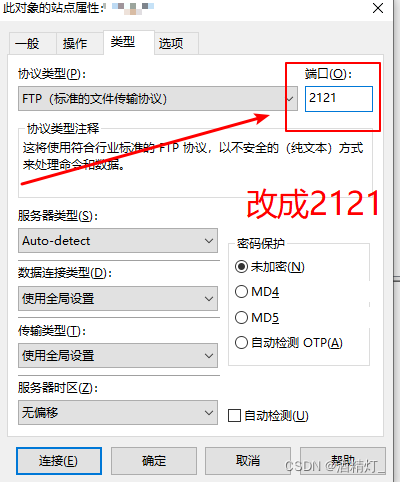
-p 2121:21 -p 2020:20 映射daocker和宿主机的端口号,通过ftp客户端,连接宿主机的2121端口,可以连接ftp服务器。2020端口,为docker映射到宿主机的数据传输端口。
-v /home/dispatch/ftp/root:/home/vsftpd/ftp 挂载的本机文件路径。注意:这个地方是有一个坑。/home/vsftpd/ftp 为docker-ftp的文件存放路径。这个不可以随便写,并且,每个人的也都不一样。路径格式为/home/vsftpd/${user} ${user} 为我后面设置的用户名。也就是FTP_USER=ftp。所以上面那个作者,设置了自己账户名为root之后,他的挂载源路径就为什么必须是root原因了。关于这个配置,等下看下配置文件就知道。
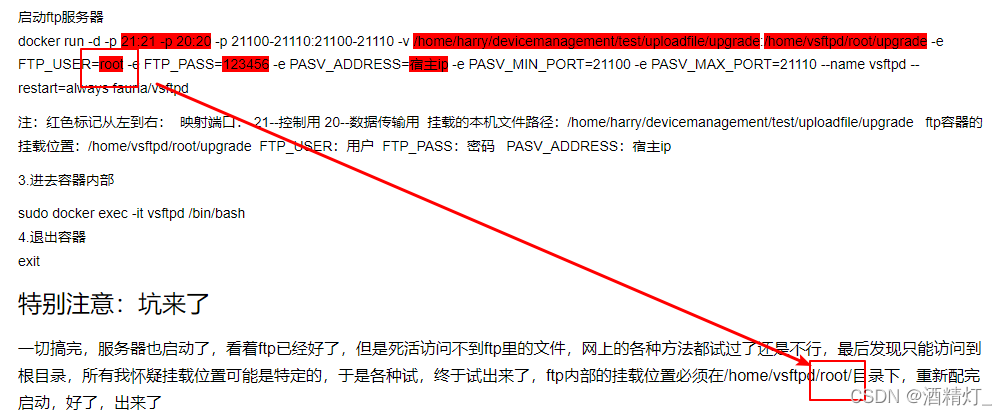
而 /home/dispatch/ftp/root 这个路径是应道宿主机的文件路径。这个可以随便写。
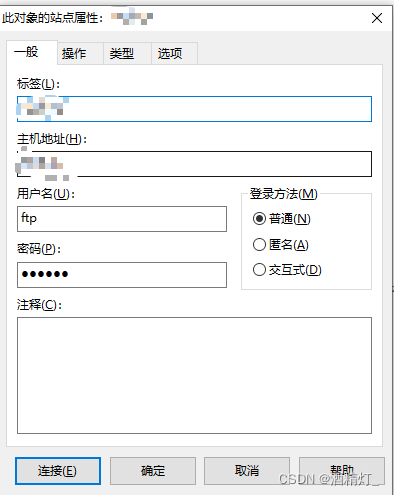
-e FTP_USER=ftp -e FTP_PASS=123456 分别为账号密码。
PASV_ADDRESS 为宿主机的IP
3)启动成功之后,使用ftp客户端连接上我们的ftp服务器。 我用的是CuteFtp 9.0
出现下面提示信息,即显示连接成功
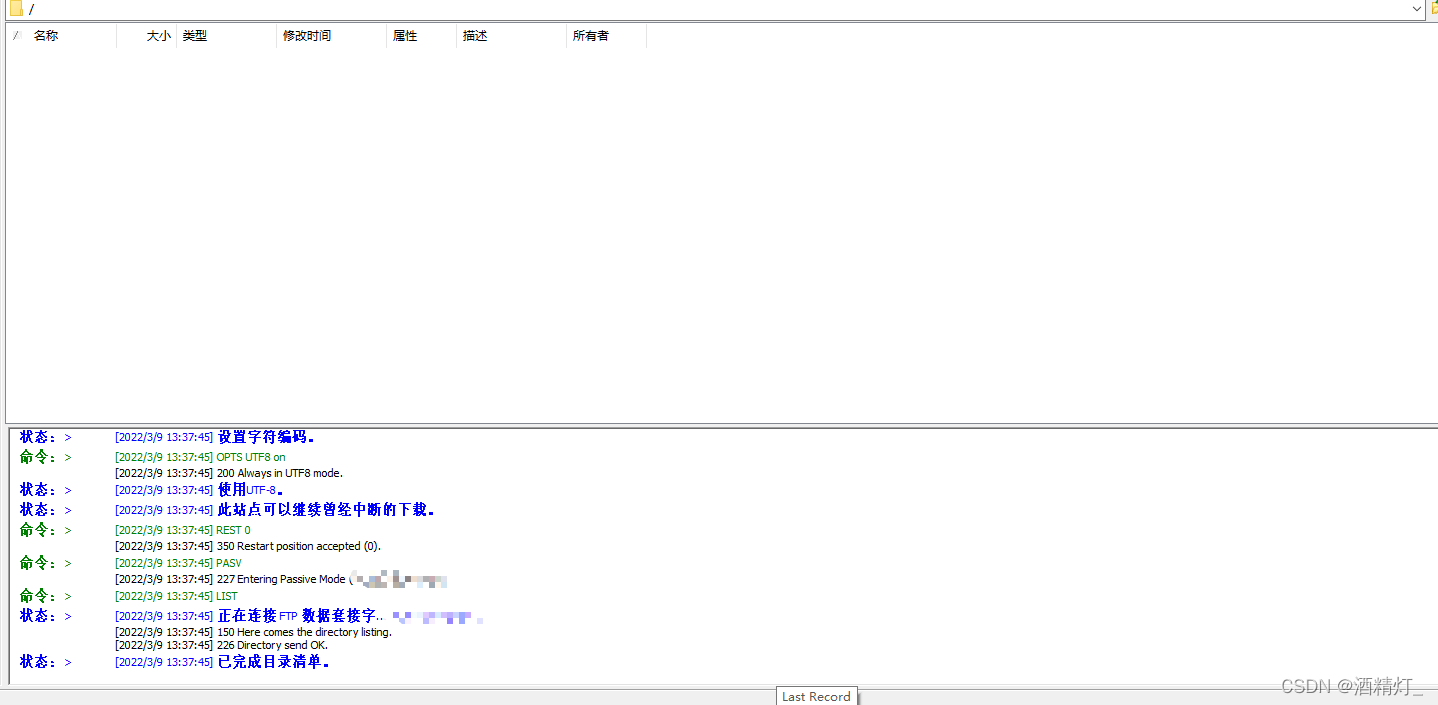
我们在此新建一个文件夹
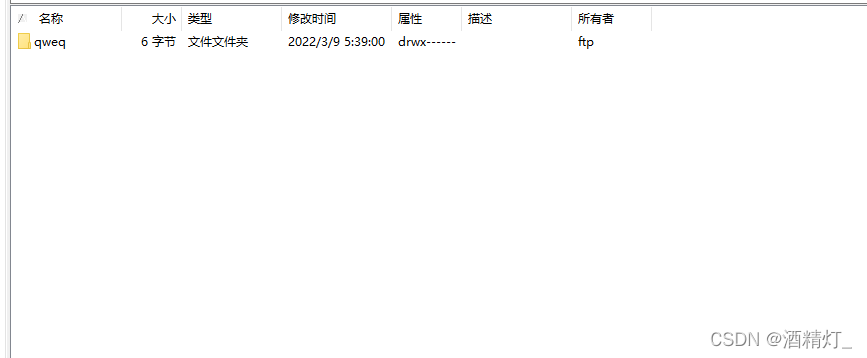
找到上面我们挂载的文件路径/home/dispatch/ftp/root ,打开就可以看到刚才新建的文件。同样在ftp服务器上文件的新增、删除、变更。使用ftp客户端都可以看到。至此docker版的ftp服务器就搭建完成。可以再去测试一下文件的上传下载。

关于挂载路径设置的问题,其实在配置文件中的都有配置。
1、进入ftp的docker容器
docker exec -it vsftpd /bin/bash
2、打开/etc/vsftpd/vsftpd.conf
vi /etc/vsftpd/vsftpd.conf
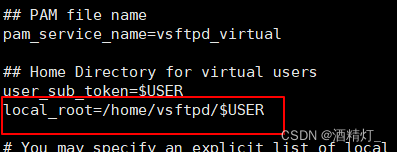
这个也就是挂载到宿主机的ftp文件路径。也就是跟每个用户名是相关的。不同的用户名,对应不同的文件路径。当然也可以自行修改配置。建议把配置文件和log日志也挂在本地
贴出整个配置文件。如下:
# Run in the foreground to keep the container running:
background=NO

# Allow anonymous FTP? (Beware - allowed by default if you comment this out).
anonymous_enable=NO

# Uncomment this to allow local users to log in.
local_enable=YES

## Enable virtual users
guest_enable=YES

## Virtual users will use the same permissions as anonymous
virtual_use_local_privs=YES

# Uncomment this to enable any form of FTP write command.
# Run in the foreground to keep the container running:
background=NO

# Allow anonymous FTP? (Beware - allowed by default if you comment this out).
anonymous_enable=NO

# Uncomment this to allow local users to log in.
local_enable=YES

## Enable virtual users
guest_enable=YES

## Virtual users will use the same permissions as anonymous
virtual_use_local_privs=YES

# Uncomment this to enable any form of FTP write command.
write_enable=YES

## PAM file name
pam_service_name=vsftpd_virtual

## Home Directory for virtual users
user_sub_token=$USER
local_root=/home/vsftpd/$USER

# You may specify an explicit list of local users to chroot() to their home
# directory. If chroot_local_user is YES, then this list becomes a list of
# users to NOT chroot().
chroot_local_user=YES

# Workaround chroot check.
# See https://www.benscobie.com/fixing-500-oops-vsftpd-refusing-to-run-with-writable-root-inside-chroot/
# and http://serverfault.com/questions/362619/why-is-the-chroot-local-user-of-vsftpd-insecure
allow_writeable_chroot=YES
# Run in the foreground to keep the container running:
background=NO

# Allow anonymous FTP? (Beware - allowed by default if you comment this out).
anonymous_enable=NO

# Uncomment this to allow local users to log in.
local_enable=YES

## Enable virtual users
guest_enable=YES

## Virtual users will use the same permissions as anonymous
virtual_use_local_privs=YES

# Uncomment this to enable any form of FTP write command.
write_enable=YES

## PAM file name
pam_service_name=vsftpd_virtual

## Home Directory for virtual users
user_sub_token=$USER
local_root=/home/vsftpd/$USER

# You may specify an explicit list of local users to chroot() to their home
# directory. If chroot_local_user is YES, then this list becomes a list of
# users to NOT chroot().
chroot_local_user=YES

# Workaround chroot check.
# See https://www.benscobie.com/fixing-500-oops-vsftpd-refusing-to-run-with-writable-root-inside-chroot/
# and http://serverfault.com/questions/362619/why-is-the-chroot-local-user-of-vsftpd-insecure
allow_writeable_chroot=YES

## Hide ids from user
hide_ids=YES

## Enable logging
xferlog_enable=YES
xferlog_file=/var/log/vsftpd/vsftpd.log

## Enable active mode
port_enable=YES
connect_from_port_20=YES
ftp_data_port=20

##| Disable seccomp filter sanboxing
seccomp_sandbox=NO

### Variables set at container runtime
pasv_address=192.168.0.16
pasv_max_port=21110
pasv_min_port=21100
pasv_addr_resolve=NO
pasv_enable=YES
file_open_mode=0666
local_umask=077
xferlog_std_format=NO
reverse_lookup_enable=YES
pasv_promiscuous=NO
port_promiscuous=NO
参数的解释可以另行搜索
我正在学习如何使用Nokogiri,根据这段代码我遇到了一些问题:require'rubygems'require'mechanize'post_agent=WWW::Mechanize.newpost_page=post_agent.get('http://www.vbulletin.org/forum/showthread.php?t=230708')puts"\nabsolutepathwithtbodygivesnil"putspost_page.parser.xpath('/html/body/div/div/div/div/div/table/tbody/tr/td/div
我有一个Ruby程序,它使用rubyzip压缩XML文件的目录树。gem。我的问题是文件开始变得很重,我想提高压缩级别,因为压缩时间不是问题。我在rubyzipdocumentation中找不到一种为创建的ZIP文件指定压缩级别的方法。有人知道如何更改此设置吗?是否有另一个允许指定压缩级别的Ruby库? 最佳答案 这是我通过查看rubyzip内部创建的代码。level=Zlib::BEST_COMPRESSIONZip::ZipOutputStream.open(zip_file)do|zip|Dir.glob("**/*")d
类classAprivatedeffooputs:fooendpublicdefbarputs:barendprivatedefzimputs:zimendprotecteddefdibputs:dibendendA的实例a=A.new测试a.foorescueputs:faila.barrescueputs:faila.zimrescueputs:faila.dibrescueputs:faila.gazrescueputs:fail测试输出failbarfailfailfail.发送测试[:foo,:bar,:zim,:dib,:gaz].each{|m|a.send(m)resc
很好奇,就使用rubyonrails自动化单元测试而言,你们正在做什么?您是否创建了一个脚本来在cron中运行rake作业并将结果邮寄给您?git中的预提交Hook?只是手动调用?我完全理解测试,但想知道在错误发生之前捕获错误的最佳实践是什么。让我们理所当然地认为测试本身是完美无缺的,并且可以正常工作。下一步是什么以确保他们在正确的时间将可能有害的结果传达给您? 最佳答案 不确定您到底想听什么,但是有几个级别的自动代码库控制:在处理某项功能时,您可以使用类似autotest的内容获得关于哪些有效,哪些无效的即时反馈。要确保您的提
假设我做了一个模块如下:m=Module.newdoclassCendend三个问题:除了对m的引用之外,还有什么方法可以访问C和m中的其他内容?我可以在创建匿名模块后为其命名吗(就像我输入“module...”一样)?如何在使用完匿名模块后将其删除,使其定义的常量不再存在? 最佳答案 三个答案:是的,使用ObjectSpace.此代码使c引用你的类(class)C不引用m:c=nilObjectSpace.each_object{|obj|c=objif(Class===objandobj.name=~/::C$/)}当然这取决于
我正在尝试使用ruby和Savon来使用网络服务。测试服务为http://www.webservicex.net/WS/WSDetails.aspx?WSID=9&CATID=2require'rubygems'require'savon'client=Savon::Client.new"http://www.webservicex.net/stockquote.asmx?WSDL"client.get_quotedo|soap|soap.body={:symbol=>"AAPL"}end返回SOAP异常。检查soap信封,在我看来soap请求没有正确的命名空间。任何人都可以建议我
关闭。这个问题是opinion-based.它目前不接受答案。想要改进这个问题?更新问题,以便editingthispost可以用事实和引用来回答它.关闭4年前。Improvethisquestion我想在固定时间创建一系列低音和高音调的哔哔声。例如:在150毫秒时发出高音调的蜂鸣声在151毫秒时发出低音调的蜂鸣声200毫秒时发出低音调的蜂鸣声250毫秒的高音调蜂鸣声有没有办法在Ruby或Python中做到这一点?我真的不在乎输出编码是什么(.wav、.mp3、.ogg等等),但我确实想创建一个输出文件。
我在我的项目目录中完成了compasscreate.和compassinitrails。几个问题:我已将我的.sass文件放在public/stylesheets中。这是放置它们的正确位置吗?当我运行compasswatch时,它不会自动编译这些.sass文件。我必须手动指定文件:compasswatchpublic/stylesheets/myfile.sass等。如何让它自动运行?文件ie.css、print.css和screen.css已放在stylesheets/compiled。如何在编译后不让它们重新出现的情况下删除它们?我自己编译的.sass文件编译成compiled/t
我想安装一个带有一些身份验证的私有(private)Rubygem服务器。我希望能够使用公共(public)Ubuntu服务器托管内部gem。我读到了http://docs.rubygems.org/read/chapter/18.但是那个没有身份验证-如我所见。然后我读到了https://github.com/cwninja/geminabox.但是当我使用基本身份验证(他们在他们的Wiki中有)时,它会提示从我的服务器获取源。所以。如何制作带有身份验证的私有(private)Rubygem服务器?这是不可能的吗?谢谢。编辑:Geminabox问题。我尝试“捆绑”以安装新的gem..
我想将html转换为纯文本。不过,我不想只删除标签,我想智能地保留尽可能多的格式。为插入换行符标签,检测段落并格式化它们等。输入非常简单,通常是格式良好的html(不是整个文档,只是一堆内容,通常没有anchor或图像)。我可以将几个正则表达式放在一起,让我达到80%,但我认为可能有一些现有的解决方案更智能。 最佳答案 首先,不要尝试为此使用正则表达式。很有可能你会想出一个脆弱/脆弱的解决方案,它会随着HTML的变化而崩溃,或者很难管理和维护。您可以使用Nokogiri快速解析HTML并提取文本:require'nokogiri'h
