防止暴力破解的四种方法:
- 1 密码要写的足够的复杂,通常建议将密码写16位,并且无连贯的数字或者字母;当然也可以固定一个时间修改一次密码,推荐是一个月修改一次会稳妥一些
- 2 修改ssh的端口号,给对方一些迷惑性,因为远程linux服务器默认端口是22,修改成其他的端口,三位数,四位数的都行,这样能避免大部分的暴力破解的可能性
- 3 通常我们远程登录都是使用root用户进行登录的,我们将root用户设置成系统用户,并且不允许root账号直接登录,添加一个普通用户,给它赋予root用户的权限,这样也能极大的避免对方破解成功的可能性。
- 4 使用秘钥认证的方式登录,在客户端上生成公钥和私钥,将公钥发送给需要远程的服务端,在输入一次正确的密码之后,后续再次远程,则不需要用到密码登录。
由于第一个密码自主性比较强,这里就不做第一个方法的演示,下面的几个方法一起来看看怎么设置吧。
#ssh配置文件
vim /etc/ssh/sshd_config
修改的是第17行的端口信息,这里有个方法,ssh默认端口是22,可以将17行的信息复制一行,在18行进行修改,这里把端口修改成2222。
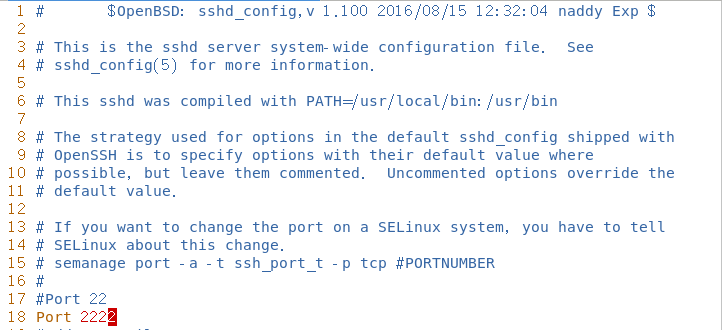
修改完之后一定要记得重启服务
systemctl restart sshd
可以使用扫描端口的工具看下
[root@localhost ~]# nmap 127.0.0.1

Starting Nmap 6.40 ( http://nmap.org ) at 2023-03-05 11:44 CST
Nmap scan report for VM-12-17-centos (127.0.0.1)
Host is up (0.0000050s latency).
Not shown: 996 closed ports
PORT     STATE SERVICE
21/tcp   open  ftp
2222/tcp open  EtherNet/IP-1
3306/tcp open  mysql
9050/tcp open  tor-socks
端口扫描并没有显示到 ssh的服务信息,若多开放几个端口,就能起到迷惑性,让对方不知道是使用什么端口远程的。
vim /etc/passwd
先将root用户设置成系统用户,并且不能进行远程登录

这里直接新增一个用户,再给一个普通用户超级权限(修改UID和GID)
[root@localhost ~]# useradd -s /bin/bash test
[root@localhost ~]# vim /etc/passwd
[root@localhost ~]# echo "GUANzhu123//" | passwd --stdin test

这里可以测试下修改完后是否具有root用户的权限,可以尝试去打开shadow文件。
[root@localhost ~]# su - test
上一次登录:日 3月  5 11:41:13 CST 2023:0 上
ABRT has detected 1 problem(s). For more info run: abrt-cli list
[root@localhost ~]# pwd
/home/test
[root@localhost ~]# tail -2 /etc/shadow
mysql:!!:19420::::::
test:!!:19421:0:99999:7:::
小提示:千万千万要记得给要赋予超级权限的普通用户设置一个登录密码,让它可以远程登录,否则会出现上不去服务器的情况。
先在本地使用ssh-keygen命令生成公钥和私钥文件,-t表示选择秘钥的类型,-b表示指定长度,这里选择长度是4096。
[root@localhost ~]# ssh-keygen -t rsa -b 4096
Generating public/private rsa key pair.
Enter file in which to save the key (/root/.ssh/id_rsa):
Created directory '/root/.ssh'.
Enter passphrase (empty for no passphrase):
Enter same passphrase again:
Your identification has been saved in /root/.ssh/id_rsa.
Your public key has been saved in /root/.ssh/id_rsa.pub.
The key fingerprint is:
SHA256:Mq/1yY0jDdMsw9DNQIUgS0mDKXxkPpxSXXg24inkl44 root@localhost.localdomain
The key's randomart image is:
+---[RSA 4096]----+
|. .B*.++.o.      |
|..B+oB +o        |
| o+=o *..+       |
|  .o.=. . o      |
|    = ooSo       |
|   E . +* o      |
|        o*       |
|       o.oo+     |
|      .  .=..    |
+----[SHA256]-----+
[root@localhost ~]# ll /root/.ssh/
总用量 12
-rw-------. 1 root root 3243 3月   5 12:17 id_rsa
-rw-r--r--. 1 root root  752 3月   5 12:17 id_rsa.pub
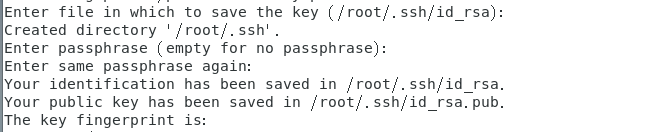
这里有几个信息分别是:
输入保存秘钥的文件,默认是放在/root/.ssh_rsa,如果不指定其他位置,直接按回车即可。
创建目录,默认是/root/.ssh这个目录,不指定的话也是直接按enter。
输入秘钥的密码,这里默认也不设置,按回车,毕竟都使用秘钥了,就不想每次远程服务器又要输入一次密码了。 再次输入相同的密码,这里也直接按回车吧
您的身份信息保证在/root/.ssh/id_rsa中 公钥已保存在/root/.ssh/id_rsa.pub中 秘钥的指纹为: RSA
4096那张图就是这个秘钥的指纹了,可以看出来是很复杂的。
以上都是在客户端上设置的,下一步是将公钥发送到服务器上面
这里又要使用一个命令ssh-copy-id.
#ip填写要远程服务器的IP
[root@localhost ~]# ssh-copy-id root@192.168.196.23
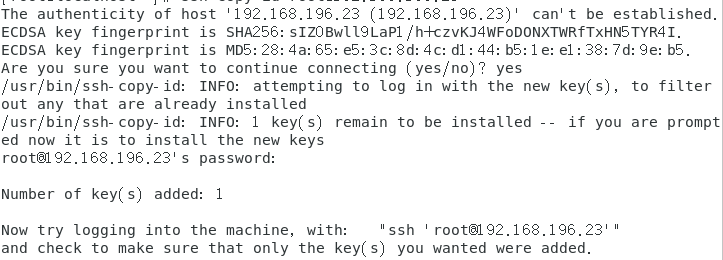
公钥发送过去后,就可以直接使用ssh远程登录;
[root@localhost ~]# ssh 192.168.196.23
Last login: Sun Mar  5 12:24:28 2023 from 192.168.196.166
[root@node1 ~]#
无须输入密码即可远程登录,这个就是秘钥登录的优势了。
fail2ban是一款安全保护工具,触发限制后会创建防火墙规则封锁IP,诸如对ssh暴力破解、ftp/http密码穷举等场景提供强有力的保护。
1.这里会使用到两台虚拟机做测试分别是 192.168.196.166、192.168.196.23
2.需要用到iptables和ssh服务
这个程序默认是未安装的,需要先安装好epel源,再安装这个程序
yum install epel-release -y
yum install fail2ban -y
配置文件的位置在:
/etc/fail2ban/jail.conf
这里填写如下信息
[root@localhost fail2ban]# vim jail.conf
[root@localhost fail2ban]# tail -10 jail.conf
[ssh-iptables]    #用到的服务
enabled = true     #开机自动启用服务
filter = sshd      #添加动作是sshd
action = iptables[name=SSH,port=ssh,protocol=tcp]
logpath = /var/log/secure     #要监控的站点日志文件
#这三个代表的是 将5分钟内频繁访问失败3次的IP屏蔽3600秒
maxretry = 3            #设定失败次数
findtime = 300 			#一定时间内
bantime = 3600    		#屏蔽多长时间
重启服务
systemctl restart fail2ban.service systemctl enable fail2ban.service
以上的都是在服务端进行的
这里测试登录失败次数超过三次后会提示什么
[root@node1 ~]# ssh 192.168.196.166
root@192.168.196.166's password: Permission denied, please try again.
root@192.168.196.166's password: Permission denied, please try again.
root@192.168.196.166's password: Permission denied (publickey,gssapi-keyex,gssapi-with-mic,password).
[root@node1 ~]# ssh 192.168.196.166 ssh: connect to host 192.168.196.166 port 22: Connection refused
[root@node1 ~]#
[root@node1 ~]# ssh 192.168.196.166 ssh: connect to host 192.168.196.166 port 22: Connection refused [root@node1 ~]# ssh 192.168.196.166 ssh: connect to host 192.168.196.166 port 22: Connection refused
测试过后显示连接失败,以上配置是已经成功了
1 [root@localhost fail2ban]# iptables -L -n | tail
2 Chain IN_public_log (1 references)
3 target prot opt source destination
4
5 Chain OUTPUT_direct (1 references)
6 target prot opt source destination
7
8 Chain f2b-SSH (1 references)
9 target prot opt source destination
REJECT all -- 192.168.196.23 0.0.0.0/0 reject-with icmp-portunreachable
10
11 RETURN all -- 0.0.0.0/0 0.0.0.0/0
12
13 [root@localhost fail2ban]# fail2ban-client status
14 Status
|- Number of jail: 1 15
`- Jail list: ssh-iptables 16
17 [root@localhost fail2ban]# fail2ban-client status ssh-iptables
18 Status for the jail: ssh-iptables
19 |- Filter
20 | |- Currently failed: 0
| |- Total failed: 6 21
| `- File list: /var/log/secure 22
23 `- Actions
24 |- Currently banned: 1
 |- Total banned: 2 25
 `- Banned IP list: 192.168.196.23
如果不慎是其他认识的人登录失败了,可以使用以下方式将他移除黑名单
[root@localhost fail2ban]# fail2ban-client set ssh-iptables unbanip 192.168.196.23
防止暴力破解的内容就是这么多了,当然也可以通过脚本的方式来屏蔽一段时间频繁访问的IP,若觉得以上内容还行的,可以点赞支持一下!

我正在学习如何使用Nokogiri,根据这段代码我遇到了一些问题:require'rubygems'require'mechanize'post_agent=WWW::Mechanize.newpost_page=post_agent.get('http://www.vbulletin.org/forum/showthread.php?t=230708')puts"\nabsolutepathwithtbodygivesnil"putspost_page.parser.xpath('/html/body/div/div/div/div/div/table/tbody/tr/td/div
总的来说,我对ruby还比较陌生,我正在为我正在创建的对象编写一些rspec测试用例。许多测试用例都非常基础,我只是想确保正确填充和返回值。我想知道是否有办法使用循环结构来执行此操作。不必为我要测试的每个方法都设置一个assertEquals。例如:describeitem,"TestingtheItem"doit"willhaveanullvaluetostart"doitem=Item.new#HereIcoulddotheitem.name.shouldbe_nil#thenIcoulddoitem.category.shouldbe_nilendend但我想要一些方法来使用
类classAprivatedeffooputs:fooendpublicdefbarputs:barendprivatedefzimputs:zimendprotecteddefdibputs:dibendendA的实例a=A.new测试a.foorescueputs:faila.barrescueputs:faila.zimrescueputs:faila.dibrescueputs:faila.gazrescueputs:fail测试输出failbarfailfailfail.发送测试[:foo,:bar,:zim,:dib,:gaz].each{|m|a.send(m)resc
我正在尝试设置一个puppet节点,但rubygems似乎不正常。如果我通过它自己的二进制文件(/usr/lib/ruby/gems/1.8/gems/facter-1.5.8/bin/facter)在cli上运行facter,它工作正常,但如果我通过由rubygems(/usr/bin/facter)安装的二进制文件,它抛出:/usr/lib/ruby/1.8/facter/uptime.rb:11:undefinedmethod`get_uptime'forFacter::Util::Uptime:Module(NoMethodError)from/usr/lib/ruby
我想了解Ruby方法methods()是如何工作的。我尝试使用“ruby方法”在Google上搜索,但这不是我需要的。我也看过ruby-doc.org,但我没有找到这种方法。你能详细解释一下它是如何工作的或者给我一个链接吗?更新我用methods()方法做了实验,得到了这样的结果:'labrat'代码classFirstdeffirst_instance_mymethodenddefself.first_class_mymethodendendclassSecond使用类#returnsavailablemethodslistforclassandancestorsputsSeco
我在我的项目中添加了一个系统来重置用户密码并通过电子邮件将密码发送给他,以防他忘记密码。昨天它运行良好(当我实现它时)。当我今天尝试启动服务器时,出现以下错误。=>BootingWEBrick=>Rails3.2.1applicationstartingindevelopmentonhttp://0.0.0.0:3000=>Callwith-dtodetach=>Ctrl-CtoshutdownserverExiting/Users/vinayshenoy/.rvm/gems/ruby-1.9.3-p0/gems/actionmailer-3.2.1/lib/action_mailer
设置:狂欢ruby1.9.2高线(1.6.13)描述:我已经相当习惯在其他一些项目中使用highline,但已经有几个月没有使用它了。现在,在Ruby1.9.2上全新安装时,它似乎不允许在同一行回答提示。所以以前我会看到类似的东西:require"highline/import"ask"Whatisyourfavoritecolor?"并得到:Whatisyourfavoritecolor?|现在我看到类似的东西:Whatisyourfavoritecolor?|竖线(|)符号是我的终端光标。知道为什么会发生这种变化吗? 最佳答案
我已经从我的命令行中获得了一切,所以我可以运行rubymyfile并且它可以正常工作。但是当我尝试从sublime中运行它时,我得到了undefinedmethod`require_relative'formain:Object有人知道我的sublime设置中缺少什么吗?我正在使用OSX并安装了rvm。 最佳答案 或者,您可以只使用“require”,它应该可以正常工作。我认为“require_relative”仅适用于ruby1.9+ 关于ruby-主要:Objectwhenrun
我有一个具有一些属性的模型:attr1、attr2和attr3。我需要在不执行回调和验证的情况下更新此属性。我找到了update_column方法,但我想同时更新三个属性。我需要这样的东西:update_columns({attr1:val1,attr2:val2,attr3:val3})代替update_column(attr1,val1)update_column(attr2,val2)update_column(attr3,val3) 最佳答案 您可以使用update_columns(attr1:val1,attr2:val2
我不确定传递给方法的对象的类型是否正确。我可能会将一个字符串传递给一个只能处理整数的函数。某种运行时保证怎么样?我看不到比以下更好的选择:defsomeFixNumMangler(input)raise"wrongtype:integerrequired"unlessinput.class==FixNumother_stuffend有更好的选择吗? 最佳答案 使用Kernel#Integer在使用之前转换输入的方法。当无法以任何合理的方式将输入转换为整数时,它将引发ArgumentError。defmy_method(number)
