话不多说,直接上码。。。。
#!/bin/sh
set -e
# Docker CE for Linux installation script
#
# See https://docs.docker.com/engine/install/ for the installation steps.
#
# This script is meant for quick & easy install via:
#   $ curl -fsSL https://get.docker.com -o get-docker.sh
#   $ sh get-docker.sh
#
# For test builds (ie. release candidates):
#   $ curl -fsSL https://test.docker.com -o test-docker.sh
#   $ sh test-docker.sh
#
# NOTE: Make sure to verify the contents of the script
#       you downloaded matches the contents of install.sh
#       located at https://github.com/docker/docker-install
#       before executing.
#
# Git commit from https://github.com/docker/docker-install when
# the script was uploaded (Should only be modified by upload job):
SCRIPT_COMMIT_SHA="b2e29ef7a9a89840d2333637f7d1900a83e7153f"

# strip "v" prefix if present
VERSION="${VERSION#v}"

# The channel to install from:
#   * nightly
#   * test
#   * stable
#   * edge (deprecated)
DEFAULT_CHANNEL_VALUE="stable"
if [ -z "$CHANNEL" ]; then
	CHANNEL=$DEFAULT_CHANNEL_VALUE
fi

DEFAULT_DOWNLOAD_URL="https://download.docker.com"
if [ -z "$DOWNLOAD_URL" ]; then
	DOWNLOAD_URL=$DEFAULT_DOWNLOAD_URL
fi

DEFAULT_REPO_FILE="docker-ce.repo"
if [ -z "$REPO_FILE" ]; then
	REPO_FILE="$DEFAULT_REPO_FILE"
fi

mirror=''
DRY_RUN=${DRY_RUN:-}
while [ $# -gt 0 ]; do
	case "$1" in
		--mirror)
			mirror="$2"
			shift
			;;
		--dry-run)
			DRY_RUN=1
			;;
		--*)
			echo "Illegal option $1"
			;;
	esac
	shift $(( $# > 0 ? 1 : 0 ))
done

case "$mirror" in
	Aliyun)
		DOWNLOAD_URL="https://mirrors.aliyun.com/docker-ce"
		;;
	AzureChinaCloud)
		DOWNLOAD_URL="https://mirror.azure.cn/docker-ce"
		;;
esac

command_exists() {
	command -v "$@" > /dev/null 2>&1
}

# version_gte checks if the version specified in $VERSION is at least
# the given CalVer (YY.MM) version. returns 0 (success) if $VERSION is either
# unset (=latest) or newer or equal than the specified version. Returns 1 (fail)
# otherwise.
#
# examples:
#
# VERSION=20.10
# version_gte 20.10 // 0 (success)
# version_gte 19.03 // 0 (success)
# version_gte 21.10 // 1 (fail)
version_gte() {
	if [ -z "$VERSION" ]; then
			return 0
	fi
	eval calver_compare "$VERSION" "$1"
}

# calver_compare compares two CalVer (YY.MM) version strings. returns 0 (success)
# if version A is newer or equal than version B, or 1 (fail) otherwise. Patch
# releases and pre-release (-alpha/-beta) are not taken into account
#
# examples:
#
# calver_compare 20.10 19.03 // 0 (success)
# calver_compare 20.10 20.10 // 0 (success)
# calver_compare 19.03 20.10 // 1 (fail)
calver_compare() (
	set +x

	yy_a="$(echo "$1" | cut -d'.' -f1)"
	yy_b="$(echo "$2" | cut -d'.' -f1)"
	if [ "$yy_a" -lt "$yy_b" ]; then
		return 1
	fi
	if [ "$yy_a" -gt "$yy_b" ]; then
		return 0
	fi
	mm_a="$(echo "$1" | cut -d'.' -f2)"
	mm_b="$(echo "$2" | cut -d'.' -f2)"
	if [ "${mm_a#0}" -lt "${mm_b#0}" ]; then
		return 1
	fi

	return 0
)

is_dry_run() {
	if [ -z "$DRY_RUN" ]; then
		return 1
	else
		return 0
	fi
}

is_wsl() {
	case "$(uname -r)" in
	*microsoft* ) true ;; # WSL 2
	*Microsoft* ) true ;; # WSL 1
	* ) false;;
	esac
}

is_darwin() {
	case "$(uname -s)" in
	*darwin* ) true ;;
	*Darwin* ) true ;;
	* ) false;;
	esac
}

deprecation_notice() {
	distro=$1
	distro_version=$2
	echo
	printf "\033[91;1mDEPRECATION WARNING\033[0m\n"
	printf "    This Linux distribution (\033[1m%s %s\033[0m) reached end-of-life and is no longer supported by this script.\n" "$distro" "$distro_version"
	echo   "    No updates or security fixes will be released for this distribution, and users are recommended"
	echo   "    to upgrade to a currently maintained version of $distro."
	echo
	printf   "Press \033[1mCtrl+C\033[0m now to abort this script, or wait for the installation to continue."
	echo
	sleep 10
}

get_distribution() {
	lsb_dist=""
	# Every system that we officially support has /etc/os-release
	if [ -r /etc/os-release ]; then
		lsb_dist="$(. /etc/os-release && echo "$ID")"
	fi
	# Returning an empty string here should be alright since the
	# case statements don't act unless you provide an actual value
	echo "$lsb_dist"
}

echo_docker_as_nonroot() {
	if is_dry_run; then
		return
	fi
	if command_exists docker && [ -e /var/run/docker.sock ]; then
		(
			set -x
			$sh_c 'docker version'
		) || true
	fi

	# intentionally mixed spaces and tabs here -- tabs are stripped by "<<-EOF", spaces are kept in the output
	echo
	echo "================================================================================"
	echo
	if version_gte "20.10"; then
		echo "To run Docker as a non-privileged user, consider setting up the"
		echo "Docker daemon in rootless mode for your user:"
		echo
		echo "    dockerd-rootless-setuptool.sh install"
		echo
		echo "Visit https://docs.docker.com/go/rootless/ to learn about rootless mode."
		echo
	fi
	echo
	echo "To run the Docker daemon as a fully privileged service, but granting non-root"
	echo "users access, refer to https://docs.docker.com/go/daemon-access/"
	echo
	echo "WARNING: Access to the remote API on a privileged Docker daemon is equivalent"
	echo "         to root access on the host. Refer to the 'Docker daemon attack surface'"
	echo "         documentation for details: https://docs.docker.com/go/attack-surface/"
	echo
	echo "================================================================================"
	echo
}

# Check if this is a forked Linux distro
check_forked() {

	# Check for lsb_release command existence, it usually exists in forked distros
	if command_exists lsb_release; then
		# Check if the `-u` option is supported
		set +e
		lsb_release -a -u > /dev/null 2>&1
		lsb_release_exit_code=$?
		set -e

		# Check if the command has exited successfully, it means we're in a forked distro
		if [ "$lsb_release_exit_code" = "0" ]; then
			# Print info about current distro
			cat <<-EOF
			You're using '$lsb_dist' version '$dist_version'.
			EOF

			# Get the upstream release info
			lsb_dist=$(lsb_release -a -u 2>&1 | tr '[:upper:]' '[:lower:]' | grep -E 'id' | cut -d ':' -f 2 | tr -d '[:space:]')
			dist_version=$(lsb_release -a -u 2>&1 | tr '[:upper:]' '[:lower:]' | grep -E 'codename' | cut -d ':' -f 2 | tr -d '[:space:]')

			# Print info about upstream distro
			cat <<-EOF
			Upstream release is '$lsb_dist' version '$dist_version'.
			EOF
		else
			if [ -r /etc/debian_version ] && [ "$lsb_dist" != "ubuntu" ] && [ "$lsb_dist" != "raspbian" ]; then
				if [ "$lsb_dist" = "osmc" ]; then
					# OSMC runs Raspbian
					lsb_dist=raspbian
				else
					# We're Debian and don't even know it!
					lsb_dist=debian
				fi
				dist_version="$(sed 's/\/.*//' /etc/debian_version | sed 's/\..*//')"
				case "$dist_version" in
					11)
						dist_version="bullseye"
					;;
					10)
						dist_version="buster"
					;;
					9)
						dist_version="stretch"
					;;
					8)
						dist_version="jessie"
					;;
				esac
			fi
		fi
	fi
}

do_install() {
	echo "# Executing docker install script, commit: $SCRIPT_COMMIT_SHA"

	if command_exists docker; then
		cat >&2 <<-'EOF'
			Warning: the "docker" command appears to already exist on this system.

			If you already have Docker installed, this script can cause trouble, which is
			why we're displaying this warning and provide the opportunity to cancel the
			installation.

			If you installed the current Docker package using this script and are using it
			again to update Docker, you can safely ignore this message.

			You may press Ctrl+C now to abort this script.
		EOF
		( set -x; sleep 20 )
	fi

	user="$(id -un 2>/dev/null || true)"

	sh_c='sh -c'
	if [ "$user" != 'root' ]; then
		if command_exists sudo; then
			sh_c='sudo -E sh -c'
		elif command_exists su; then
			sh_c='su -c'
		else
			cat >&2 <<-'EOF'
			Error: this installer needs the ability to run commands as root.
			We are unable to find either "sudo" or "su" available to make this happen.
			EOF
			exit 1
		fi
	fi

	if is_dry_run; then
		sh_c="echo"
	fi

	# perform some very rudimentary platform detection
	lsb_dist=$( get_distribution )
	lsb_dist="$(echo "$lsb_dist" | tr '[:upper:]' '[:lower:]')"

	if is_wsl; then
		echo
		echo "WSL DETECTED: We recommend using Docker Desktop for Windows."
		echo "Please get Docker Desktop from https://www.docker.com/products/docker-desktop"
		echo
		cat >&2 <<-'EOF'

			You may press Ctrl+C now to abort this script.
		EOF
		( set -x; sleep 20 )
	fi

	case "$lsb_dist" in

		ubuntu)
			if command_exists lsb_release; then
				dist_version="$(lsb_release --codename | cut -f2)"
			fi
			if [ -z "$dist_version" ] && [ -r /etc/lsb-release ]; then
				dist_version="$(. /etc/lsb-release && echo "$DISTRIB_CODENAME")"
			fi
		;;

		debian|raspbian)
			dist_version="$(sed 's/\/.*//' /etc/debian_version | sed 's/\..*//')"
			case "$dist_version" in
				11)
					dist_version="bullseye"
				;;
				10)
					dist_version="buster"
				;;
				9)
					dist_version="stretch"
				;;
				8)
					dist_version="jessie"
				;;
			esac
		;;

		centos|rhel|sles)
			if [ -z "$dist_version" ] && [ -r /etc/os-release ]; then
				dist_version="$(. /etc/os-release && echo "$VERSION_ID")"
			fi
		;;

		*)
			if command_exists lsb_release; then
				dist_version="$(lsb_release --release | cut -f2)"
			fi
			if [ -z "$dist_version" ] && [ -r /etc/os-release ]; then
				dist_version="$(. /etc/os-release && echo "$VERSION_ID")"
			fi
		;;

	esac

	# Check if this is a forked Linux distro
	check_forked

	# Print deprecation warnings for distro versions that recently reached EOL,
	# but may still be commonly used (especially LTS versions).
	case "$lsb_dist.$dist_version" in
		debian.stretch|debian.jessie)
			deprecation_notice "$lsb_dist" "$dist_version"
			;;
		raspbian.stretch|raspbian.jessie)
			deprecation_notice "$lsb_dist" "$dist_version"
			;;
		ubuntu.xenial|ubuntu.trusty)
			deprecation_notice "$lsb_dist" "$dist_version"
			;;
		fedora.*)
			if [ "$dist_version" -lt 33 ]; then
				deprecation_notice "$lsb_dist" "$dist_version"
			fi
			;;
	esac

	# Run setup for each distro accordingly
	case "$lsb_dist" in
		ubuntu|debian|raspbian)
			pre_reqs="apt-transport-https ca-certificates curl"
			if ! command -v gpg > /dev/null; then
				pre_reqs="$pre_reqs gnupg"
			fi
			apt_repo="deb [arch=$(dpkg --print-architecture) signed-by=/etc/apt/keyrings/docker.gpg] $DOWNLOAD_URL/linux/$lsb_dist $dist_version $CHANNEL"
			(
				if ! is_dry_run; then
					set -x
				fi
				$sh_c 'apt-get update -qq >/dev/null'
				$sh_c "DEBIAN_FRONTEND=noninteractive apt-get install -y -qq $pre_reqs >/dev/null"
				$sh_c 'mkdir -p /etc/apt/keyrings && chmod -R 0755 /etc/apt/keyrings'
				$sh_c "curl -fsSL \"$DOWNLOAD_URL/linux/$lsb_dist/gpg\" | gpg --dearmor --yes -o /etc/apt/keyrings/docker.gpg"
				$sh_c "chmod a+r /etc/apt/keyrings/docker.gpg"
				$sh_c "echo \"$apt_repo\" > /etc/apt/sources.list.d/docker.list"
				$sh_c 'apt-get update -qq >/dev/null'
			)
			pkg_version=""
			if [ -n "$VERSION" ]; then
				if is_dry_run; then
					echo "# WARNING: VERSION pinning is not supported in DRY_RUN"
				else
					# Will work for incomplete versions IE (17.12), but may not actually grab the "latest" if in the test channel
					pkg_pattern="$(echo "$VERSION" | sed "s/-ce-/~ce~.*/g" | sed "s/-/.*/g").*-0~$lsb_dist"
					search_command="apt-cache madison 'docker-ce' | grep '$pkg_pattern' | head -1 | awk '{\$1=\$1};1' | cut -d' ' -f 3"
					pkg_version="$($sh_c "$search_command")"
					echo "INFO: Searching repository for VERSION '$VERSION'"
					echo "INFO: $search_command"
					if [ -z "$pkg_version" ]; then
						echo
						echo "ERROR: '$VERSION' not found amongst apt-cache madison results"
						echo
						exit 1
					fi
					if version_gte "18.09"; then
							search_command="apt-cache madison 'docker-ce-cli' | grep '$pkg_pattern' | head -1 | awk '{\$1=\$1};1' | cut -d' ' -f 3"
							echo "INFO: $search_command"
							cli_pkg_version="=$($sh_c "$search_command")"
					fi
					pkg_version="=$pkg_version"
				fi
			fi
			(
				pkgs="docker-ce${pkg_version%=}"
				if version_gte "18.09"; then
						# older versions didn't ship the cli and containerd as separate packages
						pkgs="$pkgs docker-ce-cli${cli_pkg_version%=} containerd.io"
				fi
				if version_gte "20.10"; then
						pkgs="$pkgs docker-compose-plugin"
				fi
				if version_gte "20.10" && [ "$(uname -m)" = "x86_64" ]; then
						# also install the latest version of the "docker scan" cli-plugin (only supported on x86 currently)
						pkgs="$pkgs docker-scan-plugin"
				fi
				# TODO(thaJeztah) remove the $CHANNEL check once 22.06 and docker-buildx-plugin is published to the "stable" channel
				if [ "$CHANNEL" = "test" ] && version_gte "22.06"; then
						pkgs="$pkgs docker-buildx-plugin"
				fi
				if ! is_dry_run; then
					set -x
				fi
				$sh_c "DEBIAN_FRONTEND=noninteractive apt-get install -y -qq --no-install-recommends $pkgs >/dev/null"
				if version_gte "20.10"; then
					# Install docker-ce-rootless-extras without "--no-install-recommends", so as to install slirp4netns when available
					$sh_c "DEBIAN_FRONTEND=noninteractive apt-get install -y -qq docker-ce-rootless-extras${pkg_version%=} >/dev/null"
				fi
			)
			echo_docker_as_nonroot
			exit 0
			;;
		centos|fedora|rhel)
			if [ "$(uname -m)" != "s390x" ] && [ "$lsb_dist" = "rhel" ]; then
				echo "Packages for RHEL are currently only available for s390x."
				exit 1
			fi
			yum_repo="$DOWNLOAD_URL/linux/$lsb_dist/$REPO_FILE"
			if ! curl -Ifs "$yum_repo" > /dev/null; then
				echo "Error: Unable to curl repository file $yum_repo, is it valid?"
				exit 1
			fi
			if [ "$lsb_dist" = "fedora" ]; then
				pkg_manager="dnf"
				config_manager="dnf config-manager"
				enable_channel_flag="--set-enabled"
				disable_channel_flag="--set-disabled"
				pre_reqs="dnf-plugins-core"
				pkg_suffix="fc$dist_version"
			else
				pkg_manager="yum"
				config_manager="yum-config-manager"
				enable_channel_flag="--enable"
				disable_channel_flag="--disable"
				pre_reqs="yum-utils"
				pkg_suffix="el"
			fi
			(
				if ! is_dry_run; then
					set -x
				fi
				$sh_c "$pkg_manager install -y -q $pre_reqs"
				$sh_c "$config_manager --add-repo $yum_repo"

				if [ "$CHANNEL" != "stable" ]; then
					$sh_c "$config_manager $disable_channel_flag docker-ce-*"
					$sh_c "$config_manager $enable_channel_flag docker-ce-$CHANNEL"
				fi
				$sh_c "$pkg_manager makecache"
			)
			pkg_version=""
			if [ -n "$VERSION" ]; then
				if is_dry_run; then
					echo "# WARNING: VERSION pinning is not supported in DRY_RUN"
				else
					pkg_pattern="$(echo "$VERSION" | sed "s/-ce-/\\\\.ce.*/g" | sed "s/-/.*/g").*$pkg_suffix"
					search_command="$pkg_manager list --showduplicates 'docker-ce' | grep '$pkg_pattern' | tail -1 | awk '{print \$2}'"
					pkg_version="$($sh_c "$search_command")"
					echo "INFO: Searching repository for VERSION '$VERSION'"
					echo "INFO: $search_command"
					if [ -z "$pkg_version" ]; then
						echo
						echo "ERROR: '$VERSION' not found amongst $pkg_manager list results"
						echo
						exit 1
					fi
					if version_gte "18.09"; then
						# older versions don't support a cli package
						search_command="$pkg_manager list --showduplicates 'docker-ce-cli' | grep '$pkg_pattern' | tail -1 | awk '{print \$2}'"
						cli_pkg_version="$($sh_c "$search_command" | cut -d':' -f 2)"
					fi
					# Cut out the epoch and prefix with a '-'
					pkg_version="-$(echo "$pkg_version" | cut -d':' -f 2)"
				fi
			fi
			(
				pkgs="docker-ce$pkg_version"
				if version_gte "18.09"; then
					# older versions didn't ship the cli and containerd as separate packages
					if [ -n "$cli_pkg_version" ]; then
						pkgs="$pkgs docker-ce-cli-$cli_pkg_version containerd.io"
					else
						pkgs="$pkgs docker-ce-cli containerd.io"
					fi
				fi
				if version_gte "20.10" && [ "$(uname -m)" = "x86_64" ]; then
						# also install the latest version of the "docker scan" cli-plugin (only supported on x86 currently)
						pkgs="$pkgs docker-scan-plugin"
				fi
				if version_gte "20.10"; then
					pkgs="$pkgs docker-compose-plugin docker-ce-rootless-extras$pkg_version"
				fi
				# TODO(thaJeztah) remove the $CHANNEL check once 22.06 and docker-buildx-plugin is published to the "stable" channel
				if [ "$CHANNEL" = "test" ] && version_gte "22.06"; then
						pkgs="$pkgs docker-buildx-plugin"
				fi
				if ! is_dry_run; then
					set -x
				fi
				$sh_c "$pkg_manager install -y -q $pkgs"
			)
			echo_docker_as_nonroot
			exit 0
			;;
		sles)
			if [ "$(uname -m)" != "s390x" ]; then
				echo "Packages for SLES are currently only available for s390x"
				exit 1
			fi

			sles_version="${dist_version##*.}"
			sles_repo="$DOWNLOAD_URL/linux/$lsb_dist/$REPO_FILE"
			opensuse_repo="https://download.opensuse.org/repositories/security:SELinux/SLE_15_SP$sles_version/security:SELinux.repo"
			if ! curl -Ifs "$sles_repo" > /dev/null; then
				echo "Error: Unable to curl repository file $sles_repo, is it valid?"
				exit 1
			fi
			pre_reqs="ca-certificates curl libseccomp2 awk"
			(
				if ! is_dry_run; then
					set -x
				fi
				$sh_c "zypper install -y $pre_reqs"
				$sh_c "zypper addrepo $sles_repo"
				if ! is_dry_run; then
						cat >&2 <<-'EOF'
						WARNING!!
						openSUSE repository (https://download.opensuse.org/repositories/security:SELinux) will be enabled now.
						Do you wish to continue?
						You may press Ctrl+C now to abort this script.
						EOF
						( set -x; sleep 30 )
				fi
				$sh_c "zypper addrepo $opensuse_repo"
				$sh_c "zypper --gpg-auto-import-keys refresh"
				$sh_c "zypper lr -d"
			)
			pkg_version=""
			if [ -n "$VERSION" ]; then
				if is_dry_run; then
					echo "# WARNING: VERSION pinning is not supported in DRY_RUN"
				else
					pkg_pattern="$(echo "$VERSION" | sed "s/-ce-/\\\\.ce.*/g" | sed "s/-/.*/g")"
					search_command="zypper search -s --match-exact 'docker-ce' | grep '$pkg_pattern' | tail -1 | awk '{print \$6}'"
					pkg_version="$($sh_c "$search_command")"
					echo "INFO: Searching repository for VERSION '$VERSION'"
					echo "INFO: $search_command"
					if [ -z "$pkg_version" ]; then
						echo
						echo "ERROR: '$VERSION' not found amongst zypper list results"
						echo
						exit 1
					fi
					search_command="zypper search -s --match-exact 'docker-ce-cli' | grep '$pkg_pattern' | tail -1 | awk '{print \$6}'"
					# It's okay for cli_pkg_version to be blank, since older versions don't support a cli package
					cli_pkg_version="$($sh_c "$search_command")"
					pkg_version="-$pkg_version"

					search_command="zypper search -s --match-exact 'docker-ce-rootless-extras' | grep '$pkg_pattern' | tail -1 | awk '{print \$6}'"
					rootless_pkg_version="$($sh_c "$search_command")"
					rootless_pkg_version="-$rootless_pkg_version"
				fi
			fi
			(
				pkgs="docker-ce$pkg_version"
				if version_gte "18.09"; then
					if [ -n "$cli_pkg_version" ]; then
						# older versions didn't ship the cli and containerd as separate packages
						pkgs="$pkgs docker-ce-cli-$cli_pkg_version containerd.io"
					else
						pkgs="$pkgs docker-ce-cli containerd.io"
					fi
				fi
				if version_gte "20.10"; then
					pkgs="$pkgs docker-compose-plugin docker-ce-rootless-extras$pkg_version"
				fi
				# TODO(thaJeztah) remove the $CHANNEL check once 22.06 and docker-buildx-plugin is published to the "stable" channel
				if [ "$CHANNEL" = "test" ] && version_gte "22.06"; then
						pkgs="$pkgs docker-buildx-plugin"
				fi
				if ! is_dry_run; then
					set -x
				fi
				$sh_c "zypper -q install -y $pkgs"
			)
			echo_docker_as_nonroot
			exit 0
			;;
		*)
			if [ -z "$lsb_dist" ]; then
				if is_darwin; then
					echo
					echo "ERROR: Unsupported operating system 'macOS'"
					echo "Please get Docker Desktop from https://www.docker.com/products/docker-desktop"
					echo
					exit 1
				fi
			fi
			echo
			echo "ERROR: Unsupported distribution '$lsb_dist'"
			echo
			exit 1
			;;
	esac
	exit 1
}

# wrapped up in a function so that we have some protection against only getting
# half the file during "curl | sh"
do_install
复制以上shell代码到需要安装docker的服务器上
执行脚本(我将脚本名称指定为docker.sh)
[root@localhost]# bash  docker.sh
#重启
[root@localhost]# systemctl restart docker.service
#开机启动
[root@localhost]# systemctl enable docker.service
#查看是否启动
[root@localhost]# systemctl status docker.service
至此docker 安装完成。
下载安装包:
链接:https://pan.baidu.com/s/1K067k3j2xqamRwRkuFzObQ
提取码:8888
将下载的安装包及脚本文件上传到服务器中
安装docker
./install.sh -f docker-20.10.6.tgz
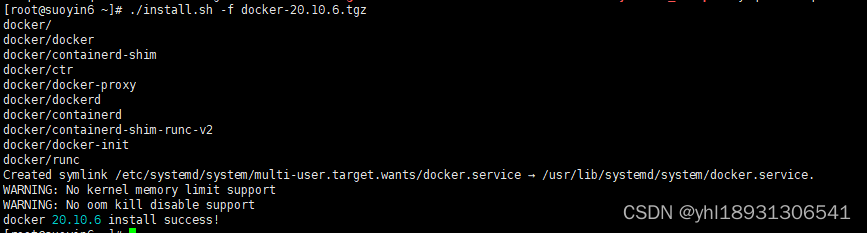
安装完成
优化镜像拉取慢的问题:
新建文件:
vim /etc/docker/daemon.json
{
  "registry-mirrors": [
  "https://docker.mirrors.ustc.edu.cn",
  "https://registry.docker-cn.com",
  "http://hub-mirror.c.163.com",
  "https://9cpn8tt6.mirror.aliyuncs.com"
],
"max-concurrent-downloads": 10,
"log-driver": "json-file",
"log-level": "warn",
"log-opts": {
"max-size": "10m",
"max-file": "3"
},
"data-root": "/var/lib/docker"
}

#重启
[root@localhost]# systemctl restart docker.service
#开机启动
[root@localhost]# systemctl enable docker.service
#查看是否启动
[root@localhost]# systemctl status docker.service

至此docker 安装完成。
两种安装方式 选其一即可。
拉取镜像
docker pull beginor/gitlab-ce:11.0.1-ce.0
docker images   ## 查看镜像

创建挂载目录
mkdir -p /data/gitlab/etc
mkdir -p /data/gitlab/log
mkdir -p /data/gitlab/data
启动容器
docker run --detach \
--publish 8443:443 --publish 8090:80 \
--name gitlab \
--restart unless-stopped  \
-v /data/gitlab/etc:/etc/gitlab \
-v /data/gitlab/log:/var/log/gitlab \
-v /data/gitlab/data:/var/opt/gitlab \
beginor/gitlab-ce:11.0.1-ce.0
查看
docker ps -a

然后修改配置文件,将external_url 参数修改为本机IP地址或者主机名称
修改一:
vim  /data/gitlab/etc/gitlab.rb
## GitLab URL
##! URL on which GitLab will be reachable.
##! For more details on configuring external_url see:
##! https://docs.gitlab.com/omnibus/settings/configuration.html#configuring-the-external-url-for-gitlab
# external_url 'GENERATED_EXTERNAL_URL'
external_url 'http://192.168.45.134/'

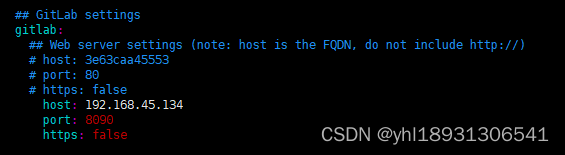
修改二: 修改 host、port、https等3个参数如下
vim /data/gitlab/data/gitlab-rails/etc/gitlab.yml
gitlab:
	## Web server settings (note: host is the FQDN, do not include http://)
	# host: 3e63caa45553
    # port: 80
    # https: false
  		host: 192.168.45.134
 		port: 8090
  		https: false
重启容器
docker restart gitlab
修改密码
# 进入容器内部
docker exec -it gitlab /bin/bash
# 进入控制台
gitlab-rails console -e production
# 查询id为1的用户,id为1的用户是超级管理员
user = User.where(id:1).first
# 修改密码为123456
user.password='123456'
# 保存
user.save!
# 退出
exit;

也可以 用 下面 命令直接查找 root 初始化密码 然后在页面手动修改
docker exec -it gitlab-dev grep ‘Password:’ /etc/gitlab/initial_root_password
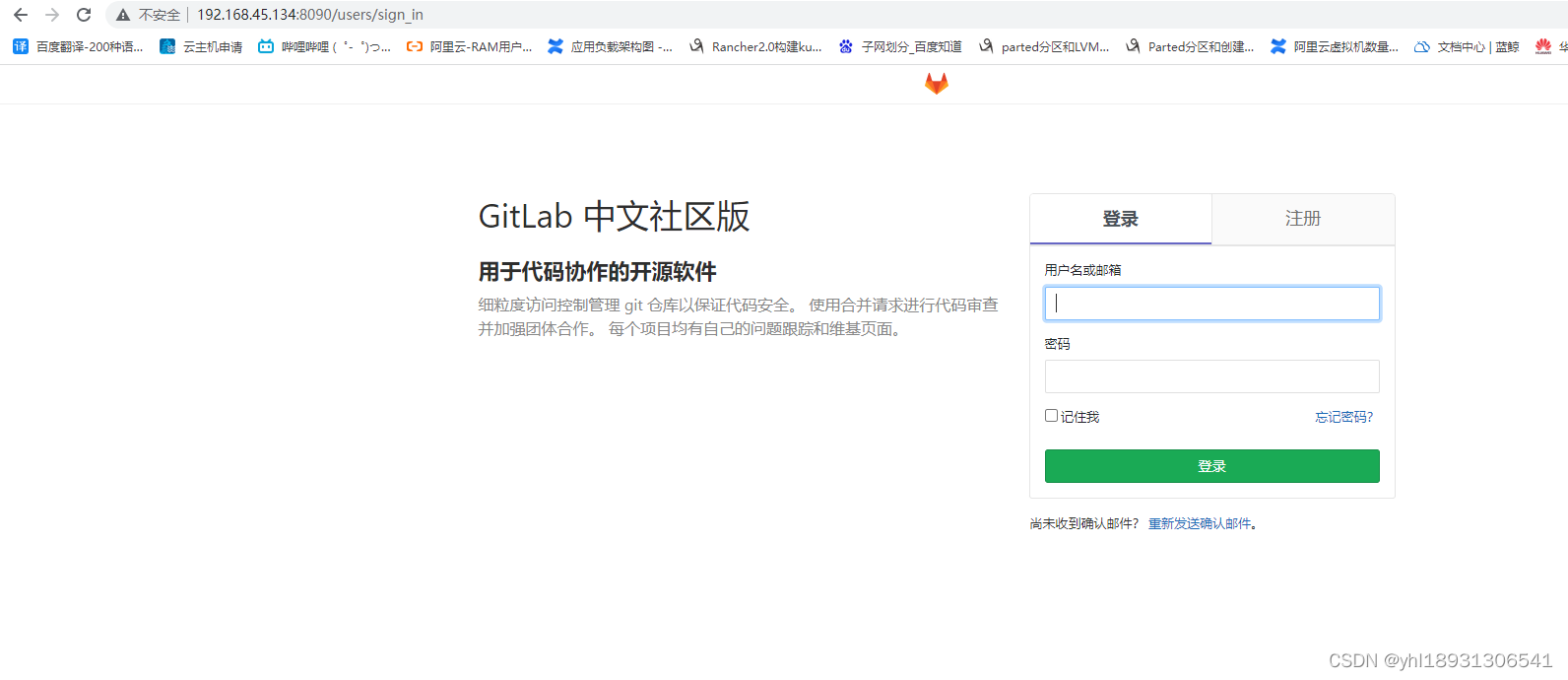
访问页面:http://192.168.45.134:8090
docker 常用命令

docker stop gitlab 	//容器外停止
docker restart gitlab  	//容器外重启
docker exec -it gitlab bash  //进入容器命令行
gitlab-ctl reconfigure //容器中应用配置,让修改后的配置生效
gitlab-ctl restart   	//容器中重启服务


gitlab 常用命令

gitlab-ctl status: 	 		查看gitlab组件状态
gitlab-ctl start:  			启动全部服务
gitlab-ctl restart: 	 	重启全部服务
gitlab-ctl stop:		    停止全部服务
gitlab-ctl tail <service name>  查看服务的日志
gitlab-ctl reconfigure:  	使配置文件生效(一般修改完主配置文件/etc/gitlab/gitlab.rb,需要执行此命令)
gitlab-ctl show-config:	    验证配置文件
拉取镜像
docker pull jenkinszh/jenkins-zh    #中文版
docker pull jenkinszh/jenkins         #英文版
查看镜像
docker images

创建一个文件夹用来存放Jenkins的数据:/data/soft/jenkins_home用来映射Jenkins的地址,修改权限为777
mkdir -p /data/soft/jenkins_home
chmod -R 777  /data/soft/
运行Jenkins
docker run -itd --name jenkins \
-p 8888:8080 -p 50000:50000 \
--restart always -e JAVA_OPTS=-Duser.timezone=Asia/Shanghai  \
-v /data/soft/jenkins_home:/var/jenkins_home	 \
-v /usr/local/maven/apache-maven-3.6.3:/usr/local/maven  \
-v /etc/localtime:/etc/localtime \
jenkinszh/jenkins-zh
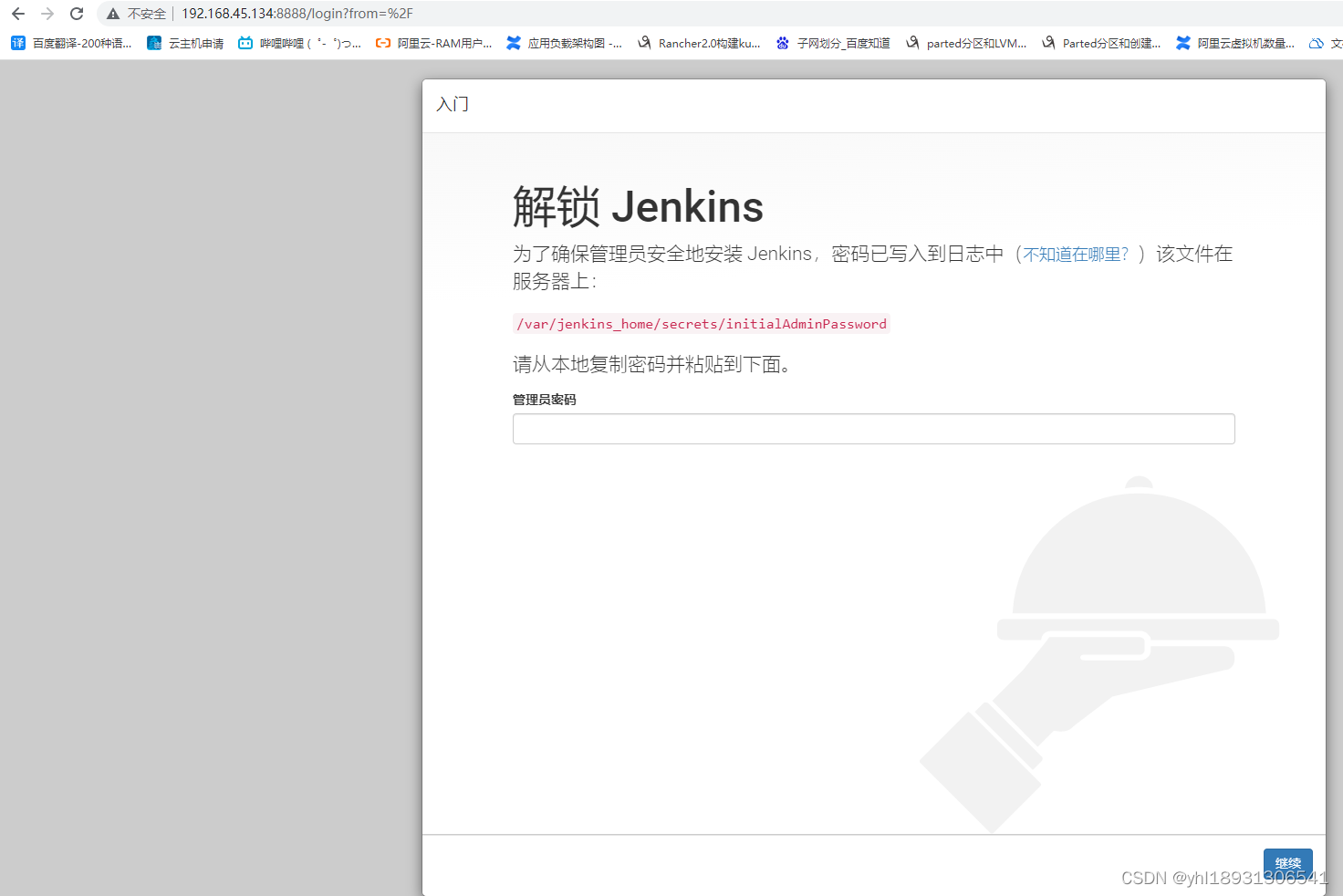
访问 Jenkins
http://192.168.45.134:8888
我想为Heroku构建一个Rails3应用程序。他们使用Postgres作为他们的数据库,所以我通过MacPorts安装了postgres9.0。现在我需要一个postgresgem并且共识是出于性能原因你想要pggem。但是我对我得到的错误感到非常困惑当我尝试在rvm下通过geminstall安装pg时。我已经非常明确地指定了所有postgres目录的位置可以找到但仍然无法完成安装:$envARCHFLAGS='-archx86_64'geminstallpg--\--with-pg-config=/opt/local/var/db/postgresql90/defaultdb/po
我打算为ruby脚本创建一个安装程序,但我希望能够确保机器安装了RVM。有没有一种方法可以完全离线安装RVM并且不引人注目(通过不引人注目,就像创建一个可以做所有事情的脚本而不是要求用户向他们的bash_profile或bashrc添加一些东西)我不是要脚本本身,只是一个关于如何走这条路的快速指针(如果可能的话)。我们还研究了这个很有帮助的问题:RVM-isthereawayforsimpleofflineinstall?但有点误导,因为答案只向我们展示了如何离线在RVM中安装ruby。我们需要能够离线安装RVM本身,并查看脚本https://raw.github.com/wayn
我有一个奇怪的问题:我在rvm上安装了rubyonrails。一切正常,我可以创建项目。但是在我输入“railsnew”时重新启动后,我有“程序'rails'当前未安装。”。SystemUbuntu12.04ruby-v"1.9.3p194"gemlistactionmailer(3.2.5)actionpack(3.2.5)activemodel(3.2.5)activerecord(3.2.5)activeresource(3.2.5)activesupport(3.2.5)arel(3.0.2)builder(3.0.0)bundler(1.1.4)coffee-rails(
我刚刚为fedora安装了emacs。我想用emacs编写ruby。为ruby提供代码提示、代码完成类型功能所需的工具、扩展是什么? 最佳答案 ruby-mode已经包含在Emacs23之后的版本中。不过,它也可以通过ELPA获得。您可能感兴趣的其他一些事情是集成RVM、feature-mode(Cucumber)、rspec-mode、ruby-electric、inf-ruby、rinari(用于Rails)等。这是我当前用于Ruby开发的Emacs配置:https://github.com/citizen428/emacs
我正在尝试在我的centos服务器上安装therubyracer,但遇到了麻烦。$geminstalltherubyracerBuildingnativeextensions.Thiscouldtakeawhile...ERROR:Errorinstallingtherubyracer:ERROR:Failedtobuildgemnativeextension./usr/local/rvm/rubies/ruby-1.9.3-p125/bin/rubyextconf.rbcheckingformain()in-lpthread...yescheckingforv8.h...no***e
我的最终目标是安装当前版本的RubyonRails。我在OSXMountainLion上运行。到目前为止,这是我的过程:已安装的RVM$\curl-Lhttps://get.rvm.io|bash-sstable检查已知(我假设已批准)安装$rvmlistknown我看到当前的稳定版本可用[ruby-]2.0.0[-p247]输入命令安装$rvminstall2.0.0-p247注意:我也试过这些安装命令$rvminstallruby-2.0.0-p247$rvminstallruby=2.0.0-p247我很快就无处可去了。结果:$rvminstall2.0.0-p247Search
我实际上是在尝试使用RVM在我的OSX10.7.5上更新ruby,并在输入以下命令后:rvminstallruby我得到了以下回复:Searchingforbinaryrubies,thismighttakesometime.Checkingrequirementsforosx.Installingrequirementsforosx.Updatingsystem.......Errorrunning'requirements_osx_brew_update_systemruby-2.0.0-p247',pleaseread/Users/username/.rvm/log/138121
由于fast-stemmer的问题,我很难安装我想要的任何rubygem。我把我得到的错误放在下面。Buildingnativeextensions.Thiscouldtakeawhile...ERROR:Errorinstallingfast-stemmer:ERROR:Failedtobuildgemnativeextension./System/Library/Frameworks/Ruby.framework/Versions/2.0/usr/bin/rubyextconf.rbcreatingMakefilemake"DESTDIR="cleanmake"DESTDIR=
当我尝试安装Ruby时遇到此错误。我试过查看this和this但无济于事➜~brewinstallrubyWarning:YouareusingOSX10.12.Wedonotprovidesupportforthispre-releaseversion.Youmayencounterbuildfailuresorotherbreakages.Pleasecreatepull-requestsinsteadoffilingissues.==>Installingdependenciesforruby:readline,libyaml,makedepend==>Installingrub
当我执行>rvminstall1.9.2时一切顺利。然后我做>rvmuse1.9.2也很顺利。但是当涉及到ruby-v时..sam@sjones:~$rvminstall1.9.2/home/sam/.rvm/rubies/ruby-1.9.2-p136,thismaytakeawhiledependingonyourcpu(s)...ruby-1.9.2-p136-#fetchingruby-1.9.2-p136-#downloadingruby-1.9.2-p136,thismaytakeawhiledependingonyourconnection...%Total%Rece
